前言
下面要介绍的很多点,在之前的课程中都多少有点接触。
兼容性问题不需要看,也就是这篇笔记最后两个点「自动添加前缀」、「多重值」。
学习目标
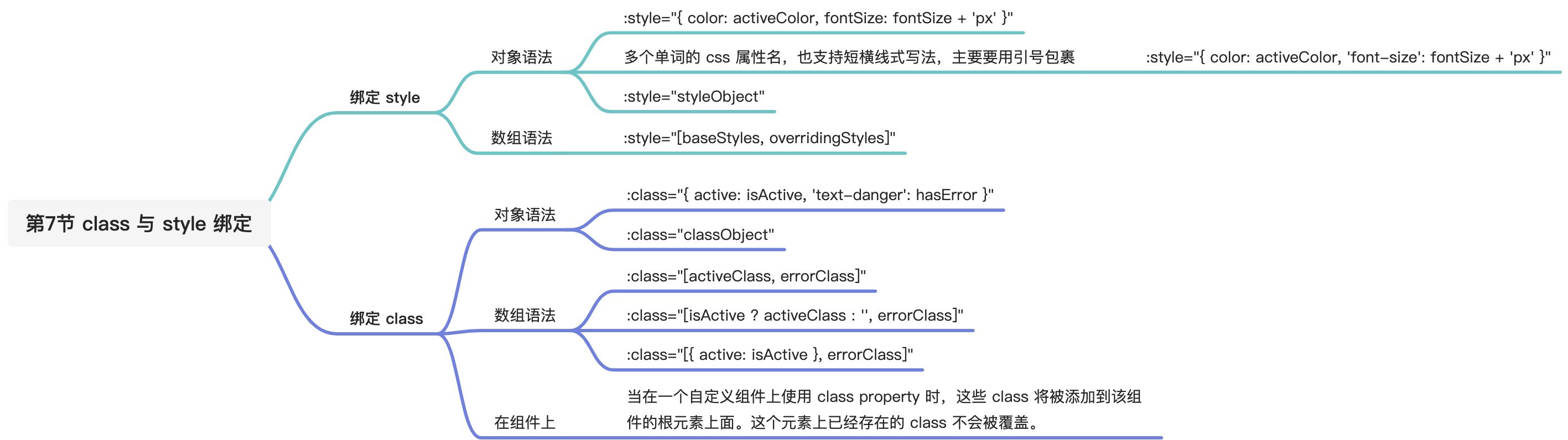
[x] 掌握 class 和 style 绑定的多种写法。
[x] 最佳实践:如果 class 和 style 的绑定相对比较复杂,建议使用「对象语法」+「计算属性」来绑定 class 和 style。
主要内容
参考资料
绑定 HTML Class
操作元素的 class 列表和内联样式是数据绑定的一个常见需求。因为它们都是 attribute,所以我们可以用 v-bind 处理它们:只需要通过表达式计算出字符串结果即可。不过,字符串拼接麻烦且易错。因此,在将 v-bind 用于 class 和 style 时,Vue.js 做了专门的增强。表达式结果的类型除了字符串之外,还可以是对象或数组。
对象语法
我们可以传给 v-bind:class 一个对象,以动态地切换 class:
<div v-bind:class="{ active: isActive }"></div>
上面的语法表示 active 这个 class 存在与否将取决于数据 property isActive 的 truthiness。
demo1
你可以在对象中传入更多字段来动态切换多个 class。此外,v-bind:class 指令也可以与普通的 class attribute 共存。当有如下模板:
<!DOCTYPE html><html lang="en"><head><meta charset="UTF-8"><title>模板语法 - 绑定 class</title></head><body><div id="app"><div class="static" v-bind:class="{ active: isActive, 'text-danger': hasError }">test</div></div><script src="https://cdn.jsdelivr.net/npm/vue@2"></script><script>const vm = new Vue({el: "#app",data: {isActive: true,hasError: false}});</script><style>.static {font-style: italic;}.active {font-weight: 700;}.text-danger {color: red;}</style></body></html>
最终渲染结果:<div class="static active"></div>
当 isActive 或者 hasError 变化时,class 列表将相应地更新。例如,如果 hasError 的值为 true,class 列表将变为 "static active text-danger"。

demo2
绑定的数据对象不必内联定义在模板里:
<!DOCTYPE html><html lang="en"><head><meta charset="UTF-8"><title>模板语法 - 绑定 class</title></head><body><div id="app"><div class="static" v-bind:class="classObject">test</div></div><script src="https://cdn.jsdelivr.net/npm/vue@2"></script><script>const vm = new Vue({el: "#app",data: {classObject: {active: true,'text-danger': false}}});</script><style>.static {font-style: italic;}.active {font-weight: 700;}.text-danger {color: red;}</style></body></html>
渲染的结果和上面一样。
demo3
我们也可以在这里绑定一个返回对象的计算属性。这是一个常用且强大的模式:
<!DOCTYPE html><html lang="en"><head><meta charset="UTF-8"><title>模板语法 - 绑定 class</title></head><body><div id="app"><div class="static" v-bind:class="classObject">test</div></div><script src="https://cdn.jsdelivr.net/npm/vue@2"></script><script>const vm = new Vue({el: "#app",data: {isActive: true,error: null},computed: {classObject: function () {return {active: this.isActive && !this.error,'text-danger': this.error && this.error.type === 'fatal'}}}});</script><style>.static {font-style: italic;}.active {font-weight: 700;}.text-danger {color: red;}</style></body></html>
数组语法
demo4
我们可以把一个数组传给 v-bind:class,以应用一个 class 列表:
<!DOCTYPE html><html lang="en"><head><meta charset="UTF-8"><title>模板语法 - 绑定 class</title></head><body><div id="app"><div v-bind:class="[activeClass, errorClass]">test</div></div><script src="https://cdn.jsdelivr.net/npm/vue@2"></script><script>const vm = new Vue({el: "#app",data: {activeClass: 'active',errorClass: 'text-danger'}});</script><style>.active {font-weight: 700;}.text-danger {color: red;}</style></body></html>
渲染为:<div class="active text-danger"></div>
如果你也想根据条件切换列表中的 class,可以用三元表达式:
<div v-bind:class="[isActive ? activeClass : '', errorClass]"></div>
这样写将始终添加 errorClass,但是只有在 isActive 是 truthy 时才添加 activeClass。
不过,当有多个条件 class 时这样写有些繁琐。所以在数组语法中也可以使用对象语法:
<div v-bind:class="[{ active: isActive }, errorClass]"></div>
用在组件上
当在一个自定义组件上使用 class property 时,这些 class 将被添加到该组件的根元素上面。这个元素上已经存在的 class 不会被覆盖。
例如,如果你声明了这个组件:
Vue.component('my-component', {template: '<p class="foo bar">Hi</p>'})
然后在使用它的时候添加一些 class:
<my-component class="baz boo"></my-component>
HTML 将被渲染为:
<p class="foo bar baz boo">Hi</p>
对于带数据绑定 class 也同样适用:
<my-component v-bind:class="{ active: isActive }"></my-component>
当 isActive 为 truthy 时,HTML 将被渲染成为:
<p class="foo bar active">Hi</p>
绑定内联样式
对象语法
v-bind:style 的对象语法十分直观——看着非常像 CSS,但其实是一个 JavaScript 对象。CSS property 名可以用驼峰式 (camelCase) 或短横线分隔 (kebab-case,记得用引号括起来) 来命名:
demo1
<!DOCTYPE html><html lang="en"><head><meta charset="UTF-8"><title>模板语法 - 绑定 style</title></head><body><div id="app"><div v-bind:style="{ color: activeColor, fontSize: fontSize + 'px' }">test</div></div><script src="https://cdn.jsdelivr.net/npm/vue@2"></script><script>const vm = new Vue({el: "#app",data: {activeColor: 'red',fontSize: 30}});</script></body></html>


<div v-bind:style="{ color: activeColor, 'font-size': fontSize + 'px' }">test</div>
如果使用短横线命名的话,比如 font-size记得加上引号。最终的渲染结果是不变的。
demo2
直接绑定到一个样式对象通常更好,这会让模板更清晰:
<!DOCTYPE html><html lang="en"><head><meta charset="UTF-8"><title>模板语法 - 绑定 style</title></head><body><div id="app"><div v-bind:style="styleObject">test</div></div><script src="https://cdn.jsdelivr.net/npm/vue@2"></script><script>const vm = new Vue({el: "#app",data: {styleObject: {color: 'red',fontSize: '30px'}}});</script></body></html>
最终结果同上。
同样的,对象语法常常结合返回对象的计算属性使用。
数组语法
v-bind:style 的数组语法可以将多个样式对象应用到同一个元素上:
<div v-bind:style="[baseStyles, overridingStyles]"></div>
自动添加前缀
当 v-bind:style 使用需要添加浏览器引擎前缀的 CSS property 时,如 transform,Vue.js 会自动侦测并添加相应的前缀。
在使用 vue 框架时,样式的兼容性问题,咋们不需要关注,vue 会帮我们处理好。
多重值
从 2.3.0 起你可以为 style 绑定中的 property 提供一个包含多个值的数组,常用于提供多个带前缀的值,例如:
<div :style="{ display: ['-webkit-box', '-ms-flexbox', 'flex'] }"></div>
这样写只会渲染数组中最后一个被浏览器支持的值。在本例中,如果浏览器支持不带浏览器前缀的 flexbox,那么就只会渲染 display: flex。

若有收获,就点个赞吧
0 人点赞


