crypto
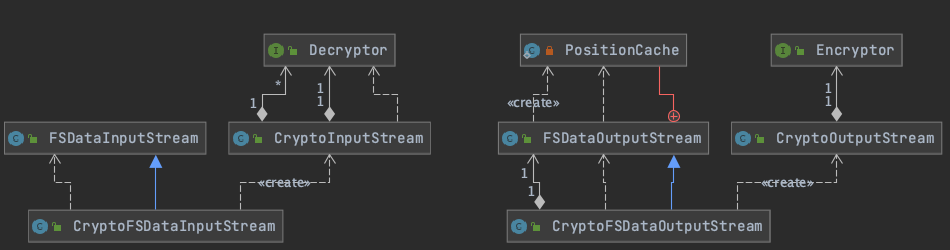
fileSystem子类
ftp
kfs
另一种集群文件系统的hadoop filesystem实现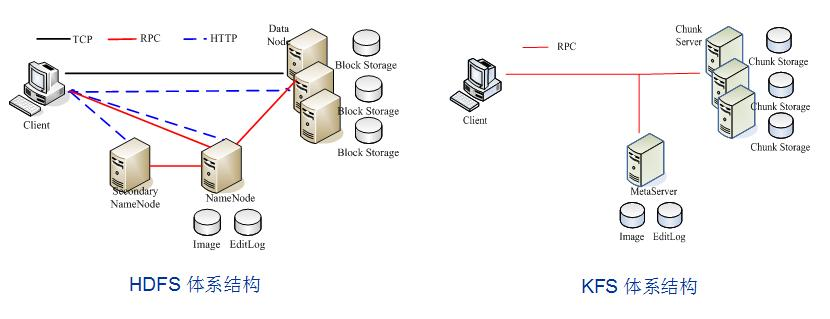
s3 和 s3native
s3
A distributed, block-based implementation of {@link org.apache.hadoop.fs.FileSystem} that uses Amazon S3 as a backing store. Files are stored in S3 as blocks (represented by {@link org.apache.hadoop.fs.s3.Block}), which have an ID and a length. Block metadata is stored in S3 as a small record (represented by {@link org.apache.hadoop.fs.s3.INode}) using the URL-encoded path string as a key. Inodes record the file type (regular file or directory) and the list of blocks. This design makes it easy to seek to any given position in a file by reading the inode data to compute which block to access, then using S3’s support for HTTP Range headers to start streaming from the correct position. Renames are also efficient since only the inode is moved (by a DELETE followed by a PUT since S3 does not support renames). For a single file /dir1/file1 which takes two blocks of storage, the file structure in S3 would be something like this: / /dir1 /dir1/file1 block-6415776850131549260 block-3026438247347758425 Inodes start with a leading /, while blocks are prefixed with block-.
s3native:
A distributed implementation of {@link org.apache.hadoop.fs.FileSystem} for reading and writing files on Amazon S3. Unlike {@link org.apache.hadoop.fs.s3.S3FileSystem}, which is block-based, this implementation stores files on S3 in their native form for interoperability with other S3 tools.
s3本身是amazon云的对象存储,其本身用来存储文件。s3FileSystem
与Linux文件系统实现非常类似,“文件”在amazon云中按块(S3对象存储中实际存储的文件是块)存储,使用Inode对文件进行索引。这样设计是为了方便进行seek操作。
每个Inode和block都用一个文件存储,区别在于文件名不同:
- Inode文件名以“/”开头
- block文件名以“block-”开头
比如,对于一个需要两个块进行存储的文件/dir1/file1,S3中的文件结构如下
/ # inode/dir # inode/dir/file1 # inodeblock-6415776850131549260 # 块block-3026438247347758425 # 块
S3NativeFileSystem
用于读写S3原生文件。一般作为用于hadoop中S3读写文件的工具(比如上面的S3FileSystem,Inode和block的读写都需要使用S3NativeFileSystem中的方法)
permission

Hadoop实现了符合POSIX标准的文件权限模型,其类似于Linux的权限模型
Owner/user Group Othersrwx rwx rwx
ViewFs
用于管理多个hadoop文件系统命名空间的方法,类似于Unix挂载表。ViewFileSystem中也会存储MountTable和MountPoine。
通过如下方式可以在core-site.xml中设置mountTable,即挂载表
<property><name>fs.defaultFs</name><value>viewfs://ClusterX</value></property><!-- 设置homedir --><property><name>fs.viewfs.mounttable.ClusterX.homedir</name><value>/home</value></property><!-- 将本地文件系统的/Users/zrang 映射到viewfs的/home路径上--><property><name>fs.viewfs.mounttable.ClusterX.link./home</name><value>file:///Users/zrwang</value></property><!-- 将hdfs的/tmp映射到viewfs的/tmp路径上--><property><name>fs.viewfs.mounttable.ClusterX.link./tmp</name><value>hdfs://dn/tmp</value></property>
示意图如下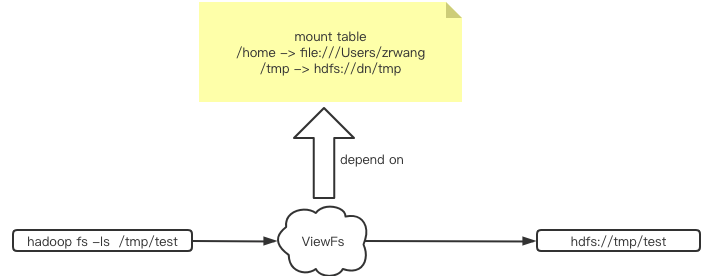
https://hadoop.apache.org/docs/current/hadoop-project-dist/hadoop-hdfs/ViewFs.html
Shell
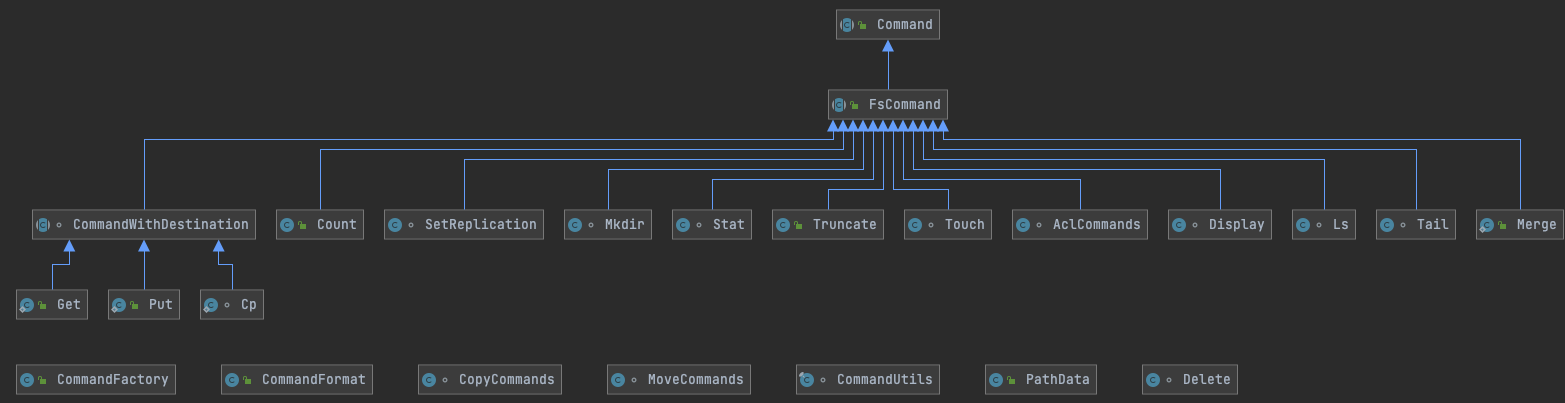
shell工作流程

FileSystem

若有收获,就点个赞吧
0 人点赞


