数据格式
Elasticsearch是面向文档型数据库,一条数据就是一个文档。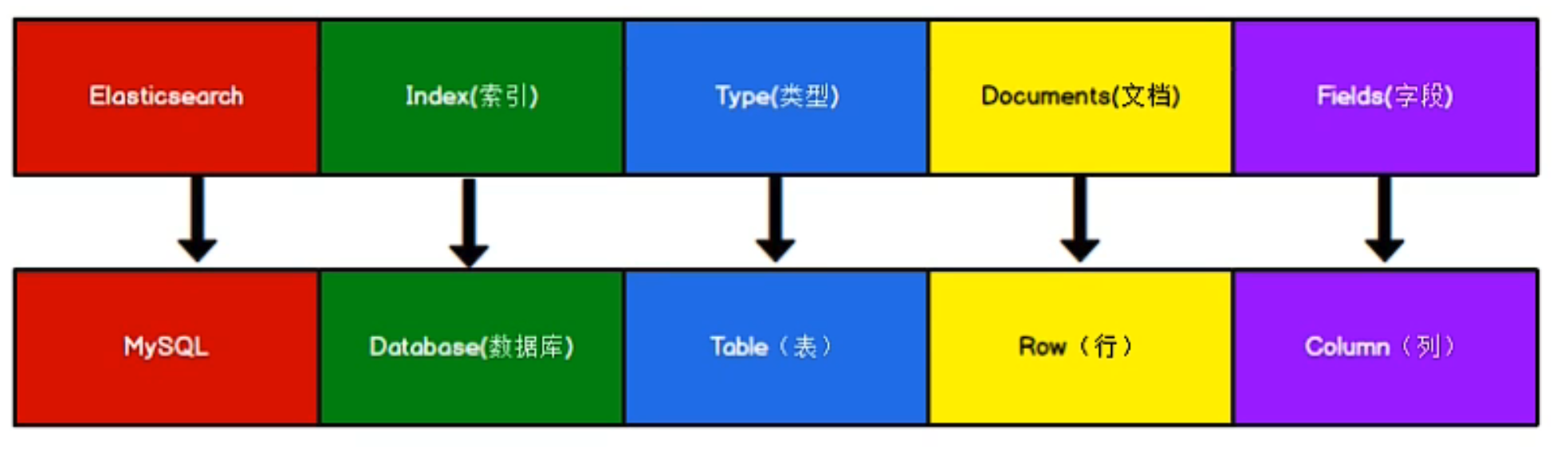
Elasticsearch 6.X中,一个index只能包含一个type,7.X中,Type概念已经被删除了
倒排索引
- 正排索引
id content
——————-
1001 my name is zhangsan
1002 my name is lisi
通过id查询很快,但是如果需要查询content里的”name”,就需要模糊查询,每条都要遍历
- 倒排索引
keyword id
—————-
name 1001, 1002
zhang 1001
索引操作
创建索引
对比关系型数据库,创建索引等同于创建数据库
在Postman中,向ES服务器发PUT请求:http://127.0.0.1:9200/shopping
{"acknowledged": true,"shards_acknowledged": true,"index": "shopping"}
查询索引
GET请求 URL不变
{"shopping": {"aliases": {},"mappings": {},"settings": {"index": {"routing": {"allocation": {"include": {"_tier_preference": "data_content"}}},"number_of_shards": "1","provided_name": "shopping","creation_date": "1650513030284","number_of_replicas": "1","uuid": "__fkgO0_R1ebjRJdflgxew","version": {"created": "8010299"}}}}}
如果要查询所有索引[http://localhost:9200/_cat/indices?v](http://localhost:9200/_cat/indices?v)
health status index uuid pri rep docs.count docs.deleted store.size pri.store.sizeyellow open shopping __fkgO0_R1ebjRJdflgxew 1 1 0 0 225b 225b
删除索引
DELETE``http://127.0.0.1:9200/shopping
{"acknowledged": true}
文档操作
创建数据
索引创建好后,创建文档,并添加数据。这里的文档可以类比为关系型数据库中的表数据,添加的数据格式为JSON格式。POST``http://127.0.0.1/shopping/_doc 必须要有body, _doc表示文档数据 ,也可以使用_create
{"title":"小米手机","category":"Xiaomi","images":"xxx.jpg","price":299}
{"_index": "shopping","_id": "hBXsSoAB2uyBztVe--TH","_version": 1,"result": "created","_shards": {"total": 2,"successful": 1,"failed": 0},"_seq_no": 0,"_primary_term": 1}
如果在uri中加入id,就不会自动生成随机的id了[http://127.0.0.1/shopping/_doc](http://127.0.0.1/shopping/_doc)/1001
查询数据
GET``[http://localhost:9200/shopping/_doc/1001](http://localhost:9200/shopping/_doc/1001)
{"_index": "shopping","_id": "1001","_version": 1,"_seq_no": 1,"_primary_term": 1,"found": true,"_source": {"title": "小米手机","category": "Xiaomi","images": "xxx.jpg","price": 299}}
如果要获取索引下的所有数据GET``[http://localhost:9200/shopping/](http://localhost:9200/shopping/_doc/1001)_search
{"took": 746,"timed_out": false,"_shards": {"total": 1,"successful": 1,"skipped": 0,"failed": 0},"hits": {"total": {"value": 2,"relation": "eq"},"max_score": 1.0,"hits": [{"_index": "shopping","_id": "hBXsSoAB2uyBztVe--TH","_score": 1.0,"_source": {"title": "小米手机","category": "Xiaomi","images": "xxx.jpg","price": 299}},{"_index": "shopping","_id": "1001","_score": 1.0,"_source": {"title": "小米手机","category": "Xiaomi","images": "xxx.jpg","price": 299}}]}}
全量数据更新
PUT``ht[tp://localhost:9200/shopping/](http://localhost:9200/shopping/_doc/1001)_doc/1001
{"title":"小米手机","category":"Xiaomi","images":"xxx.jpg","price":199}
{"_index": "shopping","_id": "1001","_version": 2,"result": "updated","_shards": {"total": 2,"successful": 1,"failed": 0},"_seq_no": 2,"_primary_term": 1}
局部数据更新
POST``http://127.0.0.1:9200/shopping/_update/1001
{"doc": {"title": "华为手机"}}
{"_index": "shopping","_id": "1001","_version": 2,"result": "noop","_shards": {"total": 0,"successful": 0,"failed": 0},"_seq_no": 2,"_primary_term": 1}
删除数据
DELETE``http://127.0.0.1:9200/shopping/_doc/1001
条件查询
通过路径加参数查询
GET``http://127.0.0.1/shopping/_search?q=category:Xiaomi
通过请求体查询
GET``[http://127.0.0.1/shopping/_search](http://127.0.0.1/shopping/_search)
{"query" : {"match" : {"category" : "Xiaomi"}}}
{"query" : {"match_all" : {}}}
分页查询&查询排序
GET``[http://127.0.0.1/shopping/_search](http://127.0.0.1/shopping/_search)
- from 从哪一条数据开始 第一条数据为0
- size 每页几条数据
- _source 指定查询返回的字段
- sort 排序 order: asc desc
从起始位置0开始(第一条数据),每页2条数据,只保留title数据, 按照价格降序排序
{"query" : {"match_all" : {}},"from": 0,"size": 2,"_source" : ["title"],"sort" : {"price" : {"order" : "desc"}}}
{"took": 2,"timed_out": false,"_shards": {"total": 1,"successful": 1,"skipped": 0,"failed": 0},"hits": {"total": {"value": 3,"relation": "eq"},"max_score": 1.0,"hits": [{"_index": "shopping","_id": "hBXsSoAB2uyBztVe--TH","_score": 1.0,"_source": {"title": "小米手机","category": "Xiaomi","images": "xxx.jpg","price": 299}},{"_index": "shopping","_id": "1001","_score": 1.0,"_source": {"title": "小米手机","category": "Xiaomi","images": "xxx.jpg","price": 199}}]}}
多条件查询
GET``[http://127.0.0.1/shopping/_search](http://127.0.0.1/shopping/_search)
- bool
must
{"query":{"bool":{"must":[{"match":{"category":"Xiaomi"}},{"match":{"price":199}}]}}}
should
{"query":{"bool":{"should":[{"match":{"category":"Xiaomi"}},{"match":{"category":"Huawei"}}]}}}
范围查询
GET``[http://127.0.0.1/shopping/_search](http://127.0.0.1/shopping/_search)filter
- range
- gt< 大于 小于
{"query":{"bool":{"filter":{"range":{"price":{"gt":199,"lt":300}}}}}}
全文检索
当保存文档数据时 ES会对文档数据进行拆解,保存到倒排索引中。当通过ES进行查询,也会通过倒排索引进行匹配。因此,即使只查询”category”:”Xiao”也会查到
如果查询”title”=”小华” 会既查到小米也查到华为的数据{"query" : {"match" : {"title" : "小米"}}}
完全匹配
这样就查不到了{"query" : {"match_phrase" : {"title" : "小"}}}
高亮查询
{"query" : {"match_phrase" : {"title" : "小"}},"highlight" : {"fields" : {"category" : {}}
聚合操作
size:0过滤掉了查询的原始数据{"aggs" : { // 聚合操作"price_group" : { // 名称 随意起的"terms" : { //"field" : "price" // 分组字段}}},"size":0}
{"aggs" : { // 聚合操作"price_avg" : { // 名称 随意起的"avg" : { //"field" : "price" // 分组字段}}},"size":0}
映射关系
其实就是表的结构信息
- 先创建user索引
- 创建user的映射关系
PUT``[http://localhost:9200/user/_mapping](http://localhost:9200/user/_mapping)
{"properties" : {"name" : {"type" : "text","index" : true},"sex" : {"type" : "keyword","index" : true},"tel" : {"type" : "keyword","index" : false}}}
- 插入数据
PUT``[http://localhost:9200/user/_create/001](http://localhost:9200/user/_create/001)
{"name" : "汤姆","sex" : "男的","tel" : "12345"}
- 查询
GET``[http://localhost:9200/user/_search](http://localhost:9200/user/_search)
{"query" : {"match" : {"name" : "汤"}}}
{"query" : {"match" : {"sex" : "男"}}}
因为sex字段是”keyword”类型,而name是”text”类型
{"query" : {"match" : {"tel" : "12345"}}}
因为字段的index设置为了false

若有收获,就点个赞吧
0 人点赞


