基于hadoop生态圈的数据仓库实践 —— OLAP与数据可视化(三)
2016年08月25日 14:38:41 wzy0623 阅读数 5549
版权声明:本文为博主原创文章,未经博主允许不得转载。 https://blog.csdn.net/wzy0623/article/details/52314152
三、Impala OLAP实例 本节使用前面销售订单的例子说明如何使用Impala做OLAP类型的查询,以及实际遇到的问题及解决方案。为了处理SCD和行级更新,我们前面的ETL使用了Hive ORCFile格式的表,可惜到目前为止,Impala还不支持ORCFile。用Impala查询ORCFile表时,错误信息如下图所示。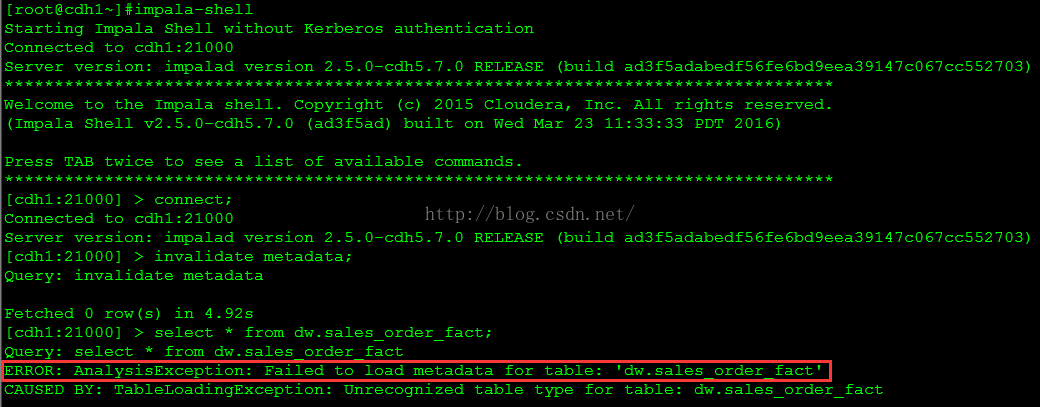
这是一个棘手的问题。如果我们再建一套和dw库中表结构一样的表,但使用Impala能够识别的文件类型,如Parquet,又会引入两个新的问题:一是CDH 5.7.0的Hive版本是1.1.0,有些数据类型不支持,如date。另一个更大的问题是增量装载数据问题。dw库的维度表和事实表都有update操作,可Impala只支持数据装载,不支持update和delete等DML操作。如果每天都做insert overwrite覆盖装载全部数据,对于大数据量来说很不现实。
尽管Impala不支持update语句,但通过使用HBase作为底层存储可是达到同样的效果。相同键值的数据被插入时,会自动覆盖原有的数据行。这样只要在每天定期ETL时,记录当天产生变化(包括修改和新增)的记录,只将这些记录插入到Impala表中,就可以实现增量数据装载。这个方案并不完美,毕竟冗余了一套数据,既浪费空间,又增加了ETL的额外工作。其实前面ETL的Hive表也可以使用HBase做底层存储而不用ORCFile文件类型,利用HBase的特性,既可以用Hive做ETL,又可以用Impala做OLAP,真正做到一套数据,多个引擎。这个方案也需要一些额外的工作,如安装HBase,配置Hive、Impala与HBase协同工作等,它最主要的问题是Impala在HBase上的查询性能并不适合OLAP场景。
如果没有累积快照事实表,可以对相对较小的维度表全量覆盖插入,而对大的事实表增量插入,这也是本实例中采用的方案。也就是说,为了保证查询性能和数据装载可行性,牺牲了对累积快照事实表的支持。希望Impala尽快支持ORCFile并能达到和Parquet同样的性能,这样就可以省却很多麻烦。
1. 建立olap库、表、视图 用下面的查询语句从MySQL的hive库生成建表文件:
use hive;
select concat(‘create table ‘, t1.tbl_name, ‘ (‘,group_concat(concat(t2.column_name,’ ‘,t2.type_name) order by t2.integer_idx),’) stored as parquet;’) into outfile ‘/data/hive/create_table.sql’
from (select t1.tbl_id,
t1.tbl_name
from TBLS t1, DBS t2
where t1.db_id = t2. db_id
and t2.name = 'dw'
and tbl_type <> 'VIRTUAL_VIEW'
and (tbl_name like '%dim' or tbl_name like '%fact')) t1,
(select case when v.column_name = 'date' then 'date1' else v.column_name end column_name,
replace(v.type_name,'date','timestamp') type_name,
v.integer_idx,
t.tbl_id
from COLUMNS_V2 v,
CDS c,
SDS s,
TBLS t
where v.cd_id = c.cd_id
and c.cd_id = s.cd_id
and s.sd_id = t.sd_id) t2
where t1.tbl_id = t2.tbl_id
group by t1.tbl_name;
生成的create_table.sql文件包含所有维度表和事实表的建表语句,例如:<br />create table product_dim (product_sk int,product_code int,product_name varchar(30),product_category varchar(30),version int,effective_date timestamp,expiry_date timestamp) stored as parquet;<br /> 用下面的查询语句从MySQL的hive库生成建视图文件:
use hive;
select concat(‘create view ‘, t1.tbl_name, ‘ as ‘, replace(replace(t1.view_original_text,’\n’,’ ‘),’ date,’,’ date1,’), ‘;’)
into outfile ‘/data/hive/create_view.sql’
from TBLS t1, DBS t2
where t1.db_id = t2.db_id
and t2.name = ‘dw’
and t1.tbl_type = ‘VIRTUAL_VIEW’;
生成的create_view.sql文件包含所有建立视图的语句,例如:<br />create view allocate_date_dim as SELECT date_sk, date, month, month_name, quarter, year, promo_ind FROM date_dim;<br /> 从Hive命令行执行建立库、表、视图的脚本:<br />hive -e 'create database olap;use olap;source /data/hive/create_table.sql;source /data/hive/create_view.sql;'
2. 初始装载数据 用下面的查询语句从MySQL的hive库生成装载数据脚本文件:
use hive;
select concat(‘insert overwrite table olap.’, t1.tbl_name, ‘ select ‘, group_concat(t2.column_name order by t2.integer_idx),’ from dw.’, t1.tbl_name ,’;’) into outfile ‘/data/hive/insert_table.sql’
from (select t1.tbl_id,
t1.tbl_name
from TBLS t1, DBS t2
where t1.db_id = t2. db_id
and t2.name = 'dw'
and tbl_type <> 'VIRTUAL_VIEW'
and (tbl_name like '%dim' or tbl_name like '%fact')) t1,
(select v.column_name,
replace(v.type_name,'date','timestamp') type_name,
v.integer_idx,
t.tbl_id
from COLUMNS_V2 v,
CDS c,
SDS s,
TBLS t
where v.cd_id = c.cd_id
and c.cd_id = s.cd_id
and s.sd_id = t.sd_id) t2
where t1.tbl_id = t2.tbl_id
group by t1.tbl_name;
生成的insert_table.sql文件包含所有insert olap表的语句,例如:<br />insert overwrite table olap.product_dim select product_sk,product_code,product_name,product_category,version,effective_date,expiry_date from dw.product_dim;<br /> 从Hive命令行执行初始装载数据的脚本:<br />hive -e 'source /data/hive/insert_table.sql;'
3. 修改销售订单定期装载脚本 首先将dw和olap库中的事实表变更为动态分区表,这样在向olap库中装载数据时,或是在olap库上进行查询时,都可以有效地利用分区消除来提高性能。这里只修改了每日定时装载所涉及的两个表product_count_fact和sales_order_fact,其它事实表的修改类似。因为分区字段只能在表定义的最后,可能会改变字段的顺序,所以还要修改相关的ETL脚本。
执行下面的语句修改dw库的事实表。
use dw;
set hive.exec.dynamic.partition=true;
set hive.exec.dynamic.partition.mode=nonstrict;
set hive.exec.max.dynamic.partitions.pernode=1000;
— product_count_fact表
create table product_count_fact_part
(product_sk int)
partitioned by (product_launch_date_sk int);
insert overwrite table product_count_fact_part partition (product_launch_date_sk)
select product_sk,product_launch_date_sk from product_count_fact;
drop table product_count_fact;
alter table product_count_fact_part rename to product_count_fact;
— sales_order_fact表
create table sales_order_fact_part
(order_number int,
customer_sk int,
customer_zip_code_sk int,
shipping_zip_code_sk int,
product_sk int,
sales_order_attribute_sk int,
order_date_sk int,
allocate_date_sk int,
allocate_quantity int,
packing_date_sk int,
packing_quantity int,
ship_date_sk int,
ship_quantity int,
receive_date_sk int,
receive_quantity int,
request_delivery_date_sk int,
order_amount decimal(10,2),
order_quantity int
)
partitioned by (entry_date_sk int)
clustered by (order_number) into 8 buckets
stored as orc tblproperties (‘transactional’=’true’);
insert overwrite table sales_order_fact_part partition (entry_date_sk)
select order_number,
customer_sk,
customer_zip_code_sk,
shipping_zip_code_sk,
product_sk,
sales_order_attribute_sk,
order_date_sk,
allocate_date_sk,
allocate_quantity,
packing_date_sk,
packing_quantity,
ship_date_sk,
ship_quantity,
receive_date_sk,
receive_quantity,
request_delivery_date_sk,
order_amount,
order_quantity,
entry_date_sk
from sales_order_fact;
drop table sales_order_fact;
alter table sales_order_fact_part rename to sales_order_fact;
执行下面的语句修改olap库的事实表,和上面的语句类似,只是表的存储类型为parquet。
use olap;
set hive.exec.dynamic.partition=true;
set hive.exec.dynamic.partition.mode=nonstrict;
set hive.exec.max.dynamic.partitions.pernode=1000;
— product_count_fact表
create table product_count_fact_part
(product_sk int)
partitioned by (product_launch_date_sk int)
stored as parquet;
insert overwrite table product_count_fact_part partition (product_launch_date_sk)
select product_sk,product_launch_date_sk from product_count_fact;
drop table product_count_fact;
alter table product_count_fact_part rename to product_count_fact;
— sales_order_fact表
create table sales_order_fact_part
(order_number int,
customer_sk int,
customer_zip_code_sk int,
shipping_zip_code_sk int,
product_sk int,
sales_order_attribute_sk int,
order_date_sk int,
allocate_date_sk int,
allocate_quantity int,
packing_date_sk int,
packing_quantity int,
ship_date_sk int,
ship_quantity int,
receive_date_sk int,
receive_quantity int,
request_delivery_date_sk int,
order_amount decimal(10,2),
order_quantity int
)
partitioned by (entry_date_sk int)
stored as parquet;
insert overwrite table sales_order_fact_part partition (entry_date_sk)
select order_number,
customer_sk,
customer_zip_code_sk,
shipping_zip_code_sk,
product_sk,
sales_order_attribute_sk,
order_date_sk,
allocate_date_sk,
allocate_quantity,
packing_date_sk,
packing_quantity,
ship_date_sk,
ship_quantity,
receive_date_sk,
receive_quantity,
request_delivery_date_sk,
order_amount,
order_quantity,
entry_date_sk
from sales_order_fact;
drop table sales_order_fact;
alter table sales_order_fact_part rename to sales_order_fact;
下面修改数据仓库每天定期装载脚本,需要做以下三项修改。
- 添加olap库中维度表的覆盖装载语句。
- 根据分区定义修改dw事实表的装载语句。
添加olap库中事实表的增量装载语句。
下面显示了修改后的regular_etl.sql定期装载脚本(只部分显示)。
— 设置环境与时间窗口
!run /root/set_time.sql
set hive.exec.dynamic.partition=true;
set hive.exec.dynamic.partition.mode=nonstrict;
set hive.exec.max.dynamic.partitions.pernode=1000;
— 装载customer维度
…
— 装载olap.customer_dim表
insert overwrite table olap.customer_dim select * from customer_dim;
— 装载product维度
…
— 装载olap.product_dim表
insert overwrite table olap.product_dim select * from product_dim;
— 装载product_count_fact表
truncate table product_count_fact;
insert into product_count_fact partition (product_launch_date_sk)
select product_sk,date_sk
from (select a.product_sk product_sk,
a.product_code product_code,
b.date_sk date_sk,
row_number() over (partition by a.product_code order by b.date_sk) rn
from product_dim a,date_dim b
where a.effective_date = b.date) t
where rn = 1;
— 全量装载olap.product_count_fact表
truncate table olap.product_count_fact;
insert into olap.product_count_fact partition (product_launch_date_sk)
select * from product_count_fact;
— 装载销售订单事实表
— 前一天新增的销售订单,因为分区键字段在最后,所以这里把entry_date_sk字段的位置做了调整。
— 后面处理分配库房、打包、配送和收货四个状态时,同样也要做相应的调整。
INSERT INTO sales_order_fact partition (entry_date_sk)
SELECT
a.order_number,
customer_sk,
i.customer_zip_code_sk,
j.shipping_zip_code_sk,
product_sk,
g.sales_order_attribute_sk,
e.order_date_sk,
null,
null,
null,
null,
null,
null,
null,
null,
f.request_delivery_date_sk,
order_amount,
quantity,
h.entry_date_sk
FROM
rds.sales_order a,
customer_dim c,
product_dim d,
order_date_dim e,
request_delivery_date_dim f,
sales_order_attribute_dim g,
entry_date_dim h,
customer_zip_code_dim i,
shipping_zip_code_dim j,
rds.customer k,
rds.cdc_time l
WHERE
a.order_status = ‘N’
AND a.customer_number = c.customer_number
AND a.status_date >= c.effective_date
AND a.status_date < c.expiry_date
AND a.customer_number = k.customer_number
AND k.customer_zip_code = i.customer_zip_code
AND a.status_date >= i.effective_date
AND a.status_date <= i.expiry_date
AND k.shipping_zip_code = j.shipping_zip_code
AND a.status_date >= j.effective_date
AND a.status_date <= j.expiry_date
AND a.product_code = d.product_code
AND a.status_date >= d.effective_date
AND a.status_date < d.expiry_date
AND to_date(a.status_date) = e.order_date
AND to_date(a.entry_date) = h.entry_date
AND to_date(a.request_delivery_date) = f.request_delivery_date
AND a.verification_ind = g.verification_ind
AND a.credit_check_flag = g.credit_check_flag
AND a.new_customer_ind = g.new_customer_ind
AND a.web_order_flag = g.web_order_flag
AND a.entry_date >= l.last_load AND a.entry_date < l.current_load ;
— 重载PA客户维度
…
— 装载olap.pa_customer_dim表
insert overwrite table olap.pa_customer_dim select * from pa_customer_dim;
— 处理分配库房、打包、配送和收货四个状态
…
— 增量装载olap.sales_order_fact表
insert into olap.sales_order_fact partition (entry_date_sk)
select t1.*
from sales_order_fact t1,entry_date_dim t2,rds.cdc_time t3
where t1.entry_date_sk = t2.entry_date_sk
and t2.entry_date >= t3.last_load and t2.entry_date < t3.current_load ;
— 更新时间戳表的last_load字段
INSERT OVERWRITE TABLE rds.cdc_time SELECT current_load, current_load FROM rds.cdc_time;
4. 定义OLAP需求 要做好OLAP类的应用,需要对业务数据有深入的理解。只有了解了业务,才能知道需要分析哪些指标,从而有的放矢地剖析相关数据,得出可信的结论来辅助决策。下面就用前面销售订单数据仓库的例子,提出若干问题,然后用Impala查询数据以回答这些问题:
- 每种产品类型以及单个产品的累积销售量和销售额是多少?
- 每种产品类型以及单个产品在每个州以及每个城市的月销售量和销售额趋势是什么?
- 每种产品类型销售量和销售额和同比如何?
- 每个州以及每个城市的客户数量及其消费金额汇总是多少?
- 迟到的订单比例是多少?
- 客户年消费金额为“高”、“中”、“低”档的人数及消费金额所占比例是多少?
- 每个城市按销售金额排在前三位的商品是什么?
5. 执行OLAP查询 使用impala-shell命令行工具执行olap库上的查询,回答上一步提出的问题。进入impala-shell,连接impalad所在主机,同步元数据,切换到olap库,这些操作使用的命令如下图所示。
(1)每种产品类型以及单个产品的累积销售量和销售额是多少?
impala目前只支持最基本的group by,尚不支持rollup、cube、grouping set等操作,所幸支持union。
select * from
(
select t2.product_category pro_category,
'' pro_name,
sum(order_quantity) sum_quantity,
sum(order_amount) sum_amount
from sales_order_fact t1, product_dim t2
where t1.product_sk = t2.product_sk
group by pro_category
union all
select t2.product_category pro_category,
t2.product_name pro_name,
sum(order_quantity) sum_quantity,
sum(order_amount) sum_amount
from sales_order_fact t1, product_dim t2
where t1.product_sk = t2.product_sk
group by pro_category, pro_name) t
order by pro_category, pro_name;
查询结果如下图所示。<br />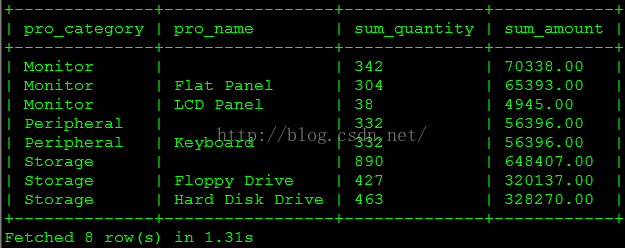<br />(2)每种产品类型以及单个产品在每个州以及每个城市的月销售量和销售额趋势是什么?
select * from
(
— 明细
select t2.product_category pro_category,
t2.product_name pro_name,
t3.state state,
t3.city city,
t4.year*100 + t4.month ym,
sum(order_quantity) sum_quantity,
sum(order_amount) sum_amount
from sales_order_fact t1
inner join product_dim t2 on t1.product_sk = t2.product_sk
inner join customer_zip_code_dim t3 on t1.customer_zip_code_sk = t3.zip_code_sk
inner join order_date_dim t4 on t1.order_date_sk = t4.date_sk
group by pro_category, pro_name, state, city, ym
union all
— 按产品分类汇总
select t2.product_category pro_category,
'' pro_name,
t3.state state,
t3.city city,
t4.year*100 + t4.month ym,
sum(order_quantity) sum_quantity,
sum(order_amount) sum_amount
from sales_order_fact t1
inner join product_dim t2 on t1.product_sk = t2.product_sk
inner join customer_zip_code_dim t3 on t1.customer_zip_code_sk = t3.zip_code_sk
inner join order_date_dim t4 on t1.order_date_sk = t4.date_sk
group by pro_category, pro_name, state, city, ym
union all
— 按产品分类、州汇总
select t2.product_category pro_category,
'' pro_name,
t3.state state,
'' city,
t4.year*100 + t4.month ym,
sum(order_quantity) sum_quantity,
sum(order_amount) sum_amount
from sales_order_fact t1
inner join product_dim t2 on t1.product_sk = t2.product_sk
inner join customer_zip_code_dim t3 on t1.customer_zip_code_sk = t3.zip_code_sk
inner join order_date_dim t4 on t1.order_date_sk = t4.date_sk
group by pro_category, pro_name, state, city, ym) t
order by pro_category, pro_name, state, city, ym;
查询部分结果如下图所示。<br />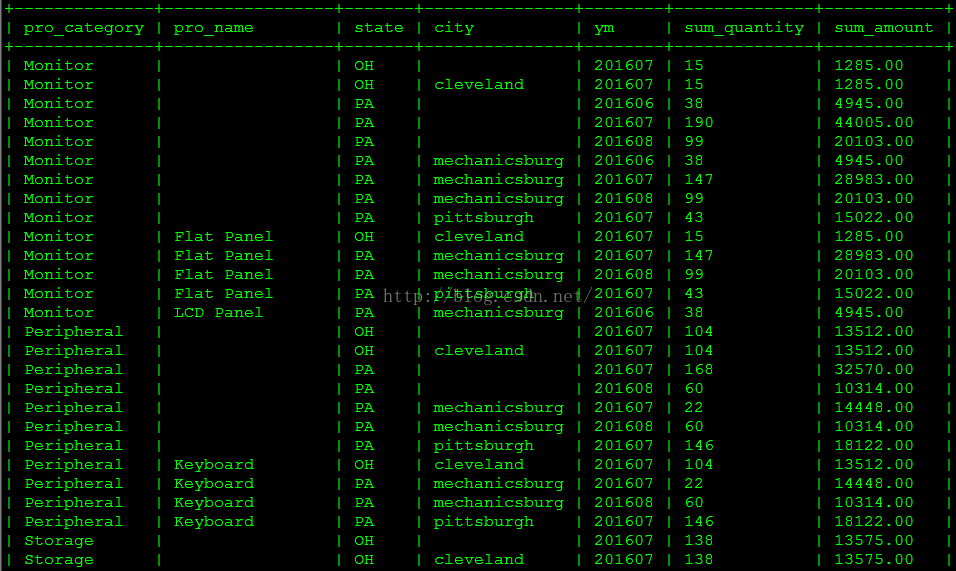<br />(3)每种产品类型销售量和销售额和同比如何?<br /> 这个查询使用了前面进阶技术——周期快照中定义的month_end_sales_order_fact表。Impala支持视图和left、right、full外连接。
create view v_product_category_month as
select t2.product_category,
t3.year,
t3.month,
t1.month_order_amount,
t1.month_order_quantity
from month_end_sales_order_fact t1
inner join product_dim t2 on t1.product_sk = t2.product_sk
inner join month_dim t3 on t1.order_month_sk = t3.month_sk;
select t1.product_category,
t1.year,
t1.month,
(t1.month_order_quantity - nvl(t2.month_order_quantity,0)) / nvl(t2.month_order_quantity,0) pct_quantity,
cast((t1.month_order_amount - nvl(t2.month_order_amount,0)) as double) / cast(nvl(t2.month_order_amount,0) as double) pct_amount
from v_product_category_month t1
left join v_product_category_month t2
on t1.product_category = t2.product_category
and t1.year = t2.year + 1
and t1.month = t2.month;
查询结果如下图所示。由于没有2015年的数据,分母是0,除0结果是Infinity而不报错。<br />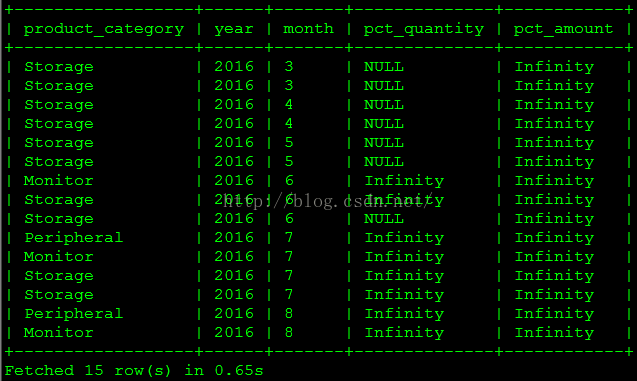<br />(4)每个州以及每个城市的客户数量及其消费金额汇总是多少?
select * from
(
select t3.state state,
t3.city city,
count(distinct t2.customer_sk) sum_customer_num,
sum(order_amount) sum_order_amount
from sales_order_fact t1
inner join customer_dim t2 on t1.customer_sk = t2.customer_sk
inner join customer_zip_code_dim t3 on t1.customer_zip_code_sk = t3.zip_code_sk
group by state, city
union all
select t3.state state,
'' city,
count(distinct t2.customer_sk) sum_customer_num,
sum(order_amount) sum_order_amount
from sales_order_fact t1
inner join customer_dim t2 on t1.customer_sk = t2.customer_sk
inner join customer_zip_code_dim t3 on t1.customer_zip_code_sk = t3.zip_code_sk
group by state, city) t
order by state, city;
查询结果如下图所示。<br />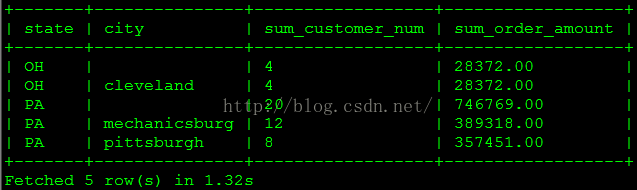<br />(5)迟到的订单比例是多少?
select sum_total, sum_late, round(sum_late/sum_total,4) late_pct
from
(
select sum(case when order_date_sk < entry_date_sk then 1 else 0 end) sum_late,
count(*) sum_total
from sales_order_fact) t;
查询结果如下图所示。<br />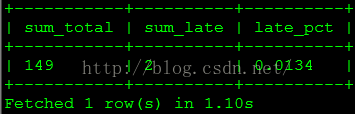<br />(6)客户年消费金额为“高”、“中”、“低”档的人数及消费金额所占比例是多少?<br /> 这个查询使用了前面进阶技术——分段维度中定义的表。
select year, bn, c_count, sum_band, sum_total, round(sum_band/sum_total,4) band_pct
from
(
select count(a.customer_sk) c_count,
sum(annual_order_amount) sum_band,
c.year year,
band_name bn
from annual_customer_segment_fact a,
annual_order_segment_dim b,
year_dim c,
annual_sales_order_fact d
where a.segment_sk = b.segment_sk
and a.year_sk = c.year_sk
and a.customer_sk = d.customer_sk
and a.year_sk = d.year_sk
and b.segment_name = ‘grid’
group by year, bn) t1,
(select sum(annual_order_amount) sum_total from annual_sales_order_fact) t2
order by year, bn;
查询结果如下图所示。<br />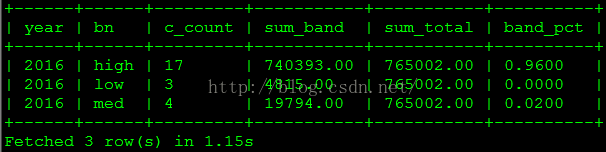<br />(7)每个城市按销售金额排在前三位的商品是什么?<br /> 此查询使用了Impala支持的窗口分析函数row_number()取得排名。
select t2.city, t3.product_name, t1.sum_order_amount, t1.rn
from
(
select customer_zip_code_sk,
product_sk,
sum_order_amount,
row_number() over (partition by customer_zip_code_sk order by sum_order_amount desc) rn
from
(
select customer_zip_code_sk,
product_sk,
sum(order_amount) sum_order_amount
from sales_order_fact t1
group by customer_zip_code_sk, product_sk) t) t1
inner join customer_zip_code_dim t2 on t1.customer_zip_code_sk = t2.zip_code_sk
inner join product_dim t3 on t1.product_sk = t3.product_sk
where t1.rn <= 3
order by t1.customer_zip_code_sk, t1.rn;
查询结果如下图所示。<br />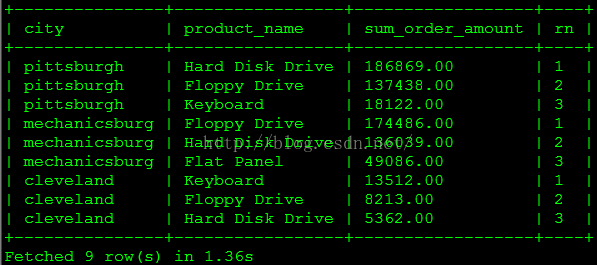<br /> 以上几个查询都在1秒左右得到结果。虽然测试数据很少,但即便这样的数据量在Hive上执行相同的查询也要几分钟时间。Impala的优势在于查询速度快,然而相对于Hive或SparkSQL,当前的Impala仍有诸多不足:不支持update、delete操作;不支持Date类型;不支持XML和JSON相关函数;不支持covar_pop、covar_samp、corr、percentile、 percentile_approx、histogram_numeric、collect_set等聚合函数;不支持rollup、cube、grouping set等操作;不支持数据抽样(Sampling)等等。看来要想日臻完美,Impala还有很多工作要做。

若有收获,就点个赞吧
0 人点赞


