1#apk文件结构
apk文件本质来说就是zip,zip的文件格式就是:
[文件头+文件数据+数据描述符]{此处可重复n次}+核心目录+目录结束标识
当压缩包中有多个文件时,就会有多个[文件头+文件数据+数据描述符]
zip可以分为3个数据区:
压缩源文件数据区,Central directory 核心目录, 目录结束标识
1)压缩源文件数据区:
记录着压缩的所有文件的内容信息,每个压缩文件都由local file header 、file data、data descriptor三部分组成,在这个数据区中每一个压缩的源文件/目录都是一条记录。
local file header 文件头
用于标识该文件的开始,记录了该压缩文件的信息。文件头标识,值固定(0x04034b50)
2)Central directory 核心目录
记录了压缩文件的目录信息,在这个数据区中每一条纪录对应在压缩源文件数据区中的一条数据。文件标示,值固定(0x02014b50)
3)目录结束标识
目录结束标识存在于整个归档包的结尾,用于标记压缩的目录数据的结束。每个压缩文件必须有且只有一个EOCD记录。标记头(0x06054b50)
主要看这个结构的注释。
| Offset | Bytes | Description | 译 |
|---|---|---|---|
| 0 | 4 | End of central directory signature = 0x06054b50 | 核心目录结束标记(0x06054b50) |
| 4 | 2 | Number of this disk | 当前磁盘编号 |
| 6 | 2 | number of the disk with the start of the central directory | 核心目录开始位置的磁盘编号 |
| 8 | 2 | total number of entries in the central directory on this disk | 该磁盘上所记录的核心目录数量 |
| 10 | 2 | total number of entries in the central directory | 核心目录结构总数 |
| 12 | 4 | Size of central directory (bytes) | 核心目录的大小 |
| 16 | 4 | offset of start of central directory with respect to the starting disk number | 核心目录开始位置相对于archive开始的位移 |
| 20 | 2 | .ZIP file comment length(n) | 注释长度 |
| 22 | n | .ZIP Comment | 注释内容 |
1.zip注释可随意修改(最大长度2个字节即256长度)
2.如何寻找注释内容?找标记头位移20位
如:看某个apk注释
2#新的应用签名方案APK Signature Scheme v2
android {...defaultConfig { ... }signingConfigs {release {...v2SigningEnabled true}}}
新的签名方案会在ZIP文件格式的 Central Directory 区块所在文件位置的前面添加一个APK Signing Block区块,如下
新应用签名方案的签名信息会被保存在区块2(APK Signing Block)中, 而区块1(Contents of ZIP entries)、区块3(ZIP Central Directory)、区块4(ZIP End of Central Directory)是受保护的,在签名后任何对区块1、3、4的修改都逃不过新的应用签名方案的检查。新的签名方案会对所有文件的修改做遍历签名,所以传统的多渠道方式如META-INF加渠道文件或者往APK中添加ZIP Comment都会失效!
**
区块2(APK Signing Block)的格式
| 偏移 | 字节数 | 描述 |
|---|---|---|
| @+0 | 8 | 这个Block的长度(本字段的长度不计算在内) |
| @+8 | n | 一组ID-value |
| @-24 | 8 | 这个Block的长度(和第一个字段一样值) |
| @-16 | 16 | 魔数 “APK Sig Block 42” |
ID-value,它由一个8字节的长度标示+4字节的ID+它的负载组成。V2的签名信息是以ID(0x7109871a)的ID-value来保存在这个区块中,而且它是可以有若干个这样的ID-value来组成,那么我们是不是可以把渠道信息当作一组ID-value写入呢?我们先来看v2的验证签名过程: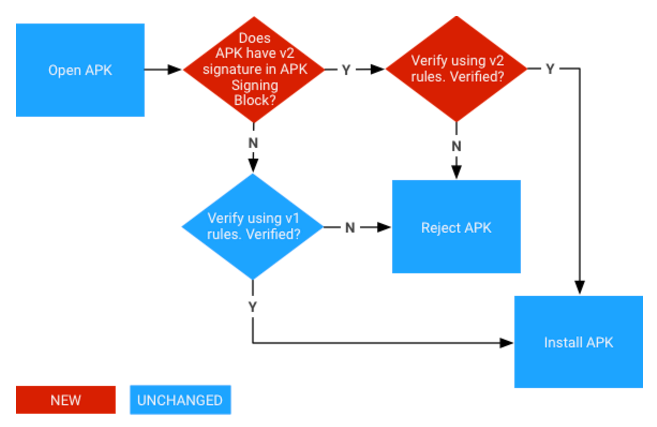
#android.util.apk.ApkSignatureSchemeV2Verifier
并且安卓的源码只对ID(0x7109871a)的ID-value做处理,其余的ID-value不做处理,如下:
public static ByteBuffer findApkSignatureSchemeV2Block(ByteBuffer apkSigningBlock,Result result) throws SignatureNotFoundException {checkByteOrderLittleEndian(apkSigningBlock);// FORMAT:// OFFSET DATA TYPE DESCRIPTION// * @+0 bytes uint64: size in bytes (excluding this field)// * @+8 bytes pairs// * @-24 bytes uint64: size in bytes (same as the one above)// * @-16 bytes uint128: magicByteBuffer pairs = sliceFromTo(apkSigningBlock, 8, apkSigningBlock.capacity() - 24);int entryCount = 0;while (pairs.hasRemaining()) {entryCount++;if (pairs.remaining() < 8) {throw new SignatureNotFoundException("Insufficient data to read size of APK Signing Block entry #" + entryCount);}long lenLong = pairs.getLong();if ((lenLong < 4) || (lenLong > Integer.MAX_VALUE)) {throw new SignatureNotFoundException("APK Signing Block entry #" + entryCount+ " size out of range: " + lenLong);}int len = (int) lenLong;int nextEntryPos = pairs.position() + len;if (len > pairs.remaining()) {throw new SignatureNotFoundException("APK Signing Block entry #" + entryCount + " size out of range: " + len+ ", available: " + pairs.remaining());}int id = pairs.getInt();if (id == APK_SIGNATURE_SCHEME_V2_BLOCK_ID) {return getByteBuffer(pairs, len - 4);}result.addWarning(Issue.APK_SIG_BLOCK_UNKNOWN_ENTRY_ID, id);pairs.position(nextEntryPos);}throw new SignatureNotFoundException("No APK Signature Scheme v2 block in APK Signing Block");}
所以,我们只需要把渠道信息当作一组ID-value写在ID(0x7109871a)的ID-value的前面,步骤:
1、根据标识(0x06054b50)找到EOCD位移。
2、EOCD起始位移16字节,找到记录中央目录的起始位移。
3、根据插入ID-value的大小修改EOCD中记录中央目录的位移。
4、根据中央目录起始位移-24找到记录签名块大小。
5、修改前后记录签名块大小的值。
private static final long APK_SIG_BLOCK_MAGIC_HI = 0x3234206b636f6c42L;private static final long APK_SIG_BLOCK_MAGIC_LO = 0x20676953204b5041L;private static final int APK_SIG_BLOCK_MIN_SIZE = 32;private static final int ZIP_EOCD_CENTRAL_DIR_OFFSET_FIELD_OFFSET = 16;private final static int CHANNEL_FLAG = 0x12345678; //渠道id标识private static void insertChannelId(RandomAccessFile apk,int adChannelId) {try{byte[] channelIdBuff = intToBytes2(adChannelId);int contentSize = channelIdBuff.length;//根据标识(0x06054b50)找到EOCDPair<ByteBuffer, Long> eocdAndOffsetInFile = getEocd(apk);ByteBuffer eocd = eocdAndOffsetInFile.first;long eocdOffset = eocdAndOffsetInFile.second;if (ZipUtils.isZip64EndOfCentralDirectoryLocatorPresent(apk, eocdOffset)) {throw new SignatureNotFoundException("ZIP64 APK not supported");}int size = 8 + 4 + contentSize;long neweocdOffset = eocdOffset + size;//查找中央目录位移long centralDirOffset = getCentralDirOffset(eocd, eocdOffset);long newCentralDirOffset = centralDirOffset + size;//查找签名块位移Pair<ByteBuffer, Long> apkSigningBlockAndOffsetInFile = findApkSigningBlock(apk, centralDirOffset);long newSigningBlockSize = apkSigningBlockAndOffsetInFile.first.capacity()-8 + size;//插入一组渠道 格式为[大小:标识:内容]int pos = (int) (apkSigningBlockAndOffsetInFile.second + 8);File tmp = File.createTempFile("tmp", null);//创建一个临时文件存放数据;FileInputStream fis = new FileInputStream(tmp);FileOutputStream fos = new FileOutputStream(tmp);apk.seek(pos);//把指针移动到指定位置byte[] buf = new byte[1024];int len = -1;//把指定位置之后的数据写入到临时文件while((len = apk.read(buf)) != -1){fos.write(buf, 0, len);}apk.seek(pos);//再把指针移动到指定位置,插入追加的数据ByteBuffer buffer = ByteBuffer.allocate(size);buffer.order(ByteOrder.LITTLE_ENDIAN);buffer.putLong(size-8); //大小buffer.putInt(CHANNEL_FLAG); //标识buffer.putInt(adChannelId); //内容apk.write(buffer.array());//再把临时文件的数据写回while((len = fis.read(buf)) > 0){apk.write(buf, 0, len);}apk.seek(neweocdOffset+ZIP_EOCD_CENTRAL_DIR_OFFSET_FIELD_OFFSET);buffer = ByteBuffer.allocate(4);buffer.order(ByteOrder.LITTLE_ENDIAN);buffer.clear();buffer.putInt((int) newCentralDirOffset);apk.write(buffer.array());//修改eocd中央目录位移apk.seek(apkSigningBlockAndOffsetInFile.second);//移到签名块头buffer = ByteBuffer.allocate(8);buffer.order(ByteOrder.LITTLE_ENDIAN);buffer.clear();buffer.putLong(newSigningBlockSize);apk.write(buffer.array()); //修改签名头大小apk.seek(newCentralDirOffset-24);buffer.clear();buffer.putLong(newSigningBlockSize);apk.write(buffer.array()); //修改签名尾大小} catch (Exception e) {e.printStackTrace();}}
3#多渠道增量更新
应用启动时将手机端的Version Code和应用APK文件的MD5值发送到服务器端。服务器通过对MD5值查找到老版本的APK, 同新老版本的APK做diff, 生成patch文件,返回给SDK。 SDK再将patch文件和手机上的老版本APK文件合成生成新版本的APK。手机端生成的新版APK文件的MD5值会和服务器端的新版APK MD5值保持严格一致。在此过程中,服务器必须存在新老两个版本的APK文件

若有收获,就点个赞吧
0 人点赞


