一、语法
find [选项]… [查找的路径] [查找的条件] [处理动作]
查找路径:默认为当前目录
查找条件:指定的查找标准,可以是文件名、大小、类型、权限等标准;默认为指定路径下所有文件
处理动作:对符合条件的文件做什么操作;默认为显示在屏幕
二、查找条件
1.文件名
- -name “文件名称”;支持使用
**glob**,严格区分大小写- glob:
?,*,[],[^]
- glob:
-iname “文件名称” 忽略大小写
-user:用户名 查找属主为指定用户名的文件
- -group:组名 查找属组为指定用户名的文件
- uid:uid名称 根据指定的uid来查找对应的文件
- gid:gid名称 根据指定的gid来查找对应的文件
- -nouser:查找没有属主的文件
-
3.文件类型
-type [名称]:
f:普通文件
- d:目录
- l:符号链接文件
- b:块文件
- s:套接字文件
- c:字符设备
-
4.组合条件
与:-a
- 或:-o
-
5.根据文件大小来查找
-size:
**[+|-]**大小单位 常用单位:K,M,G
1.单位不带加减
$ find /etc -size 3k -exec ls -lh {} \; | more-rw-r--r--. 1 root root 2.9K 8月 15 2013 /etc/rsyslog.conf-rw-r--r--. 1 root root 3.0K 3月 19 2014 /etc/warnquota.conf-rwxr-xr-x. 1 root root 2.1K 7月 15 2013 /etc/dhcp/dhclient.d/ntp.sh-rw-r--r--. 1 root root 2.9K 8月 21 2010 /etc/pinforc-rw-r--r--. 1 root root 2.4K 3月 12 2014 /etc/dbus-1/system.d/Upstart.conf
2.单位前面是减号(-)
$ find /etc -size -3k -exec ls -lh {} \; | less-rw-r--r--. 1 root root 0 8月 30 02:06 /etc/crypttab-rw-r--r--. 1 root root 233 1月 12 2010 /etc/printcap-rw-r--r--. 1 root root 0 1月 12 2010 /etc/motd-rw-r--r--. 1 root root 9 10月 2 2013 /etc/host.conf-rw-r--r--. 1 root root 1.4K 8月 23 2010 /etc/pbm2ppa.conf-rw-r--r--. 1 root root 0 8月 30 02:06 /etc/resolv.conf
3.图解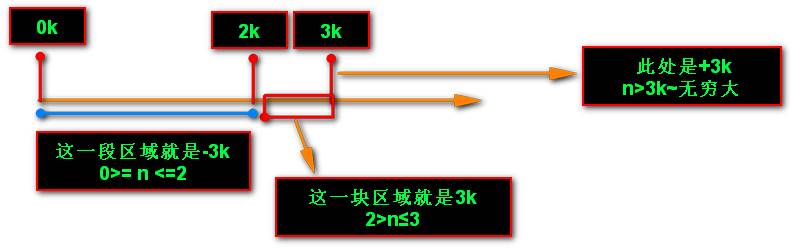
总结:
- 可以使用+ - # 来表示 (+)多少天以前 (-)多少天以内 (#)或者刚好多少天
1.什么都不加
$ date2017年 09月 02日 星期六 09:42:27 CST$ sudo find / -mtime 3 -ls23551 4 drwxrwxrwx 1 root root 4096 8月 29 17:02 /host/game/7fgame/Accounts/10995598923553 48 -rwxrwxrwx 1 root root 49152 8月 29 16:36 /host/game/7fgame/Accounts/109955989/account.db23415 1 -rwxrwxrwx 2 root root 98 8月 29 17:02 /host/game/7fgame/Accounts/109955989/ConfUpdate.ini110222 1 -rwxrwxrwx 1 root root 18 8月 29 17:02 /host/game/7fgame/Accounts/109955989/Flag.ini**749 1 -rwxrwxrwx 1 root root 204 8月 30 00:15/host/MySoft/\344\270\213\350\275n/AutoSkin/AutoSkin.xml
疑惑:
- 09月 02日 - 8月 29日 = 4天 ???? 我上面写的是3天啊
- 请注意带上具体的时间来计算!
- 09月 02日9:42:27 - 8月 29 17:02 = 3……(天) 3天多一点不到4天 也算3天
2.加上减号(多少天之内)
$ date2017年 09月 02日 星期六 10:10:11 CST$ sudo find /host -mtime -3 -ls | more5 8 drwxrwxrwx 1 root root 8192 9月 1 20:27 /host223912 4 drwxrwxrwx 1 root root 4096 8月 31 08:05 /host/$RECYCLE.BIN/S-1-5-214107 4 drwxrwxrwx 1 root root 4096 8月 30 17:14 /host/game621 44 -rwxrwxrwx 2 root root 42744 9月 2 09:58 /host/\34241\347\/\3\244.docx
3.多少天以前(不包括#)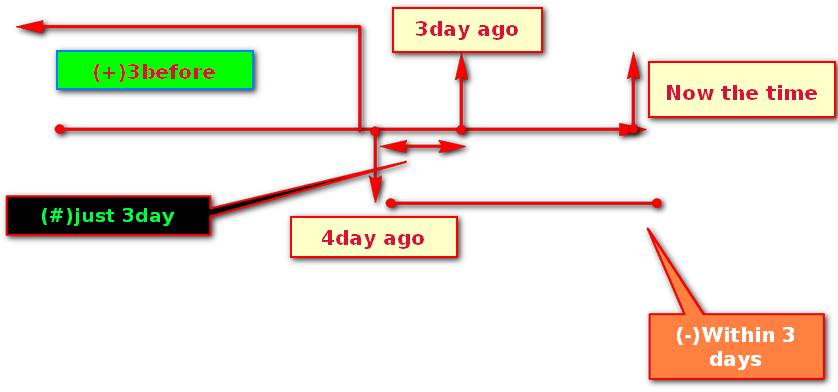
4.以”天”为单位:
- (access访问) -atime
- (modifly 修改) -mtime
- (创建 create) -ctime
5.以分钟为单位
-amin
-mmin
-cmin
6.总结
#(什么都不加)[3,3+1)- 3天0时0分0秒 ~ 3天23小时59分59秒…. 这个 之间
+#(加号)[#+1,oo]- 4天0时0秒~无穷大
**-#**(减号)**[0,#)**- N天 0时0分0秒~到现行时间 也即是 现在时间> # ≥0
7.根据权限来查找
参数:-perm (+|-)MODE
什么都不加,就是按精确查找
+MODE:任何一类对象权限(u,g,o),中只能要匹配一位即可
1.匹配任意位上的写权限
$ find /etc/vsftpd/ -perm +222 -ls392778 4 drwxr-xr-x 2 root root 4096 9月 3 20:36 /etc/vsftpd/392779 4 -rw------- 1 root root 125 3月 22 20:12 /etc/vsftpd/ftpusers392780 4 -rw------- 1 root root 361 3月 22 20:12 /etc/vsftpd/user_list
2.匹配user位的→r和w权限 0表示不考虑
$ find /etc/httpd/conf -perm +600 -ls392769 4 drwxr-xr-x 2 root root 4096 9月 3 20:46 /etc/httpd/conf392798 16 -rw-r--r-- 1 root root 13139 8月 16 03:42 /etc/httpd/conf/magic392797 36 -r--r--r-- 1 root root 34419 7月 26 17:16 /etc/httpd/conf/httpd.conf
3.匹配other位的→执行权限
[root@kali~]# find /etc/httpd/conf -perm +001 -ls392769 4 drwxr-xr-x 2 root root 4096 9月 3 20:46 /etc/httpd/conf
问题:
- 我想匹配other位既有执行权限又有写权限这个时候我怎么匹配?
4.哦,既有写又有执行,那么就是2+1就是3咯~
$ find /etc/httpd/conf -perm +003 -ls392769 4 drwxr-xr-x 2 root root 4096 9月 3 20:46 /etc/httpd/conf
诶诶诶,怎么回事,说好的既有执行又有写权限的呢?
恩….使用+号的时候只要匹配任意一位权限就可以了吧…
-MODE:每一类对象都必须同时拥有为其指定的权限标准
5.匹配other位必须有w和x权限,-与+不同 -是且条件 +是或条件
$ find /var -perm -003 -ls130979 0 lrwxrwxrwx 1 root root 10 8月 30 02:06 /var/mail -> spool/mail130331 4 drwxrwxrwt 2 root root 4096 9月 3 20:46 /var/tmp136604 0 srwxrwxrwx 1 root root 0 9月 3 19:16 /var/run/cups/cups.sock130325 0 srwxrwxrwx 1 root root 0 9月 3 19:16 /var/run/dbus/system_bus_socket260897 0 lrwxrwxrwx 1 root root 40 9月 3 20:46 /var/www/icons/poweredby.png
三、处理动作
| 动作 | 说明 |
|---|---|
| 默认的处理动作,显示至屏幕 | |
| -ls | 类似于对查找到的文件执行**ls -l**命令 |
| -delete | 删除查找到的文件 |
| -fls /path/to/somefile | 查找到的所有文件的长格式信息保存至指定文件中 |
| -ok COMMAND {} ; | 对查找到的每个文件执行由COMMAND指定的命令; 对于每个文件执行命令之前,都会交互式要求用户确认 |
| -exec COMMAND {} ; | 对查找到的每个文件执行由COMMAND指定的命令; |
| {} | 用于引用查找到的文件名称自身 |
注意:
- find传递查找到的文件至后面指定的命令时,查找到所有符合条件的文件一次性传递给后面的命令
- 有些命令不能接受过多参数,此时命令执行可能会失败;另一种方式可规避此问题:
查找系统上没有属主或者没有属组文件
# 要用括号扩起来,不然–ls 会显示异常[root@kali~]# find /tmp/ \( -nogroup -o –nouser \) -ls392660 4 -rw-r--r-- 1 500 500 1287 8月 30 03:36 /tmp/woshide
没有加括号的情况
[root@kali~]# find /tmp/ -nogroup -o -nouser -ls[root@kali~]#找不到
2.
查找/下,属主和属组都不是root的文件
方式一:
注意括号前后的空格
\( \)$ find / \( -not -user root -a -not -group root \) –ls
方式二:
括号里有多个not的时候,提取出来,并且把原来的-a变成-o
$ find / -not \( -user root -o -group root \) –ls
把not提取出来后,为什么要把且(-a)变成或呢(-o)?
如图:没有提取not之前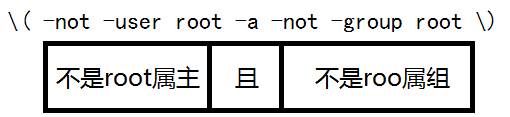
其结果是:找到的文件所属组,和所属主都不是root的文件
如图:提取了not之后,没有改变关系运算符“且”
运算过程:现在有这样一个文件,根据这个规则来代入进去
-rwsr-x--- 1 root dbus
1.是**root**属主且不是**root**属组条件不成立
2.取反(条件不成立)结果是成立
仔细看了上面的分析应该能够明白了是怎么回事了吧!
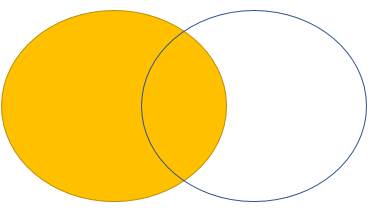
所以得出结论:
- !A –a !B = !(A –o B)
- !A –o !B = !(A –a B)
3.
查找/tmp最近5分钟访问过的文件,并且把它的名字改为NAME.txt 这个name表示找到的文件
$ find /tmp \( -type f -a -amin -5 \) -exec mv {} {}.txt \;$ ls /tmpfstab inittab.txt woshide yum.conf.txt yum.log
可以看出来{} 这个大括号 代表的是find匹配到的每一个文件!
4.
查找/var目录下属主为root,且属组为mail的所有文件或目录;
find /var \( -user root -a group mail \)
5.
查找/usr目录下不属于root、bin或hadoop的所有文件或目录
find /usr \( -not -user root -a -not -user /bin -a -not -user hadoop \)find /usr -not \( -user root -o -user bin -o -user hadoop \)
6.
查找/etc目录下最近一周内其内容修改过,同时属主不为root,也不是hadoop的文件或目录;
find /etc \( -mtime -7 -a -not -user root -not -user hadoop \)find /etc \( -mtime -7 -a -not \(-user root -o -user hadoop\) \)
7.
查找当前系统上没有属主或属组,且最近一个周内曾被访问过的文件或目录;
find / \( -nouser -a nogroup -a -atime 7 \)
8.
查找/etc目录下大于1M且类型为普通文件的所有文件;
find /etc/ -size +1M -type f
9.
查找/etc目录下所有用户都没有写权限的文件;
find /etc/ -perm 222
10.
查找/etc目录下至少有一类用户没有执行权限的文件;
find /etc -not -perm -111
11.
查找/etc/init.d目录下,所有用户都有执行权限,且其它用户有写权限的文件;
find /etc/init.d/ -perm -113

若有收获,就点个赞吧
0 人点赞


