redux流程理解
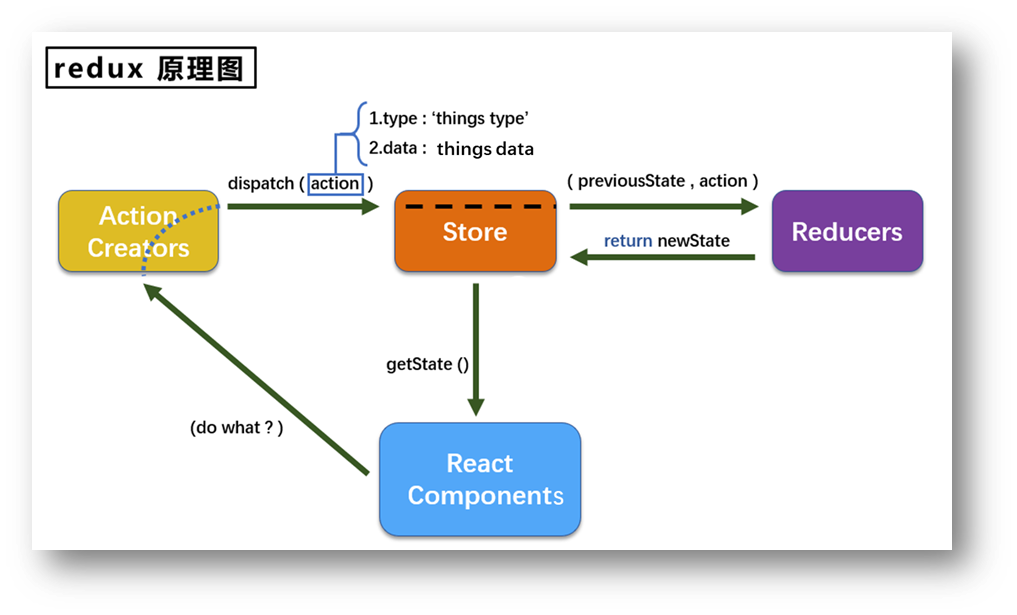
所谓redux,就是将数据集中管理,依托于一个“数据中心”对数据进行增删改查的操作。组件自身并不保存数据。建立一个这样的“数据中心”需要包含如下几个关键点:
- “数据中心”中需要有存放数据的“仓库”,所有数据都保存在这个仓库中。(store)
- 组件(component)需要给数据中心发送操作数据的命令,告诉“数据中心”要处理什么数据、做何种操作。这个命令不能是组件想怎么写怎么写,需要“数据中心”预先写好,提供给组件使用。(action)
- “数据中心”接到组件的操作数据命令,需要真正对数据进行操作,因此需要有一个模块根据组件给出的命令,来对数据进行“加工”(reducer)
以上三步分别对应redux中三个非常关键的三个模块。具体行为如图所示。
redux应用
实现如下功能:一个计数器,下拉框选择加几,加、减、奇数加、异步加四个功能。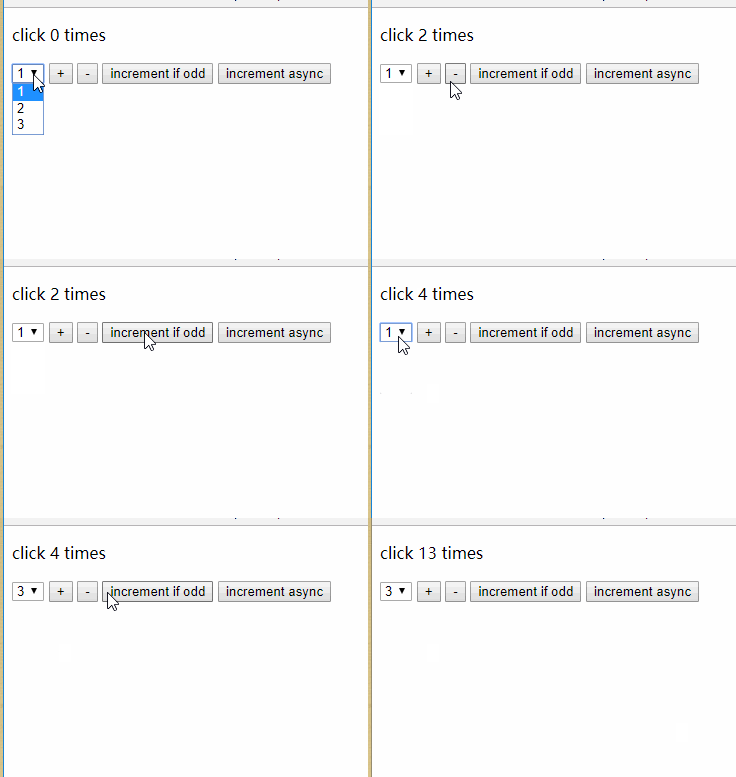
action.js
根据上图可知有四个功能,但实际只有两个action,也就是说对数据只有两种操作模式:加、减。奇数加和异步加都是对加的二次封装。因此,定义action只需要两个。一个action就是一个对象该对象包含type和data两个字段,分别表示对操作类型和数据。
export const createIncrementAction = data =>({type: 'INCREMENT', data})export const createDecrementAction = data =>({type: 'DECREMENT', data})
action.js中定义了两个方法,分别返回加、减的action对象。
reducer.js
reducer.js定义了对action的具体处理,该文件很简单,定义一个reducer,接受两个参数,第一个参数preState为更改前的值,第二个参数是action是action.js中返回的action对象。
const initState = 0export default function countReducer(preState=initState, action) {console.log(preState, action)const {type, data} = actionswitch (type) {case 'INCREMENT' :return preState + datacase 'DECREMENT' :return preState - datadefault:return preState}}
store.js
该文件相当简单,通过createStore方法创建一个store对象。store对象内部维护着所有的state和所有的reducer,怎么理解所有的?想一想,如果有一个计数数据count、有两个操作数据方法(加、减)reducer,对应两个action。这个数据count只是state中的一个。state中会有许多数据、对应许多reducer。因此store可以理解为一个“数据中心”。
import {createStore} from 'redux'import countReducer from './count_reducer'export default createStore(countReducer)
Count.jsx 组件
根据上面的动图,写出如下代码。有几个关键点:
- 取数据使用
store.getState() - 通过
createDecrementAction,createIncrementAction方法创建的action对象需要调用store.dispatch方法将action传递至store“数据中心”等待接下来处理。 redux有个大问题,数据虽然改变了但不会引起视图的改变。因此,需要在
componentDidMount生命周期钩子方法中通过store.subscribe(callback)监听store中的数据变化。一旦发生变化,调用this.setState({})从而引起视图rerender。 ```javascript // 引入store,用于获取redux中保存状态 import store from “../../redux/store”; // 引入actionCreator,专门用于创建action对象 import {createDecrementAction, createIncrementAction} from “../../redux/count_action”; class Index extends Component { componentDidMount() {// 监测redux中的状态变化,只要变化就调用render(通过调用setState手动rerender)// 好怪啊store.subscribe(() => {this.setState({})})
}
increment = () => {
const {value} = this.selectNumberstore.dispatch(createIncrementAction(value*1))
} decrement = () => {
const {value} = this.selectNumberstore.dispatch(createDecrementAction(value*1))
} incrementIfOdd = () => {
const {value} = this.selectNumberconst count = store.getState()if (count % 2 !== 0) {store.dispatch(createIncrementAction(value*1))}
} incrementAsync = () => {
const {value} = this.selectNumberconst count = store.getState()setTimeout(() => {store.dispatch(createIncrementAction(value*1))}, 500)
}
render() {return (<div><h1>当前求和为:{store.getState()}</h1><select ref={c => this.selectNumber = c}><option value="1">1</option><option value="2">2</option><option value="3">3</option></select><button onClick={this.increment}>+</button><button onClick={this.decrement}>-</button><button onClick={this.incrementIfOdd}>当前求和为奇数加</button><button onClick={this.incrementAsync}>异步加</button></div>);}
}
<a name="F8Bdt"></a>### 多数据管理通常,redux中不可能只有一个数据需要维护。对于一个复杂的系统,例如图书管理系统,需要维护书籍信息`books` 注册用户信息`users`等等。不同的数据对应不同的reducer。再次同样做一个演示,例子仍旧是上面的计数器的例子,还加了一个person数据(虽然这个person数据和计数器没有任何关联,仅仅只是展示作用)<a name="ocxTY"></a>#### action文件```javascriptexport const createIncrementAction = data =>({type: 'INCREMENT', data})export const createDecrementAction = data =>({type: 'DECREMENT', data})
export const createAddPersonAction = data => ({type: 'ADD_PERSON', data})
reducer文件
const initState = 0export default function countReducer(preState=initState, action) {console.log(preState, action)const {type, data} = actionswitch (type) {case 'INCREMENT' :return preState + datacase 'DECREMENT' :return preState - datadefault:return preState}}
const initState = [{name: "Tom", age: 18}]export default function personReducer(preState=initState, action) {const {type, data} = actionswitch (type){case ADD_PERSON:return [data, ...preState] // 返回一个新对象哦default:return preState}}
store.js
import {createStore, combineReducers} from 'redux'import countReducer from './reducers/count'import personReducer from "./reducers/person";// 汇总所有reducer为一个总reducerconst allReducer = combineReducers({count: countReducer,person: personReducer})export default createStore(allReducer)
此时的store数据,是key-value形式的。当使用state.getState()获取对象时,获取的是如下形式:
{count: {...},person: {...}}
React-redux
前面所说的redux并不是react官方实现的,所以看得到视图更新需要用this.setState({})来触发,说实话这代码挺丑的。因此,react官方对redux进行了实现,对于redux的三步实现,react-redux并未做任何改动。action、store、reducer的代码都不曾改动。react-redux所作的是更改了获取数据的方式。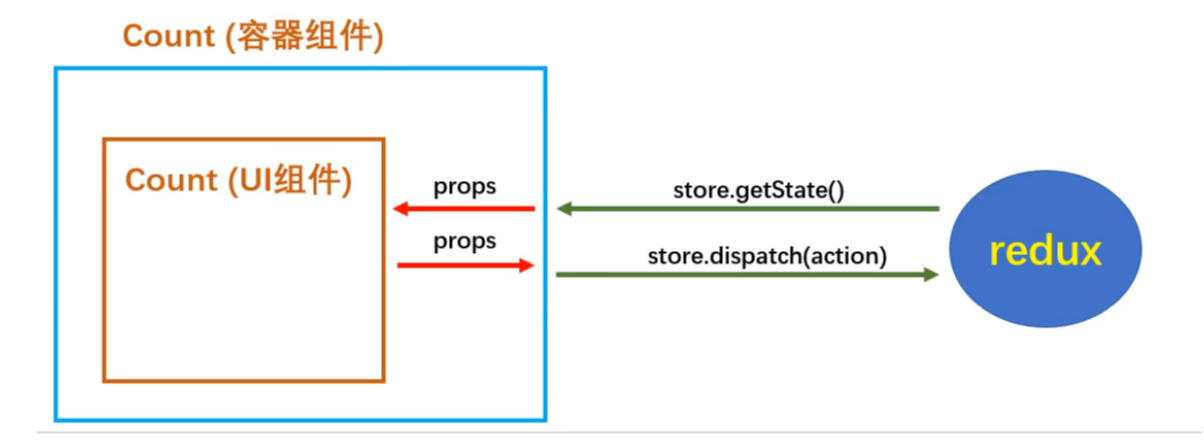
react-redux将组件分为了container组件和UI组件。UI组件就负责正常的页面逻辑,而container组件通过props的方式,专门负责给UI组件提供数据。显然所有的UI组件的父组件都会是对应的container组件。
例子依然是计数器的例子。
container组件
container组件有三个关键点,分别是mapStateToProps、mapDispatchToProps、connect。
mapStateToProps方法的返回值作为状态传递给了UI组件。参数是state,是react-redux自己传进去的。相当于react-redux自己调用了**store.getState()**方法拿到了状态,并且把返回的数据作为参数传递给这个方法了。mapDispatchToProps方法的返回值作为操作状态的方法传递给了UI组件。参数是dispatch,相当于react-redux自己将**store.dispatch**方法作为参数传递给这个方法。connect()()可以创建并返回一个容器组件,connect()(CountUI)在第二个参数传入UI组件可建立联系。**connect()()**方法自带状态检测更新视图的能力。 ```jsx // 引入Count的UI组件 import CountUI from ‘../../components/Count’; // 引入connect用于连接CountUI组件和redux import {connect} from “react-redux”; import {createIncrementAction, createDecrementAction} from “../../redux/count_action”;
// mapStateToProps函数的返回值作为状态传递给了UI组件 function mapStateToProps(state) { return {count: state.count} }
// mapDispatchToProps函数的返回值作为操作状态的方法传递给了UI组件 function mapDispatchToProps(dispatch) { return { add: data => { dispatch(createIncrementAction(data)) }, jian: data => { dispatch(createDecrementAction(data)) } } }
// 使用connect()()创建一个Count的容器组件 const CountContainer = connect(mapStateToProps, mapDispatchToProps)(CountUI)
export default CountContainer
<a name="GO5cz"></a>#### App.jsx这里唯一需要注意的是在使用Count组件时不再使用UI组件,而是使用Count的container组件。```jsximport React, {Component} from 'react';import Count from "./containers/Count";import store from "./redux/store";class App extends Component {render() {return (<div><Count/></div>);}}export default App;
index.js
index.js作为react项目的最初始入口,我们在这里做了两件事:
- 引入store,作为props引入到组件中
- 使用Provider标签包裹整个react app,表示react app中都可以使用redux。 ```javascript import React from ‘react’ import ReactDOM from ‘react-dom’ import App from ‘./App’ import store from “./redux/store”; import {Provider} from “react-redux”;
// app组件里面所有的容器组件都能收到store。
ReactDOM.render(

若有收获,就点个赞吧
0 人点赞


