Yarn的配置因集群环境而异。不同的集群节点配置可能参差不齐,有的性能好,有的性能差。而Yarn作为资源管理器,并不具有自动识别当前机器可以用的虚拟核以及物理内存的功能。在默认情况下,无论当前节点CPU核心与物理内存,都默认识为8vcores和8G内存。如果想更充分的利用集群资源,需要依据集群中每个节点的具体配置来编写配置文件,让Yarn准确识别到当前节点可用的虚拟核心数量和物理内存容量。下文是具体的配置教程,分为节点配置信息查看和配置文件编写两部分。
1、收集节点配置信息
1.1 虚拟核心数量
# 查看物理CPU个数[root@master /]# cat /proc/cpuinfo| grep "physical id"| sort| uniq| wc -l# 查看每个物理CPU中core的个数(即核心数量)[root@master /]# cat /proc/cpuinfo| grep "cpu cores"| uniq# 查看逻辑CPU的个数(即操作系统所识别的虚拟核心数量)[root@master /]# cat /proc/cpuinfo| grep "processor"| wc -l
执行样例如下图所示。演示机的物理CPU为1个,即单路CPU。当前CPU包含有4个物理核心。由于每个物理核心能同时保存多个线程状态,具有超线程的功能,所以对于操作系统来说,实际可用核心数量为8个虚拟核心。当前节点的CPU信息:单路4核心8线程。之后做配置需要使用的主要信息是虚拟核心数vcores。是一个关乎提交应用所能申请Container数量的信息。
1.2 物理内存容量
# 查看当前节点物理内存。-h表示用人类易读的方式展示。[root@master /]# free -h
在Centos 7系统中执行free -h命令,结果样例如下:total表示操作系统总共的物理内存容量。available表示操作系统剩余未分配给进程所使用的物理内存容量。
之后做配置需要使用的主要信息是total和available。total关乎分配给Yarn所能调度的内存总量,available关乎提交的应用所能启动Container的最大数量。
available = free + buffer/cache - 不可被回收内存。 buffer/cache在系统需要时,有些部分可以被回收利用,有些部分不能被回收利用。
swap作为从磁盘划分出来当做物理内存使用的一块区域,就不考虑使用了。
1.3 快速查看
手动查看每个节点的状态比较麻烦,推荐先配置启动好Spark。vcores和total memory信息在Spark WebUI(默认端口8080)首页都有显示。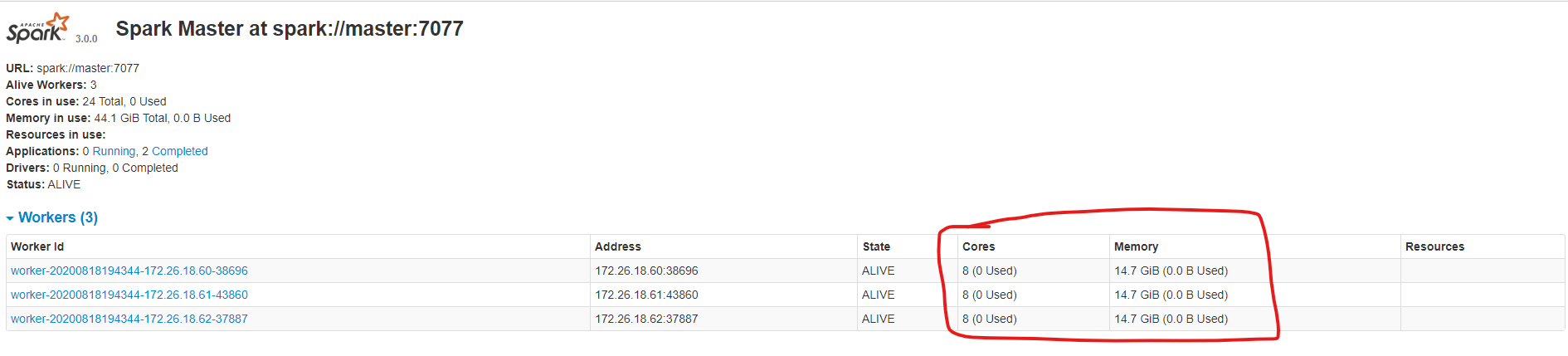
2、编写配置文件
2.1 yarn-site.xml中追加配置
有了vcores,total memory信息就可以编写Yarn的配置文件了。打开hadoop安装目录下的etc/hadoop/yarn-site.xml,追加以下配置。
| yarn.nodemanager.resource.memory-mb | 当前节点分配给Yarn使用的物理内存。小于等于total memroy。推荐total memory的70%~80%,因为其他程序还需要使用内存。单位MB。 |
|---|---|
| yarn.nodemanager.resource.cpu-vcores | 当前节点分配给Yarn使用的虚拟核数。小于等于vcores。可以设置等于vcores。 |
| yarn.scheduler.minimum-allocation-mb | Yarn资源调度时,分配给Container的最小内存容量。单位MB。 |
| yarn.scheduler.maximum-allocation-mb | Yarn资源调度时,分配给Container的最大内存容量。单位MB。 |
| yarn.scheduler.minimum-allocation-vcores | Yarn资源调度时,分配给Container的最小虚拟核数。 |
| yarn.scheduler.maximum-allocation-**vcores** | Yarn资源调度时,分配给Container的最大虚拟核数。 |
示例:一台8vcores,12G内存的节点可以做如下配置。当前节点分配大约80%可用内存,8核心给Yarn进行调度。当Yarn进行资源调度时,分配给Container的最小内存容量是1G,最大4G,最小核心1vcore,最大4vcore。
<configuration>... ...<!-- nodeManager所在节点的物理内存容量和虚拟核数。占比约80%,依照机器剩余内存配置。 --><property><name>yarn.nodemanager.resource.memory-mb</name><value>10240</value></property><property><name>yarn.nodemanager.resource.cpu-vcores</name><value>8</value></property><!-- 分配给容器的最小最大内存容量及虚拟核数量 --><property><name>yarn.scheduler.minimum-allocation-mb</name><value>1024</value></property><property><name>yarn.scheduler.maximum-allocation-mb</name><value>4192</value></property><property><name>yarn.scheduler.minimum-allocation-vcores</name><value>1</value></property><property><name>yarn.scheduler.maximum-allocation-vcores</name><value>4</value></property>... ...</configuration>
2.2 修改capacity-scheduler.xml配置
此外,还需要修改capacity-scheduler.xml配置文件。
打开hadoop安装目录下的etc/hadoop/capacity-scheduler.xml,找到yarn.scheduler.capacity.maximum-am-resource-percent和yarn.scheduler.capacity.resource-calculator属性,将<value>内容修改为如下值。
<configuration>......<property><name>yarn.scheduler.capacity.maximum-am-resource-percent</name><value>0.5</value><description>Maximum percent of resources in the cluster which can be used to runapplication masters i.e. controls number of concurrent runningapplications.</description></property>......<property><name>yarn.scheduler.capacity.resource-calculator</name><value>org.apache.hadoop.yarn.util.resource.DominantResourceCalculator</value><description>The ResourceCalculator implementation to be used to compareResources in the scheduler.The default i.e. DefaultResourceCalculator only uses Memory whileDominantResourceCalculator uses dominant-resource to comparemulti-dimensional resources such as Memory, CPU etc.</description></property>......</configuration>
| yarn.scheduler.capacity.maximum-am-resource-percent | 集群中可用于运行application master的资源比例上限,这通常用于限制并发运行的应用程序数目。调大一些,防止以后会有多个应用上线。 |
|---|---|
| org.apache.hadoop.yarn.util.resource.DominantResourceCalculator | 指定调度器使用的资源计算器。默认值时DefaultResourceCalculator,只使用内存进行比较。在使用时会出现每个Container的内存分配正常,但是vcore会被限制为1个,不能充分利用集群资源。建议修改为DominantResourceCalculator,将资源的分配同时基于内存和CPU。 |
3、重启Yarn
4、检查配置是否生效
登录Yarn Web UI (默认端口8088)。点击左侧列表Nodes选项进行查看。从下图中可以看出
圈1:表示申请Container的资源范围。和2.1小节中示例配置的一样。
圈2:表示当前节点分配给Yarn可使用的物理内存以及虚拟核心数。和2.1小节中示例配置的一样。

若有收获,就点个赞吧
0 人点赞


