1、安装使用Centos7时,可以使用最小化安装。
2、使用Nat模式让虚拟机和物理机联网
配置虚拟机网卡
# /etc/sysconfig/network-scripts/ifcfg-ens32TYPE=EthernetBOOTPROTO=staticNAME=ens32UUID=7bd3f7b2-aacb-49e1-9b0f-ab5806fdb97fDEVICE=ens32ONBOOT=yesIPADDR=192.168.2.200NETMASK=255.255.255.0GATEWAY=192.168.2.2DNS1=192.168.2.2
VMware虚拟网络配置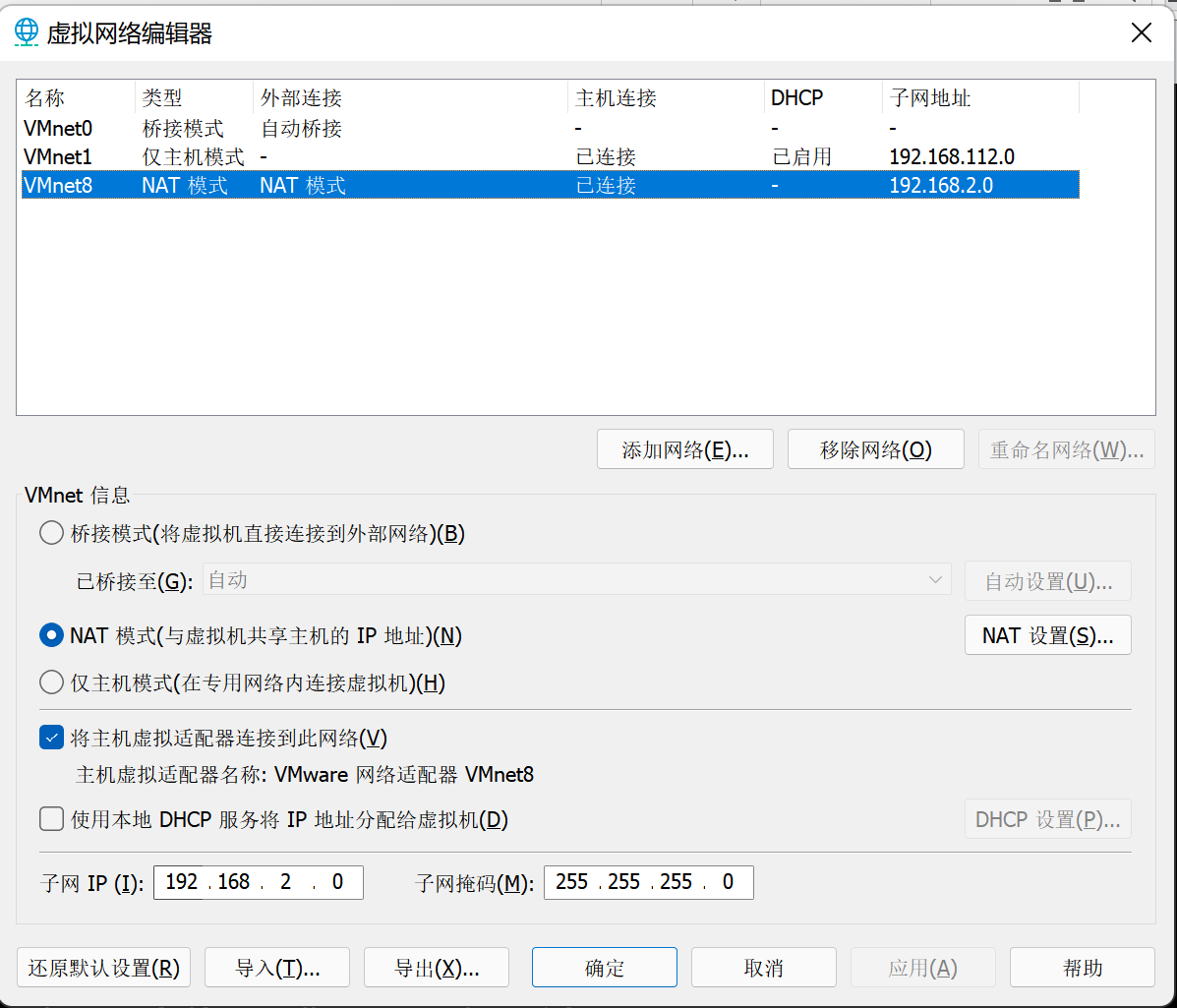
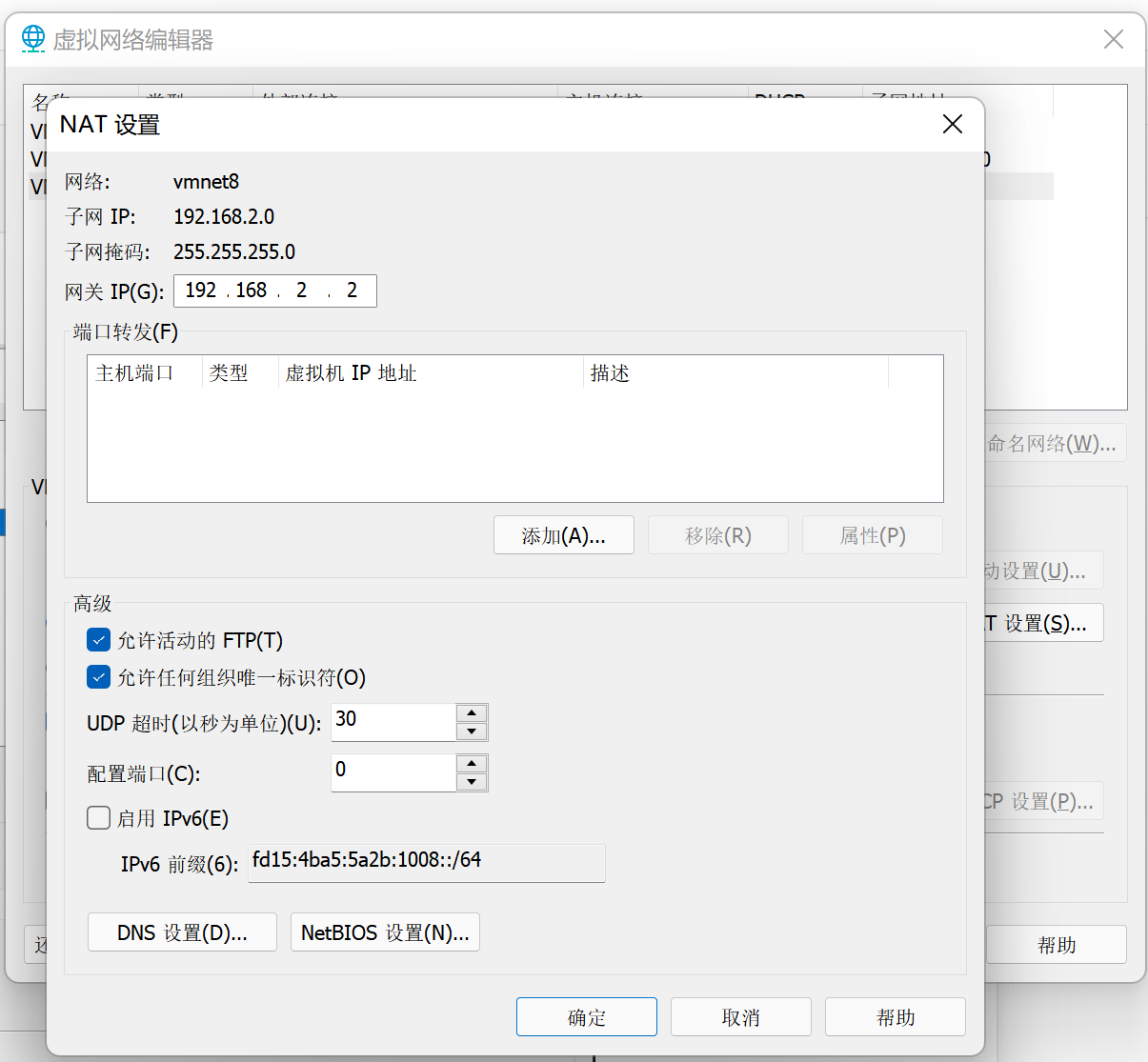
需要配置下DNS,否则虚拟机联网很慢。
3、配置使用国内源
文件名称:Centos-7.repo
# /etc/yum.repos.d# CentOS-Base.repo## The mirror system uses the connecting IP address of the client and the# update status of each mirror to pick mirrors that are updated to and# geographically close to the client. You should use this for CentOS updates# unless you are manually picking other mirrors.## If the mirrorlist= does not work for you, as a fall back you can try the# remarked out baseurl= line instead.##[base]name=CentOS-$releasever - Base - mirrors.aliyun.comfailovermethod=prioritybaseurl=http://mirrors.aliyun.com/centos/$releasever/os/$basearch/http://mirrors.aliyuncs.com/centos/$releasever/os/$basearch/http://mirrors.cloud.aliyuncs.com/centos/$releasever/os/$basearch/gpgcheck=1gpgkey=http://mirrors.aliyun.com/centos/RPM-GPG-KEY-CentOS-7#released updates[updates]name=CentOS-$releasever - Updates - mirrors.aliyun.comfailovermethod=prioritybaseurl=http://mirrors.aliyun.com/centos/$releasever/updates/$basearch/http://mirrors.aliyuncs.com/centos/$releasever/updates/$basearch/http://mirrors.cloud.aliyuncs.com/centos/$releasever/updates/$basearch/gpgcheck=1gpgkey=http://mirrors.aliyun.com/centos/RPM-GPG-KEY-CentOS-7#additional packages that may be useful[extras]name=CentOS-$releasever - Extras - mirrors.aliyun.comfailovermethod=prioritybaseurl=http://mirrors.aliyun.com/centos/$releasever/extras/$basearch/http://mirrors.aliyuncs.com/centos/$releasever/extras/$basearch/http://mirrors.cloud.aliyuncs.com/centos/$releasever/extras/$basearch/gpgcheck=1gpgkey=http://mirrors.aliyun.com/centos/RPM-GPG-KEY-CentOS-7#additional packages that extend functionality of existing packages[centosplus]name=CentOS-$releasever - Plus - mirrors.aliyun.comfailovermethod=prioritybaseurl=http://mirrors.aliyun.com/centos/$releasever/centosplus/$basearch/http://mirrors.aliyuncs.com/centos/$releasever/centosplus/$basearch/http://mirrors.cloud.aliyuncs.com/centos/$releasever/centosplus/$basearch/gpgcheck=1enabled=0gpgkey=http://mirrors.aliyun.com/centos/RPM-GPG-KEY-CentOS-7#contrib - packages by Centos Users[contrib]name=CentOS-$releasever - Contrib - mirrors.aliyun.comfailovermethod=prioritybaseurl=http://mirrors.aliyun.com/centos/$releasever/contrib/$basearch/http://mirrors.aliyuncs.com/centos/$releasever/contrib/$basearch/http://mirrors.cloud.aliyuncs.com/centos/$releasever/contrib/$basearch/gpgcheck=1enabled=0gpgkey=http://mirrors.aliyun.com/centos/RPM-GPG-KEY-CentOS-7
yum makecache
4、配置Windows Terminal远程连接终端
"profiles":{"defaults":{// Put settings here that you want to apply to all profiles.},"list":[{// Make changes here to the powershell.exe profile."guid": "{61c54bbd-c2c6-5271-96e7-009a87ff44bf}","name": "Windows PowerShell","commandline": "powershell.exe","hidden": false},{// Make changes here to the cmd.exe profile."guid": "{0caa0dad-35be-5f56-a8ff-afceeeaa6101}","name": "命令提示符","commandline": "cmd.exe","hidden": false},{"guid": "{b453ae62-4e3d-5e58-b989-0a998ec441b8}","hidden": false,"name": "Azure Cloud Shell","source": "Windows.Terminal.Azure"},// 配置SSH远程连接。{"guid": "{7e7bf29d-dff9-490b-9d64-ee9f5574b47c}","hidden": false,"name": "192.168.2.200—centos7","commandline":"ssh root@192.168.2.200"}]},
如果ssh连接速度慢,那么就修改/etc/ssh/sshd_config中115行UseDNS为no。

若有收获,就点个赞吧
0 人点赞


