功能
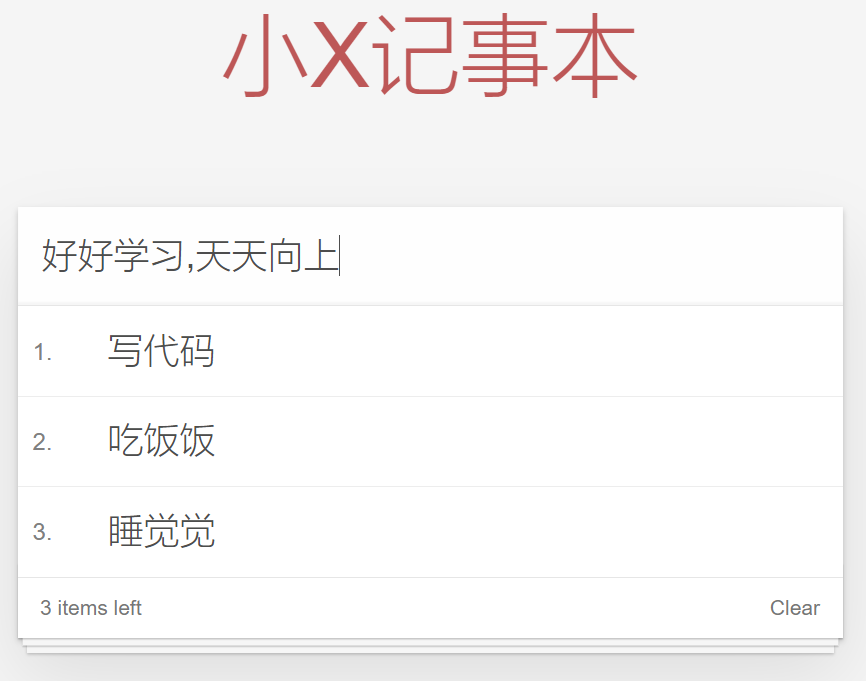
代码
<html><head><meta http-equiv="content-type" content="text/html; charset=UTF-8" /><title>小X记事本</title><meta http-equiv="content-type" content="text/html; charset=UTF-8" /><meta name="robots" content="noindex, nofollow" /><meta name="googlebot" content="noindex, nofollow" /><meta name="viewport" content="width=device-width, initial-scale=1" /><link rel="stylesheet" type="text/css" href="./css/index.css" /></head><body><!-- 主体区域 --><section id="todoapp"><!-- 输入框 --><header class="header"><h1>小X记事本</h1><input v-model="inputValue" @keyup.enter="add" autofocus="autofocus" autocomplete="off" placeholder="请输入任务"class="new-todo" ></header><!-- 列表区域 --><section class="main"><ul class="todo-list"><li class="todo" v-for="(item,index) in list"><div class="view"><span class="index">{{ index+1 }}.</span><label>{{ item }}</label><button class="destroy" @click="remove(index)"></button></div></li></ul></section><!-- 统计和清空 --><footer class="footer" ><!--这里用v-if和v-show都行,根据表达式的真值切换元素的显示和隐藏。v-show:本质是通过操纵dom元素来切换显示状态,当表达式为true时,元素存在于dom树中,当为false时元素从dom树中移除v-if:设置display的值来控制元素的显示与隐藏--><span class="todo-count" v-if="list.length!=0"><!-- 基于数据的开发方式--将标签内的元素用差值表达式换成是数组的长度即可 --><strong>{{ list.length }}</strong> items left</span><button class="clear-completed" @click="clear" v-if="list.length!=0">Clear</button></footer></section><!-- 开发环境版本,包含了有帮助的命令行警告 --><script src="https://cdn.jsdelivr.net/npm/vue/dist/vue.js"></script><script>var app = new Vue({el: "#todoapp",data: {list: ["写代码", "吃饭饭", "睡觉觉"],inputValue: "好好学习,天天向上"},methods: {add: function () {this.list.push(this.inputValue);},remove:function(index) {//splice--从index这个位置开始删除1个元素this.list.splice(index,1);},clear:function() {//清空即让list数组为空即可this.list=[];}},})</script></body></html>
html,body {margin: 0;padding: 0;}body {background: #fff;}button {margin: 0;padding: 0;border: 0;background: none;font-size: 100%;vertical-align: baseline;font-family: inherit;font-weight: inherit;color: inherit;-webkit-appearance: none;appearance: none;-webkit-font-smoothing: antialiased;-moz-osx-font-smoothing: grayscale;}body {font: 14px "Helvetica Neue", Helvetica, Arial, sans-serif;line-height: 1.4em;background: #f5f5f5;color: #4d4d4d;min-width: 230px;max-width: 550px;margin: 0 auto;-webkit-font-smoothing: antialiased;-moz-osx-font-smoothing: grayscale;font-weight: 300;}:focus {outline: 0;}.hidden {display: none;}#todoapp {background: #fff;margin: 180px 0 40px 0;position: relative;box-shadow: 0 2px 4px 0 rgba(0, 0, 0, 0.2), 0 25px 50px 0 rgba(0, 0, 0, 0.1);}#todoapp input::-webkit-input-placeholder {font-style: italic;font-weight: 300;color: #e6e6e6;}#todoapp input::-moz-placeholder {font-style: italic;font-weight: 300;color: #e6e6e6;}#todoapp input::input-placeholder {font-style: italic;font-weight: 300;color: gray;}#todoapp h1 {position: absolute;top: -160px;width: 100%;font-size: 60px;font-weight: 100;text-align: center;color: rgba(175, 47, 47, .8);-webkit-text-rendering: optimizeLegibility;-moz-text-rendering: optimizeLegibility;text-rendering: optimizeLegibility;}.new-todo,.edit {position: relative;margin: 0;width: 100%;font-size: 24px;font-family: inherit;font-weight: inherit;line-height: 1.4em;border: 0;color: inherit;padding: 6px;border: 1px solid #999;box-shadow: inset 0 -1px 5px 0 rgba(0, 0, 0, 0.2);box-sizing: border-box;-webkit-font-smoothing: antialiased;-moz-osx-font-smoothing: grayscale;}.new-todo {padding: 16px;border: none;background: rgba(0, 0, 0, 0.003);box-shadow: inset 0 -2px 1px rgba(0, 0, 0, 0.03);}.main {position: relative;z-index: 2;border-top: 1px solid #e6e6e6;}.toggle-all {width: 1px;height: 1px;border: none; /* Mobile Safari */opacity: 0;position: absolute;right: 100%;bottom: 100%;}.toggle-all + label {width: 60px;height: 34px;font-size: 0;position: absolute;top: -52px;left: -13px;-webkit-transform: rotate(90deg);transform: rotate(90deg);}.toggle-all + label:before {content: "❯";font-size: 22px;color: #e6e6e6;padding: 10px 27px 10px 27px;}.toggle-all:checked + label:before {color: #737373;}.todo-list {margin: 0;padding: 0;list-style: none;max-height: 420px;overflow: auto;}.todo-list li {position: relative;font-size: 24px;border-bottom: 1px solid #ededed;height: 60px;box-sizing: border-box;}.todo-list li:last-child {border-bottom: none;}.todo-list .view .index {position: absolute;color: gray;left: 10px;top: 20px;font-size: 16px;}.todo-list li .toggle {text-align: center;width: 40px;/* auto, since non-WebKit browsers doesn't support input styling */height: auto;position: absolute;top: 0;bottom: 0;margin: auto 0;border: none; /* Mobile Safari */-webkit-appearance: none;appearance: none;}.todo-list li .toggle {opacity: 0;}.todo-list li .toggle + label {/*Firefox requires `#` to be escaped - https://bugzilla.mozilla.org/show_bug.cgi?id=922433IE and Edge requires *everything* to be escaped to render, so we do that instead of just the `#` - https://developer.microsoft.com/en-us/microsoft-edge/platform/issues/7157459/*/background-image: url("data:image/svg+xml;utf8,%3Csvg%20xmlns%3D%22http%3A//www.w3.org/2000/svg%22%20width%3D%2240%22%20height%3D%2240%22%20viewBox%3D%22-10%20-18%20100%20135%22%3E%3Ccircle%20cx%3D%2250%22%20cy%3D%2250%22%20r%3D%2250%22%20fill%3D%22none%22%20stroke%3D%22%23ededed%22%20stroke-width%3D%223%22/%3E%3C/svg%3E");background-repeat: no-repeat;background-position: center left;}.todo-list li .toggle:checked + label {background-image: url("data:image/svg+xml;utf8,%3Csvg%20xmlns%3D%22http%3A//www.w3.org/2000/svg%22%20width%3D%2240%22%20height%3D%2240%22%20viewBox%3D%22-10%20-18%20100%20135%22%3E%3Ccircle%20cx%3D%2250%22%20cy%3D%2250%22%20r%3D%2250%22%20fill%3D%22none%22%20stroke%3D%22%23bddad5%22%20stroke-width%3D%223%22/%3E%3Cpath%20fill%3D%22%235dc2af%22%20d%3D%22M72%2025L42%2071%2027%2056l-4%204%2020%2020%2034-52z%22/%3E%3C/svg%3E");}.todo-list li label {word-break: break-all;padding: 15px 15px 15px 60px;display: block;line-height: 1.2;transition: color 0.4s;}.todo-list li.completed label {color: #d9d9d9;text-decoration: line-through;}.todo-list li .destroy {display: none;position: absolute;top: 0;right: 10px;bottom: 0;width: 40px;height: 40px;margin: auto 0;font-size: 30px;color: #cc9a9a;margin-bottom: 11px;transition: color 0.2s ease-out;}.todo-list li .destroy:hover {color: #af5b5e;}.todo-list li .destroy:after {content: "×";}.todo-list li:hover .destroy {display: block;}.todo-list li .edit {display: none;}.todo-list li.editing:last-child {margin-bottom: -1px;}.footer {color: #777;padding: 10px 15px;height: 20px;text-align: center;border-top: 1px solid #e6e6e6;}.footer:before {content: "";position: absolute;right: 0;bottom: 0;left: 0;height: 50px;overflow: hidden;box-shadow: 0 1px 1px rgba(0, 0, 0, 0.2), 0 8px 0 -3px #f6f6f6,0 9px 1px -3px rgba(0, 0, 0, 0.2), 0 16px 0 -6px #f6f6f6,0 17px 2px -6px rgba(0, 0, 0, 0.2);}.todo-count {float: left;text-align: left;}.todo-count strong {font-weight: 300;}.filters {margin: 0;padding: 0;list-style: none;position: absolute;right: 0;left: 0;}.filters li {display: inline;}.filters li a {color: inherit;margin: 3px;padding: 3px 7px;text-decoration: none;border: 1px solid transparent;border-radius: 3px;}.filters li a:hover {border-color: rgba(175, 47, 47, 0.1);}.filters li a.selected {border-color: rgba(175, 47, 47, 0.2);}.clear-completed,html .clear-completed:active {float: right;position: relative;line-height: 20px;text-decoration: none;cursor: pointer;}.clear-completed:hover {text-decoration: underline;}.info {margin: 50px auto 0;color: #bfbfbf;font-size: 15px;text-shadow: 0 1px 0 rgba(255, 255, 255, 0.5);text-align: center;}.info p {line-height: 1;}.info a {color: inherit;text-decoration: none;font-weight: 400;}.info a:hover {text-decoration: underline;}/*Hack to remove background from Mobile Safari.Can't use it globally since it destroys checkboxes in Firefox*/@media screen and (-webkit-min-device-pixel-ratio: 0) {.toggle-all,.todo-list li .toggle {background: none;}.todo-list li .toggle {height: 40px;}}@media (max-width: 430px) {.footer {height: 50px;}.filters {bottom: 10px;}}

若有收获,就点个赞吧
0 人点赞


