
1.数据类型
基本数据类型 number string boolean null undefined symbol bigint
引用数据类型 object function
100+1+21.2+0+NaN+’Tencent’+’’+’null’+9+’false’
如果加号的左右两边出现字符串或者对象,就会使其按照字符串拼接。是因为对象碰到加号转化为数字,转化为字符串(tostring)然后转化为数字,因此中途就发生拼接。字符串除了全数字,都是NaN。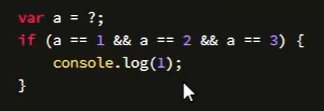
对象转字符串怎么转? 先调用valueof ,没有原始值的话再调用 toString
这道题(数据劫持),重写tostring,直接调用tostring是对象的方法,因此
1.自己在对象中写tostring
2.使用defineproperty

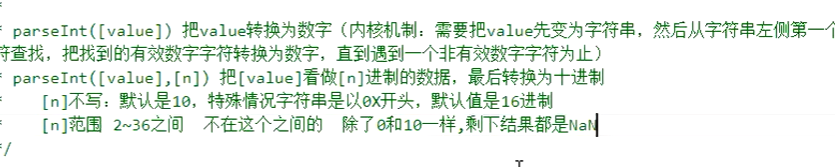
parseInt接收map传入的前两个参数。例如parseint(10.18,0)=>parseInt(10.18,10)
parseint(0,1)=> NaN
parseint (10,2)=> 把10看作字符串‘10’,然后二进制转换,2
parseint(25,3)=>把25看作字符串‘25’,因此只有2符合3进制, 因此是2
parseint(23,4) =>把23看作字符串‘23’,‘23’都符合4进制,因此是11
注意 a.x先处理等于后面的对象,然后处理a等于后面的对象。
第一题,

注意对象

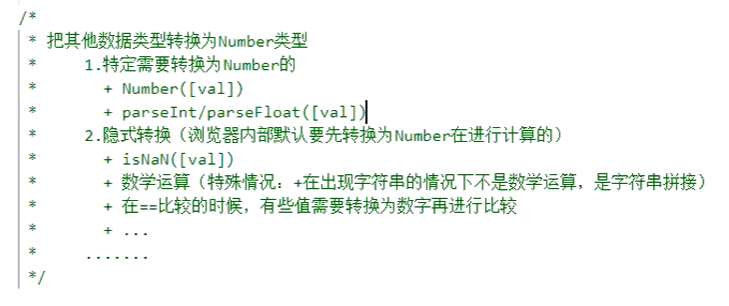
弱比较先转化同类,再比较
[]==false
‘’==0 =>0==0 true
! 先转换成布尔,再取反
除了五个falsy值,其他都是true
!true ==false => true


若有收获,就点个赞吧
0 人点赞


