一、登录
1.1 config文件登录
1)接口描述
| 接口描述 | 使用config文件进行登录 |
|---|---|
| URL | /api/v1/login/config |
| Method | POST |
2)请求参数
| 参数 | 类型 | 必选 | 说明 |
|---|---|---|---|
| file | File | Yes | Log in to the K8S config file |
3)返回参数
| 参数 | 类型 | 必选 | 说明 |
|---|---|---|---|
| status | Number | Yes | Status code |
| msg | String | Yes | Statemessages |
| data | Object | Yes | Object |
4)例子
200 :登录成功
{"status": "success","responseData": {"validated" : true},"msg": "login success","error": null}200 :登录成功{"status": "success","responseData": {"data": {"validated" : true},"totalNum" : 0},"msg": "login success","error": null}
200 :配置文件为空
{"status": "failure","responseData":null,"msg": "login failure","error": {"ErrorCode": "KubeSpace.Login.ConfigFileLogin.ConfigFileIsEmpty","Description": "Login failed. Kubernetes configuration file is empty","Solution": "检查kubernetes配置文件确认无误后再进行登录","ErrorDetails":[{"错误细节"}],}}
400 :请求发生错误(超时、越权)
{"status": "failure","responseData":null,"error": {"ErrorCode": "xxx","Description": "Host not found","Solution": "http请求发生错误","ErrorDetails":null,}}
500 :服务器发生错误
{"status": "failure","responseData":null,"error": {"ErrorCode": "xxx","Description": "","Solution": "服务器源代码错误","ErrorDetails":null,}}
错误:错误码规范
1.2 token登录
1)接口描述
| 接口描述 | 使用token字符串进行登录 |
|---|---|
| URL | /api/v1/login/token |
| Method | POST |
2)请求参数
| 参数 | 类型 | 必选 | 说明 |
|---|---|---|---|
| host | string | Yes | The cluster IP |
| token | string | Yes | Token string used to log in to K8S |
3)返回参数
| 参数 | 类型 | 必选 | 说明 |
|---|---|---|---|
| status | Number | Yes | Status code |
| msg | String | Yes | Statemessages |
| data | Object | Yes | Object |
4)例子
{"data": true,"msg": "Login success","status": 200}
二、资源管理
2.1 service资源管理
2.1.1 创建service
1)接口描述
| 接口描述 | 创建一个Service对象 |
|---|---|
| URL | /api/v1/namespaces/{namespace}/service |
| Method | POST |
2)请求参数
| 参数 | 类型 | 必选 | 说明 |
|---|---|---|---|
| namespace | string | Yes | The namespace to which the service belongs |
| file | File | Yes | The YAML file used to create the service |
3)返回参数
| 参数 | 类型 | 必选 | 说明 |
|---|---|---|---|
| status | Number | Yes | Status code |
| msg | String | Yes | Statemessages |
| data | Object | Yes | Object |
4)例子
5)状态码
| 状态码 | 描述 |
|---|---|
| 201 | The request has been fulfilled, resulting in the creation of a new resource. |
2.1.2 更新service
1)接口描述
| 接口描述 | 替换指定的Service对象 |
|---|---|
| URL | /api/v1/namespaces/{namespace}/services/{name} |
| Method | PUT |
2)请求参数
| 参数 | 类型 | 必选 | 说明 |
|---|---|---|---|
| name | string | Yes | Name of the service |
| namespace | string | Yes | The namespace to which the service belongs |
| json | string | Yes | The YAML file used to updatethe service |
3)返回参数
| 参数 | 类型 | 必选 | 说明 |
|---|---|---|---|
| status | Number | Yes | Status code |
| msg | String | Yes | Statemessages |
| data | Object | Yes | Object |
4)例子
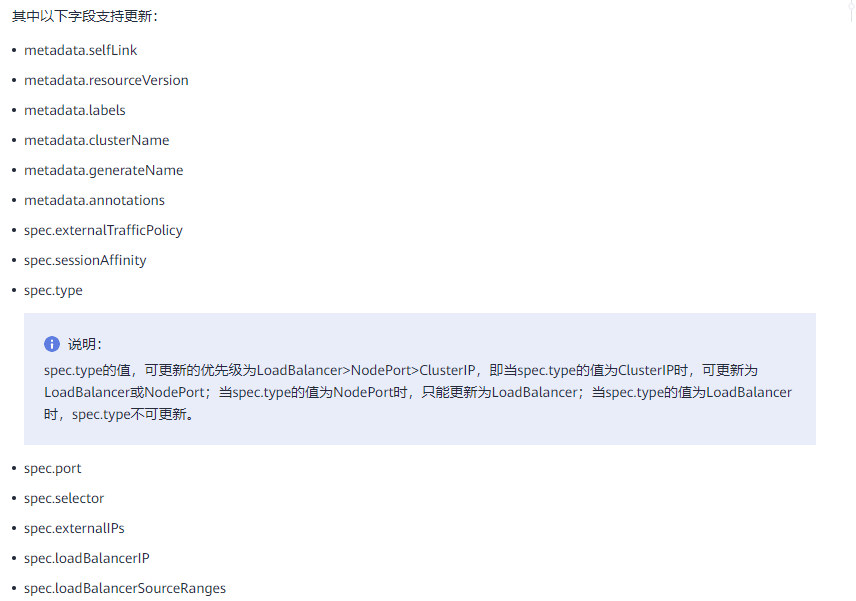
5)状态码
| 状态码 | 描述 |
|---|---|
| 200 | This operation succeeds, and a Service resource object is returned. |
2.1.3 查询指定的service
1)接口描述
| 接口描述 | 获取指定的Service对象 |
|---|---|
| URL | /api/v1/namespaces/{namespace}/services/{name} |
| Method | GET |
2)请求参数
| 参数 | 类型 | 必选 | 说明 |
|---|---|---|---|
| name | string | Yes | Name of the service |
| namespace | string | Yes | The namespace to which the service belongs |
3)返回参数
| 参数 | 类型 | 必选 | 说明 |
|---|---|---|---|
| status | Number | Yes | Status code |
| msg | String | Yes | Statemessages |
| data | Object | Yes | Object |
4)例子
5)状态码
| 状态码 | 描述 |
|---|---|
| 200 | This operation succeeds, and a Service resource object is returned. |
2.1.4 指定namespace下的service
1)接口描述
| 接口描述 | 列出指定Namespace下的Service对象 |
|---|---|
| URL | /api/v1/namespaces/{namespace}/services |
| Method | GET |
2)请求参数
| 参数 | 类型 | 必选 | 说明 |
|---|---|---|---|
| namespace | string | Yes | The namespace to which the service belongs |
3)返回参数
| 参数 | 类型 | 必选 | 说明 |
|---|---|---|---|
| status | Number | Yes | Status code |
| msg | String | Yes | Statemessages |
| data | Object | Yes | Object |
4)例子
5)状态码
| 状态码 | 描述 |
|---|---|
| 200 | This operation succeeds, and a group of Service resource objects is returned. |
2.1.5 删除指定service
1)接口描述
| 接口描述 | 删除一个Service对象 |
|---|---|
| URL | /api/v1/namespaces/{namespace}/services/{name} |
| Method | DELETE |
2)请求参数
| 参数 | 类型 | 必选 | 说明 |
|---|---|---|---|
| name | string | Yes | Name of the service |
| namespace | string | Yes | The namespace to which the service belongs |
3)返回参数
| 参数 | 类型 | 必选 | 说明 |
|---|---|---|---|
| status | Number | Yes | Status code |
| msg | String | Yes | Statemessages |
| data | Object | Yes | Object |
4)例子
5)状态码
| 状态码 | 描述 |
|---|---|
| 200 | Delete a Service resource object successfully. |
2.2 Workload资源管理
2.2.1 创建Workload
1)接口描述
| 接口描述 | 创建一个Workload资源对象 |
|---|---|
| URL | /apis/apps/v1/namespaces/{namespace}/workloadType/{deployments } |
| /apis/apps/v1/namespaces/{namespace}/workloadType/{statefulsets} | |
| /apis/apps/v1/namespaces/{namespace}/workloadType/{daemonsets} | |
| /apis/apps/v1/namespaces/{namespace}/workloadType/{replicasets} | |
| Method | POST |
2)请求参数
| 参数 | 类型 | 必选 | 说明 |
|---|---|---|---|
| namespace | string | Yes | The namespace to which the workload belongs |
| Type | string | Yes | workloadType |
| file | File | Yes | The YAML file used to create the workload |
3)返回参数
| 参数 | 类型 | 必选 | 说明 |
|---|---|---|---|
| status | Number | Yes | Status code |
| msg | String | Yes | Statemessages |
| data | Object | Yes | Object |
4)例子
5)状态码
| 状态码 | 描述 |
|---|---|
| 200 | This operation succeeds, and a Endpoint resource object is returned. |
2.2.2 更新Workload
1)接口描述
| 接口描述 | 替换指定的Workload对象 |
|---|---|
| URL | /apis/apps/v1/namespaces/{namespace}/deployments/{name} |
| /apis/apps/v1/namespaces/{namespace}/statefulsets/{name} | |
| /apis/apps/v1/namespaces/{namespace}/daemonsets/{name} | |
| /apis/apps/v1/namespaces/{namespace}/replicasets/{name} | |
| Method | PUT |
2)请求参数
| 参数 | 类型 | 必选 | 说明 |
|---|---|---|---|
| name | string | Yes | Name of the Workload |
| namespace | string | Yes | The namespace to which the Workload belongs |
| byte[] | string | Yes | The YAML file used to update the Workload |
3)返回参数
| 参数 | 类型 | 必选 | 说明 |
|---|---|---|---|
| status | Number | Yes | Status code |
| msg | String | Yes | Statemessages |
| data | Object | Yes | Object |
4)例子
5)状态码
| 状态码 | 描述 |
|---|---|
| 200 | This operation succeeds, and a Workload resource object is returned. |
2.2.3 查询Workload
1)接口描述
| 接口描述 | 获取某个Namespace下指定的Workload对象 |
|---|---|
| URL | /apis/apps/v1/namespaces/{namespace}/workloadTypes/{workloadType} |
| Method | GET |
2)请求参数
(无)
3)返回参数
| 参数 | 类型 | 必选 | 说明 |
|---|---|---|---|
| status | Number | Yes | Status code |
| msg | String | Yes | Statemessages |
| data | Object | Yes | Object |
4)例子
5)状态码
| 状态码 | 描述 |
|---|---|
| 200 | This operation succeeds, and a Workload resource object is returned. |
2.2.4 删除指定Workload
1)接口描述
| 接口描述 | 删除一个Workload对象 |
|---|---|
| URL | /apis/apps/v1/namespaces/{namespace}/deployments/{name} |
| /apis/apps/v1/namespaces/{namespace}/statefulsets/{name} | |
| /apis/apps/v1/namespaces/{namespace}/replicasets/{name} | |
| /apis/apps/v1/namespaces/{namespace}/daemonset/{name} | |
| Method | DELETE |
2)请求参数
| 参数 | 类型 | 必选 | 说明 |
|---|---|---|---|
| name | string | Yes | Name of the Workload |
| namespace | string | Yes | The namespace to which the Workload belongs |
3)返回参数
| 参数 | 类型 | 必选 | 说明 |
|---|---|---|---|
| status | Number | Yes | Status code |
| msg | String | Yes | Statemessages |
| data | Object | Yes | Object |
4)例子
5)状态码
| 状态码 | 描述 |
|---|---|
| 200 | Delete a Workload resource object successfully. |
2.3 统计资源
2.4.1 获取集群节点CPU、,Memory、namespace数量、pod数量
1)接口描述
| 接口描述 | 根据Nodename获取指定的Node |
|---|---|
| URL | /api/v1/index |
| Method | GET |
2)请求参数(待定)
| 参数 | 类型 | 必选 | 说明 |
|---|---|---|---|
| cluster集群名称 | String | 是 | Name of the Node. |
3)返回参数
| 参数 | 类型 | 必选 | 说明 |
|---|---|---|---|
| status | Number | Yes | Status code |
| msg | String | Yes | Statemessages |
| data | Object | Yes | Object |
4)响应示例:
5)状态码
| 状态码 | 描述 |
|---|---|
| 200 | This operation succeeds, and a Node resource object is returned. |
2.4 Node
2.4.1 获取指定的Node
1)接口描述
| 接口描述 | 根据Nodename获取指定的Node |
|---|---|
| URL | /api/v1/nodes/{name} |
| Method | GET |
2)请求参数
| 参数 | 类型 | 必选 | 说明 |
|---|---|---|---|
| nodename | String | 是 | Name of the Node. |
3)返回参数
| 参数 | 类型 | 必选 | 说明 |
|---|---|---|---|
| status | Number | Yes | Status code |
| msg | String | Yes | Statemessages |
| data | Object | Yes | Object |
4)响应示例:
{"data": {"Name": "k8smaster","IP": "10.4.104.169","Image": "CentOS Linux 7 (Core)","System": "linux","KernelVersion": "3.10.0-1127.el7.x86_64","Architecture": "amd64","CreationTime": "2021-03-30 16:26:07 +0800 CST"},"msg": "Query node success","status": 1}
5)状态码
| 状态码 | 描述 |
|---|---|
| 200 | This operation succeeds, and a Node resource object is returned. |
2.4.2 获取Node列表
1)接口描述
| 接口描述 | 列出所有的Node |
|---|---|
| URL | /api/v1/nodes |
| Method | GET |
2)请求参数
| 参数 | 类型 | 必选 | 说明 |
|---|---|---|---|
| cluster集群名称 | String | 是 | Name of the Node. |
3)返回参数
| 参数 | 类型 | 必选 | 说明 |
|---|---|---|---|
| status | Number | Yes | Status code |
| msg | String | Yes | Statemessages |
| data | Object | Yes | Object |
4)响应示例:
{"data": [{"Name": "k8smaster","IP": "10.4.104.169","Image": "CentOS Linux 7 (Core)","System": "linux","KernelVersion": "3.10.0-1127.el7.x86_64","Architecture": "amd64","CreationTime": "2021-03-30 16:26:07 +0800 CST"},{"Name": "k8snode1","IP": "10.4.104.170","Image": "CentOS Linux 7 (Core)","System": "linux","KernelVersion": "3.10.0-1127.el7.x86_64","Architecture": "amd64","CreationTime": "2021-03-30 16:29:59 +0800 CST"},{"Name": "k8snode2","IP": "10.4.104.171","Image": "CentOS Linux 7 (Core)","System": "linux","KernelVersion": "3.10.0-1127.el7.x86_64","Architecture": "amd64","CreationTime": "2021-03-30 16:30:06 +0800 CST"}],"msg": "Query node list success","status": 1}
5)状态码
| 状态码 | 描述 |
|---|---|
| 200 | This operation succeeds, and the JSONs of a group of Node objects are returned. |
2.5 Namespace
2.5.1 获取指定Namespace
1)接口描述
| 接口描述 | 根据namespace名称获取详细信息 |
|---|---|
| URL | /api/v1/namespaces/{name} |
| Method | GET |
2)请求参数
| 参数 | 类型 | 必选 | 说明 |
|---|---|---|---|
| namespace | string | Yes | NameSpace |
3)返回参数
| 参数 | 类型 | 必选 | 说明 |
|---|---|---|---|
| status | Number | Yes | Status code |
| msg | String | Yes | Statemessages |
| data | Object | Yes | Object |
4)响应示例:
{"data": {"Name": "default","Phase": "Active","CreationTime": "2021-03-30 16:26:08 +0800 CST","Link": "/api/v1/namespaces/default"},"msg": "Query namespace success","status": 1}
5)状态码
| 状态码 | 描述 |
|---|---|
| 200 | This operation succeeds, and a Namespace resource object is returned. |
2.5.2 获取namespace列表
1)接口描述
| 接口描述 | 获取集群中所有Namespace的信息 |
|---|---|
| URL | /api/v1/namespaces |
| Method | GET |
2)请求参数
(也可无)
| 参数 | 类型 | 必选 | 说明 |
|---|---|---|---|
| cluster集群名称 | String | 是 | Name of the Node. |
3)返回参数
| 参数 | 类型 | 必选 | 说明 |
|---|---|---|---|
| status | Number | Yes | Status code |
| msg | String | Yes | Statemessages |
| data | Object | Yes | Object |
4)响应示例:
{"data": [{"Name": "acme","Phase": "Active","CreationTime": "2021-04-13 14:03:28 +0800 CST","Link": "/api/v1/namespaces/acme"},{"Name": "cvtest","Phase": "Active","CreationTime": "2021-08-16 18:10:08 +0800 CST","Link": "/api/v1/namespaces/cvtest"},{"Name": "default","Phase": "Active","CreationTime": "2021-03-30 16:26:08 +0800 CST","Link": "/api/v1/namespaces/default"},{"Name": "demo","Phase": "Active","CreationTime": "2021-07-20 19:47:57 +0800 CST","Link": "/api/v1/namespaces/demo"},{"Name": "dev","Phase": "Active","CreationTime": "2021-04-13 18:23:24 +0800 CST","Link": "/api/v1/namespaces/dev"},{"Name": "kube-node-lease","Phase": "Active","CreationTime": "2021-03-30 16:26:07 +0800 CST","Link": "/api/v1/namespaces/kube-node-lease"},{"Name": "kube-public","Phase": "Active","CreationTime": "2021-03-30 16:26:07 +0800 CST","Link": "/api/v1/namespaces/kube-public"},{"Name": "kube-system","Phase": "Active","CreationTime": "2021-03-30 16:26:07 +0800 CST","Link": "/api/v1/namespaces/kube-system"},{"Name": "my-namespace","Phase": "Active","CreationTime": "2021-04-13 14:09:22 +0800 CST","Link": "/api/v1/namespaces/my-namespace"},{"Name": "roledemo","Phase": "Active","CreationTime": "2021-04-13 10:26:20 +0800 CST","Link": "/api/v1/namespaces/roledemo"},{"Name": "sademo","Phase": "Active","CreationTime": "2021-04-20 14:42:07 +0800 CST","Link": "/api/v1/namespaces/sademo"}],"msg": "Query namespace list success","status": 1}
5)状态码
| 状态码 | 描述 |
|---|---|
| 200 | This operation succeeds, and a group of Namespace resource objects is returned. |
2.6 yaml文件获取
1)接口描述
| 接口描述 | 获取集群中所有Namespace的信息 |
|---|---|
| URL | /api/v1/yaml |
| Method | GET |
2)请求参数
(也可无)
| 参数 | 类型 | 必选 | 说明 |
|---|---|---|---|
| cluster集群名称 | String | 是 | Name of the Node. |
3)返回参数
| 参数 | 类型 | 必选 | 说明 |
|---|---|---|---|
| status | Number | Yes | Status code |
| msg | String | Yes | Statemessages |
| data | Object | Yes | Object |
以下作废
2.4.3 获取指定Node的资源信息
1)接口描述
| 接口描述 | 根据Nodename查询指定node的资源信息 |
|---|---|
| URL | http://10.4.104.169:8010/api/v1/node/getResources |
| Method | GET |
2)请求参数
| 参数 | 类型 | 必选 | 说明 |
|---|---|---|---|
| nodename | String | 是 | Name of the Node. |
3)返回参数
| 参数 | 类型 | 必选 | 说明 |
|---|---|---|---|
| status | Number | Yes | Status code |
| msg | String | Yes | Statemessages |
| data | Object | Yes | Object |
4)响应示例:
{"data": {"CPURequestsFraction": 18.75,"MemoryRequestsFraction": 0.7610930802963111,"PodNumber": 7},"msg": "Query node success","status": 1}
5)状态码
| 状态码 | 描述 |
|---|---|
| 200 | This operation succeeds, and the Resources of Node object are returned. |
2.5.3 获取Namespace的数量
1)接口描述
| 接口描述 | 根据集群下Namespace的数量 |
|---|---|
| URL | http://10.4.104.169:8010/api/v1/namespace/queryNum |
| Method | GET |
2)请求参数
无
3)返回参数
| 参数 | 类型 | 必选 | 说明 |
|---|---|---|---|
| status | Number | Yes | Status code |
| msg | String | Yes | Statemessages |
| data | Object | Yes | Object |
4)响应示例:
{"data": 11,"msg": "Query namespace number success","status": 1}
5)状态码
| 状态码 | 描述 |
|---|---|
| 200 | This operation succeeds, and the number of Namespace is returned. |

若有收获,就点个赞吧
0 人点赞


