一、ReplicaSet
RS主要被Deployments用作Pod机制的创建、删除和更新,但也可以独立使用。
通过编写yaml文件,可以确保运行指定数量的Pod:
apiVersion: extensions/v1beta1kind: ReplicaSetmetadata:name: frontend# these labels can be applied automatically# from the labels in the pod template if not set# labels:# app: guestbook# tier: frontendspec:# this replicas value is default# modify it according to your casereplicas: 3# selector can be applied automatically# from the labels in the pod template if not set,# but we are specifying the selector here to# demonstrate its usage.selector:matchLabels:tier: frontendmatchExpressions:- {key: tier, operator: In, values: [frontend]}template:metadata:labels:app: guestbooktier: frontendspec:containers:- name: php-redisimage: gcr.io/google_samples/gb-frontend:v3resources:requests:cpu: 100mmemory: 100Mienv:- name: GET_HOSTS_FROMvalue: dns# If your cluster config does not include a dns service, then to# instead access environment variables to find service host# info, comment out the 'value: dns' line above, and uncomment the# line below.# value: envports:- containerPort: 80
与Deployment创建一样,读入yaml解析为结构体,调用接口创建ReplicaSet及其管理的Pod
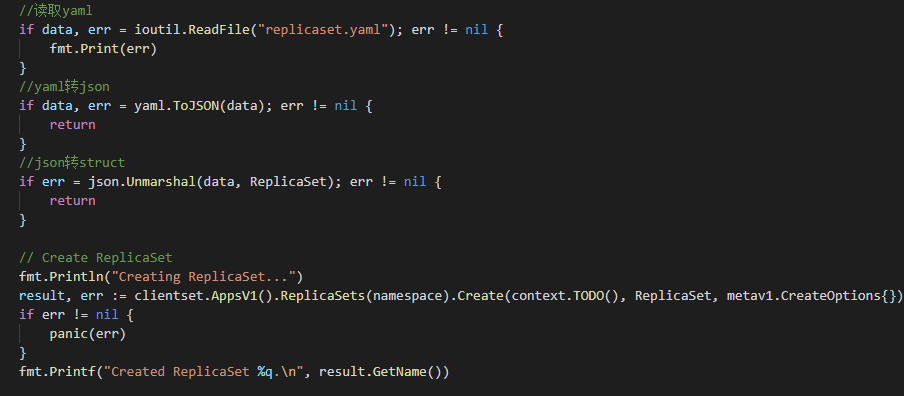
同样的,也提供了删、改、查的方法
二、StatefulSet
StatefulSets是有状态系统服务设计
编写yaml文件创建:
apiVersion: apps/v1kind: StatefulSetmetadata:name: tds-webspec:serviceName: demo-servicereplicas: 2selector:matchLabels:app: nginxtemplate:metadata:labels:app: nginxspec:containers:- name: nginximage: k8s.gcr.io/nginx-slim:0.8ports:- containerPort: 80name: webvolumeMounts:- name: wwwmountPath: /usr/share/nginx/html
同样的,也提供了删、改、查的方法
三、DaemonSet
DaemonSet 确保全部(或者一些)Node 上运行一个 Pod 的副本。当有 Node 加入集群时,也会为他们新增一个 Pod 。当有 Node 从集群移除时,这些 Pod 也会被回收。删除 DaemonSet 将会删除它创建的所有 Pod。
编写yaml创建:
apiVersion: extensions/v1beta1kind: DaemonSetmetadata:name: tds-daemonsetspec:template:metadata:labels:app: loggingid: fluentdname: fluentdspec:containers:- name: fluentd-esimage: gcr.io/google_containers/fluentd-elasticsearch:1.3env:- name: FLUENTD_ARGSvalue: -qqvolumeMounts:- name: containersmountPath: /var/lib/docker/containers- name: varlogmountPath: /varlogvolumes:- hostPath:path: /var/lib/docker/containersname: containers- hostPath:path: /var/logname: varlog
同样的,也提供了删、改、查的方法

若有收获,就点个赞吧
0 人点赞


