popup组件在退出时脚本停止运行
只有background组件可以持续运行,需要调用background脚本来运行你的后台任务,参考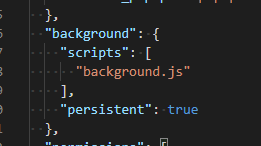
popup脚本发送请求给background脚本可以参考如下
bg = chrome.extension.getBackgroundPage(); // get background scriptsbg.add_1(params); // call background func
当然也可以把background func绑定到popup的一些组件上
buttonOne = document.getElementById('btn_add_one');buttonOne.onclick = bg.add_1;
那如何反向传递呢?没找到好的方法,可以参考
https://stackoverflow.com/questions/15948283/can-i-call-the-function-inside-popup-js-from-background-js
的回答,使用event来做,但是感觉不太对
background.js:chrome.runtime.sendMessage({yourMsg: 'Your Msg'});
popup.js:
chrome.runtime.onMessage.addListener(function(message) {//here you can call your popup.js functionxyz()});
background组件爬取页面时出现跨域问题
使用大致如下列代码时
req = new XMLHttpRequest();req.open('GET', url, true);req.send(null);
其使用的域貌似为你当前浏览器打开的域,执行后台爬虫任务时会失效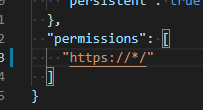
以此增加跨域权限
无法获取已打开html的源代码
一个土办法是后台使用前述代码指行一次html请求,显然不优雅,参考文章
https://stackoverflow.com/questions/11684454/getting-the-source-html-of-the-current-page-from-chrome-extension
简单复制其提供的inject代码加入到项目
// @author Rob W <http://stackoverflow.com/users/938089/rob-w>// Demo: var serialized_html = DOMtoString(document);function DOMtoString(document_root) {var html = '',node = document_root.firstChild;while (node) {switch (node.nodeType) {case Node.ELEMENT_NODE:html += node.outerHTML;break;case Node.TEXT_NODE:html += node.nodeValue;break;case Node.CDATA_SECTION_NODE:html += '<![CDATA[' + node.nodeValue + ']]>';break;case Node.COMMENT_NODE:html += '<!--' + node.nodeValue + '-->';break;case Node.DOCUMENT_TYPE_NODE:// (X)HTML documents are identified by public identifiershtml += "<!DOCTYPE " + node.name + (node.publicId ? ' PUBLIC "' + node.publicId + '"' : '') + (!node.publicId && node.systemId ? ' SYSTEM' : '') + (node.systemId ? ' "' + node.systemId + '"' : '') + '>\n';break;}node = node.nextSibling;}return html;}chrome.runtime.sendMessage({action: "getSource",source: DOMtoString(document)});
在你认为可以的地方执行一次下述函数注入你的js
chrome.tabs.executeScript(null, {file: "getPagesSource.js"}, function() {// If you try and inject into an extensions page or the webstore/NTP you'll get an errorif (chrome.runtime.lastError) {message.innerText = 'There was an error injecting script : \n' + chrome.runtime.lastError.message;}});
注意,getPagesSource.js为前述inject代码
并且在你认为合适的地方(猜测background脚本及popup脚本都可以,我写在popup)加入下述代码以处理由注入脚本发回来的请求
chrome.runtime.onMessage.addListener(function(request, sender) {if (request.action == "getSource") {message.innerText = request.source;// do something with source code}});

若有收获,就点个赞吧
0 人点赞


