锚点功能的实现
1.页面:
//需要被定为的点<div class="choice-result-box" id="questionReport"><template v-for="(item, index) in list"><div :id="'anchor-'+(index+1)"></div></tempate></div>//触发锚点事件<div @click="nextQuestion" data-classname="choice-result-box" :data-index="quesIndex"v-anchor="'anchor-'+quesIndex"><span>下一题</span></div>
2.vue自定义指令
// 当被绑定的元素插入到 DOM 中时inserted: function (el, binding) {el.onclick = function () {//要定位的元素classNamelet className = el.dataset.classname;//第一个元素相对于文档偏移量let topOffsetPx = document.getElementsByClassName(className)[0].offsetTop;//当前选中的元素文档偏移量let domOffsetPx = document.getElementById('anchor-' + el.dataset.index).offsetTop;// 目标元素相对于文档偏移量 - 第一个元素相对于文档偏移量 就是滚动条要滚动的距离let scrollTopPx = domOffsetPx - topOffsetPx;document.getElementById('questionReport').scrollTo({top:scrollTopPx,behavior:'smooth'});}}
3.js实现动画滚动效果
方法一:
el.onclick = function () {//要定位的元素classNamelet className = el.dataset.classname;//第一个元素相对于文档偏移量let topOffsetPx = document.getElementsByClassName(className)[0].offsetTop;//当前选中的元素文档偏移量let domOffsetPx = document.getElementById('anchor-' + el.dataset.index).offsetTop;// 目标元素相对于文档偏移量 - 第一个元素相对于文档偏移量 就是滚动条要滚动的距离let scrollTopPx = domOffsetPx - topOffsetPx;//需要滚动的距离不应该每次从头开始topOffsetPx += document.getElementById('questionReport').scrollTop;let speed = scrollTopPx / 50;(//方法一function smoothDown() {//大于的话是向下滚动,小于是向上滚动if (scrollTopPx > topOffsetPx) {topOffsetPx += speed;//因为scrollTop取小数会造成不准确的问题,所以大于的话直接取需要滚动的距离if (topOffsetPx > scrollTopPx) {topOffsetPx = scrollTopPx}document.getElementById('questionReport').scrollTop = topOffsetPx;setTimeout(smoothDown, 40);}})();}}
方法二:
inserted: function (el, binding) {el.onclick = function () {//要定位的元素classNamelet className = el.dataset.classname;//第一个元素相对于文档偏移量let topOffsetPx = document.getElementsByClassName(className)[0].offsetTop;//当前选中的元素文档偏移量let domOffsetPx = document.getElementById('anchor-' + el.dataset.index).offsetTop;// 目标元素相对于文档偏移量 - 第一个元素相对于文档偏移量 就是滚动条要滚动的距离let scrollTopPx = domOffsetPx - topOffsetPx;(function startRollToEnd(end = 0, time = 1000) {let timer;//获取当前毫秒数let startTime = +new Date();let start = document.getElementById('questionReport').scrollTop; //初始位置//获取从开始到结束需要滚动的长度let lengthY =scrollTopPx-start ;timer = requestAnimationFrame(function func() {//获取下一帧的时间距离开始的时间,以此计算此时的位置,如果超过了预计的时间,则就等于参数所规定的时间let timeX = time - Math.max(0, startTime - (+new Date()) + time);document.getElementById('questionReport').scrollTop = timeX * (lengthY) / time + start;timer = requestAnimationFrame(func);// 如果距离开始时间已经到了规定的时间则不用在执行了if (timeX == time) {cancelAnimationFrame(timer);}});})();}}
其他实现方法
let button = document.getElementById('button')button.addEventListener('click',function(){let cb = ()=>{if(document.documentElement.scrollTop===0){//满足条件,不再递归调用return;} else {let speed = 40 //每个帧内滚动条移动的距离document.documentElement.scrollTop -= speed//不满足条件,再次调用cbrequestAnimationFrame(cb)}}requestAnimationFrame(cb)}
参考链接:https://juejin.cn/post/6844903925473083405
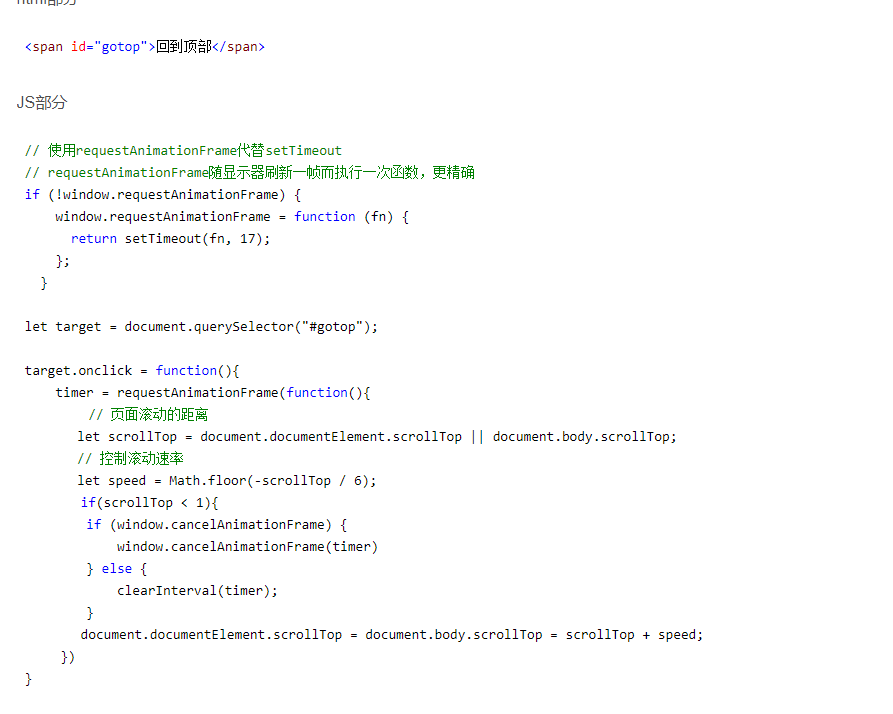
Element.getBoundingClientRect() 方法返回元素的大小及其相对于视口的位置。
function animateScroll(element,speed) {let rect=element.getBoundingClientRect();//获取元素相对窗口的top值,此处应加上窗口本身的偏移let top=window.pageYOffset+rect.top;let currentTop=0;let requestId;//采用requestAnimationFrame,平滑动画function step(timestamp) {currentTop+=speed;if(currentTop<=top){window.scrollTo(0,currentTop);requestId=window.requestAnimationFrame(step);}else{window.cancelAnimationFrame(requestId);}}window.requestAnimationFrame(step);}

若有收获,就点个赞吧
0 人点赞


