简介
okhttp的网络请求采用interceptors链的模式。每一级interceptor只处理自己的工作,然后将剩余的工作,交给下一级interceptor。本文将主要阅读okhttp中的BridgeInterceptor,了解它的作用和工作原理。
BridgeInterceptor
BridgeInterceptor从名字上很难看出它的含义。其实,它是一个处理请求与返回的拦截器,它会对请求的Header进行一些处理,然后将工作交到下一级Interceptor,下一级完成后,再对返回进行处理。
/*** Bridges from application code to network code. First it builds a network request from a user* request. Then it proceeds to call the network. Finally it builds a user response from the network* response.*/class BridgeInterceptor(private val cookieJar: CookieJar) : Interceptor {...}
从注释中我们也可以看出,BridgeInterceptor的实现主要分两部分:请求的处理和返回的处理。
Request
override fun intercept(chain: Interceptor.Chain): Response {val userRequest = chain.request()val requestBuilder = userRequest.newBuilder()val body = userRequest.body()if (body != null) {val contentType = body.contentType()if (contentType != null) {requestBuilder.header("Content-Type", contentType.toString())}val contentLength = body.contentLength()if (contentLength != -1L) {requestBuilder.header("Content-Length", contentLength.toString())requestBuilder.removeHeader("Transfer-Encoding")} else {requestBuilder.header("Transfer-Encoding", "chunked")requestBuilder.removeHeader("Content-Length")}}if (userRequest.header("Host") == null) {requestBuilder.header("Host", hostHeader(userRequest.url(), false))}if (userRequest.header("Connection") == null) {requestBuilder.header("Connection", "Keep-Alive")}// If we add an "Accept-Encoding: gzip" header field we're responsible for also decompressing// the transfer stream.var transparentGzip = falseif (userRequest.header("Accept-Encoding") == null && userRequest.header("Range") == null) {transparentGzip = truerequestBuilder.header("Accept-Encoding", "gzip")}val cookies = cookieJar.loadForRequest(userRequest.url())if (cookies.isNotEmpty()) {requestBuilder.header("Cookie", cookieHeader(cookies))}if (userRequest.header("User-Agent") == null) {requestBuilder.header("User-Agent", userAgent)}...}
这一部分,主要是对Request的Headers进行处理。如果调用者,有自行设置相关的Header,则直接从userRequest的body中获取,然后设置到requestBuilder中。这里有几处参数的处理值得注意。
contentLength
val contentLength = body.contentLength()if (contentLength != -1L) {requestBuilder.header("Content-Length", contentLength.toString())requestBuilder.removeHeader("Transfer-Encoding")} else {requestBuilder.header("Transfer-Encoding", "chunked")requestBuilder.removeHeader("Content-Length")}
获取body的内容长度。如果内容长度不为-1,则设置长度,并去除”Transfer-Encoding”。如果内容长度为-1,则是chunked模式,去掉”Content-Length”。
gzip
// If we add an "Accept-Encoding: gzip" header field we're responsible for also decompressing// the transfer stream.var transparentGzip = falseif (userRequest.header("Accept-Encoding") == null && userRequest.header("Range") == null) {transparentGzip = truerequestBuilder.header("Accept-Encoding", "gzip")}
如果用户没有指定Accept-Encoding,且请求没有带Range字段时,可以自动转换为gzip。
Response
完成了Request后,我们会委托给下层进行实现,然后将networkResponse返回给我们。Response中,主要是需要对transparentGzip进行判断。如果是gzip模式,则需要进行一些处理。
...val networkResponse = chain.proceed(requestBuilder.build())HttpHeaders.receiveHeaders(cookieJar, userRequest.url(), networkResponse.headers())val responseBuilder = networkResponse.newBuilder().request(userRequest)if (transparentGzip &&"gzip".equals(networkResponse.header("Content-Encoding"), ignoreCase = true) &&HttpHeaders.hasBody(networkResponse)) {val responseBody = networkResponse.body()if (responseBody != null) {val gzipSource = GzipSource(responseBody.source())val strippedHeaders = networkResponse.headers().newBuilder().removeAll("Content-Encoding").removeAll("Content-Length").build()responseBuilder.headers(strippedHeaders)val contentType = networkResponse.header("Content-Type")responseBuilder.body(RealResponseBody(contentType, -1L, gzipSource.buffer()))}}return responseBuilder.build()}
如果Response是gzip模式且transparentGzip为true且HttpHeaders.hasBody为true时,会去掉Headers中的”Content-Encoding”和”Content-Length”。
这个地方值得深究一下。
transparentGzip为true的条件是:
var transparentGzip = falseif (userRequest.header("Accept-Encoding") == null && userRequest.header("Range") == null) {transparentGzip = truerequestBuilder.header("Accept-Encoding", "gzip")}
/** Returns true if the response must have a (possibly 0-length) body. See RFC 7231. */public static boolean hasBody(Response response) {// HEAD requests never yield a body regardless of the response headers.if (response.request().method().equals("HEAD")) {return false;}int responseCode = response.code();if ((responseCode < HTTP_CONTINUE || responseCode >= 200)&& responseCode != HTTP_NO_CONTENT&& responseCode != HTTP_NOT_MODIFIED) {return true;}// If the Content-Length or Transfer-Encoding headers disagree with the response code, the// response is malformed. For best compatibility, we honor the headers.if (contentLength(response) != -1|| "chunked".equalsIgnoreCase(response.header("Transfer-Encoding"))) {return true;}return false;}
所以,okhttp会去掉Headers中的”Content-Encoding”和”Content-Length”的条件是:
- 用户未设置Request的”Accept-Encoding”
- 用户未设置Request的”Range”
- Response中”Content-Encoding”为gzip
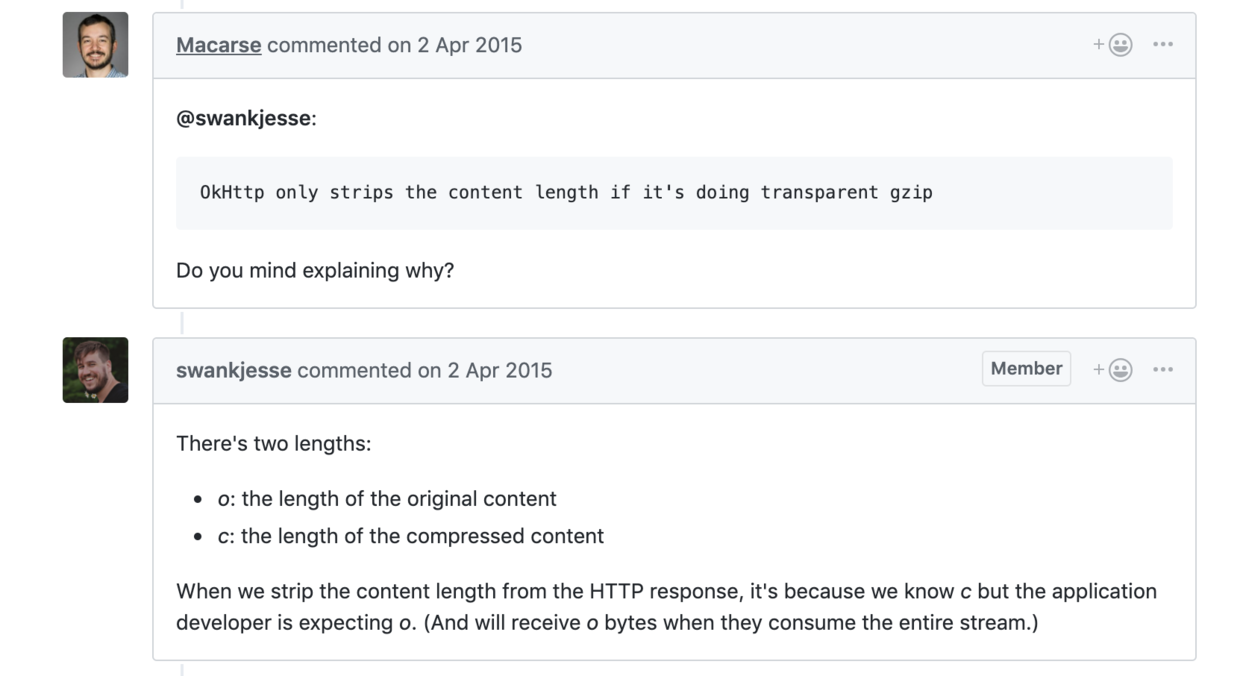
当用户未设置Accep-Encoding时,用户期望的Content-Length是返回的内容长度。但由于okhttp在用户未设置Accep-Encoding时,会进行gzip的转换。
当HTTP使用gzip方式时,Content-Length的返回是根据gzip压缩后的长度进行返回的。此时Content-Length的值与用户所期望的不符的。因为用户并没有主动使用gzip模式。
所以,此时okhttp选择将Content-Length remove掉,以免让调用者产生误解。
不得不说okhttp在此处的处理略显粗暴,但也不是完全不能理解。
Issue中也有相关的讨论
总结
okhttp的BridgeInterceptor处理了HTTP的请求中对于请求Header和返回Header。对于HTTP模式的各种匹配做了相应的适配和容错。
如有问题,欢迎指正。

若有收获,就点个赞吧
0 人点赞


