服务器端生产密钥(一直默认回车就好,当然你也可以重新命名):
[root@localhost ~]# ssh-keygen -t rsa
然后会在 root目录下自动生成.ssh目录和公钥(id_rsa.pub)私钥(id_rsa)
[root@localhost ~]# cd /root/.ssh
[root@localhost .ssh]# ll 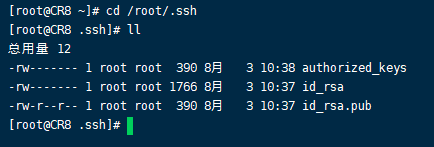
新建一个公钥文件,设置权限为600
[root@localhost .ssh]# touch authorized_keys
[root@localhost .ssh]# chmod 600 authorized_keys
将公钥拷贝到authorized_keys
[root@localhost .ssh]# cat id_rsa.pub >> authorized_keys
修改配置
[root@localhost /]# vi /etc/ssh/sshd_config
RSAAuthentication yes #CentOS7.4默认开启,不用添加
PubkeyAuthentication yes # 开启密钥登入的认证方式
AuthorizedKeysFile .ssh/authorized_keys #默认公钥存放的位置
重启服务(只有root有权限)
[root@localhost /]# service sshd restart
将私钥id_rsa拷贝到我们的本地(可以使用xshell ,WinSCP)
到现在,可以用密钥登录,但是密码还是能登录,所以要去掉密码登录。
修改配置(普通用户)PermitRootLogin yes
[root@localhost /]# vi /etc/ssh/sshd_config
PasswordAuthentication no #允许密码认证,当我们完成全部设置并以密钥方式登录成功后,可以禁用密码登录。
重启服务(只有root有权限)
[root@localhost /]# service sshd restart
修改配置(root用户)
[root@localhost /]# vi /etc/ssh/sshd_config
PermitRootLogin no #此处请留意 root 用户能否通过 SSH 登录,默认为yes,root用户不能密码登陆 PermitRootLogin without-password:
重启服务(只有root有权限)
[root@localhost /]# service sshd restart
文件:/etc/ssh/sshd_config中参数说明
#是否允许使用基于密码的认证。默认为”yes”。
PasswordAuthentication yes
#是否允许 root 登录。可用值如下:
“yes”(默认) 表示允许。”no”表示禁止。
PermitRootLogin yes
#是否允许密码为空的用户远程登录。默认为”no”。
PermitEmptyPasswords no
#是否允许公钥认证。仅可以用于SSH-2。默认值为”yes”。
PubkeyAuthentication
#存放该用户可以用来登录的 RSA/DSA 公钥。
AuthorizedKeysFile /home/cicrossh/.ssh/authorized_keys

若有收获,就点个赞吧
0 人点赞


