Docker 是一个开源的平台,我们可以用 Docker 来开发、部署和运行我们的应用程序。
Docker屏蔽了底层的基础设施,开发人员和 IT 专业人员只需进行极少修改或不修改,即可将其部署到不同的环境中。
Docker 架构
- Docker Client;(Docker客户端)
- Docker Daemon;(Docker守护进程)
- Docker Registry。(存储中心,注册中心)
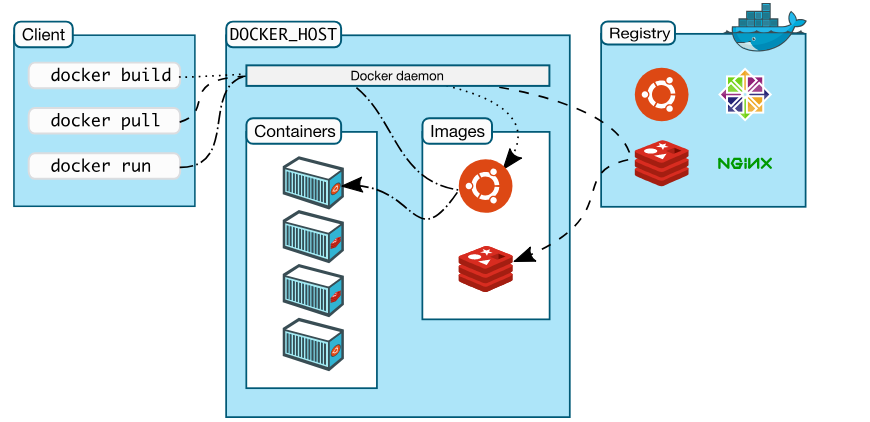
Docker常用命令
run
docker run 用来通过镜像启动一个容器,是操作 docker 容器的核心命令了,参数及其丰富,多达 91 个参数,使用手册如下:
docker run --helpUsage: docker run [OPTIONS] IMAGE [COMMAND] [ARG...]Run a command in a new container
一些核心参数如下
--interactive 等同于 -i ,接受 stdin 的输入;--tty 等同于 -t,分配一个 tty,一般和 i 一起使用;--name 给容器设置一个名字;--add-host 给容器设置 hosts 文件,格式 host:ip;--env 环境变量设置;--expose 暴露端口;--hostname 设置容器的主机名;--link 容器网络相关,和其他的 container 连接;--cpu-quota 设置 CPU 限制;--memory 设置容器可以使用的内存限制。--restart 每次docker重启的时候自动启动容器attach
kill
ps
docker ps 可以列出正在运行的容器的信息,同时也支持一些过滤的参数
docker ps --helpUsage: docker ps [OPTIONS]List containersOptions:-a, --all Show all containers (default shows just running)-f, --filter filter Filter output based on conditions provided--format string Pretty-print containers using a Go template-n, --last int Show n last created containers (includes all states) (default -1)-l, --latest Show the latest created container (includes all states)--no-trunc Don't truncate output-q, --quiet Only display numeric IDs-s, --size Display total file sizes
logs
docker logs 用来获取 docker 的 log。
docker logs --helpUsage: docker logs [OPTIONS] CONTAINERFetch the logs of a containerOptions:--details Show extra details provided to logs-f, --follow Follow log output--since string Show logs since timestamp (e.g. 2013-01-02T13:23:37) or relative (e.g. 42m for 42 minutes)--tail string Number of lines to show from the end of the logs (default "all")-t, --timestamps Show timestamps--until string Show logs before a timestamp (e.g. 2013-01-02T13:23:37) or relative (e.g. 42m for 42 minutes)
top
Docker镜像
和镜像相关的常用的操作命令如下:
- images:列出本地所有的镜像;
- build:通过 Dockerfile build 出镜像;
- commit:将容器中的所有改动生成新的镜像;
- history:查看镜像的历史;
- save:将镜像保存成 tar 包;
- import:通过 tar 包导入新的镜像;
- load:通过 tar 包或者标志输入导入镜像;
- rmi:删除本地镜像;
- tag:给镜像打 tag。
镜像仓库操作
和镜像仓库(registry)相关的操作重要有 4 个操作命令:
- login: 登录镜像仓库;
- logout: 登出镜像仓库;
- pull: 从镜像仓库拉取镜像 ;
- push: 向镜像仓库 push 镜像,需要先 login。
常用镜像
busybox
docker界的helloworld
BusyBox 将许多常用的 UNIX 应用工具精简版集成到一个小的可执行文件中。使用 BusyBox 中的应用通常情况下可用替换我们在 Linux 系统中使用的 GNU 应用工具,比如文件应用工具(比如 cp, rm),shell 应用工具(比如 xargs)。BusyBox 中的工具比 GNU 完整版要少一些命令选项,通常是一些不太常用。BusyBox 提供的命令选项是和 GNU 完整命令一致的。同时 BusyBox 提供了一个相对完整和轻巧的操作系统环境。 BusyBox 的设计实现考虑对自身大小的优化和资源的物尽其用。同时 BusyBox 也是模块化的,这也就意味者你可以通过编译选择去掉一些特性。这也意味可以更好的支持定制化系统。
busybox有很多版本,其中 official 一栏中为OK的是官方镜像。
Alphine
Alpine 操作系统是一个面向安全的轻型 Linux 发行版,简而言之有两个优点
- 容量小,但是功能上比busybox完善的多。
- 适用于更多常用场景,并且是一个优秀的可以适用于生产的基础系统/环境。
备注
参考文档
https://docs.docker.com/engine/reference/commandline/cli/

若有收获,就点个赞吧
0 人点赞


