- 什么是指令,有什么作用?
- Angular有哪些常用内置指令以及用法?
- 如何自定义指令并使用?
什么是指令?有什么作用?
- 指令是为 Angular 应用程序中的元素添加额外行为的类
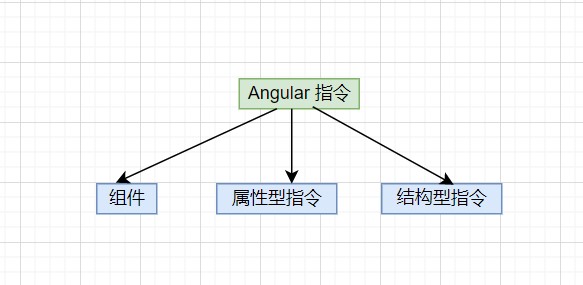
组件:带有模板的指令。这种指令类型是最常见的指令类型。
属性型指令: 更改元素、组件或其他指令的外观或行为的指令。
结构型指令: 通过添加和删除 DOM 元素来更改 DOM 布局的指令。
内置指令
属性指令
见directives-demo1
/* html*/<h2>Attribute directives</h2><hr><h2 id="ngClass">NgClass Binding</h2><div [ngClass]="flagClass?'active':''">NgClass Binding.</div><div [ngClass]="currentClasses">NgClass Binding.</div><button (click)="setCurrentClass()">change currentClass</button><hr><h2 id="ngStyle">NgStyle Binding</h2><div [ngStyle]="currentStyle">NgStyle Binding.</div><button (click)="setCurrentStyles()">change currentStyles</button>/* css*/.active {color: red}/* ts*/import { Component, Input, Output, EventEmitter } from '@angular/core';@Component({selector: 'directives-demo1',templateUrl: './directives-demo1.component.html',styleUrls: [ './directives-demo1.component.less' ]})export class DirectivesDemo1Component {flagStyle: boolean = falseflagClass: boolean = falsecurrentClasses = {}currentStyle={}constructor() {}setCurrentClass() {this.flagClass = !this.flagClassthis.currentClasses = {active: this.flagClass}}setCurrentStyles() {this.flagStyle = !this.flagStylethis.currentStyle = {'font-size': this.flagStyle ? '24px' : '12px'}}}
结构指令
/* html*/<h2>Structural directives</h2><h3 id="ngIf">NgIf Binding</h3><div *ngIf="flag">NgIf cool</div><div *ngIf="flag;else temp">NgIf cool</div><ng-template #temp>NgIf not cool</ng-template><button (click)="changeFlag()">change currentClass</button><hr><h3 id="ngFor">NgFor Binding</h3><div *ngFor="let item of items;let i=index">name: {{item.name}} index:{{i}}<hr></div><!--每个元素只能应用一个结构型指令 --><!--<div *ngFor="let item of items;let i=index" *ngIf="item==='A'">name: {{item.name}} index:{{i}}<hr></div>--><!--为没有 DOM 元素的指令安排宿主:Angular 的 <ng-container> 是一个分组元素,它不会干扰样式或布局,因为 Angular 不会将其放置在 DOM 中。--><hr><h3>NgFor and NgIf Binding</h3><ng-container *ngFor="let item of items;let i=index"><div *ngIf="i>1">name: {{item.name}} index:{{i}}<hr></div></ng-container><!--通过跟踪对条目列表的更改,使用 *ngFor 的 trackBy 属性,Angular 只能更改和重新渲染已更改的条目,而不必重新加载整个条目列表。--><hr><h3>NgFor 的trackBy 跟踪条目</h3><div *ngFor="let item of items;let i=index;trackBy:trackByItems">name: {{item.name}} index:{{i}}<hr></div><button (click)="add()">change currentClass</button><hr><h3>NgSwitch</h3><ng-container *ngFor="let item of items;let i=index"><div [ngSwitch]="item.name"><span *ngSwitchCase="'A'"> 我是A</span><span *ngSwitchDefault>我是B</span></div></ng-container>/* ts*/import { Component, Input, Output, EventEmitter } from '@angular/core';@Component({selector: 'directives-demo1',templateUrl: './directives-demo2.component.html',styleUrls: [ './directives-demo2.component.less' ]})export class DirectivesDemo2Component {flag: boolean = falseitems = [{ name: 'A', key: 1 },{ name: 'B', key: 2 },{ name: 'C', key: 3 },{ name: 'D', key: 4 }]constructor() {}changeFlag() {this.flag = !this.flag}trackByItems(item: any) {return item.key}add() {this.items = [ { name: 'A', key: 1 },{ name: 'B', key: 2 },{ name: 'C', key: 3 },{ name: 'D', key: 4 },{ name: 'E', key: 5 }]}}
自定义属性指令
import { Directive, ElementRef, HostListener, Input } from '@angular/core';/*** @Directive() 装饰器的配置属性会指定指令的 CSS 属性选择器 [appHighlight]。* */@Directive({selector: '[appHighlight]'})export class HighlightDirective {@Input() appHighlight = '';@Input() defaultColor = 'yellow';/*** ElementRef 的 nativeElement 属性会提供对宿主 DOM 元素的直接访问权限。* */constructor(private el: ElementRef) {//el.nativeElement.style.backgroundColor = 'yellow';}private highlight(color: string) {this.el.nativeElement.style.backgroundColor = color;}/*** 使用 @HostListener() 装饰器,你可以订阅本属性型指令宿主 DOM 元素上的事件* */@HostListener('mouseenter') onMouseEnter() {this.highlight(this.appHighlight||this.defaultColor);}@HostListener('mouseleave') onMouseLeave() {this.highlight('');}}
自定义结构指令
/* html*/<hr><h3>自定义结构指令</h3><p *unless="false">unless!!!!</p><!--*是一个语法糖等同于,避免复杂写ng-template--><ng-template [unless]="false"><p>unless!!!!</p></ng-template>/* ts*/import { Directive, Input, TemplateRef, ViewContainerRef } from '@angular/core';/*** @Directive() 装饰器的配置属性会指定指令的 CSS 属性选择器 [unless]。* */@Directive({selector: '[unless]'})export class UnlessDirective {private hasView = false;/*** 通过TemplateRef 拿到宿主的内嵌视图* 通过ViewContainerRef 拿到宿主视图容器访问权限* */constructor(private templateRef: TemplateRef<any>,private viewContainer: ViewContainerRef) {}@Input() set unless(condition: boolean) {if (!condition && !this.hasView) {/*** 通过createEmbeddedView去实例化视图* */this.viewContainer.createEmbeddedView(this.templateRef);this.hasView = true;} else if (condition && this.hasView) {this.viewContainer.clear();this.hasView = false;}}}

若有收获,就点个赞吧
0 人点赞


