1. 获取.properties/.yml方法
注意事项: 在 .yml 配置时,冒号(:)后面一定要有空格, 没有空格可能会有一下情况
- 使用Environment和封装类时,值为null
- 使用@Value时,spring boot项目启动时会报:org.springframework.beans.factory.BeanCreationException: Error creating bean with name ‘webController’: Injection of autowired dependencies failed; nested exception is java.lang.IllegalArgumentException: Could not resolve placeholder ‘test.testMsg’ in value “${test.testMsg}”
1. 方法一:使用@Value(“”)
2. 方法二:使用Environment
package com.rit.demo.controller;import org.springframework.beans.factory.annotation.Autowired;import org.springframework.beans.factory.annotation.Value;import org.springframework.core.env.Environment;import org.springframework.web.bind.annotation.RequestMapping;import org.springframework.web.bind.annotation.RestController;@RestController@RequestMapping("/webCon")public class WebController {@Value("${test.testMsg}")private String msg;@Autowiredprivate Environment env;@RequestMapping("/index1")public String index1() {return "方式一:"+msg;}@RequestMapping("/index2")public String index2() {return "方式二:"+env.getProperty("redis.province.redisKey");}}
#application.propertiesredis.province.redisKey=witkeyProvince


3. 方法三:使用封装类
- 创建application.yml
- 引入依赖
- 创建bean
- 创建测试类
```xml#application.ymlmyProps: #自定义的属性和值simpleProp: simplePropValuearrayProps: 1,2,3,4,5listProp1:- name: abcvalue: abcValue- name: efgvalue: efgValuelistProp2:- config2Value1- config2Vavlue2mapProps:key1: value1key2: value2
<dependency><groupId>org.springframework.boot</groupId><artifactId>spring-boot-configuration-processor</artifactId><optional>true</optional></dependency>
```java//bean.classpackage com.rit.demo.pojo;import java.util.ArrayList;import java.util.HashMap;import java.util.List;import java.util.Map;import org.springframework.boot.context.properties.ConfigurationProperties;import org.springframework.stereotype.Component;@Component//接收application.yml中的wechat下面的屬性@ConfigurationProperties(prefix = "my-props")public class ReadApplicationUntil {private String simpleProp;private String[] arrayProps;private List<Map<String, String>> listProp1 = new ArrayList<>(); //接收prop1里面的属性值private List<String> listProp2 = new ArrayList<>(); //接收prop2里面的属性值private Map<String, String> mapProps = new HashMap<>(); //接收prop1里面的属性值public String getSimpleProp() {return simpleProp;}//String类型的一定需要setter来接收属性值;maps, collections, 和 arrays 不需要public void setSimpleProp(String simpleProp) {this.simpleProp = simpleProp;}public List<Map<String, String>> getListProp1() {return listProp1;}public List<String> getListProp2() {return listProp2;}public String[] getArrayProps() {return arrayProps;}public void setArrayProps(String[] arrayProps) {this.arrayProps = arrayProps;}public Map<String, String> getMapProps() {return mapProps;}public void setMapProps(Map<String, String> mapProps) {this.mapProps = mapProps;}}
//测试类package com.rit.demo.test;import org.junit.jupiter.api.Test;import org.springframework.beans.factory.annotation.Autowired;import org.springframework.boot.test.context.SpringBootTest;import com.fasterxml.jackson.core.JsonProcessingException;import com.fasterxml.jackson.databind.ObjectMapper;import com.rit.demo.pojo.ReadApplicationUntil;@SpringBootTestpublic class YmlTest {private final ObjectMapper objectMapper = new ObjectMapper();@Autowiredprivate ReadApplicationUntil applicationUntil;@Testpublic void yml() throws JsonProcessingException {System.out.println("simpleProp: " + applicationUntil.getSimpleProp());System.out.println("arrayProps: " + objectMapper.writeValueAsString(applicationUntil.getArrayProps()));System.out.println("listProp1: " + objectMapper.writeValueAsString(applicationUntil.getListProp1()));System.out.println("listProp2: " + objectMapper.writeValueAsString(applicationUntil.getListProp2()));System.out.println("mapProps: " + objectMapper.writeValueAsString(applicationUntil.getMapProps()));}}
测试结果: simpleProp: simplePropValue arrayProps: [“1”,”2”,”3”,”4”,”5”] listProp1: [{“name”:”abc”,”value”:”abcValue”},{“name”:”efg”,”value”:”efgValue”}] listProp2: [“config2Value1”,”config2Vavlue2”]
mapProps: {“key1”:”value1”,”key2”:”value2”}
补充知识:
如何执行测试类: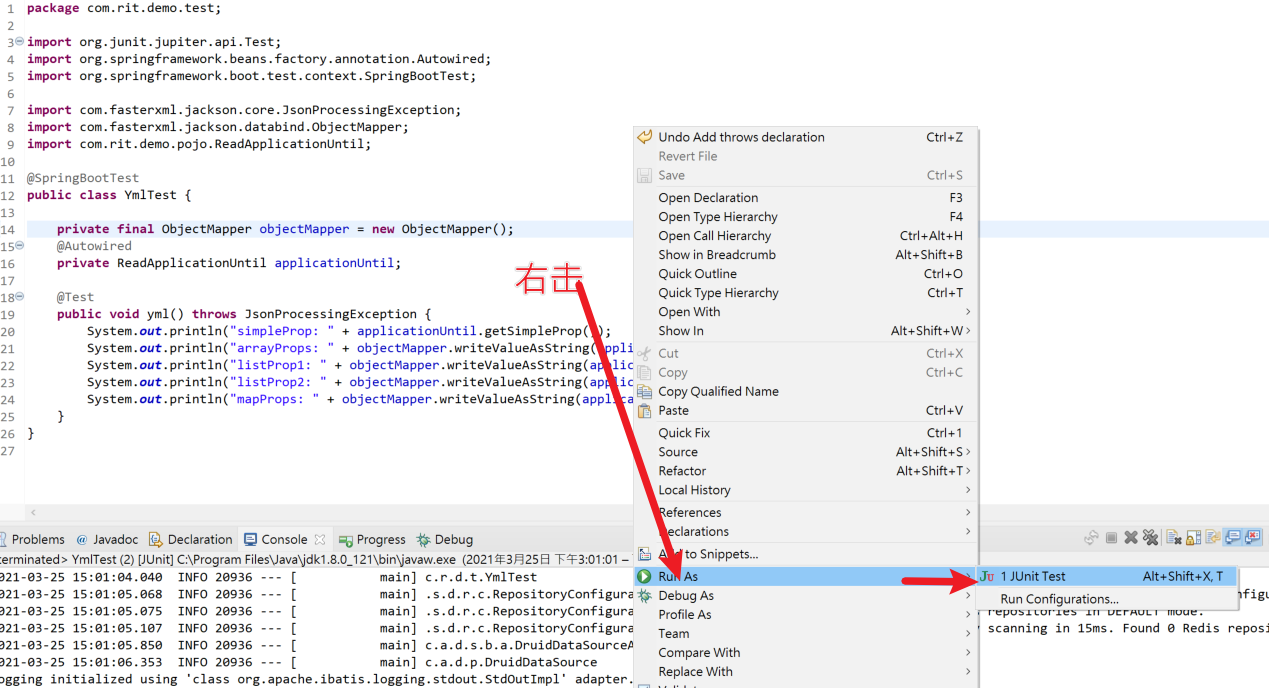

若有收获,就点个赞吧
0 人点赞


