1. mongoDB的环境搭建
1.1数据库相关概念
在一个数据库软件中可以包含多个数据仓库,在每个数据仓库中可以包含多个数据集合,每个数据集合中可以包含多条文档(具体的数据)。
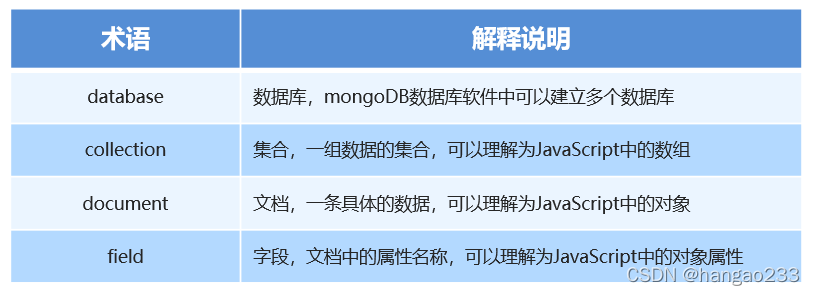
1.2 Mongoose第三方包
- 使用Node.js操作MongoDB数据库需要依赖Node.js第三方包mongoose
- 使用npm install mongoose命令下载
1.3 启动mongoDB
在命令行工具中运行net start mongoDB即可启动MongoDB,否则MongoDB将无法连接。
这个启动命令需要在管理员模式下运行
1.4 数据库连接
使用mongoose提供的connect方法即可连接数据库。
const mongoose = require('mongoose');mongoose.connect('mongodb://localhost/playground').then(() => console.log('数据库连接成功')).catch(err => console.log('数据库连接失败', err))
1.5 创建数据库
在MongoDB中不需要显式创建数据库,如果正在使用的数据库不存在,MongoDB会自动创建。
在创建集合时会自动创建数据库
2. MongoDB 增删改查操作
2.1 创建集合
创建集合分为两步,一是对对集合设定规则,二是创建集合,创建mongoose.Schema构造函数的实例即可创建集合。
const mongoose = require('mongoose');mongoose.connect('mongodb://localhost/playground').then(() => console.log('数据库连接成功')).catch(err => console.log('数据库连接失败', err))// 设定集合规则const courseSchema = new mongoose.Schema({name: String,author: String,isPublished: Boolean});// 创建集合并应用规则 Course 是返回来的一个构造函数const Course = mongoose.model('Course', courseSchema); // courses
2.2 创建文档
创建文档实际上就是向集合中插入数据。
分为两步:
①创建集合实例。
②调用实例对象下的save方法将数据保存到数据库中。
第一种方式:
// 创建集合实例const course = new Course({name: 'Node.js mongonDB',author: 'gaohan',isPublished: true});// 将数据保存在数据库中course.save();
第二种方式:
// 第二种方式, 可以用上PromiseCourse.create({name: 'javascript', author: 'aaaaa', isPublished: true}).then(doc => console.log(doc)).catch(err => console.log(err))
2.3 mongoDB 数据库导入数据
前提:找到mongodb数据库的安装目录,将安装目录下的bin目录放置在环境变量中。
mongoimport –d 数据库名称 –c 集合名称 –file 要导入的数据文件。
mongoimport -d playground -c users --file user.json

出现这个结果就是导入成功
2.4 查询文档
查询集合所有文档
const mongoose = require('mongoose');mongoose.connect('mongodb://localhost/playground').then(() => console.log('数据库连接成功')).catch(err => console.log('数据库连接失败', err))// 创建集合规则const userSchema = new mongoose.Schema({name: String,age: Number,email: String,password: String,hobbies: [String]});// 使用规则创建集合const User = mongoose.model('User', userSchema);// 查询用户集合中所有文档User.find().then(result => console.log(result))
根据id查询文档
User.findOne({_id: '5c09f2d9aeb04b22f846096b'}).then(result => console.log(result))
查询用户集合中年龄字段大于20并且小于40的文档
User.find({age: {$gt: 20, $lt: 40}}).then(result => console.log(result))
查询用户集合中匹配包含敲代码的文档
User.find({hobbies: {$in: ['敲代码']}}).then(result => console.log(result))
根据年龄字段升序排列
User.find().sort('age').then(result => console.log(result))
根据年龄字段降序排列
User.find().sort('-age').then(result => console.log(result))
skip 跳过多少条数据 limit 限制查询数量
User.find().skip(2).limit(2).then(result => console.log(result))
2.5 删除文档
删除单个
User.findByIdAndDelete({_id: '5c09f2b6aeb04b22f846096a'}).then(result => console.log(result))
删除多个
User.deleteMany({}).then(result => console.log(result))
2.6 更新文档
更新单个
User.updateOne({name: '李四'}, {name: '李逍遥'}).then(result => console.log(result))
更新多个
User.updateMany({}, {age: 56}).then(result => console.log(result))
2.7 mongoose 验证
在创建集合规则时,可以设置当前字段的验证规则,验证失败就则输入插入失败。
- required: true 必传字段
- minlength:3 字符串最小长度
- maxlength: 20 字符串最大长度
- trim: true 去除字符串两边的空格
- min: 2 数值最小为2
- max: 100 数值最大为100
- enum: [‘html’, ‘css’, ‘javascript’, ‘node.js’]
- validate: 自定义验证器
- default: 默认值
示例:
const mongoose = require('mongoose');mongoose.connect('mongodb://localhost/playground').then(() => console.log('数据库连接成功')).catch(err => console.log('数据库连接失败', err))const postSchema = new mongoose.Schema({title: {type: String,// 必选字段required: true,// 字符串的最小长度minlength: 2,// 字符串的最大长度maxlength: 5,// 去除字符串两边的空格trim: true},age: {type: Number,// 数值最小min: 18,// 数值最大max: 100},publishDate: {type: Date,// 默认值default: Date.now},category: {type: String,// 枚举限定内容enum: ['html', 'css', 'javascript', 'node.js']},author: {type: String,validate: {validator: v => {// 返回布尔值// true 验证成功// false 验证失败// v 要验证的值return v && v.length > 4},// 自定义错误信息message: '传入的值不符合验证规则'}}});const Post = mongoose.model('Post', postSchema);Post.create({title: 'abc', age: 60, category: 'javascript',author: 'aaaaa'}).then(res => console.log(res))
2.8 集合关联
通常不同集合的数据之间是有关系的,例如文章信息和用户信息存储在不同集合中,但文章是某个用户发表的,要查询文章的所有信息包括发表用户,就需要用到集合关联。
- 使用id对集合进行关联
- 使用populate方法进行关联集合查询

集合关联实现
const mongoose = require('mongoose');mongoose.connect('mongodb://localhost/playground').then(() => console.log('数据库连接成功')).catch(err => console.log('数据库连接失败', err))// 用户集合规则const userSchema = new mongoose.Schema({name: {type: String,required: true}})// 文章集合规则const postSchema = new mongoose.Schema({title: {type: String},author: {type: mongoose.Schema.Types.ObjectId,ref: 'User'}})// 用户集合const User = mongoose.model('User', userSchema);// 文章集合const Post = mongoose.model('Post', postSchema);// 创建用户// User.create({name: 'xiaogao'}).then(res => console.log(res))// 创建文章// Post.create({title: '123', author: '6212589048801e6764839db4'}).then(res => console.log(res))// 联合查询Post.find().populate('author').then(res => console.log(res))
2.9 案例:用户信息增删改查
这个案例前端用的都是拼接字符串,没啥好在博客中展示的,在gitee中有完整代码。
- 搭建网站服务器,实现客户端与服务器端的通信 ```javascript const express = require(‘express’) const app = express()
app.listen(8080, () => { console.log(‘Express server running at http://127.0.0.1‘); })
2. 连接数据库,创建用户集合,向集合中插入文档```javascriptconst mongoose = require('mongoose')mongoose.connect('mongodb://localhost/playground').then(() => console.log('数据库连接成功')).catch(err => console.log('数据库连接失败', err))const userSchema = new mongoose.Schema({name: {type: String,required: true,minlength: 2,maxlength: 20},age: {type: Number,min: 18,max: 80},password: String,email: String,hobbies: [ String ]})// 创建集合,返回集合构造函数mongoose.model('User', userSchema)
- 当用户访问/list时,将所有用户信息查询出来
- 将用户信息和表格HTML进行拼接并将拼接结果响应回客户端
- 当用户访问/add时,呈现表单页面,并实现添加用户信息功能
- 当用户访问/modify时,呈现修改页面,并实现修改用户信息功能
- 当用户访问/delete时,实现用户删除功能

若有收获,就点个赞吧
0 人点赞


