项目背景
ceph-deploy is no longer actively maintained. It is not tested on versions of Ceph newer than Nautilus. It does not support RHEL8, CentOS 8, or newer operating systems.
Cephadm
Cephadm is new in the Octopus v15.2.0 release and does not support older versions of Ceph
https://docs.ceph.com/docs/master/cephadm/
官方文档
https://docs.ceph.com/docs/master/
https://docs.ceph.com/docs/master/install/manual-deployment/
ceph version 15.2.3
https://docs.ceph.com/docs/master/install/
参考
https://www.cnblogs.com/luoliyu/articles/10808886.html
https://www.cnblogs.com/luoliyu/articles/11122125.html
192.168.11.140 node01
192.168.11.141 node02
192.168.11.142 node03
单网卡
部署系统版本
[root@node01 ~]# uname -raLinux node01 4.18.0-147.8.1.el8_1.x86_64 #1 SMP Thu Apr 9 13:49:54 UTC 2020 x86_64 x86_64 x86_64 GNU/Linux[root@node01 ~]# cat /etc/redhat-releaseCentOS Linux release 8.1.1911 (Core)[root@node01 ~]#
环境准备
1:设置主机名和hosts文件同步
2:各节点免密钥登陆设置
3:设置时间同步 timedatectl set-ntp yes
关闭防火墙systemctl disable firewalld.servicesystemctl stop firewalld.servicesetenforce 0关闭selinuxsed -i "s/^SELINUX=enforcing/SELINUX=disabled/g" /etc/sysconfig/selinuxsed -i "s/^SELINUX=enforcing/SELINUX=disabled/g" /etc/selinux/configsed -i "s/^SELINUX=permissive/SELINUX=disabled/g" /etc/sysconfig/selinuxsed -i "s/^SELINUX=permissive/SELINUX=disabled/g" /etc/selinux/config控制节点上设置ssh key 免密钥登陆ssh-keygen -q -N "" -f ~/.ssh/id_rsa分发keyssh-copy-id 192.168.11.140ssh-copy-id 192.168.11.140ssh-copy-id 192.168.11.141同步时间设置:yum install chrony -ysystemctl enable chronyd.servicesystemctl start chronyd.servicevim /etc/chrony.conf修改第26行allow 192.168.111.0/24systemctl restart chronyd查看端口:123netstat -lutnpvim /etc/chrony.conf修改第3行server 192.168.111.10 iburstsystemctl restart chronyd查看时区date -R查看时间同步状态timedatectltimedatectl set-local-rtc 1timedatectl set-ntp yeschronyc trackingchronyc sourcestats -v
设置阿里云源
https://mirrors.aliyun.com/ceph/
https://mirrors.aliyun.com/ceph/rpm-15.2.3/
[root@node01 yum.repos.d]# cat ceph.repo
[ceph]name=cephbaseurl=https://mirrors.aliyun.com/ceph/rpm-15.2.3/el8/x86_64/gpgcheck=0priority=1[ceph-noarch]name=cephnoarchbaseurl=https://mirrors.aliyun.com/ceph/rpm-15.2.3/el8/noarch/gpgcheck=0priority=1[ceph-source]name=Ceph source packagesbaseurl=https://mirrors.aliyun.com/ceph/rpm-15.2.3/el8/SRPMS/enabled=0gpgcheck=1type=rpm-mdgpgkey=http://mirrors.aliyun.com/ceph/keys/release.ascpriority=1
追加官方源:
yum install epel-release -y
yum install centos-release-ceph-* -y
[ centos-release-ceph-nautilus]
[centos-release-ceph-octopus]
yum install centos-release-ceph-nautilus -y
yum install ceph -y
[root@node01 ceph-node01]# cd /etc/yum.repos.d/
[root@node01 yum.repos.d]# ll
总用量 88
-rw-r--r--. 1 root root  731 3月  13 03:15 CentOS-AppStream.repo
-rw-r--r--. 1 root root 2595 12月 19 10:43 CentOS-Base.repo
-rw-r--r--. 1 root root  798 3月  13 03:15 CentOS-centosplus.repo
-rw-r--r--  1 root root  956 5月  19 03:10 CentOS-Ceph-Nautilus.repo
-rw-r--r--  1 root root  945 5月  19 03:39 CentOS-Ceph-Octopus.repo
-rw-r--r--. 1 root root 1043 3月  13 03:15 CentOS-CR.repo
-rw-r--r--. 1 root root  668 3月  13 03:15 CentOS-Debuginfo.repo
-rw-r--r--. 1 root root  743 3月  13 03:15 CentOS-Devel.repo
-rw-r--r--. 1 root root  756 3月  13 03:15 CentOS-Extras.repo
-rw-r--r--. 1 root root  338 3月  13 03:15 CentOS-fasttrack.repo
-rw-r--r--. 1 root root  738 3月  13 03:15 CentOS-HA.repo
-rw-r--r--. 1 root root  928 3月  13 03:15 CentOS-Media.repo
-rw-r--r--. 1 root root  736 3月  13 03:15 CentOS-PowerTools.repo
-rw-r--r--. 1 root root 1382 3月  13 03:15 CentOS-Sources.repo
-rw-r--r--  1 root root  353 3月  19 22:25 CentOS-Storage-common.repo
-rw-r--r--. 1 root root   74 3月  13 03:15 CentOS-Vault.repo
-rw-r--r--. 1 root root  421 6月   9 16:03 ceph.repo
-rw-r--r--  1 root root 1167 12月 19 00:08 epel-modular.repo
-rw-r--r--  1 root root 1249 12月 19 00:08 epel-playground.repo
-rw-r--r--  1 root root 1104 12月 19 00:08 epel.repo
-rw-r--r--  1 root root 1266 12月 19 00:08 epel-testing-modular.repo
-rw-r--r--  1 root root 1203 12月 19 00:08 epel-testing.repo
[root@node01 yum.repos.d]#
开始部署
存储节点node01
生成ID
uuidgen
sudo vim /etc/ceph/ceph.conf
[global]
fsid = d8884d6b-c9ac-4a10-b727-5f4cb2fed114
mon initial members = node01
mon host = 192.168.11.140
public network = 192.168.11.0/24
auth cluster required = cephx
auth service required = cephx
auth client required = cephx
osd journal size = 1024
osd pool default size = 3
osd pool default min size = 2
osd pool default pg num = 333
osd pool default pgp num = 333
osd crush chooseleaf type = 1
ceph-authtool --create-keyring /tmp/ceph.mon.keyring --gen-key -n mon. --cap mon 'allow *'
sudo ceph-authtool --create-keyring /etc/ceph/ceph.client.admin.keyring --gen-key -n client.admin --cap mon 'allow *' --cap osd 'allow *' --cap mds 'allow *' --cap mgr 'allow *'
sudo ceph-authtool --create-keyring /var/lib/ceph/bootstrap-osd/ceph.keyring --gen-key -n client.bootstrap-osd --cap mon 'profile bootstrap-osd' --cap mgr 'allow r'
sudo ceph-authtool /tmp/ceph.mon.keyring --import-keyring /etc/ceph/ceph.client.admin.keyring
sudo ceph-authtool /tmp/ceph.mon.keyring --import-keyring /var/lib/ceph/bootstrap-osd/ceph.keyring
sudo chown ceph:ceph /tmp/ceph.mon.keyring
monmaptool --create --add node01 192.168.11.140 --fsid d8884d6b-c9ac-4a10-b727-5f4cb2fed114 /tmp/monmap
sudo -u ceph mkdir  -p /var/lib/ceph/mon/ceph-node01
sudo -u ceph ceph-mon --mkfs -i node01 --monmap /tmp/monmap --keyring /tmp/ceph.mon.keyring
sudo systemctl start ceph-mon@node01
sudo systemctl enable ceph-mon@node01
systemctl status ceph-mon@node01.service
sudo ceph -s
cd /etc/ceph
增加存储节点
存储节点node02 node03
同步密钥文件**
scp ceph.conf node02:/etc/ceph
scp ceph.client.admin.keyring node02:/etc/ceph
scp /var/lib/ceph/bootstrap-osd/ceph.keyring node02:/var/lib/ceph/bootstrap-osd
scp ceph.conf node03:/etc/ceph
scp ceph.client.admin.keyring node03:/etc/ceph
scp /var/lib/ceph/bootstrap-osd/ceph.keyring node03:/var/lib/ceph/bootstrap-osd
部署官方源
yum install epel-release -y
yum install centos-release-ceph-* -y
yum install ceph -y
sudo -u ceph mkdir  -p /var/lib/ceph/mon/ceph-node02
ceph auth get mon. -o /tmp/ceph.mon.keyring
ceph mon getmap -o /tmp/monmap
ceph-mon --mkfs -i node02 --monmap /tmp/monmap --keyring /tmp/ceph.mon.keyring
touch /var/lib/ceph/mon/ceph-node02/done
vim /etc/ceph/ceph.conf
[global]
fsid = d8884d6b-c9ac-4a10-b727-5f4cb2fed114
mon initial members = node01
mon host = 192.168.11.140
public network = 192.168.11.0/24
auth cluster required = cephx
auth service required = cephx
auth client required = cephx
osd journal size = 1024
#设置副本数
osd pool default size = 3
#最小副本数
osd pool default min size = 2
osd pool default pg num = 333
osd pool default pgp num = 333
osd crush chooseleaf type = 1
osd_mkfs_type = xfs
max mds = 5
mds max file size = 100000000000000
mds cache size = 1000000
#把时钟偏移设置成0.5s,默认是0.05s,由于ceph集群中存在异构PC,导致时钟偏移总是大于0.05s,为了方便同步直接把时钟偏移设置成0.5s
mon clock drift allowed = .50
#设置osd节点down后900s,把此osd节点逐出ceph集群,把之前映射到此节点的数据映射到其他节点。
mon osd down out interval = 900
[mon.node02]
host = node02
mon addr = 192.168.11.141:6789
chown -R ceph:ceph /var/lib/ceph
systemctl start ceph-mon@node02
systemctl enable ceph-mon@node02
systemctl status ceph-mon@node02
ceph -s
存储节点node03
sudo -u ceph mkdir  -p /var/lib/ceph/mon/ceph-node03
ceph auth get mon. -o /tmp/ceph.mon.keyring
ceph mon getmap -o /tmp/monmap
ceph-mon --mkfs -i node03 --monmap /tmp/monmap --keyring /tmp/ceph.mon.keyring
touch /var/lib/ceph/mon/ceph-node03/done
vim /etc/ceph/ceph.conf
[global]
fsid = d8884d6b-c9ac-4a10-b727-5f4cb2fed114
mon initial members = node01
mon host = 192.168.11.140
public network = 192.168.11.0/24
auth cluster required = cephx
auth service required = cephx
auth client required = cephx
osd journal size = 1024
#设置副本数
osd pool default size = 3
#最小副本数
osd pool default min size = 2
osd pool default pg num = 333
osd pool default pgp num = 333
osd crush chooseleaf type = 1
osd_mkfs_type = xfs
max mds = 5
mds max file size = 100000000000000
mds cache size = 1000000
#把时钟偏移设置成0.5s,默认是0.05s,由于ceph集群中存在异构PC,导致时钟偏移总是大于0.05s,为了方便同步直接把时钟偏移设置成0.5s
mon clock drift allowed = .50
#设置osd节点down后900s,把此osd节点逐出ceph集群,把之前映射到此节点的数据映射到其他节点。
mon osd down out interval = 900
[mon.node03]
host = node03
mon addr = 192.168.11.142:6789
chown -R ceph:ceph /var/lib/ceph
systemctl start ceph-mon@node03
systemctl enable ceph-mon@node03
systemctl status ceph-mon@node03
ceph -s
故障处理一
enable-msgr2
[root@node01 ceph]# ceph -s
  cluster:
    id:     d8884d6b-c9ac-4a10-b727-5f4cb2fed114
    health: HEALTH_WARN
            no active mgr
            1 monitors have not enabled msgr2

  services:
    mon: 3 daemons, quorum node01,node02,node03 (age 7m)
    mgr: no daemons active
    osd: 3 osds: 3 up (since 7m), 3 in (since 7m)

  data:
    pools:   0 pools, 0 pgs
    objects: 0 objects, 0 B
    usage:   0 B used, 0 B / 0 B avail
    pgs:

[root@node01 ceph]# ceph osd tree
ID  CLASS  WEIGHT   TYPE NAME        STATUS  REWEIGHT  PRI-AFF
-1         0.05846  root default
-3         0.01949      host node01
 0    ssd  0.01949          osd.0        up   1.00000  1.00000
-5         0.01949      host node02
 1    ssd  0.01949          osd.1        up   1.00000  1.00000
-7         0.01949      host node03
 2    ssd  0.01949          osd.2        up   1.00000  1.00000
[root@node01 ceph]# ceph mon versions
{
    "ceph version 15.2.3 (d289bbdec69ed7c1f516e0a093594580a76b78d0) octopus (stable)": 3
}
[root@node01 ceph]#

[root@node01 ~]# ceph health detail
HEALTH_WARN no active mgr; 1 monitors have not enabled msgr2
[WRN] MGR_DOWN: no active mgr
[WRN] MON_MSGR2_NOT_ENABLED: 1 monitors have not enabled msgr2
    mon.node01 is not bound to a msgr2 port, only v1:192.168.11.140:6789/0
[root@node01 ~]# ceph -s
  cluster:
    id:     d8884d6b-c9ac-4a10-b727-5f4cb2fed114
    health: HEALTH_WARN
            no active mgr
            1 monitors have not enabled msgr2

  services:
    mon: 3 daemons, quorum node01,node02,node03 (age 22s)
    mgr: no daemons active
    osd: 3 osds: 3 up (since 11m), 3 in (since 101m)

  data:
    pools:   0 pools, 0 pgs
    objects: 0 objects, 0 B
    usage:   0 B used, 0 B / 0 B avail
    pgs:

[root@node01 ~]#
[root@node01 ~]# netstat -tnlp |grep ceph-mon
tcp        0      0 192.168.11.140:6789     0.0.0.0:*               LISTEN      2225/ceph-mon
处理动作
health告警,启用了msgr2后就会消失。
ceph mon enable-msgr2
然后重启服务
systemctl restart ceph-mon@node01
[root@node01 ~]# ceph mon enable-msgr2
[root@node01 ~]# systemctl restart ceph-mon@node01.service
[root@node01 ~]#
[root@node01 ~]#
[root@node01 ~]# netstat -tnlp |grep ceph-mon
tcp        0      0 192.168.11.140:3300     0.0.0.0:*               LISTEN      3800/ceph-mon
tcp        0      0 192.168.11.140:6789     0.0.0.0:*               LISTEN      3800/ceph-mon
[root@node01 ~]# ceph -s
  cluster:
    id:     d8884d6b-c9ac-4a10-b727-5f4cb2fed114
    health: HEALTH_WARN
            no active mgr

  services:
    mon: 3 daemons, quorum node01,node02,node03 (age 3m)
    mgr: no daemons active
    osd: 3 osds: 3 up (since 20m), 3 in (since 110m)

  data:
    pools:   0 pools, 0 pgs
    objects: 0 objects, 0 B
    usage:   0 B used, 0 B / 0 B avail
    pgs:

[root@node01 ~]#
增加存储节点osd
ceph-volume lvm create —data /dev/nvme0n2
[root@node01 ~]# lsblk
NAME                                                                                                MAJ:MIN RM  SIZE RO TYPE MOUNTPOINT
sr0                                                                                                  11:0    1 1024M  0 rom
nvme0n1                                                                                             259:0    0   50G  0 disk
├─nvme0n1p1                                                                                         259:1    0    1G  0 part /boot
└─nvme0n1p2                                                                                         259:2    0   49G  0 part
  ├─cl-root                                                                                         253:0    0   44G  0 lvm  /
  └─cl-swap                                                                                         253:1    0    5G  0 lvm  [SWAP]
nvme0n2                                                                                             259:3    0   20G  0 disk
└─ceph--0c460d1e--13f1--4715--bdc5--52039efec380-osd--block--9713a919--7c37--4e2d--8365--6b01be72b36c
                                                                                                    253:2    0   20G  0 lvm
[root@node01 ~]# sudo ceph-volume lvm list


====== osd.0 =======

  [block]       /dev/ceph-0c460d1e-13f1-4715-bdc5-52039efec380/osd-block-9713a919-7c37-4e2d-8365-6b01be72b36c

      block device              /dev/ceph-0c460d1e-13f1-4715-bdc5-52039efec380/osd-block-9713a919-7c37-4e2d-8365-6b01be72b36c
      block uuid                e3oXip-JF5d-TLhX-TZNq-nLHH-aCsW-tx3HVc
      cephx lockbox secret
      cluster fsid              d8884d6b-c9ac-4a10-b727-5f4cb2fed114
      cluster name              ceph
      crush device class        None
      encrypted                 0
      osd fsid                  9713a919-7c37-4e2d-8365-6b01be72b36c
      osd id                    0
      type                      block
      vdo                       0
      devices                   /dev/nvme0n2
[root@node01 ~]#
systemctl start ceph-osd@0.service
systemctl status ceph-osd@0.service
systemctl enable ceph-osd@0.service
节点2
systemctl start ceph-osd@1.service
systemctl status ceph-osd@1.service
systemctl enable ceph-osd@1.service
节点3
systemctl start ceph-osd@2.service
systemctl status ceph-osd@2.service
systemctl enable ceph-osd@2.service
[root@node01 ~]# ceph osd tree
ID  CLASS  WEIGHT   TYPE NAME        STATUS  REWEIGHT  PRI-AFF
-1         0.05846  root default
-3         0.01949      host node01
 0    ssd  0.01949          osd.0        up   1.00000  1.00000
-5         0.01949      host node02
 1    ssd  0.01949          osd.1        up   1.00000  1.00000
-7         0.01949      host node03
 2    ssd  0.01949          osd.2        up   1.00000  1.00000
[root@node01 ~]#
添加新盘
[root@node01 ~]# lsblk
NAME                                                                                                MAJ:MIN RM  SIZE RO TYPE MOUNTPOINT
sr0                                                                                                  11:0    1 1024M  0 rom
rbd0                                                                                                252:0    0  100M  0 disk /ceph-rbd
nvme0n1                                                                                             259:0    0   50G  0 disk
├─nvme0n1p1                                                                                         259:1    0    1G  0 part /boot
└─nvme0n1p2                                                                                         259:2    0   49G  0 part
  ├─cl-root                                                                                         253:0    0   44G  0 lvm  /
  └─cl-swap                                                                                         253:1    0    5G  0 lvm  [SWAP]
nvme0n2                                                                                             259:3    0   20G  0 disk
└─ceph--0c460d1e--13f1--4715--bdc5--52039efec380-osd--block--9713a919--7c37--4e2d--8365--6b01be72b36c
                                                                                                    253:2    0   20G  0 lvm
nvme0n3                                                                                             259:4    0   20G  0 disk
[root@node01 ~]# ceph-volume lvm create --data /dev/nvme0n3
Running command: /usr/bin/ceph-authtool --gen-print-key
Running command: /usr/bin/ceph --cluster ceph --name client.bootstrap-osd --keyring /var/lib/ceph/bootstrap-osd/ceph.keyring -i - osd new 124061d6-9c03-436d-8e63-6da56b29c03d
Running command: /usr/sbin/vgcreate --force --yes ceph-c2d496a3-2ad5-4e5e-b479-42d34196c145 /dev/nvme0n3
 stdout: Physical volume "/dev/nvme0n3" successfully created.
 stdout: Volume group "ceph-c2d496a3-2ad5-4e5e-b479-42d34196c145" successfully created
Running command: /usr/sbin/lvcreate --yes -l 100%FREE -n osd-block-124061d6-9c03-436d-8e63-6da56b29c03d ceph-c2d496a3-2ad5-4e5e-b479-42d34196c145
 stdout: Logical volume "osd-block-124061d6-9c03-436d-8e63-6da56b29c03d" created.
Running command: /usr/bin/ceph-authtool --gen-print-key
Running command: /usr/bin/mount -t tmpfs tmpfs /var/lib/ceph/osd/ceph-3
Running command: /usr/bin/chown -h ceph:ceph /dev/ceph-c2d496a3-2ad5-4e5e-b479-42d34196c145/osd-block-124061d6-9c03-436d-8e63-6da56b29c03d
Running command: /usr/bin/chown -R ceph:ceph /dev/dm-3
Running command: /usr/bin/ln -s /dev/ceph-c2d496a3-2ad5-4e5e-b479-42d34196c145/osd-block-124061d6-9c03-436d-8e63-6da56b29c03d /var/lib/ceph/osd/ceph-3/block
Running command: /usr/bin/ceph --cluster ceph --name client.bootstrap-osd --keyring /var/lib/ceph/bootstrap-osd/ceph.keyring mon getmap -o /var/lib/ceph/osd/ceph-3/activate.monmap
 stderr: 2020-06-10T15:42:47.467+0800 7ff961571700 -1 auth: unable to find a keyring on /etc/ceph/ceph.client.bootstrap-osd.keyring,/etc/ceph/ceph.keyring,/etc/ceph/keyring,/etc/ceph/keyring.bin,: (2) No such file or directory
2020-06-10T15:42:47.467+0800 7ff961571700 -1 AuthRegistry(0x7ff95c058ec8) no keyring found at /etc/ceph/ceph.client.bootstrap-osd.keyring,/etc/ceph/ceph.keyring,/etc/ceph/keyring,/etc/ceph/keyring.bin,, disabling cephx
 stderr: got monmap epoch 4
Running command: /usr/bin/ceph-authtool /var/lib/ceph/osd/ceph-3/keyring --create-keyring --name osd.3 --add-key AQD2juBeYqGnFhAA7+6NUuygkvcq2Z3CDt/y+A==
 stdout: creating /var/lib/ceph/osd/ceph-3/keyring
added entity osd.3 auth(key=AQD2juBeYqGnFhAA7+6NUuygkvcq2Z3CDt/y+A==)
Running command: /usr/bin/chown -R ceph:ceph /var/lib/ceph/osd/ceph-3/keyring
Running command: /usr/bin/chown -R ceph:ceph /var/lib/ceph/osd/ceph-3/
Running command: /usr/bin/ceph-osd --cluster ceph --osd-objectstore bluestore --mkfs -i 3 --monmap /var/lib/ceph/osd/ceph-3/activate.monmap --keyfile - --osd-data /var/lib/ceph/osd/ceph-3/ --osd-uuid 124061d6-9c03-436d-8e63-6da56b29c03d --setuser ceph --setgroup ceph
--> ceph-volume lvm prepare successful for: /dev/nvme0n3
Running command: /usr/bin/chown -R ceph:ceph /var/lib/ceph/osd/ceph-3
Running command: /usr/bin/ceph-bluestore-tool --cluster=ceph prime-osd-dir --dev /dev/ceph-c2d496a3-2ad5-4e5e-b479-42d34196c145/osd-block-124061d6-9c03-436d-8e63-6da56b29c03d --path /var/lib/ceph/osd/ceph-3 --no-mon-config
Running command: /usr/bin/ln -snf /dev/ceph-c2d496a3-2ad5-4e5e-b479-42d34196c145/osd-block-124061d6-9c03-436d-8e63-6da56b29c03d /var/lib/ceph/osd/ceph-3/block
Running command: /usr/bin/chown -h ceph:ceph /var/lib/ceph/osd/ceph-3/block
Running command: /usr/bin/chown -R ceph:ceph /dev/dm-3
Running command: /usr/bin/chown -R ceph:ceph /var/lib/ceph/osd/ceph-3
Running command: /usr/bin/systemctl enable ceph-volume@lvm-3-124061d6-9c03-436d-8e63-6da56b29c03d
 stderr: Created symlink /etc/systemd/system/multi-user.target.wants/ceph-volume@lvm-3-124061d6-9c03-436d-8e63-6da56b29c03d.service → /usr/lib/systemd/system/ceph-volume@.service.
Running command: /usr/bin/systemctl enable --runtime ceph-osd@3
 stderr: Created symlink /run/systemd/system/ceph-osd.target.wants/ceph-osd@3.service → /usr/lib/systemd/system/ceph-osd@.service.
Running command: /usr/bin/systemctl start ceph-osd@3
--> ceph-volume lvm activate successful for osd ID: 3
--> ceph-volume lvm create successful for: /dev/nvme0n3
[root@node01 ~]# systemctl restart ceph-osd@3.service
[root@node01 ~]# systemctl enable ceph-osd@3.service
Created symlink /etc/systemd/system/ceph-osd.target.wants/ceph-osd@3.service → /usr/lib/systemd/system/ceph-osd@.service.
[root@node01 ~]# ceph osd tree
ID  CLASS  WEIGHT   TYPE NAME        STATUS  REWEIGHT  PRI-AFF
-1         0.07794  root default
-3         0.03897      host node01
 0    ssd  0.01949          osd.0        up   1.00000  1.00000
 3    ssd  0.01949          osd.3        up   1.00000  1.00000
-5         0.01949      host node02
 1    ssd  0.01949          osd.1        up   1.00000  1.00000
-7         0.01949      host node03
 2    ssd  0.01949          osd.2        up   1.00000  1.00000
[root@node01 ~]#
[root@node03 ~]# ceph df
--- RAW STORAGE ---
CLASS  SIZE     AVAIL    USED    RAW USED  %RAW USED
ssd    120 GiB  114 GiB  55 MiB   6.1 GiB       5.05
TOTAL  120 GiB  114 GiB  55 MiB   6.1 GiB       5.05

--- POOLS ---
POOL                   ID  STORED   OBJECTS  USED     %USED  MAX AVAIL
rbd                     1  8.3 MiB       12   25 MiB   0.02     36 GiB
cephfs_data             2      0 B        0      0 B      0     36 GiB
cephfs_metadata         3   25 KiB       22  160 KiB      0     36 GiB
device_health_metrics   4   32 KiB        1   96 KiB      0     36 GiB
[root@node03 ~]# rados df
POOL_NAME                 USED  OBJECTS  CLONES  COPIES  MISSING_ON_PRIMARY  UNFOUND  DEGRADED  RD_OPS       RD  WR_OPS      WR  USED COMPR  UNDER COMPR
cephfs_data                0 B        0       0       0                   0        0         0       0      0 B       0     0 B         0 B          0 B
cephfs_metadata        160 KiB       22       0      66                   0        0         0      77   78 KiB      37  32 KiB         0 B          0 B
device_health_metrics   96 KiB        1       0       3                   0        0         0       0      0 B       2   2 KiB         0 B          0 B
rbd                     25 MiB       12       0      36                   0        0         0     751  2.0 MiB     104  14 MiB         0 B          0 B

total_objects    35
total_used       6.1 GiB
total_avail      114 GiB
total_space      120 GiB
[root@node03 ~]# ceph osd tree
ID  CLASS  WEIGHT   TYPE NAME        STATUS  REWEIGHT  PRI-AFF
-1         0.11691  root default
-3         0.03897      host node01
 0    ssd  0.01949          osd.0        up   1.00000  1.00000
 3    ssd  0.01949          osd.3        up   1.00000  1.00000
-5         0.03897      host node02
 1    ssd  0.01949          osd.1        up   1.00000  1.00000
 4    ssd  0.01949          osd.4        up   1.00000  1.00000
-7         0.03897      host node03
 2    ssd  0.01949          osd.2        up   1.00000  1.00000
 5    ssd  0.01949          osd.5        up   1.00000  1.00000
[root@node03 ~]#
mgr rbd块存储
ceph auth get-or-create mgr.node01 mon 'allow profile mgr' osd 'allow *' mds 'allow *'
sudo -u ceph mkdir /var/lib/ceph/mgr/ceph-node01
ceph auth get mgr.node01 -o /var/lib/ceph/mgr/ceph-node01/keyring
systemctl start ceph-mgr@node01
systemctl status ceph-mgr@node01
systemctl enable ceph-mgr@node01
[root@node01 ~]# ceph -s
cluster:
   id:     d8884d6b-c9ac-4a10-b727-5f4cb2fed114
   health: HEALTH_OK

 services:
   mon: 3 daemons, quorum node01,node02,node03 (age 68m)
   mgr: node01(active, since 14m)
   mds: cephfs:1 {0=node01=up:active}
   osd: 3 osds: 3 up (since 84m), 3 in (since 2h)

 task status:
   scrub status:
       mds.node01: idle

 data:
   pools:   4 pools, 81 pgs
   objects: 35 objects, 12 MiB
   usage:   3.0 GiB used, 57 GiB / 60 GiB avail
   pgs:     81 active+clean
激活节点mgr
ceph auth get-or-create mgr.node01 mon 'allow profile mgr' osd 'allow *' mds 'allow *'
sudo -u ceph mkdir /var/lib/ceph/mgr/ceph-node01
ceph auth get mgr.node01 -o /var/lib/ceph/mgr/ceph-node01/keyring
chown -R ceph:ceph /var/lib/ceph/mgr/ceph-node01/keyring
systemctl start ceph-mgr@node01
systemctl status ceph-mgr@node01
systemctl enable ceph-mgr@node01
ceph auth get-or-create mgr.node02 mon 'allow profile mgr' osd 'allow *' mds 'allow *'
sudo -u ceph mkdir /var/lib/ceph/mgr/ceph-node02
ceph auth get mgr.node02 -o /var/lib/ceph/mgr/ceph-node02/keyring
chown -R ceph:ceph /var/lib/ceph/mgr/ceph-node02/keyring
systemctl restart ceph-mgr@node02
systemctl status ceph-mgr@node02
systemctl enable ceph-mgr@node02
ceph auth get-or-create mgr.node03 mon 'allow profile mgr' osd 'allow *' mds 'allow *'
sudo -u ceph mkdir  -p /var/lib/ceph/mgr/ceph-node03
ceph auth get mgr.node03 -o /var/lib/ceph/mgr/ceph-node03/keyring
chown -R ceph:ceph /var/lib/ceph/mgr/ceph-node03/keyring
systemctl restart ceph-mgr@node03
systemctl status ceph-mgr@node03
systemctl enable ceph-mgr@node03
创建一个OSD pool
ceph osd pool create rbd 128
ceph osd lspools
初始化块设备
rbd pool init rbd
rbd create volume1 —size 100M
加载rbd内核模块
modprobe rbd
[root@node01 ~]# ceph osd lspools
1 rbd
2 cephfs_data
3 cephfs_metadata
4 device_health_metrics
[root@node01 ~]# rbd ls -l
NAME     SIZE     PARENT  FMT  PROT  LOCK
volume1  100 MiB            2
[root@node01 ~]#
查看块设备镜像
[root@node01 ~]# rbd info rbd/volume1
rbd image 'volume1':
    size 100 MiB in 25 objects
    order 22 (4 MiB objects)
    snapshot_count: 0
    id: 19755e053bbd7
    block_name_prefix: rbd_data.19755e053bbd7
    format: 2
    features: layering
    op_features:
    flags:
    create_timestamp: Wed Jun 10 00:17:44 2020
    access_timestamp: Wed Jun 10 00:17:44 2020
    modify_timestamp: Wed Jun 10 00:17:44 2020
[root@node01 ~]#
rbd info显示的RBD镜像的format为2,Format 2的RBD镜像支持RBD分层,支持Copy-On-Write
将块设备映射到系统
rbd map volume1
[root@node01 ~]# rbd map volume1
/dev/rbd0
[root@node01 ~]# rbd ls -l
NAME     SIZE     PARENT  FMT  PROT  LOCK
volume1  100 MiB            2
[root@node01 ~]# mount /dev/rbd0 /ceph-rbd
[root@node01 ~]# df -TH
文件系统            类型      容量  已用  可用 已用% 挂载点
devtmpfs            devtmpfs  4.1G     0  4.1G    0% /dev
tmpfs               tmpfs     4.1G     0  4.1G    0% /dev/shm
tmpfs               tmpfs     4.1G   11M  4.1G    1% /run
tmpfs               tmpfs     4.1G     0  4.1G    0% /sys/fs/cgroup
/dev/mapper/cl-root xfs        48G  6.4G   41G   14% /
/dev/nvme0n1p1      ext4      1.1G  210M  744M   22% /boot
tmpfs               tmpfs     4.1G   29k  4.1G    1% /var/lib/ceph/osd/ceph-0
tmpfs               tmpfs     817M  1.2M  816M    1% /run/user/42
tmpfs               tmpfs     817M  4.1k  817M    1% /run/user/0
/dev/rbd0           xfs        97M  6.3M   91M    7% /ceph-rbd
[root@node01 ~]# rbd showmapped
id  pool  namespace  image    snap  device
0   rbd              volume1  -     /dev/rbd0
[root@node01 ~]#
开机自动挂载
**
[root@node01 ~]# cat  /usr/local/bin/rbd-mount
#!/bin/bash

# Pool name where block device image is stored
export poolname=rbd0

# Disk image name
export rbdimage=volume1

# Mounted Directory
export mountpoint=/ceph-rbd

# Image mount/unmount and pool are passed from the systemd service as arguments
# Are we are mounting or unmounting
if [ "$1" == "m" ]; then
   modprobe rbd
   rbd feature disable $rbdimage object-map fast-diff deep-flatten
   rbd map $rbdimage
   mkdir -p $mountpoint
   mount /dev/$poolname  $mountpoint
fi
if [ "$1" == "u" ]; then
   umount $mountpoint
   rbd unmap /dev/rbd/$poolname/$rbdimage
fi
[root@node01 ~]#
[root@node01 ~]# wget -O /usr/local/bin/rbd-mount https://raw.githubusercontent.com/aishangwei/ceph-demo/master/client/rbd-mount
--2020-06-10 14:51:22--  https://raw.githubusercontent.com/aishangwei/ceph-demo/master/client/rbd-mount
正在解析主机 raw.githubusercontent.com (raw.githubusercontent.com)... 151.101.64.133, 151.101.0.133, 151.101.192.133, ...
正在连接 raw.githubusercontent.com (raw.githubusercontent.com)|151.101.64.133|:443... 已连接。
已发出 HTTP 请求,正在等待回应... 200 OK
长度:647 [text/plain]
正在保存至: “/usr/local/bin/rbd-mount”

/usr/local/bin/rbd-mount          100%[============================================================>]     647  --.-KB/s  用时 0s

2020-06-10 14:51:29 (82.1 MB/s) - 已保存 “/usr/local/bin/rbd-mount” [647/647])
[root@node01 ~]#
[root@node01 ~]# ll /usr/local/bin/rbd-mount
-rw-r--r-- 1 root root 647 6月  10 14:51 /usr/local/bin/rbd-mount
[root@node01 ~]# vim /usr/local/bin/rbd-mount
[root@node01 ~]# chmod +x /usr/local/bin/rbd-mount
[root@node01 ~]#
[root@node01 ~]# wget -O /etc/systemd/system/rbd-mount.service https://raw.githubusercontent.com/aishangwei/ceph-demo/master/client/rbd-mount.service
--2020-06-10 14:58:28--  https://raw.githubusercontent.com/aishangwei/ceph-demo/master/client/rbd-mount.service
正在解析主机 raw.githubusercontent.com (raw.githubusercontent.com)... 151.101.0.133, 151.101.64.133, 151.101.128.133, ...
正在连接 raw.githubusercontent.com (raw.githubusercontent.com)|151.101.0.133|:443... 已连接。
已发出 HTTP 请求,正在等待回应... 200 OK
长度:327 [text/plain]
正在保存至: “/etc/systemd/system/rbd-mount.service”

/etc/systemd/system/rbd-mount.ser 100%[============================================================>]     327  --.-KB/s  用时 0s

2020-06-10 14:58:29 (29.8 MB/s) - 已保存 “/etc/systemd/system/rbd-mount.service” [327/327])

[root@node01 ~]# ll /etc/systemd/system/rbd-mount.service
-rw-r--r-- 1 root root 327 6月  10 14:58 /etc/systemd/system/rbd-mount.service
[root@node01 ~]# systemctl daemon-reload
[root@node01 ~]#
[root@node01 ~]# systemctl enable rbd-mount.service
Created symlink /etc/systemd/system/multi-user.target.wants/rbd-mount.service → /etc/systemd/system/rbd-mount.service.
[root@node01 ~]# systemctl status rbd-mount.service
mds
sudo -u ceph mkdir /var/lib/ceph/mds/ceph-node01
ceph auth get-or-create mds.node01 osd “allow rwx” mds “allow” mon “allow profile mds”
ceph auth get mds.node01 -o /var/lib/ceph/mds/ceph-node01/keyring
vim /etc/ceph/ceph.conf
[global]
fsid = d8884d6b-c9ac-4a10-b727-5f4cb2fed114
mon initial members = node01
mon host = 192.168.11.140
public network = 192.168.11.0/24
auth cluster required = cephx
auth service required = cephx
auth client required = cephx
osd journal size = 1024

#设置副本数
osd pool default size = 3
#最小副本数
osd pool default min size = 2
osd pool default pg num = 333
osd pool default pgp num = 333
osd crush chooseleaf type = 1
osd_mkfs_type = xfs
max mds = 5
mds max file size = 100000000000000
mds cache size = 1000000
#把时钟偏移设置成0.5s,默认是0.05s,由于ceph集群中存在异构PC,导致时钟偏移总是大于0.05s,为了方便同步直接把时钟偏移设置成0.5s
mon clock drift allowed = .50
#设置osd节点down后900s,把此osd节点逐出ceph集群,把之前映射到此节点的数据映射到其他节点。
mon osd down out interval = 900

[mon.node01]
host = node01
mon addr = 192.168.11.140:6789

[mds.node01]
host = 192.168.11.140
systemctl start ceph-mds@node01
systemctl restart ceph-mds@node01
systemctl status ceph-mds@node01
systemctl enable ceph-mds@node01
cephfs 文件存储
创建cephfs OSD pool
ceph osd pool create cephfs_metadata 1
服务器端启动cephfs
ceph fs new cephfs cephfs_metadata cephfs_data
ceph fs ls
验证数据生成
ceph mds stat
[root@node01 ~]# ceph mds stat
cephfs:1 {0=node01=up:active}
[root@node01 ~]#
服务端查看使用情况
[root@node01 ~]# ceph df
--- RAW STORAGE ---
CLASS  SIZE    AVAIL   USED    RAW USED  %RAW USED
ssd    60 GiB  57 GiB  38 MiB   3.0 GiB       5.06
TOTAL  60 GiB  57 GiB  38 MiB   3.0 GiB       5.06

--- POOLS ---
POOL                   ID  STORED   OBJECTS  USED     %USED  MAX AVAIL
rbd                     1  8.3 MiB       12   25 MiB   0.05     18 GiB
cephfs_data             2      0 B        0      0 B      0     18 GiB
cephfs_metadata         3   13 KiB       22  122 KiB      0     18 GiB
device_health_metrics   4   21 KiB        1   62 KiB      0     18 GiB
[root@node01 ~]#
安装插件
yum -y install ceph-fuse
ceph-authtool -p /etc/ceph/ceph.client.admin.keyring > admin.key
chmod 600 admin.key
[root@node01 ~]# mkdir -p cephfs-data
[root@node01 ~]#
[root@node01 ~]# mount -t ceph 192.168.11.140:6789:/ /ceph-fs/ -o name=admin,secretfile=admin.key
[root@node01 ~]# df -TH
文件系统              类型      容量  已用  可用 已用% 挂载点
devtmpfs              devtmpfs  4.1G     0  4.1G    0% /dev
tmpfs                 tmpfs     4.1G     0  4.1G    0% /dev/shm
tmpfs                 tmpfs     4.1G   11M  4.1G    1% /run
tmpfs                 tmpfs     4.1G     0  4.1G    0% /sys/fs/cgroup
/dev/mapper/cl-root   xfs        48G  6.4G   41G   14% /
/dev/nvme0n1p1        ext4      1.1G  210M  744M   22% /boot
tmpfs                 tmpfs     4.1G   29k  4.1G    1% /var/lib/ceph/osd/ceph-0
tmpfs                 tmpfs     817M  1.2M  816M    1% /run/user/42
tmpfs                 tmpfs     817M  4.1k  817M    1% /run/user/0
/dev/rbd0             xfs        97M  6.3M   91M    7% /ceph-rbd
192.168.11.140:6789:/ ceph       20G     0   20G    0% /ceph-fs
[root@node01 ~]#
自动挂载
mv /root/admin.key /etc/ceph/cephfs.key**
192.168.11.140:6789:/ /ceph-fs ceph name=admin,secretfile=/etc/ceph/cephfs.key,_netdev,noatime 0 0
[root@node01 ~]# mount -a
[root@node01 ~]# df -TH
文件系统              类型      容量  已用  可用 已用% 挂载点
devtmpfs              devtmpfs  4.1G     0  4.1G    0% /dev
tmpfs                 tmpfs     4.1G     0  4.1G    0% /dev/shm
tmpfs                 tmpfs     4.1G   11M  4.1G    1% /run
tmpfs                 tmpfs     4.1G     0  4.1G    0% /sys/fs/cgroup
/dev/mapper/cl-root   xfs        48G  6.5G   41G   14% /
/dev/nvme0n1p1        ext4      1.1G  210M  744M   22% /boot
tmpfs                 tmpfs     4.1G   29k  4.1G    1% /var/lib/ceph/osd/ceph-0
tmpfs                 tmpfs     817M  1.2M  816M    1% /run/user/42
tmpfs                 tmpfs     817M  4.1k  817M    1% /run/user/0
/dev/rbd0             xfs        97M  6.3M   91M    7% /ceph-rbd
192.168.11.140:6789:/ ceph       20G     0   20G    0% /ceph-fs
[root@node01 ~]# cat /etc/fstab

#
# /etc/fstab
# Created by anaconda on Mon Feb 24 00:43:40 2020
#
# Accessible filesystems, by reference, are maintained under '/dev/disk/'.
# See man pages fstab(5), findfs(8), mount(8) and/or blkid(8) for more info.
#
# After editing this file, run 'systemctl daemon-reload' to update systemd
# units generated from this file.
#
/dev/mapper/cl-root     /                       xfs     defaults        0 0
UUID=7cff28fa-77ae-4485-a9fc-0cdd05835035 /boot                   ext4    defaults        1 2
/dev/mapper/cl-swap     swap                    swap    defaults        0 0
192.168.11.140:6789:/  /ceph-fs ceph  name=admin,secretfile=/etc/ceph/cephfs.key,_netdev,noatime 0 0
[root@node01 ~]#
故障处理二
[root@node01 ceph-node01]#  ceph -s
  cluster:
    id:     d8884d6b-c9ac-4a10-b727-5f4cb2fed114
    health: HEALTH_WARN
            1/3 mons down, quorum node01,node02
            1 slow ops, oldest one blocked for 132 sec, mon.node03 has slow ops

  services:
    mon: 3 daemons, quorum node01,node02 (age 0.178562s), out of quorum: node03
    mgr: node01(active, since 6h), standbys: node03, node02
    mds: cephfs:1 {0=node01=up:active}
    osd: 3 osds: 3 up (since 10m), 3 in (since 9h)

  task status:
    scrub status:
        mds.node01: idle

  data:
    pools:   4 pools, 81 pgs
    objects: 35 objects, 12 MiB
    usage:   3.0 GiB used, 57 GiB / 60 GiB avail
    pgs:     81 active+clean
处理动作
1:检查node03上mon服务开机后是否自动启动
2:检查node03上的防火墙是否关闭
[root@node03 ~]# systemctl restart ceph-mon@node03
[root@node03 ~]#
[root@node03 ~]# systemctl status firewalld.service
● firewalld.service - firewalld - dynamic firewall daemon
   Loaded: loaded (/usr/lib/systemd/system/firewalld.service; enabled; vendor preset: enabled)
   Active: active (running) since Wed 2020-06-10 07:10:42 CST; 12min ago
     Docs: man:firewalld(1)
 Main PID: 1491 (firewalld)
    Tasks: 2 (limit: 49636)
   Memory: 34.3M
   CGroup: /system.slice/firewalld.service
           └─1491 /usr/libexec/platform-python -s /usr/sbin/firewalld --nofork --nopid

6月 10 07:10:41 node03 systemd[1]: Starting firewalld - dynamic firewall daemon...
6月 10 07:10:42 node03 systemd[1]: Started firewalld - dynamic firewall daemon.
6月 10 07:10:42 node03 firewalld[1491]: WARNING: AllowZoneDrifting is enabled. This is considered an insecure configuration option. It>

[root@node03 ~]# systemctl disable firewalld.service
Removed /etc/systemd/system/multi-user.target.wants/firewalld.service.
Removed /etc/systemd/system/dbus-org.fedoraproject.FirewallD1.service.
[root@node03 ~]# systemctl stop firewalld.service
[root@node03 ~]#
[root@node03 ~]# systemctl status ceph-mon@node03
● ceph-mon@node03.service - Ceph cluster monitor daemon
   Loaded: loaded (/usr/lib/systemd/system/ceph-mon@.service; enabled; vendor preset: disabled)
   Active: active (running) since Wed 2020-06-10 07:18:30 CST; 8min ago
 Main PID: 3205 (ceph-mon)
    Tasks: 27
   Memory: 75.7M
   CGroup: /system.slice/system-ceph\x2dmon.slice/ceph-mon@node03.service
           └─3205 /usr/bin/ceph-mon -f --cluster ceph --id node03 --setuser ceph --setgroup ceph

6月 10 07:23:20 node03 ceph-mon[3205]: 2020-06-10T07:23:20.394+0800 7f6295089700 -1 mon.node03@2(electing) e4 get_health_metrics repor>
6月 10 07:23:25 node03 ceph-mon[3205]: 2020-06-10T07:23:25.395+0800 7f6295089700 -1 mon.node03@2(electing) e4 get_health_metrics repor>
6月 10 07:23:30 node03 ceph-mon[3205]: 2020-06-10T07:23:30.395+0800 7f6295089700 -1 mon.node03@2(electing) e4 get_health_metrics repor>
6月 10 07:23:35 node03 ceph-mon[3205]: 2020-06-10T07:23:35.396+0800 7f6295089700 -1 mon.node03@2(electing) e4 get_health_metrics repor>
6月 10 07:23:40 node03 ceph-mon[3205]: 2020-06-10T07:23:40.397+0800 7f6295089700 -1 mon.node03@2(electing) e4 get_health_metrics repor>
6月 10 07:23:45 node03 ceph-mon[3205]: 2020-06-10T07:23:45.398+0800 7f6295089700 -1 mon.node03@2(electing) e4 get_health_metrics repor>
6月 10 07:23:50 node03 ceph-mon[3205]: 2020-06-10T07:23:50.398+0800 7f6295089700 -1 mon.node03@2(electing) e4 get_health_metrics repor>
6月 10 07:23:55 node03 ceph-mon[3205]: 2020-06-10T07:23:55.399+0800 7f6295089700 -1 mon.node03@2(electing) e4 get_health_metrics repor>
6月 10 07:24:00 node03 ceph-mon[3205]: 2020-06-10T07:24:00.398+0800 7f6295089700 -1 mon.node03@2(electing) e4 get_health_metrics repor>
6月 10 07:24:05 node03 ceph-mon[3205]: 2020-06-10T07:24:05.399+0800 7f6295089700 -1 mon.node03@2(electing) e4 get_health_metrics repor>
[root@node03 ~]#
ceph 优化
待续……
rbd_default_features = 1
故障处理三
[root@node01 ~]# ceph mgr module enable dashboard
Error ENOENT: all mgr daemons do not support module 'dashboard', pass --force to force enablement
处理动作
各个mgr节点都要部署 ceph-mgr-dashboard这个安装包
然后修改配置文件ceph.conf 加入
[mon]
mgr initial modules = dashboard
然后重启服务
systemctl restart ceph-mgr@node03.service
[root@node03 ~]# yum install ceph-mgr-dashboard -y
Repository AppStream is listed more than once in the configuration
Repository extras is listed more than once in the configuration
Repository PowerTools is listed more than once in the configuration
Repository centosplus is listed more than once in the configuration
ceph                                                                                                    12 kB/s | 1.5 kB     00:00
cephnoarch                                                                                              13 kB/s | 1.5 kB     00:00
CentOS-8 - AppStream                                                                                   4.0 kB/s | 4.3 kB     00:01
CentOS-8 - Base - mirrors.aliyun.com                                                                    35 kB/s | 3.9 kB     00:00
CentOS-8 - Extras - mirrors.aliyun.com                                                                  20 kB/s | 1.5 kB     00:00
CentOS-8 - Ceph Nautilus                                                                               1.7 kB/s | 3.0 kB     00:01
CentOS-8 - Ceph Octopus                                                                                5.1 kB/s | 3.0 kB     00:00
Extra Packages for Enterprise Linux Modular 8 - x86_64                                                  27 kB/s | 7.8 kB     00:00
Extra Packages for Enterprise Linux 8 - x86_64                                                         7.2 kB/s | 5.6 kB     00:00
依赖关系解决。
=======================================================================================================================================
 软件包                                 架构                  版本                           仓库                                 大小
=======================================================================================================================================
安装:
 ceph-mgr-dashboard                     noarch                2:15.2.3-0.el8                 ceph-noarch                         3.3 M
安装依赖关系:
 ceph-grafana-dashboards                noarch                2:15.2.3-0.el8                 ceph-noarch                          22 k
 ceph-prometheus-alerts                 noarch                2:15.2.3-0.el8                 ceph-noarch                         8.7 k
 python3-jwt                            noarch                1.6.1-2.el8                    base                                 43 k
 python3-repoze-lru                     noarch                0.7-6.el8                      centos-ceph-nautilus                 33 k
 python3-routes                         noarch                2.4.1-12.el8                   centos-ceph-nautilus                196 k

事务概要
=======================================================================================================================================
安装  6 软件包

总下载:3.6 M
安装大小:19 M
下载软件包:
(1/6): ceph-grafana-dashboards-15.2.3-0.el8.noarch.rpm                                                 141 kB/s |  22 kB     00:00
(2/6): python3-jwt-1.6.1-2.el8.noarch.rpm                                                              1.7 MB/s |  43 kB     00:00
(3/6): ceph-prometheus-alerts-15.2.3-0.el8.noarch.rpm                                                   20 kB/s | 8.7 kB     00:00
(4/6): python3-routes-2.4.1-12.el8.noarch.rpm                                                          800 kB/s | 196 kB     00:00
(5/6): ceph-mgr-dashboard-15.2.3-0.el8.noarch.rpm                                                      4.6 MB/s | 3.3 MB     00:00
(6/6): python3-repoze-lru-0.7-6.el8.noarch.rpm                                                          49 kB/s |  33 kB     00:00
---------------------------------------------------------------------------------------------------------------------------------------
总计                                                                                                   2.9 MB/s | 3.6 MB     00:01
运行事务检查
事务检查成功。
运行事务测试
事务测试成功。
运行事务
  准备中  :                                                                                                                        1/1
  安装    : python3-repoze-lru-0.7-6.el8.noarch                                                                                    1/6
  安装    : python3-routes-2.4.1-12.el8.noarch                                                                                     2/6
  安装    : python3-jwt-1.6.1-2.el8.noarch                                                                                         3/6
  安装    : ceph-prometheus-alerts-2:15.2.3-0.el8.noarch                                                                           4/6
  安装    : ceph-grafana-dashboards-2:15.2.3-0.el8.noarch                                                                          5/6
  安装    : ceph-mgr-dashboard-2:15.2.3-0.el8.noarch                                                                               6/6
  运行脚本: ceph-mgr-dashboard-2:15.2.3-0.el8.noarch                                                                               6/6
  验证    : ceph-grafana-dashboards-2:15.2.3-0.el8.noarch                                                                          1/6
  验证    : ceph-mgr-dashboard-2:15.2.3-0.el8.noarch                                                                               2/6
  验证    : ceph-prometheus-alerts-2:15.2.3-0.el8.noarch                                                                           3/6
  验证    : python3-jwt-1.6.1-2.el8.noarch                                                                                         4/6
  验证    : python3-repoze-lru-0.7-6.el8.noarch                                                                                    5/6
  验证    : python3-routes-2.4.1-12.el8.noarch                                                                                     6/6

已安装:
  ceph-mgr-dashboard-2:15.2.3-0.el8.noarch ceph-grafana-dashboards-2:15.2.3-0.el8.noarch ceph-prometheus-alerts-2:15.2.3-0.el8.noarch
  python3-jwt-1.6.1-2.el8.noarch           python3-repoze-lru-0.7-6.el8.noarch           python3-routes-2.4.1-12.el8.noarch

完毕!
[root@node03 ~]#
[root@node03 ~]# systemctl restart ceph-mgr@node03.service
[root@node03 ~]# ceph mgr module enable dashboard
[root@node03 ~]#
配置登陆界面用户和密码
[root@node01 ceph-rbd]# ceph dashboard create-self-signed-cert
Self-signed certificate created
[root@node01 ceph-rbd]# ceph dashboard set-login-credentials admin admin
******************************************************************
***          WARNING: this command is deprecated.              ***
*** Please use the ac-user-* related commands to manage users. ***
******************************************************************
Username and password updated
[root@node01 ceph-rbd]# ceph mgr services
{
    "dashboard": "https://node03:8443/"
}
[root@node01 ceph-rbd]#
[root@node01 ceph-rbd]# netstat -lntup|grep 8443
tcp6       0      0 :::8443                 :::*                    LISTEN      5068/ceph-mgr
[root@node01 ceph-rbd]#
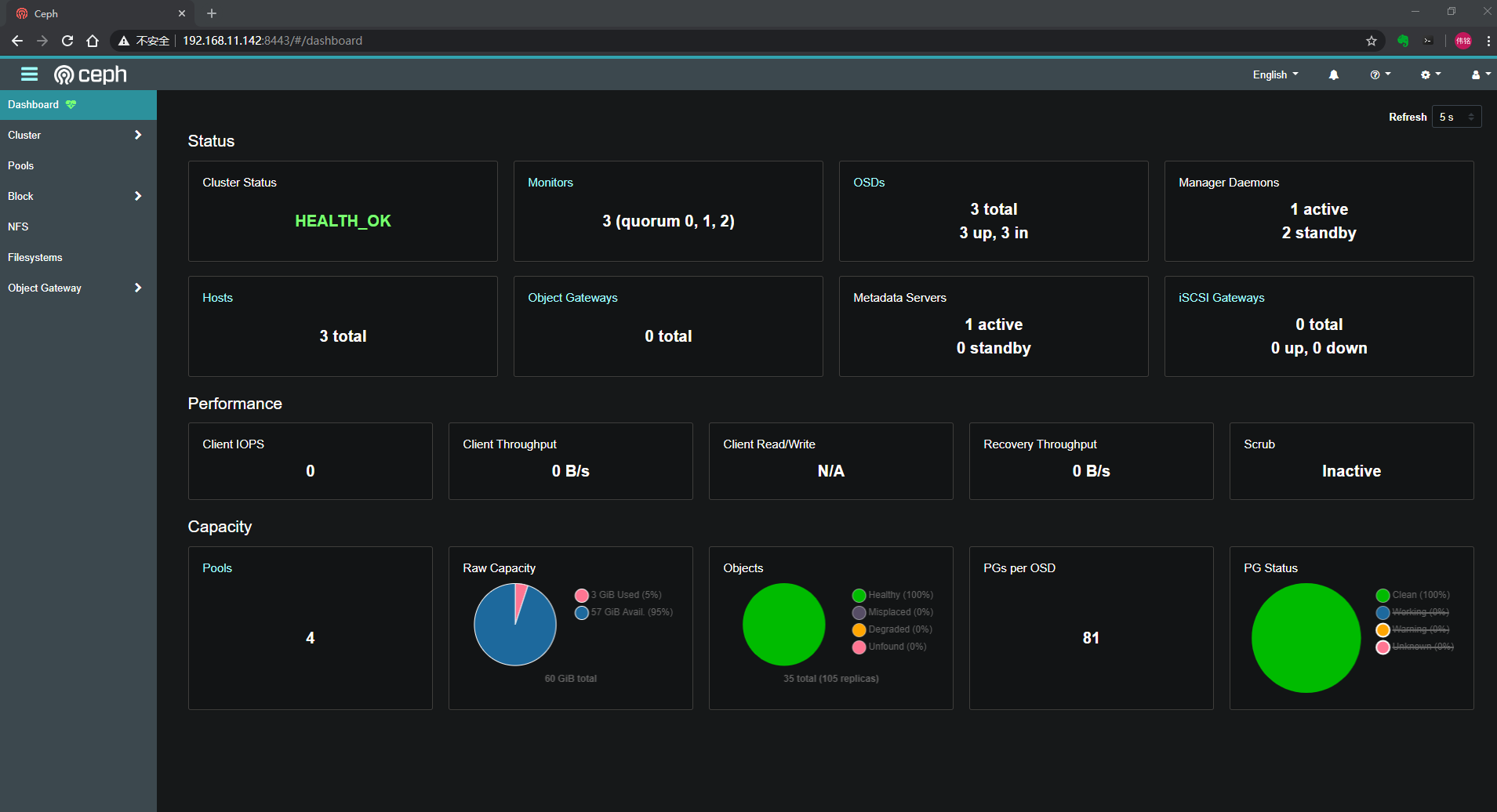
ceph 监控
[root@node01 ~]# ceph mgr module enable prometheus
1:安装 prometheus和grafana
2:对接数据库
3:导入监控模板
ceph 常用命令
ceph -v
ceph mon versions
ceph device ls
ceph -s
ceph osd tree
ceph health detail
ceph df
ceph fs ls
ceph-volume lvm list
ceph fs volume ls
ceph fs status
[root@node01 ~]# ceph -h
General usage:
==============
usage: ceph [-h] [-c CEPHCONF] [-i INPUT_FILE] [-o OUTPUT_FILE]
[--setuser SETUSER] [--setgroup SETGROUP] [--id CLIENT_ID]
[--name CLIENT_NAME] [--cluster CLUSTER]
[--admin-daemon ADMIN_SOCKET] [-s] [-w] [--watch-debug]
[--watch-info] [--watch-sec] [--watch-warn] [--watch-error]
[-W WATCH_CHANNEL] [--version] [--verbose] [--concise]
[-f {json,json-pretty,xml,xml-pretty,plain,yaml}]
[--connect-timeout CLUSTER_TIMEOUT] [--block] [--period PERIOD]
Ceph administration tool
optional arguments:
-h, --help request mon help
-c CEPHCONF, --conf CEPHCONF
ceph configuration file
-i INPUT_FILE, --in-file INPUT_FILE
input file, or "-" for stdin
-o OUTPUT_FILE, --out-file OUTPUT_FILE
output file, or "-" for stdout
--setuser SETUSER set user file permission
--setgroup SETGROUP set group file permission
--id CLIENT_ID, --user CLIENT_ID
client id for authentication
--name CLIENT_NAME, -n CLIENT_NAME
client name for authentication
--cluster CLUSTER cluster name
--admin-daemon ADMIN_SOCKET
submit admin-socket commands ("help" for help
-s, --status show cluster status
-w, --watch watch live cluster changes
--watch-debug watch debug events
--watch-info watch info events
--watch-sec watch security events
--watch-warn watch warn events
--watch-error watch error events
-W WATCH_CHANNEL, --watch-channel WATCH_CHANNEL
watch live cluster changes on a specific channel
(e.g., cluster, audit, cephadm, or '*' for all)
--version, -v display version
--verbose make verbose
--concise make less verbose
-f {json,json-pretty,xml,xml-pretty,plain,yaml}, --format {json,json-pretty,xml,xml-pretty,plain,yaml}
--connect-timeout CLUSTER_TIMEOUT
set a timeout for connecting to the cluster
--block block until completion (scrub and deep-scrub only)
--period PERIOD, -p PERIOD
polling period, default 1.0 second (for polling
commands only)
Local commands:
===============
ping <mon.id> Send simple presence/life test to a mon
<mon.id> may be 'mon.*' for all mons
daemon {type.id|path} <cmd>
Same as --admin-daemon, but auto-find admin socket
daemonperf {type.id | path} [stat-pats] [priority] [<interval>] [<count>]
daemonperf {type.id | path} list|ls [stat-pats] [priority]
Get selected perf stats from daemon/admin socket
Optional shell-glob comma-delim match string stat-pats
Optional selection priority (can abbreviate name):
critical, interesting, useful, noninteresting, debug
List shows a table of all available stats
Run <count> times (default forever),
once per <interval> seconds (default 1)
Monitor commands:
=================
alerts send (re)send alerts immediately
auth add <entity> [<caps>...] add auth info for <entity> from input file, or random key if no
input is given, and/or any caps specified in the command
auth caps <entity> <caps>... update caps for <name> from caps specified in the command
auth export [<entity>] write keyring for requested entity, or master keyring if none given
auth get <entity> write keyring file with requested key
auth get-key <entity> display requested key
auth get-or-create <entity> [<caps>...] add auth info for <entity> from input file, or random key if no
input given, and/or any caps specified in the command
auth get-or-create-key <entity> [<caps>...] get, or add, key for <name> from system/caps pairs specified in
the command. If key already exists, any given caps must match
the existing caps for that key.
auth import auth import: read keyring file from -i <file>
auth ls list authentication state
auth print-key <entity> display requested key
auth print_key <entity> display requested key
auth rm <entity> remove all caps for <name>
balancer dump <plan> Show an optimization plan
balancer eval [<option>] Evaluate data distribution for the current cluster or specific
pool or specific plan
balancer eval-verbose [<option>] Evaluate data distribution for the current cluster or specific
pool or specific plan (verbosely)
balancer execute <plan> Execute an optimization plan
balancer ls List all plans
balancer mode none|crush-compat|upmap Set balancer mode
balancer off Disable automatic balancing
balancer on Enable automatic balancing
balancer optimize <plan> [<pools>...] Run optimizer to create a new plan
balancer pool add <pools>... Enable automatic balancing for specific pools
balancer pool ls List automatic balancing pools. Note that empty list means all
existing pools will be automatic balancing targets, which is the
default behaviour of balancer.
balancer pool rm <pools>... Disable automatic balancing for specific pools
balancer reset Discard all optimization plans
balancer rm <plan> Discard an optimization plan
balancer show <plan> Show details of an optimization plan
balancer status Show balancer status
config assimilate-conf Assimilate options from a conf, and return a new, minimal conf file
config dump Show all configuration option(s)
config generate-minimal-conf Generate a minimal ceph.conf file
config get <who> [<key>] Show configuration option(s) for an entity
config help <key> Describe a configuration option
config log [<num:int>] Show recent history of config changes
config ls List available configuration options
config reset <num:int> Revert configuration to a historical version specified by <num>
config rm <who> <name> Clear a configuration option for one or more entities
config set <who> <name> <value> [--force] Set a configuration option for one or more entities
config show <who> [<key>] Show running configuration
config show-with-defaults <who> Show running configuration (including compiled-in defaults)
config-key dump [<key>] dump keys and values (with optional prefix)
config-key exists <key> check for <key>'s existence
config-key get <key> get <key>
config-key ls list keys
config-key rm <key> rm <key>
config-key set <key> [<val>] set <key> to value <val>
crash archive <id> Acknowledge a crash and silence health warning(s)
crash archive-all Acknowledge all new crashes and silence health warning(s)
crash info <id> show crash dump metadata
crash json_report <hours> Crashes in the last <hours> hours
crash ls Show new and archived crash dumps
crash ls-new Show new crash dumps
crash post Add a crash dump (use -i <jsonfile>)
crash prune <keep> Remove crashes older than <keep> days
crash rm <id> Remove a saved crash <id>
crash stat Summarize recorded crashes
device check-health Check life expectancy of devices
device get-health-metrics <devid> [<sample>] Show stored device metrics for the device
device info <devid> Show information about a device
device light on|off <devid> [ident|fault] [--force] Enable or disable the device light. Default type is `ident`
Usage:
device light (on|off) <devid> [ident|fault] [--force]
device ls Show devices
device ls-by-daemon <who> Show devices associated with a daemon
device ls-by-host <host> Show devices on a host
device ls-lights List currently active device indicator lights
device monitoring off Disable device health monitoring
device monitoring on Enable device health monitoring
device predict-life-expectancy <devid> Predict life expectancy with local predictor
device query-daemon-health-metrics <who> Get device health metrics for a given daemon
device rm-life-expectancy <devid> Clear predicted device life expectancy
device scrape-daemon-health-metrics <who> Scrape and store device health metrics for a given daemon
device scrape-health-metrics [<devid>] Scrape and store health metrics
device set-life-expectancy <devid> <from> [<to>] Set predicted device life expectancy
df [detail] show cluster free space stats
features report of connected features
fs add_data_pool <fs_name> <pool> add data pool <pool>
fs authorize <filesystem> <entity> <caps>... add auth for <entity> to access file system <filesystem> based on
following directory and permissions pairs
fs clone cancel <vol_name> <clone_name> [<group_name>] Cancel an pending or ongoing clone operation.
fs clone status <vol_name> <clone_name> [<group_name>] Get status on a cloned subvolume.
fs dump [<epoch:int>] dump all CephFS status, optionally from epoch
fs fail <fs_name> bring the file system down and all of its ranks
fs flag set enable_multiple <val> [--yes-i-really-mean-it] Set a global CephFS flag
fs get <fs_name> get info about one filesystem
fs ls list filesystems
fs new <fs_name> <metadata> <data> [--force] [--allow-dangerous- make new filesystem using named pools <metadata> and <data>
metadata-overlay]
fs reset <fs_name> [--yes-i-really-mean-it] disaster recovery only: reset to a single-MDS map
fs rm <fs_name> [--yes-i-really-mean-it] disable the named filesystem
fs rm_data_pool <fs_name> <pool> remove data pool <pool>
fs set <fs_name> max_mds|max_file_size|allow_new_snaps|inline_data| set fs parameter <var> to <val>
cluster_down|allow_dirfrags|balancer|standby_count_wanted|session_
timeout|session_autoclose|allow_standby_replay|down|joinable|min_
compat_client <val> [--yes-i-really-mean-it] [--yes-i-really-
really-mean-it]
fs set-default <fs_name> set the default to the named filesystem
fs status [<fs>] Show the status of a CephFS filesystem
fs subvolume create <vol_name> <sub_name> [<size:int>] [<group_ Create a CephFS subvolume in a volume, and optionally, with a
name>] [<pool_layout>] [<uid:int>] [<gid:int>] [<mode>] specific size (in bytes), a specific data pool layout, a specific
mode, and in a specific subvolume group
fs subvolume getpath <vol_name> <sub_name> [<group_name>] Get the mountpath of a CephFS subvolume in a volume, and
optionally, in a specific subvolume group
fs subvolume info <vol_name> <sub_name> [<group_name>] Get the metadata of a CephFS subvolume in a volume, and optionally,
in a specific subvolume group
fs subvolume ls <vol_name> [<group_name>] List subvolumes
fs subvolume resize <vol_name> <sub_name> <new_size> [<group_ Resize a CephFS subvolume
name>] [--no-shrink]
fs subvolume rm <vol_name> <sub_name> [<group_name>] [--force] Delete a CephFS subvolume in a volume, and optionally, in a
specific subvolume group
fs subvolume snapshot clone <vol_name> <sub_name> <snap_name> Clone a snapshot to target subvolume
<target_sub_name> [<pool_layout>] [<group_name>] [<target_group_
name>]
fs subvolume snapshot create <vol_name> <sub_name> <snap_name> Create a snapshot of a CephFS subvolume in a volume, and
[<group_name>] optionally, in a specific subvolume group
fs subvolume snapshot ls <vol_name> <sub_name> [<group_name>] List subvolume snapshots
fs subvolume snapshot protect <vol_name> <sub_name> <snap_name> Protect snapshot of a CephFS subvolume in a volume, and optionally,
[<group_name>] in a specific subvolume group
fs subvolume snapshot rm <vol_name> <sub_name> <snap_name> [<group_ Delete a snapshot of a CephFS subvolume in a volume, and
name>] [--force] optionally, in a specific subvolume group
fs subvolume snapshot unprotect <vol_name> <sub_name> <snap_name> Unprotect a snapshot of a CephFS subvolume in a volume, and
[<group_name>] optionally, in a specific subvolume group
fs subvolumegroup create <vol_name> <group_name> [<pool_layout>] Create a CephFS subvolume group in a volume, and optionally, with
[<uid:int>] [<gid:int>] [<mode>] a specific data pool layout, and a specific numeric mode
fs subvolumegroup getpath <vol_name> <group_name> Get the mountpath of a CephFS subvolume group in a volume
fs subvolumegroup ls <vol_name> List subvolumegroups
fs subvolumegroup rm <vol_name> <group_name> [--force] Delete a CephFS subvolume group in a volume
fs subvolumegroup snapshot create <vol_name> <group_name> <snap_ Create a snapshot of a CephFS subvolume group in a volume
name>
fs subvolumegroup snapshot ls <vol_name> <group_name> List subvolumegroup snapshots
fs subvolumegroup snapshot rm <vol_name> <group_name> <snap_name> Delete a snapshot of a CephFS subvolume group in a volume
[--force]
fs volume create <name> [<placement>] Create a CephFS volume
fs volume ls List volumes
fs volume rm <vol_name> [<yes-i-really-mean-it>] Delete a FS volume by passing --yes-i-really-mean-it flag
fsid show cluster FSID/UUID
health [detail] show cluster health
health mute <code> [<ttl>] [--sticky] mute health alert
health unmute [<code>] unmute existing health alert mute(s)
influx config-set <key> <value> Set a configuration value
influx config-show Show current configuration
influx send Force sending data to Influx
insights Retrieve insights report
insights prune-health <hours> Remove health history older than <hours> hours
iostat Get IO rates
log <logtext>... log supplied text to the monitor log
log last [<num:int>] [debug|info|sec|warn|error] [*|cluster|audit| print last few lines of the cluster log
cephadm]
mds compat rm_compat <feature:int> remove compatible feature
mds compat rm_incompat <feature:int> remove incompatible feature
mds compat show show mds compatibility settings
mds count-metadata <property> count MDSs by metadata field property
mds fail <role_or_gid> Mark MDS failed: trigger a failover if a standby is available
mds metadata [<who>] fetch metadata for mds <role>
mds ok-to-stop <ids>... check whether stopping the specified MDS would reduce immediate
availability
mds repaired <role> mark a damaged MDS rank as no longer damaged
mds rm <gid:int> remove nonactive mds
mds versions check running versions of MDSs
mgr count-metadata <property> count ceph-mgr daemons by metadata field property
mgr dump [<epoch:int>] dump the latest MgrMap
mgr fail [<who>] treat the named manager daemon as failed
mgr metadata [<who>] dump metadata for all daemons or a specific daemon
mgr module disable <module> disable mgr module
mgr module enable <module> [--force] enable mgr module
mgr module ls list active mgr modules
mgr self-test background start <workload> Activate a background workload (one of command_spam, throw_
exception)
mgr self-test background stop Stop background workload if any is running
mgr self-test cluster-log <channel> <priority> <message> Create an audit log record.
mgr self-test config get <key> Peek at a configuration value
mgr self-test config get_localized <key> Peek at a configuration value (localized variant)
mgr self-test health clear [<checks>...] Clear health checks by name. If no names provided, clear all.
mgr self-test health set <checks> Set a health check from a JSON-formatted description.
mgr self-test insights_set_now_offset <hours> Set the now time for the insights module.
mgr self-test module <module> Run another module's self_test() method
mgr self-test remote Test inter-module calls
mgr self-test run Run mgr python interface tests
mgr services list service endpoints provided by mgr modules
mgr versions check running versions of ceph-mgr daemons
mon add <name> <addr> add new monitor named <name> at <addr>
mon count-metadata <property> count mons by metadata field property
mon dump [<epoch:int>] dump formatted monmap (optionally from epoch)
mon enable-msgr2 enable the msgr2 protocol on port 3300
mon feature ls [--with-value] list available mon map features to be set/unset
mon feature set <feature_name> [--yes-i-really-mean-it] set provided feature on mon map
mon getmap [<epoch:int>] get monmap
mon metadata [<id>] fetch metadata for mon <id>
mon ok-to-add-offline check whether adding a mon and not starting it would break quorum
mon ok-to-rm <id> check whether removing the specified mon would break quorum
mon ok-to-stop <ids>... check whether mon(s) can be safely stopped without reducing
immediate availability
mon rm <name> remove monitor named <name>
mon scrub scrub the monitor stores
mon set-addrs <name> <addrs> set the addrs (IPs and ports) a specific monitor binds to
mon set-rank <name> <rank:int> set the rank for the specified mon
mon set-weight <name> <weight:int> set the weight for the specified mon
mon stat summarize monitor status
mon versions check running versions of monitors
node ls [all|osd|mon|mds|mgr] list all nodes in cluster [type]
orch apply [mon|mgr|rbd-mirror|crash|alertmanager|grafana|node- Update the size or placement for a service or apply a large yaml
exporter|prometheus] [<placement>] [--unmanaged] spec
orch apply mds <fs_name> [<placement>] [--unmanaged] Update the number of MDS instances for the given fs_name
orch apply nfs <svc_id> <pool> [<namespace>] [<placement>] [-- Scale an NFS service
unmanaged]
orch apply osd [--all-available-devices] [--preview] [<service_ Create OSD daemon(s) using a drive group spec
name>] [--unmanaged] [plain|json|json-pretty|yaml]
orch apply rgw <realm_name> <zone_name> [<subcluster>] [<port: Update the number of RGW instances for the given zone
int>] [--ssl] [<placement>] [--unmanaged]
orch cancel cancels ongoing operations
orch daemon add [mon|mgr|rbd-mirror|crash|alertmanager|grafana| Add daemon(s)
node-exporter|prometheus] [<placement>]
orch daemon add iscsi <pool> [<fqdn_enabled>] [<trusted_ip_list>] Start iscsi daemon(s)
[<placement>]
orch daemon add mds <fs_name> [<placement>] Start MDS daemon(s)
orch daemon add nfs <svc_arg> <pool> [<namespace>] [<placement>] Start NFS daemon(s)
orch daemon add osd [<svc_arg>] Create an OSD service. Either --svc_arg=host:drives
orch daemon add rgw [<realm_name>] [<zone_name>] [<placement>] Start RGW daemon(s)
orch daemon rm <names>... [--force] Remove specific daemon(s)
orch daemon start|stop|restart|redeploy|reconfig <name> Start, stop, restart, redeploy, or reconfig a specific daemon
orch device ls [<hostname>...] [plain|json|json-pretty|yaml] [-- List devices on a host
refresh]
orch device zap <hostname> <path> [--force] Zap (erase!) a device so it can be re-used
orch host add <hostname> [<addr>] [<labels>...] Add a host
orch host label add <hostname> <label> Add a host label
orch host label rm <hostname> <label> Remove a host label
orch host ls [plain|json|json-pretty|yaml] List hosts
orch host rm <hostname> Remove a host
orch host set-addr <hostname> <addr> Update a host address
orch ls [<service_type>] [<service_name>] [--export] [plain|json| List services known to orchestrator
json-pretty|yaml] [--refresh]
orch osd rm <svc_id>... [--replace] [--force] Remove OSD services
orch osd rm status status of OSD removal operation
orch pause Pause orchestrator background work
orch ps [<hostname>] [<service_name>] [<daemon_type>] [<daemon_ List daemons known to orchestrator
id>] [plain|json|json-pretty|yaml] [--refresh]
orch resume Resume orchestrator background work (if paused)
orch rm <service_name> [--force] Remove a service
orch set backend <module_name> Select orchestrator module backend
orch start|stop|restart|redeploy|reconfig <service_name> Start, stop, restart, redeploy, or reconfig an entire service (i.e.
all daemons)
orch status Report configured backend and its status
orch upgrade check [<image>] [<ceph_version>] Check service versions vs available and target containers
orch upgrade pause Pause an in-progress upgrade
orch upgrade resume Resume paused upgrade
orch upgrade start [<image>] [<ceph_version>] Initiate upgrade
orch upgrade status Check service versions vs available and target containers
orch upgrade stop Stop an in-progress upgrade
osd blacklist add|rm <addr> [<expire:float>] add (optionally until <expire> seconds from now) or remove <addr>
from blacklist
osd blacklist clear clear all blacklisted clients
osd blacklist ls show blacklisted clients
osd blocked-by print histogram of which OSDs are blocking their peers
osd count-metadata <property> count OSDs by metadata field property
osd crush add <id|osd.id> <weight:float> <args>... add or update crushmap position and weight for <name> with
<weight> and location <args>
osd crush add-bucket <name> <type> [<args>...] add no-parent (probably root) crush bucket <name> of type <type>
to location <args>
osd crush class create <class> create crush device class <class>
osd crush class ls list all crush device classes
osd crush class ls-osd <class> list all osds belonging to the specific <class>
osd crush class rename <srcname> <dstname> rename crush device class <srcname> to <dstname>
osd crush class rm <class> remove crush device class <class>
osd crush create-or-move <id|osd.id> <weight:float> <args>... create entry or move existing entry for <name> <weight> at/to
location <args>
osd crush dump dump crush map
osd crush get-device-class <ids>... get classes of specified osd(s) <id> [<id>...]
osd crush get-tunable straw_calc_version get crush tunable <tunable>
osd crush link <name> <args>... link existing entry for <name> under location <args>
osd crush ls <node> list items beneath a node in the CRUSH tree
osd crush move <name> <args>... move existing entry for <name> to location <args>
osd crush rename-bucket <srcname> <dstname> rename bucket <srcname> to <dstname>
osd crush reweight <name> <weight:float> change <name>'s weight to <weight> in crush map
osd crush reweight-all recalculate the weights for the tree to ensure they sum correctly
osd crush reweight-subtree <name> <weight:float> change all leaf items beneath <name> to <weight> in crush map
osd crush rm <name> [<ancestor>] remove <name> from crush map (everywhere, or just at <ancestor>)
osd crush rm-device-class <ids>... remove class of the osd(s) <id> [<id>...],or use <all|any> to
remove all.
osd crush rule create-erasure <name> [<profile>] create crush rule <name> for erasure coded pool created with
<profile> (default default)
osd crush rule create-replicated <name> <root> <type> [<class>] create crush rule <name> for replicated pool to start from <root>,
replicate across buckets of type <type>, use devices of type
<class> (ssd or hdd)
osd crush rule create-simple <name> <root> <type> [firstn|indep] create crush rule <name> to start from <root>, replicate across
buckets of type <type>, using a choose mode of <firstn|indep> (
default firstn; indep best for erasure pools)
osd crush rule dump [<name>] dump crush rule <name> (default all)
osd crush rule ls list crush rules
osd crush rule ls-by-class <class> list all crush rules that reference the same <class>
osd crush rule rename <srcname> <dstname> rename crush rule <srcname> to <dstname>
osd crush rule rm <name> remove crush rule <name>
osd crush set <id|osd.id> <weight:float> <args>... update crushmap position and weight for <name> to <weight> with
location <args>
osd crush set [<prior_version:int>] set crush map from input file
osd crush set-all-straw-buckets-to-straw2 convert all CRUSH current straw buckets to use the straw2 algorithm
osd crush set-device-class <class> <ids>... set the <class> of the osd(s) <id> [<id>...],or use <all|any> to
set all.
osd crush set-tunable straw_calc_version <value:int> set crush tunable <tunable> to <value>
osd crush show-tunables show current crush tunables
osd crush swap-bucket <source> <dest> [--yes-i-really-mean-it] swap existing bucket contents from (orphan) bucket <source> and
<target>
osd crush tree [--show-shadow] dump crush buckets and items in a tree view
osd crush tunables legacy|argonaut|bobtail|firefly|hammer|jewel| set crush tunables values to <profile>
optimal|default
osd crush unlink <name> [<ancestor>] unlink <name> from crush map (everywhere, or just at <ancestor>)
osd crush weight-set create <pool> flat|positional create a weight-set for a given pool
osd crush weight-set create-compat create a default backward-compatible weight-set
osd crush weight-set dump dump crush weight sets
osd crush weight-set ls list crush weight sets
osd crush weight-set reweight <pool> <item> <weight:float>... set weight for an item (bucket or osd) in a pool's weight-set
osd crush weight-set reweight-compat <item> <weight:float>... set weight for an item (bucket or osd) in the backward-compatible
weight-set
osd crush weight-set rm <pool> remove the weight-set for a given pool
osd crush weight-set rm-compat remove the backward-compatible weight-set
osd deep-scrub <who> initiate deep scrub on osd <who>, or use <all|any> to deep scrub
all
osd destroy <id|osd.id> [--force] [--yes-i-really-mean-it] mark osd as being destroyed. Keeps the ID intact (allowing reuse),
but removes cephx keys, config-key data and lockbox keys,
rendering data permanently unreadable.
osd df [plain|tree] [class|name] [<filter>] show OSD utilization
osd down <ids>... [--definitely-dead] set osd(s) <id> [<id>...] down, or use <any|all> to set all osds
down
osd drain <osd_ids:int>... drain osd ids
osd drain status show status
osd drain stop [<osd_ids:int>...] show status for osds. Stopping all if osd_ids are omitted
osd dump [<epoch:int>] print summary of OSD map
osd erasure-code-profile get <name> get erasure code profile <name>
osd erasure-code-profile ls list all erasure code profiles
osd erasure-code-profile rm <name> remove erasure code profile <name>
osd erasure-code-profile set <name> [<profile>...] [--force] create erasure code profile <name> with [<key[=value]> ...] pairs.
Add a --force at the end to override an existing profile (VERY
DANGEROUS)
osd find <id|osd.id> find osd <id> in the CRUSH map and show its location
osd force-create-pg <pgid> [--yes-i-really-mean-it] force creation of pg <pgid>
osd get-require-min-compat-client get the minimum client version we will maintain compatibility with
osd getcrushmap [<epoch:int>] get CRUSH map
osd getmap [<epoch:int>] get OSD map
osd getmaxosd show largest OSD id
osd in <ids>... set osd(s) <id> [<id>...] in, can use <any|all> to automatically
set all previously out osds in
osd info [<id|osd.id>] print osd's {id} information (instead of all osds from map)
osd last-stat-seq <id|osd.id> get the last pg stats sequence number reported for this osd
osd lost <id|osd.id> [--yes-i-really-mean-it] mark osd as permanently lost. THIS DESTROYS DATA IF NO MORE
REPLICAS EXIST, BE CAREFUL
osd ls [<epoch:int>] show all OSD ids
osd ls-tree [<epoch:int>] <name> show OSD ids under bucket <name> in the CRUSH map
osd map <pool> <object> [<nspace>] find pg for <object> in <pool> with [namespace]
osd metadata [<id|osd.id>] fetch metadata for osd {id} (default all)
osd new <uuid> [<id|osd.id>] Create a new OSD. If supplied, the `id` to be replaced needs to
exist and have been previously destroyed. Reads secrets from JSON
file via `-i <file>` (see man page).
osd numa-status show NUMA status of OSDs
osd ok-to-stop <ids>... check whether osd(s) can be safely stopped without reducing
immediate data availability
osd out <ids>... set osd(s) <id> [<id>...] out, or use <any|all> to set all osds out
osd pause pause osd
osd perf print dump of OSD perf summary stats
osd pg-temp <pgid> [<id|osd.id>...] set pg_temp mapping pgid:[<id> [<id>...]] (developers only)
osd pg-upmap <pgid> <id|osd.id>... set pg_upmap mapping <pgid>:[<id> [<id>...]] (developers only)
osd pg-upmap-items <pgid> <id|osd.id>... set pg_upmap_items mapping <pgid>:{<id> to <id>, [...]} (
developers only)
osd pool application disable <pool> <app> [--yes-i-really-mean-it] disables use of an application <app> on pool <poolname>
osd pool application enable <pool> <app> [--yes-i-really-mean-it] enable use of an application <app> [cephfs,rbd,rgw] on pool
<poolname>
osd pool application get [<pool>] [<app>] [<key>] get value of key <key> of application <app> on pool <poolname>
osd pool application rm <pool> <app> <key> removes application <app> metadata key <key> on pool <poolname>
osd pool application set <pool> <app> <key> <value> sets application <app> metadata key <key> to <value> on pool
<poolname>
osd pool autoscale-status report on pool pg_num sizing recommendation and intent
osd pool cancel-force-backfill <who>... restore normal recovery priority of specified pool <who>
osd pool cancel-force-recovery <who>... restore normal recovery priority of specified pool <who>
osd pool create <pool> [<pg_num:int>] [<pgp_num:int>] [replicated| create pool
erasure] [<erasure_code_profile>] [<rule>] [<expected_num_objects:
int>] [<size:int>] [<pg_num_min:int>] [on|off|warn] [<target_size_
bytes:int>] [<target_size_ratio:float>]
osd pool deep-scrub <who>... initiate deep-scrub on pool <who>
osd pool force-backfill <who>... force backfill of specified pool <who> first
osd pool force-recovery <who>... force recovery of specified pool <who> first
osd pool get <pool> size|min_size|pg_num|pgp_num|crush_rule| get pool parameter <var>
hashpspool|nodelete|nopgchange|nosizechange|write_fadvise_
dontneed|noscrub|nodeep-scrub|hit_set_type|hit_set_period|hit_set_
count|hit_set_fpp|use_gmt_hitset|target_max_objects|target_max_
bytes|cache_target_dirty_ratio|cache_target_dirty_high_ratio|
cache_target_full_ratio|cache_min_flush_age|cache_min_evict_age|
erasure_code_profile|min_read_recency_for_promote|all|min_write_
recency_for_promote|fast_read|hit_set_grade_decay_rate|hit_set_
search_last_n|scrub_min_interval|scrub_max_interval|deep_scrub_
interval|recovery_priority|recovery_op_priority|scrub_priority|
compression_mode|compression_algorithm|compression_required_ratio|
compression_max_blob_size|compression_min_blob_size|csum_type|
csum_min_block|csum_max_block|allow_ec_overwrites|fingerprint_
algorithm|pg_autoscale_mode|pg_autoscale_bias|pg_num_min|target_
size_bytes|target_size_ratio
osd pool get-quota <pool> obtain object or byte limits for pool
osd pool ls [detail] list pools
osd pool mksnap <pool> <snap> make snapshot <snap> in <pool>
osd pool rename <srcpool> <destpool> rename <srcpool> to <destpool>
osd pool repair <who>... initiate repair on pool <who>
osd pool rm <pool> [<pool2>] [--yes-i-really-really-mean-it] [-- remove pool
yes-i-really-really-mean-it-not-faking]
osd pool rmsnap <pool> <snap> remove snapshot <snap> from <pool>
osd pool scrub <who>... initiate scrub on pool <who>
osd pool set <pool> size|min_size|pg_num|pgp_num|pgp_num_actual| set pool parameter <var> to <val>
crush_rule|hashpspool|nodelete|nopgchange|nosizechange|write_
fadvise_dontneed|noscrub|nodeep-scrub|hit_set_type|hit_set_period|
hit_set_count|hit_set_fpp|use_gmt_hitset|target_max_bytes|target_
max_objects|cache_target_dirty_ratio|cache_target_dirty_high_
ratio|cache_target_full_ratio|cache_min_flush_age|cache_min_evict_
age|min_read_recency_for_promote|min_write_recency_for_promote|
fast_read|hit_set_grade_decay_rate|hit_set_search_last_n|scrub_
min_interval|scrub_max_interval|deep_scrub_interval|recovery_
priority|recovery_op_priority|scrub_priority|compression_mode|
compression_algorithm|compression_required_ratio|compression_max_
blob_size|compression_min_blob_size|csum_type|csum_min_block|csum_
max_block|allow_ec_overwrites|fingerprint_algorithm|pg_autoscale_
mode|pg_autoscale_bias|pg_num_min|target_size_bytes|target_size_
ratio <val> [--yes-i-really-mean-it]
osd pool set-quota <pool> max_objects|max_bytes <val> set object or byte limit on pool
osd pool stats [<pool_name>] obtain stats from all pools, or from specified pool
osd primary-affinity <id|osd.id> <weight:float> adjust osd primary-affinity from 0.0 <= <weight> <= 1.0
osd primary-temp <pgid> <id|osd.id> set primary_temp mapping pgid:<id>|-1 (developers only)
osd purge <id|osd.id> [--force] [--yes-i-really-mean-it] purge all osd data from the monitors including the OSD id and
CRUSH position
osd purge-new <id|osd.id> [--yes-i-really-mean-it] purge all traces of an OSD that was partially created but never
started
osd repair <who> initiate repair on osd <who>, or use <all|any> to repair all
osd require-osd-release luminous|mimic|nautilus|octopus [--yes-i- set the minimum allowed OSD release to participate in the cluster
really-mean-it]
osd reweight <id|osd.id> <weight:float> reweight osd to 0.0 < <weight> < 1.0
osd reweight-by-pg [<oload:int>] [<max_change:float>] [<max_osds: reweight OSDs by PG distribution [overload-percentage-for-
int>] [<pools>...] consideration, default 120]
osd reweight-by-utilization [<oload:int>] [<max_change:float>] reweight OSDs by utilization [overload-percentage-for-
[<max_osds:int>] [--no-increasing] consideration, default 120]
osd reweightn <weights> reweight osds with {<id>: <weight>,...})
osd rm-pg-upmap <pgid> clear pg_upmap mapping for <pgid> (developers only)
osd rm-pg-upmap-items <pgid> clear pg_upmap_items mapping for <pgid> (developers only)
osd safe-to-destroy <ids>... check whether osd(s) can be safely destroyed without reducing data
durability
osd scrub <who> initiate scrub on osd <who>, or use <all|any> to scrub all
osd set full|pause|noup|nodown|noout|noin|nobackfill|norebalance| set <key>
norecover|noscrub|nodeep-scrub|notieragent|nosnaptrim|pglog_
hardlimit [--yes-i-really-mean-it]
osd set-backfillfull-ratio <ratio:float> set usage ratio at which OSDs are marked too full to backfill
osd set-full-ratio <ratio:float> set usage ratio at which OSDs are marked full
osd set-group <flags> <who>... set <flags> for batch osds or crush nodes, <flags> must be a comma-
separated subset of {noup,nodown,noin,noout}
osd set-nearfull-ratio <ratio:float> set usage ratio at which OSDs are marked near-full
osd set-require-min-compat-client <version> [--yes-i-really-mean- set the minimum client version we will maintain compatibility with
it]
osd setcrushmap [<prior_version:int>] set crush map from input file
osd setmaxosd <newmax:int> set new maximum osd value
osd stat print summary of OSD map
osd status [<bucket>] Show the status of OSDs within a bucket, or all
osd stop <ids>... stop the corresponding osd daemons and mark them as down
osd test-reweight-by-pg [<oload:int>] [<max_change:float>] [<max_ dry run of reweight OSDs by PG distribution [overload-percentage-
osds:int>] [<pools>...] for-consideration, default 120]
osd test-reweight-by-utilization [<oload:int>] [<max_change: dry run of reweight OSDs by utilization [overload-percentage-for-
float>] [<max_osds:int>] [--no-increasing] consideration, default 120]
osd tier add <pool> <tierpool> [--force-nonempty] add the tier <tierpool> (the second one) to base pool <pool> (the
first one)
osd tier add-cache <pool> <tierpool> <size:int> add a cache <tierpool> (the second one) of size <size> to existing
pool <pool> (the first one)
osd tier cache-mode <pool> none|writeback|forward|readonly| specify the caching mode for cache tier <pool>
readforward|proxy|readproxy [--yes-i-really-mean-it]
osd tier rm <pool> <tierpool> remove the tier <tierpool> (the second one) from base pool <pool> (
the first one)
osd tier rm-overlay <pool> remove the overlay pool for base pool <pool>
osd tier set-overlay <pool> <overlaypool> set the overlay pool for base pool <pool> to be <overlaypool>
osd tree [<epoch:int>] [up|down|in|out|destroyed...] print OSD tree
osd tree-from [<epoch:int>] <bucket> [up|down|in|out|destroyed...] print OSD tree in bucket
osd unpause unpause osd
osd unset full|pause|noup|nodown|noout|noin|nobackfill|norebalance| unset <key>
norecover|noscrub|nodeep-scrub|notieragent|nosnaptrim
osd unset-group <flags> <who>... unset <flags> for batch osds or crush nodes, <flags> must be a
comma-separated subset of {noup,nodown,noin,noout}
osd utilization get basic pg distribution stats
osd versions check running versions of OSDs
pg cancel-force-backfill <pgid>... restore normal backfill priority of <pgid>
pg cancel-force-recovery <pgid>... restore normal recovery priority of <pgid>
pg debug unfound_objects_exist|degraded_pgs_exist show debug info about pgs
pg deep-scrub <pgid> start deep-scrub on <pgid>
pg dump [all|summary|sum|delta|pools|osds|pgs|pgs_brief...] show human-readable versions of pg map (only 'all' valid with
plain)
pg dump_json [all|summary|sum|pools|osds|pgs...] show human-readable version of pg map in json only
pg dump_pools_json show pg pools info in json only
pg dump_stuck [inactive|unclean|stale|undersized|degraded...] show information about stuck pgs
[<threshold:int>]
pg force-backfill <pgid>... force backfill of <pgid> first
pg force-recovery <pgid>... force recovery of <pgid> first
pg getmap get binary pg map to -o/stdout
pg ls [<pool:int>] [<states>...] list pg with specific pool, osd, state
pg ls-by-osd <id|osd.id> [<pool:int>] [<states>...] list pg on osd [osd]
pg ls-by-pool <poolstr> [<states>...] list pg with pool = [poolname]
pg ls-by-primary <id|osd.id> [<pool:int>] [<states>...] list pg with primary = [osd]
pg map <pgid> show mapping of pg to osds
pg repair <pgid> start repair on <pgid>
pg repeer <pgid> force a PG to repeer
pg scrub <pgid> start scrub on <pgid>
pg stat show placement group status.
progress Show progress of recovery operations
progress clear Reset progress tracking
progress json Show machine readable progress information
prometheus file_sd_config Return file_sd compatible prometheus config for mgr cluster
quorum_status report status of monitor quorum
rbd mirror snapshot schedule add <level_spec> <interval> [<start_ Add rbd mirror snapshot schedule
time>]
rbd mirror snapshot schedule list [<level_spec>] List rbd mirror snapshot schedule
rbd mirror snapshot schedule remove <level_spec> [<interval>] Remove rbd mirror snapshot schedule
[<start_time>]
rbd mirror snapshot schedule status [<level_spec>] Show rbd mirror snapshot schedule status
rbd perf image counters [<pool_spec>] [write_ops|write_bytes|write_ Retrieve current RBD IO performance counters
latency|read_ops|read_bytes|read_latency]
rbd perf image stats [<pool_spec>] [write_ops|write_bytes|write_ Retrieve current RBD IO performance stats
latency|read_ops|read_bytes|read_latency]
rbd task add flatten <image_spec> Flatten a cloned image asynchronously in the background
rbd task add migration abort <image_spec> Abort a prepared migration asynchronously in the background
rbd task add migration commit <image_spec> Commit an executed migration asynchronously in the background
rbd task add migration execute <image_spec> Execute an image migration asynchronously in the background
rbd task add remove <image_spec> Remove an image asynchronously in the background
rbd task add trash remove <image_id_spec> Remove an image from the trash asynchronously in the background
rbd task cancel <task_id> Cancel a pending or running asynchronous task
rbd task list [<task_id>] List pending or running asynchronous tasks
rbd trash purge schedule add <level_spec> <interval> [<start_time>] Add rbd trash purge schedule
rbd trash purge schedule list [<level_spec>] List rbd trash purge schedule
rbd trash purge schedule remove <level_spec> [<interval>] [<start_ Remove rbd trash purge schedule
time>]
rbd trash purge schedule status [<level_spec>] Show rbd trash purge schedule status
report [<tags>...] report full status of cluster, optional title tag strings
restful create-key <key_name> Create an API key with this name
restful create-self-signed-cert Create localized self signed certificate
restful delete-key <key_name> Delete an API key with this name
restful list-keys List all API keys
restful restart Restart API server
service dump dump service map
service status dump service state
status show cluster status
telegraf config-set <key> <value> Set a configuration value
telegraf config-show Show current configuration
telegraf send Force sending data to Telegraf
telemetry off Disable telemetry reports from this cluster
telemetry on [<license>] Enable telemetry reports from this cluster
telemetry send [ceph|device...] [<license>] Force sending data to Ceph telemetry
telemetry show [<channels>...] Show last report or report to be sent
telemetry show-device Show last device report or device report to be sent
telemetry status Show current configuration
tell <type.id> <args>... send a command to a specific daemon
test_orchestrator load_data load dummy data into test orchestrator
time-sync-status show time sync status
versions check running versions of ceph daemons
zabbix config-set <key> <value> Set a configuration value
zabbix config-show Show current configuration
zabbix discovery Discovering Zabbix data
zabbix send Force sending data to Zabbix
[root@node01 ~]#

若有收获,就点个赞吧
0 人点赞


