简介
https://www.rook.io
https://github.com/rook/rook
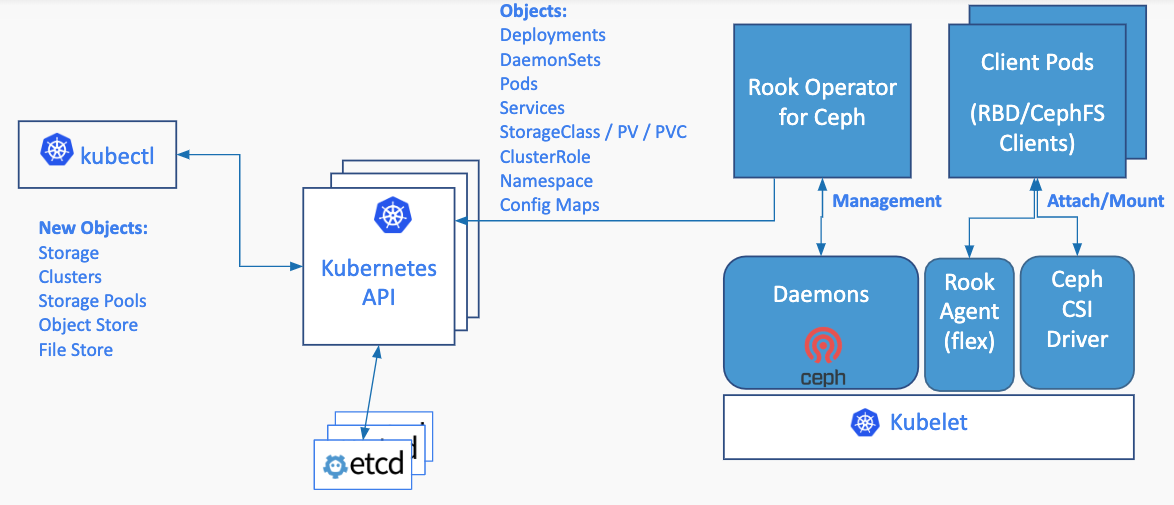
https://www.rook.io/docs/rook/v1.6/ceph-storage.html
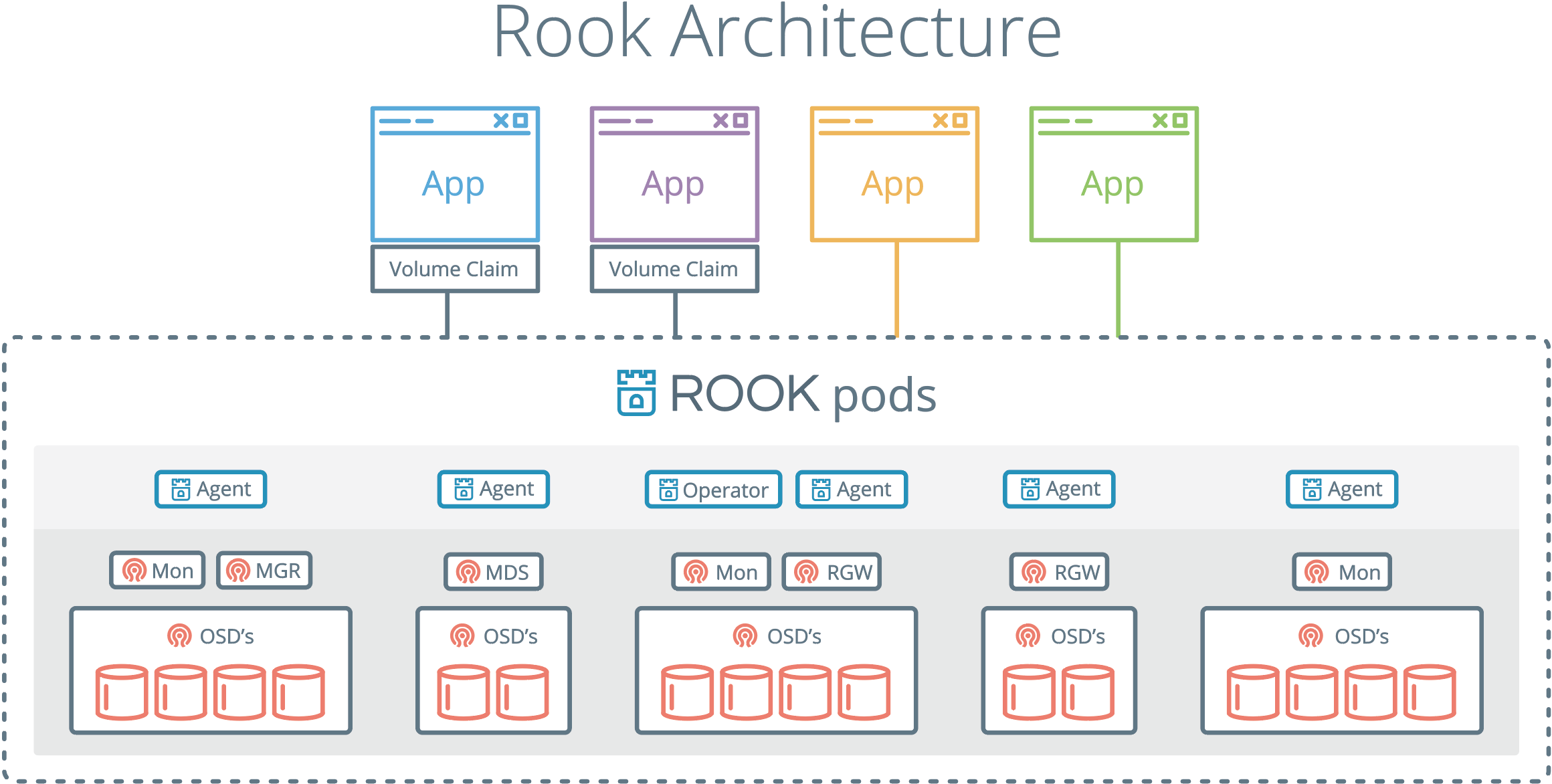
rook 架构
升级内核
yum install https://www.elrepo.org/elrepo-release-7.el7.elrepo.noarch.rpm -yyum remove kernel-tools-libs.x86_64 kernel-tools.x86_64 -yyum --disablerepo=* --enablerepo=elrepo-kernel install kernel-ml-tools.x86_64 -yyum --disablerepo=* --enablerepo=elrepo-kernel install kernel-ml.x86_64 -ygrub2-set-default 0reboot
加载 rbd模块
modprobe rbdcat > /etc/rc.sysinit << EOF#!/bin/bashfor file in /etc/sysconfig/modules/*.modulesdo[ -x \$file ] && \$filedoneEOFcat > /etc/sysconfig/modules/rbd.modules << EOFmodprobe rbdEOFchmod 755 /etc/sysconfig/modules/rbd.moduleslsmod |grep rbd
克隆源码
[root@master home]# git clone https://github.com.cnpmjs.org/rook/rook.gitCloning into 'rook'...remote: Enumerating objects: 77401, done.remote: Counting objects: 100% (454/454), done.remote: Compressing objects: 100% (248/248), done.remote: Total 77401 (delta 218), reused 345 (delta 186), pack-reused 76947Receiving objects: 100% (77401/77401), 41.21 MiB | 6.56 MiB/s, done.Resolving deltas: 100% (53869/53869), done.[root@master home]#
[root@master rook]# pwd/home/rook[root@master rook]# ls -ltotal 360-rw-r----- 1 root root 4844 May 5 18:39 ADOPTERS.mddrwxr-x--- 6 root root 104 May 5 18:39 builddrwxr-x--- 5 root root 47 May 5 18:39 clusterdrwxr-x--- 4 root root 34 May 5 18:39 cmd-rw-r----- 1 root root 138 May 5 18:39 CODE_OF_CONDUCT.md-rw-r----- 1 root root 846 May 5 18:39 CODE-OWNERS-rw-r----- 1 root root 8475 May 5 18:39 CONTRIBUTING.md-rw-r----- 1 root root 1422 May 5 18:39 DCOdrwxr-x--- 6 root root 103 May 5 18:39 designdrwxr-x--- 3 root root 4096 May 5 18:39 Documentation-rw-r----- 1 root root 3970 May 5 18:39 go.mod-rw-r----- 1 root root 232761 May 5 18:39 go.sum-rw-r----- 1 root root 7957 May 5 18:39 GOVERNANCE.mddrwxr-x--- 6 root root 91 May 5 18:39 images-rw-r----- 1 root root 8248 May 5 18:39 INSTALL.md-rw-r----- 1 root root 13380 May 5 18:39 Jenkinsfile-rw-r----- 1 root root 11368 May 5 18:39 LICENSE-rw-r----- 1 root root 5965 May 5 18:39 Makefile-rw-r----- 1 root root 2611 May 5 18:39 OWNERS.md-rw-r----- 1 root root 131 May 5 18:39 PendingReleaseNotes.mddrwxr-x--- 9 root root 105 May 5 18:39 pkg-rw-r----- 1 root root 11019 May 5 18:39 README.md-rw-r----- 1 root root 3192 May 5 18:39 ROADMAP.md-rw-r----- 1 root root 11049 May 5 18:39 SECURITY.mddrwxr-x--- 7 root root 125 May 5 18:39 tests[root@master rook]#
切换到kubernetes目录
[root@master kubernetes]# ls -ltotal 16drwxr-x--- 2 root root 47 May 5 18:39 cassandradrwxr-x--- 7 root root 4096 May 5 18:39 ceph-rw-r----- 1 root root 1205 May 5 18:39 mysql.yamldrwxr-x--- 2 root root 269 May 5 18:39 nfs-rw-r----- 1 root root 129 May 5 18:39 README.md-rw-r----- 1 root root 1303 May 5 18:39 wordpress.yaml[root@master kubernetes]#
[root@master ceph]# lsceph-client.yaml dashboard-external-https.yaml object-bucket-claim-delete.yaml pool-test.yamlcluster-external-management.yaml dashboard-external-http.yaml object-bucket-claim-retain.yaml pool.yamlcluster-external.yaml dashboard-ingress-https.yaml object-ec.yaml pre-k8s-1.16cluster-on-pvc.yaml dashboard-loadbalancer.yaml object-external.yaml rbdmirror.yamlcluster-stretched.yaml direct-mount.yaml object-multisite-pull-realm.yaml rgw-external.yamlcluster-test.yaml filesystem-ec.yaml object-multisite.yaml scc.yamlcluster.yaml filesystem-mirror.yaml object-openshift.yaml storageclass-bucket-delete.yamlcommon-external.yaml filesystem-test.yaml object-test.yaml storageclass-bucket-retain.yamlcommon-second-cluster.yaml filesystem.yaml object-user.yaml test-datacommon.yaml flex object.yaml toolbox-job.yamlcrds.yaml import-external-cluster.sh operator-openshift.yaml toolbox.yamlcreate-external-cluster-resources.py monitoring operator.yamlcreate-external-cluster-resources.sh nfs-test.yaml osd-purge.yamlcsi nfs.yaml pool-ec.yaml[root@master ceph]# pwd/home/rook/cluster/examples/kubernetes/ceph[root@master ceph]# cd csi/[root@master csi]# ls -ltotal 0drwxr-x--- 2 root root 210 May 5 18:39 cephfsdrwxr-x--- 2 root root 214 May 5 18:39 rbddrwxr-x--- 4 root root 31 May 5 18:39 template[root@master csi]# cd cephfs/[root@master cephfs]# ls -ltotal 36-rw-r----- 1 root root 1705 May 5 18:39 kube-registry.yaml-rw-r----- 1 root root 321 May 5 18:39 pod.yaml-rw-r----- 1 root root 268 May 5 18:39 pvc-clone.yaml-rw-r----- 1 root root 310 May 5 18:39 pvc-restore.yaml-rw-r----- 1 root root 195 May 5 18:39 pvc.yaml-rw-r----- 1 root root 597 May 5 18:39 snapshotclass.yaml-rw-r----- 1 root root 219 May 5 18:39 snapshot.yaml-rw-r----- 1 root root 1496 May 5 18:39 storageclass-ec.yaml-rw-r----- 1 root root 1490 May 5 18:39 storageclass.yaml[root@master cephfs]#
安装operator
[root@master ceph]# ll common.yaml operator.yaml
-rw-r----- 1 root root 30170 May  5 18:39 common.yaml
-rw-r----- 1 root root 20393 May  5 18:39 operator.yaml
[root@master ceph]#
kubectl apply -f common.yaml operator.yaml
安装ceph
[root@master ceph]# ll cluster.yaml
-rw-r----- 1 root root 14119 May  5 18:39 cluster.yaml
[root@master ceph]#
kubectl apply -f cluster.yaml
安装块存储
[root@master ceph]# ls csi/rbd/storageclass.yaml
csi/rbd/storageclass.yaml
[root@master ceph]#
kubectl apply -f csi/rbd/storageclass.yaml
安装对象存储
[root@master ceph]# ls object.yaml
object.yaml
kubectl -f object.yaml
安装Shared Filesystem
[root@master ceph]# ls -l filesystem.yaml
-rw-r----- 1 root root 4463 May  5 18:39 filesystem.yaml
[root@master ceph]#
kubectl apply -f filesystem.yaml
kubectl apply -f csi/cephfs/storageclass.yaml
安装dashboard
[root@master ceph]# ls -l dashboard-ingress-https.yaml
-rw-r----- 1 root root 886 May  5 18:39 dashboard-ingress-https.yaml
kubectl apply -f dashboard-ingress-https.yaml
安装工具 toolbox
[root@master ceph]# ls -l toolbox.yaml
-rw-r----- 1 root root 1474 May  5 18:39 toolbox.yaml
[root@master ceph]# kubectl apply -f toolbox.yaml
https://blog.csdn.net/zwjzqqb/article/details/104988391
https://zhuanlan.zhihu.com/p/138991974

若有收获,就点个赞吧
0 人点赞


