1、敏感词过滤器
1、编写敏感词过滤器SensitiveFilter
@Componentpublic class SensitiveFilter {private static final Logger logger = LoggerFactory.getLogger(SensitiveFilter.class);// 替换符private static final String REPLACEMENT = "***";// 根节点private TrieNode rootNode = new TrieNode();@PostConstructpublic void init() {try (InputStream is = this.getClass().getClassLoader().getResourceAsStream("sensitive-words.txt");BufferedReader reader = new BufferedReader(new InputStreamReader(is));) {String keyword;while ((keyword = reader.readLine()) != null) {// 添加到前缀树this.addKeyword(keyword);}} catch (IOException e) {logger.error("加载敏感词文件失败: " + e.getMessage());}}// 将一个敏感词添加到前缀树中private void addKeyword(String keyword) {TrieNode tempNode = rootNode;for (int i = 0; i < keyword.length(); i++) {char c = keyword.charAt(i);TrieNode subNode = tempNode.getSubNode(c);if (subNode == null) {// 初始化子节点subNode = new TrieNode();tempNode.addSubNode(c, subNode);}// 指向子节点,进入下一轮循环tempNode = subNode;// 设置结束标识if (i == keyword.length() - 1) {tempNode.setKeywordEnd(true);}}}/*** 过滤敏感词** @param text 待过滤的文本* @return 过滤后的文本*/public String filter(String text) {if (StringUtils.isBlank(text)) {return null;}// 指针1TrieNode tempNode = rootNode;// 指针2int begin = 0;// 指针3int position = 0;// 结果StringBuilder sb = new StringBuilder();while (position < text.length()) {char c = text.charAt(position);// 跳过符号if (isSymbol(c)) {// 若指针1处于根节点,将此符号计入结果,让指针2向下走一步if (tempNode == rootNode) {sb.append(c);begin++;}// 无论符号在开头或中间,指针3都向下走一步position++;continue;}// 检查下级节点tempNode = tempNode.getSubNode(c);if (tempNode == null) {// 以begin开头的字符串不是敏感词sb.append(text.charAt(begin));// 进入下一个位置position = ++begin;// 重新指向根节点tempNode = rootNode;} else if (tempNode.isKeywordEnd()) {// 发现敏感词,将begin~position字符串替换掉sb.append(REPLACEMENT);// 进入下一个位置begin = ++position;// 重新指向根节点tempNode = rootNode;} else {// 检查下一个字符position++;}}// 将最后一批字符计入结果sb.append(text.substring(begin));return sb.toString();}// 判断是否为符号private boolean isSymbol(Character c) {// 0x2E80~0x9FFF 是东亚文字范围return !CharUtils.isAsciiAlphanumeric(c) && (c < 0x2E80 || c > 0x9FFF);}// 前缀树private class TrieNode {// 关键词结束标识private boolean isKeywordEnd = false;// 子节点(key是下级字符,value是下级节点)private Map<Character, TrieNode> subNodes = new HashMap<>();public boolean isKeywordEnd() {return isKeywordEnd;}public void setKeywordEnd(boolean keywordEnd) {isKeywordEnd = keywordEnd;}// 添加子节点public void addSubNode(Character c, TrieNode node) {subNodes.put(c, node);}// 获取子节点public TrieNode getSubNode(Character c) {return subNodes.get(c);}}}
2、敏感词记录表sensitive-words.txt
赌博嫖娼吸毒开票
2、发布帖子
1、引入fastjson依赖
<dependency><groupId>com.alibaba</groupId><artifactId>fastjson</artifactId><version>1.2.79</version></dependency>
2、编写统一返回结果处理CommunityUtil
/*** 统一返回结果处理* @param code* @param msg* @param map* @return*/public static String getJSONString(int code, String msg, Map<String, Object> map) {JSONObject json = new JSONObject();json.put("code", code);json.put("msg", msg);if (map != null) {for (String key : map.keySet()) {json.put(key, map.get(key));}}return json.toJSONString();}public static String getJSONString(int code, String msg) {return getJSONString(code, msg, null);}public static String getJSONString(int code) {return getJSONString(code, null, null);}}
3、DiscussPostMapper
/*** 增加帖子的方法* @param discussPost* @return*/int insertDiscussPost(DiscussPost discussPost);
4、Discusspost-mapper.xml
<sql id="insertFields">user_id,title,content,type,status,create_time,comment_count,score</sql><insert id="insertDiscussPost">insert into discuss_post(<include refid="insertFields"></include>)values(#{userId},#{title},#{content},#{type},#{status},#{createTime},#{commentCount},#{score})</insert>
5、DiscussService
public int addDiscussPost(DiscussPost discussPost){if(null==discussPost){throw new IllegalArgumentException("参数不能为空");}//转义HTML标记discussPost.setTitle(HtmlUtils.htmlEscape(discussPost.getTitle()));discussPost.setTitle(HtmlUtils.htmlEscape(discussPost.getContent()));//过滤敏感词discussPost.setTitle(sensitiveFilter.filter(discussPost.getTitle()));discussPost.setTitle(sensitiveFilter.filter(discussPost.getContent()));return discussPostMapper.insertDiscussPost(discussPost);}
6、DiscussController
@PostMapping("/discuss/add")@ResponseBodypublic String addDiscussPost(String title,String content){User user = hostHolder.getUser();if(null==user){return CommunityUtil.getJSONString(300,"您还没有登录哦!");}DiscussPost post = new DiscussPost();post.setUserId(user.getId());post.setTitle(title);post.setContent(content);post.setCreateTime(new Date());discussPostService.addDiscussPost(post);return CommunityUtil.getJSONString(200,"发布成功");}
3、帖子详情功能
1、DiscussPostMapper
/*** 根据id查询帖子* @param id* @return*/DiscussPost selectDiscussPostById(int id);
2、discuss-post.mapper
<select id="selectDiscussPostById" resultType="DiscussPost">select <include refid="selectFields"></include>from discuss_postwhere id=#{id}</select>
3、DiscussPostService
public DiscussPost selectDiscussPostById(int id){return discussPostMapper.selectDiscussPostById(id);}
4、DiscussPostController
/*** 查询帖子详情接口* @param discussPostId* @param model* @return*/@GetMapping("/discuss/detail/{discussPostId}")public String selectDiscussPostById(@PathVariable int discussPostId,Model model){//帖子DiscussPost post = discussPostService.selectDiscussPostById(discussPostId);model.addAttribute("post",post);//作者User user = userService.selectUserById(post.getUserId());model.addAttribute("user",user);return "/site/discuss-detail";}
5、模板处理略
index.html
discuss-detail.html
4、事务处理
• 什么是事务
- 事务是由N步数据库操作序列组成的逻辑执行单元,这系列操作要么全执行,要么全放弃执行。
• 事务的特性(ACID)
- 原子性(Atomicity):事务是应用中不可再分的最小执行体。
- 一致性(Consistency):事务执行的结果,须使数据从一个一致性状态,变为另一个一致性状态。
- 隔离性(Isolation):各个事务的执行互不干扰,任何事务的内部操作对其他的事务都是隔离的。
- 持久性(Durability):事务一旦提交,对数据所做的任何改变都要记录到永久存储器中。
事务的隔离性
• 常见的并发异常
- 第一类丢失更新、第二类丢失更新。
- 脏读、不可重复读、幻读。
• 常见的隔离级别
- Read Uncommitted:读取未提交的数据。
- Read Committed:读取已提交的数据。
- Repeatable Read:可重复读。
- Serializable:串行化。
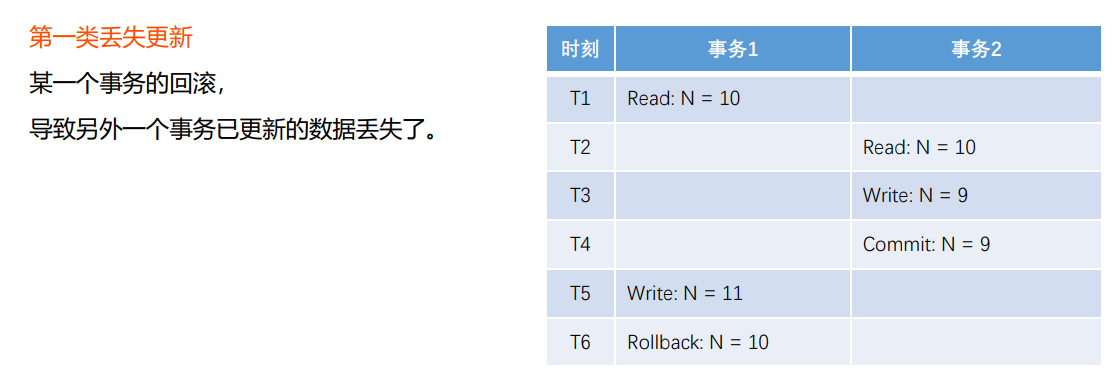
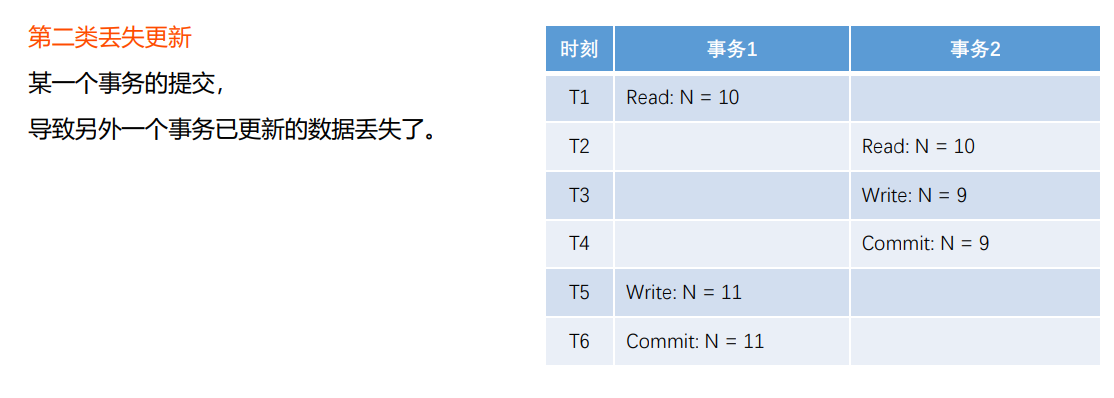
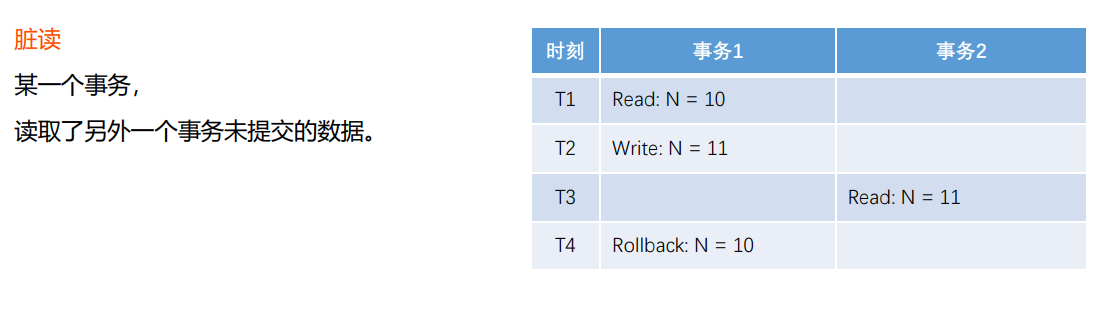


实现机制
• 悲观锁(数据库)
- 共享锁(S锁)
事务A对某数据加了共享锁后,其他事务只能对该数据加共享锁,但不能加排他锁。 - 排他锁(X锁)
事务A对某数据加了排他锁后,其他事务对该数据既不能加共享锁,也不能加排他锁。
• 乐观锁(自定义)
- 版本号、时间戳等
在更新数据前,检查版本号是否发生变化。若变化则取消本次更新,否则就更新数据(版本号+1)。
Spring事务管理
• 声明式事务
- 通过XML配置,声明某方法的事务特征。
- 通过注解,声明某方法的事务特征。
• 编程式事务
通过 TransactionTemplate 管理事务,
并通过它执行数据库的操作。声明式事务举例
// REQUIRED: 支持当前事务(外部事务),如果不存在则创建新事务.// REQUIRES_NEW: 创建一个新事务,并且暂停当前事务(外部事务).// NESTED: 如果当前存在事务(外部事务),则嵌套在该事务中执行(独立的提交和回滚),否则就会REQUIRED一样.@Transactional(isolation = Isolation.READ_COMMITTED, propagation = Propagation.REQUIRED)public Object save1() {// 新增用户User user = new User();user.setUsername("alpha");user.setSalt(CommunityUtil.generateUUID().substring(0, 5));user.setPassword(CommunityUtil.md5("123" + user.getSalt()));user.setEmail("alpha@qq.com");user.setHeaderUrl("http://image.nowcoder.com/head/99t.png");user.setCreateTime(new Date());userMapper.insertUser(user);// 新增帖子DiscussPost post = new DiscussPost();post.setUserId(user.getId());post.setTitle("Hello");post.setContent("新人报道!");post.setCreateTime(new Date());discussPostMapper.insertDiscussPost(post);Integer.valueOf("abc");return "ok";}
编程式事务举例
public Object save2() {transactionTemplate.setIsolationLevel(TransactionDefinition.ISOLATION_READ_COMMITTED);transactionTemplate.setPropagationBehavior(TransactionDefinition.PROPAGATION_REQUIRED);return transactionTemplate.execute(new TransactionCallback<Object>() {@Overridepublic Object doInTransaction(TransactionStatus status) {// 新增用户User user = new User();user.setUsername("beta");user.setSalt(CommunityUtil.generateUUID().substring(0, 5));user.setPassword(CommunityUtil.md5("123" + user.getSalt()));user.setEmail("beta@qq.com");user.setHeaderUrl("http://image.nowcoder.com/head/999t.png");user.setCreateTime(new Date());userMapper.insertUser(user);// 新增帖子DiscussPost post = new DiscussPost();post.setUserId(user.getId());post.setTitle("你好");post.setContent("我是新人!");post.setCreateTime(new Date());discussPostMapper.insertDiscussPost(post);Integer.valueOf("abc");return "ok";}});}
5、显示评论功能
1、CommentMapper
@Mapperpublic interface CommentMapper {List<Comment> selectCommentsByEntity(int entityType, int entityId, int offset, int limit);int selectCountByEntity(int entityType, int entityId);}
2、comment-mapper.xml ```xml
id, user_id, entity_type, entity_id, target_id, content, status, create_time
3、CommentService```java@Servicepublic class CommentService {@Autowiredprivate CommentMapper commentMapper;public List<Comment> findCommentsByEntity(int entityType, int entityId, int offset, int limit) {return commentMapper.selectCommentsByEntity(entityType, entityId, offset, limit);}public int findCommentCount(int entityType, int entityId) {return commentMapper.selectCountByEntity(entityType, entityId);}}
4、CommentController
/*** 查询帖子详情接口* @param discussPostId* @param model* @return*/@GetMapping("/discuss/detail/{discussPostId}")public String selectDiscussPostById(@PathVariable int discussPostId,Model model,Page page){//帖子DiscussPost post = discussPostService.selectDiscussPostById(discussPostId);model.addAttribute("post",post);//作者User user = userService.selectUserById(post.getUserId());model.addAttribute("user",user);// 评论分页信息page.setLimit(5);page.setPath("/discuss/detail/" + discussPostId);page.setRows(post.getCommentCount());// 评论: 给帖子的评论// 回复: 给评论的评论// 评论列表List<Comment> commentList = commentService.findCommentsByEntity(ENTITY_TYPE_POST, post.getId(), page.getOffset(), page.getLimit());// 评论VO列表List<Map<String, Object>> commentVoList = new ArrayList<>();if (commentList != null) {for (Comment comment : commentList) {// 评论VOMap<String, Object> commentVo = new HashMap<>();// 评论commentVo.put("comment", comment);// 作者commentVo.put("user", userService.selectUserById(comment.getUserId()));// 回复列表List<Comment> replyList = commentService.findCommentsByEntity(ENTITY_TYPE_COMMENT, comment.getId(), 0, Integer.MAX_VALUE);// 回复VO列表List<Map<String, Object>> replyVoList = new ArrayList<>();if (replyList != null) {for (Comment reply : replyList) {Map<String, Object> replyVo = new HashMap<>();// 回复replyVo.put("reply", reply);// 作者replyVo.put("user", userService.selectUserById(reply.getUserId()));// 回复目标User target = reply.getTargetId() == 0 ? null : userService.selectUserById(reply.getTargetId());replyVo.put("target", target);replyVoList.add(replyVo);}}commentVo.put("replys", replyVoList);// 回复数量int replyCount = commentService.findCommentCount(ENTITY_TYPE_COMMENT, comment.getId());commentVo.put("replyCount", replyCount);commentVoList.add(commentVo);}}model.addAttribute("comments", commentVoList);return "/site/discuss-detail";}}
5、页面略
index.html
discuss-detail.html
6、添加评论功能
1、CommentMapper
int insertComment(Comment comment);
2、DiscussMapper
/*** 更新评论数量* @param id* @param commentCount* @return*/int updateCommentCount(int id, int commentCount);
3、comment-mapper.xml
<sql id="insertFields">user_id, entity_type, entity_id, target_id, content, status, create_time</sql><insert id="insertComment" parameterType="Comment">insert into comment(<include refid="insertFields"></include>)values(#{userId},#{entityType},#{entityId},#{targetId},#{content},#{status},#{createTime})</insert>
4、discusspost-mapper.xml
<update id="updateCommentCount">update discuss_post set comment_count = #{commentCount} where id = #{id}</update>
5、CommentService
@Transactional(isolation = Isolation.READ_COMMITTED, propagation = Propagation.REQUIRED)public int addComment(Comment comment) {if (comment == null) {throw new IllegalArgumentException("参数不能为空!");}// 添加评论comment.setContent(HtmlUtils.htmlEscape(comment.getContent()));comment.setContent(sensitiveFilter.filter(comment.getContent()));int rows = commentMapper.insertComment(comment);// 更新帖子评论数量if (comment.getEntityType() == ENTITY_TYPE_POST) {int count = commentMapper.selectCountByEntity(comment.getEntityType(), comment.getEntityId());discussPostService.updateCommentCount(comment.getEntityId(), count);}return rows;}
6、DiscussPostService
public int updateCommentCount(int id, int commentCount) {return discussPostMapper.updateCommentCount(id, commentCount);}
7、CommentController
@Controller@RequestMapping("/comment")public class CommentController {@Autowiredprivate CommentService commentService;@Autowiredprivate HostHolder hostHolder;@RequestMapping(path = "/add/{discussPostId}", method = RequestMethod.POST)public String addComment(@PathVariable("discussPostId") int discussPostId, Comment comment) {comment.setUserId(hostHolder.getUser().getId());comment.setStatus(0);comment.setCreateTime(new Date());commentService.addComment(comment);return "redirect:/discuss/detail/" + discussPostId;}}
7、私信列表功能
1、Message
@Data@AllArgsConstructor@NoArgsConstructor@ToStringpublic class Message {private int id;private int fromId;private int toId;private String conversationId;private String content;private int status;private Date createTime;}
2、MessageMapper
@Mapperpublic interface MessageMapper {/*** 查询当前用户的会话列表,针对每个会话只返回一条最新的私信* @param userId* @param offset* @param limit* @return*/List<Message> selectConversations(int userId, int offset, int limit);/*** 查询当前用户的会话数量* @param userId* @return*/int selectConversationCount(int userId);/*** 查询某个会话所包含的私信列表* @param conversationId* @param offset* @param limit* @return*/List<Message> selectLetters(String conversationId, int offset, int limit);/*** 查询某个会话所包含的私信数量* @param conversationId* @return*/int selectLetterCount(String conversationId);/*** 查询未读私信的数量* @param userId* @param conversationId* @return*/int selectLetterUnreadCount(int userId, String conversationId);}
3、message-mapper.xml
<mapper namespace="com.guang.community.dao.MessageMapper"><sql id="selectFields">id, from_id, to_id, conversation_id, content, status, create_time</sql><select id="selectConversations" resultType="Message">select <include refid="selectFields"></include>from messagewhere id in (select max(id) from messagewhere status != 2and from_id != 1and (from_id = #{userId} or to_id = #{userId})group by conversation_id)order by id desclimit #{offset}, #{limit}</select><select id="selectConversationCount" resultType="int">select count(m.maxid) from (select max(id) as maxid from messagewhere status != 2and from_id != 1and (from_id = #{userId} or to_id = #{userId})group by conversation_id) as m</select><select id="selectLetters" resultType="Message">select <include refid="selectFields"></include>from messagewhere status != 2and from_id != 1and conversation_id = #{conversationId}order by id desclimit #{offset}, #{limit}</select><select id="selectLetterCount" resultType="int">select count(id)from messagewhere status != 2and from_id != 1and conversation_id = #{conversationId}</select><select id="selectLetterUnreadCount" resultType="int">select count(id)from messagewhere status = 0and from_id != 1and to_id = #{userId}<if test="conversationId!=null">and conversation_id = #{conversationId}</if></select></mapper>
4、MessageService
@Servicepublic class MessageService {@Autowiredprivate MessageMapper messageMapper;public List<Message> findConversations(int userId, int offset, int limit) {return messageMapper.selectConversations(userId, offset, limit);}public int findConversationCount(int userId) {return messageMapper.selectConversationCount(userId);}public List<Message> findLetters(String conversationId, int offset, int limit) {return messageMapper.selectLetters(conversationId, offset, limit);}public int findLetterCount(String conversationId) {return messageMapper.selectLetterCount(conversationId);}public int findLetterUnreadCount(int userId, String conversationId) {return messageMapper.selectLetterUnreadCount(userId, conversationId);}}
5、MessageController
@Controllerpublic class MessageController {@Autowiredprivate MessageService messageService;@Autowiredprivate HostHolder hostHolder;@Autowiredprivate UserService userService;/*** 私信列表接口* @param model* @param page* @return*/@GetMapping("/letter/list")public String getLetterList(Model model, Page page) {User user = hostHolder.getUser();// 分页信息page.setLimit(5);page.setPath("/letter/list");page.setRows(messageService.findConversationCount(user.getId()));// 会话列表List<Message> conversationList = messageService.findConversations(user.getId(), page.getOffset(), page.getLimit());List<Map<String, Object>> conversations = new ArrayList<>();if (conversationList != null) {for (Message message : conversationList) {Map<String, Object> map = new HashMap<>();map.put("conversation", message);map.put("letterCount", messageService.findLetterCount(message.getConversationId()));map.put("unreadCount", messageService.findLetterUnreadCount(user.getId(), message.getConversationId()));int targetId = user.getId() == message.getFromId() ? message.getToId() : message.getFromId();map.put("target", userService.selectUserById(targetId));conversations.add(map);}}model.addAttribute("conversations", conversations);// 查询未读消息数量int letterUnreadCount = messageService.findLetterUnreadCount(user.getId(), null);model.addAttribute("letterUnreadCount", letterUnreadCount);return "/site/letter";}/*** 私信详情接口* @param conversationId* @param page* @param model* @return*/@GetMapping("/letter/detail/{conversationId}")public String getLetterDetail(@PathVariable("conversationId") String conversationId, Page page, Model model) {// 分页信息page.setLimit(5);page.setPath("/letter/detail/" + conversationId);page.setRows(messageService.findLetterCount(conversationId));// 私信列表List<Message> letterList = messageService.findLetters(conversationId, page.getOffset(), page.getLimit());List<Map<String, Object>> letters = new ArrayList<>();if (letterList != null) {for (Message message : letterList) {Map<String, Object> map = new HashMap<>();map.put("letter", message);map.put("fromUser", userService.selectUserById(message.getFromId()));letters.add(map);}}model.addAttribute("letters", letters);// 私信目标model.addAttribute("target", getLetterTarget(conversationId));return "/site/letter-detail";}private User getLetterTarget(String conversationId) {String[] ids = conversationId.split("_");int id0 = Integer.parseInt(ids[0]);int id1 = Integer.parseInt(ids[1]);if (hostHolder.getUser().getId() == id0) {return userService.selectUserById(id1);} else {return userService.selectUserById(id0);}}}
6、页面略
index.html
letter.html
letter-detail.html
8、发送私信功能
1、MessageMapper
/*** 新增消息* @param message* @return*/int insertMessage(Message message);/*** 修改消息的状态* @param ids* @param status* @return*/int updateStatus(List<Integer> ids, int status);
2、message-mapper.xml
<sql id="insertFields">from_id, to_id, conversation_id, content, status, create_time</sql><insert id="insertMessage" parameterType="Message" keyProperty="id">insert into message(<include refid="insertFields"></include>)values(#{fromId},#{toId},#{conversationId},#{content},#{status},#{createTime})</insert><update id="updateStatus">update message set status = #{status}where id in<foreach collection="ids" item="id" open="(" separator="," close=")">#{id}</foreach></update>
3、UserService
public User findUserByName(String username){return userMapper.selectUserByName(username);}
4、MessageService
public int addMessage(Message message) {message.setContent(HtmlUtils.htmlEscape(message.getContent()));message.setContent(sensitiveFilter.filter(message.getContent()));return messageMapper.insertMessage(message);}//修改已读消息的状态public int readMessage(List<Integer> ids) {return messageMapper.updateStatus(ids, 1);}
5、MessageController
//私信详情接口中添加 设置已读List<Integer> ids = getLetterIds(letterList);if (!ids.isEmpty()) {messageService.readMessage(ids);}/*** 获取未读消息的id集合* @param letterList* @return*/private List<Integer> getLetterIds(List<Message> letterList) {List<Integer> ids = new ArrayList<>();if (letterList != null) {for (Message message : letterList) {if (hostHolder.getUser().getId() == message.getToId() && message.getStatus() == 0) {ids.add(message.getId());}}}return ids;}/*** 发送私信接口* @param toName* @param content* @return*/@PostMapping("/letter/send")@ResponseBodypublic String sendLetter(String toName, String content) {User target = userService.findUserByName(toName);if (target == null) {return CommunityUtil.getJSONString(1, "目标用户不存在!");}Message message = new Message();message.setFromId(hostHolder.getUser().getId());message.setToId(target.getId());if (message.getFromId() < message.getToId()) {message.setConversationId(message.getFromId() + "_" + message.getToId());} else {message.setConversationId(message.getToId() + "_" + message.getFromId());}message.setContent(content);message.setCreateTime(new Date());messageService.addMessage(message);return CommunityUtil.getJSONString(0);}
6、页面(略)
letter.js
letter.html
letter-detail.html
9、统一异常处理
- 用于修饰类,表示该类是Controller的全局配置类。
- 在此类中,可以对Controller进行如下三种全局配置:
异常处理方案、绑定数据方案、绑定参数方案。
• @ExceptionHandler - 用于修饰方法,该方法会在Controller出现异常后被调用,用于处理捕获到的异常。
• @ModelAttribute
用于修饰方法,该方法会在Controller方法执行前被调用,用于为Model对象绑定参数。
• @DataBinder - 用于修饰方法,该方法会在Controller方法执行前被调用,用于绑定参数的转换器。
1、在template下error目录4xx.html与5xx.html
2、DiscussPostController
/*** 500错误页面* @return*/@GetMapping("/error")public String getErrorPage() {return "/error/500";}
3、ExceptionAdvice
@ControllerAdvice(annotations = Controller.class)public class ExceptionAdvice {private static final Logger logger = LoggerFactory.getLogger(ExceptionAdvice.class);@ExceptionHandler({Exception.class})public void handleException(Exception e, HttpServletRequest request, HttpServletResponse response) throws IOException {logger.error("服务器发生异常: " + e.getMessage());for (StackTraceElement element : e.getStackTrace()) {logger.error(element.toString());}String xRequestedWith = request.getHeader("x-requested-with");if ("XMLHttpRequest".equals(xRequestedWith)) {response.setContentType("application/plain;charset=utf-8");PrintWriter writer = response.getWriter();writer.write(CommunityUtil.getJSONString(1, "服务器异常!"));} else {response.sendRedirect(request.getContextPath() + "/error");}}}
10、统一记录日志
AOP的实现
AspectJ
AspectJ是语言级的实现,它扩展了Java语言,定义了AOP语法。
- AspectJ在编译期织入代码,它有一个专门的编译器,用来生成遵守Java字节码规范的class文件。
Spring AOP
- Spring AOP使用纯Java实现,它不需要专门的编译过程,也不需要特殊的类装载器。
- Spring AOP在运行时通过代理的方式织入代码,只支持方法类型的连接点。
Spring支持对AspectJ的集成。
@Component@Aspectpublic class AlphaAspect {@Pointcut("execution(* com.nowcoder.community.service.*.*(..))")public void pointcut() {}@Before("pointcut()")public void before() {System.out.println("before");}@After("pointcut()")public void after() {System.out.println("after");}@AfterReturning("pointcut()")public void afterRetuning() {System.out.println("afterRetuning");}@AfterThrowing("pointcut()")public void afterThrowing() {System.out.println("afterThrowing");}@Around("pointcut()")public Object around(ProceedingJoinPoint joinPoint) throws Throwable {System.out.println("around before");Object obj = joinPoint.proceed();System.out.println("around after");return obj;}}
1、ServiceLogAspect ```java @Component @Aspect public class ServiceLogAspect {
private static final Logger logger = LoggerFactory.getLogger(ServiceLogAspect.class);
@Pointcut(“execution( com.guang.community.service..*(..))”) public void pointcut() {
}
@Before(“pointcut()”) public void before(JoinPoint joinPoint) {
// 用户[1.2.3.4],在[xxx],访问了[com.guang.community.service.xxx()].ServletRequestAttributes attributes = (ServletRequestAttributes) RequestContextHolder.getRequestAttributes();HttpServletRequest request = attributes.getRequest();String ip = request.getRemoteHost();String now = new SimpleDateFormat("yyyy-MM-dd HH:mm:ss").format(new Date());String target = joinPoint.getSignature().getDeclaringTypeName() + "." + joinPoint.getSignature().getName();logger.info(String.format("用户[%s],在[%s],访问了[%s].", ip, now, target));
}
}
```

若有收获,就点个赞吧
0 人点赞


