
什么是Spark Streaming
Spark Streaming类似于Apache Storm,用于流式数据的处理。根据其官方文档介绍,Spark Streaming有高吞吐量和容错能力强等特点。Spark Streaming支持的数据输入源很多,例如:Kafka、Flume、Twitter、ZeroMQ和简单的TCP套接字等等。数据输入后可以用Spark的高度抽象原语如:map、reduce、join、window等进行运算。而结果也能保存在很多地方,如HDFS,数据库等。另外Spark Streaming也能和MLlib(机器学习)以及Graphx完美融合。
为什么要学习Spark Streaming
易用

容错

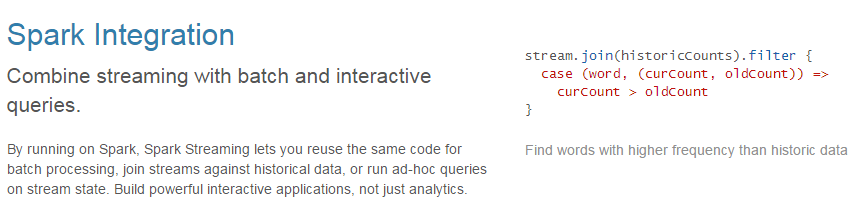
易整合到Spark体系
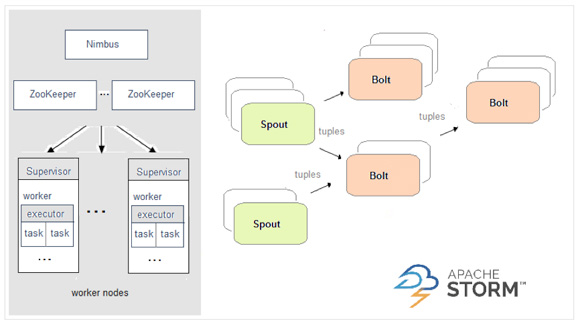
Spark与Storm的对比

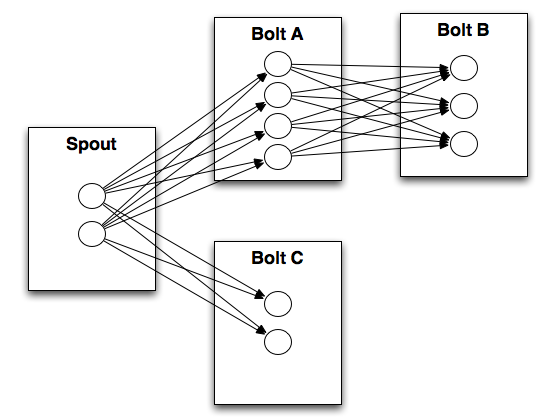
Storm注重一条一条的处理,更看重时效性
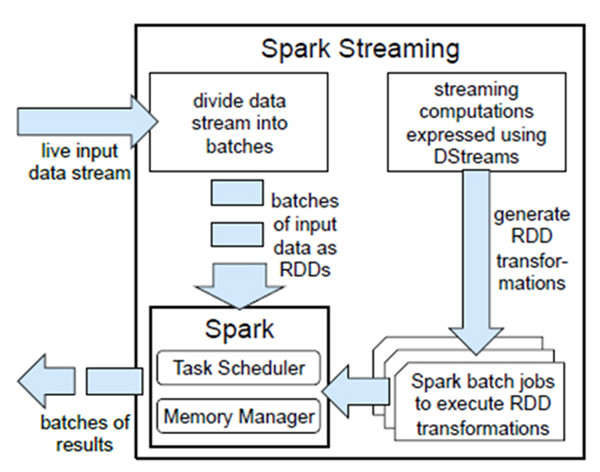
SparkStreaming注重批式处理,更看重吞吐量
Flink 是一个面向分布式数据流处理和批量数据处理的开源计算平台,高吞吐、低延迟 ,它能够基于同一个Flink运行时,提供支持流处理和批处理两种类型应用的功能。
| Spark | Storm |
|---|---|
 |
 |
| 开发语言:Scala | 开发语言:Clojure |
| 编程模型:DStream | 编程模型:Spout/Bolt |
 |
 |
Spark Streaming与Storm的应用场景
对于Storm来说:
1、建议在那种需要纯实时,不能忍受1秒以上延迟的场景下使用,比如实时金融系统,要求纯实时进行金融交易和分析
2、此外,如果对于实时计算的功能中,要求可靠的事务机制和可靠性机制,即数据的处理完全精准,一条也不能多,一条也不能少,也可以考虑使用Storm
3、如果还需要针对高峰低峰时间段,动态调整实时计算程序的并行度,以最大限度利用集群资源(通常是在小型公司,集群资源紧张的情况),也可以考虑用Storm
4、如果一个大数据应用系统,它就是纯粹的实时计算,不需要在中间执行SQL交互式查询、复杂的transformation算子等,那么用Storm是比较好的选择
对于Spark Streaming来说:
1、如果对上述适用于Storm的三点,一条都不满足的实时场景,即,不要求纯实时,不要求强大可靠的事务机制,不要求动态调整并行度,那么可以考虑使用Spark Streaming
2、考虑使用Spark Streaming最主要的一个因素,应该是针对整个项目进行宏观的考虑,即,如果一个项目除了实时计算之外,还包括了离线批处理、交互式查询等业务功能,而且实时计算中,可能还会牵扯到高延迟批处理、交互式查询等功能,那么就应该首选Spark生态,用Spark Core开发离线批处理,用Spark SQL开发交互式查询,用Spark Streaming开发实时计算,三者可以无缝整合,给系统提供非常高的可扩展性。
Spark Streaming与Storm的优劣分析
事实上,Spark Streaming绝对谈不上比Storm优秀。这两个框架在实时计算领域中,都很优秀,只是擅长的细分场景并不相同。
Spark Streaming仅仅在吞吐量上比Storm要优秀,而吞吐量这一点,也是历来挺Spark Streaming,贬Storm的人着重强调的。但是问题是,是不是在所有的实时计算场景下,都那么注重吞吐量?不尽然。因此,通过吞吐量说Spark Streaming强于Storm,不靠谱。
事实上,Storm在实时延迟度上,比Spark Streaming就好多了,前者是纯实时,后者是准实时。而且,Storm的事务机制、健壮性 / 容错性、动态调整并行度等特性,都要比Spark Streaming更加优秀。
Spark Streaming,有一点是Storm绝对比不上的,就是:它位于Spark生态技术栈中,因此Spark Streaming可以和Spark Core、Spark SQL无缝整合,也就意味着,我们可以对实时处理出来的中间数据,立即在程序中无缝进行延迟批处理、交互式查询等操作。这个特点大大增强了Spark Streaming的优势和功能。
DStream
什么是DStream
Discretized 离散的
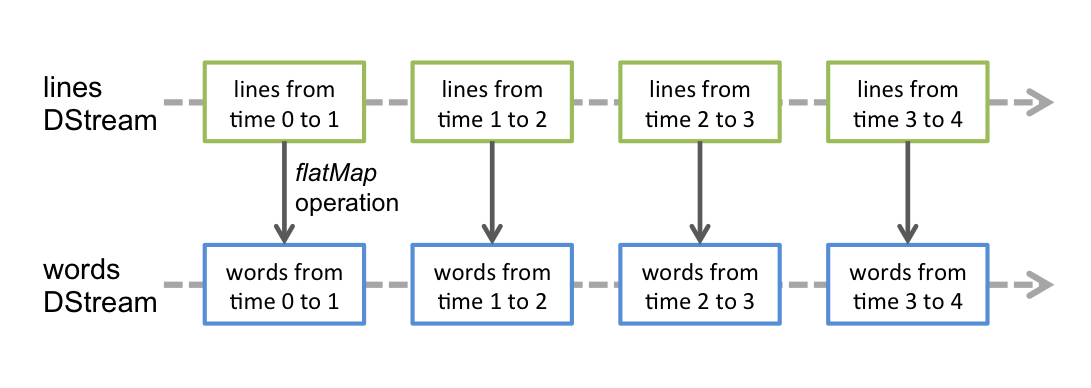
Discretized Stream是Spark Streaming的基础抽象,代表持续性的数据流和经过各种Spark原语操作后的结果数据流。在内部实现上,DStream是一系列连续的RDD来表示。每个RDD含有一段时间间隔内的数据(SparkStreaming 就是一个连续的RDD,每隔一段时间产生一个连续的RDD,我们叫做DStream)
如下图: 对数据的操作也是按照RDD为单位来进行的
 计算过程由Spark engine来完成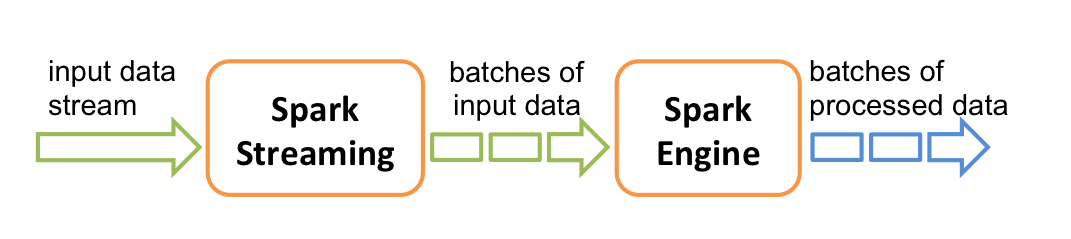
DStream相关操作
DStream上的原语与RDD的类似,分为Transformations(转换)和Output Operations(输出)两种,此外转换操作中还有一些比较特殊的原语,如:updateStateByKey()、transform()以及各种Window相关的原语。
Transformations on DStreams
| Transformation | Meaning |
|---|---|
| map(func) | Return a new DStream by passing each element of the source DStream through a function func. |
| flatMap(func) | Similar to map, but each input item can be mapped to 0 or more output items. |
| filter(func) | Return a new DStream by selecting only the records of the source DStream on which func returns true. |
| repartition(numPartitions) | Changes the level of parallelism in this DStream by creating more or fewer partitions. |
| union(otherStream) | Return a new DStream that contains the union of the elements in the source DStream and otherDStream. |
| count() | Return a new DStream of single-element RDDs by counting the number of elements in each RDD of the source DStream. |
| reduce(func) | Return a new DStream of single-element RDDs by aggregating the elements in each RDD of the source DStream using a function func (which takes two arguments and returns one). The function should be associative so that it can be computed in parallel. |
| countByValue() | When called on a DStream of elements of type K, return a new DStream of (K, Long) pairs where the value of each key is its frequency in each RDD of the source DStream. |
| reduceByKey(func, [numTasks]) | When called on a DStream of (K, V) pairs, return a new DStream of (K, V) pairs where the values for each key are aggregated using the given reduce function. Note: By default, this uses Spark’s default number of parallel tasks (2 for local mode, and in cluster mode the number is determined by the config property spark.default.parallelism) to do the grouping. You can pass an optional numTasks argument to set a different number of tasks. |
| join(otherStream, [numTasks]) | When called on two DStreams of (K, V) and (K, W) pairs, return a new DStream of (K, (V, W)) pairs with all pairs of elements for each key. |
| cogroup(otherStream, [numTasks]) | When called on a DStream of (K, V) and (K, W) pairs, return a new DStream of (K, Seq[V], Seq[W]) tuples. |
| transform(func) | Return a new DStream by applying a RDD-to-RDD function to every RDD of the source DStream. This can be used to do arbitrary RDD operations on the DStream. |
| updateStateByKey(func) | Return a new “state” DStream where the state for each key is updated by applying the given function on the previous state of the key and the new values for the key. This can be used to maintain arbitrary state data for each key. |
特殊的Transformations
- UpdateStateByKey Operation
UpdateStateByKey原语用于记录历史记录,上文中Word Count示例中就用到了该特性。若不用UpdateStateByKey来更新状态,那么每次数据进来后分析完成后,结果输出后将不在保存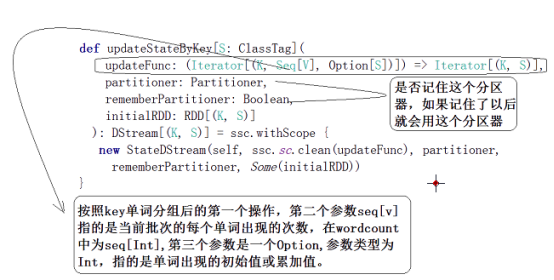
- Transform Operation
Transform原语允许DStream上执行任意的RDD-to-RDD函数。通过该函数可以方便的扩展Spark API。此外,MLlib(机器学习)以及Graphx也是通过本函数来进行结合的。
- Window Operations 窗函数
Window Operations有点类似于Storm中的State,可以设置窗口的大小和滑动窗口的间隔来动态的获取当前Steaming的允许状态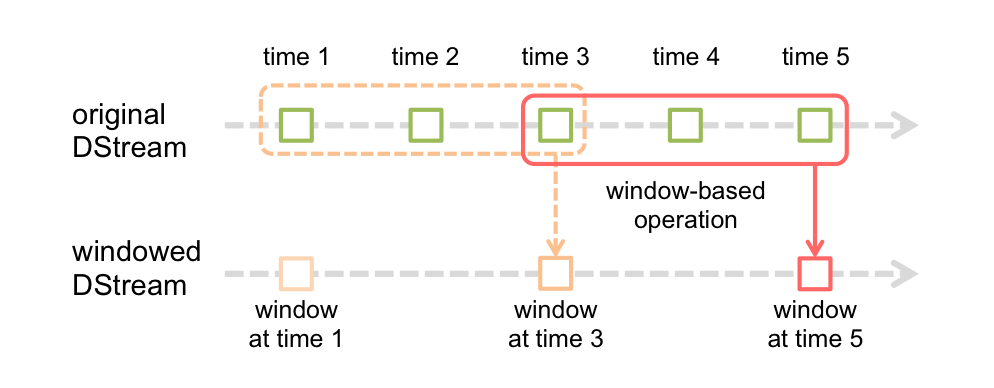
窗函数源码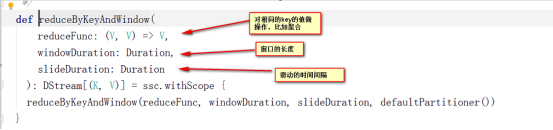
简易执行图示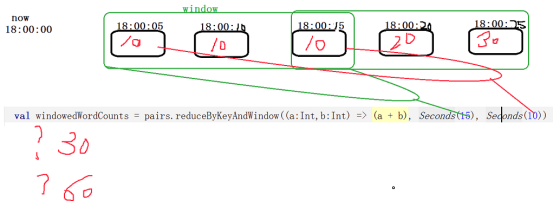
Output Operations on DStreams
Output Operations可以将DStream的数据输出到外部的数据库或文件系统,当某个Output Operations原语被调用时(与RDD的Action相同),streaming程序才会开始真正的计算过程。
| Output Operation | Meaning |
|---|---|
| print() | Prints the first ten elements of every batch of data in a DStream on the driver node running the streaming application. This is useful for development and debugging. |
| saveAsTextFiles(prefix, [suffix]) | Save this DStream’s contents as text files. The file name at each batch interval is generated based on prefix and suffix: “prefix-TIME_IN_MS[.suffix]”. |
| saveAsObjectFiles(prefix, [suffix]) | Save this DStream’s contents as SequenceFiles of serialized Java objects. The file name at each batch interval is generated based on prefix and suffix: “prefix-TIME_IN_MS[.suffix]”. |
| saveAsHadoopFiles(prefix, [suffix]) | Save this DStream’s contents as Hadoop files. The file name at each batch interval is generated based on prefix and suffix: “prefix-TIME_IN_MS[.suffix]”. |
| foreachRDD(func) | The most generic output operator that applies a function, func, to each RDD generated from the stream. This function should push the data in each RDD to an external system, such as saving the RDD to files, or writing it over the network to a database. Note that the function func is executed in the driver process running the streaming application, and will usually have RDD actions in it that will force the computation of the streaming RDDs. |
实战
用Spark Streaming实现实时WordCount
架构图: 安装并启动生产者
首先在一台Linux(ip:192.168.110.11)上用YUM安装nc工具
yum install -y nc
启动一个服务端并监听9999端口
nc -lk 9999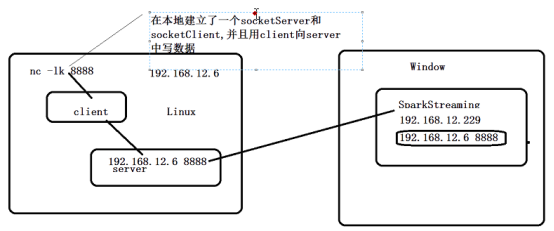
- 编写Spark Streaming程序
package cn.sfy.spark.streamingimport cn.sfy.spark.util.LoggerLevelimport org.apache.spark.SparkConfimport org.apache.spark.streaming.{Seconds, StreamingContext}object NetworkWordCount {def main(args: Array[String]) {//设置日志级别LoggerLevel.setStreamingLogLevels()//创建SparkConf并设置为本地模式运行//注意local[2]代表开两个线程val conf = new SparkConf().setMaster("local[2]").setAppName("NetworkWordCount")//设置DStream批次时间间隔为2秒val ssc = new StreamingContext(conf, Seconds(5))//通过网络读取数据val lines = ssc.socketTextStream("192.168.110.11", 9999)//将读到的数据用空格切成单词val words = lines.flatMap(_.split(" "))//将单词和1组成一个pairval pairs = words.map(word => (word, 1))//按单词进行分组求相同单词出现的次数val wordCounts = pairs.reduceByKey(_ + _)//打印结果到控制台wordCounts.print()//开始计算ssc.start()//等待停止ssc.awaitTermination()}}
2.启动Spark Streaming程序:由于使用的是本地模式“local[2]”所以可以直接在本地运行该程序
注意:要指定并行度,如在本地运行设置setMaster(“local[2]”),相当于启动两个线程,一个给receiver,一个给computer。如果是在集群中运行,必须要求集群中可用core数大于1
3.在Linux端命令行中输入单词 4.在IDEA控制台中查看结果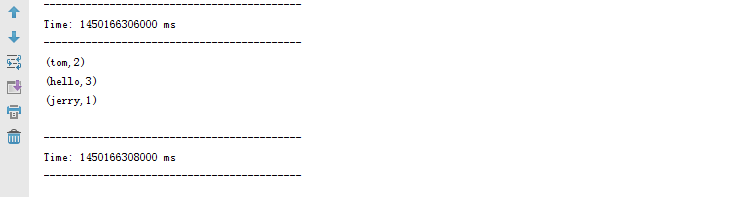
问题:结果每次在Linux段输入的单词次数都被正确的统计出来,但是结果不能累加!如果需要累加需要使用updateStateByKey(func)来更新状态,下面给出一个例子:
package cn.sfy.spark.streamingimport cn.sfy.spark.util.LoggerLevelimport org.apache.spark.{HashPartitioner, SparkConf}import org.apache.spark.streaming.{StreamingContext, Seconds}object NetworkUpdateStateWordCount {/*** String : 单词 hello* Seq[Int] :单词在当前批次出现的次数* Option[Int] : 历史结果*/val updateFunc = (iter: Iterator[(String, Seq[Int], Option[Int])]) => {//iter.flatMap(it=>Some(it._2.sum + it._3.getOrElse(0)).map(x=>(it._1,x)))iter.flatMap{case(x,y,z)=>Some(y.sum + z.getOrElse(0)).map(m=>(x, m))}}def main(args: Array[String]) {LoggerLevel.setStreamingLogLevels()val conf = new SparkConf().setMaster("local[2]").setAppName("NetworkUpdateStateWordCount")val ssc = new StreamingContext(conf, Seconds(5))//做checkpoint 写入共享存储中ssc.checkpoint("c://aaa")val lines = ssc.socketTextStream("192.168.110.11", 9999)//reduceByKey 结果不累加//val result = lines.flatMap(_.split(" ")).map((_, 1)).reduceByKey(_+_)//updateStateByKey结果可以累加但是需要传入一个自定义的累加函数:updateFuncval results = lines.flatMap(_.split(" ")).map((_,1)).updateStateByKey(updateFunc, new HashPartitioner(ssc.sparkContext.defaultParallelism), true)results.print()ssc.start()ssc.awaitTermination()}}
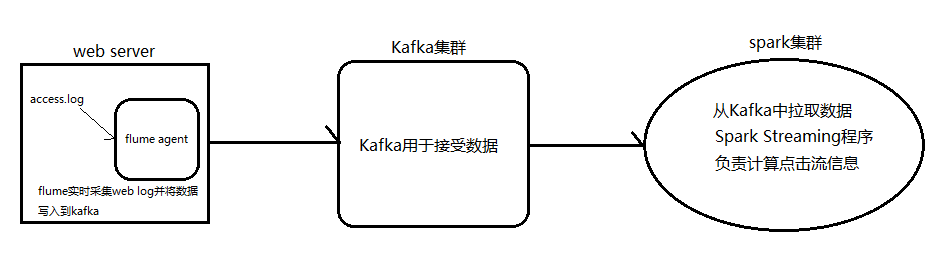
Spark Streaming整合Kafka完成网站点击流实时统计
安装并配置zk
安装并配置Kafka
启动zk ./zkServer.sh start
启动Kafka
./bin/kafka-server-start.sh -daemon config/server.properties &
创建topic
bin/kafka-topics.sh --create --zookeeper cdh1:2181,Mini1:2181--replication-factor 3 --partitions 3 --topic second
编写Spark Streaming应用程序
package cn.sfy.spark.streamingpackage cn.sfy.sparkimport org.apache.spark.{HashPartitioner, SparkConf}import org.apache.spark.storage.StorageLevelimport org.apache.spark.streaming.kafka.KafkaUtilsimport org.apache.spark.streaming.{Seconds, StreamingContext}object UrlCount {val updateFunc = (iterator: Iterator[(String, Seq[Int], Option[Int])]) => {iterator.flatMap{case(x,y,z)=> Some(y.sum + z.getOrElse(0)).map(n=>(x, n))}}def main(args: Array[String]) {//接收命令行中的参数val Array(zkQuorum, groupId, topics, numThreads, hdfs) = args//创建SparkConf并设置AppNameval conf = new SparkConf().setAppName("UrlCount")//创建StreamingContextval ssc = new StreamingContext(conf, Seconds(2))//设置检查点ssc.checkpoint(hdfs)//设置topic信息val topicMap = topics.split(",").map((_, numThreads.toInt)).toMap//重Kafka中拉取数据创建DStreamval lines = KafkaUtils.createStream(ssc, zkQuorum ,groupId, topicMap, StorageLevel.MEMORY_AND_DISK).map(_._2)//切分数据,截取用户点击的urlval urls = lines.map(x=>(x.split(" ")(6), 1))//统计URL点击量val result = urls.updateStateByKey(updateFunc, new HashPartitioner(ssc.sparkContext.defaultParallelism), true)//将结果打印到控制台result.print()ssc.start()ssc.awaitTermination()}}

若有收获,就点个赞吧
0 人点赞


