hbase数据模型
 NOSQL:非关系型数据库
Row Key
与nosql数据库们一样,row key是用来检索记录的主键。访问HBASE table中的行,只有三种方式:
1.通过单个row key访问
2.通过row key的range(正则)
3.全表扫描
Row key行键 (Row key)可以是任意字符串(最大长度 是 64KB,实际应用中长度一般为 10-100bytes),在HBASE内部,row key保存为字节数组。存储时,数据按照Row key的字典序(byte order)排序存储。设计key时,要充分排序存储这个特性,将经常一起读取的行存储放到一起。(位置相关性)
Columns Family
列簇 :HBASE表中的每个列,都归属于某个列族。列族是表的schema的一部 分(而列不是),必须在使用表之前定义。列名都以列族作为前缀。例如 courses:history,courses:math都属于courses 这个列族。
Cell
由{row key, columnFamily, version} 唯一确定的单元。cell中 的数据是没有类型的,全部是字节码形式存贮。
关键字:无类型、字节码
Time Stamp
HBASE 中通过rowkey和columns确定的为一个存贮单元称为cell。每个 cell都保存 着同一份数据的多个版本。版本通过时间戳来索引。时间戳的类型是 64位整型。时间戳可以由HBASE(在数据写入时自动 )赋值,此时时间戳是精确到毫秒 的当前系统时间。时间戳也可以由客户显式赋值。如果应用程序要避免数据版 本冲突,就必须自己生成具有唯一性的时间戳。每个 cell中,不同版本的数据按照时间倒序排序,即最新的数据排在最前面。
为了避免数据存在过多版本造成的的管理 (包括存贮和索引)负担,HBASE提供 了两种数据版本回收方式。一是保存数据的最后n个版本,二是保存最近一段 时间内的版本(比如最近七天)。用户可以针对每个列族进行设置。
hbase命令
启动hbase
注意:启动hbase之前,必须保证hadoop集群和zookeeper集群是可用的。
start-hbase.sh
页面:http://cdh1:60010/
命令的进退
1、hbase提供了一个shell的终端给用户交互
#$HBASE_HOME/bin/hbase shell
2、如果退出执行quit命令
#$HBASE_HOME/bin/hbase shell
……
>quit
命令
| 名称 | 命令表达式 |
|---|---|
| 创建表 | create ‘表名’, ‘列族名1’,’列族名2’,’列族名N’ |
| 查看所有表 | list |
| 描述表 | describe ‘表名’ |
| 判断表存在 | exists ‘表名’ |
| 判断是否禁用启用表 | is_enabled ‘表名’ is_disabled ‘表名’ |
| 添加记录 | put ‘表名’, ‘rowKey’, ‘列族 : 列‘ , ‘值’ |
| 查看记录rowkey下的所有数据 | get ‘表名’ , ‘rowKey’ |
| 查看表中的记录总数 | count ‘表名’ |
| 获取某个列族 | get ‘表名’,’rowkey’,’列族’ |
| 获取某个列族的某个列 | get ‘表名’,’rowkey’,’列族:列’ |
| 删除记录 | delete ‘表名’ ,‘行名’ , ‘列族:列’ |
| 删除整行 | deleteall ‘表名’,’rowkey’ |
| 删除一张表 | 先要屏蔽该表,才能对该表进行删除 第一步 disable ‘表名’ ,第二步 drop ‘表名’ |
| 清空表 | truncate ‘表名’ |
| 查看所有记录 | scan “表名” |
| 查看某个表某个列中所有数据 | scan “表名” , {COLUMNS=>’列族名:列名’} |
| 更新记录 | 就是重写一遍,进行覆盖,hbase没有修改,都是追加 |
查看表结构
hbase(main):005:0> describe ‘emp1’
创建表
hbase(main):002:0> create ‘emp1’,’info1’,’info2’
删除表
1.hbase(main):007:0> disable ‘emp’
2.hbase(main):008:0> drop ‘emp’
赋值 ‘1234’ rowkey 相当于id
hbase(main):011:0> put ‘emp1’,’1234’,’info1:name’,’zhangsan’
scan扫描表
相同的id(row key)对某一列重新添加就是覆盖
添加列簇下的列

添加新的行(rowkey)
根据rowkey查询所有
获取某一列族
获取列族的某个列
删除列族中的某一列
删除后
删除行(行键)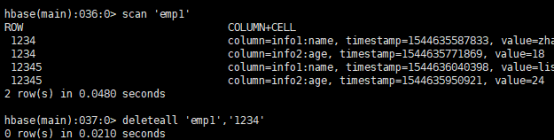
删除后
清空表数据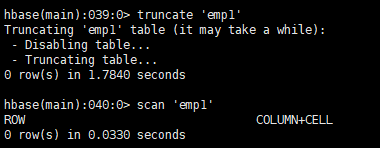
hbase开发
配置
HBaseConfiguration
包:org.apache.hadoop.hbase.HBaseConfiguration
作用:通过此类可以对HBase进行配置
用法实例:
Configuration config = HBaseConfiguration.create();
说明: HBaseConfiguration.create() 默认会从classpath 中查找 hbase-site.xml 中的配置信息,初始化 Configuration。
使用方法:
static Configuration config = null;static {config = HBaseConfiguration.create();config.set("hbase.zookeeper.quorum", "slave1,slave2,slave3");config.set("hbase.zookeeper.property.clientPort", "2181");}
表管理类
HBaseAdmin
包:org.apache.hadoop.hbase.client.HBaseAdmin
作用:提供接口关系HBase 数据库中的表信息
用法:
HBaseAdmin admin = new HBaseAdmin(config);
表描述类
HTableDescriptor
包:org.apache.hadoop.hbase.HTableDescriptor
作用:HTableDescriptor 类包含了表的名字以及表的列族信息
表的schema(设计)
用法:
HTableDescriptor htd =new HTableDescriptor(tablename);
htd.addFamily(new HColumnDescriptor(“myFamily”));
列族的描述类
HColumnDescriptor
包:org.apache.hadoop.hbase.HColumnDescriptor
作用:HColumnDescriptor 维护列族的信息
用法:
htd.addFamily(new HColumnDescriptor(“myFamily”));
创建表的操作
CreateTable(一般我们用shell创建表)static Configuration config = null;static {config = HBaseConfiguration.create();config.set("hbase.zookeeper.quorum", "slave1,slave2,slave3");config.set("hbase.zookeeper.property.clientPort", "2181");}HBaseAdmin admin = new HBaseAdmin(config);HTableDescriptor desc = new HTableDescriptor(tableName);HColumnDescriptor family1 = new HColumnDescriptor(“f1”);HColumnDescriptor family2 = new HColumnDescriptor(“f2”);desc.addFamily(family1);desc.addFamily(family2);admin.createTable(desc);
删除表
HBaseAdmin admin = new HBaseAdmin(config);admin.disableTable(tableName);admin.deleteTable(tableName);
创建一个表的类
HTable
包:org.apache.hadoop.hbase.client.HTable
作用:HTable 和 HBase 的表通信
用法:
// 普通获取表
HTable table = new HTable(config,Bytes.toBytes(tablename);
// 通过连接池获取表
Connection connection = ConnectionFactory.createConnection(config);
HTableInterface table = connection.getTable(TableName.valueOf(“user”));
单条插入数据
Put
包:org.apache.hadoop.hbase.client.Put
作用:插入数据
用法:
Put put = new Put(row);
p.add(family,qualifier,value);
说明:向表 tablename 添加 “family,qualifier,value”指定的值。
示例代码:
Connection connection = ConnectionFactory.createConnection(config);
HTableInterface table = connection.getTable(TableName.valueOf(“user”));
Put put = new Put(Bytes.toBytes(rowKey));
put.add(Bytes.toBytes(family), Bytes.toBytes(qualifier),Bytes.toBytes(value));
table.put(put);
批量插入
批量插入List<Put> list = new ArrayList<Put>();Put put = new Put(Bytes.toBytes(rowKey));//获取put,用于插入put.add(Bytes.toBytes(family), Bytes.toBytes(qualifier),Bytes.toBytes(value));//封装信息list.add(put);table.put(list);//添加记录
删除数据
Delete
包:org.apache.hadoop.hbase.client.Delete
作用:删除给定rowkey的数据
用法:
Delete del= new Delete(Bytes.toBytes(rowKey));
table.delete(del);
代码实例Connection connection = ConnectionFactory.createConnection(config);HTableInterface table = connection.getTable(TableName.valueOf("user"));Delete del= new Delete(Bytes.toBytes(rowKey));table.delete(del);
单条查询
Get
包:org.apache.hadoop.hbase.client.Get
作用:获取单个行的数据
用法:
HTable table = new HTable(config,Bytes.toBytes(tablename));
Get get = new Get(Bytes.toBytes(row));
Result result = table.get(get);
说明:获取 tablename 表中 row 行的对应数据
代码示例:Connection connection = ConnectionFactory.createConnection(config);HTableInterface table = connection.getTable(TableName.valueOf("user"));Get get = new Get(rowKey.getBytes());Result row = table.get(get);for (KeyValue kv : row.raw()) {System.out.print(new String(kv.getRow()) + " ");System.out.print(new String(kv.getFamily()) + ":");System.out.print(new String(kv.getQualifier()) + " = ");System.out.print(new String(kv.getValue()));System.out.print(" timestamp = " + kv.getTimestamp() + "\n");}
批量查询
ResultScanner
包:org.apache.hadoop.hbase.client.ResultScanner
作用:获取值的接口
用法:
ResultScanner scanner = table.getScanner(scan);
For(Result rowResult : scanner){
Bytes[] str = rowResult.getValue(family,column);
}
说明:循环获取行中列值。
代码示例:Connection connection = ConnectionFactory.createConnection(config);HTableInterface table = connection.getTable(TableName.valueOf("user"));Scan scan = new Scan();scan.setStartRow("a1".getBytes());scan.setStopRow("a20".getBytes());ResultScanner scanner = table.getScanner(scan);for (Result row : scanner) {System.out.println("\nRowkey: " + new String(row.getRow()));for (KeyValue kv : row.raw()) {System.out.print(new String(kv.getRow()) + " ");System.out.print(new String(kv.getFamily()) + ":");System.out.print(new String(kv.getQualifier()) + " = ");System.out.print(new String(kv.getValue()));System.out.print(" timestamp = " + kv.getTimestamp() + "\n");}}
hbase过滤器
FilterList
FilterList 代表一个过滤器列表,可以添加多个过滤器进行查询,多个过滤器之间的关系有:
与关系(符合所有):FilterList.Operator.MUST_PASS_ALL
或关系(符合任一):FilterList.Operator.MUST_PASS_ONE
使用方法:FilterList filterList = new FilterList(FilterList.Operator.MUST_PASS_ONE);Scan s1 = new Scan();filterList.addFilter(new SingleColumnValueFilter(Bytes.toBytes(“f1”), Bytes.toBytes(“c1”), CompareOp.EQUAL,Bytes.toBytes(“v1”) ) );filterList.addFilter(new SingleColumnValueFilter(Bytes.toBytes(“f1”), Bytes.toBytes(“c2”), CompareOp.EQUAL,Bytes.toBytes(“v2”) ) );// 添加下面这一行后,则只返回指定的cell,同一行中的其他cell不返回s1.addColumn(Bytes.toBytes(“f1”), Bytes.toBytes(“c1”));s1.setFilter(filterList); //设置filterResultScanner ResultScannerFilterList = table.getScanner(s1); //返回结果列表
MapReduce操作Hbase
实现方法
Hbase对MapReduce提供支持,它实现了TableMapper类和TableReducer类,我们只需要继承这两个类即可。
1、写个mapper继承TableMapper
参数:Text:mapper的输出key类型; IntWritable:mapper的输出value类型。
其中的map方法如下:
map(ImmutableBytesWritable key, Result value,Context context)
参数:key:rowKey;value: Result ,一行数据; context上下文
2、写个reduce继承TableReducer
参数:Text:reducer的输入key; IntWritable:reduce的输入value;
ImmutableBytesWritable:reduce输出到hbase中的rowKey类型。
其中的reduce方法如下:
reduce(Text key, Iterable
参数: key:reduce的输入key;values:reduce的输入value;
准备表
1、建立数据来源表‘word’,包含一个列族‘content’
向表中添加数据,在列族中放入列‘info’,并将短文数据放入该列中,如此插入多行,行键为不同的数据即可
2、建立输出表‘stat’,包含一个列族‘content’
3、通过Mr操作Hbase的‘word’表,对‘content:info’中的短文做词频统计,并将统计结果写入‘stat’表的‘content:info中’,行键为单词
实现
package com.itcast.hbase;

import java.io.IOException;
import java.util.ArrayList;
import java.util.List;

import org.apache.hadoop.conf.Configuration;
import org.apache.hadoop.hbase.HBaseConfiguration;
import org.apache.hadoop.hbase.HColumnDescriptor;
import org.apache.hadoop.hbase.HTableDescriptor;
import org.apache.hadoop.hbase.client.HBaseAdmin;
import org.apache.hadoop.hbase.client.HTable;
import org.apache.hadoop.hbase.client.Put;
import org.apache.hadoop.hbase.client.Result;
import org.apache.hadoop.hbase.client.Scan;
import org.apache.hadoop.hbase.io.ImmutableBytesWritable;
import org.apache.hadoop.hbase.mapreduce.TableMapReduceUtil;
import org.apache.hadoop.hbase.mapreduce.TableMapper;
import org.apache.hadoop.hbase.mapreduce.TableReducer;
import org.apache.hadoop.hbase.util.Bytes;
import org.apache.hadoop.io.IntWritable;
import org.apache.hadoop.io.Text;
import org.apache.hadoop.mapreduce.Job;
/**
 * mapreduce操作hbase
 * @author wilson
 *
 */
public class HBaseMr {
    /**
     * 创建hbase配置
     */
    static Configuration config = null;
    static {
        config = HBaseConfiguration.create();
        config.set("hbase.zookeeper.quorum", "slave1,slave2,slave3");
        config.set("hbase.zookeeper.property.clientPort", "2181");
    }
    /**
     * 表信息
     */
    public static final String tableName = "word";//表名1
    public static final String colf = "content";//列族
    public static final String col = "info";//列
    public static final String tableName2 = "stat";//表名2
    /**
     * 初始化表结构,及其数据
     */
    public static void initTB() {
        HTable table=null;
        HBaseAdmin admin=null;
        try {
            admin = new HBaseAdmin(config);//创建表管理
            /*删除表*/
            if (admin.tableExists(tableName)||admin.tableExists(tableName2)) {
                System.out.println("table is already exists!");
                admin.disableTable(tableName);
                admin.deleteTable(tableName);
                admin.disableTable(tableName2);
                admin.deleteTable(tableName2);
            }
            /*创建表*/
                HTableDescriptor desc = new HTableDescriptor(tableName);
                HColumnDescriptor family = new HColumnDescriptor(colf);
                desc.addFamily(family);
                admin.createTable(desc);
                HTableDescriptor desc2 = new HTableDescriptor(tableName2);
                HColumnDescriptor family2 = new HColumnDescriptor(colf);
                desc2.addFamily(family2);
                admin.createTable(desc2);
            /*插入数据*/
                table = new HTable(config,tableName);
                table.setAutoFlush(false);
                table.setWriteBufferSize(5);
                List<Put> lp = new ArrayList<Put>();
                Put p1 = new Put(Bytes.toBytes("1"));
                p1.add(colf.getBytes(), col.getBytes(),    ("The Apache Hadoop software library is a framework").getBytes());
                lp.add(p1);
                Put p2 = new Put(Bytes.toBytes("2"));p2.add(colf.getBytes(),col.getBytes(),("The common utilities that support the other Hadoop modules").getBytes());
                lp.add(p2);
                Put p3 = new Put(Bytes.toBytes("3"));
                p3.add(colf.getBytes(), col.getBytes(),("Hadoop by reading the documentation").getBytes());
                lp.add(p3);
                Put p4 = new Put(Bytes.toBytes("4"));
                p4.add(colf.getBytes(), col.getBytes(),("Hadoop from the release page").getBytes());
                lp.add(p4);
                Put p5 = new Put(Bytes.toBytes("5"));
                p5.add(colf.getBytes(), col.getBytes(),("Hadoop on the mailing list").getBytes());
                lp.add(p5);
                table.put(lp);
                table.flushCommits();
                lp.clear();
        } catch (Exception e) {
            e.printStackTrace();
        } finally {
            try {
                if(table!=null){
                    table.close();
                }
            } catch (IOException e) {
                e.printStackTrace();
            }
        }
    }
    /**
     * MyMapper 继承 TableMapper
     * TableMapper<Text,IntWritable>
     * Text:输出的key类型,
     * IntWritable:输出的value类型
     */
    public static class MyMapper extends TableMapper<Text, IntWritable> {
        private static IntWritable one = new IntWritable(1);
        private static Text word = new Text();
        @Override
        //输入的类型为:key:rowKey; value:一行数据的结果集Result
        protected void map(ImmutableBytesWritable key, Result value,
                Context context) throws IOException, InterruptedException {
            //获取一行数据中的colf:col
            String words = Bytes.toString(value.getValue(Bytes.toBytes(colf), Bytes.toBytes(col)));// 表里面只有一个列族,所以我就直接获取每一行的值
            //按空格分割
            String itr[] = words.toString().split(" ");
            //循环输出word和1
            for (int i = 0; i < itr.length; i++) {
                word.set(itr[i]);
                context.write(word, one);
            }
        }
    }
    /**
     * MyReducer 继承 TableReducer
     * TableReducer<Text,IntWritable>
     * Text:输入的key类型,
     * IntWritable:输入的value类型,
     * ImmutableBytesWritable:输出类型,表示rowkey的类型
     */
    public static class MyReducer extends
            TableReducer<Text, IntWritable, ImmutableBytesWritable> {
        @Override
        protected void reduce(Text key, Iterable<IntWritable> values,
                Context context) throws IOException, InterruptedException {
            //对mapper的数据求和
            int sum = 0;
            for (IntWritable val : values) {//叠加
                sum += val.get();
            }
            // 创建put,设置rowkey为单词
            Put put = new Put(Bytes.toBytes(key.toString()));
            // 封装数据
            put.add(Bytes.toBytes(colf), Bytes.toBytes(col),Bytes.toBytes(String.valueOf(sum)));
            //写到hbase,需要指定rowkey、put
            context.write(new ImmutableBytesWritable(Bytes.toBytes(key.toString())),put);
        }
    }

    public static void main(String[] args) throws IOException,
            ClassNotFoundException, InterruptedException {
        config.set("df.default.name", "hdfs://master:9000/");//设置hdfs的默认路径
        config.set("hadoop.job.ugi", "hadoop,hadoop");//用户名,组
        config.set("mapred.job.tracker", "master:9001");//设置jobtracker在哪
        //初始化表
        initTB();//初始化表
        //创建job
        Job job = new Job(config, "HBaseMr");//job
        job.setJarByClass(HBaseMr.class);//主类
        //创建scan
        Scan scan = new Scan();
        //可以指定查询某一列
        scan.addColumn(Bytes.toBytes(colf), Bytes.toBytes(col));
        //创建查询hbase的mapper,设置表名、scan、mapper类、mapper的输出key、mapper的输出value
        TableMapReduceUtil.initTableMapperJob(tableName, scan, MyMapper.class,Text.class, IntWritable.class, job);
        //创建写入hbase的reducer,指定表名、reducer类、job
        TableMapReduceUtil.initTableReducerJob(tableName2, MyReducer.class, job);
        System.exit(job.waitForCompletion(true) ? 0 : 1);
    }
}

若有收获,就点个赞吧
0 人点赞


