简介
JSP之所以可以在html中运行Java代码,是因为JSP被转译成了Servlet
xx.jsp -> xx_jsp.java -> xx_jsp.class,执行xx_jsp生成html,通过http传输html响应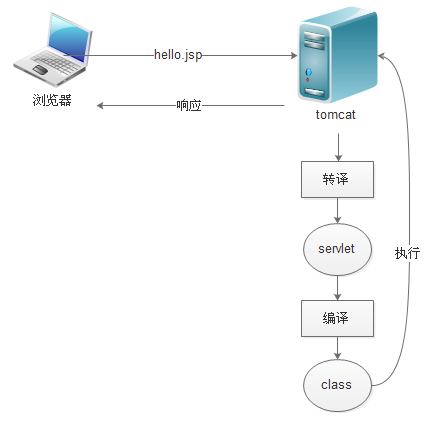
页面元素
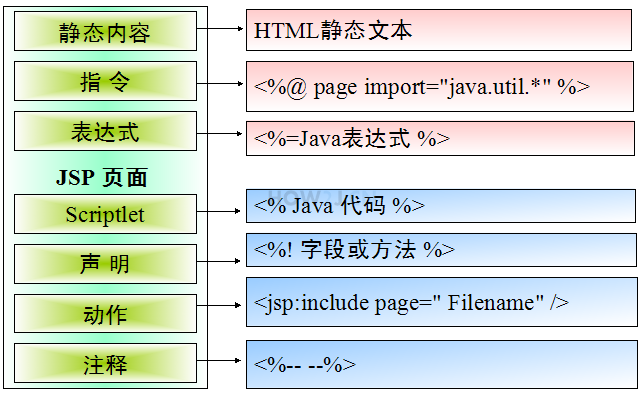
指令
page指令
contentType:浏览器编码方式;pageEncoding:该jsp编码方式;import:导入其他类
include指令
页面包含,分指令include和动作include
指令include:被包含 jsp 会被插入到包含 jsp 中,一起转译成一个 .java 文件
动作 include:被包含的 jsp 不会插入到当前 jsp 的转译 .java 中,而是生成一个独立的 .java 文件。当前 jsp 的转译 .java 文件会在服务端访问该 .java 文件,然后把返回的结果,嵌入到响应中
在参数传递方面,指令include对导致两个jsp合并成一个java文件,所以不存在传参的问题
动作include有传参的需要,要通过
<%@include file="filePath" %><jsp:include page="filePath"><jsp:param name="" value="" /></jsp:include>
跳转
客户端跳转和服务端跳转
客户端跳转和Servlet中是一样的
服务端跳转也可以和Servlet一样,或使用动作<jsp:forward
<% response.sendRedirect(filePath);%><% request.getRequestDispatcher(filePath).forward(request, response); %><jsp:forward page="filePath" />
作用域
pageContext当前页面,只能在当前页面访问,在其他页面就不能访问了
requestContext 一次请求,如果发生的是服务器跳转,从XX.jsp 到YY.jsp,这其实是一次跳转,所以在YY.jsp 中可以取到在XX.jsp 中的值。这是一种页面间传递数据的方式
sessionContext 当前会话
applicationContext 全局,所有用户共享。application对象是ServletContext接口的实例。application 映射的是web应用本身
<%pageContext.setAttribute("键名","值");%><%=pageContext.getAttribute("键名")%><%request.setAttribute("键名","值");%><%=request.getAttribute("键名")><%session.setAttribute("键名","值");response.sendRedirect("XX.jsp");%><%=session.getAttribute("键名")><%application.setAttribute("键名","值");System.out.println(application == request.getServletContext());response.sendRedirect("XX.jsp");%><%=application.getAttribute("键名")%>
隐式对象
不需要显示定义,直接就可以使用的对象。一共9个
request,response,out,pageContext,session,application,page,config,exception
page对象即表示当前对象,JSP 会被编译为一个Servlet 类,运行的时候是一个Servlet 实例,page 即代表this
config 可以获取一些在web.xml 中初始化的参数
exception对象只有当前页面的<%@page 指令设置为 isErrorPage=”true” 的时候才可以使用,同时,在其他页面需要设置<%@page 指令 errorPage=”” 来指定一个专门处理异常的页面
JSTL标准标签库和EL表达式语言
JSTL
需要导入两个jar 包,jstl.jar 和standard.jar
指令设置:<%@ taglib uri=”http://java.sun.com/jsp/jstl/core“ prefix=”c”%>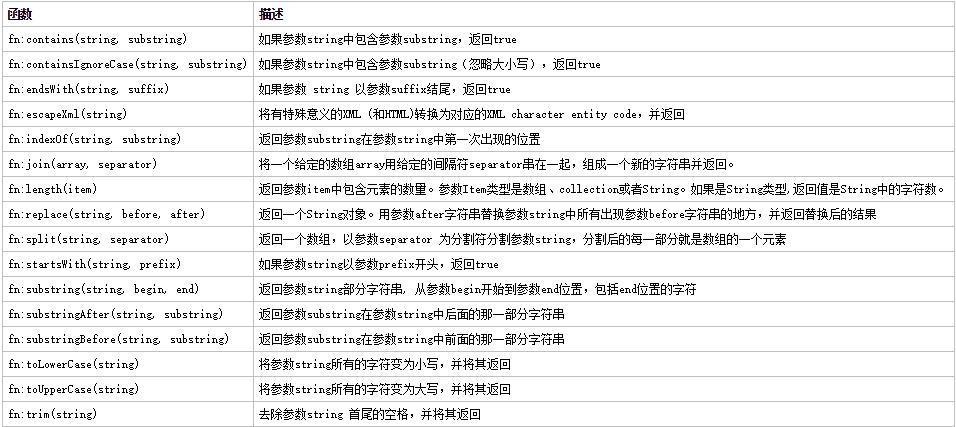
EL
为了保证EL 表达式能够正常使用,需要在<%@page 标签里加上isELIgnored=”false”
可以取值作用域的优先级:pageContext>request>session>application
eq:进行条件判断,大大简化了JSTL 的 c:if 和c:choose 代码;eq相等 ne、neq不相等
gt大于, lt小于;gte、ge大于等于;lte、le 小于等于;not非 mod求模
is [not] div by是否能被某数整除 ;is [not] even是否为偶数 ;is [not] odd是否为奇
会话
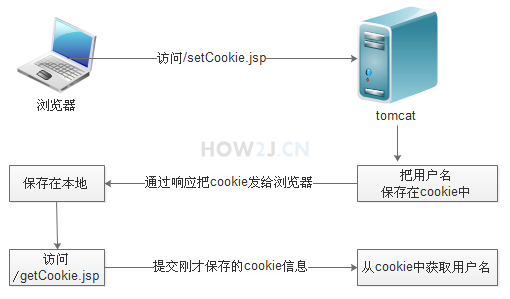
Cookie
需要 import=”javax.servlet.http.Cookie”
<%Cookie c = new Cookie("键","值");c.setMaxAge(保留时间);c.setPath("主机名");response.addCookie(c);%><%Cookie[] cookies = request.getCookies();if(null != cookies){for(int d = 0;d <= cookies.length - 1;d++){out.print(cookies[d].getName() + ":" +cookies[d].getValue() + "<br/>");}}%>
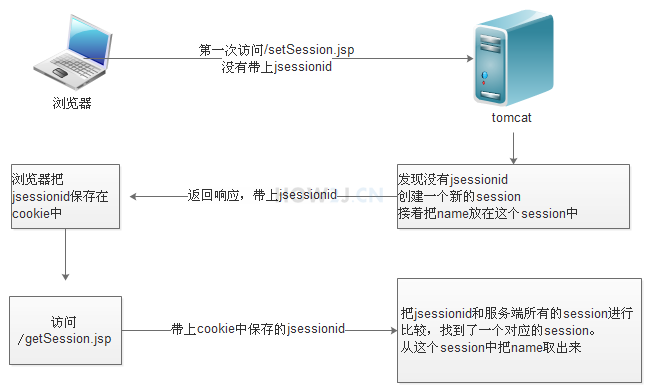
Session
需要 import=”javax.servlet.http.Cookie”
可以在tomcat/conf/web.xml 中的session-config 配置进行调整session 的有效期
如果浏览器把cookie 功能关闭,要使用<%=response.encodeURL(“getSession.jsp”)%>
<%session.setAttribute("键名","值");%><%String name = (String)session.getAttribute("键名");%>

若有收获,就点个赞吧
0 人点赞


