一、Ids4基本概念
1.1-什么IdentityServer4?
IdentityServer是基于OpenID Connect的协议标准的身份认证和授权程序,他实现了OpenID Connect和Oauth 2.0协议。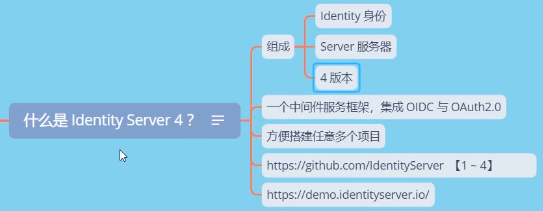
1.2-IdentityServer4能做什么?

1.3-IdentityServer4知识点?
1)常见术语解析: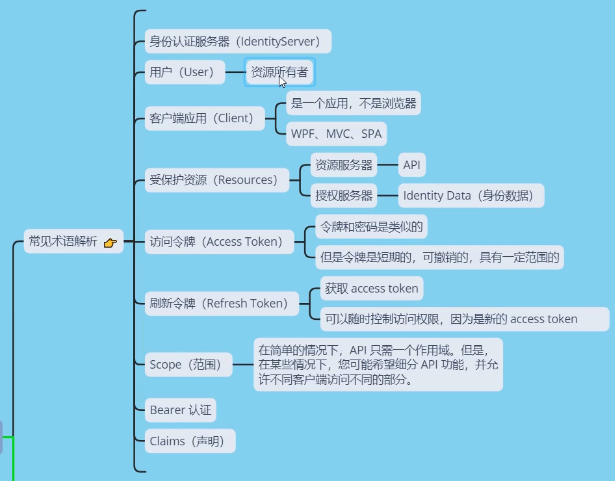
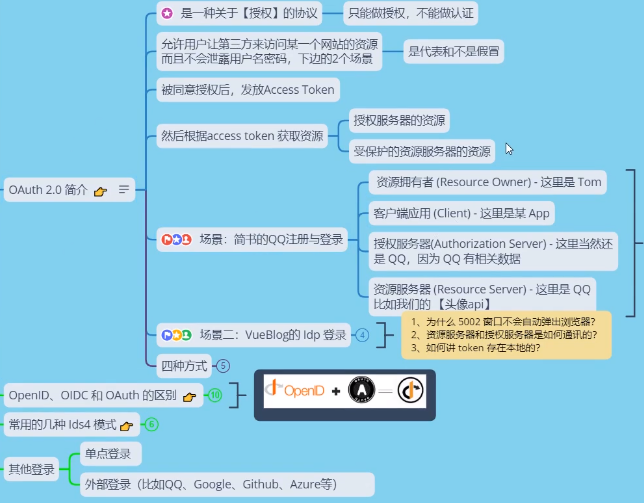
2)JWT与OAuth2.0:

3)常见的4种授权模式: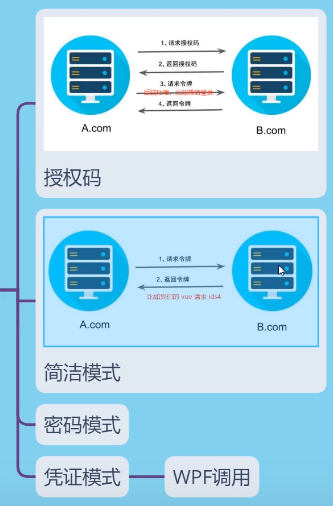
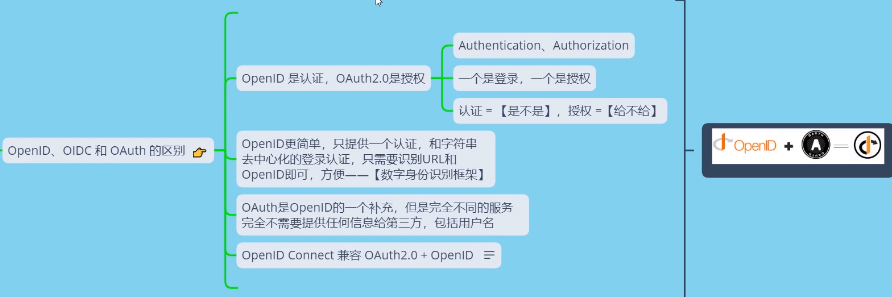
1.4-OpenID、OpenIDConnct、OAuth的区别?
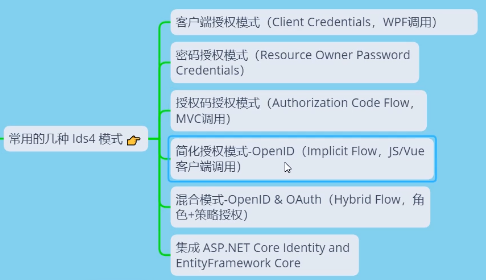
1.5-IdentityServer4常用的几种模式

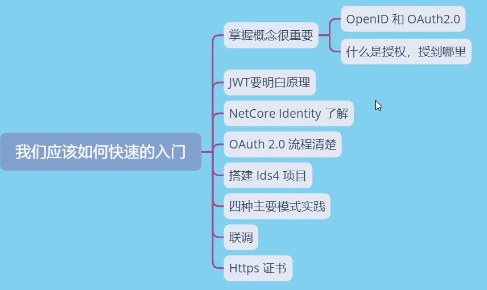
1.6-如何快速入门?
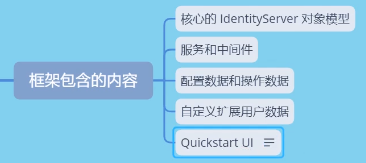
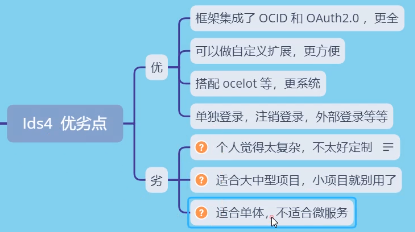
1.7-Ids4优劣势
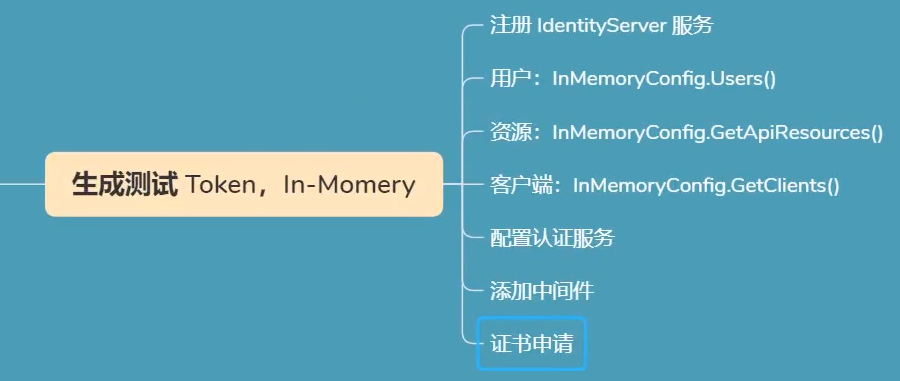
二、快速搭建Ids4基础项目并生成Token

命令: dotnet new -i IdentityServer4.Templates
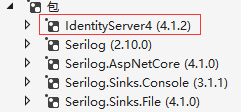
(1)创建项目,然后引用Nuget包。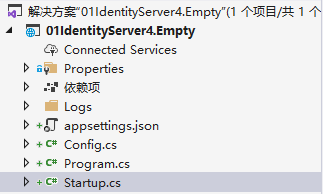
(2)【Program.cs】
public class Program{public static int Main(string[] args){//SerilogLog.Logger = new LoggerConfiguration().MinimumLevel.Debug().MinimumLevel.Override("Microsoft", LogEventLevel.Error).MinimumLevel.Override("System", LogEventLevel.Error).MinimumLevel.Override("Microsoft.AspNetCore.Authentication", LogEventLevel.Information).Enrich.FromLogContext().WriteTo.Console(outputTemplate: "[{Timestamp:HH:mm:ss} {Leve1}] {SourceContext} {NewLine} {Message:1j} {NewLine}{Exception} {NewLine}", theme: AnsiConsoleTheme.Literate).WriteTo.File(Path.Combine("Logs", @"logs.log"),rollingInterval:RollingInterval.Infinite).CreateLogger();try{Log.Information("Starting host...");//创建一个宿主CreateHostBuilder(args).Build().Run();return 0;}catch (Exception ex) {Log.Fatal("Host terminated " + ex.Message);return 1;}finally{//关闭日志Log.CloseAndFlush();}}public static IHostBuilder CreateHostBuilder(string[] args) =>Host.CreateDefaultBuilder(args).ConfigureWebHostDefaults(webBuilder =>{webBuilder.UseStartup<Startup>();//使用Serilog日志接管IlogwebBuilder.UseSerilog();});}
(3)【Startup.cs】
public class Startup{// This method gets called by the runtime. Use this method to add services to the container.// For more information on how to configure your application, visit https://go.microsoft.com/fwlink/?LinkID=398940public void ConfigureServices(IServiceCollection services){var builder = services.AddIdentityServer().AddInMemoryIdentityResources(Config.Ids)//用户.AddTestUsers(Config.Users)//资源API.AddInMemoryApiResources(Config.Apis)//客户端.AddInMemoryClients(Config.Clients);//开发环境-添加证书builder.AddDeveloperSigningCredential();//配置认证证书服务services.AddAuthentication();}// This method gets called by the runtime. Use this method to configure the HTTP request pipeline.public void Configure(IApplicationBuilder app, IWebHostEnvironment env){if (env.IsDevelopment()){app.UseDeveloperExceptionPage();}app.UseRouting();//中间件配置app.UseIdentityServer();app.UseEndpoints(endpoints =>{endpoints.MapGet("/", async context =>{await context.Response.WriteAsync("Hello World!");});});}
(3)【Config.cs】
public static IEnumerable<IdentityResource> Ids =>new IdentityResource[]{new IdentityResources.OpenId()};/// <summary>/// API资源/// </summary>public static IEnumerable<ApiResource> Apis => new ApiResource[] {//添加一个API资源new ApiResource("blog.core.api","Blog.Core API")};/// <summary>/// 客户端信息/// </summary>public static IEnumerable<Client> Clients => new Client[] {//客户端信息new Client{ClientId="blog",//定义客户端IDClientSecrets=new[]{ new Secret("secret".Sha256())},//Client用来获取Token//这里是使用用户名密码和ClientCredentials来换取token的方式,//ClientCredentials允许Client只使用ClientSecrets来获取token,这种方式适合呢种没有用于参与的api动作。AllowedGrantTypes=GrantTypes.ResourceOwnerPasswordAndClientCredentials,AllowedScopes=new[]{ "blog.core.api" }//允许访问的API资源}};/// <summary>/// 用户信息/// </summary>public static List<TestUser> Users =>new List<TestUser>{new TestUser{SubjectId="1",Username="admin",Password="admin"}};
三、Ids4持久化操作
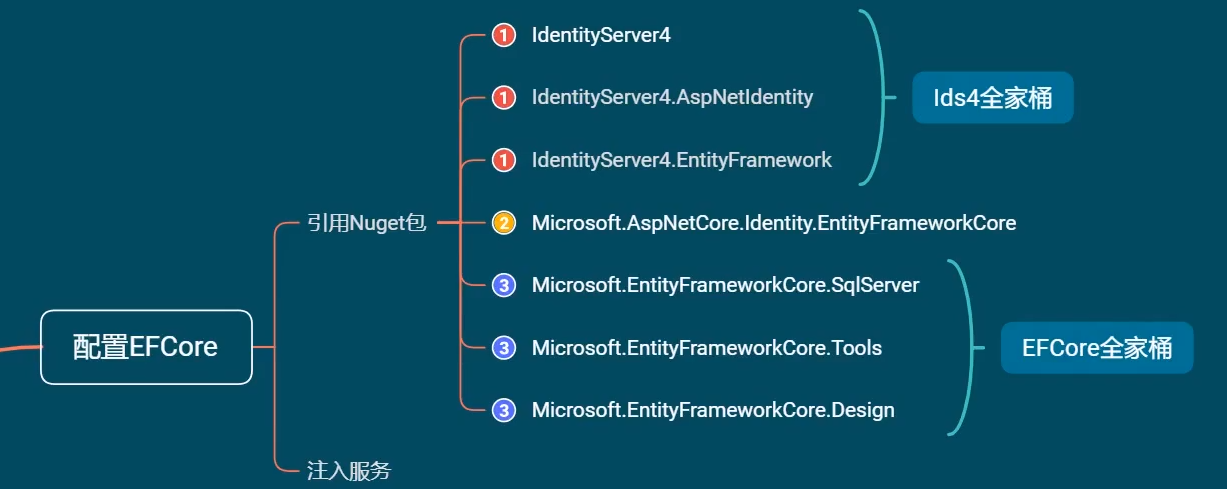
一、迁移项目( 使用 Package Manager Console ): 1、add-migration InitialIdentityServerPersistedGrantDbMigration -c PersistedGrantDbContext -o Data/Migrations/IdentityServer/PersistedGrantDb 2、add-migration InitialIdentityServerConfigurationDbMigration -c ConfigurationDbContext -o Data/Migrations/IdentityServer/ConfigurationDb 3、add-migration AppDbMigration -c ApplicationDbContext -o Data
4、update-database -context PersistedGrantDbContext
5、update-database -context ConfigurationDbContext
6、update-database -context ApplicationDbContext
—针对:Kimi.OAuth/Web
1、add-migration InitialIdentityServerPersistedGrantDbMigration -c PersistedGrantDbContext -o EntityFrameworkCore/DbContext/Migrations/IdentityServer/PersistedGrantDb 2、add-migration InitialIdentityServerConfigurationDbMigration -c ConfigurationDbContext -o EntityFrameworkCore/DbContext/Migrations/IdentityServer/ConfigurationDb 3、add-migration AppDbMigration -c ApplicationDbContext -o EntityFrameworkCore/DbContext/Migrations/ApplicationUser
四、数据库全表解析
4.1-操作部分
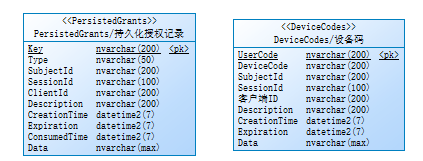
4.2-配置部分(资源)
//Identityxxx(3)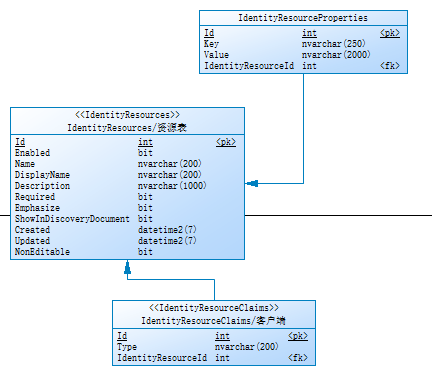
//APIxxx(6)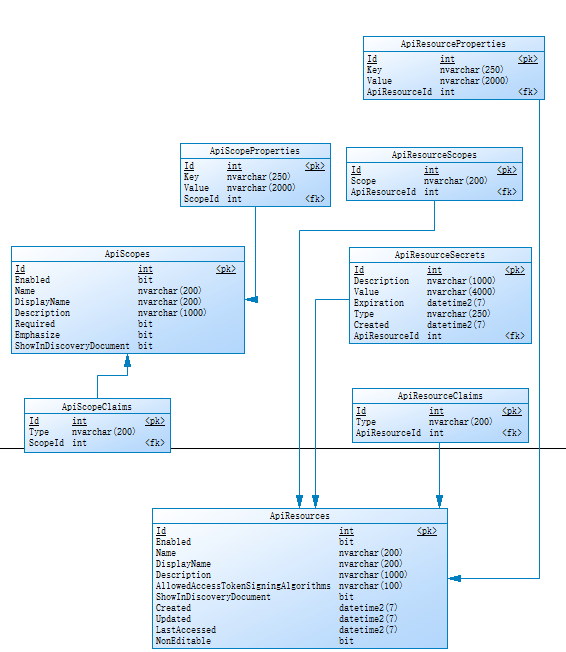
//Clientxxx(10)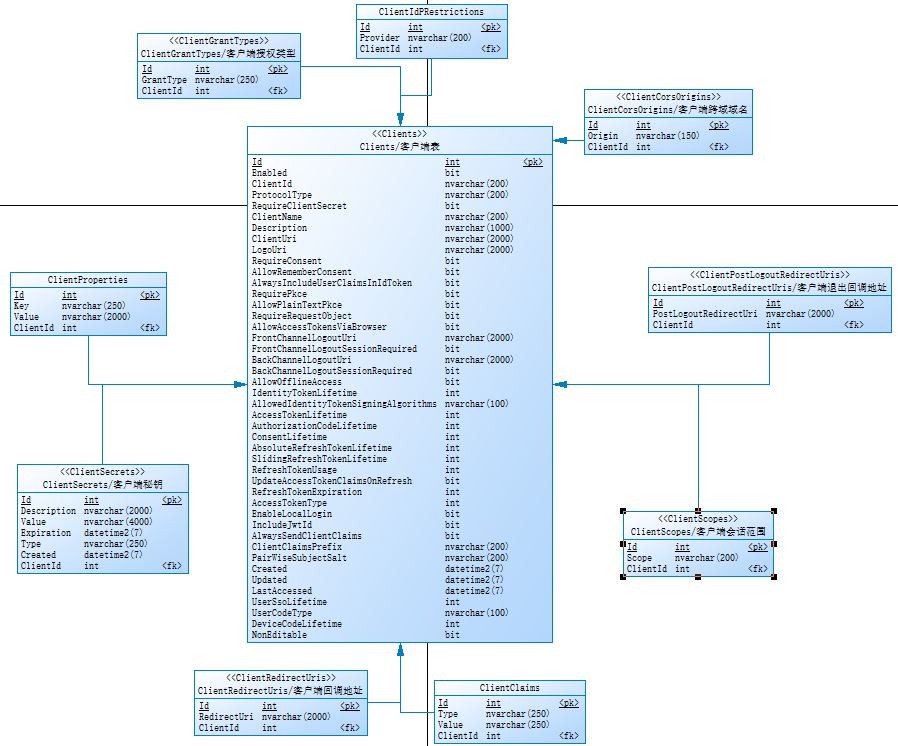
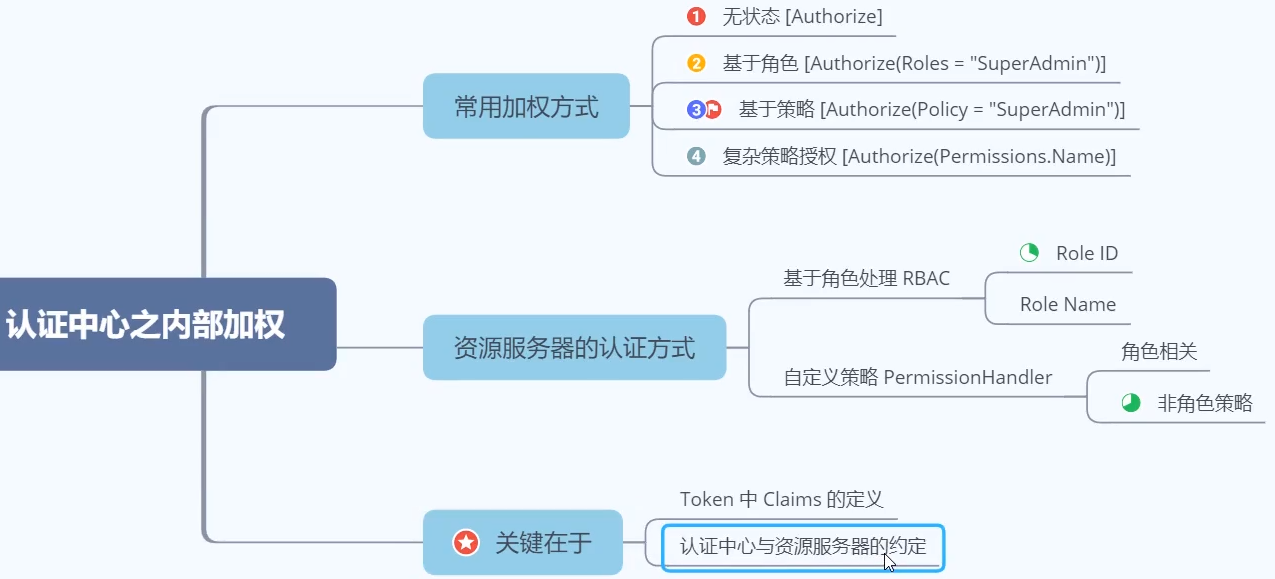
五、认证中心之内外加权

若有收获,就点个赞吧
0 人点赞


