本文实现了一种自动记录请求响应日志的一种方式,
在没有链路追踪系统的情况下也可以快速定位问题。
这里使用了 mongodb存储日志 laravel的mongodb包使用了jenssegers/mongodb
对于错误日志,加入请求标识符,可通过日志收集工具例如Elastic stack在kibana中检索标识符查看相关信息
创建request event
namespace App\Light\RequestID;use Illuminate\Contracts\Support\Arrayable;class RequestEndEvent implements \JsonSerializable, Arrayable{public $request_id; //请求标识public $elapse_time; //消耗时间public $url; //urlpublic $params; //请求参数public $method; //请求方法public $header; //请求public $uid; //用户idpublic $created_at; //请求时间public $response_content;//响应内容public $response_header; //响应头public $tag; //标签public $memory; //消耗内存/*** 实现arrayable* @return array*/public function toArray(){try {$res = json_decode($this->response_content, true);} catch (\Exception $exception) {$res = $this->response_content;}return ['request_id' => $this->request_id,'elapse_time' => $this->elapse_time,'url' => $this->url,'params' => $this->params,'method' => $this->method,'header' => $this->header,'uid' => $this->uid,'created_at' => $this->created_at,'response_content' => $res,'response_header' => $this->response_header,'tag' => $this->tag,'memory' => $this->memory,];}/*** 实现JsonSerializable* @return array*/public function jsonSerialize(){return $this->toArray();}/*** 支持打印* @return false|string*/public function __toString(){return json_encode($this, JSON_UNESCAPED_UNICODE);}}
创建事件监听器
<?phpnamespace App\Light\RequestID;use Carbon\Carbon;use Illuminate\Support\Facades\DB;class RequestEndEventListener{public function handle(RequestEndEvent $event){//持久化DB::connection('mongodb')->collection('request_' . Carbon::now()->format('Ym'))->insert($event->toArray());}}
创建RequestID处理类
<?phpnamespace App\Light\RequestID;use Carbon\Carbon;use Illuminate\Support\Facades\Auth;use Ramsey\Uuid\Uuid;class RequestID{//请求IDprivate $ID;//请求开始时间,不严格private $startTime;/**获取请求ID* @return mixed*/public function get(){return $this->ID;}/*** 生成请求ID* @throws \Exception*/public function begin(){if (empty($this->ID)) {$this->ID = Uuid::uuid4()->toString();$this->startTime = microtime(true);}}/*** 结束请求* @param \Illuminate\Http\Request $request* @param $response*/public function end(\Illuminate\Http\Request $request, $response){$event = new RequestEndEvent();$event->request_id = ResID::get();$event->elapse_time = round(microtime(true) - $this->startTime, 4);$event->url = $request->fullUrl();$event->params = $request->all();$event->method = $request->method();$event->header = $request->header();$uid = Auth::id();$event->uid = $uid ? $uid : 0;$event->created_at = Carbon::now()->toDateTimeString();$event->response_content = $response->getContent();$event->response_header = $response->headers->all();// $event->tag = '';$event->tag = $request->route()->getTag();//这里可以使用获取路由自定义标签//触发事件event($event);}}
创建门面
<?phpnamespace App\Light\RequestID;use Illuminate\Support\Facades\Facade;/*** 支持IDE语法提示* @method static \App\Light\RequestID\RequestID get()* @method static \App\Light\RequestID\RequestID begin()* @method static \App\Light\RequestID\RequestID end($request, $response)*/class ResID extends Facade{/*** Get the registered name of the component.** @return string*/protected static function getFacadeAccessor(){return 'RequestID';}}
创建Terminate中间件
<?phpnamespace App\Light\RequestID;use Closure;class RequestIDMiddlerware{public function handle($request, Closure $next){//开始生成请求标识ResID::begin();return $next($request);}public function terminate(\Illuminate\Http\Request $request, $response){//保存请求数据ResID::end($request, $response);}}
创建服务提供者
<?phpnamespace App\Light\RequestID;use Illuminate\Foundation\Support\Providers\EventServiceProvider;class RequestIDServiceProvider extends EventServiceProvider{protected $listen = [RequestEndEvent::class => [RequestEndEventListener::class,//注册事件处理器],];public function register(){//绑定单例$this->app->singleton('RequestID', function () {return new RequestID();});//注册全局中间件$kernel = $this->app[\Illuminate\Contracts\Http\Kernel::class];// 放在所有中间件的最前面,确保其他中间件都能获取到$kernel->prependMiddleware(RequestIDMiddlerware::class);}}
注册服务提供者
config/app.php加入
//request服务提供者App\Light\RequestID\RequestIDServiceProvider::class,
日志中加入请求标识
app/Exceptions/Handle.php加入
/*** 增加日志记录全局请求标识** @return array*/protected function context(){return array_merge(parent::context(), ['request_id' => ResID::get(), //让错误日志也记录请求标识]);}
查看结果
访问任意URL,可看到Mongodb中自动记录了该请求相关信息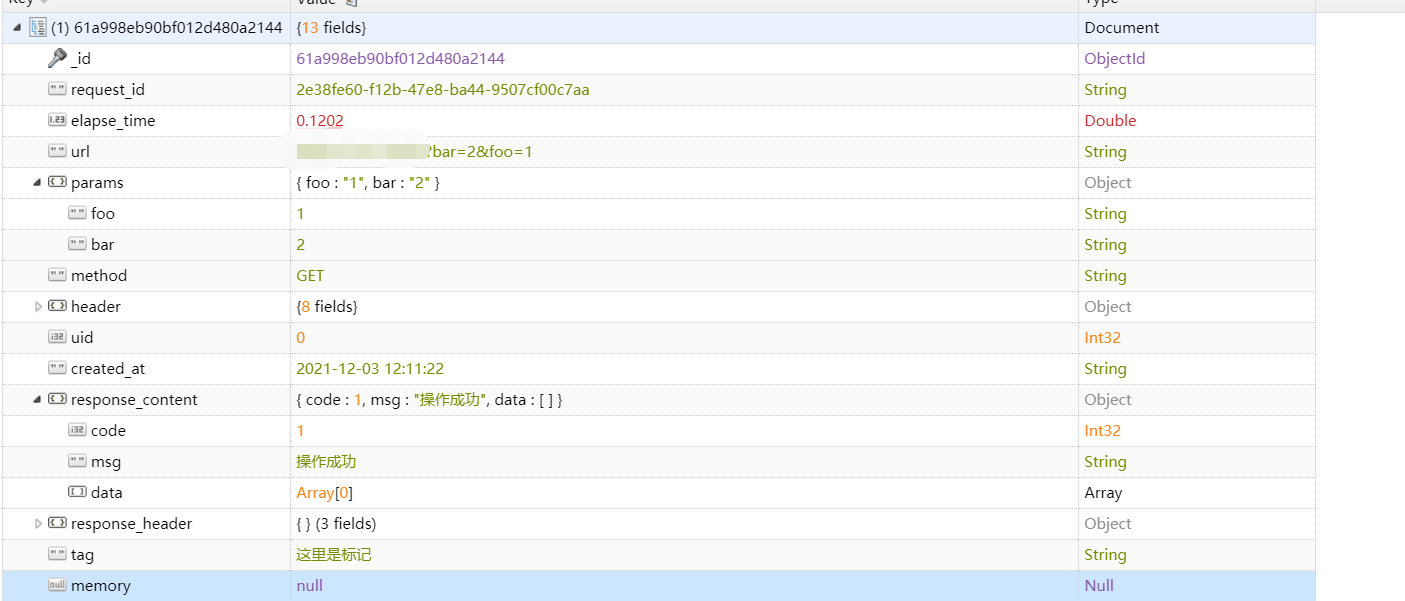
查看报错日志
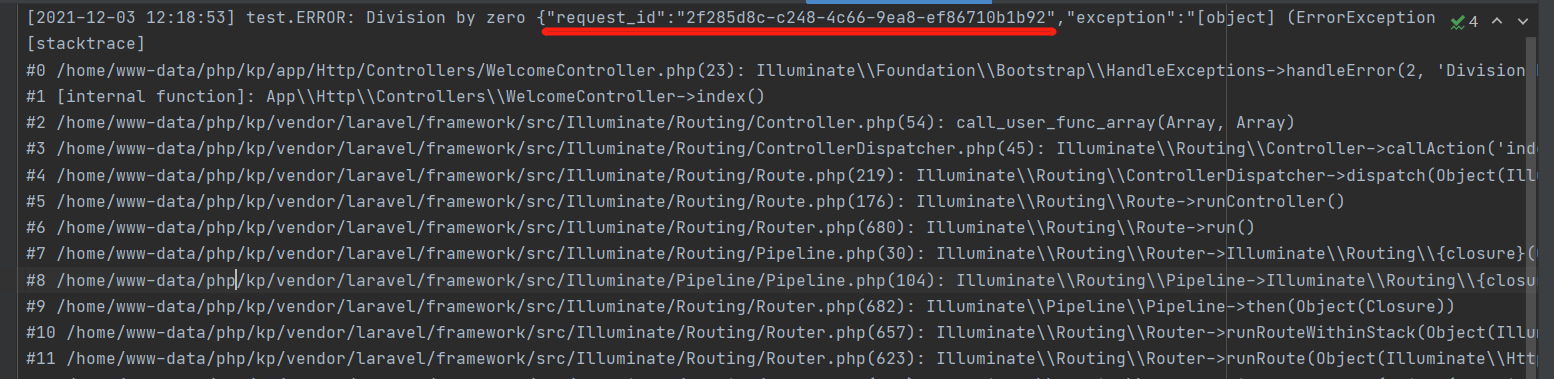

若有收获,就点个赞吧
0 人点赞


