一、Hive知识相关
1、hive基本类型的相互转化:
cast(字段名 as 转化的类型)
字符串拼接:
concat(string A,string B)字符串的拼接
concat(分隔符,string A,string B) 指定分隔符的字符串拼接
2、将hive中的数据导出到本地服务器上:
insert overwrite local directory ‘目标地址’ select ……..
例:insert overwrite local directory ‘sale_car/user_gprs_day_pro’ select url from user_gprs_day_pro where day=’20170812’ and url like ‘%http://m.autohome.com%‘;
3、将hive中的数据导出到集群中:
insert overwrite directory ‘目标地址’ select ……..
例:insert overwrite directory ‘/zhhs_zd/input_sale_car/user_gprs_day_pro/20170817’
select concat_ws(‘|’,) from user_gprs_day_pro
where day=’20170817’;
4、创建分区表:
create table if not exists user_gprs_day_pro(
telno string,
start_time string,
web_name string
) partitioned by(day string)
row format delimited fields terminated by ‘\t’;
4.1创建外部表:
create external table exter_table(
> id int,
> name string,
> age int,
> tel string)
> location ‘/home/wyp/external’;
这里需要指定外部表存放数据的路径(当然,你也可以不指定外部表的存放路径,这样Hive将在HDFS上的/user/hive/warehouse/文件夹下以外部表的表名创建一个文件夹,并将属于这个表的数据存放在这里)
4.2、Hive中内部表与外部表的区别:
1、加载数据
1)hive内部表,上传数据时:
如果数据是hdfs的文件,那么会将hdfs的文件移动到hive所在的hdfs路径下
如果数据是linux的文件,那么是拷贝到hive所在的hdfs路径下
2) hive外部表,上传数据时:
数据是hdfs的文件,那么仅仅是针对hdfs的文件创建一个快捷链接而已,
如果数据是linux的文件,那么是拷贝到hive外表所在的hdfs路径下
3)加载数据的时候,普通表不会检查数据的格式(如果格式不正确,就会存储为null),而外部表会检查源数据的格式(如果格式不正确,加载失败)。
那么,应该如何选择使用哪种表呢?在大多数情况没有太多的区别,因此选择只是个人喜好的问题。但是作为一个经验,如果所有处理都需要由Hive完成,那么你应该创建内部表,否则使用外部表。原文链接:http://blog.csdn.net/sunlei1980/article/details/46572679
2、在删除表的时候,Hive将会把属于内部表的元数据和数据全部删掉;而删除外部表的时候,Hive仅仅删除外部表的元数据,数据是不会删除的!
5、将清洗的结果加载到hive表中:
load data inpath ‘/zhhs_zd/output_sale_car/user_gprs_day_pro_20170826/‘
into table user_gprs_day_pro partition(day=’20170826’);
6、删除某个分区中的数据:
alter table user_gprs_day_pro drop partition (day=’20170817’);
6.1、删除表:
drop table 表名; drop table 表名 purge; ——永久性删除,不准备再恢复
6.2、删除表中的数据(保留表结构):
truncate table 表名; ——不能删除外部表
也可以使用overwrite来覆盖前面的数据
7、给表增加分区:
alter table user_gprs_day_pro add if not exists partition (day=’20170819’,province=’011’) location ‘/unicom/CDD/W004_bak/20170819/011’;
alter table user_gprs_day_pro add if not exists partition (day=’20170819’,province=’036’) location
‘/unicom/CDD/W004_bak/20170819/036’;
alter table user_gprs_day_pro add if not exists partition (day=’20170819’,province=’038’) location
‘/unicom/CDD/W004_bak/20170819/038’;
8、查看分区:
show partitions 表名;
9、查看表结构:
show create table 表名;
describe table_name;#查看表结构
10、修改表名(rename to):
alter table 旧表名 rename to 新表名;
10、修改分区表的名称:
alter table table_name partition 旧分区 rename to 新分区;
例: ALTER TABLE employee PARTITION (year=’1203’) RENAME TO PARTITION (Yoj=’1203’);
10.1、修改字段名(change):
alter table table_name change old_field new_field 字段类型
10.2、修改字段类型:
ALTER TABLE dc_mf_device_stock CHANGE date_time date_time int;(把date_time 由string类型转成int)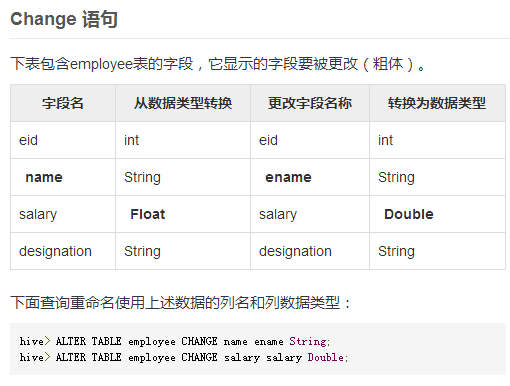
10.2、添加一列:
alter table table_name add columns(字段名1 字段类型1 comment ‘字段说明’,字段名2 字段类型2)
10.3、替换列(replace):
alter table table_name replace columns (
ename STRING name string,
eid INT empid int
)
11、时间相关函数:
unix_timestamp()——获取系统的时间,转成时间戳格式
unix_timestamp(‘20170831’,’yyyymmdd’)——按照固定是格式转成时间戳
from_unixtime(1504084217000,’yyyy-MM-dd’)——将时间戳转化成指定的格式输出
date_sub(’2017-09-08‘,7)——时间减数字,返回7天之后的日期
datediff(’2017-09-08‘,’2017-09-03‘)——日期减日期,返回天数
例:【20170908执行的结果】
select date_sub(from_unixtime(unix_timestamp(),’yyyy-MM-dd’),7) from user_gprs_day_pro limit;——2017-09-01
select from_unixtime(unix_timestamp()-7246060,’yyyyMMdd’) from user_gprs_day_pro limit 2;
——20170901
select datediff(from_unixtime(unix_timestamp(‘20170831’,’yyyymmdd’),’yyyy-mm-dd’),from_unixtime(unix_timestamp(‘20170816’,’yyyymmdd’),’yyyy-mm-dd’)) from user_gprs_day_pro limit 2;
——15
12、hive行转列函数
create table aaaaa as
select car_name,
age,
stage,
intention
from (
select concat_ws(‘,’,car_name1,car_name2,car_name3,car_name4,car_name5) car_names,
age,
stage,
intention
from quick_sale_car
) a
lateral view explode(split(car_names,’,’)) car_names as car_name;
13、列转行: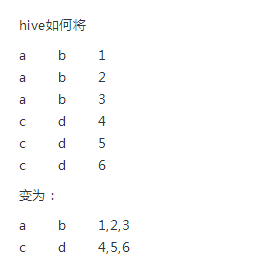
create table car_browse_name as
select
t.telno,
concat_ws(‘,’,collect_set(a.car_name)) car_names
from user_gprs_day_pro t
left join car_name_and_id a
on a.web_name = t.web_name and a.car_id=t.car_id group by t.telno;
14、row_number函数
row_number() over (partition by t.telno order by t.in_time desc) row_id
15、if exists 和 if not exists
drop database if exists db_name;
11. 中位数函数:percentile
【语法: percentile(BIGINT col, p)】
返回值: double
说明: 求准确的第pth个百分位数,p必须介于0和1之间,但是col字段目前只支持整数,不支持浮点数类型
【语法: percentile(BIGINT col, array(p1 [, p2]…))】
返回值: array
说明: 功能和上述类似,之后后面可以输入多个百分位数,返回类型也为array,其中为对应的百分位数。
举例:
select percentile(score,<0.2,0.4>) from lxw_dual;取0.2,0.4位置的数据
12、 locate(string substr, string str[, int pos])——pos也可以没有
查找字符串str中的pos位置后字符串substr第一次出现的位置,返回值为int
16、hive教程:
http://www.yiibai.com/hive/hive_create_table.html#article-start
17、打印hive启动过程的log:
hive -hiveconf hive.root.logger=DEBUG,console
18、用户自定义的UDF函数:
1)Hive可以允许用户编写自己定义的函数UDF,来在查询中使用。Hive中有3种UDF:
UDF:操作单个数据行,产生单个数据行;
UDAF:操作多个数据行,产生一个数据行。
UDTF:操作一个数据行,产生多个数据行一个表作为输出。
2)用户构建的UDF使用过程如下:
第一步:继承UDF或者UDAF或者UDTF,重写evaluate方法。
org.apache.hadoop.hive.ql.exec.UDF;
第二步:将写好的类打包为jar。如hivefirst.jar.
第三步:进入到Hive外壳环境中,利用add jar /home/hadoop/hivefirst.jar.注册该jar文件
第四步:为该类起一个别名,create temporary function mylength as ‘com.whut.StringLength’;这里注意UDF只是为这个Hive会话临时定义的。
第五步:在select中使用mylength();
详细地址:http://blog.csdn.net/bitcarmanlee/article/details/51249260
3)UDAF
用户的UDAF必须继承了org.apache.hadoop.hive.ql.exec.UDAF;
用户的UDAF必须包含至少一个实现了org.apache.hadoop.hive.ql.exec的静态类,诸如常见的实现了 UDAFEvaluator。
一个计算函数必须实现的5个方法的具体含义如下:
init():主要是负责初始化计算函数并且重设其内部状态,一般就是重设其内部字段。一般在静态类中定义一个内部字段来存放最终的结果。
iterate():每一次对一个新值进行聚集计算时候都会调用该方法,计算函数会根据聚集计算结果更新内部状态。当输入值合法或者正确计算了,则就返回true。
terminatePartial():Hive需要部分聚集结果的时候会调用该方法,必须要返回一个封装了聚集计算当前状态的对象。
merge():Hive进行合并一个部分聚集和另一个部分聚集的时候会调用该方法。
terminate():Hive最终聚集结果的时候就会调用该方法。计算函数需要把状态作为一个值返回给用户。
部分聚集结果的数据类型和最终结果的数据类型可以不同。
4)UDTF
UDTF(User-Defined Table-Generating Functions) 用来解决 输入一行输出多行(On-to-many maping) 的需求。
编写自己需要的UDTF继承
org.apache.hadoop.hive.ql.udf.generic.GenericUDTF
实现initialize, process, close三个方法
UDTF首先会调用initialize方法,此方法返回UDTF的返回行的信息(返回个数,类型)。初始化完成后,会调用process方法,对传入的参数进行处理,可以通过forword()方法把结果返回。最后close()方法调用,对需要清理的方法进行清理。
UDTF有两种使用方法,一种直接放到select后面,一种和lateral view一起使用。
1)
直接select中使用:
select explode_map(properties) as (col1,col2) fromsrc;
不可以添加其他字段使用:
select a, explode_map(properties) as (col1,col2) fromsrc
不可以嵌套调用:
select explode_map(explode_map(properties)) fromsrc
不可以和group by/cluster by/distribute by/sort by一起使用:
select explode_map(properties) as (col1,col2) from srcgroup by col1, col2
和lateral view一起使用:
select src.id, mytable.col1, mytable.col2 from src lateral view explode_map(properties) mytable as col1, col2;
lateral view用于和split, explode等UDTF一起使用,它能够将一行数据拆成多行数据,在此基础上可以对拆分后的数据进行聚合。lateral view首先为原始表的每行调用UDTF,UTDF会把一行拆分成一或者多行,lateral view再把结果组合,产生一个支持别名表的虚拟表。
LATERAL VIEW udtf(expression) tableAlias AS columnAlias
其中 columnAlias是多个用’,’分割的虚拟列名,这些列名从属于表tableAlias
19、coalesce(null,11,12,13,null)返回其参数中的第一个非空表达式,如果全部为null,就返回null:
select Coalesce(null,null,1,2,null)union
select Coalesce(null,11,12,13,null)union
select Coalesce(111,112,113,114,null)
返回结果:
1
11
111
*20、Hive的数据类型
| 基本数据类型 | ||
|---|---|---|
| 类型 | 描述 | 示例 |
| TINYINT | 1个字节(8位)有符号整数 | 1 |
| SMALLINT | 2字节(16位)有符号整数 | 1 |
| INT | 4字节(32位)有符号整数 | 1 |
| BIGINT | 8字节(64位)有符号整数 | 1 |
| FLOAT | 4字节(32位)单精度浮点数 | 1.0 |
| DOUBLE | 8字节(64位)双精度浮点数 | 1.0 |
| BOOLEAN | true/false | true |
| STRING | 字符串 | ‘xia’,”xia” |
| 复杂数据类型 | ||
|---|---|---|
| 类型 | 描述 | 示例 |
| ARRAY | 一组有序字段。字段的类型必须相同 | Array(1,2) |
| MAP | 一组无序的键/值对。键的类型必须是原子的,值可以是任何类型,同一个映射的键的类型必须相同,值得类型也必须相同 | Map(‘a’,1,’b’,2) |
| STRUCT | 一组命名的字段。字段类型可以不同 | Struct(‘a’,1,1,0) |
二、Hive内置的运算符
1、关系运算符: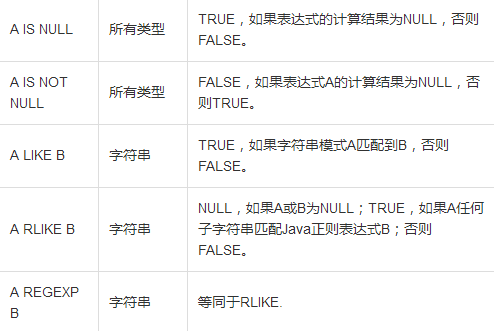
2、排序函数 order by 和 sort by的区别:
1)order by为全局排序,只有一个reduce的输出
select from baidu_click order by click desc;
2)sort by局部排序,常和distribute by搭配使用:被distribute by设定的字段为KEY,数据会被HASH分发到不同的reducer机器上,然后sort by会对同一个reducer机器上的每组数据进行局部排序。
select from baiduclick distribute by product_line sort by click desc;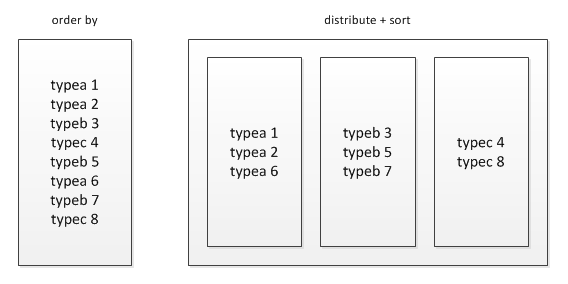
3)文章地址:http://www.crazyant.net/1456.html
3、mapjoin的使用:
1)正常的join操作:
select f.a,f.b from A t join B f on ( f.a=t.a and f.ftime=20110802)
2)mapjoin的使用场景和原理:
如果B表有30亿行记录,A表只有100行记录,而且B表中数据倾斜特别严重,有一个key上有15亿行记录,在运行过程中特别的慢,而且在reduece的过程中遇有内存不够而报错。MAPJION会把小表全部读入内存中,在map阶段直接拿另外一个表的数据和内存中表数据做匹配,由于在map是进行了join操作,省去了reduce运行的效率也会高很多。
select /+ mapjoin(A)/ f.a,f.b from A t join B f on ( f.a=t.a and f.ftime=20110802);
3)mapjoin还有一个很大的好处是能够进行不等连接的join操作,如果将不等条件写在where中,那么mapreduce过程中会进行笛卡尔积,运行效率特别低,如果使用mapjoin操作,在map的过程中就完成了不等值的join操作,效率会高很多。
select /+ mapjoin(A)/ A.a,A.b from A join B where A.a>B.a;
4)文章链接:http://blog.csdn.net/woshixuye/article/details/53696257
简单总结一下,mapjoin的使用场景:
1. 关联操作中有一张表非常小
2.不等值的链接操作
三、Hive参数配置说明
1、hive参数详解:http://www.aboutyun.com/thread-7794-1-1.html
http://blog.csdn.net/w13770269691/article/details/17232947
1)hive.exec.reducers.max ——reducer 个数的上限。
默认值:999
2)hive.exec.parallel.thread.number ——并发提交时的并发线程的个数。
默认值:8
3)hive.merge.size.per.task ——每个任务合并后文件的大小,根据此大小确定 reducer 的个数,
默认值:256000000 (256M)
4)hive.cli.encoding ——Hive 默认的命令行字符编码。
默认值:’UTF8’
5)hive.merge.smallfiles.avgsize ——需要合并的小文件群的平均大小,默认 16 M。
默认值:16000000
6)set mapreduce.map.failures.maxpercent=5 ——允许map失败的百分比
7)set mapreduce.reduce.failures.maxpercent=5 ——允许reduce失败的百分比
8)设置map和reduce的内存大小:
set mapreduce.map.memory.mb = 4096 ——4G
set mapreduce.reduce.memory.mb = 8192 ——8G
四、Hive的参数调优
1、文章来源:http://blog.csdn.net/q412774506/article/details/46998713
[http://blog.csdn.net/scgaliguodong123/article/details/45477323](http://blog.csdn.net/scgaliguodong123_/article/details/45477323)
2、job并行优化
hive job的并行化执行,在job之间没有依赖关系时可以同时执行,并行数另外配置,默认为8,开启并行会消耗更多的集群资源来提高执行速度,可对特定作业作并行执行合适。
hive.exec.parallel=true;
Job并行最大数,与job并行配置配合使用,但受集群资源与Job之间是否依赖的因素影响,即最大数为64。
hive.exec.parallel.thread.number=8
3、job合并输入小文件(会启动新的job合并文件)
hive.merge.mapredfiles;——是否开启合并 Map/Reduce 小文件,默认值:false
hive.merge.smallfiles.avgsize=256000000;——当输出文件平均大小小于该值,启动新job合并文件
hive.merge.size.per.task=64000000;——合并之后的文件大小
4、压缩数据
中间压缩就是处理hive查询的多个job之间的数据,对于中间压缩,最好选择一个节省CPU耗时的压缩方式
hive.exec.compress.intermediate=true;//决定查询的中间 map/reduce job (中间 stage)的输出是否为压缩格式
hive.intermediate.compression.codec=org.apache.hadoop.io.compress.SnappyCodec; //中间 map/reduce job 的压缩编解码器的类名(一个压缩编解码器可能包含多种压缩类型),该值可能在程序中被自动设置。
hive.intermediate.compression.type=BLOCK (压缩单元为块压缩) //中间 map/reduce job 的压缩类型,如 “BLOCK””RECORD”
4.1、hive查询最终的输出也可以压缩
hive.exec.compress.output=true; //决定查询中最后一个 map/reduce job 的输出是否为压缩格式
mapred.output.compression.type=BLOCK //压缩类型
mapred.output.compression.codec=org.apache.hadoop.io.compress.GzipCodec; // 压缩格式
1)org.apache.hadoop.io.compress.GzipCodec; ——Gzip压缩
2)org.apache.hadoop.io.compress.BZip2Codec;——Bzip2压缩
3)com.hadoop.compression.lzo.LzopCodec;——lzo压缩
4)org.apache.hadoop.io.compress.DefaultCodec; ——默认的压缩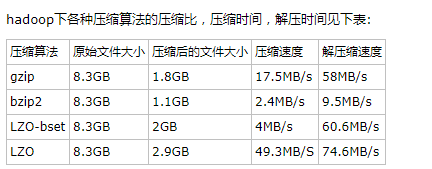
4.2、压缩文章:http://blog.csdn.net/houzhizhen/article/details/53097106
5、数据倾斜优化
注意:如果hql使用多个distinct是无法使用这个参数去解决倾斜问题,可以改用sum()+group by解决
hive.optimize.skewjoin //是否优化数据倾斜的 Join,对于倾斜的 Join 会开启新的 Map/Reduce Job 处理。
数据倾斜时负载均衡,当选项设定为true,生成的查询计划会有两个MRJob:
1)第一个MRJob 中,Map的输出结果集合会随机分布到Reduce中,每个Reduce做部分聚合操作,并输出结果,这样处理的结果是相同的GroupBy Key有可能被分发到不同的Reduce中,从而达到负载均衡的目的;
2)第二个MRJob再根据预处理的数据结果按照GroupBy Key分布到Reduce中(这个过程可以保证相同的GroupBy Key被分布到同一个Reduce中),最后完成最终的聚合操作。
默认值:false
hive.skewjoin.key //倾斜键数目阈值,超过此值则判定为一个倾斜的 Join 查询。
默认值: 1000000
hive.skewjoin.mapjoin.map.tasks //处理数据倾斜的 Map Join 的 Map 数上限。
默认值: 10000
hive.skewjoin.mapjoin.min.split //处理数据倾斜的 Map Join 的最小数据切分大小,以字节为单位,默认为32M。
默认值:33554432
6、一条hql语句产生多个job,考虑是否需要优化hql:
遇到过的情况是,一条简单的count,distinct,在加where条件,统计用户数的hql,产生了3个job,而使用sum,case when 来代替count统计人数,只产生1个job,这样的优化提高了效率,节省了时间。在数据量比较小的情况下可能感觉不到,但是当数据在上百G或者T数量级的情况下,效率就会特别明显。
Hive常见错误以及优化方案
1、HIVE MapJoin异常问题处理
错误问题:
2018-10-16 08:10:11 Starting to launch local task to process map join; maximum memory = 2015887360
2018-10-16 08:10:13 Processing rows: 200000 Hashtable size: 199999 Memory usage: 178795080 percentage: 0.089
2018-10-16 08:10:13 Processing rows: 300000 Hashtable size: 299999 Memory usage: 188796416 percentage: 0.094
Execution failed with exit status: 3
Obtaining error information
Task failed!
Task ID:
Stage-16
Logs:
/opt/beh/logs/hive/lf_zh/hive.log
FAILED: Execution Error, return code 3 from org.apache.hadoop.hive.ql.exec.mr.MapredLocalTask
ATTEMPT: Execute BackupTask: org.apache.hadoop.hive.ql.exec.mr.MapRedTask
解决方案:
1、set hive.auto.convert.join = false; 关闭mapjion
2、调小hive.smalltable.filesize,默认是25000000(在2.0.0版本中)
3、hive.mapjoin.localtask.max.memory.usage 调大到0.999
4、set hive.ignore.mapjoin.hint=false; 关闭忽略mapjoin的hints
错误原因分析:
出现问题的地方就是MapredLocalTask这里,在客户端本地启动一个Driver进程,扫描小表的数据,将其转换成一个HashTable的数据结构,这个过程中在做内存检查,即checkMemoryStatus的时候,抛出了异常。我们看一下这里的检查点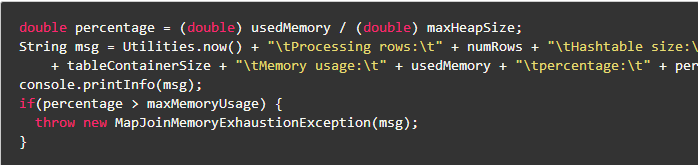
double percentage = (double) usedMemory / (double) maxHeapSize;
String msg = Utilities.now() + “\tProcessing rows:\t” + numRows + “\tHashtable size:\t”
+ tableContainerSize + “\tMemory usage:\t” + usedMemory + “\tpercentage:\t” + percentageNumberFormat.format(percentage);
console.printInfo(msg);
if(percentage > maxMemoryUsage) {
throw new MapJoinMemoryExhaustionException(msg);
}
跟当前进程的MaxHeap有关,跟当前进程的UsedMemory有关,跟参数maxMemoryUsage有关(hive.mapjoin.localtask.max.memory.usage),通过分析比较我们可以发现,上述的方案1和4,直接关闭mapjion,避免启动MapredLocalTask,就不会出现这样的check,进而不会出现问题;
上述的方案2,减小join表的大小,进而减小UsedMemory,也可以解决这个问题;
上面的方案3, 调大maxMemoryUsage,使内存充分利用,也可以解决这个问题;
2、数据倾斜分析
http://www.cnblogs.com/ggjucheng/archive/2013/01/03/2842860.html
1)join时,把on中条件为空的先过滤,在union为空的数据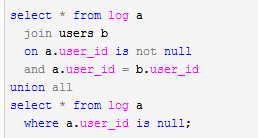
2)赋予空值新的key值
结论:方法2比方法1效率更好,不但io少了,而且作业数也少了。解决方法1中 log读取两次,jobs是2。解决方法2 job数是1 。这个优化适合无效 id (比如 -99 , ’’, null 等) 产生的倾斜问题。把空值的 key 变成一个字符串加上随机数,就能把倾斜的数据分到不同的reduce上 ,解决数据倾斜问题。
hive on spark的使用:
1、背景
Hive on Spark是由Cloudera发起,由Intel、MapR等公司共同参与的开源项目,其目的是把Spark作为Hive的一个计算引擎,将Hive的查询作为Spark的任务提交到Spark集群上进行计算。通过该项目,可以提高Hive查询的性能,同时为已经部署了Hive或者Spark的用户提供了更加灵活的选择,从而进一步提高Hive和Spark的普及率。
2、简介
Hive on Spark是从Hive on MapReduce演进而来,Hive的整体解决方案很不错,但是从查询提交到结果返回需要相当长的时间,查询耗时太长,这个主要原因就是由于Hive原生是基于MapReduce的,那么如果我们不生成MapReduce Job,而是生成Spark Job,就可以充分利用Spark的快速执行能力来缩短HiveQL的响应时间。
Hive on Spark现在是Hive组件(从Hive1.1 release之后)的一部分。
3、设置引擎
—使用mapreduce计算
set hive.execution.engine=mr;
—使用spark计算
set hive.execution.engine=spark;
—使用tez计算引擎
set hive.execution.engine=tez;
(Tez+Hive)仍采用MapReduce计算框架,但对DAG(有向无环图)的作业依赖关系进行了裁剪,并将多个小作业合并成一个大作业,这样,不仅计算量减少,而且写HDFS次数也会大大减少。
4、验证数据的案例:
(1)hive执行以下sql:
use lf_zhhs_pro_v2;set hive.execution.engine=spark;select f3.telno,g1.car_name,f3.web_name,f3.customer_level,g1.brand,g1.price_min,g1.price_max,g1.level,g1.car_body_type,g1.country,g1.channel,g1.energy_type,g1.is_electricfrom(select f2.telno,f2.web_name,f2.chexing_id,f2.customer_levelfrom(select f.telno,f1.web_name,f1.chexing_id,f1.customer_level,row_number() over(partition by f.telno order by f1.chexing_id desc,f1.customer_level asc) row_idfrom(select telno,count(*) countfrom auto_financegroup by telnohaving count > 2) finner join(select telno,web_name,chexing_id,customer_levelfrom auto_financewhere stage not in ('车贷','签约','钱包')and project_id='01'union allselect t.telno,t.web_name,t.chexing_id,g.customer_levelfrom(select telno,web_name,stage,chexing_idfrom auto_financewhere project_id='02') tleft join web_module gon (t.web_name=g.web_name and t.stage=g.modular_id)) f1on (f.telno=f1.telno)) f2where f2.row_id=1) f3left join car_name_and_id g1on (f3.web_name = g1.web_name and f3.chexing_id = g1.car_id)where f3.telno not in (select telno from auto_finance_youche);
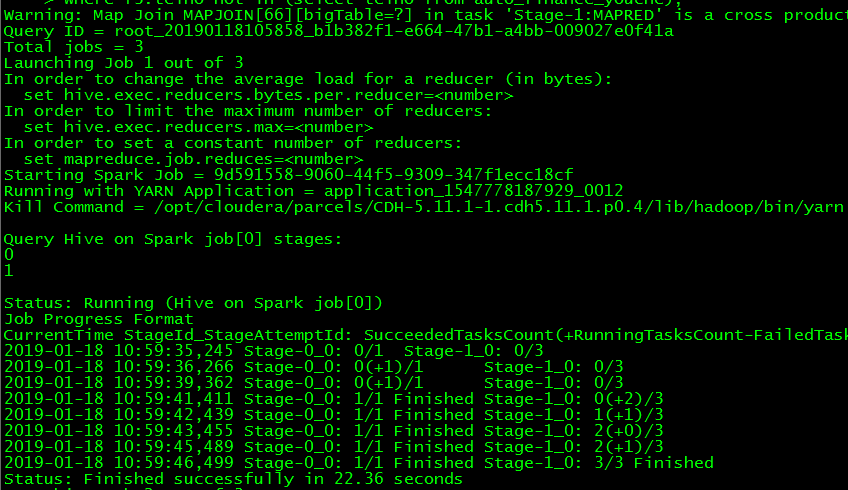
结果:
hive执行:需要11个job、时间:Time taken: 445.374 seconds, Fetched: 54 row(s) ———-7分钟
spark执行:需要三个job、时间:Time taken: 81.404 seconds, Fetched: 54 row(s) ———-1.3分钟
结论:
spark引擎要比hive快许多,而且job数量也少
【hive任务可以在页面:192.168.0.220:8088中查看执行情况】
(2)使用spark去执行:
启动:spark2-shell
执行:
spark.sql(“use lf_zhhs_pro_v2”)
spark.sql(“””
select f3.telno,g1.car_name,f3.web_name,f3.customer_level,
g1.brand,g1.price_min,g1.price_max,g1.level,g1.car_body_type,g1.country,g1.channel,g1.energy_type,g1.is_electric
from(select f2.telno,
f2.web_name,
f2.chexing_id,
f2.customer_level
from(select f.telno,
f1.web_name,
f1.chexing_id,
f1.customer_level,
row_number() over(partition by f.telno order by f1.chexing_id desc,f1.customer_level asc) row_id
from(select telno,
count() count
from auto_finance
group by telno
having count > 2
) f
inner join(select telno,web_name,chexing_id,customer_level
from auto_finance
where stage not in (‘车贷’,’签约’,’钱包’)
and project_id=’01’
union all
select t.telno,t.web_name,t.chexing_id,g.customer_level
from(select telno,web_name,stage,chexing_id
from auto_finance
where project_id=’02’
) t
left join web_module g
on (t.web_name=g.web_name and t.stage=g.modular_id)
) f1
on (f.telno=f1.telno)
) f2
where f2.row_id=1
) f3
left join car_name_and_id g1
on (f3.web_name = g1.web_name and f3.chexing_id = g1.car_id)
where f3.telno not in (select telno from auto_finance_youche)
“””).show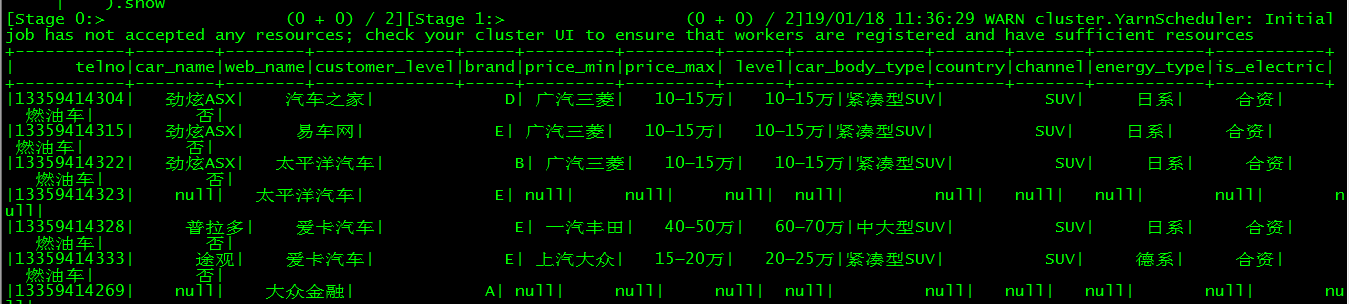
【spark任务可以在页面:192.168.0.220:4040中查看执行情况】
hive中update和delete的使用:
Hive自0.14版本开始支持update和delete,要执行update和delete的表必须支持ACID,而支持ACID,就必须满足以下条件:
1、表的存储格式必须是ORC(STORED AS ORC);
2、表必须进行分桶(CLUSTERED BY (col_name, col_name, …) INTO num_buckets BUCKETS);
3、Table property中参数transactional必须设定为True(tblproperties(‘transactional’=’true’));
4、也必须设置配置参数:
Client端:
hive.support.concurrency – true
hive.enforce.bucketing – true
hive.exec.dynamic.partition.mode – nonstrict
hive.txn.manager – org.apache.hadoop.hive.ql.lockmgr.DbTxnManager
服务端:
hive.compactor.initiator.on – true
hive.compactor.worker.threads – 1
hive.txn.manager – org.apache.hadoop.hive.ql.lockmgr.DbTxnManager(经过测试,服务
端也需要设定该配置项)
https://blog.csdn.net/xueyao0201/article/details/79387647
hive非交互式模式运行的命令参数:
1、hive -f test.sql -f 可以运行脚本文件
2、hive -e “select from testTable” -e 运行简短的hql命令
3、hive -S -e “select * from testTable” -S 强制不显示执行过程,只输出结果

若有收获,就点个赞吧
0 人点赞


