正则表达式几乎是现代编程语言的标配,现代 C++ 中也提供了正则表达式的原生支持。正则表达式一般用来做字符串的匹配,查询,分割,替换等操作,有时候使用正则表达式比手写解析器要直观方便得多。
🐭 什么是正则表达式
正则表达式是独立自成体系的知识,内容较多,语法也比较繁杂。另外,正则表达式还有不同的流派,比如 awk 流派, grep 流派,ECMAScript 流派等等。
C++ 中的正则表达式可以通过不同的选项来支持不同的正则流派,默认使用的是修改过的 ECMAScript 流派。这里不介绍正则表达式的语法内容,在需要使用的时候,可以查询 C++ 标准文档。
🐂 正则匹配
主要是函数「std::regex_match」,正则匹配是匹配整个模式,部分匹配需要使用正则查询。
#include <iostream>#include <regex>#include <string>int main() {std::cout.setf(std::ios_base::boolalpha);const std::string fns[] = {"foo.txt", "baz.dat", "f.o.txt"};// simple matchconst std::regex reg0("[a-z]+\\.txt");for (const auto &fn : fns) {std::cout << fn << " matchs the pattern: " << std::regex_match(fn, reg0) << '\n';}// foo.txt matchs the pattern: true// baz.dat matchs the pattern: false// f.o.txt matchs the pattern: false// simple searchstd::cout << fns[2]<< " matchs the pattern by regex_search: " << std::regex_search(fns[2], reg0)<< '\n';// f.o.txt matchs the pattern by regex_search: true// regex_search(data, regex(pattern))// always equivalent to// regex_match(data, regex("(.|\n)*"+pattern+"(.|\n)*"))// group match, group[0] is the whole stringconst std::regex reg1("([a-z]+)\\.([a-z]+)");std::smatch m;for (const auto &fn : fns) {if (std::regex_match(fn, m, reg1)) {for (size_t i = 0; i < m.size(); ++i) {std::cout << "submatch[" << i << "] = " << m[i].str() << std::endl;}std::cout << std::endl;}}#if 0submatch[0] = foo.txtsubmatch[1] = foosubmatch[2] = txtsubmatch[0] = baz.datsubmatch[1] = bazsubmatch[2] = dat#endifreturn 0;}
🐯 正则查询
主要是函数「std::regex_search」,正则查询主要用来遍历字符串,查询第一个满足正则模式的匹配结果,找到就退出。基于正则查询的还有两个正则迭代器,支持对字符串不停的进行正则查询,用起来也比较方便。
#include <iostream>#include <regex>#include <string>int main() {std::string data = "XML tag: <tag-name>the value</tag-name>.";std::regex reg("<(.*)>(.*)</(\\1)>");std::smatch m;if (std::regex_search(data, m, reg)) {for (size_t i = 0; i < m.size(); ++i) {std::cout << "m[" << i << "] = " << m[i].str() << std::endl;}std::cout << "prefix() = " << m.prefix() << std::endl;std::cout << "suffix() = " << m.suffix() << std::endl;}#if 0m[0] = <tag-name>the value</tag-name>m[1] = tag-namem[2] = the valuem[3] = tag-nameprefix() = XML tag:suffix() = .#endifreturn 0;}
图解正则查询: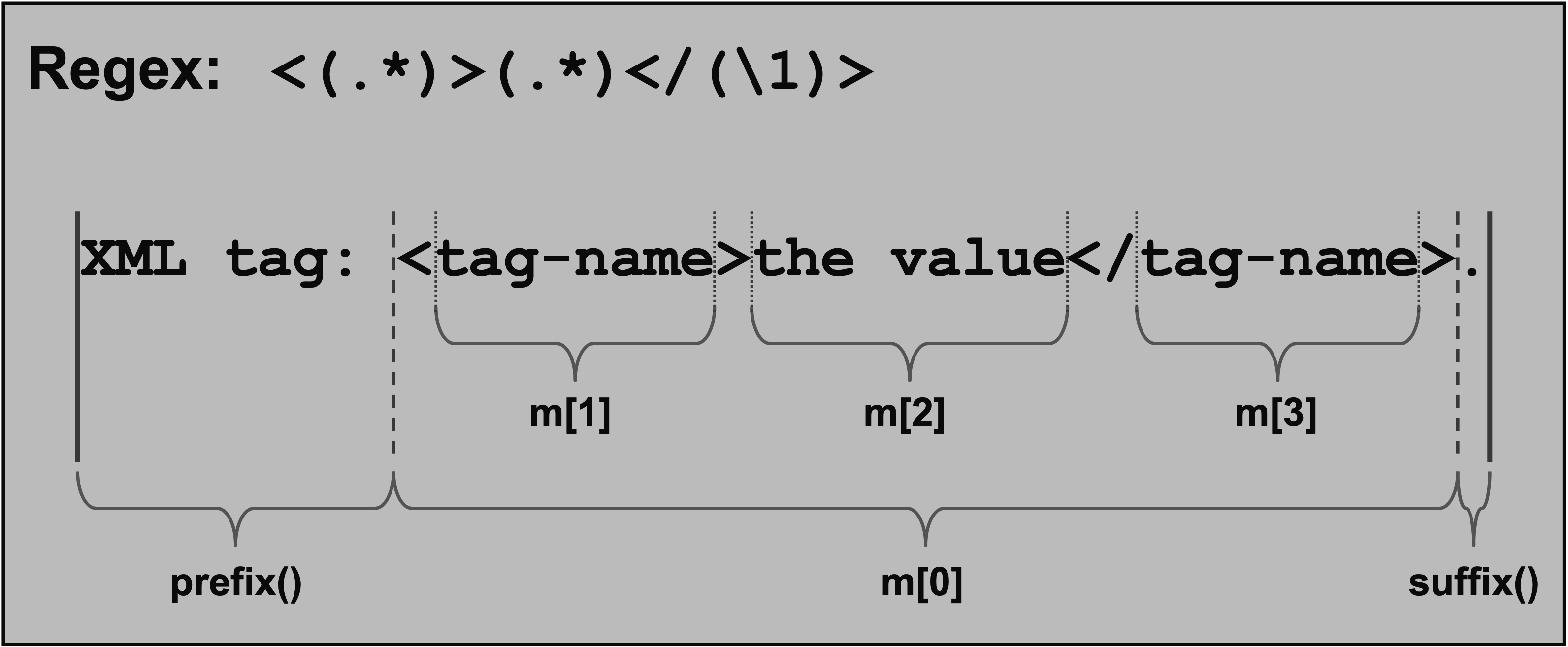
正则迭代器在每次迭代过程中,调用正则查询来得到一个匹配结果。因此,可以在遍历一个字符串的时候多次应用同一个匹配模式。正则分词迭代器用起来就更灵活了,可以指定提取指定部分的匹配结果,也可以指定提取非匹配部分的字符串。
#include <iostream>#include <regex>#include <string>int main() {const std::string data = "<person>\n"" <first>Nico</first>\n"" <last>Josuttis</last>\n""</person>\n";std::regex reg("<(.*)>(.*)</(\\1)>");std::sregex_iterator beg1(data.cbegin(), data.cend(), reg);std::sregex_iterator end1;std::for_each(beg1, end1, [](const std::smatch &m) {std::cout << m[0].str() << std::endl;std::cout << m[1].str() << std::endl;std::cout << m[2].str() << std::endl;std::cout << m[3].str() << std::endl;});#if 0<first>Nico</first>firstNicofirst<last>Josuttis</last>lastJosuttislast#endif// output is same as above, we can change the {0,1,2,3} to {2} just for valuesstd::sregex_token_iterator beg2(data.cbegin(), data.cend(), reg, {0, 1, 2, 3});std::sregex_token_iterator end2;for (; beg2 != end2; ++beg2) {std::cout << beg2->str() << std::endl;}std::cout << std::endl;std::string langs = "C, C++ ,Java . Python; Lua";std::regex sep("[[:space:]]*[,;.][[:space:]]*");// -1 means non-matched fragmentstd::sregex_token_iterator beg3(langs.begin(), langs.end(), sep, -1);std::sregex_token_iterator end3;for (; beg3 != end3; ++beg3) {std::cout << "language: " << beg3->str() << std::endl;}std::cout << std::endl;#if 0language: Clanguage: C++language: Javalanguage: Pythonlanguage: Lua#endifreturn 0;}
🐰 正则替换
主要是函数「std::regex_replace」,这个函数主要用来迭代字符串的一个个正则匹配结果,然后按照格式化部分指定的要求进行替换,最后拷贝替换后的字符串到输出。与正则捕获组一起使用,能做很多复杂的事情,还要注意匹配选项的合理使用。另外,我们一般不修改原始输入字符串,使用另外一个字符串对象来保存替换后的结果。
#include <iostream>#include <regex>#include <string>int main() {const std::string data = "<person>\n"" <first>Nico</first>\n"" <last>Josuttis</last>\n""</person>\n";std::regex reg("<(.*)>(.*)</(\\1)>");const std::string repfmt{"<$1 value=\"$2\"/>"};std::cout << std::regex_replace(data, reg, repfmt) << std::endl;#if 0<person><first value="Nico"/><last value="Josuttis"/></person>#endif// use iterator interface, and// - format_no_copy: don’t copy characters that don’t match// - format_first_only: replace only the first match foundstd::string res;const auto repflags =std::regex_constants::format_no_copy | std::regex_constants::format_first_only;std::regex_replace(std::back_inserter(res), data.begin(), data.end(), reg, repfmt,repflags);std::cout << res << std::endl;#if 0<first value="Nico"/>#endif// $& : The matched pattern// $n : The nth matched capture group// $` : The prefix of the matched pattern// $' : The suffix of the matched pattern// $$ : The character $std::string text = "Quick brown fOx";std::regex regvowel("a|e|i|o|u", std::regex_constants::icase);std::cout << std::regex_replace(text, regvowel, "[$&]") << std::endl;// Q[u][i]ck br[o]wn f[O]xreturn 0;}

若有收获,就点个赞吧
0 人点赞


