文件系统的相关操作一直以来都是跨平台开发的难点,不同的平台有不同的系统 API 设计,往往需要自己封装来实现统一接口。现代 C++ 提供了文件系统库,大大的方便了开发者,统一了各个平台的文件、目录、目录遍历等编程操作。
🐭 总览
C++ 文件系统库主要由下面几个部分组成:
std::filesystem::path std::filesystem::file_status std::filesystem::directory_entry std::filesystem::directory_iterator https://en.cppreference.com/w/cpp/filesystem
当然还有其他的一些辅助类和方法,其中最重要的就是 path 类,C++ 的整个文件系统库都是围绕着 path 类建立起来的。
本文不会介绍文件系统库的方方面面,只介绍其中比较重要的部分。比如下面的内容就不会介绍:
- 文件、目录的创建、拷贝、删除、移动
- 文件系统空间信息的获取
- 文件、目录的软链接、硬链接
- 零时文件、目录的创建和使用
🐂 path 类介绍
path 类是整个文件系统库的核心,path 表示的是一种路径,它可以表示各种类型的文件,也可以表示目录。POSIX 系统和 windows 系统下的 path 是有区别的,主要区别如下图: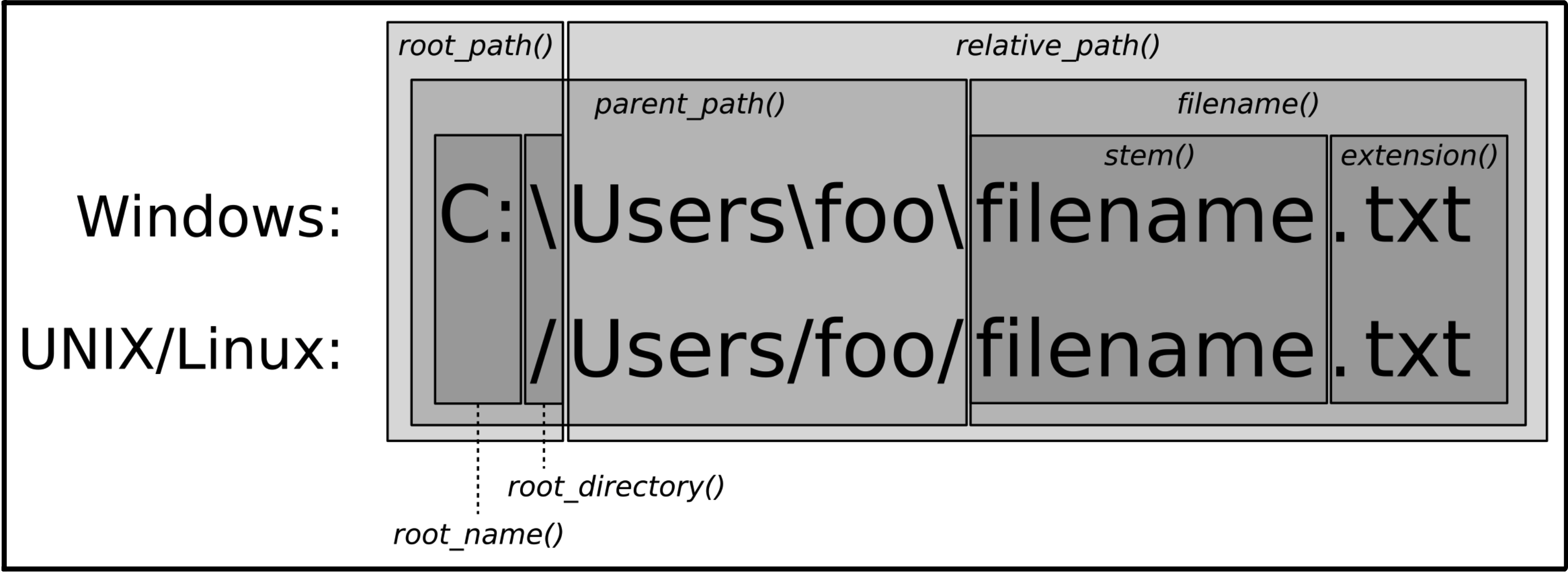 ```cpp
include
include
int main() { // make sure the path exists before run the program namespace fs = std::filesystem; std::cout.setf(std::ios_base::boolalpha);
// set current path, string() can remove std::quoted() impact fs::current_path(“/Users/jtcheng/work/code/cpp/leetcode”); std::cout << fs::current_path().string() << std::endl; // /Users/jtcheng/work/code/cpp/leetcode
// absolute path fs::path p0(“/Users/jtcheng/work/code/cpp/leetcode”); p0 /= “main.cpp”; std::cout << p0.is_absolute() << std::endl; // true std::cout << p0.filename() << std::endl; // “main.cpp” std::cout << p0.extension() << std::endl; // “.cpp” std::cout << p0.stem() << std::endl; // “main”
// relative path fs::path p1(“../.././cpp/leetcode/main.cpp”); std::cout << p1.is_relative() << std::endl; // true std::cout << fs::equivalent(p0, p1) << std::endl; // true std::cout << p1 << std::endl; // “../.././cpp/leetcode/main.cpp”
// normalized path std::cout << fs::canonical(p1) << std::endl; std::cout << fs::absolute(p1) << std::endl; // “/Users/jtcheng/work/code/cpp/leetcode/main.cpp” // “/Users/jtcheng/work/code/cpp/leetcode/../.././cpp/leetcode/main.cpp”
// p3 with a trailing directory separator
fs::path p2(“/Users/jtcheng/work/code/cpp/leetcode/Debug”);
fs::path p3(“/Users/jtcheng/work/code/cpp/leetcode/Debug/“);
std::copy(p2.begin(), p2.end(), std::ostream_iterator
return 0; }
<a name="PevtW"></a>## 🐯 file_status 类介绍针对一个 path 对象,我们可以得到其 file_status 对象,file_status 对象包含了文件类型和文件权限信息。<br />**文件类型信息:**```cpp#include <filesystem>#include <iostream>int main() {namespace fs = std::filesystem;auto type = [](const fs::file_type &t) {switch (t) {case fs::file_type::block:return 'b';case fs::file_type::character:return 'c';case fs::file_type::directory:return 'd';case fs::file_type::fifo:return 'p';case fs::file_type::regular:return 'f';case fs::file_type::socket:return 's';case fs::file_type::symlink:return 'l';case fs::file_type::none:case fs::file_type::not_found:case fs::file_type::unknown:default:return '?';}};fs::path p0("/Users/jtcheng/work/code/cpp/leetcode/main.cpp");std::cout << type(fs::status(p0).type()) << std::endl; // ffs::path p1("/Users/jtcheng/work/code/cpp/leetcode");std::cout << type(fs::status(p1).type()) << std::endl; // dstd::cout << type(fs::status("/dev/null").type()) << std::endl; // cfs::path p2 = p1 / "nonexistent.txt";std::cout << type(fs::status(p2).type()) << std::endl; // ?return 0;}
文件权限信息:
#include <filesystem>#include <iostream>#include <string>int main() {namespace fs = std::filesystem;auto permissions = [](const fs::perms &p) {auto check = [&p](const fs::perms &bit, const char c) {return (p & bit) == fs::perms::none ? '-' : c;};return std::string{check(fs::perms::owner_read, 'r'), check(fs::perms::owner_write, 'w'),check(fs::perms::owner_exec, 'x'), check(fs::perms::group_read, 'r'),check(fs::perms::group_write, 'w'), check(fs::perms::group_exec, 'x'),check(fs::perms::others_read, 'r'), check(fs::perms::others_write, 'w'),check(fs::perms::others_exec, 'x')};};fs::path p0("/Users/jtcheng/work/code/cpp/leetcode/main.cpp");const fs::perms fp0 = fs::status(p0).permissions();std::cout << permissions(fp0) << std::endl;// rw-r--r--fs::path p1("/Users/jtcheng/work/code/cpp/leetcode");std::cout << permissions(fs::status(p1).permissions()) << std::endl;// rwxr-xr-x// set file permission to 777fs::permissions(p0, fs::perms::owner_all | fs::perms::group_all | fs::perms::others_all);std::cout << permissions(fs::status(p0).permissions()) << std::endl;// rwxrwxrwx// restore file permission to 644fs::permissions(p0, fp0);return 0;}
🐰 目录遍历操作
目录可以通过一个 path 对象来初始化,然后可以通过目录迭代器来遍历目录里面的内容,也可以递归的遍历多级目录。目录迭代器非常有用,如果没有目录迭代器,遍历一个目录需要操作系统 API 的支持。
一个简单的文件统计程序:
#include <filesystem>#include <iostream>#include <map>#include <sstream>#include <string>int main() {using namespace std;using namespace filesystem;auto sizestr = [](const size_t size) {stringstream ss;if (size >= 1000000) {ss << (size / 1000000) << 'M';} else if (size >= 1000) {ss << (size / 1000) << 'K';} else {ss << size << 'B';}return ss.str();};auto extstats = [](const path &d) {map<string, pair<size_t, size_t>> m;auto dopts = directory_options::skip_permission_denied;for (const auto &entry : recursive_directory_iterator{d, dopts}) {const path p{entry.path()};const string ext{p.extension().string()};if (is_directory(status(p)) || ext.empty()) {continue;}auto &[size, count] = m[ext];size += file_size(p);count += 1;};return m;};path dir("/Users/jtcheng/Documents/cppreference");cout << "TYPE NUM SIZE AVG_SIZE\n" << string(36, '-') << '\n';for (const auto &[ext, stats] : extstats(dir)) {const auto &[size, count] = stats;cout << setw(6) << left << ext << setw(8) << right << count << setw(10)<< sizestr(size) << setw(10) << sizestr(size / count) << endl;}#if 0TYPE NUM SIZE AVG_SIZE------------------------------------.css 2 83K 41K.gif 7 6K 902B.html 5237 221M 42K.ico 1 2K 2K.js 3 13K 4K.php 1 743B 743B.png 36 363K 10K.svg 59 337K 5K.ttf 2 843K 421K#endifreturn 0;}

若有收获,就点个赞吧
0 人点赞


