分区:
分区的过程是将一个表或索引分解为多个更小的、更可管理的部分。
mysql分区:
mysql中的分区为水平分区,同时mysql中的分区是局部分区,一个分区中及存放了数据有存放了索引
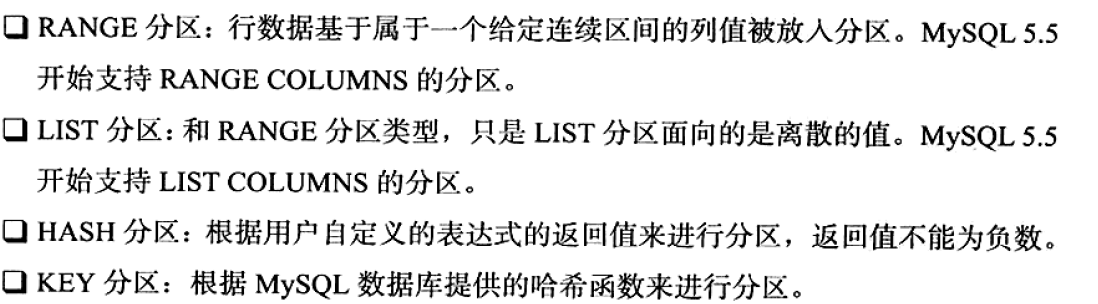
mysql中支持的分区类型:
分区列的选择:
1. 如果表中存在主键或唯一索引时,分区列必须是唯一索引的一个组成部分
## 表中存在主键或唯一索引时,分区列不是唯一索引的一个组成部分
mysql> create table t1 (
    -> co1 int not null,
    -> co2 date not null,
    -> co3 int not null,
    -> co4 int not null,
    -> unique key(co1,co2)
    -> )
    -> partition by hash(co3)
    -> partitions 4;
ERROR 1503 (HY000): A PRIMARY KEY must include all columns in the table's partitioning function
## 中存在注解或唯一索引时,分区列是唯一索引的一个组成部分
mysql> create table t1(
    -> col1 int not null,
    -> col2 date not null,
    -> col3 int not null,
    -> unique key (col1,col2)
    -> )
    -> partition by hash(col1) ##分区列只需要是唯一索引列中的一个即可,不需选择全部。
    -> partitions 4;
Query OK, 0 rows affected (0.08 sec)
mysql>
2.如果建表时没有指定唯一索引或主键,那么可以指定任何一个列为分区列
mysql>  create table t1(
    -> co1 int not null,
    -> co2 date not null,
    -> co3 int not null,
    -> co4 int not null)
    -> partition by hash(co4)
    -> partitions 4;
Query OK, 0 rows affected (0.08 sec)

mysql>
range分区:
行数据基于属于一个给定连续区间的列值被放入分区。
    mysql> create table t(
    -> a int)
    -> partition by range(a)(
    -> partition p0 values less than(10),//小于10的值放入p0分区中
    -> partition p1 values less than(20)//小于20大于等于10的值放入p1中
    -> );
Query OK, 0 rows affected (0.04 sec)
mysql> insert into t values(14),(19),(8),(7);
Query OK, 4 rows affected (0.00 sec)
Records: 4  Duplicates: 0  Warnings: 0

mysql> select * from t partition(p0);
+------+
| a    |
+------+
|    8 |
|    7 |
+------+
2 rows in set (0.00 sec)

mysql> select * from t partition(p1);
+------+
| a    |
+------+
|   14 |
|   19 |
+------+
2 rows in set (0.00 sec)

mysql> select * from t;
+------+
| a    |
+------+
|    8 |
|    7 |
|   14 |
|   19 |
+------+
4 rows in set (0.00 sec)
mysql> insert into t select 20;/*不能添加大于最后一个分区中指定的值*/
ERROR 1526 (HY000): Table has no partition for value 20
list分区:
和RANGE分区类型,只是LIST分区面向的是离散的值。
mysql> create table t2(a int)partition by list(a)(
    -> partition p0 values in(1,5,7,9),##注意语法的使用,只有和()中一样的值才会被插入到该分区中
    -> partition p1 values in(10,12,13,14));
Query OK, 0 rows affected (0.05 sec)

mysql> insert into t2 select 5;
Query OK, 1 row affected (0.00 sec)
Records: 1  Duplicates: 0  Warnings: 0

mysql> insert into t2 select 10;
Query OK, 1 row affected (0.00 sec)
Records: 1  Duplicates: 0  Warnings: 0

mysql> select * from t2;
+------+
| a    |
+------+
|    5 |
|   10 |
+------+
2 rows in set (0.00 sec)

mysql> select * from t2 partition(p0);
+------+
| a    |
+------+
|    5 |
+------+
1 row in set (0.00 sec)

mysql> select * from t2 partition(p1);
+------+
| a    |
+------+
|   10 |
+------+
1 row in set (0.00 sec)

mysql>
hash分区:
KEY分区:
分区与速度:
1.当查找数据时只在一个分区内查找交快,如果要跨分区查找交慢
mysql> create table sales(money decimal(10,2),date datetime)partition by range(year(date))(
    -> partition p2008 values less than(2009),
    -> partition p2009 values less than(2010),
    -> partition p2010 values less than(2011));
Query OK, 0 rows affected (0.07 sec)

mysql> insert into  sales select 100,'2008-01-01';
Query OK, 1 row affected (0.01 sec)
Records: 1  Duplicates: 0  Warnings: 0

mysql> insert into  sales select 100,'2008-02-01';
Query OK, 1 row affected (0.00 sec)
Records: 1  Duplicates: 0  Warnings: 0

mysql> insert into  sales select 200,'2008-01-02';
Query OK, 1 row affected (0.01 sec)
Records: 1  Duplicates: 0  Warnings: 0

mysql> insert into  sales select 200,'2009-03-01';
Query OK, 1 row affected (0.00 sec)
Records: 1  Duplicates: 0  Warnings: 0

mysql> insert into  sales select 200,'2010-03-01';
Query OK, 1 row affected (0.00 sec)
Records: 1  Duplicates: 0  Warnings: 0

mysql> select * from sales;
+--------+---------------------+
| money  | date                |
+--------+---------------------+
| 100.00 | 2008-01-01 00:00:00 |
| 100.00 | 2008-02-01 00:00:00 |
| 200.00 | 2008-01-02 00:00:00 |
| 200.00 | 2009-03-01 00:00:00 |
| 200.00 | 2010-03-01 00:00:00 |
+--------+---------------------+
5 rows in set (0.00 sec)

mysql> select * from sales partition(p2008);
+--------+---------------------+
| money  | date                |
+--------+---------------------+
| 100.00 | 2008-01-01 00:00:00 |
| 100.00 | 2008-02-01 00:00:00 |
| 200.00 | 2008-01-02 00:00:00 |
+--------+---------------------+
3 rows in set (0.00 sec)

mysql> select * from sales partition(p2009);
+--------+---------------------+
| money  | date                |
+--------+---------------------+
| 200.00 | 2009-03-01 00:00:00 |
+--------+---------------------+
1 row in set (0.00 sec)

mysql> select * from sales partition(p2010);
+--------+---------------------+
| money  | date                |
+--------+---------------------+
| 200.00 | 2010-03-01 00:00:00 |
+--------+---------------------+
1 row in set (0.00 sec)
  ##但使用分区查询时只查询一个分区时会比较快
mysql> explain select * from sales where date>='2008-01-01' and date<'2009-01-01';
+----+-------------+-------+------------+------+---------------+------+---------+------+------+----------+-------------+
| id | select_type | table | partitions | type | possible_keys | key  | key_len | ref  | rows | filtered | Extra       |
+----+-------------+-------+------------+------+---------------+------+---------+------+------+----------+-------------+
|  1 | SIMPLE      | sales | p2008      | ALL  | NULL          | NULL | NULL    | NULL |    3 |    33.33 | Using where |
+----+-------------+-------+------------+------+---------------+------+---------+------+------+----------+-------------+
1 row in set, 1 warning (0.00 sec)
##但使用分区查询时要跨查分区时会比较慢
mysql> explain select * from sales where date>='2008-01-01' and date<'2010-01-01';
+----+-------------+-------+-------------+------+---------------+------+---------+------+------+----------+-------------+
| id | select_type | table | partitions  | type | possible_keys | key  | key_len | ref  | rows | filtered | Extra       |
+----+-------------+-------+-------------+------+---------------+------+---------+------+------+----------+-------------+
|  1 | SIMPLE      | sales | p2008,p2009 | ALL  | NULL          | NULL | NULL    | NULL |    4 |    25.00 | Using where |
+----+-------------+-------+-------------+------+---------------+------+---------+------+------+----------+-------------+
1 row in set, 1 warning (0.00 sec)
2.当使用除year()、to_days,to_seconds(),unix_timestamp()之外的日期函数为分区列时,优化器不会优化,会查询全部的分区
/*当使用除year()、to_days,to_seconds(),unix_timestamp()之外的日期函数为分区列时,优化器不会优化,会查询全部的分区*/
mysql> create table sales_two(money decimal(10,2),date datetime) partition by range(year(date)*100+month(date))(
    -> partition p201001 values less than (201002),
    -> partition p201002 values less than (201003),
    -> partition p201003 values less than (201004));
Query OK, 0 rows affected (0.07 sec)
mysql> explain select * from sales_two where date>='2010-01-01' and date<='2010-01-31'\G
*************************** 1. row ***************************
           id: 1
  select_type: SIMPLE
        table: sales_two
   partitions: p201001,p201002,p201003/*优化器会查询所有的分区*/
         type: ALL
possible_keys: NULL
          key: NULL
      key_len: NULL
          ref: NULL
         rows: 1
     filtered: 100.00
        Extra: Using where
1 row in set, 1 warning (0.01 sec)

mysql>
分区中的null值
mysql数据库中的分区总是视null值小于任何一个非null值,对于不同的分区类型,mysql的处理也是不一样的
1.range分区:
对于range分区,如果向分区中插入null值,则mysql数据库会自动将该值放入最左边的分区
mysql> create table t(a int)partition by range(a)(
    -> partition p0 values less than(10),
    -> partition p1 values less than(20),
    -> partition p2 values less than(30));
Query OK, 0 rows affected (0.06 sec)

mysql> insert into t values(1),(5),(null),(20),(15);
Query OK, 5 rows affected (0.01 sec)
Records: 5  Duplicates: 0  Warnings: 0

mysql> select * from t;
+------+
| a    |
+------+
|    1 |
|    5 |
| NULL |
|   15 |
|   20 |
+------+
5 rows in set (0.00 sec)

mysql> select * from t partition(p0);
+------+
| a    |
+------+
|    1 |
|    5 |
| NULL |
+------+
3 rows in set (0.00 sec)

mysql>
2.list分区下要使用null值,则必须要显示的指出那个分区中存放null值;
mysql> show create table t2\G
*************************** 1. row ***************************
       Table: t2
Create Table: CREATE TABLE `t2` (
  `a` int(11) DEFAULT NULL
) ENGINE=InnoDB DEFAULT CHARSET=utf8
/*!50100 PARTITION BY LIST (a)
(PARTITION p0 VALUES IN (1,5,7,9) ENGINE = InnoDB,
 PARTITION p1 VALUES IN (10,12,13,14) ENGINE = InnoDB,
 PARTITION p3 VALUES IN (NULL,20,25) ENGINE = InnoDB) */
1 row in set (0.01 sec)
mysql> insert into t2 values (null),(25);
Query OK, 2 rows affected (0.01 sec)
Records: 2  Duplicates: 0  Warnings: 0
mysql> select * from t2 partition(p3);
+------+
| a    |
+------+
| NULL |
|   25 |
+------+
2 rows in set (0.00 sec)
分区的选择:
分区的创建有的时候确实会提高查询的性能,但是如果设计到跨区查询就会浪费时间,同时分区的使用也是根据数据库的应用来确定的,数据库主要有两种应用1.InnoDB存储引擎的OLTP(在线事务的处理)另一种是MyISAM存储引擎的OLAP(在线分析处理)。对于OLAP,分区可以很好的提高查询性能,因为OLAP需要频繁的扫描一张很大的表。然而对于OLTP,通常不会获取表中太多的数据,大部分都是通过索引返回几条,所以b+树就可以很好的完成操作,不需要进行分区。

若有收获,就点个赞吧
0 人点赞


