
总览
POM文件帮助文档.md
maven由Java开发
安装和配置maven
阿里云云效
安装maven和国内镜像: maven最最重要的配置:配置国内阿里云镜像仓库,快到起飞
注意,标签顺序不能变
<mirror><!--此镜像的唯一标识符,用来区分不同的mirror元素--><id>alimaven</id><!--镜像名称--><name>aliyun maven</name><!--镜像url--><url>http://maven.aliyun.com/nexus/content/groups/public/</url><!--对哪种仓库镜像--><mirrorOf>central</mirrorOf></mirror>
项目里单独配置:
repositories {mavenLocal()maven {url = 'https://maven.aliyun.com/repository/public'}}
依赖
parent的依赖优先于次级依赖
Introduction to the Dependency Mechanism
依赖传递
- 优先性
声明优先说的是2度依赖
特殊优先说的是1度依赖,如同时配置了log4j的1.2.13和1.2.14,取后者
- 可选依赖
隐藏自己用的东西<optional>true</option>
- 排除依赖
不用别人用的东西<exclusions></exlusions
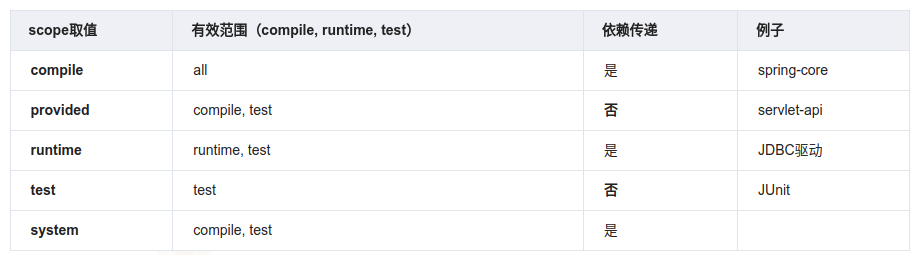
依赖范围
- compile —— gradle api
- provided —— gradle compileOnly
- runtime —— gradle runtimeOnly
dependencymanagement
Maven实战—- dependencies与dependencyManagement的区别
dependency tree
IntelliJ IDEA(idea) 查看 maven依赖树
版本控制
SNAPSHOT
关于 maven 中 SNAPSHOT 的 jar包的更新机制
模块版本控制
<modules><module>client</module><module>dao</module><module>core</module><module>start</module><module>common</module><module>facade</module><module>log-sdk</module></modules><dependency><groupId>com.raycloud.sheji</groupId><artifactId>raycloud-sheji-infra-client</artifactId><version>${infra.client.version}</version></dependency># 这是外部pom中定义的,子module中的版本可能会重新指定<properties><java.version>1.8</java.version><dubbo.version>2.7.7</dubbo.version><zookeeper.version>3.4.13</zookeeper.version><infra.client.version>1.0.0-SNAPSHOT</infra.client.version></properties>
优先级:子module > 主module > parent
最新版本
项目中一般不用LATEST,可以用此拉远程库知道最新版本是什么
<dependency><groupId>com.paypal.sdk</groupId><artifactId>checkout-sdk</artifactId><version>LATEST</version></dependency>
项目构建
插件
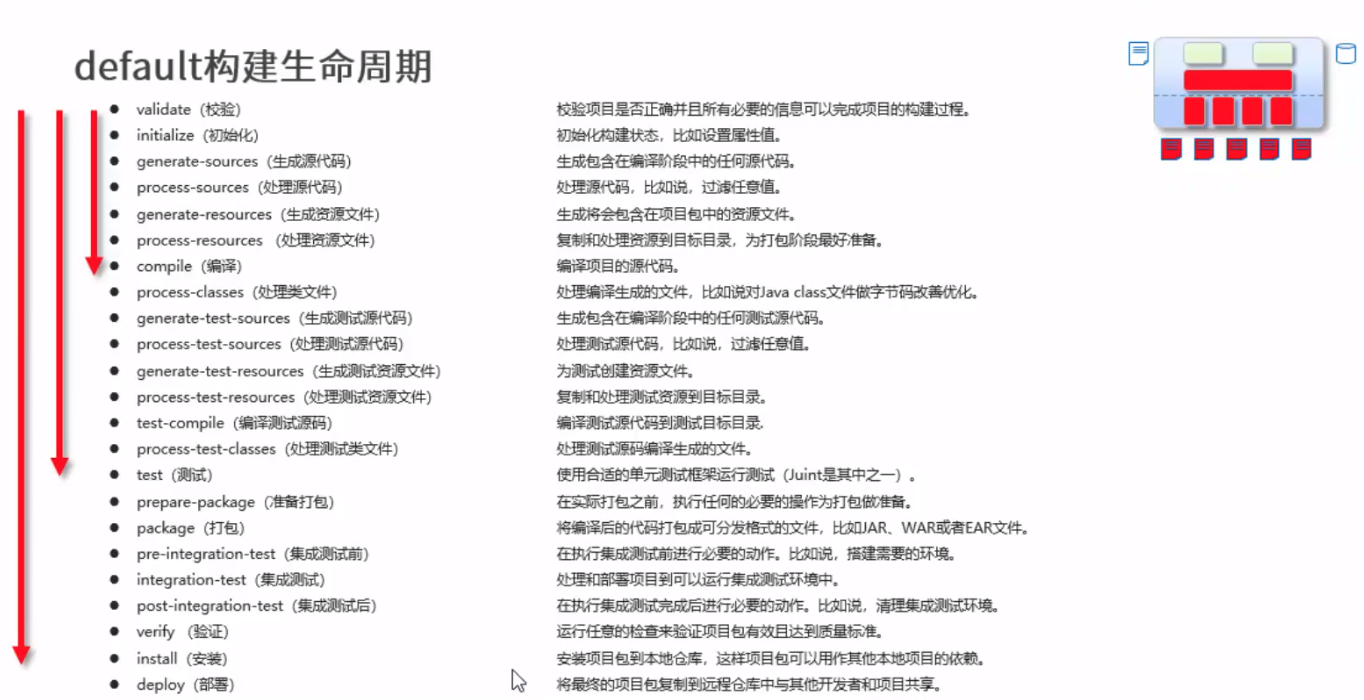
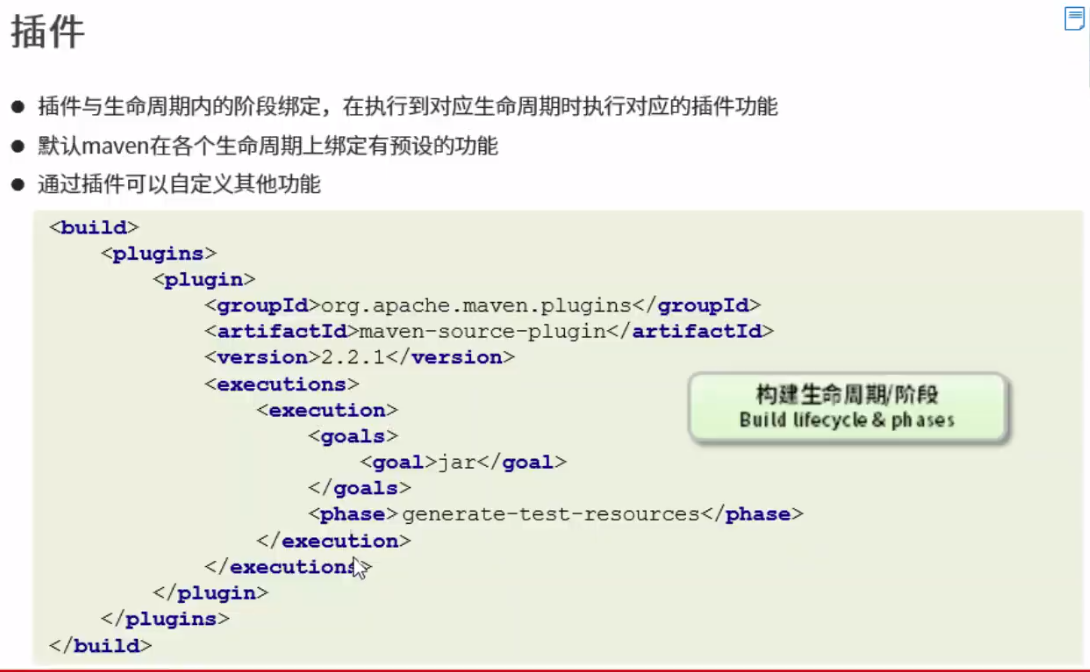
<plugin><groupId>org.apache.maven.plugins</groupId><!-- compile插件 --><artifactId>maven-compiler-plugin</artifactId><configuration><source>1.6</source><target>1.6</target></configuration><executions><execution><id>default-testCompile</id><!-- 哪个阶段执行,参照官网 --><phase>test-compile</phase><configuration><testExcludes><exclude>**/jsfunit/*.java</exclude></testExcludes></configuration><!-- goals,参照官网 --><goals><goal>testCompile</goal></goals></execution></executions></plugin>
Compile
maven-compiler-plugin include/exclude
Package
Install
compile + test compile + test + local repo
多模块
pom坐标groupId, artifactId等
- What Is an Apache Maven Artifact?
- [译]Maven项目groupId、artifactId和version命名规范
- groupId
- artifactId
- version
- packaging
- classifier
packaging
maven pom.xml配置文件中的packaging标签
聚合
继承
Maven goals
- Maven tool window — lifecycle
- Run Anything window
- Run/Debug Configurations
私服 Maven Nexus
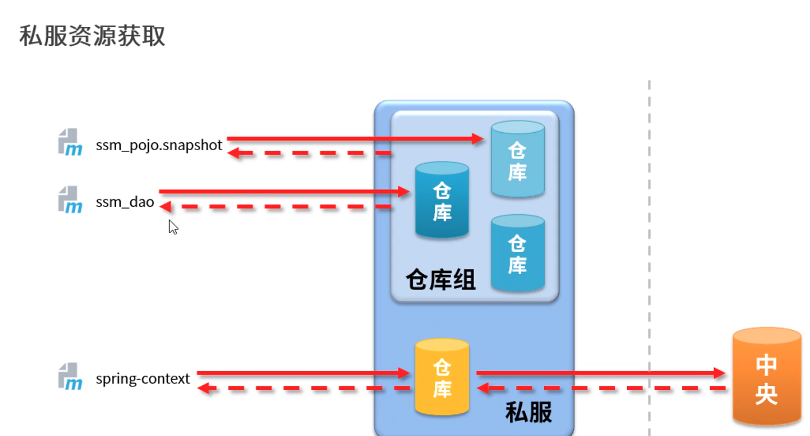
Nexus Guides
- JDK配置
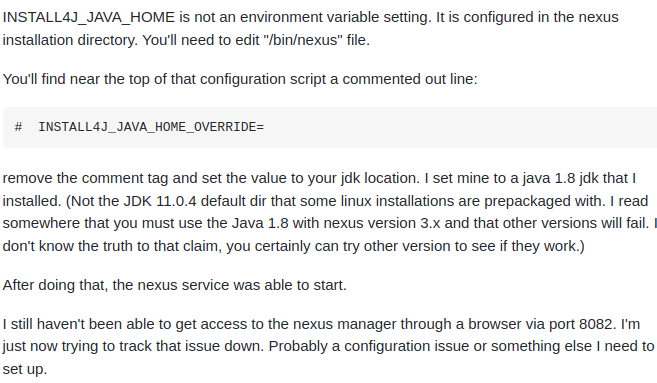
安装运行中遇到的问题:
- 8081端口和nginx冲突,修改端口为8281
- 安装目录/usr/local的owner是root,为了不改变owner运行,要在root用户安装sdkman和java8,并且要把java和nexus的bin软连接到/usr/bin,然后在root中运行nexus run。
Maven常用命令
maven常用命令environment variables
maven 命令的格式为 mvn [plugin-name]:[goal-name],可以接受的参数如下,
-D 指定参数,如 -Dmaven.test.skip=true 跳过单元测试
-P 指定 Profile 配置,可以用于区分环境;
-e 显示maven运行出错的信息;
-o 离线执行命令,即不去远程仓库更新包;
-X 显示maven允许的debug信息;
-U 强制去远程更新snapshot的插件或依赖,默认每天只更新一次。
常用maven命令
创建maven项目:mvn archetype:generate
指定 group: -DgroupId=packageName
指定 artifact:-DartifactId=projectName
创建web项目:-DarchetypeArtifactId=maven-archetype-webappmvn archetype:generate -DgroupId=com.itheima -DartifactId=java-project -DarchetypeArtifactId=maven-archetype-quickstart -Dversion=0.0.1-snapshot -DinteractiveMode=false
mvn archetype:generate -DgroupId=com.itheima -DartifactId=web-project -DarchetypeArtifactId=maven-archetype-webapp -Dversion=0.0.1-snapshot -DinteractiveMode=false
验证项目是否正确:mvn validate
- maven 打包:mvn package
- 只打jar包:mvn jar:jar
- 生成源码jar包:mvn source:jar
- 产生应用需要的任何额外的源代码:mvn generate-sources
- 编译源代码: mvn compile
- 编译测试代码:mvn test-compile
- 运行测试:mvn test
- 运行检查:mvn verify
- 清理maven项目:mvn clean
- 生成eclipse项目:mvn eclipse:eclipse
- 清理eclipse配置:mvn eclipse:clean
- 生成idea项目:mvn idea:idea
- 安装项目到本地仓库:mvn install
- 发布项目到远程仓库:mvn:deploy
- 在集成测试可以运行的环境中处理和发布包:mvn integration-test
- 显示maven依赖树:mvn dependency:tree
- 显示maven依赖列表:mvn dependency:list
- 下载依赖包的源码:mvn dependency:sources
- 安装本地jar到本地仓库:mvn install:install-file -DgroupId=packageName -DartifactId=projectName -Dversion=version -Dpackaging=jar -Dfile=path
- mvn命令跳过测试:
mvn install -Dmaven.test.skip=true 测试类不会生成.class 文件
mvn install -DskipTests 测试类会生成.class文件
web项目相关命令
- 启动tomcat:mvn tomcat:run
- 启动jetty:mvn jetty:run
- 运行打包部署:mvn tomcat:deploy
- 撤销部署:mvn tomcat:undeploy
- 启动web应用:mvn tomcat:start
- 停止web应用:mvn tomcat:stop
- 重新部署:mvn tomcat:redeploy
- 部署展开的war文件:mvn war:exploded tomcat:exploded
Maven Surefire Plugin
- surefire-reports: target/surefire-reports/index.html
excludes and includes
<plugin><groupId>org.apache.maven.plugins</groupId><artifactId>maven-surefire-plugin</artifactId><version>3.0.0-M4</version><configuration><excludes><exclude>**/pm/*.java</exclude><exclude>**/Pm*.java</exclude></excludes><includes><include>com/synnex/biz/hierarchy/service/sales/dept/*Test.java</include></includes></configuration></plugin>
# Test one classmvn test -Dtest=AppTest# Test one methodmvn test -Dtest=AppTest#testFoo# Test two methods with the plus sign (+)mvn test -Dtest=AppTest#testFoo+testBar# Test multiple items comma separated and with a wildcard (*)mvn test -Dtest=AppTest,Web*# Test by Package with a wildcard (*)mvn test -Dtest=com.mycompany.*.*Test
# Exclude one test class, by using the explanation mark (!)mvn test -Dtest=!LegacyTest# Exclude one test methodmvn verify -Dtest=!LegacyTest#testFoo# Exclude two test methodsmvn verify -Dtest=!LegacyTest#testFoo+testBar# Exclude a package with a wildcard (*)mvn test -Dtest=!com.mycompany.app.Legacy*
问题
_remote.repositories文件
使用Maven管理项目时,明明本地仓库有对应的jar包,但还是报找不到

若有收获,就点个赞吧
0 人点赞


