- Exercise 1: Index Techproducts Example Data
- start
- on Unix or MacOS
- on Windows
- restart
- If you have defined ZK_HOST in solr.in.sh/solr.in.cmd (see instructions)
- you can omit -z
from the above command. - Exercise 2: Modify the Schema and Index Films Data
- Create a New Collection
- Preparing Schemaless for the Films Data
- Index Sample Film Data
- Faceting
- Exercise 3: Index Your Own Data
- new learned Searching
- Demo
- Other
- tutorial 100%
- searching 0%
- Solr 入门
Exercise 1: Index Techproducts Example Data
Launch Solr in SolrCloud Mode
- run script
```powershell
start
on Unix or MacOS
bin/solr start -e cloudon Windows
bin\solr.cmd start -e cloud
restart
If you have defined ZK_HOST in solr.in.sh/solr.in.cmd (see instructions)
you can omit -z from the above command.
./bin/solr start -c -p 8983 -s example/cloud/node1/solr ./bin/solr start -c -p 7574 -s example/cloud/node2/solr -z localhost:9983
2. Because we are starting in SolrCloud mode, and did not define any details about an external ZooKeeper cluster, Solr launches its own ZooKeeper and connects both nodes to it.2. Let's name our collection "techproducts"2. A collection must have a configset, which at a minimum includes the two main configuration files for Solr: the schema file (named either managed-schema or schema.xml), and solrconfig.xml.sample_techproducts_configs is specifically designed to support the sample data we want to use.5. [http://localhost:8983/solr/#/~cloud?view=nodes](http://localhost:8983/solr/#/~cloud?view=nodes)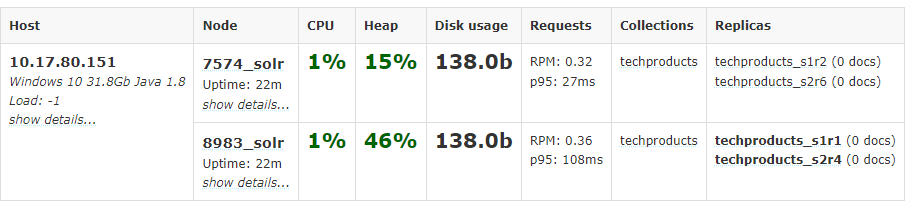<a name="FgxyF"></a>## Index the Techproducts Data6. Solr includes the bin/post tool in order to facilitate indexing various types of documents easily.```powershell# Linux/Macsolr-8.11.0:$ bin/post -c techproducts example/exampledocs/*# WindowsC:\solr-8.11.0> java -jar -Dc=techproducts -Dauto example\exampledocs\post.jar example\exampledocs\*
Basic Searching
Solr can be queried via REST clients, curl, wget, Chrome POSTMAN, etc., as well as via native clients available for many programming languages.
Search for a Single Term
- q=Foundation
[http://localhost:8983/solr/techproducts/select?indent=true&q.op=OR&q=Foundation](http://localhost:8983/solr/techproducts/select?indent=true&q.op=OR&q=Foundation)
- f1=id,cat
[http://localhost:8983/solr/techproducts/select?fl=id%2Ccat&indent=true&q.op=OR&q=*%3A*](http://localhost:8983/solr/techproducts/select?fl=id%2Ccat&indent=true&q.op=OR&q=*%3A*)
Field Searches
- q=cat:electronics
[http://localhost:8983/solr/techproducts/select?indent=true&q.op=OR&q=cat%3Aelectronics](http://localhost:8983/solr/techproducts/select?indent=true&q.op=OR&q=cat%3Aelectronics)
Phrase Search
- q=”multiple terms here”
[http://localhost:8983/solr/techproducts/select?indent=true&q.op=OR&q=%22CAS%20latency%22](http://localhost:8983/solr/techproducts/select?indent=true&q.op=OR&q=%22CAS%20latency%22)
- q=\”multiple+terms+here\”
curl "http://localhost:8983/solr/techproducts/select?q=\"CAS+latency\""
Combining Searches
+should be encoded in url and - no need.
- q=+electronics +music
[http://localhost:8983/solr/techproducts/select?indent=true&q.op=OR&q=%2Belectronics%20%2Bmusic](http://localhost:8983/solr/techproducts/select?indent=true&q.op=OR&q=%2Belectronics%20%2Bmusic)
- q=+electronics -music
[http://localhost:8983/solr/techproducts/select?indent=true&q.op=OR&q=%2Belectronics%20-music](http://localhost:8983/solr/techproducts/select?indent=true&q.op=OR&q=%2Belectronics%20-music)
- q=%2Belectronics%20%2Bmusic
curl "http://localhost:8983/solr/techproducts/select?q=%2Belectronics%20%2Bmusic"
- q=%2Belectronics+-music
中间的+们没有encode是因为它是作为phrase的空格替代curl "http://localhost:8983/solr/techproducts/select?q=%2Belectronics+-music"
Delete collection, stop nodes, stop all
# delete this collectionbin/solr delete -c techproducts# create a new collection:bin/solr create -c <yourCollection> -s 2 -rf 2
The following command line will stop Solr and remove the directories for each of the two nodes that were created all the way back in Exercise 1:
bin/solr stop -all;rm -Rf example/cloud/
Exercise 2: Modify the Schema and Index Films Data
- a feature in Solr called “field guessing“, Solr attempts to guess what type of data is in a field while it’s indexing it, also automatically creates new fields in the schema for new fields that appear in incoming documents. This mode is called “Schemaless“
What is a “schema” and why do I need one?
Solr’s schema is a single file (in XML) that stores the details about the fields and field types Solr is expected to understand. The schema defines not only the field or field type names, but also any modifications that should happen to a field before it is indexed. For example, if you want to ensure that a user who enters “abc” and a user who enters “ABC” can both find a document containing the term “ABC”, you will want to normalize (lower-case it, in this case) “ABC” when it is indexed, and normalize the user query to be sure of a match. These rules are defined in your schema.
Earlier in the tutorial we mentioned copy fields, which are fields made up of data that originated from other fields. You can also define dynamic fields, which use wildcards (such as _t or _s) to dynamically create fields of a specific field type. These types of rules are also defined in the schema.
Create a New Collection
use a configset that has a very minimal schema and let Solr figure out from the data what fields to add,_default configset is the default and is used if you don’t specify one at all.
# linuxbin/solr create -c films -s 2 -rf 2# windowsbin/solr.cmd create -c films -s 2 -rf 2
Preparing Schemaless for the Films Data
Create the “names” Field
_default configset two parallel things happening
- managed schema.only be modified by Solr’s Schema API
- field guessing. configured in the solrconfig.xml
the schemaless features are fine to start with, but not recommend going to production without a schema that you have defined yourself.
- uses the Schema API
curl "[http://localhost:8983/solr/films/schema"](http://localhost:8983/solr/films/schema") -X POST -H "Content-type:application/json" --data-binary "{\"add-field\": {\"name\":\"name\", \"type\":\"text_general\", \"multiValued\":false, \"stored\":true}}"
- use the Admin UI to create fields

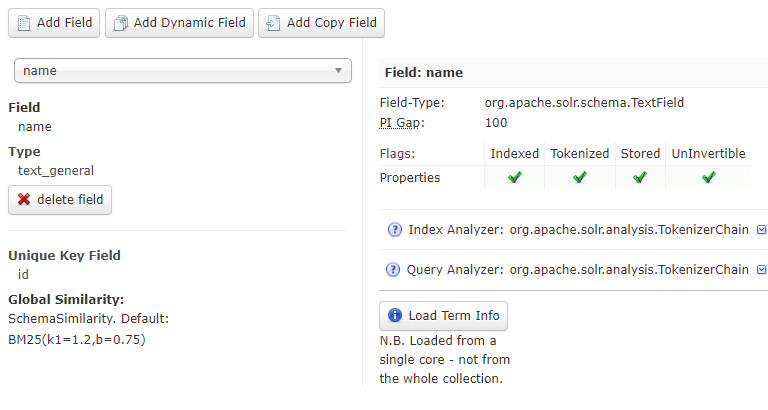
Create a “catchall” Copy Field
相当于q=foo在所有fields中查询
in last exercise’s configuration, copy fields into a text field, and that field was the default when no other field was defined in the query.
now, set up a “catchall field” by defining a copy field that will take all data from all fields and index it into a field named text.curl "[http://localhost:8983/solr/films/schema](http://localhost:8983/solr/films/schema)"-X POST -H "Content-type:application/json" --data-binary "{\"add-copy-field\" : {\"source\":\"*\",\"dest\":\"_text_\"}}"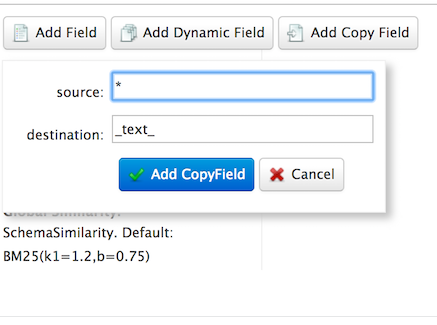
Index Sample Film Data
bin/post -c films example/films/films.jsonC:\solr-8.11.0> java -jar -Dc=films -Dauto example\exampledocs\post.jar example\films\*.json
- -c films: this is the Solr collection to index data to. ```shell bin/post -c films example/films/films.xml
C:\solr-8.11.0> java -jar -Dc=films -Dauto example\exampledocs\post.jar example\films*.xml
```shellbin/post -c films example/films/films.csv -params "f.genre.split=true&f.directed_by.split=true&f.genre.separator=|&f.directed_by.separator=|"java -jar -Dc=films -Dparams="f.genre.split=true&f.directed_by.split=true&f.genre.separator=|&f.directed_by.separator=|" -Dauto .\example\exampledocs\post.jar .\example\films\*.csv
Note the CSV command includes extra parameters. This is to ensure multi-valued entries in the “genre” and “directed_by” columns are split by the pipe (|) character, used in this file as a separator. Telling Solr to split these columns this way will ensure proper indexing of the data.
Faceting
Field Facets
facet counts for the genre_str fieldcurl "[http://localhost:8983/solr/films/select?q=*:*&rows=0&facet=true&facet.field=genre_str"](http://localhost:8983/solr/films/select?q=*:*&rows=0&facet=true&facet.field=genre_str")
limit the facets to only those that contain a certain numbercurl "[http://localhost:8983/solr/films/select?=&q=*:*&facet.field=genre_str&facet.mincount=200&facet=on&rows=0"](http://localhost:8983/solr/films/select?=&q=*:*&facet.field=genre_str&facet.mincount=200&facet=on&rows=0")
Range Facets
numeric range and date rangecurl '[http://localhost:8983/solr/films/select?q=*:*&row=0&facet=true&facet.range=initial_release_date&facet.range.start=NOW-20YEAR&facet.range.end=NOW&facet.range.gap=%2B1YEAR'](http://localhost:8983/solr/films/select?q=*:*&row=0&facet=true&facet.range=initial_release_date&facet.range.start=NOW-20YEAR&facet.range.end=NOW&facet.range.gap=%2B1YEAR')
Pivot Facets
“decision trees”,所谓的导航查询curl "[http://localhost:8983/solr/films/select?q=*:*&rows=0&facet=on&facet.pivot=genre_str,directed_by_str"](http://localhost:8983/solr/films/select?q=*:*&rows=0&facet=on&facet.pivot=genre_str,directed_by_str")
Exercise 3: Index Your Own Data
Create Your Own Collection
./bin/solr create -c localDocs -s 2 -rf 2
Indexing Ideas
Local Files with bin/post
DataImportHandler
数据库导入
or other structured data sources. There are several examples included for feeds, GMail, and a small HSQL database.
Data Import Handler (DIH)
The README.txt file in example/example-DIH will give you details on how to start working with this tool.
SolrJ
Java API方式
<dependency><groupId>org.apache.solr</groupId><artifactId>solr-solrj</artifactId><version>8.11.0</version></dependency>
Documents Screen
Use the Admin UI Documents tab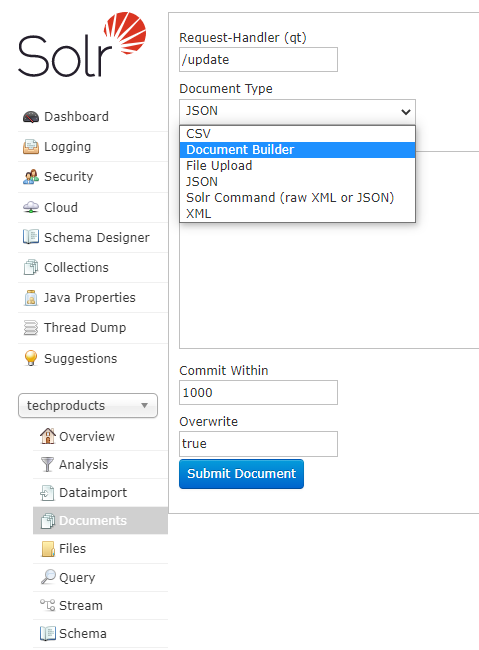
Updating Data
- uniqueKey 默认id
the example Solr schema (a file named either managed-schema or schema.xml) specifies a uniqueKey field called id. Whenever you POST commands to Solr to add a document with the same value for the uniqueKey as an existing document, it automatically replaces it for you
core-specific Overview section of the Solr Admin UI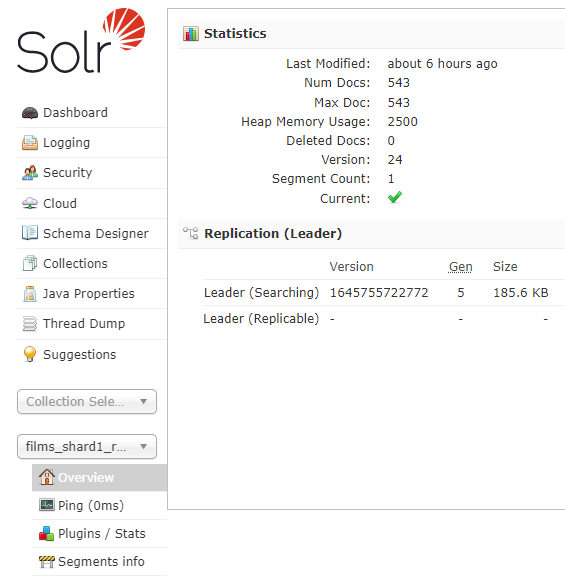
Deleting Data
merely removing documents doesn’t change the underlying field definitions. Essentially, this will allow
you to reindex your data after making changes to fields for your needs.
- Execute the following command to delete a specific document:
bin/post -c localDocs -d "<delete><id>SP2514N</id></delete>"
- To delete all documents, you can use “delete-by-query” command like:
bin/post -c localDocs -d "<delete><query>*:*</query></delete>"
new learned Searching
q.op
- q.op=OR
- q.op=AND
[http://localhost:8983/solr/techproducts/select?indent=true&q.op=OR&q=%2B(id%3A0812521390%20id%3A0441385532)](http://localhost:8983/solr/techproducts/select?indent=true&q.op=OR&q=%2B(id%3A0812521390%20id%3A0441385532))
两个id中间的空格代表And或者Or,由q.op决定
fq
fq
fq are cached independently of the main query. When a later query uses the same filter, there’s a cache hit.fq=popularity:[10 TO *]&fq=section:0fq=+popularity:[10 TO *] +section:0
filter
filter
与fq效果一样
- Support for a special filter(…) syntax to indicate that some query clauses should be cached in the filter cache (as a constant score boolean query). This allows sub-queries to be cached and re-used in other queries. For example inStock:true will be cached and re-used in all three of the queries below:
- q=features:songs OR filter(inStock:true)
- q=+manu:Apple +filter(inStock:true)
- q=+manu:Apple & fq=inStock:true
- This can even be used to cache individual clauses of complex filter queries. In the first query below, 3 items will be added to the filter cache (the top level fq and both filter(…) clauses) and in the second query, there will be 2 cache hits, and one new cache insertion (for the new top level fq):
- q=features:songs & fq=+filter(inStock:true) +filter(price:[* TO 100])
- q=manu:Apple & fq=-filter(inStock:true) -filter(price:[* TO 100])
Demo
(orderType: ("8" OR "1108") AND (*:* NOT deleteDatetime:*) AND (*:* NOT closedDate:*) AND (*:* NOT salesRelDate:*) AND (*:* NOT creditRelDate:*) AND !fromRefType:("370" OR "390") AND boExpireDate:[* TO NOW] )
Other

若有收获,就点个赞吧
0 人点赞


