数据库管理
MySQL
系统命令
> mysql -u root -p
SQL语句
SHOW DATABASES;CREATE DATABASE mydb;USE mydb;
PgSQL
系统命令
=> sudo su postgres=> psql -l=> createdb mydb=> psql mydb# 查看当前数据库=>\c mydb
SQL语句
CREATE DATABASE my_pgWITH OWNER = my_pgENCODING = 'UTF8'TABLESPACE = tbs;
数据表
MySQL
-- 创建数据表CREATE TABLE users o(id INT AUTO_INCREMENT,name VARCHAR(255) NOT NULL);-- 查看数据表SHOW TABLES;-- 查看表信息SHOW COLUMNS FROM users o;
查看表信息
=> \d users
sql语句```sql-- 查看数据表select * from pg_tables;-- 创建数据表CREATE TABLE users o(id SERIAL,name VARCHAR(255) NOT NULL);
为查询columns创建视图
SELECT *FROM information_schema.columnsWHERE table_schema = 'public'AND table_name = 'user'ORDER BY column_name ASC;-- 创建视图CREATE view user_columnsasSELECT *FROM information_schema.columnsWHERE table_schema = 'public'AND table_name = 'user'ORDER BY column_name ASC;SELECT * FROM user_columns;
导入SQL
MySQL
> source /db/users/o.sql
PgSQL
=> \i /db/users/o.sql
数据类型
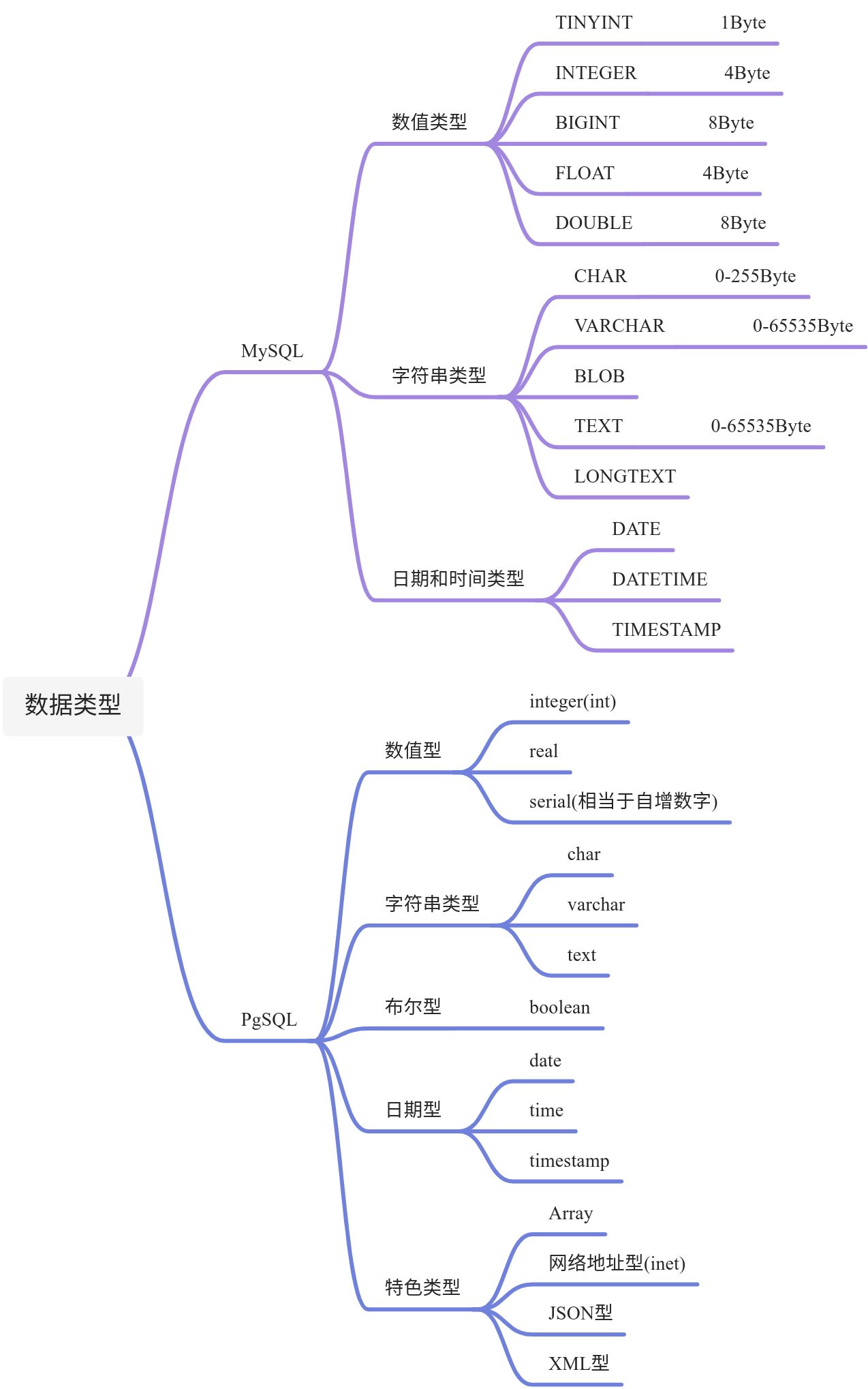
表约束
关键字
MySQL和PgSQL具有相同的sql约束
- not null: 不能为空
- unique: 在所有数据中值必须唯一
- check: 字段设置条件
- default: 字段默认值
- primary key: 主键,不能为空,且不能重复
create table public.test (id SERIAL,name VARCHAR(10) not null unique,age integer not null default 20,check (age > 1),primary key(id));
修改主键
alter table sample_details drop primary key;alter table sample_details add primary key(sample_no asc, sku_no asc);
增删改字段
```sql alter table users add fullname varchar(255); alter table users drop fullname;
— 重命名字段 rename to — MySQL alter table users CHANGE player nba_player VARCHAR(255) — PgSQL alter table users rename player to nba_player;
— 修改字段类型 — MySQL alter table users MODIFY nba_player VARCHAR(100); — PgSQL alter table users alter nba_player type varchar(100);
<a name="66805fe0"></a># INSERT语句- insert into [tablename] (field, ...) values (value, ...)```sql-- 选择字段插入insert into user (username, password, email) VALUES ( 'a', 'b', 'c');-- 全字段插入insert into user VALUES (DEFAULT, 'a', 'b', 'c');
SELECT语句
-- MySQLSELECT * FROM users 3, 6;-- PgSQLselect * from users limit 6 offset 3;
WHERE
--- 1=1便于增减AND条件SELECT * FROM usersWHERE 1 = 1AND gender = 0;-- 1=2,只看表结构SELECT * FROM users WHERE 1 = 2;
UPDATE
- update [table] set [field=newvalue,…] where …
DELETE
- delete from [table] where …
TRUNCATE
-- pgsqlTRUNCATE [ TABLE ] [ ONLY ] name [ * ] [, ... ][ RESTART IDENTITY | CONTINUE IDENTITY ] [ CASCADE | RESTRICT ]
copy
--mysql-- 只复制表结构,方法1CREATE TABLE new_table_name LIKE source_table_name;-- 只复制表结构,方法2-- 复制表结构和数据CREATE TABLE order_archived ASSELECT * FROM orders;-- 利用tmp表SELECT tmp.name FROM (SELECT name FROM student_contacts GROUP BY name HAVING COUNT(1) > 1) AS tmp;-- truncate tableINSERT INTO order_archivedSELECT * FROM ordersWHERE order_date < '2019-01-01';-- pgsql本地文件copyCOPY table_name [ ( column_name [, ...] ) ]FROM { 'filename' | PROGRAM 'command' | STDIN }[ [ WITH ] ( option [, ...] ) ]COPY { table_name [ ( column_name [, ...] ) ] | ( query ) }TO { 'filename' | PROGRAM 'command' | STDOUT }[ [ WITH ] ( option [, ...] ) ]\copy (select user_id, pay_money, create_date + 31 as create_date from t_pay_202012) to '/home/zhangsan/database/pgsql/202101.txt';
聚合
distinct、sum、max、min、group by、group by+having
select distinct team from users;select sum(score) from users;select max(score) from users;select min(score) from users;select * from users where score = (select max(score) from users);select team, max(score) from users group by team;select team, max(score) from users group by team having max(score) >= 25 order by max(score);
优先顺序:where>group by>having>order by
WHERE 和 HAVING、ON 有什么区别?
函数
select player, length(player) from users;select player, concat(player, '/', team) as "球员信息" from users;select substring(team, 1, 1) as "球队首文字" from users;select concat('我', substring(team, 1, 1)) as "球队首文字" from users;select random();select * from users order by random();select * from users order by random() limit 1;
SELECT SUSER_NAME(); -- SYBASE, 数据库登录用户名
Date function
-- SQL SERVER/ SYBASESELECT DATEDIFF(day, '2020-03-25 23:59', GETDATE()) AS difference_in_day;SELECT convert(datetime, convert(char(20), dateadd(dd, 3, getdate()), 1))-- MYSQLSELECT NOW() - INTERVAL 1 DAY;SELECT DATE_ADD(NOW(), INTERVAL -1 DAY);SELECT DATE_SUB(NOW(), INTERVAL 1 DAY);SELECT YEAR(NOW());
索引
-- PG和MySQL通用-- 创建索引-- 索引:根据该字段查询更快,追加数据时变慢> create index nba_player_index on users(nba_player);> ALTER TABLE users ADD index nba_player_index (nba_player);-- 去掉索引> drop index nba_player_index on users;> ALTER TABLE users DROP INDEX nba_player;
Join连接
-- 内连接:MySQL&PgSQLSELECT u.player, t.content FROM users u JOIN twitters t ON u.id = t.user_id WHERE u.id = 1;-- 外连接:MySQLSELECT u.player, t.content FROM users u LEFT JOIN twitters t ON u.id = t.user_id WHERE u.id = 1;SELECT u.player, t.content FROM users u RIGHT JOIN twitters t ON u.id = t.user_id WHERE u.id = 1;-- 外连接:PgSQLSELECT u.player, t.content FROM users u LEFT OUTER JOIN twitters t ON u.id = t.user_id WHERE u.id = 1;SELECT u.player, t.content FROM users u RIGHT OUTER JOIN twitters t ON u.id = t.user_id WHERE u.id = 1;
外键
-- MySqlALTER TABLE order_account add CONSTRAINT `FK_order_account_agent` FOREIGN KEY (`agent_id`) REFERENCES `agent` (`id`);
视图
create view curry_twitters as select u.player, t.content from users as u, twitters as t where u.id = t.user_id and u.id = 1;-- 查看已有视图-- MySQLSHOW TABLE STATUS WHERE COMMENT='view';-- PgSQL> \dv> \d curry_twitters>select * from curry_twitters;-- 删除视图> drop view curry_twitters;
使用事务
数据库事务(Database Transaction) ,是指作为单个逻辑工作单元执行的一系列操作,要么完全地执行,要么完全地不执行。 事务处理可以确保除非事务性单元内的所有操作都成功完成,否则不会永久更新面向数据的资源。通过将一组相关操作组合为一个要么全部成功要么全部失败的单元,可以简化错误恢复并使应用程序更加可靠。一个逻辑工作单元要成为事务,必须满足所谓的ACID(原子性、一致性、隔离性和持久性)属性。事务是数据库运行中的逻辑工作单位,由DBMS中的事务管理子系统负责事务的处理。
- PostgreSql数据库事务使用
- begin
- commit
- rollback
> select * from users;> begin;> update users set score = 50 where player = '库里';> update users set score = 60 where player = '哈登';> commit;> select * from users;> begin;> update users set score = 0 where player = '库里';> update users set score = 0 where player = '哈登';-- 如果在这里执行了一下SELECT,还是会生效。> rollback;> select * from users;

若有收获,就点个赞吧
0 人点赞


