- 入门-HTTP
- 入门-HTTP-索引-查询 & 删除
- 入门-HTTP-文档-创建(Put & Post)
- 入门-HTTP-查询-主键查询 & 全查询
- 入门-HTTP-全量修改 & 局部修改 & 删除
- 入门-HTTP-条件查询 & 分页查询 & 查询排序
- 入门-HTTP-多条件查询 & 范围查询
- 入门-HTTP-全文检索 & 完全匹配 & 高亮查询
- 入门-HTTP-聚合查询
- 入门-HTTP-映射关系
- 入门-JavaAPI
参考博客 参考视频 官方网址 官方文档 Elasticsearch 7.8.0下载页面
Windows 版的 Elasticsearch 压缩包,解压即安装完毕,解压后的 Elasticsearch 的目录结构如下 :
目录 含义
| 目录 | 含义 |
|---|---|
| bin | 可执行脚本目录 |
| config | 配置目录 |
| jdk | 内置 JDK 目录 |
| lib | 类库 |
| logs | 日志目录 |
| modules | 模块目录 |
| plugins | 插件目录 |
注意: 9300 端口为 Elasticsearch 集群间组件的通信端口, 9200 端口为浏览器访问的 http协议 RESTful 端口。
打开浏览器,输入地址: http://localhost:9200,测试返回结果,返回结果如下:
{"name" : "DESKTOP-LNJQ0VF","cluster_name" : "elasticsearch","cluster_uuid" : "nCZqBhfdT1-pw8Yas4QU9w","version" : {"number" : "7.8.0","build_flavor" : "default","build_type" : "zip","build_hash" : "757314695644ea9a1dc2fecd26d1a43856725e65","build_date" : "2020-06-14T19:35:50.234439Z","build_snapshot" : false,"lucene_version" : "8.5.1","minimum_wire_compatibility_version" : "6.8.0","minimum_index_compatibility_version" : "6.0.0-beta1"},"tagline" : "You Know, for Search"}
入门-倒排索引
正排索引(传统)
| id | content |
|---|---|
| 1001 | my name is zhang san |
| 1002 | my name is li si |
倒排索引
| keyword | id |
|---|---|
| name | 1001, 1002 |
| zhang | 1001 |
Elasticsearch 是面向文档型数据库,一条数据在这里就是一个文档。 为了方便大家理解,我们将 Elasticsearch 里存储文档数据和关系型数据库 MySQL 存储数据的概念进行一个类比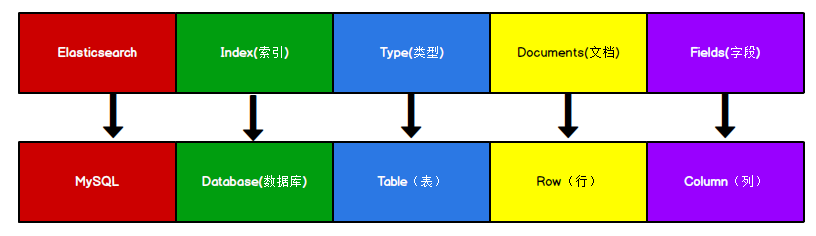
ES 里的 Index 可以看做一个库,而 Types 相当于表, Documents 则相当于表的行。这里 Types 的概念已经被逐渐弱化, Elasticsearch 6.X 中,一个 index 下已经只能包含一个type, Elasticsearch 7.X 中, Type 的概念已经被删除了。
入门-HTTP
入门-HTTP-索引-创建
对比关系型数据库,创建索引就等同于创建数据库。
在 Postman 中,向 ES 服务器发 PUT 请求 : http://127.0.0.1:9200/shopping
请求后,服务器返回响应:
{"acknowledged": true,//响应结果"shards_acknowledged": true,//分片结果"index": "shopping"//索引名称}
如果重复发 PUT 请求 : http://127.0.0.1:9200/shopping 添加索引,会返回错误信息 :
{"error": {"root_cause": [{"type": "resource_already_exists_exception","reason": "index [shopping/J0WlEhh4R7aDrfIc3AkwWQ] already exists","index_uuid": "J0WlEhh4R7aDrfIc3AkwWQ","index": "shopping"}],"type": "resource_already_exists_exception","reason": "index [shopping/J0WlEhh4R7aDrfIc3AkwWQ] already exists","index_uuid": "J0WlEhh4R7aDrfIc3AkwWQ","index": "shopping"},"status": 400}
入门-HTTP-索引-查询 & 删除
查看所有索引
在 Postman 中,向 ES 服务器发 GET 请求 : http://127.0.0.1:9200/_cat/indices?v
这里请求路径中的_cat 表示查看的意思, indices 表示索引,所以整体含义就是查看当前 ES服务器中的所有索引,就好像 MySQL 中的 show tables 的感觉,服务器响应结果如下 :
health status index uuid pri rep docs.count docs.deleted store.size pri.store.sizeyellow open shopping J0WlEhh4R7aDrfIc3AkwWQ 1 1 0 0 208b 208b
表头 含义
health 当前服务器健康状态: green(集群完整) yellow(单点正常、集群不完整) red(单点不正常)
status 索引打开、关闭状态
index 索引名
uuid 索引统一编号
pri 主分片数量
rep 副本数量
docs.count 可用文档数量
docs.deleted 文档删除状态(逻辑删除)
store.size 主分片和副分片整体占空间大小
pri.store.size 主分片占空间大小
查看单个索引
在 Postman 中,向 ES 服务器发 GET 请求 : http://127.0.0.1:9200/shopping
返回结果如下:
{"shopping": {//索引名"aliases": {},//别名"mappings": {},//映射"settings": {//设置"index": {//设置 - 索引"creation_date": "1617861426847",//设置 - 索引 - 创建时间"number_of_shards": "1",//设置 - 索引 - 主分片数量"number_of_replicas": "1",//设置 - 索引 - 主分片数量"uuid": "J0WlEhh4R7aDrfIc3AkwWQ",//设置 - 索引 - 主分片数量"version": {//设置 - 索引 - 主分片数量"created": "7080099"},"provided_name": "shopping"//设置 - 索引 - 主分片数量}}}}
删除索引
在 Postman 中,向 ES 服务器发 DELETE 请求 : http://127.0.0.1:9200/shopping
返回结果如下:
{"acknowledged": true}
再次查看所有索引,GET http://127.0.0.1:9200/_cat/indices?v,返回结果如下:
health status index uuid pri rep docs.count docs.deleted store.size pri.store.size
入门-HTTP-文档-创建(Put & Post)
假设索引已经创建好了,接下来我们来创建文档,并添加数据。这里的文档可以类比为关系型数据库中的表数据,添加的数据格式为 JSON 格式
{"title":"小米手机","category":"小米","images":"http://www.gulixueyuan.com/xm.jpg","price":3999.00}
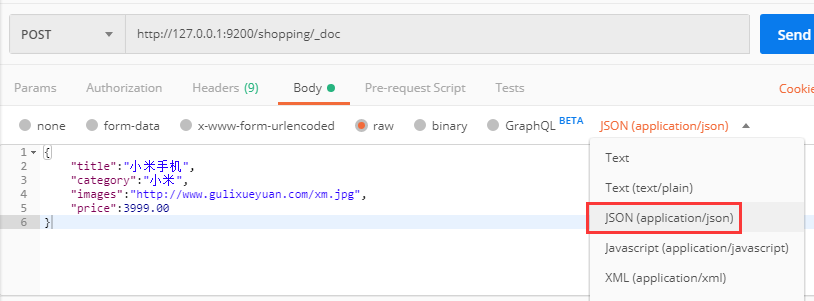
注意,此处发送请求的方式必须为 POST,不能是 PUT,否则会发生错误 。
{"_index": "shopping",//索引"_type": "_doc",//类型-文档"_id": "ANQqsHgBaKNfVnMbhZYU",//唯一标识,可以类比为 MySQL 中的主键,随机生成"_version": 1,//版本"result": "created",//结果,这里的 create 表示创建成功"_shards": {//"total": 2,//分片 - 总数"successful": 1,//分片 - 总数"failed": 0//分片 - 总数},"_seq_no": 0,"_primary_term": 1}
上面的数据创建后,由于没有指定数据唯一性标识(ID),默认情况下, ES 服务器会随机生成一个。
如果想要自定义唯一性标识,需要在创建时指定: http://127.0.0.1:9200/shopping/_doc/1,请求体JSON内容为:
{"title":"小米手机","category":"小米","images":"http://www.gulixueyuan.com/xm.jpg","price":3999.00}
返回结果如下:
{"_index": "shopping","_type": "_doc","_id": "1",//<------------------自定义唯一性标识"_version": 1,"result": "created","_shards": {"total": 2,"successful": 1,"failed": 0},"_seq_no": 1,"_primary_term": 1}
此处需要注意:如果增加数据时明确数据主键,那么请求方式也可以为 PUT。
入门-HTTP-查询-主键查询 & 全查询
查看文档时,需要指明文档的唯一性标识,类似于 MySQL 中数据的主键查询
在 Postman 中,向 ES 服务器发 GET 请求 : http://127.0.0.1:9200/shopping/_doc/1 。
{"_index": "shopping","_type": "_doc","_id": "1","_version": 1,"_seq_no": 1,"_primary_term": 1,"found": true,"_source": {"title": "小米手机","category": "小米","images": "http://www.gulixueyuan.com/xm.jpg","price": 3999}}
查找不存在的内容,向 ES 服务器发 GET 请求 : http://127.0.0.1:9200/shopping/_doc/1001。
{"_index": "shopping","_type": "_doc","_id": "1001","found": false}
查看索引下所有数据,向 ES 服务器发 GET 请求 : http://127.0.0.1:9200/shopping/_search。
{"took": 133,"timed_out": false,"_shards": {"total": 1,"successful": 1,"skipped": 0,"failed": 0},"hits": {"total": {"value": 2,"relation": "eq"},"max_score": 1,"hits": [{"_index": "shopping","_type": "_doc","_id": "ANQqsHgBaKNfVnMbhZYU","_score": 1,"_source": {"title": "小米手机","category": "小米","images": "http://www.gulixueyuan.com/xm.jpg","price": 3999}},{"_index": "shopping","_type": "_doc","_id": "1","_score": 1,"_source": {"title": "小米手机","category": "小米","images": "http://www.gulixueyuan.com/xm.jpg","price": 3999}}]}}
入门-HTTP-全量修改 & 局部修改 & 删除
全量修改
和新增文档一样,输入相同的 URL 地址请求,如果请求体变化,会将原有的数据内容覆盖
在 Postman 中,向 ES 服务器发 POST 请求 : http://127.0.0.1:9200/shopping/_doc/1
请求体JSON内容为:
{"title":"华为手机","category":"华为","images":"http://www.gulixueyuan.com/hw.jpg","price":1999.00}
修改成功后,服务器响应结果:
{"_index": "shopping","_type": "_doc","_id": "1","_version": 2,"result": "updated",//<-----------updated 表示数据被更新"_shards": {"total": 2,"successful": 1,"failed": 0},"_seq_no": 2,"_primary_term": 1}
局部修改
修改数据时,也可以只修改某一给条数据的局部信息
在 Postman 中,向 ES 服务器发 POST 请求 : http://127.0.0.1:9200/shopping/_update/1。
请求体JSON内容为:
{"doc": {"title":"小米手机","category":"小米"}}
返回结果如下:
{"_index": "shopping","_type": "_doc","_id": "1","_version": 3,"result": "updated",//<-----------updated 表示数据被更新"_shards": {"total": 2,"successful": 1,"failed": 0},"_seq_no": 3,"_primary_term": 1}
在 Postman 中,向 ES 服务器发 GET请求 : http://127.0.0.1:9200/shopping/_doc/1,查看修改内容:
{"_index": "shopping","_type": "_doc","_id": "1","_version": 3,"_seq_no": 3,"_primary_term": 1,"found": true,"_source": {"title": "小米手机","category": "小米","images": "http://www.gulixueyuan.com/hw.jpg","price": 1999}}
删除
删除一个文档不会立即从磁盘上移除,它只是被标记成已删除(逻辑删除)。
在 Postman 中,向 ES 服务器发 DELETE 请求 : http://127.0.0.1:9200/shopping/_doc/1
返回结果:
{"_index": "shopping","_type": "_doc","_id": "1","_version": 4,"result": "deleted",//<---删除成功"_shards": {"total": 2,"successful": 1,"failed": 0},"_seq_no": 4,"_primary_term": 1}
在 Postman 中,向 ES 服务器发 GET请求 : http://127.0.0.1:9200/shopping/_doc/1,查看是否删除成功:
{"_index": "shopping","_type": "_doc","_id": "1","found": false}
入门-HTTP-条件查询 & 分页查询 & 查询排序
条件查询
假设有以下文档内容,(在 Postman 中,向 ES 服务器发 GET请求 : http://127.0.0.1:9200/shopping/_search):
{"took": 5,"timed_out": false,"_shards": {"total": 1,"successful": 1,"skipped": 0,"failed": 0},"hits": {"total": {"value": 6,"relation": "eq"},"max_score": 1,"hits": [{"_index": "shopping","_type": "_doc","_id": "ANQqsHgBaKNfVnMbhZYU","_score": 1,"_source": {"title": "小米手机","category": "小米","images": "http://www.gulixueyuan.com/xm.jpg","price": 3999}},{"_index": "shopping","_type": "_doc","_id": "A9R5sHgBaKNfVnMb25Ya","_score": 1,"_source": {"title": "小米手机","category": "小米","images": "http://www.gulixueyuan.com/xm.jpg","price": 1999}},{"_index": "shopping","_type": "_doc","_id": "BNR5sHgBaKNfVnMb7pal","_score": 1,"_source": {"title": "小米手机","category": "小米","images": "http://www.gulixueyuan.com/xm.jpg","price": 1999}},{"_index": "shopping","_type": "_doc","_id": "BtR6sHgBaKNfVnMbX5Y5","_score": 1,"_source": {"title": "华为手机","category": "华为","images": "http://www.gulixueyuan.com/xm.jpg","price": 1999}},{"_index": "shopping","_type": "_doc","_id": "B9R6sHgBaKNfVnMbZpZ6","_score": 1,"_source": {"title": "华为手机","category": "华为","images": "http://www.gulixueyuan.com/xm.jpg","price": 1999}},{"_index": "shopping","_type": "_doc","_id": "CdR7sHgBaKNfVnMbsJb9","_score": 1,"_source": {"title": "华为手机","category": "华为","images": "http://www.gulixueyuan.com/xm.jpg","price": 1999}}]}}
URL带参查询
查找category为小米的文档,在 Postman 中,向 ES 服务器发 GET请求 : http://127.0.0.1:9200/shopping/_search?q=category:小米,返回结果如下:
{"took": 94,"timed_out": false,"_shards": {"total": 1,"successful": 1,"skipped": 0,"failed": 0},"hits": {"total": {"value": 3,"relation": "eq"},"max_score": 1.3862942,"hits": [{"_index": "shopping","_type": "_doc","_id": "ANQqsHgBaKNfVnMbhZYU","_score": 1.3862942,"_source": {"title": "小米手机","category": "小米","images": "http://www.gulixueyuan.com/xm.jpg","price": 3999}},{"_index": "shopping","_type": "_doc","_id": "A9R5sHgBaKNfVnMb25Ya","_score": 1.3862942,"_source": {"title": "小米手机","category": "小米","images": "http://www.gulixueyuan.com/xm.jpg","price": 1999}},{"_index": "shopping","_type": "_doc","_id": "BNR5sHgBaKNfVnMb7pal","_score": 1.3862942,"_source": {"title": "小米手机","category": "小米","images": "http://www.gulixueyuan.com/xm.jpg","price": 1999}}]}}
上述为URL带参数形式查询,这很容易让不善者心怀恶意,或者参数值出现中文会出现乱码情况。为了避免这些情况,我们可用使用带JSON请求体请求进行查询。
请求体带参查询
接下带JSON请求体,还是查找category为小米的文档,在 Postman 中,向 ES 服务器发 GET请求 : http://127.0.0.1:9200/shopping/_search,附带JSON体如下:
{"query":{"match":{"category":"小米"}}}
返回结果如下:
{"took": 3,"timed_out": false,"_shards": {"total": 1,"successful": 1,"skipped": 0,"failed": 0},"hits": {"total": {"value": 3,"relation": "eq"},"max_score": 1.3862942,"hits": [{"_index": "shopping","_type": "_doc","_id": "ANQqsHgBaKNfVnMbhZYU","_score": 1.3862942,"_source": {"title": "小米手机","category": "小米","images": "http://www.gulixueyuan.com/xm.jpg","price": 3999}},{"_index": "shopping","_type": "_doc","_id": "A9R5sHgBaKNfVnMb25Ya","_score": 1.3862942,"_source": {"title": "小米手机","category": "小米","images": "http://www.gulixueyuan.com/xm.jpg","price": 1999}},{"_index": "shopping","_type": "_doc","_id": "BNR5sHgBaKNfVnMb7pal","_score": 1.3862942,"_source": {"title": "小米手机","category": "小米","images": "http://www.gulixueyuan.com/xm.jpg","price": 1999}}]}}
带请求体方式的查找所有内容
查找所有文档内容,也可以这样,在 Postman 中,向 ES 服务器发 GET请求 : http://127.0.0.1:9200/shopping/_search,附带JSON体如下:
{"query":{"match_all":{}}}
则返回所有文档内容:
{"took": 2,"timed_out": false,"_shards": {"total": 1,"successful": 1,"skipped": 0,"failed": 0},"hits": {"total": {"value": 6,"relation": "eq"},"max_score": 1,"hits": [{"_index": "shopping","_type": "_doc","_id": "ANQqsHgBaKNfVnMbhZYU","_score": 1,"_source": {"title": "小米手机","category": "小米","images": "http://www.gulixueyuan.com/xm.jpg","price": 3999}},{"_index": "shopping","_type": "_doc","_id": "A9R5sHgBaKNfVnMb25Ya","_score": 1,"_source": {"title": "小米手机","category": "小米","images": "http://www.gulixueyuan.com/xm.jpg","price": 1999}},{"_index": "shopping","_type": "_doc","_id": "BNR5sHgBaKNfVnMb7pal","_score": 1,"_source": {"title": "小米手机","category": "小米","images": "http://www.gulixueyuan.com/xm.jpg","price": 1999}},{"_index": "shopping","_type": "_doc","_id": "BtR6sHgBaKNfVnMbX5Y5","_score": 1,"_source": {"title": "华为手机","category": "华为","images": "http://www.gulixueyuan.com/xm.jpg","price": 1999}},{"_index": "shopping","_type": "_doc","_id": "B9R6sHgBaKNfVnMbZpZ6","_score": 1,"_source": {"title": "华为手机","category": "华为","images": "http://www.gulixueyuan.com/xm.jpg","price": 1999}},{"_index": "shopping","_type": "_doc","_id": "CdR7sHgBaKNfVnMbsJb9","_score": 1,"_source": {"title": "华为手机","category": "华为","images": "http://www.gulixueyuan.com/xm.jpg","price": 1999}}]}}
查询指定字段
如果你想查询指定字段,在 Postman 中,向 ES 服务器发 GET请求 : http://127.0.0.1:9200/shopping/_search,附带JSON体如下:
{"query":{"match_all":{}},"_source":["title"]}
返回结果如下:
{"took": 5,"timed_out": false,"_shards": {"total": 1,"successful": 1,"skipped": 0,"failed": 0},"hits": {"total": {"value": 6,"relation": "eq"},"max_score": 1,"hits": [{"_index": "shopping","_type": "_doc","_id": "ANQqsHgBaKNfVnMbhZYU","_score": 1,"_source": {"title": "小米手机"}},{"_index": "shopping","_type": "_doc","_id": "A9R5sHgBaKNfVnMb25Ya","_score": 1,"_source": {"title": "小米手机"}},{"_index": "shopping","_type": "_doc","_id": "BNR5sHgBaKNfVnMb7pal","_score": 1,"_source": {"title": "小米手机"}},{"_index": "shopping","_type": "_doc","_id": "BtR6sHgBaKNfVnMbX5Y5","_score": 1,"_source": {"title": "华为手机"}},{"_index": "shopping","_type": "_doc","_id": "B9R6sHgBaKNfVnMbZpZ6","_score": 1,"_source": {"title": "华为手机"}},{"_index": "shopping","_type": "_doc","_id": "CdR7sHgBaKNfVnMbsJb9","_score": 1,"_source": {"title": "华为手机"}}]}}
分页查询
在 Postman 中,向 ES 服务器发 GET请求 : http://127.0.0.1:9200/shopping/_search,附带JSON体如下:
{"query":{"match_all":{}},"from":0,"size":2}
返回结果如下:
{"took": 1,"timed_out": false,"_shards": {"total": 1,"successful": 1,"skipped": 0,"failed": 0},"hits": {"total": {"value": 6,"relation": "eq"},"max_score": 1,"hits": [{"_index": "shopping","_type": "_doc","_id": "ANQqsHgBaKNfVnMbhZYU","_score": 1,"_source": {"title": "小米手机","category": "小米","images": "http://www.gulixueyuan.com/xm.jpg","price": 3999}},{"_index": "shopping","_type": "_doc","_id": "A9R5sHgBaKNfVnMb25Ya","_score": 1,"_source": {"title": "小米手机","category": "小米","images": "http://www.gulixueyuan.com/xm.jpg","price": 1999}}]}}
查询排序
如果你想通过排序查出价格最高的手机,在 Postman 中,向 ES 服务器发 GET请求 : http://127.0.0.1:9200/shopping/_search,附带JSON体如下:
{"query":{"match_all":{}},"sort":{"price":{"order":"desc"}}}
返回结果如下:
{"took": 96,"timed_out": false,"_shards": {"total": 1,"successful": 1,"skipped": 0,"failed": 0},"hits": {"total": {"value": 6,"relation": "eq"},"max_score": null,"hits": [{"_index": "shopping","_type": "_doc","_id": "ANQqsHgBaKNfVnMbhZYU","_score": null,"_source": {"title": "小米手机","category": "小米","images": "http://www.gulixueyuan.com/xm.jpg","price": 3999},"sort": [3999]},{"_index": "shopping","_type": "_doc","_id": "A9R5sHgBaKNfVnMb25Ya","_score": null,"_source": {"title": "小米手机","category": "小米","images": "http://www.gulixueyuan.com/xm.jpg","price": 1999},"sort": [1999]},{"_index": "shopping","_type": "_doc","_id": "BNR5sHgBaKNfVnMb7pal","_score": null,"_source": {"title": "小米手机","category": "小米","images": "http://www.gulixueyuan.com/xm.jpg","price": 1999},"sort": [1999]},{"_index": "shopping","_type": "_doc","_id": "BtR6sHgBaKNfVnMbX5Y5","_score": null,"_source": {"title": "华为手机","category": "华为","images": "http://www.gulixueyuan.com/xm.jpg","price": 1999},"sort": [1999]},{"_index": "shopping","_type": "_doc","_id": "B9R6sHgBaKNfVnMbZpZ6","_score": null,"_source": {"title": "华为手机","category": "华为","images": "http://www.gulixueyuan.com/xm.jpg","price": 1999},"sort": [1999]},{"_index": "shopping","_type": "_doc","_id": "CdR7sHgBaKNfVnMbsJb9","_score": null,"_source": {"title": "华为手机","category": "华为","images": "http://www.gulixueyuan.com/xm.jpg","price": 1999},"sort": [1999]}]}}
入门-HTTP-多条件查询 & 范围查询
多条件查询
假设想找出小米牌子,价格为3999元的。(must相当于数据库的&&)
{"query":{"bool":{"must":[{"match":{"category":"小米"}},{"match":{"price":3999.00}}]}}}
返回结果如下:
{"took": 134,"timed_out": false,"_shards": {"total": 1,"successful": 1,"skipped": 0,"failed": 0},"hits": {"total": {"value": 1,"relation": "eq"},"max_score": 2.3862944,"hits": [{"_index": "shopping","_type": "_doc","_id": "ANQqsHgBaKNfVnMbhZYU","_score": 2.3862944,"_source": {"title": "小米手机","category": "小米","images": "http://www.gulixueyuan.com/xm.jpg","price": 3999}}]}}
假设想找出小米和华为的牌子。(should相当于数据库的||)
在 Postman 中,向 ES 服务器发 GET请求 : http://127.0.0.1:9200/shopping/_search,附带JSON体如下:
{"query":{"bool":{"should":[{"match":{"category":"小米"}},{"match":{"category":"华为"}}]},"filter":{"range":{"price":{"gt":2000}}}}}
返回结果如下:
{"took": 8,"timed_out": false,"_shards": {"total": 1,"successful": 1,"skipped": 0,"failed": 0},"hits": {"total": {"value": 6,"relation": "eq"},"max_score": 1.3862942,"hits": [{"_index": "shopping","_type": "_doc","_id": "ANQqsHgBaKNfVnMbhZYU","_score": 1.3862942,"_source": {"title": "小米手机","category": "小米","images": "http://www.gulixueyuan.com/xm.jpg","price": 3999}},{"_index": "shopping","_type": "_doc","_id": "A9R5sHgBaKNfVnMb25Ya","_score": 1.3862942,"_source": {"title": "小米手机","category": "小米","images": "http://www.gulixueyuan.com/xm.jpg","price": 1999}},{"_index": "shopping","_type": "_doc","_id": "BNR5sHgBaKNfVnMb7pal","_score": 1.3862942,"_source": {"title": "小米手机","category": "小米","images": "http://www.gulixueyuan.com/xm.jpg","price": 1999}},{"_index": "shopping","_type": "_doc","_id": "BtR6sHgBaKNfVnMbX5Y5","_score": 1.3862942,"_source": {"title": "华为手机","category": "华为","images": "http://www.gulixueyuan.com/xm.jpg","price": 1999}},{"_index": "shopping","_type": "_doc","_id": "B9R6sHgBaKNfVnMbZpZ6","_score": 1.3862942,"_source": {"title": "华为手机","category": "华为","images": "http://www.gulixueyuan.com/xm.jpg","price": 1999}},{"_index": "shopping","_type": "_doc","_id": "CdR7sHgBaKNfVnMbsJb9","_score": 1.3862942,"_source": {"title": "华为手机","category": "华为","images": "http://www.gulixueyuan.com/xm.jpg","price": 1999}}]}}
范围查询
假设想找出小米和华为的牌子,价格大于2000元的手机。
在 Postman 中,向 ES 服务器发 GET请求 : http://127.0.0.1:9200/shopping/_search,附带JSON体如下:
{"query":{"bool":{"should":[{"match":{"category":"小米"}},{"match":{"category":"华为"}}],"filter":{"range":{"price":{"gt":2000}}}}}}
返回结果如下:
{"took": 72,"timed_out": false,"_shards": {"total": 1,"successful": 1,"skipped": 0,"failed": 0},"hits": {"total": {"value": 1,"relation": "eq"},"max_score": 1.3862942,"hits": [{"_index": "shopping","_type": "_doc","_id": "ANQqsHgBaKNfVnMbhZYU","_score": 1.3862942,"_source": {"title": "小米手机","category": "小米","images": "http://www.gulixueyuan.com/xm.jpg","price": 3999}}]}}
入门-HTTP-全文检索 & 完全匹配 & 高亮查询
全文检索
这功能像搜索引擎那样,如品牌输入“小华”,返回结果带回品牌有“小米”和华为的。
在 Postman 中,向 ES 服务器发 GET请求 : http://127.0.0.1:9200/shopping/_search,附带JSON体如下:
{"query":{"match":{"category" : "小华"}}}
返回结果如下:
{"took": 7,"timed_out": false,"_shards": {"total": 1,"successful": 1,"skipped": 0,"failed": 0},"hits": {"total": {"value": 6,"relation": "eq"},"max_score": 0.6931471,"hits": [{"_index": "shopping","_type": "_doc","_id": "ANQqsHgBaKNfVnMbhZYU","_score": 0.6931471,"_source": {"title": "小米手机","category": "小米","images": "http://www.gulixueyuan.com/xm.jpg","price": 3999}},{"_index": "shopping","_type": "_doc","_id": "A9R5sHgBaKNfVnMb25Ya","_score": 0.6931471,"_source": {"title": "小米手机","category": "小米","images": "http://www.gulixueyuan.com/xm.jpg","price": 1999}},{"_index": "shopping","_type": "_doc","_id": "BNR5sHgBaKNfVnMb7pal","_score": 0.6931471,"_source": {"title": "小米手机","category": "小米","images": "http://www.gulixueyuan.com/xm.jpg","price": 1999}},{"_index": "shopping","_type": "_doc","_id": "BtR6sHgBaKNfVnMbX5Y5","_score": 0.6931471,"_source": {"title": "华为手机","category": "华为","images": "http://www.gulixueyuan.com/xm.jpg","price": 1999}},{"_index": "shopping","_type": "_doc","_id": "B9R6sHgBaKNfVnMbZpZ6","_score": 0.6931471,"_source": {"title": "华为手机","category": "华为","images": "http://www.gulixueyuan.com/xm.jpg","price": 1999}},{"_index": "shopping","_type": "_doc","_id": "CdR7sHgBaKNfVnMbsJb9","_score": 0.6931471,"_source": {"title": "华为手机","category": "华为","images": "http://www.gulixueyuan.com/xm.jpg","price": 1999}}]}}
完全匹配
在 Postman 中,向 ES 服务器发 GET请求 : http://127.0.0.1:9200/shopping/_search,附带JSON体如下:
{"query":{"match_phrase":{"category" : "为"}}}
返回结果如下:
{"took": 2,"timed_out": false,"_shards": {"total": 1,"successful": 1,"skipped": 0,"failed": 0},"hits": {"total": {"value": 3,"relation": "eq"},"max_score": 0.6931471,"hits": [{"_index": "shopping","_type": "_doc","_id": "BtR6sHgBaKNfVnMbX5Y5","_score": 0.6931471,"_source": {"title": "华为手机","category": "华为","images": "http://www.gulixueyuan.com/xm.jpg","price": 1999}},{"_index": "shopping","_type": "_doc","_id": "B9R6sHgBaKNfVnMbZpZ6","_score": 0.6931471,"_source": {"title": "华为手机","category": "华为","images": "http://www.gulixueyuan.com/xm.jpg","price": 1999}},{"_index": "shopping","_type": "_doc","_id": "CdR7sHgBaKNfVnMbsJb9","_score": 0.6931471,"_source": {"title": "华为手机","category": "华为","images": "http://www.gulixueyuan.com/xm.jpg","price": 1999}}]}}
高亮查询
在 Postman 中,向 ES 服务器发 GET请求 : http://127.0.0.1:9200/shopping/_search,附带JSON体如下:
{"query":{"match_phrase":{"category" : "为"}},"highlight":{"fields":{"category":{}//<----高亮这字段}}}
返回结果如下:
{"took": 100,"timed_out": false,"_shards": {"total": 1,"successful": 1,"skipped": 0,"failed": 0},"hits": {"total": {"value": 3,"relation": "eq"},"max_score": 0.6931471,"hits": [{"_index": "shopping","_type": "_doc","_id": "BtR6sHgBaKNfVnMbX5Y5","_score": 0.6931471,"_source": {"title": "华为手机","category": "华为","images": "http://www.gulixueyuan.com/xm.jpg","price": 1999},"highlight": {"category": ["华<em>为</em>"//<------高亮一个为字。]}},{"_index": "shopping","_type": "_doc","_id": "B9R6sHgBaKNfVnMbZpZ6","_score": 0.6931471,"_source": {"title": "华为手机","category": "华为","images": "http://www.gulixueyuan.com/xm.jpg","price": 1999},"highlight": {"category": ["华<em>为</em>"]}},{"_index": "shopping","_type": "_doc","_id": "CdR7sHgBaKNfVnMbsJb9","_score": 0.6931471,"_source": {"title": "华为手机","category": "华为","images": "http://www.gulixueyuan.com/xm.jpg","price": 1999},"highlight": {"category": ["华<em>为</em>"]}}]}}
入门-HTTP-聚合查询
聚合允许使用者对 es 文档进行统计分析,类似与关系型数据库中的 group by,当然还有很多其他的聚合,例如取最大值max、平均值avg等等。
接下来按price字段进行分组:
在 Postman 中,向 ES 服务器发 GET请求 : http://127.0.0.1:9200/shopping/_search,附带JSON体如下:
{"aggs":{//聚合操作"price_group":{//名称,随意起名"terms":{//分组"field":"price"//分组字段}}}}
返回结果如下:
{"took": 63,"timed_out": false,"_shards": {"total": 1,"successful": 1,"skipped": 0,"failed": 0},"hits": {"total": {"value": 6,"relation": "eq"},"max_score": 1,"hits": [{"_index": "shopping","_type": "_doc","_id": "ANQqsHgBaKNfVnMbhZYU","_score": 1,"_source": {"title": "小米手机","category": "小米","images": "http://www.gulixueyuan.com/xm.jpg","price": 3999}},{"_index": "shopping","_type": "_doc","_id": "A9R5sHgBaKNfVnMb25Ya","_score": 1,"_source": {"title": "小米手机","category": "小米","images": "http://www.gulixueyuan.com/xm.jpg","price": 1999}},{"_index": "shopping","_type": "_doc","_id": "BNR5sHgBaKNfVnMb7pal","_score": 1,"_source": {"title": "小米手机","category": "小米","images": "http://www.gulixueyuan.com/xm.jpg","price": 1999}},{"_index": "shopping","_type": "_doc","_id": "BtR6sHgBaKNfVnMbX5Y5","_score": 1,"_source": {"title": "华为手机","category": "华为","images": "http://www.gulixueyuan.com/xm.jpg","price": 1999}},{"_index": "shopping","_type": "_doc","_id": "B9R6sHgBaKNfVnMbZpZ6","_score": 1,"_source": {"title": "华为手机","category": "华为","images": "http://www.gulixueyuan.com/xm.jpg","price": 1999}},{"_index": "shopping","_type": "_doc","_id": "CdR7sHgBaKNfVnMbsJb9","_score": 1,"_source": {"title": "华为手机","category": "华为","images": "http://www.gulixueyuan.com/xm.jpg","price": 1999}}]},"aggregations": {"price_group": {"doc_count_error_upper_bound": 0,"sum_other_doc_count": 0,"buckets": [{"key": 1999,"doc_count": 5},{"key": 3999,"doc_count": 1}]}}}
上面返回结果会附带原始数据的。若不想要不附带原始数据的结果,在 Postman 中,向 ES 服务器发 GET请求 : http://127.0.0.1:9200/shopping/_search,附带JSON体如下:
{"aggs":{"price_group":{"terms":{"field":"price"}}},"size":0}
返回结果如下:
{"took": 60,"timed_out": false,"_shards": {"total": 1,"successful": 1,"skipped": 0,"failed": 0},"hits": {"total": {"value": 6,"relation": "eq"},"max_score": null,"hits": []},"aggregations": {"price_group": {"doc_count_error_upper_bound": 0,"sum_other_doc_count": 0,"buckets": [{"key": 1999,"doc_count": 5},{"key": 3999,"doc_count": 1}]}}}
若想对所有手机价格求平均值。
在 Postman 中,向 ES 服务器发 GET请求 : http://127.0.0.1:9200/shopping/_search,附带JSON体如下:
{"aggs":{"price_avg":{//名称,随意起名"avg":{//求平均"field":"price"}}},"size":0}
返回结果如下:
{"took": 14,"timed_out": false,"_shards": {"total": 1,"successful": 1,"skipped": 0,"failed": 0},"hits": {"total": {"value": 6,"relation": "eq"},"max_score": null,"hits": []},"aggregations": {"price_avg": {"value": 2332.3333333333335}}}
入门-HTTP-映射关系
有了索引库,等于有了数据库中的 database。
接下来就需要建索引库(index)中的映射了,类似于数据库(database)中的表结构(table)。
创建数据库表需要设置字段名称,类型,长度,约束等;索引库也一样,需要知道这个类型下有哪些字段,每个字段有哪些约束信息,这就叫做映射(mapping)。
先创建一个索引:
PUT http://127.0.0.1:9200/user
返回结果:
{"acknowledged": true,"shards_acknowledged": true,"index": "user"}
创建映射
# PUT http://127.0.0.1:9200/user/_mapping{"properties": {"name":{"type": "text","index": true},"sex":{"type": "keyword","index": true},"tel":{"type": "keyword","index": false}}}
返回结果如下:
{"acknowledged": true}
查询映射
#GET http://127.0.0.1:9200/user/_mapping返回结果如下:{"user": {"mappings": {"properties": {"name": {"type": "text"},"sex": {"type": "keyword"},"tel": {"type": "keyword","index": false}}}}}
增加数据
#PUT http://127.0.0.1:9200/user/_create/1001{"name":"小米","sex":"男的","tel":"1111"}返回结果如下:{"_index": "user","_type": "_doc","_id": "1001","_version": 1,"result": "created","_shards": {"total": 2,"successful": 1,"failed": 0},"_seq_no": 0,"_primary_term": 1}
查找name含有”小“数据:
#GET http://127.0.0.1:9200/user/_search{"query":{"match":{"name":"小"}}}返回结果如下:{"took": 495,"timed_out": false,"_shards": {"total": 1,"successful": 1,"skipped": 0,"failed": 0},"hits": {"total": {"value": 1,"relation": "eq"},"max_score": 0.2876821,"hits": [{"_index": "user","_type": "_doc","_id": "1001","_score": 0.2876821,"_source": {"name": "小米","sex": "男的","tel": "1111"}}]}}
查找sex含有”男“数据:
#GET http://127.0.0.1:9200/user/_search{"query":{"match":{"sex":"男"}}}返回结果如下:{"took": 1,"timed_out": false,"_shards": {"total": 1,"successful": 1,"skipped": 0,"failed": 0},"hits": {"total": {"value": 0,"relation": "eq"},"max_score": null,"hits": []}}
入门-JavaAPI
入门-JavaAPI-环境准备
新建Maven工程。
添加依赖:
<dependencies><dependency><groupId>org.elasticsearch</groupId><artifactId>elasticsearch</artifactId><version>7.8.0</version></dependency><!-- elasticsearch 的客户端 --><dependency><groupId>org.elasticsearch.client</groupId><artifactId>elasticsearch-rest-high-level-client</artifactId><version>7.8.0</version></dependency><!-- elasticsearch 依赖 2.x 的 log4j --><dependency><groupId>org.apache.logging.log4j</groupId><artifactId>log4j-api</artifactId><version>2.8.2</version></dependency><dependency><groupId>org.apache.logging.log4j</groupId><artifactId>log4j-core</artifactId><version>2.8.2</version></dependency><dependency><groupId>com.fasterxml.jackson.core</groupId><artifactId>jackson-databind</artifactId><version>2.9.9</version></dependency><!-- junit 单元测试 --><dependency><groupId>junit</groupId><artifactId>junit</artifactId><version>4.12</version></dependency></dependencies>
HelloElasticsearch
import java.io.IOException;import org.apache.http.HttpHost;import org.elasticsearch.client.RestClient;import org.elasticsearch.client.RestHighLevelClient;public class HelloElasticsearch {public static void main(String[] args) throws IOException {// 创建客户端对象RestHighLevelClient client = new RestHighLevelClient(RestClient.builder(new HttpHost("localhost", 9200, "http")));// ...System.out.println(client);// 关闭客户端连接client.close();}}
入门-JavaAPI-索引-创建
import org.apache.http.HttpHost;import org.elasticsearch.action.admin.indices.create.CreateIndexRequest;import org.elasticsearch.action.admin.indices.create.CreateIndexResponse;import org.elasticsearch.client.RequestOptions;import org.elasticsearch.client.RestClient;import org.elasticsearch.client.RestHighLevelClient;import java.io.IOException;public class CreateIndex {public static void main(String[] args) throws IOException {// 创建客户端对象RestHighLevelClient client = new RestHighLevelClient(RestClient.builder(new HttpHost("localhost", 9200, "http")));// 创建索引 - 请求对象CreateIndexRequest request = new CreateIndexRequest("user2");// 发送请求,获取响应CreateIndexResponse response = client.indices().create(request,RequestOptions.DEFAULT);boolean acknowledged = response.isAcknowledged();// 响应状态System.out.println("操作状态 = " + acknowledged);// 关闭客户端连接client.close();}}后台打印:四月 09, 2021 2:12:08 下午 org.elasticsearch.client.RestClient logResponse警告: request [PUT http://localhost:9200/user2?master_timeout=30s&include_type_name=true&timeout=30s] returned 1 warnings: [299 Elasticsearch-7.8.0-757314695644ea9a1dc2fecd26d1a43856725e65 "[types removal] Using include_type_name in create index requests is deprecated. The parameter will be removed in the next major version."]操作状态 = true
入门-JavaAPI-索引-查询 & 删除
查询
import org.apache.http.HttpHost;import org.elasticsearch.client.RequestOptions;import org.elasticsearch.client.RestClient;import org.elasticsearch.client.RestHighLevelClient;import org.elasticsearch.client.indices.GetIndexRequest;import org.elasticsearch.client.indices.GetIndexResponse;import java.io.IOException;public class SearchIndex {public static void main(String[] args) throws IOException {// 创建客户端对象RestHighLevelClient client = new RestHighLevelClient(RestClient.builder(new HttpHost("localhost", 9200, "http")));// 查询索引 - 请求对象GetIndexRequest request = new GetIndexRequest("user2");// 发送请求,获取响应GetIndexResponse response = client.indices().get(request,RequestOptions.DEFAULT);System.out.println("aliases:"+response.getAliases());System.out.println("mappings:"+response.getMappings());System.out.println("settings:"+response.getSettings());client.close();}}后台打印:aliases:{user2=[]}mappings:{user2=org.elasticsearch.cluster.metadata.MappingMetadata@ad700514}settings:{user2={"index.creation_date":"1617948726976","index.number_of_replicas":"1","index.number_of_shards":"1","index.provided_name":"user2","index.uuid":"UGZ1ntcySnK6hWyP2qoVpQ","index.version.created":"7080099"}}Process finished with exit code 0
删除
import org.apache.http.HttpHost;import org.elasticsearch.action.admin.indices.delete.DeleteIndexRequest;import org.elasticsearch.action.support.master.AcknowledgedResponse;import org.elasticsearch.client.RequestOptions;import org.elasticsearch.client.RestClient;import org.elasticsearch.client.RestHighLevelClient;import java.io.IOException;public class DeleteIndex {public static void main(String[] args) throws IOException {RestHighLevelClient client = new RestHighLevelClient(RestClient.builder(new HttpHost("localhost", 9200, "http")));// 删除索引 - 请求对象DeleteIndexRequest request = new DeleteIndexRequest("user2");// 发送请求,获取响应AcknowledgedResponse response = client.indices().delete(request,RequestOptions.DEFAULT);// 操作结果System.out.println("操作结果 : " + response.isAcknowledged());client.close();}}
入门-JavaAPI-文档-新增 & 修改
重构
上文由于频繁使用以下连接Elasticsearch和关闭它的代码,于是对它进行重构。
public class SomeClass {public static void main(String[] args) throws IOException {RestHighLevelClient client = new RestHighLevelClient(RestClient.builder(new HttpHost("localhost", 9200, "http")));...client.close();}}
重构后的代码:
import org.elasticsearch.client.RestHighLevelClient;public interface ElasticsearchTask {void doSomething(RestHighLevelClient client) throws Exception;}
public class ConnectElasticsearch{public static void connect(ElasticsearchTask task){// 创建客户端对象RestHighLevelClient client = new RestHighLevelClient(RestClient.builder(new HttpHost("localhost", 9200, "http")));try {task.doSomething(client);// 关闭客户端连接client.close();} catch (Exception e) {e.printStackTrace();}}}
接下来,如果想让Elasticsearch完成一些操作,就编写一个lambda式即可。
public class SomeClass {public static void main(String[] args) {ConnectElasticsearch.connect(client -> {//do something});}}
新增
import com.fasterxml.jackson.databind.ObjectMapper;import com.lun.elasticsearch.hello.ConnectElasticsearch;import com.lun.elasticsearch.model.User;import org.elasticsearch.action.index.IndexRequest;import org.elasticsearch.action.index.IndexResponse;import org.elasticsearch.client.RequestOptions;import org.elasticsearch.common.xcontent.XContentType;public class InsertDoc {public static void main(String[] args) {ConnectElasticsearch.connect(client -> {// 新增文档 - 请求对象IndexRequest request = new IndexRequest();// 设置索引及唯一性标识request.index("user").id("1001");// 创建数据对象User user = new User();user.setName("zhangsan");user.setAge(30);user.setSex("男");ObjectMapper objectMapper = new ObjectMapper();String productJson = objectMapper.writeValueAsString(user);// 添加文档数据,数据格式为 JSON 格式request.source(productJson, XContentType.JSON);// 客户端发送请求,获取响应对象IndexResponse response = client.index(request, RequestOptions.DEFAULT);3.打印结果信息System.out.println("_index:" + response.getIndex());System.out.println("_id:" + response.getId());System.out.println("_result:" + response.getResult());});}}
修改
import com.lun.elasticsearch.hello.ConnectElasticsearch;import org.elasticsearch.action.update.UpdateRequest;import org.elasticsearch.action.update.UpdateResponse;import org.elasticsearch.client.RequestOptions;import org.elasticsearch.common.xcontent.XContentType;public class UpdateDoc {public static void main(String[] args) {ConnectElasticsearch.connect(client -> {// 修改文档 - 请求对象UpdateRequest request = new UpdateRequest();// 配置修改参数request.index("user").id("1001");// 设置请求体,对数据进行修改request.doc(XContentType.JSON, "sex", "女");// 客户端发送请求,获取响应对象UpdateResponse response = client.update(request, RequestOptions.DEFAULT);System.out.println("_index:" + response.getIndex());System.out.println("_id:" + response.getId());System.out.println("_result:" + response.getResult());});}}
入门-JavaAPI-文档-查询 & 删除
查询
import com.lun.elasticsearch.hello.ConnectElasticsearch;import org.elasticsearch.action.get.GetRequest;import org.elasticsearch.action.get.GetResponse;import org.elasticsearch.client.RequestOptions;public class GetDoc {public static void main(String[] args) {ConnectElasticsearch.connect(client -> {//1.创建请求对象GetRequest request = new GetRequest().index("user").id("1001");//2.客户端发送请求,获取响应对象GetResponse response = client.get(request, RequestOptions.DEFAULT);3.打印结果信息System.out.println("_index:" + response.getIndex());System.out.println("_type:" + response.getType());System.out.println("_id:" + response.getId());System.out.println("source:" + response.getSourceAsString());});}}
删除
import com.lun.elasticsearch.hello.ConnectElasticsearch;import org.elasticsearch.action.delete.DeleteRequest;import org.elasticsearch.action.delete.DeleteResponse;import org.elasticsearch.client.RequestOptions;public class DeleteDoc {public static void main(String[] args) {ConnectElasticsearch.connect(client -> {//创建请求对象DeleteRequest request = new DeleteRequest().index("user").id("1001");//客户端发送请求,获取响应对象DeleteResponse response = client.delete(request, RequestOptions.DEFAULT);//打印信息System.out.println(response.toString());});}}
入门-JavaAPI-文档-批量新增 & 批量删除\
批量新增
import com.lun.elasticsearch.hello.ConnectElasticsearch;import org.elasticsearch.action.bulk.BulkRequest;import org.elasticsearch.action.bulk.BulkResponse;import org.elasticsearch.action.index.IndexRequest;import org.elasticsearch.client.RequestOptions;import org.elasticsearch.common.xcontent.XContentType;public class BatchInsertDoc {public static void main(String[] args) {ConnectElasticsearch.connect(client -> {//创建批量新增请求对象BulkRequest request = new BulkRequest();request.add(newIndexRequest().index("user").id("1001").source(XContentType.JSON, "name","zhangsan"));request.add(newIndexRequest().index("user").id("1002").source(XContentType.JSON, "name","lisi"));request.add(newIndexRequest().index("user").id("1003").source(XContentType.JSON, "name","wangwu"));//客户端发送请求,获取响应对象BulkResponse responses = client.bulk(request, RequestOptions.DEFAULT);//打印结果信息System.out.println("took:" + responses.getTook());System.out.println("items:" + responses.getItems());});}}
批量删除
import com.lun.elasticsearch.hello.ConnectElasticsearch;import org.elasticsearch.action.bulk.BulkRequest;import org.elasticsearch.action.bulk.BulkResponse;import org.elasticsearch.action.delete.DeleteRequest;import org.elasticsearch.client.RequestOptions;public class BatchDeleteDoc {public static void main(String[] args) {ConnectElasticsearch.connect(client -> {//创建批量删除请求对象BulkRequest request = new BulkRequest();request.add(new DeleteRequest().index("user").id("1001"));request.add(new DeleteRequest().index("user").id("1002"));request.add(new DeleteRequest().index("user").id("1003"));//客户端发送请求,获取响应对象BulkResponse responses = client.bulk(request, RequestOptions.DEFAULT);//打印结果信息System.out.println("took:" + responses.getTook());System.out.println("items:" + responses.getItems());});}}
入门-JavaAPI-文档-高级查询-全量查询
先批量增加数据
public class BatchInsertDoc {public static void main(String[] args) {ConnectElasticsearch.connect(client -> {//创建批量新增请求对象BulkRequest request = new BulkRequest();request.add(new IndexRequest().index("user").id("1001").source(XContentType.JSON, "name", "zhangsan", "age", "10", "sex","女"));request.add(new IndexRequest().index("user").id("1002").source(XContentType.JSON, "name", "lisi", "age", "30", "sex","女"));request.add(new IndexRequest().index("user").id("1003").source(XContentType.JSON, "name", "wangwu1", "age", "40", "sex","男"));request.add(new IndexRequest().index("user").id("1004").source(XContentType.JSON, "name", "wangwu2", "age", "20", "sex","女"));request.add(new IndexRequest().index("user").id("1005").source(XContentType.JSON, "name", "wangwu3", "age", "50", "sex","男"));request.add(new IndexRequest().index("user").id("1006").source(XContentType.JSON, "name", "wangwu4", "age", "20", "sex","男"));//客户端发送请求,获取响应对象BulkResponse responses = client.bulk(request, RequestOptions.DEFAULT);//打印结果信息System.out.println("took:" + responses.getTook());System.out.println("items:" + responses.getItems());});}}
查询所有索引数据
import com.lun.elasticsearch.hello.ConnectElasticsearch;import org.elasticsearch.action.search.SearchRequest;import org.elasticsearch.action.search.SearchResponse;import org.elasticsearch.client.RequestOptions;import org.elasticsearch.index.query.QueryBuilders;import org.elasticsearch.search.SearchHit;import org.elasticsearch.search.SearchHits;import org.elasticsearch.search.builder.SearchSourceBuilder;public class QueryDoc {public static void main(String[] args) {ConnectElasticsearch.connect(client -> {// 创建搜索请求对象SearchRequest request = new SearchRequest();request.indices("user");// 构建查询的请求体SearchSourceBuilder sourceBuilder = new SearchSourceBuilder();// 查询所有数据sourceBuilder.query(QueryBuilders.matchAllQuery());request.source(sourceBuilder);SearchResponse response = client.search(request, RequestOptions.DEFAULT);// 查询匹配SearchHits hits = response.getHits();System.out.println("took:" + response.getTook());System.out.println("timeout:" + response.isTimedOut());System.out.println("total:" + hits.getTotalHits());System.out.println("MaxScore:" + hits.getMaxScore());System.out.println("hits========>>");for (SearchHit hit : hits) {//输出每条查询的结果信息System.out.println(hit.getSourceAsString());}System.out.println("<<========");});}}
入门-JavaAPI-文档-高级查询-分页查询 & 条件查询 & 查询排序
条件查询
import com.lun.elasticsearch.hello.ConnectElasticsearch;import com.lun.elasticsearch.hello.ElasticsearchTask;import org.elasticsearch.action.search.SearchRequest;import org.elasticsearch.action.search.SearchResponse;import org.elasticsearch.client.RequestOptions;import org.elasticsearch.index.query.QueryBuilders;import org.elasticsearch.search.SearchHit;import org.elasticsearch.search.SearchHits;import org.elasticsearch.search.builder.SearchSourceBuilder;import org.elasticsearch.search.sort.SortOrder;public class QueryDoc {public static final ElasticsearchTask SEARCH_BY_CONDITION = client -> {// 创建搜索请求对象SearchRequest request = new SearchRequest();request.indices("user");// 构建查询的请求体SearchSourceBuilder sourceBuilder = new SearchSourceBuilder();sourceBuilder.query(QueryBuilders.termQuery("age", "30"));request.source(sourceBuilder);SearchResponse response = client.search(request, RequestOptions.DEFAULT);// 查询匹配SearchHits hits = response.getHits();System.out.println("took:" + response.getTook());System.out.println("timeout:" + response.isTimedOut());System.out.println("total:" + hits.getTotalHits());System.out.println("MaxScore:" + hits.getMaxScore());System.out.println("hits========>>");for (SearchHit hit : hits) {//输出每条查询的结果信息System.out.println(hit.getSourceAsString());}System.out.println("<<========");};public static void main(String[] args) {ConnectElasticsearch.connect(SEARCH_BY_CONDITION);}}
分页查询
import com.lun.elasticsearch.hello.ConnectElasticsearch;import com.lun.elasticsearch.hello.ElasticsearchTask;import org.elasticsearch.action.search.SearchRequest;import org.elasticsearch.action.search.SearchResponse;import org.elasticsearch.client.RequestOptions;import org.elasticsearch.index.query.QueryBuilders;import org.elasticsearch.search.SearchHit;import org.elasticsearch.search.SearchHits;import org.elasticsearch.search.builder.SearchSourceBuilder;import org.elasticsearch.search.sort.SortOrder;public class QueryDoc {public static final ElasticsearchTask SEARCH_BY_PAGING = client -> {// 创建搜索请求对象SearchRequest request = new SearchRequest();request.indices("user");// 构建查询的请求体SearchSourceBuilder sourceBuilder = new SearchSourceBuilder();sourceBuilder.query(QueryBuilders.matchAllQuery());// 分页查询// 当前页其实索引(第一条数据的顺序号), fromsourceBuilder.from(0);// 每页显示多少条 sizesourceBuilder.size(2);request.source(sourceBuilder);SearchResponse response = client.search(request, RequestOptions.DEFAULT);// 查询匹配SearchHits hits = response.getHits();System.out.println("took:" + response.getTook());System.out.println("timeout:" + response.isTimedOut());System.out.println("total:" + hits.getTotalHits());System.out.println("MaxScore:" + hits.getMaxScore());System.out.println("hits========>>");for (SearchHit hit : hits) {//输出每条查询的结果信息System.out.println(hit.getSourceAsString());}System.out.println("<<========");};public static void main(String[] args) {ConnectElasticsearch.connect(SEARCH_BY_CONDITION);}}
查询排序
import com.lun.elasticsearch.hello.ConnectElasticsearch;import com.lun.elasticsearch.hello.ElasticsearchTask;import org.elasticsearch.action.search.SearchRequest;import org.elasticsearch.action.search.SearchResponse;import org.elasticsearch.client.RequestOptions;import org.elasticsearch.index.query.QueryBuilders;import org.elasticsearch.search.SearchHit;import org.elasticsearch.search.SearchHits;import org.elasticsearch.search.builder.SearchSourceBuilder;import org.elasticsearch.search.sort.SortOrder;public class QueryDoc {public static final ElasticsearchTask SEARCH_WITH_ORDER = client -> {// 创建搜索请求对象SearchRequest request = new SearchRequest();request.indices("user");// 构建查询的请求体SearchSourceBuilder sourceBuilder = new SearchSourceBuilder();sourceBuilder.query(QueryBuilders.matchAllQuery());// 排序sourceBuilder.sort("age", SortOrder.ASC);request.source(sourceBuilder);SearchResponse response = client.search(request, RequestOptions.DEFAULT);// 查询匹配SearchHits hits = response.getHits();System.out.println("took:" + response.getTook());System.out.println("timeout:" + response.isTimedOut());System.out.println("total:" + hits.getTotalHits());System.out.println("MaxScore:" + hits.getMaxScore());System.out.println("hits========>>");for (SearchHit hit : hits) {//输出每条查询的结果信息System.out.println(hit.getSourceAsString());}System.out.println("<<========");};public static void main(String[] args) {ConnectElasticsearch.connect(SEARCH_WITH_ORDER);}}
入门-JavaAPI-文档-高级查询-组合查询 & 范围查询
组合查询
import com.lun.elasticsearch.hello.ConnectElasticsearch;import com.lun.elasticsearch.hello.ElasticsearchTask;import org.elasticsearch.action.search.SearchRequest;import org.elasticsearch.action.search.SearchResponse;import org.elasticsearch.client.RequestOptions;import org.elasticsearch.index.query.BoolQueryBuilder;import org.elasticsearch.index.query.QueryBuilders;import org.elasticsearch.search.SearchHit;import org.elasticsearch.search.SearchHits;import org.elasticsearch.search.builder.SearchSourceBuilder;import org.elasticsearch.search.sort.SortOrder;public class QueryDoc {public static final ElasticsearchTask SEARCH_BY_BOOL_CONDITION = client -> {// 创建搜索请求对象SearchRequest request = new SearchRequest();request.indices("user");// 构建查询的请求体SearchSourceBuilder sourceBuilder = new SearchSourceBuilder();BoolQueryBuilder boolQueryBuilder = QueryBuilders.boolQuery();// 必须包含boolQueryBuilder.must(QueryBuilders.matchQuery("age", "30"));// 一定不含boolQueryBuilder.mustNot(QueryBuilders.matchQuery("name", "zhangsan"));// 可能包含boolQueryBuilder.should(QueryBuilders.matchQuery("sex", "男"));sourceBuilder.query(boolQueryBuilder);request.source(sourceBuilder);SearchResponse response = client.search(request, RequestOptions.DEFAULT);// 查询匹配SearchHits hits = response.getHits();System.out.println("took:" + response.getTook());System.out.println("timeout:" + response.isTimedOut());System.out.println("total:" + hits.getTotalHits());System.out.println("MaxScore:" + hits.getMaxScore());System.out.println("hits========>>");for (SearchHit hit : hits) {//输出每条查询的结果信息System.out.println(hit.getSourceAsString());}System.out.println("<<========");};public static void main(String[] args) {ConnectElasticsearch.connect(SEARCH_BY_BOOL_CONDITION);}}
范围查询
import com.lun.elasticsearch.hello.ConnectElasticsearch;import com.lun.elasticsearch.hello.ElasticsearchTask;import org.elasticsearch.action.search.SearchRequest;import org.elasticsearch.action.search.SearchResponse;import org.elasticsearch.client.RequestOptions;import org.elasticsearch.index.query.BoolQueryBuilder;import org.elasticsearch.index.query.QueryBuilders;import org.elasticsearch.index.query.RangeQueryBuilder;import org.elasticsearch.search.SearchHit;import org.elasticsearch.search.SearchHits;import org.elasticsearch.search.builder.SearchSourceBuilder;import org.elasticsearch.search.sort.SortOrder;public class QueryDoc {public static final ElasticsearchTask SEARCH_BY_RANGE = client -> {// 创建搜索请求对象SearchRequest request = new SearchRequest();request.indices("user");// 构建查询的请求体SearchSourceBuilder sourceBuilder = new SearchSourceBuilder();RangeQueryBuilder rangeQuery = QueryBuilders.rangeQuery("age");// 大于等于//rangeQuery.gte("30");// 小于等于rangeQuery.lte("40");sourceBuilder.query(rangeQuery);request.source(sourceBuilder);SearchResponse response = client.search(request, RequestOptions.DEFAULT);// 查询匹配SearchHits hits = response.getHits();System.out.println("took:" + response.getTook());System.out.println("timeout:" + response.isTimedOut());System.out.println("total:" + hits.getTotalHits());System.out.println("MaxScore:" + hits.getMaxScore());System.out.println("hits========>>");for (SearchHit hit : hits) {//输出每条查询的结果信息System.out.println(hit.getSourceAsString());}System.out.println("<<========");};public static void main(String[] args) {ConnectElasticsearch.connect(SEARCH_BY_RANGE);}}
入门-JavaAPI-文档-高级查询-模糊查询 & 高亮查询
模糊查询
import com.lun.elasticsearch.hello.ConnectElasticsearch;import com.lun.elasticsearch.hello.ElasticsearchTask;import org.elasticsearch.action.search.SearchRequest;import org.elasticsearch.action.search.SearchResponse;import org.elasticsearch.client.RequestOptions;import org.elasticsearch.common.unit.Fuzziness;import org.elasticsearch.index.query.BoolQueryBuilder;import org.elasticsearch.index.query.QueryBuilders;import org.elasticsearch.index.query.RangeQueryBuilder;import org.elasticsearch.search.SearchHit;import org.elasticsearch.search.SearchHits;import org.elasticsearch.search.builder.SearchSourceBuilder;import org.elasticsearch.search.sort.SortOrder;public class QueryDoc {public static final ElasticsearchTask SEARCH_BY_FUZZY_CONDITION = client -> {// 创建搜索请求对象SearchRequest request = new SearchRequest();request.indices("user");// 构建查询的请求体SearchSourceBuilder sourceBuilder = new SearchSourceBuilder();sourceBuilder.query(QueryBuilders.fuzzyQuery("name","wangwu").fuzziness(Fuzziness.ONE));request.source(sourceBuilder);SearchResponse response = client.search(request, RequestOptions.DEFAULT);// 查询匹配SearchHits hits = response.getHits();System.out.println("took:" + response.getTook());System.out.println("timeout:" + response.isTimedOut());System.out.println("total:" + hits.getTotalHits());System.out.println("MaxScore:" + hits.getMaxScore());System.out.println("hits========>>");for (SearchHit hit : hits) {//输出每条查询的结果信息System.out.println(hit.getSourceAsString());}System.out.println("<<========");};public static void main(String[] args) {// ConnectElasticsearch.connect(SEARCH_ALL);// ConnectElasticsearch.connect(SEARCH_BY_CONDITION);// ConnectElasticsearch.connect(SEARCH_BY_PAGING);// ConnectElasticsearch.connect(SEARCH_WITH_ORDER);// ConnectElasticsearch.connect(SEARCH_BY_BOOL_CONDITION);// ConnectElasticsearch.connect(SEARCH_BY_RANGE);ConnectElasticsearch.connect(SEARCH_BY_FUZZY_CONDITION);}}
高亮查询
import com.lun.elasticsearch.hello.ConnectElasticsearch;import com.lun.elasticsearch.hello.ElasticsearchTask;import org.elasticsearch.action.search.SearchRequest;import org.elasticsearch.action.search.SearchResponse;import org.elasticsearch.client.RequestOptions;import org.elasticsearch.common.unit.Fuzziness;import org.elasticsearch.index.query.BoolQueryBuilder;import org.elasticsearch.index.query.QueryBuilders;import org.elasticsearch.index.query.RangeQueryBuilder;import org.elasticsearch.index.query.TermsQueryBuilder;import org.elasticsearch.search.SearchHit;import org.elasticsearch.search.SearchHits;import org.elasticsearch.search.builder.SearchSourceBuilder;import org.elasticsearch.search.fetch.subphase.highlight.HighlightBuilder;import org.elasticsearch.search.fetch.subphase.highlight.HighlightField;import org.elasticsearch.search.sort.SortOrder;import java.util.Map;public class QueryDoc {public static final ElasticsearchTask SEARCH_WITH_HIGHLIGHT = client -> {// 高亮查询SearchRequest request = new SearchRequest().indices("user");//2.创建查询请求体构建器SearchSourceBuilder sourceBuilder = new SearchSourceBuilder();//构建查询方式:高亮查询TermsQueryBuilder termsQueryBuilder =QueryBuilders.termsQuery("name","zhangsan");//设置查询方式sourceBuilder.query(termsQueryBuilder);//构建高亮字段HighlightBuilder highlightBuilder = new HighlightBuilder();highlightBuilder.preTags("<font color='red'>");//设置标签前缀highlightBuilder.postTags("</font>");//设置标签后缀highlightBuilder.field("name");//设置高亮字段//设置高亮构建对象sourceBuilder.highlighter(highlightBuilder);//设置请求体request.source(sourceBuilder);//3.客户端发送请求,获取响应对象SearchResponse response = client.search(request, RequestOptions.DEFAULT);//4.打印响应结果SearchHits hits = response.getHits();System.out.println("took::"+response.getTook());System.out.println("time_out::"+response.isTimedOut());System.out.println("total::"+hits.getTotalHits());System.out.println("max_score::"+hits.getMaxScore());System.out.println("hits::::>>");for (SearchHit hit : hits) {String sourceAsString = hit.getSourceAsString();System.out.println(sourceAsString);//打印高亮结果Map<String, HighlightField> highlightFields = hit.getHighlightFields();System.out.println(highlightFields);}System.out.println("<<::::");};public static void main(String[] args) {ConnectElasticsearch.connect(SEARCH_WITH_HIGHLIGHT);}}
入门-JavaAPI-文档-高级查询-最大值查询 & 分组查询
最大值查询
import com.lun.elasticsearch.hello.ConnectElasticsearch;import com.lun.elasticsearch.hello.ElasticsearchTask;import org.elasticsearch.action.search.SearchRequest;import org.elasticsearch.action.search.SearchResponse;import org.elasticsearch.client.RequestOptions;import org.elasticsearch.common.unit.Fuzziness;import org.elasticsearch.index.query.BoolQueryBuilder;import org.elasticsearch.index.query.QueryBuilders;import org.elasticsearch.index.query.RangeQueryBuilder;import org.elasticsearch.index.query.TermsQueryBuilder;import org.elasticsearch.search.SearchHit;import org.elasticsearch.search.SearchHits;import org.elasticsearch.search.aggregations.AggregationBuilders;import org.elasticsearch.search.builder.SearchSourceBuilder;import org.elasticsearch.search.fetch.subphase.highlight.HighlightBuilder;import org.elasticsearch.search.fetch.subphase.highlight.HighlightField;import org.elasticsearch.search.sort.SortOrder;import java.util.Map;public class QueryDoc {public static final ElasticsearchTask SEARCH_WITH_MAX = client -> {// 高亮查询SearchRequest request = new SearchRequest().indices("user");SearchSourceBuilder sourceBuilder = new SearchSourceBuilder();sourceBuilder.aggregation(AggregationBuilders.max("maxAge").field("age"));//设置请求体request.source(sourceBuilder);//3.客户端发送请求,获取响应对象SearchResponse response = client.search(request, RequestOptions.DEFAULT);//4.打印响应结果SearchHits hits = response.getHits();System.out.println(response);};public static void main(String[] args) {ConnectElasticsearch.connect(SEARCH_WITH_MAX);}}
分组查询
import com.lun.elasticsearch.hello.ConnectElasticsearch;import com.lun.elasticsearch.hello.ElasticsearchTask;import org.elasticsearch.action.search.SearchRequest;import org.elasticsearch.action.search.SearchResponse;import org.elasticsearch.client.RequestOptions;import org.elasticsearch.common.unit.Fuzziness;import org.elasticsearch.index.query.BoolQueryBuilder;import org.elasticsearch.index.query.QueryBuilders;import org.elasticsearch.index.query.RangeQueryBuilder;import org.elasticsearch.index.query.TermsQueryBuilder;import org.elasticsearch.search.SearchHit;import org.elasticsearch.search.SearchHits;import org.elasticsearch.search.aggregations.AggregationBuilders;import org.elasticsearch.search.builder.SearchSourceBuilder;import org.elasticsearch.search.fetch.subphase.highlight.HighlightBuilder;import org.elasticsearch.search.fetch.subphase.highlight.HighlightField;import org.elasticsearch.search.sort.SortOrder;import java.util.Map;public class QueryDoc {public static final ElasticsearchTask SEARCH_WITH_GROUP = client -> {SearchRequest request = new SearchRequest().indices("user");SearchSourceBuilder sourceBuilder = new SearchSourceBuilder();sourceBuilder.aggregation(AggregationBuilders.terms("age_groupby").field("age"));//设置请求体request.source(sourceBuilder);//3.客户端发送请求,获取响应对象SearchResponse response = client.search(request, RequestOptions.DEFAULT);//4.打印响应结果SearchHits hits = response.getHits();System.out.println(response);};public static void main(String[] args) {ConnectElasticsearch.connect(SEARCH_WITH_GROUP);}}

若有收获,就点个赞吧
0 人点赞


