第 1 章 Hive 基本概念
1) hive 简介
Hive:由 Facebook 开源用于解决海量结构化日志的数据统计工具。 Hive 是基于 Hadoop 的一个数据仓库工具,可以将结构化的数据文件映射为一张表,并 提供类 SQL 查询功能。
2) Hive 本质:将 HQL 转化成 MapReduce 程序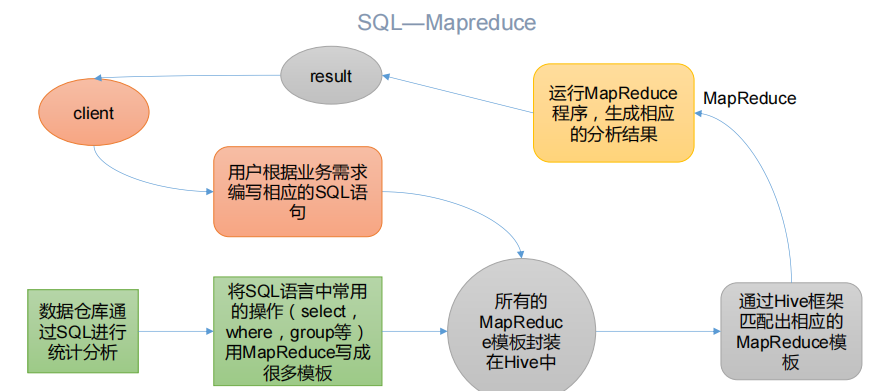
(1)Hive 处理的数据存储在 HDFS
(2)Hive 分析数据底层的实现是 MapReduce
(3)执行程序运行在 Yarn 上
1.2Hive 的优缺点
1.2.1 优点
(1)操作接口采用类 SQL 语法,提供快速开发的能力(简单、容易上手)。
(2)避免了去写 MapReduce,减少开发人员的学习成本。
(3)Hive 的执行延迟比较高,因此 Hive 常用于数据分析,对实时性要求不高的场合。
(4)Hive 优势在于处理大数据,对于处理小数据没有优势,因为 Hive 的执行延迟比较 高。
(5)Hive 支持用户自定义函数,用户可以根据自己的需求来实现自己的函数。
1.2.2 缺点
1)Hive 的 HQL 表达能力有限
(1)迭代式算法无法表达
(2)数据挖掘方面不擅长,由于 MapReduce 数据处理流程的限制,效率更高的算法却
无法实现。
2)Hive 的效率比较低
(1)Hive 自动生成的 MapReduce 作业,通常情况下不够智能化
(2)Hive 调优比较困难,粒度较粗
1.3 Hive 架构原理
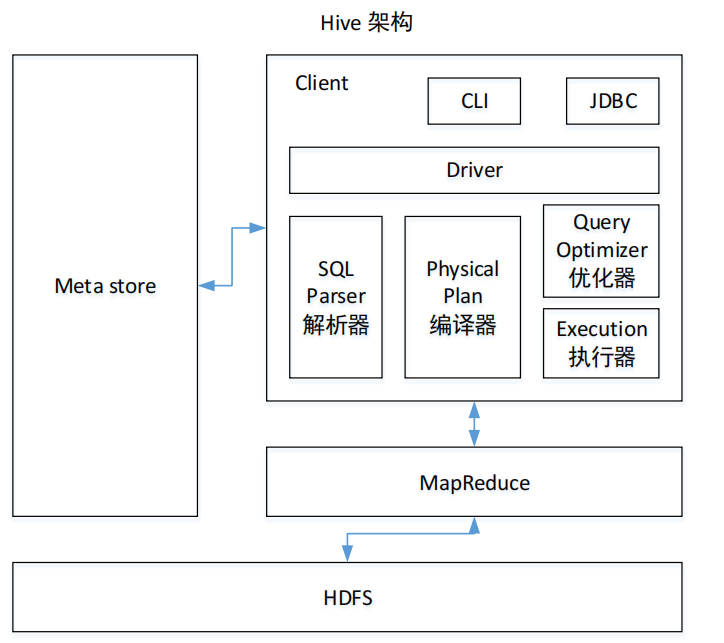
1)用户接口:Client
CLI(command-line interface)、JDBC/ODBC(jdbc 访问 hive)、WEBUI(浏览器访问 hive)
2)元数据:Metastore
元数据包括:表名、表所属的数据库(默认是 default)、表的拥有者、列/分区字段、 表的类型(是否是外部表)、表的数据所在目录等;
默认存储在自带的 derby 数据库中,推荐使用 MySQL 存储 Metastore
3)Hadoop
使用 HDFS 进行存储,使用 MapReduce 进行计算。
4)驱动器:Driver
(1)解析器(SQL Parser):将 SQL 字符串转换成抽象语法树 AST,这一步一般都用第 三方工具库完成,比如 antlr;对 AST 进行语法析,比如表是否存在、字段是否存在、SQL 语义是否有误。
(2)编译器(Physical Plan):将 AST 编译生成逻辑执行计划。
(3)优化器(Query Optimizer):对逻辑执行计划进行优化。
(4)执行器(Execution):把逻辑执行计划转换成可以运行的物理计划。对于 Hive 来 说,就是 MR/Spark。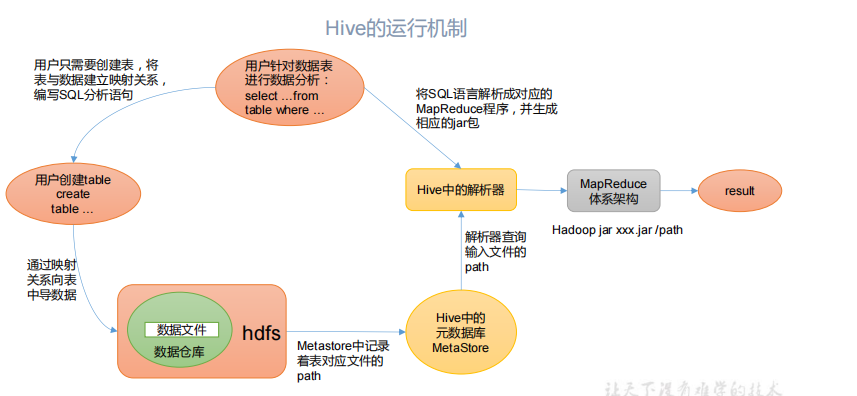
Hive 通过给用户提供的一系列交互接口,接收到用户的指令(SQL),使用自己的 Driver, 结合元数据(MetaStore),将这些指令翻译成 MapReduce,提交到 Hadoop 中执行,最后,将 执行返回的结果输出到用户交互接口。
第 2 章 Hive 安装
2.2Hive 安装部署
1)把 apache-hive-3.1.2-bin.tar.gz 上传到 linux 的/opt/software 目录下
2)解压 apache-hive-3.1.2-bin.tar.gz 到/opt/module/目录下面
[atguigu@hadoop102 software]$ tar -zxvf /opt/software/apache-hive-3.1.2-bin.tar.gz -C /opt/module/
3)修改 apache-hive-3.1.2-bin.tar.gz 的名称为 hive
[atguigu@hadoop102 software]$ mv /opt/module/apache-hive-3.1.2-bin/ /opt/module/hive
4)修改/etc/profile.d/my_env.sh,添加环境变量
[atguigu@hadoop102 software]$ sudo vim /etc/profile.d/my_env.sh
5)添加内容
#HIVE_HOMEexport HIVE_HOME=/opt/module/hiveexport PATH=$PATH:$HIVE_HOME/bin
6)解决日志 Jar 包冲突
[atguigu@hadoop102 software]$ mv $HIVE_HOME/lib/log4j-slf4j-impl-2.10.0.jar $HIVE_HOME/lib/log4j-slf4j-impl-2.10.0.bak
7)初始化元数据库
[atguigu@hadoop102 hive]$ bin/schematool -dbType derby -initSchema
2.2.2 启动并使用 Hive
1)启动 Hive
[atguigu@hadoop102 hive]$ bin/hive
2)使用 Hive
hive> show databases;hive> show tables;hive> create table test(id int);hive> insert into test values(1);hive> select * from test;
3)在 CRT 窗口中开启另一个窗口开启 Hive,在/tmp/atguigu 目录下监控 hive.log 文件
Caused by: ERROR XSDB6: Another instance of Derby may have already bootedthe database /opt/module/hive/metastore_db.atorg.apache.derby.iapi.error.StandardException.newException(UnknownSource)atorg.apache.derby.iapi.error.StandardException.newException(Unknown Source)atorg.apache.derby.impl.store.raw.data.BaseDataFileFactory.privGetJBMSLockOnDB(Unknown Source)atorg.apache.derby.impl.store.raw.data.BaseDataFileFactory.run(UnknownSource)...
原因在于 Hive 默认使用的元数据库为 derby,开启 Hive 之后就会占用元数据库,且不与 其他客户端共享数据,所以我们需要将 Hive 的元数据地址改为 MySQL。
2.3MySQL 安装
2.4 Hive 元数据配置到 MySQL
2.4.1 拷贝驱动
将 MySQL 的 JDBC 驱动拷贝到 Hive 的 lib 目录下
[atguigu@hadoop102 software]$ cp /opt/software/mysql-connector-java-5.1.37.jar $HIVE_HOME/lib
2.4.2 配置 Metastore 到 MySQL
1)在$HIVE_HOME/conf 目录下新建 hive-site.xml 文件
[atguigu@hadoop102 software]$ vim $HIVE_HOME/conf/hive-site.xml
添加如下内容
<?xml version="1.0"?><?xml-stylesheet type="text/xsl" href="configuration.xsl"?><configuration><!-- jdbc 连接的 URL --><property><name>javax.jdo.option.ConnectionURL</name><value>jdbc:mysql://hadoop102:3306/metastore?useSSL=false</value></property><!-- jdbc 连接的 Driver--><property><name>javax.jdo.option.ConnectionDriverName</name><value>com.mysql.jdbc.Driver</value></property><!-- jdbc 连接的 username--><property><name>javax.jdo.option.ConnectionUserName</name><value>root</value></property><!-- jdbc 连接的 password --><property><name>javax.jdo.option.ConnectionPassword</name><value>000000</value></property><!-- Hive 元数据存储版本的验证 --><property><name>hive.metastore.schema.verification</name><value>false</value></property><!--元数据存储授权--><property><name>hive.metastore.event.db.notification.api.auth</name><value>false</value></property><!-- Hive 默认在 HDFS 的工作目录 --><property><name>hive.metastore.warehouse.dir</name><value>/user/hive/warehouse</value></property></configuration>
2)登陆 MySQL
[atguigu@hadoop102 software]$ mysql -uroot -p000000
3)新建 Hive 元数据库
mysql> create database metastore;mysql> quit;
4) 初始化 Hive 元数据库
[atguigu@hadoop102 software]$ schematool -initSchema -dbType mysql - verbose
2.4.3 再次启动 Hive
1)启动 Hive
[atguigu@hadoop102 hive]$ bin/hive
2)使用 Hive
hive> show databases;hive> show tables;hive> create table test (id int);hive> insert into test values(1);hive> select * from test;
3)在 CRT 窗口中开启另一个窗口开启 Hive
hive> show databases;hive> show tables;hive> select * from aa;
2.5 使用元数据服务的方式访问 Hive
1)在 hive-site.xml 文件中添加如下配置信息
<!-- 指定存储元数据要连接的地址 --><property><name>hive.metastore.uris</name><value>thrift://hadoop102:9083</value></property>
2)启动 metastore
[atguigu@hadoop202 hive]$ hive --service metastore2020-04-24 16:58:08: Starting Hive Metastore Server注意: 启动后窗口不能再操作,需打开一个新的 shell 窗口做别的操作
3)启动 hive
[atguigu@hadoop202 hive]$ bin/hive
2.6 使用 JDBC 方式访问 Hive
1)在 hive-site.xml 文件中添加如下配置信息
<!-- 指定 hiveserver2 连接的 host --><property><name>hive.server2.thrift.bind.host</name><value>hadoop102</value></property><!-- 指定 hiveserver2 连接的端口号 --><property><name>hive.server2.thrift.port</name><value>10000</value></property>
2)启动 hiveserver2
[atguigu@hadoop102 hive]$ bin/hive --service hiveserver2
3)启动 beeline 客户端(需要多等待一会)
[atguigu@hadoop102 hive]$ bin/beeline -u jdbc:hive2://hadoop102:10000 -n why
java.sql.SQLException: Could not open client transport with JDBC Uri: jdbc:hive2://localhost:10000/default: java.net.ConnectException: 拒绝连接
通过sudo netstat -anp|grep 10000 查看谁占用了10000端口,也就是hiveserver2有没有启动。
hiveserver2 会显示七八个Hive Session ID之后,才会真正启动,这要等个几分钟呢。在sudo netstat -anp|grep 10000能查到端口前,都证明hiveserver2没有启动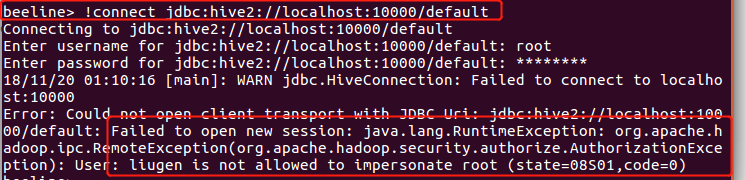
解决方案:
在hadoop的配置文件core-site.xml增加如下配置,重启hdfs,其中“xxx”是连接beeline的用户,将“xxx”替换成自己的用户名即可。最关键的是一定要重启hadoop,先stop-all.sh,再start-all.sh,否则不会生效的!!那样就还是报错!
<property><name>hadoop.proxyuser.xxx.hosts</name><value>*</value></property><property><name>hadoop.proxyuser.xxx.groups</name><value>*</value></property>
bug解决参考地址
4)看到如下界面
Connecting to jdbc:hive2://hadoop102:10000Connected to: Apache Hive (version 3.1.2)Driver: Hive JDBC (version 3.1.2)Transaction isolation: TRANSACTION_REPEATABLE_READBeeline version 3.1.2 by Apache Hive0: jdbc:hive2://hadoop102:10000>
5)编写 hive 服务启动脚本(了解)
(1) 前台启动的方式导致需要打开多个 shell 窗口,可以使用如下方式后台方式启动
nohup: 放在命令开头,表示不挂起,也就是关闭终端进程也继续保持运行状态
/dev/null:是 Linux 文件系统中的一个文件,被称为黑洞,所有写入改文件的内容 都会被自动丢弃
2>&1 : 表示将错误重定向到标准输出上
&: 放在命令结尾,表示后台运行
一般会组合使用: nohup [xxx 命令操作]> file 2>&1 &,表示将 xxx 命令运行的结 果输出到 file 中,并保持命令启动的进程在后台运行。
如上命令不要求掌握。
[atguigu@hadoop202 hive]$ nohup hive --service metastore 2>&1 &[atguigu@hadoop202 hive]$ nohup hive --service hiveserver2 2>&1 &
(2) 为了方便使用,可以直接编写脚本来管理服务的启动和关闭
[atguigu@hadoop102 hive]$ vim $HIVE_HOME/bin/hiveservices.sh
内容如下:此脚本的编写不要求掌握。直接拿来使用即可。
#!/bin/bashHIVE_LOG_DIR=$HIVE_HOME/logsif [ ! -d $HIVE_LOG_DIR ]thenmkdir -p $HIVE_LOG_DIRfi#检查进程是否运行正常,参数 1 为进程名,参数 2 为进程端口function check_process(){pid=$(ps -ef 2>/dev/null | grep -v grep | grep -i $1 | awk '{print$2}')ppid=$(netstat -nltp 2>/dev/null | grep $2 | awk '{print $7}' | cut -d '/' -f 1)echo $pid[[ "$pid" =~ "$ppid" ]] && [ "$ppid" ] && return 0 || return 1}function hive_start(){metapid=$(check_process HiveMetastore 9083)cmd="nohup hive --service metastore >$HIVE_LOG_DIR/metastore.log 2>&1&"[ -z "$metapid" ] && eval $cmd || echo "Metastroe 服务已启动"server2pid=$(check_process HiveServer2 10000)cmd="nohup hiveserver2 >$HIVE_LOG_DIR/hiveServer2.log 2>&1 &"[ -z "$server2pid" ] && eval $cmd || echo "HiveServer2 服务已启动" }function hive_stop(){metapid=$(check_process HiveMetastore 9083)[ "$metapid" ] && kill $metapid || echo "Metastore 服务未启动"server2pid=$(check_process HiveServer2 10000)[ "$server2pid" ] && kill $server2pid || echo "HiveServer2 服务未启动" }case $1 in"start")hive_start;;"stop")hive_stop;;"restart")hive_stopsleep 2hive_start;;"status")check_process HiveMetastore 9083 >/dev/null && echo "Metastore 服务运行正常" || echo "Metastore 服务运行异常"check_process HiveServer2 10000 >/dev/null && echo "HiveServer2 服务运行正常" || echo "HiveServer2 服务运行异常";;*)echo Invalid Args!echo 'Usage: '$(basename $0)' start|stop|restart|status';;esac
3)添加执行权限
[atguigu@hadoop102 hive]$ chmod +x $HIVE_HOME/bin/hiveservices.sh
4)启动 Hive 后台服务
[atguigu@hadoop102 hive]$ hiveservices.sh start
2.7 Hive 常用交互命令
[atguigu@hadoop102 hive]$ bin/hive -helpusage: hive-d,--define <key=value> Variable subsitution to apply to hivecommands. e.g. -d A=B or --define A=B--database <databasename> Specify the database to use-e <quoted-query-string> SQL from command line-f <filename> SQL from files-H,--help Print help information--hiveconf <property=value> Use value for given property--hivevar <key=value> Variable subsitution to apply to hivecommands. e.g. --hivevar A=B-i <filename> Initialization SQL file-S,--silent Silent mode in interactive shell-v,--verbose Verbose mode (echo executed SQL to theconsole)
1)“-e”不进入 hive 的交互窗口执行 sql 语句
[atguigu@hadoop102 hive]$ bin/hive -e "select id from student;"
2)“-f”执行脚本中 sql 语句
(1)在/opt/module/hive/下创建 datas 目录并在 datas 目录下创建 hivef.sql 文件[atguigu@hadoop102 datas]$ touch hivef.sql(2)文件中写入正确的 sql 语句select *from student;(3)执行文件中的 sql 语句[atguigu@hadoop102 hive]$ bin/hive -f /opt/module/hive/datas/hivef.sql(4)执行文件中的 sql 语句并将结果写入文件中[atguigu@hadoop102 hive]$ bin/hive -f /opt/module/hive/datas/hivef.sql >/opt/module/datas/hive_result.txt
2.8 Hive 其他命令操作
1)退出 hive 窗口:
hive(default)>exit;
hive(default)>quit;
2)在 hive cli 命令窗口中如何查看 hdfs 文件系统
hive(default)>dfs -ls /;
3)查看在 hive 中输入的所有历史命令
(1)进入到当前用户的根目录 /root 或/home/atguigu
(2)查看. hivehistory 文件
[atguig2u@hadoop102 ~]$ cat .hivehistory

若有收获,就点个赞吧
0 人点赞


