- 概述
- 框架
- 事件处理驱动层
- define EV_SYN 0x00 同步事件。用途:告知事件处理层提交数据给应用层
- define EV_KEY 0x01 按键事件
- define EV_REL 0x02 鼠标事件
- define EV_ABS 0x03 触摸事件
- define EV_MSC 0x04 其他事件
- define EV_SW 0x05 开关事件
- define EV_LED 0x11 键盘LED事件
- define EV_SND 0x12 声音事件
- define EV_REP 0x14 重复事件
- define EV_FF 0x15 力反馈事件
- define EV_PWR 0x16 电源事件
- define EV_FF_STATUS 0x17
- define EV_MAX 0x1f
- define EV_CNT (EV_MAX+1)
- 设备驱动层
- 多点触控协议
概述
输入子系统的作用是:统一管理所有的输入设备(例如:触摸屏、键盘、鼠标等等),然后以统一的标准上报数据给应用层,使得应用层可以忽略底层硬件的改变,统一读取输入设备的数据。
查看input设备文件方法1:
root@rk3399_lonbon_mid:/data/ssh # ls /dev/input/event* -lcrw-rw---- 1 root input 13, 64 2013-01-18 23:05 /dev/input/event0crw-rw---- 1 root input 13, 65 2013-01-18 23:05 /dev/input/event1crw-rw---- 1 root input 13, 66 2013-01-18 23:05 /dev/input/event2crw-rw---- 1 root input 13, 67 2013-01-18 23:05 /dev/input/event3说明:主设备号固定为13,次设备号从13开始root@rk3399_lonbon_mid:/data/ssh # hexdump /dev/input/event3序号 | 时间戳 |type|code| value0000000 16c3 50f9 1e20 000c 0001 014a 0001 0000 EV_KEY BTN_TOUCH 0x10000010 16c3 50f9 1e20 000c 0003 002f 0000 0000 EV_ABS ABS_MT_SLOT 0x0 第一个slot0000020 16c3 50f9 1e20 000c 0003 0039 0008 0000 EV_ABS ABS_MT_TRACKING_ID 0x8 第8个触点0000030 16c3 50f9 1e20 000c 0003 0035 0670 0000 EV_ABS ABS_MT_POSITION_X 0x06700000040 16c3 50f9 1e20 000c 0003 0036 323a 0000 EV_ABS ABS_MT_POSITION_Y 0x323a0000050 16c3 50f9 1e20 000c 0003 0030 0080 0000 EV_ABS ABS_MT_TOUCH_MAJOR 0x800000060 16c3 50f9 1e20 000c 0003 0030 0001 0000 EV_ABS ABS_MT_TOUCH_MAJOR 0x10000070 16c3 50f9 1e20 000c 0000 0000 0000 0000 EV_SYN0000080 16c3 50f9 3d8d 000c 0003 0030 0080 0000 EV_ABS ABS_MT_TOUCH_MAJOR 0x800000090 16c3 50f9 3d8d 000c 0003 0030 0001 0000 EV_ABS ABS_MT_TOUCH_MAJOR 0x100000a0 16c3 50f9 3d8d 000c 0000 0000 0000 0000 EV_SYN0000a60 16c4 50f9 9ab5 0003 0003 002f 0001 0000 EV_ABS ABS_MT_SLOT 0x1 第二个slot0000a70 16c4 50f9 9ab5 0003 0003 0039 0009 0000 EV_ABS ABS_MT_TRACKING_ID 0x9 第9个触点0000a80 16c4 50f9 9ab5 0003 0003 0035 02dc 0000 EV_ABS ABS_MT_POSITION_X 0x02dc0000a90 16c4 50f9 9ab5 0003 0003 0036 29d9 0000 EV_ABS ABS_MT_POSITION_Y 0x29d90000aa0 16c4 50f9 9ab5 0003 0003 0030 0080 0000 EV_ABS ABS_MT_TOUCH_MAJOR 0x800000ab0 16c4 50f9 9ab5 0003 0003 0030 0001 0000 EV_ABS ABS_MT_TOUCH_MAJOR 0x10000ac0 16c4 50f9 9ab5 0003 0000 0000 0000 0000 EV_SYN0000ad0 16c4 50f9 bca5 0003 0003 002f 0000 0000 EV_ABS ABS_MT_SLOT 0x00000ae0 16c4 50f9 bca5 0003 0003 0035 061d 0000 EV_ABS ABS_MT_POSITION_X 0x061d 说明:slot 0下的触点的X轴发生改变0000af0 16c4 50f9 bca5 0003 0003 0030 0080 0000 EV_ABS ABS_MT_TOUCH_MAJOR 0x800000b00 16c4 50f9 bca5 0003 0003 0030 0001 0000 EV_ABS ABS_MT_TOUCH_MAJOR 0x10000b10 16c4 50f9 bca5 0003 0003 002f 0001 0000 EV_ABS ABS_MT_SLOT 0x10000b20 16c4 50f9 bca5 0003 0003 0030 0080 0000 ABS_MT_TOUCH_MAJOR 0x800000b30 16c4 50f9 bca5 0003 0003 0030 0001 0000 EV_ABS ABS_MT_TOUCH_MAJOR 0x10000b40 16c4 50f9 bca5 0003 0000 0000 0000 0000 EV_SYN00000d0 6594 50f9 e203 0001 0003 0039 ffff ffff EV_ABS ABS_MT_TRACKING_ID -1
input子系统上报的每行数据对应为一个struct input_event:
struct input_event {
    struct timeval time;   //存放时间戳,占8字节
    __u16 type;            //表示事件类型
    __u16 code;            //键码,和type有关
    __s32 value;           //键值,和code有关
};
方法2:通过/proc/bus/input/devices查看输入设备的所有信息
root@rk3399_lonbon_mid:/data/ssh # cat /proc/bus/input/devices

I: Bus=0019 Vendor=0001 Product=0001 Version=0100
N: Name="ff420030.pwm"
P: Phys=gpio-keys/remotectl
S: Sysfs=/devices/platform/ff420030.pwm/input/input0
U: Uniq=
H: Handlers=event0 cpufreq keychord
B: PROP=0
B: EV=3
B: KEY=10000000000 40408800 1c16c000000000 0

I: Bus=0019 Vendor=0001 Product=0001 Version=0100
N: Name="rk29-keypad"
P: Phys=gpio-keys/input0
S: Sysfs=/devices/platform/rockchip-key/input/input1
U: Uniq=
H: Handlers=event1 keychord
B: PROP=0
B: EV=3
B: KEY=100000 40008000 1c004000000000 800000000000000

I: Bus=0003 Vendor=0c45 Product=6366 Version=0100
N: Name="USB 2.0 Camera"
P: Phys=usb-fe3c0000.usb-1/button
S: Sysfs=/devices/platform/fe3c0000.usb/usb2/2-1/2-1:1.0/input/input2
U: Uniq=
H: Handlers=event2 cpufreq
B: PROP=0
B: EV=3
B: KEY=100000 0 0 0

I: Bus=0018 Vendor=0000 Product=0000 Version=0000
N: Name="ilitek_ts"
P: Phys=
S: Sysfs=/devices/platform/ff3d0000.i2c/i2c-4/4-0041/input/input3
U: Uniq=
H: Handlers=event3 cpufreq
B: PROP=2
B: EV=b
B: KEY=400 0 0 0 0 0
B: ABS=265800000000003
框架

- 设备驱动层:
- 读取“物理硬件设备”的输入数据,并转换成标准的输入事件。
- 调用“核心层”提供的接口,将数据提交给“事件处理层”。
- 核心结构:input_dev
- 需驱动开发者实现
- 核心层的作用:
- 向上两层提供接口
- 核心结构:input_handle
- 无需驱动开发者实现
- 事件处理层作用:
- 给应用层提供统一的访问设备
- 核心结构:input_handler
- 无需驱动开发者实现
事件处理驱动层
核心数据结构
struct input_event
作用:屏蔽硬件差异,上报统一的数据给应用层。
struct input_event {
    struct timeval time;   //存放时间戳,占8字节,64位
    __u16 type;            //表示事件类型
    __u16 code;            //键码,和type有关
    __s32 value;           //键值,和code有关
};
成员说明:
- type 事件的类型(event types),用途:区分不同类型的数据,例如触摸数据、鼠标数据、按键数据。
```c
/*
- Event types */
define EV_SYN 0x00 同步事件。用途:告知事件处理层提交数据给应用层
define EV_KEY 0x01 按键事件
define EV_REL 0x02 鼠标事件
define EV_ABS 0x03 触摸事件
define EV_MSC 0x04 其他事件
define EV_SW 0x05 开关事件
define EV_LED 0x11 键盘LED事件
define EV_SND 0x12 声音事件
define EV_REP 0x14 重复事件
define EV_FF 0x15 力反馈事件
define EV_PWR 0x16 电源事件
define EV_FF_STATUS 0x17
define EV_MAX 0x1f
define EV_CNT (EV_MAX+1)
---

- code

对于按键,可取的值如下:
```c
#define KEY_RESERVED        0
#define KEY_ESC            1     数字键盘1键
#define KEY_1            2     数字键盘2键
...
#define BTN_LEFT        0x110  鼠标的左键
#define BTN_RIGHT        0x111  鼠标的右键
#define BTN_MIDDLE        0x112  鼠标的中键
对于鼠标,可取值如下:
#define REL_X            0x00
#define REL_Y            0x01
...
对于触摸屏,可取值如下:
#define ABS_X                0x00
#define ABS_Y                0x01
//以下键值属于多点触摸(muli touch):
#define ABS_MT_SLOT        0x2f    /* MT slot being modified */
#define ABS_MT_TOUCH_MAJOR    0x30    /* Major axis of touching ellipse 手指与触摸屏接触时的椭圆长轴 */
#define ABS_MT_TOUCH_MINOR    0x31    /* Minor axis (omit if circular) 手指与触摸屏接触时的椭圆短轴*/
#define ABS_MT_WIDTH_MAJOR    0x32    /* Major axis of approaching ellipse 手指的椭圆长轴*/
#define ABS_MT_WIDTH_MINOR    0x33    /* Minor axis (omit if circular) 手指的椭圆短轴*/
#define ABS_MT_ORIENTATION    0x34    /* Ellipse orientation 椭圆方向*/
#define ABS_MT_POSITION_X    0x35    /* Center X touch position X中心接触位置*/
#define ABS_MT_POSITION_Y    0x36    /* Center Y touch position Y中心接触位置*/
#define ABS_MT_TOOL_TYPE    0x37    /* Type of touching device */
#define ABS_MT_BLOB_ID        0x38    /* Group a set of packets as a blob */
#define ABS_MT_TRACKING_ID    0x39    /* Unique ID of initiated contact 触点的追踪ID*/
#define ABS_MT_PRESSURE        0x3a    /* Pressure on contact area 接触区域的压力*/
#define ABS_MT_DISTANCE        0x3b    /* Contact hover distance */
#define ABS_MT_TOOL_X        0x3c    /* Center X tool position */
#define ABS_MT_TOOL_Y        0x3d    /* Center Y tool position */
……
注意:鼠标的按键和鼠标的光标是不同的,所以用不同的code来表示
对于同步事件,可取值如下:
/*
 * Synchronization events.
 */

#define SYN_REPORT        0
#define SYN_CONFIG        1
#define SYN_MT_REPORT    2
#define SYN_DROPPED        3
#define SYN_MAX            0xf
#define SYN_CNT            (SYN_MAX+1)
- value
value和code有关。例如:如果code为KEY_1,则value的值为0或1。如果code为 ABS_X,则value为X轴坐标值
设备驱动层
核心数据结构
struct input_dev
实现struct input_dev,则完成设备驱动层的编程工作。
struct input_dev {
    const char *name;
    const char *phys;
    const char *uniq;
    struct input_id id;

    unsigned long propbit[BITS_TO_LONGS(INPUT_PROP_CNT)];

    unsigned long evbit[BITS_TO_LONGS(EV_CNT)];
    unsigned long keybit[BITS_TO_LONGS(KEY_CNT)];
    unsigned long relbit[BITS_TO_LONGS(REL_CNT)];
    unsigned long absbit[BITS_TO_LONGS(ABS_CNT)];
    unsigned long mscbit[BITS_TO_LONGS(MSC_CNT)];
    unsigned long ledbit[BITS_TO_LONGS(LED_CNT)];
    unsigned long sndbit[BITS_TO_LONGS(SND_CNT)];
    unsigned long ffbit[BITS_TO_LONGS(FF_CNT)];
    unsigned long swbit[BITS_TO_LONGS(SW_CNT)];

    unsigned int hint_events_per_packet;

    unsigned int keycodemax;
    unsigned int keycodesize;
    void *keycode;

    int (*setkeycode)(struct input_dev *dev,
              const struct input_keymap_entry *ke,
              unsigned int *old_keycode);
    int (*getkeycode)(struct input_dev *dev,
              struct input_keymap_entry *ke);

    struct ff_device *ff;

    unsigned int repeat_key;
    struct timer_list timer;

    int rep[REP_CNT];

    struct input_mt *mt;

    struct input_absinfo *absinfo;

    unsigned long key[BITS_TO_LONGS(KEY_CNT)];
    unsigned long led[BITS_TO_LONGS(LED_CNT)];
    unsigned long snd[BITS_TO_LONGS(SND_CNT)];
    unsigned long sw[BITS_TO_LONGS(SW_CNT)];

    int (*open)(struct input_dev *dev);
    void (*close)(struct input_dev *dev);
    int (*flush)(struct input_dev *dev, struct file *file);
    int (*event)(struct input_dev *dev, unsigned int type, unsigned int code, int value);

    struct input_handle __rcu *grab;

    spinlock_t event_lock;
    struct mutex mutex;

    unsigned int users;
    bool going_away;

    struct device dev;

    struct list_head    h_list;
    struct list_head    node;

    unsigned int num_vals;
    unsigned int max_vals;
    struct input_value *vals;

    bool devres_managed;
};
成员说明:
- name:name of the device
输入设备的名称。应用层可以通过cat /proc/bus/input/devices来查看
- phys: physical path to the device in the system hierarchy
系统层次结构中设备的物理路径
- id: id of the device (struct input_id)
设备的ID。具体如下,可以通过cat /proc/bus/input/devices来查看:
struct input_id {
    __u16 bustype; //可以赋值为BUS_I2C、BUS_USB、BUS_BLUETOOTH等等,表示输入设备的物理接口是什么类型
    __u16 vendor; //供应厂的ID,对应VID
    __u16 product; //产品的ID,对用PID
    __u16 version; //版本
};
- evbit:bitmap of types of events supported by the device (EV_KEY, EV_REL, etc.)
输入设备所支持的events type的位图,简单来说,就是1个bit表示一种事件类型,作用:记录内核支持的事件类型。
unsigned long evbit[BITS_TO_LONGS(EV_CNT)]的展开如下:
BITS_TO_LONGS(EV_CNT)的展开如下
已知:
#define EV_MAX            0x1f
#define EV_CNT            (EV_MAX+1)
#define BITS_PER_BYTE        8
#define DIV_ROUND_UP(n,d) (((n) + (d) - 1) / (d))
#define BITS_TO_LONGS(nr)    DIV_ROUND_UP(nr, BITS_PER_BYTE * sizeof(long))
sizeof(long)对于32位系统为4byte,对于64bit系统为8byte
假设sizeof(long)为64
所以BITS_TO_LONGS(nr)展开之后为:
等于DIV_ROUND_UP(nr, 64)
等于((nr) + (64) - 1) / (64)
也就是说:
如果EV_CNT为32,则定义的数组为unsigned long evbit[1];
如果EV_CNT为65,则定义的数组为unsigned long evbit[2];
举例说明evbit成员的赋值方式:
已知:
#define EV_SYN            0x00
#define EV_KEY            0x01
#define EV_ABS            0x03
#ifdef CONFIG_64BIT
#define BITS_PER_LONG 64
#else
#define BITS_PER_LONG 32
#endif /* CONFIG_64BIT */
evbit成员的赋值方式1:
#define BIT_MASK(nr)         (1UL << ((nr) % BITS_PER_LONG))
ts->input_dev->evbit[0] = BIT_MASK(EV_SYN) | BIT_MASK(EV_KEY) | BIT_MASK(EV_ABS) ;//说明:evbit[0]的bit0、bit1、bit3被置一
上面一行也可以等效于:
ts->input_dev->evbit[BIT_WORD(EV_SYN)]  = BIT_MASK(EV_SYN);
ts->input_dev->evbit[BIT_WORD(EV_KEY)]  = BIT_MASK(EV_KEY);
ts->input_dev->evbit[BIT_WORD(EV_ABS)]  = BIT_MASK(EV_ABS);
evbit成员的赋值方式2:
set_bit(EV_KEY, input_device->evbit);
set_bit(EV_ABS, input_device->evbit);
evbit成员的赋值方式3:
__set_bit(EV_KEY, input_device->evbit);
__set_bit(EV_ABS, input_device->evbit);
注意:set_bit是带有原子保护,__set_bit不带有原子保护。
- keybit: bitmap of keys/buttons this device has
设备支持的按键的位图。一个位表示一个按键,用于记录内核支持的按键。
示例:
ts->pen_dev->keybit[BIT_WORD(BTN_TOUCH)] = BIT_MASK(BTN_TOUCH);
set_bit(BTN_TOOL_PEN, ts->pen_dev->keybit);
- relbit: bitmap of relative axes for the device
设备的相对轴的位图。前提:evbit数组中要支持EV_REL。
set_bit(REL_X, idev->relbit);
set_bit(REL_Y, idev->relbit);
- absbit: bitmap of absolute axes for the device
设备的绝对轴的位图。前提:evbit数组中要支持EV_ABS。
多点触控协议
介绍
为了充分利用新的多点触控和多用户设备(multi-user devices,)的功能,需要一种方法来报告多个接触点(即与设备表面直接接触的对象)的详细数据。这个文档描述了多点触摸(MT)协议,它允许内核驱动程序报告任意数量的接触点的详细信息。
根据硬件的性能(capabilities ),协议分为两种类型。
- A类:对于能够处理匿名(anonymous )触点的设备采用A类协议,该协议描述了如何将触点的原始数据发送给接收方(receiver)。能够处理A类协议的设备称为A类设备(type A device)
- B类:对于能够跟踪(tracking)带ID的(identifiable)触点的设备采用B类协议,协议描述了如何通过事件槽(event slots.)发送新的单个触点。
注意:MT协议类型A已过时,所有内核驱动程序已转换为使用类型B。
说白了,A类协议和B类协议就是内核将触摸坐标上报给应用层的两种不同的方式。如下图: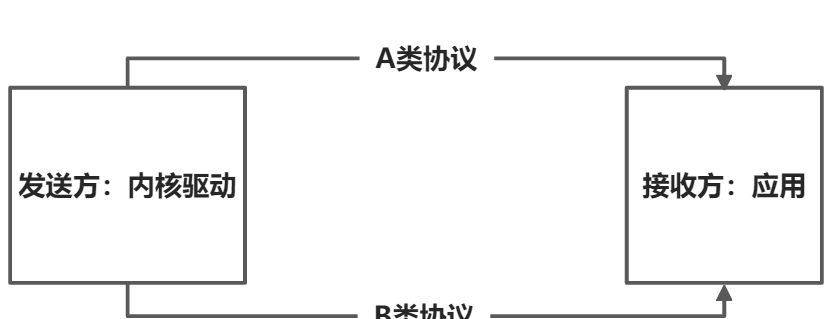
协议用法
内核驱动以单独的ABSMT事件包(events packets)顺序发送触点的详细信息。只有ABS_MT事件被识别(recognized )为触点包(contact packet)的一部分。由于单点触摸(ST,single touch)应用程序会忽略ABS_MT事件,所以可以在现有驱动程序中的ST协议之上实现(implemented )MT协议。
类型A设备的驱动程序通过在每个包(packet)的末尾调用input_mt_sync()来分离(separate )触点包(contact packet)。调用input_mt_sync()时会生成一个SYN_MT_REPORT事件,该事件指示(instructs )接收方(receiver)接受当前触点的数据并准备接收另一个触点数据。
类型B设备的驱动程序通过在每个包的开头调用input_mt_slot()来分离接触包(contact pack),并使用slot作为参数。input_mt_slot()接口将生成一个ABS_MT_SLOT事件,该事件指示接收方(receiver)为给定槽(slot)的更新做好准备。
所有驱动程序都通过调用常用(usual )的input_sync()函数来标记多点触摸传输的结束。input_sync()指示(instructs )接收方对自上次EV_SYN/SYN_REPORT以来累积(accumulated )的事件采取行动,并准备接收一组新的事件包(events packets)。
无状态(stateless )A类协议和有状态(stateful )B类槽协议(slot protocol)的主要区别在于:B类协议使用ID区分触点以减少发送到用户空间的数据量(amount of data)。slot协议需要使用( requires the use of)的ABS_MT_TRACKING_ID是由触摸IC提供,或者由原始数据计算。
对于类型A设备,内核驱动程序应该生成当前触摸面板(surface)上的所有的匿名触摸点(anonymous contacts)。上报数据的事件流的先后顺序并不重要。事件过滤(event filter)和触摸坐标跟踪(finger tracking)由用户空间完成。说白了,就是内核直接上报,应用负责过滤并处理。
对于类型B设备,内核驱动程序应该将slot与每个标识的触摸点关联起来,并使用该slot传送触摸点坐标的更改。通过修改关联slot的ABS_MT_TRACKING_ID来实现(achieve)触摸点的创建、替换和销毁。非负(non-negative)tracking id 被解释(interpreted )为一个接触,值为-1表示(denotes )一个未使用的槽。以前不存在的tracking id 被认为是新的,不再存在(no longer present )的tracking id 被认为是删除的。由于(since)只传送更改,所以每个触点的完整状态必须驻留在(reside in)接收端(receiving end)。在(Upon)接收到MT事件时,只需更新当前槽的适当属性(attribute)。
一些设备识别和跟踪的触点比它们上报给驱动的要多。这种设备的驱动程序应该将一个B型槽(slot)与硬件上报的每个触点关联起来。每当(Whenever)与插槽相关联的触点的id发生变化时,驱动程序应该通过更改其ABS_MT_TRACKING_ID来使该插槽无效(invalidate)。如果硬件信号显示(signals)它正在跟踪的触点比当前上报的更多,驱动程序应该使用BTN_TOOLTAP事件来通知用户空间硬件正在跟踪的触点的总数。驱动程序应该通过显式发送相应的BTNTOOLTAP事件并在调用inputmt_report_pointer_emulation()时将use_count设置为false来实现这一点。驱动程序应该只发布硬件能够上报的插槽数量。Userspace can detect that a driver can report more total contacts than slots by noting that the largest supported BTN_TOOL*TAP event is larger than the total number of type B slots reported in the absinfo for the ABS_MT_SLOT axis.
ABS_MT_SLOT的value最小值为0。
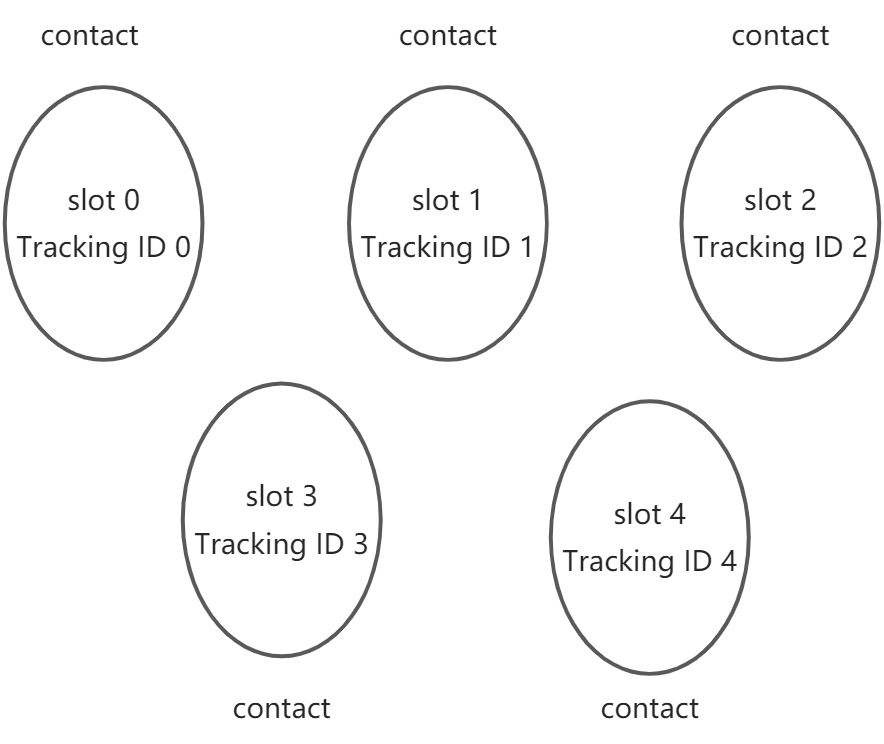
Trackingd ID与slot ID与contact的认知:
slot ID:从低到高分配,有多少个slot,则表示有多少个按下的点。按下两个手指,则有两个slot ID为slot 0 和slot 1。如果松开slot 0的对应手指,则slot 0被回收,如果此时再按下一个手指,则优先使用的是slot 0而不是slot 2。
Trackingd ID:每触按一次就会加1,只要不松开,tracking id都不会增加。这是一个统计触摸屏被触按多少次的计数量。可以通过tracking id确定当前的触点是第几个触点。
contact:contact就是触按触摸屏的意思
- 协议A示例:
以下是A类设备的双触点触摸最小事件序列(event sequence):
    ABS_MT_POSITION_X x[0] 第一个触点坐标
    ABS_MT_POSITION_Y y[0]
    SYN_MT_REPORT   每个触点坐标之间用SYN_REPORT来表示同步(synchronization)
    ABS_MT_POSITION_X x[1] 第二个触点坐标
    ABS_MT_POSITION_Y y[1]
    SYN_MT_REPORT
    SYN_REPORT
松开第一触点的事件序列如下:
   ABS_MT_POSITION_X x[1]
   ABS_MT_POSITION_Y y[1]
   SYN_MT_REPORT
   SYN_REPORT
松开第二个触点后的事件序列如下:
   SYN_MT_REPORT
   SYN_REPORT
如果驱动(driver)除了上报ABS_MT事件,还上报了BTN_TOUCH或ABS_PRESSURE,最后一个SYN_MT_REPORT事件可能被省略。否则(Otherwise),最后一个SYN_REPORT将被输入核心(input core)丢弃,导致没有零接触事件(zero-contact event)到达(reaching )用户空间(userland)。
实际示例:
示例1:
input_report_abs(ts->input_dev, ABS_MT_POSITION_X, x);
input_report_abs(ts->input_dev, ABS_MT_POSITION_Y, y);
input_report_abs(ts->input_dev, ABS_MT_TOUCH_MAJOR, w);
input_report_abs(ts->input_dev, ABS_MT_WIDTH_MAJOR, w);
input_report_abs(ts->input_dev, ABS_MT_TRACKING_ID, id);
input_mt_sync(ts->input_dev);

示例2:
input_report_abs(input_dev, ABS_MT_TRACKING_ID, pContactBuf[i].ID);
input_report_abs(input_dev, ABS_MT_TOUCH_MAJOR, pContactBuf[i].Status);
input_report_abs(input_dev, ABS_MT_POSITION_X, pContactBuf[i].X);
input_report_abs(input_dev, ABS_MT_POSITION_Y, pContactBuf[i].Y);
input_report_abs(input_dev, ABS_MT_WIDTH_MAJOR, 0);
input_mt_sync(input_dev);

示例3:
#ifdef ILITEK_TOUCH_PROTOCOL_B
    input_mt_slot(input, id);
    input_mt_report_slot_state(input, MT_TOOL_FINGER, true);
#endif
    if (!ILITEK_ROTATE_FLAG) {
    input_event(input, EV_ABS, ABS_MT_POSITION_X, x);
    input_event(input, EV_ABS, ABS_MT_POSITION_Y, y);
    } else {
    input_event(input, EV_ABS, ABS_MT_POSITION_X, y);
    input_event(input, EV_ABS, ABS_MT_POSITION_Y, x);
    }
    input_event(input, EV_ABS, ABS_MT_TOUCH_MAJOR, h);
    input_event(input, EV_ABS, ABS_MT_TOUCH_MAJOR, w);
#ifdef ILITEK_REPORT_PRESSURE
    input_event(input, EV_ABS, ABS_MT_PRESSURE, p);
#endif
#ifdef ILITEK_TOUCH_PROTOCOL_A
    input_event(input, EV_ABS, ABS_MT_TRACKING_ID, id);
    input_mt_sync(input);
#endif
- 协议B示例:
以下是B类设备的双触点触摸最小事件序列(event sequence):
   ABS_MT_SLOT 0   用slot 0表示第一手指按在屏幕上形成的槽(slot)
   ABS_MT_TRACKING_ID 45   第一个触点的tracking id为45
   ABS_MT_POSITION_X x[0]
   ABS_MT_POSITION_Y y[0]
   ABS_MT_SLOT 1    用slot 1表示第二手指按在屏幕上形成的槽(slot)
   ABS_MT_TRACKING_ID 46    第二个触点的tracking id为46
   ABS_MT_POSITION_X x[1]
   ABS_MT_POSITION_Y y[1]
   SYN_REPORT
这是在x方向移动tracking id为45的触点后的事件序列:
   ABS_MT_SLOT 0
   ABS_MT_POSITION_X x[0]
   SYN_REPORT
以下是0槽(slot 0)触点抬起后的事件顺序:此处忽略ABS_MT_SLOT是因为slot 0已经被释放。下面事件的作用是解除slot 0和id为45的触点。其他的新的触点可以使用slot 0和tracking id 45。
   ABS_MT_TRACKING_ID  -1
   SYN_REPORT
实际应用示例:
示例1:
input_mt_slot(ts->input_dev, id);
input_report_abs(ts->input_dev, ABS_MT_TRACKING_ID, id);
input_report_abs(ts->input_dev, ABS_MT_POSITION_X, x);
input_report_abs(ts->input_dev, ABS_MT_POSITION_Y, y);
input_report_abs(ts->input_dev, ABS_MT_TOUCH_MAJOR, w);
input_report_abs(ts->input_dev, ABS_MT_WIDTH_MAJOR, w);

示例2:
input_mt_slot(input_dev, pContactBuf[i].ID);
input_mt_report_slot_state(input_dev, MT_TOOL_FINGER, pContactBuf[i].Status);
if(pContactBuf[i].Status)
{
    input_report_abs(input_dev, ABS_MT_TOUCH_MAJOR, pContactBuf[i].Status);
    input_report_abs(input_dev, ABS_MT_POSITION_X, pContactBuf[i].X);
    input_report_abs(input_dev, ABS_MT_POSITION_Y, pContactBuf[i].Y);
}

示例3:
#ifdef ILITEK_TOUCH_PROTOCOL_B
    input_mt_slot(input, id);
    input_mt_report_slot_state(input, MT_TOOL_FINGER, true);
#endif
    if (!ILITEK_ROTATE_FLAG) {
    input_event(input, EV_ABS, ABS_MT_POSITION_X, x);
    input_event(input, EV_ABS, ABS_MT_POSITION_Y, y);
    } else {
    input_event(input, EV_ABS, ABS_MT_POSITION_X, y);
    input_event(input, EV_ABS, ABS_MT_POSITION_Y, x);
    }
    input_event(input, EV_ABS, ABS_MT_TOUCH_MAJOR, h);
    input_event(input, EV_ABS, ABS_MT_TOUCH_MAJOR, w);
#ifdef ILITEK_REPORT_PRESSURE
    input_event(input, EV_ABS, ABS_MT_PRESSURE, p);
#endif
#ifdef ILITEK_TOUCH_PROTOCOL_A
    input_event(input, EV_ABS, ABS_MT_TRACKING_ID, id);
    input_mt_sync(input);
#endif
ABS_MT_XXX事件的用法
MT协议定义了一组具有所需属性(desired properties)的ABS_MT事件(ABS_MT事件属于struct input_event结构体中的code成员)。ABS_MT事件被划分为多个类别,以允许部分实现( partial implementation)。最小集合由ABS_MT_POSITION_X和ABS_MT_POSITION_Y组成,只要实现ABS_MT_POSITION_X和ABS_MT_POSITION_Y就可以追踪多个触摸点。如果设备支持,可以使用ABS_MT_TOUCH_MAJOR和ABS_MT_WIDTH_MAJOR分别(respectively)提供接触面积(contact area)和接近工具(approaching tool)的大小。
TOUCH和WIDTH参数具有几何解释(geometrical interpretation):想象一下透过( looking through)窗户看到一个人轻轻地(gently )把手指放在玻璃上。你会看到两个区域(regions),一个内部区域由手指接触玻璃的部分组成,另一个外部区域由手指的周长组成。如下面的视屏所示:
 触摸区域(a)的中心为ABS_MT_POSITION_X/Y,接近手指(b)的中心为ABS_MT_TOOL_X/Y(手指是touch tool的一种)。触摸区域(a)直径为ABS_MT_TOUCH_MAJOR,手指直径(b)为ABS_MT_WIDTH_MAJOR。现在想象一下这个人用手指用力按压玻璃。接触区域会增大,一般情况下,ABS_MT_TOUCH_MAJOR / ABS_MT_WIDTH_MAJOR的比值(ratio )总是小于1,这个比值与接触压力成正比(压力越大,比值约接近1)。对于基于压力的器件,可以使用ABS_MT_PRESSURE来提供接触区域的压力。能够接触悬停(contact hovering)的设备(Device)可以使用ABS_MT_DISTANCE来表示接触(contact)到表面(surface)的距离。
除了MAJOR参数外,还可以通过添加MINOR参数来描述触摸(touch)和手指区域( finger regions)的椭圆形状(oval shape),例如MAJOR和MINOR是椭圆的长轴和短轴。触摸椭圆(touch ellipse)的方向可以用orientation参数来描述,手指椭圆(finger ellipse)的方向由向量(a - b)给出。
对于A类设备,通过ABS_MT_BLOB_ID可以进一步指定(further specification)触摸形状( touch shape)。
ABS_MT_TOOL_TYPE可以用来指定触摸工具是手指还是笔或其他东西。最后,可以使用ABS_MT_TRACKING_ID事件跟踪(track)已识别的(indentifid)触摸(contact)。
在type B协议中,ABS_MT_TOOL_TYPE和ABS_MT_TRACKING_ID由input core隐式处理(implicitly handled)。驱动程序应该调用input_mt_report_slot_state()。
事件定义
ABS_MT_TOUCH_MAJOR
触摸长轴( major axis)的长度。 如果触摸面板(surface )具有X乘以Y的分辨率,则ABS_MT_TOUCH_MAJOR的最大可能值是√(X^2 + Y^2),对角线 。
ABS_MT_TOUCH_MINOR
触摸的短轴的长度,如果触摸是圆形的,则可以忽略此事件
ABS_MT_WIDTH_MAJOR
触摸工具垂直投影到触摸屏上的形成的投影的长轴的长度。触摸工具有:手指、电容笔。触摸工具投影的方向和触摸的方向是一致的。
ABS_MT_WIDTH_MINOR
触摸工具垂直投影到触摸屏上的形成的投影的短轴的长度。
应用可以上面四个值获得触摸的长宽信息。ABS_MT_TOUCH_MAJOR / ABS_MT_WIDTH_MAJOR比值(ratio)近似于( approximates )压力(pressure)的概念(notion )。手的手指和手掌都有不同的特征宽度(characteristic widths)。
ABS_MT_PRESSURE
接触区域的压力。可代替(instead of )TOUCH和WIDTH用于基于压力的设备或任何具有空间(spatial)信号(signal )强度(intensity )分布(distribution)的设备。
如果分辨率为0,压力数据的单位是任意(arbitrary )单位,如果分辨率为非0值,压力数据的单位为units/gram,即:每单位上有多少克的压力。
ABS_MT_DISTANCE
触摸工具和触摸屏之间的距离,如果为0,表示触摸工具和触摸屏处于接触状态,如果为大于0,则触摸工具在触摸屏正上方。
ABS_MT_ORIENTATION
接触椭圆的方向(orientation)。这个值应该描述一个围绕触摸中心顺时针的有符号的四分之一圈( signed quarter of a revolution)。带符号的值范围是任意的,但是对于与曲面的Y轴(北)对齐(aligned )的椭圆的方向值为0,当椭圆向左旋转时返回负值,当椭圆向右旋转时返回正值。当与X轴正方向对齐时,返回最大大值max;当与X轴在负方向对齐时,应返回最小值-max。
默认情况下,触摸椭圆是对称(symmetrical )的。对于能够(capable)真正360度方向旋转的设备,报告的方向值必须超过最大范围,以表明超过四分之一的旋转。对于倒置的手指,应该返回max 2。
如果触摸区域是圆形的,或者在ABS_MT_ORIENTATION在内核驱动程序中不可用,可以省略ABS_MT_ORIENTATION。如果设备可以区分两个轴,但不能(唯一地)区分两个轴之间的任何值,则可以支持部分方向(partial orientation)。在这种情况下,ABS_MT_ORIENTATION的范围应该是[0,1]。
ABS_MT_POSITION_X
接触椭圆中心的X轴坐标
ABS_MT_POSITION_Y
接触椭圆中心的Y轴坐标
ABS_MT_TOOL_X
接近触摸屏的工具的中心X轴坐标。如果触摸屏不能区分(distinguish)预期的触点和工具本身,则可以省略。
ABS_MT_TOOL_Y
接近触摸屏的工具的中心Y轴坐标。如果触摸屏不能区分(distinguish)预期的触点和工具本身,则可以省略。
上述这四个位置(position )值可以用来区分(separate )触摸的位置和触摸工具的位置。 the major tool axis points towards the touch point. Otherwise, the tool axes are aligned with the touch axes.
ABS_MT_TOOL_TYPE
许多内核驱动程序不能区分不同的工具类型,例如手指或笔。在这种情况下,应该省略事件。协议目前主要支持MT_TOOL_FINGER、MT_TOOL_PEN和MT_TOOL_PALM(手掌)。对于类型B设备,此事件由输入核心(input core)处理驱动程序应该使用input_mt_report_slot_state()。当一个触摸仍然按在触摸设备上时,ABS_MT_TOOL_TYPE可能会随着时间的推移(over time)而改变,因为可能当触摸工具第一次出现时,固件(firmware )无法确定哪个工具正在被使用。
*ABS_MT_TRACKING_ID
TRACKING_ID在整个生命周期中(throughout its life cycle)标识一个触摸。TRACKING_ID的值范围应该足够大,以确保在很长一段时间内(over an extended period of time)保持触摸有的唯一标识。对于类型B设备,此事件由输入核心( input core)处理(handle);驱动程序应该使用input_mt_report_slot_state()。
事件计算
不同的硬件结构不可避免地( unavoidably )导致(leads to)一些设备比其他设备更适合于MT协议。为了简化( simplify )和统一(unify)映射,本节( section)给出了如何计算某些事件的方法(recipes)。
对于将触摸上报为矩形的设备,无法获取方向(signed orientation) 。假设X和Y是接触矩形的边长( lengths of the sides ),这里有一个简单的公式( formula),保留了尽可能多的信息:
ABS_MT_TOUCH_MAJOR := max(X, Y)
ABS_MT_TOUCH_MINOR := min(X, Y)
ABS_MT_ORIENTATION := bool(X > Y)   值的范围为[0,1]。如果手指沿着Y轴,在值为0;如果如果手指沿着X轴,在值为1
手指跟踪
手指跟踪的过程( process ),即为触摸屏上的每个接触分配一个唯一的trackingID,是一个欧氏二部匹配问题( Euclidian Bipartite Matching problem)。在每次事件同步时( synchronization),实际触摸坐标将与前一次同步中的触摸匹配。
手势/姿势
在创建手势事件的具体应用( specific application)中,可以使用TOUCH和WIDTH参数来近似( approximate )计算手指压力或区分不同的手指。通过MINOR参数的添加,还可以区分手指是滑动还是点击,通过ORIENTATION,可以检测手指的扭曲的程度。
申请释放 struct input_dev
input_allocate_device
struct input_dev input_allocate_device(void)
为新的输入设备分配内存
Parameters
void
无参数
Description
返回struct input_dev or NULL
*示例:
    struct input_dev *pInputDev=NULL;


    pInputDev = input_allocate_device();
    if(pInputDev == NULL)
    {
        EGALAX_DBG(DBG_MODULE, " Failed to allocate input device\n");
        return NULL;//-ENOMEM;
    }
devm_input_allocate_device
struct input_dev devminput_allocate_device(struct device dev)
分配输入设备
Parameters
struct device*dev
被创建的输入设备的属主(owner),这里可以理解为:struct device dev是struct input_dev”的父类。
Description
返回 struct input_dev or NULL.
输入设备(Managed input devices )不需要显式地取消注销或释放,因为当所有者设备( owner device )从它的驱动解除绑定(或绑定失败)时,注销或释放的操作将自动完成,不需要主动调用devm_input_device_unregister()接口。一旦分配了托管输入设备(Managed input devices ),就可以以与常规输入设备相同的方式设置和注册它了。
NOTE
struct device dev会被设置为_struct input_dev的父类(parent)
示例:
static s8 gtp_request_input_dev(struct i2c_client *client,
                                struct goodix_ts_data *ts)
{
    ts->input_dev = devm_input_allocate_device(&client->dev);  //说明:创建输入设备,该输入设备的所有者是i2c_client
    if (ts->input_dev == NULL)
    {
        GTP_ERROR("Failed to allocate input device.");
        return -ENOMEM;
    }
}
input_free_device
示例:
    struct input_dev *pInputDev=NULL;
    pInputDev = input_allocate_device(); //申请空间
    if(pInputDev == NULL)
    {
        EGALAX_DBG(DBG_MODULE, " Failed to allocate input device\n");
        return NULL;//-ENOMEM;
    }

    pInputDev->name = "eGalax_Touch_Screen";
    pInputDev->phys = "I2C";
    pInputDev->id.bustype = BUS_I2C;
    pInputDev->id.vendor = 0x0EEF;
    pInputDev->id.product = 0x0020;
    pInputDev->id.version = 0x0001;

    ret = input_register_device(pInputDev);
    if(ret)
    {
        EGALAX_DBG(DBG_MODULE, " Unable to register input device.\n");
        input_free_device(pInputDev);   //注册失败,需要主动释放“struct input_dev*”
        pInputDev = NULL;
    }
设置struct input_dev *dev
set_bit
void setbit(long nr, volatile unsigned long addr_)
在内存中原子地设置一个位
*Parameters
- long nr:要设置的位
- volatile unsigned long*addr :开始计数的地址
示例:设置支持的event
struct input_dev *pInputDev=NULL;
pInputDev = input_allocate_device();
set_bit(EV_ABS, pInputDev->evbit);
set_bit(EV_KEY, pInputDev->evbit);
__set_bit
void _set_bit(long nr, volatile unsigned long addr_)
在内存中设置一个位,注意这个操作
*Parameters
- long nr:要设置的位
- volatile unsigned long*addr :开始计数的地址
Description
与set_bit()不同,这个函数是非原子的。 如果对同一内存区域并发调用它,结果可能是只有一个操作成功。
示例:
struct input_dev *pInputDev=NULL;
pInputDev = input_allocate_device();
__set_bit(BTN_TOUCH, pInputDev->keybit);
__set_bit(INPUT_PROP_DIRECT, pInputDev->propbit);
input_set_abs_params
原型:
 * Note that input core does not clamp reported values to the [minimum, maximum] limits, such task is left to userspace.
 *
 * Resolution for main axes (ABS_X, ABS_Y, ABS_Z) is reported in
 * units per millimeter (units/mm), resolution for rotational axes
 * (ABS_RX, ABS_RY, ABS_RZ) is reported in units per radian.
 */
struct input_absinfo { //被EVIOCGABS/EVIOCSABS ioctls使用
    __s32 value;   //轴的最新上报值。
    __s32 minimum; //指定轴的最小值
    __s32 maximum; //指定轴的最打值
    __s32 fuzz; //指定用于从事件(event)流中过滤噪声的模糊(fuzz)值。
    __s32 flat; //在此值内的值将被joydev接口丢弃,并报告为0。
    __s32 resolution; //为轴上报的值指定分辨率
};

void input_set_abs_params(struct input_dev *dev, unsigned int axis,
              int min, int max, int fuzz, int flat)
{
    struct input_absinfo *absinfo;

    input_alloc_absinfo(dev);
    if (!dev->absinfo)
        return;

    absinfo = &dev->absinfo[axis];
    absinfo->minimum = min;
    absinfo->maximum = max;
    absinfo->fuzz = fuzz;
    absinfo->flat = flat;

    __set_bit(EV_ABS, dev->evbit);
    __set_bit(axis, dev->absbit);
}
示例
struct input_dev *pInputDev=NULL;
pInputDev = input_allocate_device();
input_set_abs_params(pInputDev, ABS_X, 0, MAX_RESOLUTION, 0, 0); //设置X轴的坐标最小值为0,最大值为MAX_RESOLUTION
input_set_abs_params(pInputDev, ABS_Y, 0, MAX_RESOLUTION, 0, 0); //设置Y轴的坐标最小值为0,最大值为MAX_RESOLUTION
input_set_abs_params(pInputDev, ABS_MT_POSITION_X, 0, MAX_RESOLUTION, 0, 0);  //设置多点触摸的X轴的坐标最小值为0,最大值为MAX_RESOLUTION
input_set_abs_params(pInputDev, ABS_MT_POSITION_Y, 0, MAX_RESOLUTION, 0, 0);  //设置多点触摸的Y轴的坐标最小值为0,最大值为MAX_RESOLUTION
input_set_abs_params(pInputDev, ABS_MT_WIDTH_MAJOR, 0, MAX_RESOLUTION, 0, 0); //设置手指接近触摸屏的椭圆的长轴
input_set_abs_params(pInputDev, ABS_MT_TOUCH_MAJOR, 0, 255, 0, 0); //设置手指接触触摸屏的椭圆的长轴
input_set_abs_params(pInputDev, ABS_MT_TRACKING_ID, 0, MAX_SUPPORT_POINT, 0, 0); //设置多点触摸时,追踪ID的数目范围为0~MAX_SUPPORT_POINT.
input_set_abs_params(pInputDev, ABS_MT_PRESSURE, 0, 255, 0, 0); //设置多点触摸的压力范围
input_mt_init_slots
int inputmt_init_slots(struct input_dev dev, unsigned int numslots, unsigned int flags)
初始化 MT input slots
Parameters
struct input_devdev
支持MT事件和手指跟踪的输入设备(input device )
unsigned int num_slots
设备使用的槽(slots)的数目
unsigned int flags
在input core处理的MT任务
Description
这个函数在输入设备中为MT槽处理(MT slot handling)分配所有必要的内存,准备使用ABS_MT_SLOT和ABS_MT_TRACKING_ID事件,并设置适当的缓冲区(buffers)。根据设置的flags标志,它还执行坐标点模拟和帧同步(pointer emulation and frame synchronization)。
注意:这个接口只能调用一次。如果重复调用该接口,来初始化槽(slot)的数目为新的数目,则会返回-EINVAL。
示例:
#define SIS_MAX_FINGERS                      10

struct input_dev *input = devm_input_allocate_device(&client->dev);
if (!input) {
    dev_err(&client->dev, "Failed to allocate input device\n");
    return -ENOMEM;
}
error = input_mt_init_slots(input, SIS_MAX_FINGERS, INPUT_MT_DIRECT);
if (error) {
    dev_err(&client->dev,
            "Failed to initialize MT slots: %d\n", error);
    return error;
}
上报数据
input_event
input_mt_slot
上报slot id。
定义:
static inline void input_mt_slot(struct input_dev *dev, int slot)
{
    input_event(dev, EV_ABS, ABS_MT_SLOT, slot);
}
input_report_abs
上报触摸坐标
定义:
static inline void input_report_abs(struct input_dev *dev, unsigned int code, int value)
{
    input_event(dev, EV_ABS, code, value);
}
使用示例:
input_report_abs(input, ABS_MT_TOUCH_MAJOR,width * SIS_AREA_UNIT);
input_report_abs(input, ABS_MT_TOUCH_MINOR,height * SIS_AREA_UNIT);
input_report_abs(input, ABS_MT_PRESSURE, pressure);
input_report_abs(input, ABS_MT_POSITION_X, x);
input_report_abs(input, ABS_MT_POSITION_Y, y);
input_sync
上报同步事件 :EV_SYN + SYN_REPORT + 0
static inline void input_sync(struct input_dev *dev)
{
    input_event(dev, EV_SYN, SYN_REPORT, 0);
}
实际上报了下面的结构体:
struct input_event {
    struct timeval time = 时间;
    __u16 type = EV_SYN ;
    __u16 code = SYN_REPORT ;
    __s32 value = 0;
};
input_mt_sync
上报同步事件:EV_SYN SYN_MT_REPORT 0
static inline void input_mt_sync(struct input_dev *dev)
{
    input_event(dev, EV_SYN, SYN_MT_REPORT, 0);
}
input_mt_get_slot_by_key
原型:int input_mt_get_slot_by_key(struct input_dev *dev, int key)
作用:通过key来匹配并获得slot
参数:key 待寻找的slot的key
返回值:
如果key对应的slot存在,则返回slot
如果不存在,保存可以,并返回第一个未使用的slot
如果没有可用的slot,在返回-1
示例:
#define SIS_CONTACT_ID_OFFSET        1 /* Contact ID */

error = sis_read_packet(ts->client, ts->packet,
                        &num_contacts, &contact_size);
if (error)
    break;
const u8 *contact; = &ts->packet[SIS_PKT_CONTACT_OFFSET];
u8 *data=contact;
int slot = input_mt_get_slot_by_key(input, data[SIS_CONTACT_ID_OFFSET]);
if (slot < 0)
    return -ENOENT;
input_mt_slot(input, slot);
input_mt_report_slot_state
原型:void input_mt_report_slot_state(struct input_dev *dev,unsigned int tool_type, bool active)
作用:上报触摸状态
参数:tool_type:触摸工具的类型;active:true表示触摸有效,false表示触摸松开。
返回值:无
说明:
如果触摸松开时,则调用input_event(dev, EV_ABS, ABS_MT_TRACKING_ID, -1);
如果触摸是有效的,即一直按着,则调用input_event(dev, EV_ABS, ABS_MT_TRACKING_ID, id);上报tracking id,调用input_event(dev, EV_ABS, ABS_MT_TOOL_TYPE, tool_type);上传触摸类型
示例:
error = sis_read_packet(ts->client, ts->packet,
                        &num_contacts, &contact_size);
if (error)
    break;
const u8 *contact; = &ts->packet[SIS_PKT_CONTACT_OFFSET];
u8 *data=contact;
u8 status = data[SIS_CONTACT_STATUS_OFFSET]; //触摸状态:按下、松开
input_mt_report_slot_state(input, MT_TOOL_FINGER,
                           status == SIS_STATUS_DOWN);
注册注销struct input_dev *dev
input_register_device
int inputregister_device(struct input_dev dev_)
注册输入设备到input core
Parameters
struct input_devdev
待注册的设备
Description
- 在调用inputregister_device之前,必须先使用input_allocate_device()构造struct input_dev dev并设置它的所有功能( capabilities ),即:设置支持的event到“evbit”,设置支持的code到“keybit”、“absbit”、“relbit”。如果input_register_device()接口执行成功失败,务必调用 input_free_device()来释放struct input_dev dev_。如果如果input_register_device()接口执行成功,则可以调用 input_unregister_device()接口注销设备,在这种情况下,不需要调用input_free_device()。
- 注意:input_register_device也可以用于注册由devm_input_allocate_device()分配的输入设备。由devm_input_allocate_device()分配的输入设备无需显示释放,释放是由the devres infrastructure负责
示例1:
    struct input_dev *pInputDev=NULL;
    pInputDev = input_allocate_device();
    if(pInputDev == NULL)
    {
        EGALAX_DBG(DBG_MODULE, " Failed to allocate input device\n");
        return NULL;//-ENOMEM;
    }
    ....
    ret = input_register_device(pInputDev); //注册设备
    if(ret)
    {
        EGALAX_DBG(DBG_MODULE, " Unable to register input device.\n");
        input_free_device(pInputDev); //注册失败,释放struct input_dev *
        pInputDev = NULL;
    }
示例2:
    ts->input_dev = devm_input_allocate_device(&client->dev);
    if (ts->input_dev == NULL)
    {
        GTP_ERROR("Failed to allocate input device.");
        return -ENOMEM;
    }
    ....
    ret = input_register_device(ts->input_dev);
    if (ret)
    {
        GTP_ERROR("Register %s input device failed", ts->input_dev->name);
        return -ENODEV;
    }
input_unregister_device
void input_unregister_device(struct input_dev dev)
注销struct input_dev dev
Parameters
已注册的structinput_devdev
*示例:
    if(input_dev)
    {
        EGALAX_DBG(DBG_MODULE,  " Unregister input device\n");
        input_unregister_device(input_dev);
        input_dev = NULL;
    }

若有收获,就点个赞吧
0 人点赞


