自定义@Conditional注解
通过自定义注解@ConditionOnSystemProperties实现条件装配。
自定义注解@ConditionOnSystemProperties,需要在@Conditional注解中传入实现Condition接口的类;
@Target({ ElementType.TYPE, ElementType.METHOD })@Retention(RetentionPolicy.RUNTIME)@Documented@Conditional(OnSystemPropertiesCondition.class)public @interface ConditionOnSystemProperties {String key();String value();}
创建OnSystemPropertiesCondition类,并实现Condition接口;通过判断@ConditionOnSystemProperties注解中的key与value是否与环境变量所匹配,来控制装配;
public class OnSystemPropertiesCondition implements Condition {@Overridepublic boolean matches(ConditionContext context, AnnotatedTypeMetadata metadata) {Map<String, Object> attributes = metadata.getAnnotationAttributes("com.xxx.ConditionOnSystemProperties");String key = (String) attributes.get("key");String value = (String) attributes.get("value");String property = System.getenv(key);return value.equals(property);}}
创建ConditionalBootstrap启动类,并定义一个名称为“sayHello”的Bean;装配条件是环境变量中存在名为“name”的变量,且“name”的值为“lily”;
public class ConditionalBootstrap {@Bean@ConditionOnSystemProperties(key = "name", value = "lily")public String sayHello() {return "hello";}public static void main(String[] args) {ConfigurableApplicationContext context = new SpringApplicationBuilder(ConditionalBootstrap.class).web(WebApplicationType.NONE).run(args);String sayHello = context.getBean("sayHello", String.class);System.out.println(sayHello);context.close();}}
由于环境变量中不存在名为“name”的变量,所以获取Bean失败。运行结果如下图:

- 向环境变量中添加名为“name”值为“lily”的变量,IntelliJ IDEA中可以使用如下方式添加环境变量;
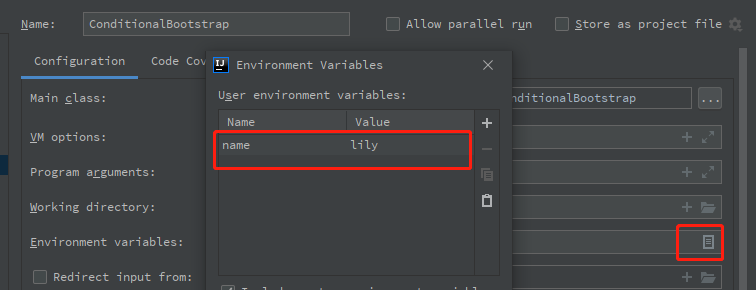
- 运行结果如下图:


若有收获,就点个赞吧
0 人点赞


