1.什么是JUC?
JUC是指java.Util包中的三个操作线程的包!
java.util.concurrent
java.util.concurrent.atomic
java.util.concurrent.locks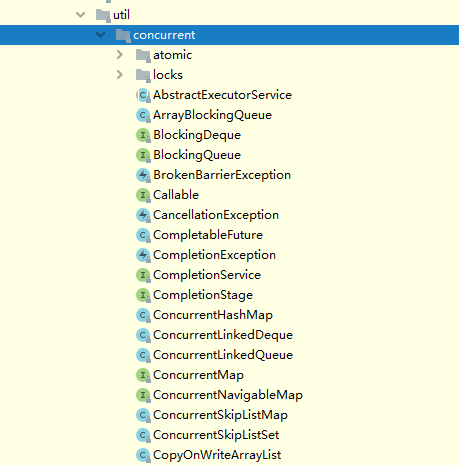
2.线程进程和程序
程序(Program):是一个静态的概念,一般对应于操作系统中的一个可执行的文件。
比如:我们要启动酷狗听音乐,则对应酷狗可执行程序。当我们双击酷狗,则加载程序到内存中,开始执行该程序,于是产生了“进程”。
进程:执行中的程序叫做进程(Process),是一个动态的概念。现代的操作系统都可以同时启动多个进程。
比如:我们在用酷狗听音乐,也可以使用wps写文档,也可以同时用浏览器查看网页。可以通过任务管理器查看当前的进程。
线程:是进程的一个执行路径,一个进程中至少有一个线程,进程中的多个线程共享进程的资源。
java默认有两个线程:main(主)线程和GC(垃圾回收)线程
java真的可以开启线程吗?开启不了!
public synchronized void start() {/*** This method is not invoked for the main method thread or "system"* group threads created/set up by the VM. Any new functionality added* to this method in the future may have to also be added to the VM.** A zero status value corresponds to state "NEW".*/if (threadStatus != 0)throw new IllegalThreadStateException();/* Notify the group that this thread is about to be started* so that it can be added to the group's list of threads* and the group's unstarted count can be decremented. */group.add(this);boolean started = false;try {start0();started = true;} finally {try {if (!started) {group.threadStartFailed(this);}} catch (Throwable ignore) {/* do nothing. If start0 threw a Throwable thenit will be passed up the call stack */}}}//这是一个C++底层,Java是没有权限操作底层硬件的private native void start0();
Java是没有权限去开启线程、操作硬件的,这是一个native的一个本地方法,它调用的底层的C++代码。
并发: 多线程操作同一个资源。
CPU 只有一核,模拟出来多条线程,天下武功,唯快不破。那么我们就可以使用CPU快速交替,来模拟多线程。
并行: 多个人(CPU内核)一起行走(运行)
CPU多核,多个线程可以同时执行。 我们可以使用线程池!
public class Test1 {public static void main(String[] args) {//获取cpu的核数System.out.println(Runtime.getRuntime().availableProcessors());}}
线程有几个状态?6个
public enum State {/*** Thread state for a thread which has not yet started.*///运行(新生,就绪)NEW,/*** Thread state for a runnable thread. A thread in the runnable* state is executing in the Java virtual machine but it may* be waiting for other resources from the operating system* such as processor.*///运行RUNNABLE,/*** Thread state for a thread blocked waiting for a monitor lock.* A thread in the blocked state is waiting for a monitor lock* to enter a synchronized block/method or* reenter a synchronized block/method after calling* {@link Object#wait() Object.wait}.*///阻塞BLOCKED,/*** Thread state for a waiting thread.* A thread is in the waiting state due to calling one of the* following methods:* <ul>* <li>{@link Object#wait() Object.wait} with no timeout</li>* <li>{@link #join() Thread.join} with no timeout</li>* <li>{@link LockSupport#park() LockSupport.park}</li>* </ul>** <p>A thread in the waiting state is waiting for another thread to* perform a particular action.** For example, a thread that has called <tt>Object.wait()</tt>* on an object is waiting for another thread to call* <tt>Object.notify()</tt> or <tt>Object.notifyAll()</tt> on* that object. A thread that has called <tt>Thread.join()</tt>* is waiting for a specified thread to terminate.*///等待WAITING,/*** Thread state for a waiting thread with a specified waiting time.* A thread is in the timed waiting state due to calling one of* the following methods with a specified positive waiting time:* <ul>* <li>{@link #sleep Thread.sleep}</li>* <li>{@link Object#wait(long) Object.wait} with timeout</li>* <li>{@link #join(long) Thread.join} with timeout</li>* <li>{@link LockSupport#parkNanos LockSupport.parkNanos}</li>* <li>{@link LockSupport#parkUntil LockSupport.parkUntil}</li>* </ul>*///超时等待TIMED_WAITING,/*** Thread state for a terminated thread.* The thread has completed execution.*///终止TERMINATED;}
wait/sleep的区别?
1.来自不同的类
wait => Object
sleep => Thread
一般情况企业中使用休眠是:
TimeUnit.DAYS.sleep(1); //休眠1天
TimeUnit.SECONDS.sleep(1); //休眠1s
2.关于锁的释放
3.使用的范围是不同的
wait 必须在同步代码块中;
sleep 可以在任何地方睡;
4.是否需要捕获异常
wait是不需要捕获异常(中断异常除外,所有线程都有中断异常);
sleep必须要捕获异常;
3.Lock锁(重点)
传统:synchronized
package com.test.demo;/*** 基本的卖票例子* 记住:线程就是一个单独的资源类,没用任何的附属操作!*/public class Demo01{public static void main(String[] args) {//多线程操作Ticket ticket = new Ticket();new Thread(()-> { for (int i = 0; i < 60; i++) ticket.sale(); },"A").start();new Thread(()-> { for (int i = 0; i < 60; i++) ticket.sale(); },"B").start();new Thread(()-> { for (int i = 0; i < 60; i++) ticket.sale(); },"C").start();new Thread(()-> { for (int i = 0; i < 60; i++) ticket.sale(); },"D").start();}}//资源类class Ticket{private static int number=50;//卖票方式public synchronized void sale(){if (number>0){System.out.println(Thread.currentThread().getName() + "购买了第" + (number--) + "张票,剩余票数为"+number);}}}
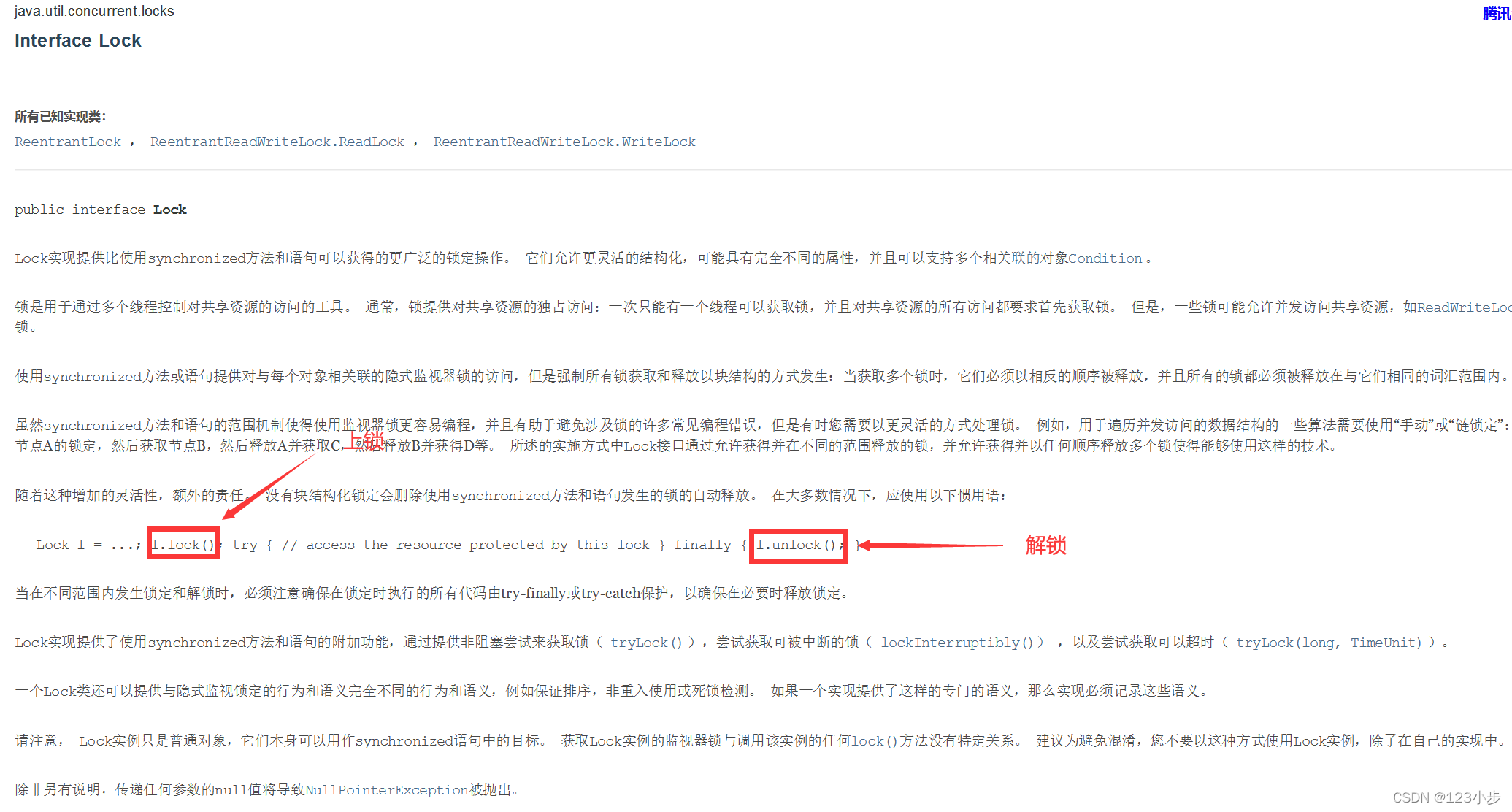
Lock接口

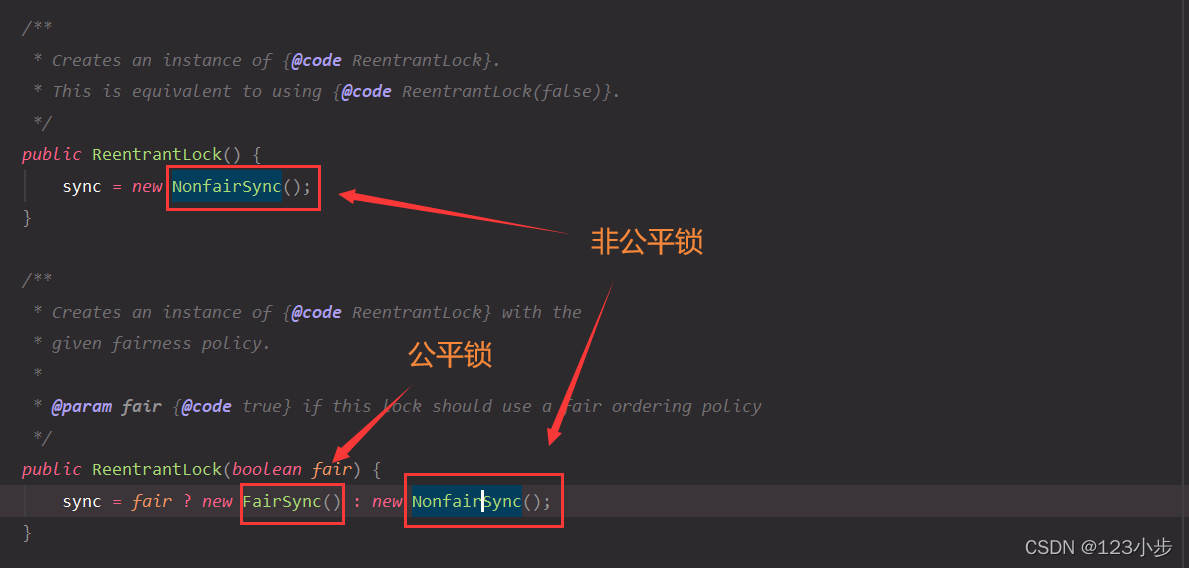
公平锁:十分公平,必须先来后到~
非公平锁:十分不公平,可以插队(默认为非公平锁)。
package com.test.demo;import java.util.concurrent.locks.Lock;import java.util.concurrent.locks.ReentrantLock;/*** 基本的卖票例子* 记住:线程就是一个单独的资源类,没用任何的附属操作!*/public class Demo01{public static void main(String[] args) {//多线程操作Ticket ticket = new Ticket();new Thread(()-> { for (int i = 0; i < 60; i++) ticket.sale(); },"A").start();new Thread(()-> { for (int i = 0; i < 60; i++) ticket.sale(); },"B").start();new Thread(()-> { for (int i = 0; i < 60; i++) ticket.sale(); },"C").start();new Thread(()-> { for (int i = 0; i < 60; i++) ticket.sale(); },"D").start();}}//资源类class Ticket{private static int number=50;Lock lock= new ReentrantLock();//卖票方式public void sale(){//加锁lock.lock();try {if (number>0){System.out.println(Thread.currentThread().getName() + "购买了第" + (number--) + "张票,剩余票数为"+number);}} finally {//解锁lock.unlock();}}}
synchronized锁与Lock锁的区别
- synchronized是内置的java关键字而Lock是一个接口。
- synchronized无法判断获取锁的状态,Lock可以判断是否获取到了锁。
- synchronized会自动释放锁,Lock必须要手动释放锁!否则会造成死锁。
- synchronized 线程1(获得锁,阻塞),线程2(等待,傻傻的等);Lock锁就不会一直等下去。
- synchronized 可重入锁 不可以中断的 非公平,Lock 可重入锁 可以判断的 非公平(可以设置)。
- synchronized 适合锁少量同步代码,Lock适合锁大量同步代码。
锁是什么?如何判断锁的是谁?
个人理解:锁是一种用于解决安全的机制,java中锁一般都是锁的对象,或者锁的是需要进行增删改的属性或发方法。4.生产者和消费者问题
synchronized版
package JUC.PC;public class A {public static void main(String[] args) {Data data = new Data();new Thread(()->{try {for (int i = 0; i < 20; i++) {data.Production();}} catch (InterruptedException e) {e.printStackTrace();}},"A").start();new Thread(()->{try {for (int i = 0; i < 20; i++) {data.Consumption();}} catch (InterruptedException e) {e.printStackTrace();}},"B").start();}}//资源类class Data {private int number = 0;//生产public synchronized void Production() throws InterruptedException {if (number != 0) {this.wait();}number++;System.out.println(Thread.currentThread().getName()+"线程生产+1,目前总数"+number);this.notifyAll();}//消费public synchronized void Consumption() throws InterruptedException {if (number==0){this.wait();}number--;System.out.println(Thread.currentThread().getName()+"线程消费-1,目前总数"+number);this.notifyAll();}}
如果有ABCD4个线程则会出现问题?虚假唤醒!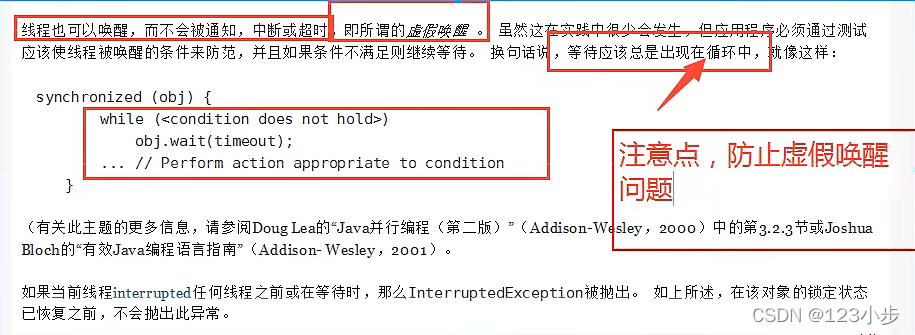
解决方案:将if改为while即可
package JUC.PC;public class A {public static void main(String[] args) {Data data = new Data();new Thread(() -> {try {for (int i = 0; i < 20; i++) {data.Production();}} catch (InterruptedException e) {e.printStackTrace();}}, "A").start();new Thread(() -> {try {for (int i = 0; i < 20; i++) {data.Consumption();}} catch (InterruptedException e) {e.printStackTrace();}}, "B").start();new Thread(() -> {try {for (int i = 0; i < 20; i++) {data.Production();}} catch (InterruptedException e) {e.printStackTrace();}}, "C").start();new Thread(() -> {try {for (int i = 0; i < 20; i++) {data.Consumption();}} catch (InterruptedException e) {e.printStackTrace();}}, "D").start();}}//资源类class Data {private int number = 0;//生产public synchronized void Production() throws InterruptedException {while (number != 0) {this.wait();}number++;System.out.println(Thread.currentThread().getName() + "线程生产+1,目前总数" + number);this.notifyAll();}//消费public synchronized void Consumption() throws InterruptedException {while (number == 0) {this.wait();}number--;System.out.println(Thread.currentThread().getName() + "线程消费-1,目前总数" + number);this.notifyAll();}}
JUC版的生产者和消费者问题
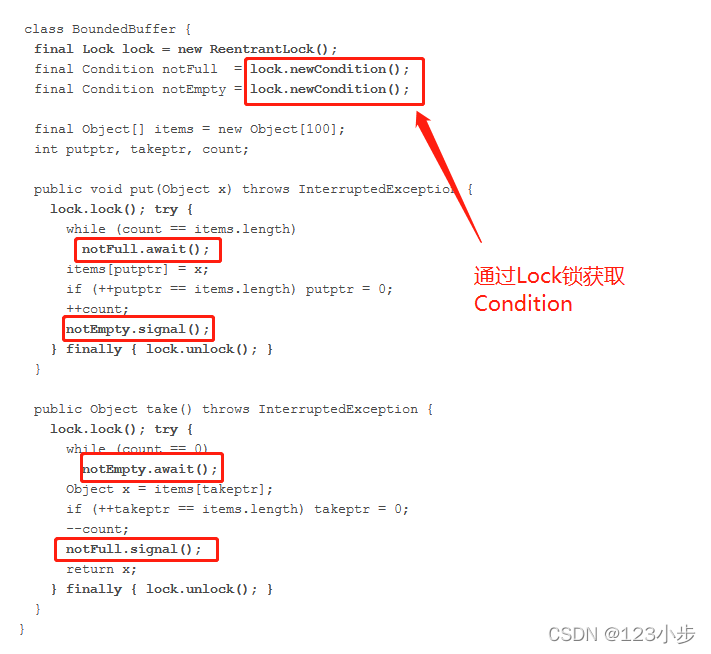
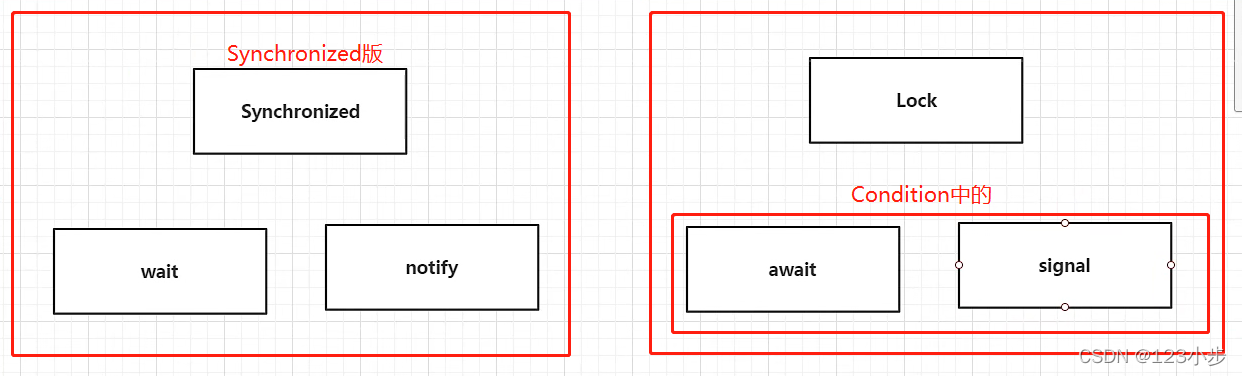
package JUC.PC;import java.lang.management.LockInfo;import java.util.concurrent.locks.Condition;import java.util.concurrent.locks.Lock;import java.util.concurrent.locks.ReentrantLock;public class A {public static void main(String[] args) {Data data = new Data();new Thread(() -> {try {for (int i = 0; i < 20; i++) {data.Production();}} catch (InterruptedException e) {e.printStackTrace();}}, "A").start();new Thread(() -> {try {for (int i = 0; i < 20; i++) {data.Consumption();}} catch (InterruptedException e) {e.printStackTrace();}}, "B").start();new Thread(() -> {try {for (int i = 0; i < 20; i++) {data.Production();}} catch (InterruptedException e) {e.printStackTrace();}}, "C").start();new Thread(() -> {try {for (int i = 0; i < 20; i++) {data.Consumption();}} catch (InterruptedException e) {e.printStackTrace();}}, "D").start();}}//资源类class Data {private int number = 0;Lock reentrantLock = new ReentrantLock();Condition condition = reentrantLock.newCondition();//生产public void Production() throws InterruptedException {try {reentrantLock.lock();while (number != 0) {condition.await();}number++;System.out.println(Thread.currentThread().getName() + "线程生产+1,目前总数" + number);condition.signalAll();} finally {reentrantLock.unlock();}}//消费public void Consumption() throws InterruptedException {try {reentrantLock.lock();while (number == 0) {condition.await();}number--;System.out.println(Thread.currentThread().getName() + "线程消费-1,目前总数" + number);condition.signalAll();} finally {reentrantLock.unlock();}}}
任何一个新技术,绝不仅仅只是覆盖了原来的技术,一定有它的优势和补充了原来的技术!
Condition 精准通知和唤醒线程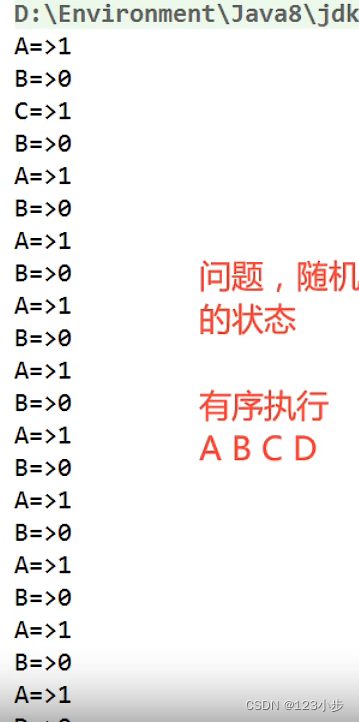
可以定义多个监视器进行精准通知,如:
package JUC.PC;import java.util.concurrent.locks.Condition;import java.util.concurrent.locks.Lock;import java.util.concurrent.locks.ReentrantLock;public class B {public static void main(String[] args) {Data01 data01 = new Data01();new Thread(() -> {for (int i = 0; i < 10; i++) {data01.printA();}}, "A").start();new Thread(() -> {for (int i = 0; i < 10; i++) {data01.printB();}}, "B").start();new Thread(() -> {for (int i = 0; i < 10; i++) {data01.printC();}}, "C").start();new Thread(() -> {for (int i = 0; i < 10; i++) {data01.printD();}}, "D").start();}}class Data01 {//可重入锁private final Lock lock = new ReentrantLock();//监视器private final Condition condition1 = lock.newCondition();private final Condition condition2 = lock.newCondition();private final Condition condition3 = lock.newCondition();private final Condition condition4 = lock.newCondition();//物品数量private int count = 0;//生产public void printA() {lock.lock();try {while (count != 0) {//等待condition1.await();}count++;System.out.println(Thread.currentThread().getName() + "生产物品数量+1物品还剩" + count + "个,通知B消费");//唤醒Bcondition2.signal();} catch (InterruptedException e) {e.printStackTrace();} finally {lock.unlock();}}//消费public void printB() {lock.lock();try {while (count <= 0) {condition2.await();}count--;System.out.println(Thread.currentThread().getName() + "消费物品数量-1物品还剩" + count + "个,通知C生产");//通知Ccondition3.signal();} catch (Exception e) {e.printStackTrace();} finally {lock.unlock();}}//生产public void printC() {try {lock.lock();while (count != 0) {//等待condition3.await();}count++;System.out.println(Thread.currentThread().getName() + "生产物品数量+1物品还剩" + count + "个,通知D消费");//唤醒Dcondition4.signal();} catch (InterruptedException e) {e.printStackTrace();} finally {lock.unlock();}}//消费public void printD() {lock.lock();try {while (count <= 0) {condition4.await();}count--;System.out.println(Thread.currentThread().getName() + "消费物品数量-1物品还剩" + count + "个,通知A生产");//通知Acondition1.signal();} catch (Exception e) {e.printStackTrace();} finally {lock.unlock();}}}
5.八锁现象
如何判断锁的是什么?
问题一:在标准情况下,两个线程是先发短信还是先打电话?
package JUC.Lock8;import java.util.concurrent.TimeUnit;/*** 8锁,就是关于锁的八个问题* 1.在标准情况下,两个线程是先发短信还是先打电话? 先发短信*/public class Test1 {public static void main(String[] args) throws InterruptedException {Phone phone = new Phone();new Thread(() -> {phone.sendSms();}, "A").start();TimeUnit.SECONDS.sleep(1);new Thread(() -> {phone.call();}, "B").start();}}class Phone {//发短信public synchronized void sendSms() {System.out.println("发短信中...");}//打电话public synchronized void call() {System.out.println("打电话中...");}}
问题二:在sendSms方法延迟了4秒后的情况下,两个线程是先发短信还是先打电话?
package JUC.Lock8;import java.util.concurrent.TimeUnit;/*** 8锁,就是关于锁的八个问题* 1.在标准情况下,两个线程是先发短信还是先打电话? 先发短信* 2.在sendSms方法延迟了4秒后的情况下,两个线程是先发短信还是先打电话? 先发短信,因为两个方法都是同一个对象所以代表着谁先拿到锁谁就先执行*/public class Test1 {public static void main(String[] args) throws InterruptedException {Phone phone = new Phone();new Thread(() -> {try {phone.sendSms();} catch (InterruptedException e) {e.printStackTrace();}}, "A").start();TimeUnit.SECONDS.sleep(1);new Thread(() -> {phone.call();}, "B").start();}}class Phone {//发短信public synchronized void sendSms() throws InterruptedException {TimeUnit.SECONDS.sleep(4);System.out.println("发短信中...");}//打电话public synchronized void call() {System.out.println("打电话中...");}}
问题三:这里输出发短信还是hello?
package JUC.Lock8;import java.util.concurrent.TimeUnit;/*** 8锁,就是关于锁的八个问题* 1.在标准情况下,两个线程是先发短信还是先打电话? 先发短信* 2.在sendSms方法延迟了4秒后的情况下,两个线程是先发短信还是先打电话? 先发短信,因为两个方法都是同一个对象所以代表着谁先拿到锁谁就先执行* 3.这里输出发短信还是hello? hello 因为着hello这个方法并没有上锁,且发短信的方法以及拉到了锁但是需要睡眠4秒所以是hello*/public class Test1 {public static void main(String[] args) throws InterruptedException {Phone phone = new Phone();new Thread(() -> {try {phone.sendSms();} catch (InterruptedException e) {e.printStackTrace();}}, "A").start();TimeUnit.SECONDS.sleep(1);new Thread(() -> {phone.hello();}, "B").start();}}class Phone {//发短信public synchronized void sendSms() throws InterruptedException {TimeUnit.SECONDS.sleep(4);System.out.println("发短信中...");}//打电话public synchronized void call() {System.out.println("打电话中...");}public void hello(){System.out.println("hello");}}
问题四:有两个对象先执行发短信还是打电话?
package JUC.Lock8;import java.util.concurrent.TimeUnit;/*** 8锁,就是关于锁的八个问题* 1.在标准情况下,两个线程是先发短信还是先打电话? 先发短信* 2.在sendSms方法延迟了4秒后的情况下,两个线程是先发短信还是先打电话? 先发短信,因为两个方法都是同一个对象所以代表着谁先拿到锁谁就先执行* 3.这里输出发短信还是hello? hello 因为着hello这个方法并没有上锁,且发短信的方法以及拉到了锁但是需要睡眠4秒所以是hello* 4.有两个对象先执行发短信还是打电话? 打电话,应为这里有了两个对象将不在受锁的影响,而sendSms方法中又睡眠的4秒所以是先打电话*/public class Test1 {public static void main(String[] args) throws InterruptedException {//两个对象Phone phone = new Phone();Phone phone01 = new Phone();new Thread(() -> {try {phone.sendSms();} catch (InterruptedException e) {e.printStackTrace();}}, "A").start();TimeUnit.SECONDS.sleep(1);new Thread(() -> {phone01.call();}, "B").start();}}class Phone {//发短信public synchronized void sendSms() throws InterruptedException {TimeUnit.SECONDS.sleep(4);System.out.println("发短信中...");}//打电话public synchronized void call() {System.out.println("打电话中...");}}
问题五:增加两个静态同步方法,只有一个对象,先发短信还是先打电话?
package JUC.Lock8;import java.util.concurrent.TimeUnit;/*** 8锁,就是关于锁的八个问题* 5.增加两个静态同步方法,只有一个对象,先发短信还是先打电话? 发短信,因为静态的方法从属于类则锁锁的就是类了,而sendSms短信是最先拿到锁的*/public class Test2 {public static void main(String[] args) throws InterruptedException {//两个对象Phone phone = new Phone();new Thread(() -> {try {phone.sendSms();} catch (InterruptedException e) {e.printStackTrace();}}, "A").start();TimeUnit.SECONDS.sleep(1);new Thread(() -> {phone.call();}, "B").start();}}class Phone {//发短信public static synchronized void sendSms() throws InterruptedException {TimeUnit.SECONDS.sleep(4);System.out.println("发短信中...");}//打电话public static synchronized void call() {System.out.println("打电话中...");}}
问题六:增加两个静态同步方法,两个个对象,先发短信还是先打电话?
package JUC.Lock8;import java.util.concurrent.TimeUnit;/*** 8锁,就是关于锁的八个问题* 6.增加两个静态同步方法,两个个对象,先发短信还是先打电话? 发短信,因为静态的方法从属于类则锁锁的就是类了,而sendSms短信是最先拿到锁的*/public class Test3 {public static void main(String[] args) throws InterruptedException {//两个对象Phone phone = new Phone();Phone phone02 = new Phone();new Thread(() -> {try {phone.sendSms();} catch (InterruptedException e) {e.printStackTrace();}}, "A").start();TimeUnit.SECONDS.sleep(1);new Thread(() -> {phone02.call();}, "B").start();}}class Phone {//发短信public static synchronized void sendSms() throws InterruptedException {TimeUnit.SECONDS.sleep(4);System.out.println("发短信中...");}//打电话public static synchronized void call() {System.out.println("打电话中...");}}
问题七:一个静态同步方法,一个非静态同步方法,只有一个对象,先发短信还是先打电话?
package JUC.Lock8;import java.util.concurrent.TimeUnit;/*** 8锁,就是关于锁的八个问题* 7.一个静态同步方法,一个非静态同步方法,只有一个对象,先发短信还是先打电话? 打电话,因为一个锁的是class一个锁的是对象,但是发短信会延迟4秒而打电话只延迟一秒所以是打电话.*/public class Test4 {public static void main(String[] args) throws InterruptedException {//两个对象Phone phone = new Phone();new Thread(() -> {try {phone.sendSms();} catch (InterruptedException e) {e.printStackTrace();}}, "A").start();TimeUnit.SECONDS.sleep(1);new Thread(() -> {phone.call();}, "B").start();}}class Phone {//发短信public static synchronized void sendSms() throws InterruptedException {TimeUnit.SECONDS.sleep(4);System.out.println("发短信中...");}//打电话public synchronized void call() {System.out.println("打电话中...");}}
问题八:一个静态同步方法,一个非静态同步方法,两个对象,先发短信还是先打电话?
package JUC.Lock8;import java.util.concurrent.TimeUnit;/*** 8锁,就是关于锁的八个问题* 8.一个静态同步方法,一个非静态同步方法,两个对象,先发短信还是先打电话? 打电话,因为一个锁的是class一个锁的是对象,但是发短信会延迟4秒而打电话只延迟一秒所以是打电话.*/public class Test4 {public static void main(String[] args) throws InterruptedException {//两个对象Phone phone = new Phone();Phone phone02 = new Phone();new Thread(() -> {try {phone.sendSms();} catch (InterruptedException e) {e.printStackTrace();}}, "A").start();TimeUnit.SECONDS.sleep(1);new Thread(() -> {phone02.call();}, "B").start();}}class Phone {//发短信public static synchronized void sendSms() throws InterruptedException {TimeUnit.SECONDS.sleep(4);System.out.println("发短信中...");}//打电话public synchronized void call() {System.out.println("打电话中...");}}
小结:
如果是非静态的synchronized是锁的调用它的对象!
如果为静态的synchronized是锁的是Class类模板!
6.集合安全问题
List
当在单线程中List是安全的,但在并发中ArrayList是不安全的如:
package JUC.List;import java.util.ArrayList;import java.util.List;import java.util.UUID;public class TestList {public static void main(String[] args) {List<String> list = new ArrayList<>();for (int i = 1; i <= 100; i++) {new Thread(()->{list.add(UUID.randomUUID().toString().substring(0, 10));System.out.println(list);},String.valueOf(i)).start();}}}
就会出现了:ConcurrentModificationException(并发修改异常),解决方案:
- 使用synchronized给ArrayList的add方法加锁(ArrayList是1.2出来的)
- 使用List的子类Vector集合类着里面加入了synchronized(Vector是1.0出来的)
- 使用Collections.synchronizedList()方法将集合转换为安全的集合
- 使用CopyOnWriteArrayList类在java并发包concurrent下!
这里推荐使用CopyOnWriteArrayList因为:
- 不同于Vector,它并不是锁的对象,而是锁了进行修改的数组,提高了效率
- 它的add方法对传入的数据进行了Copy然后才进行保存,提高了安全。 ``` package JUC.List;
import java.util.*; import java.util.concurrent.CopyOnWriteArrayList;
public class TestList {
public static void main(String[] args) {
List
<a name="Qoao3"></a>### Set
package JUC.List;
import java.util.*;
//同理可得:ConcurrentModificationException(并发修改异常)
public class TestList {
public static void main(String[] args) {
Set
解决方案:- 使用Collections.synchronizedSet()方法将集合转换为安全的set集合!- 使用ConcurrentSkipListSet类在java并发包concurrent下!HashSet的底层就是使用了HashMap的键去存储的!同理ConcurrentSkipListSet类的底层是使用了ConcurrentSkipListMap的键进行存储!<a name="A4Fcl"></a>### Map**面试题:**<br />**Map是这样用的吗?**> HashMap<Object, Object> objectObjectHashMap = new HashMap<>();**默认等价什么?**<br />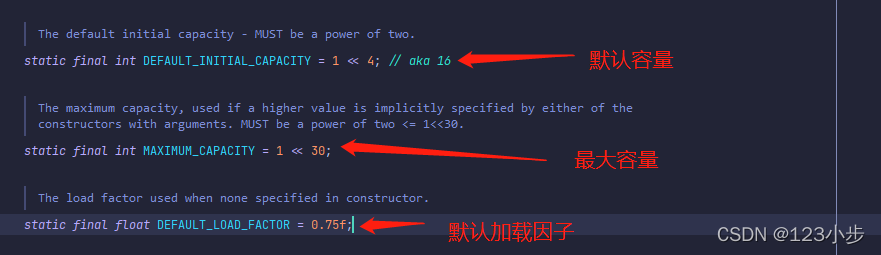<br />**默认的容量为16**<br />**默认的加载因子是0.75**<br />**同时HashMap也是不安全的**
package JUC.List;
import java.util.HashMap; import java.util.UUID;
//同理会报:ConcurrentModificationException(并发修改异常)
public class TestMap {
public static void main(String[] args) {
HashMap
**解决方案:**- 使用Collections.synchronizedSortedMap()把Map转换为安全的集合- 使用ConcurrentHashMap类在java并发包concurrent下!<a name="SrGSP"></a>## 7.Callable (简单)<a name="TDEkj"></a>### Callable多线程的第三种实现方式:1. 表示有返回值1. 可以抛出异常1. 方法不同,run()/call()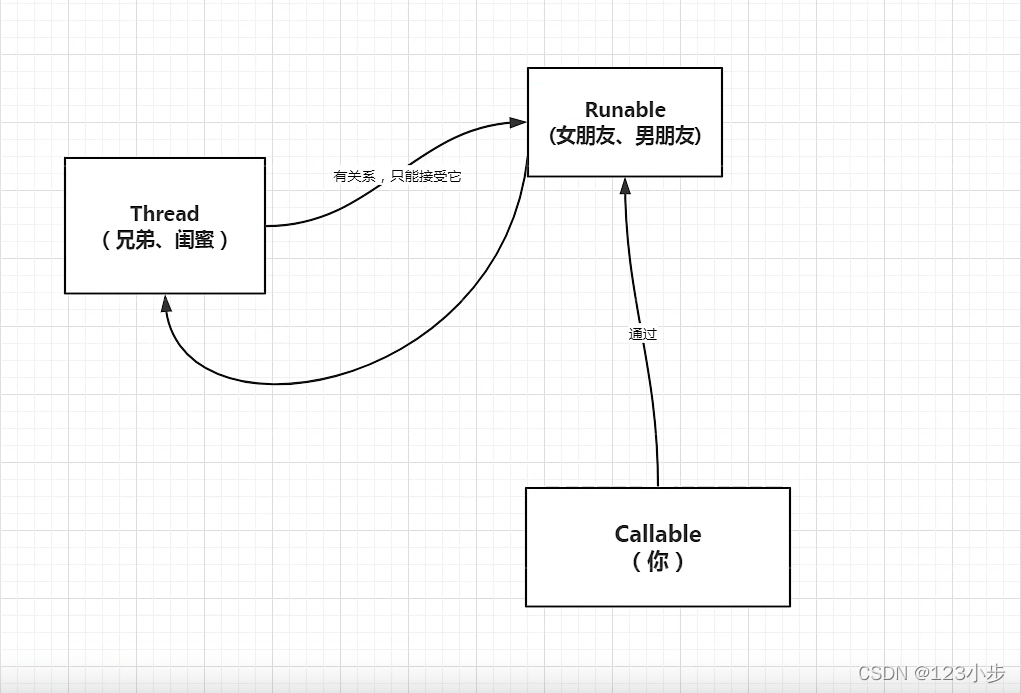** 而这样如何去调用Thread进行启动Callable线程了?**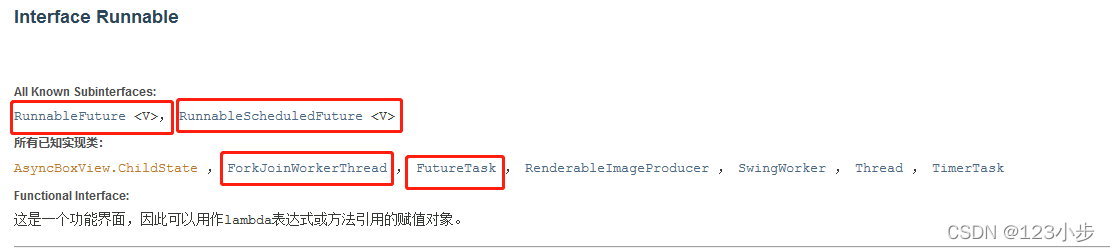<br />这里就有一个实现了Runnable的类叫做[FutureTask](https://blog.csdn.net/abc98526/java/util/concurrent/FutureTask.html)类(适配器模式),它去实现了Runnable接口可以通过它去进行调用Thread。<br /><br />如:
package JUC.Callable;
import java.util.concurrent.Callable; import java.util.concurrent.ExecutionException; import java.util.concurrent.FutureTask;
public class TestCallable {
public static void main(String[] args) throws ExecutionException, InterruptedException {
//创建适配器
FutureTask
class MyCallable implements Callable
/*** Computes a result, or throws an exception if unable to do so.** @return computed result* @throws Exception if unable to compute a result*/@Overridepublic Integer call() throws Exception {System.out.println("你好");return 1024;}
}
<br />** 细节问题:**- 有缓存!- 接口可能会遭到堵塞,需要等待线程执行完毕!<a name="uRUuN"></a>## 8.常用辅助类(必会)<a name="ktP9p"></a>### CountDownLatch类: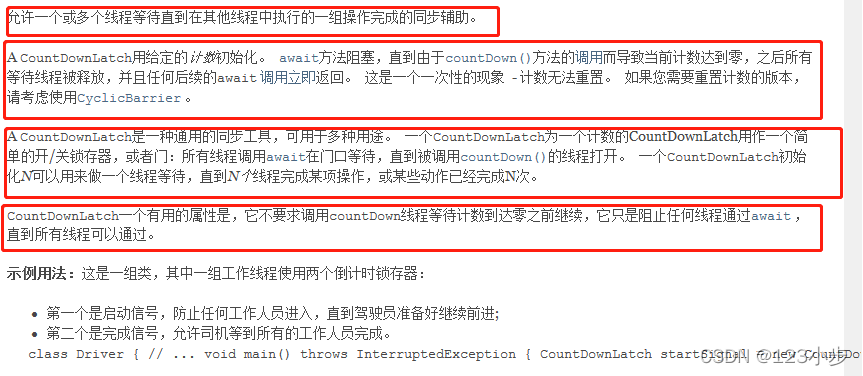<br />该类可以用作一个减法计数器去执行实例:
package JUC.AuxiliaryClass;
import java.util.concurrent.CountDownLatch;
//计数器 public class TestCountDownLatch { public static void main(String[] args) throws InterruptedException { //总数是6 CountDownLatch countDownLatch = new CountDownLatch(6); for (int i = 0; i < 6; i++) { new Thread(() -> { System.out.println(Thread.currentThread().getName()+”走了”); countDownLatch.countDown();//表示数量-1 },String.valueOf(i)).start(); } //等待计数器归零在往下执行! countDownLatch.await();
System.out.println("关门!");}
}
**常用方法:**<br /> countDownLatch.countDown(); //表示数量-1<br />countDownLatch.await(); //等待计数器归零在往下执行!<br />原理:当每次有线程调用 countDown()方法则数量减一,假设数量变为0,await()方法就会被唤醒继续执行!<a name="vEUIC"></a>### CyclicBarrier类**加法计数器:**
package JUC.AuxiliaryClass;
import java.util.concurrent.Semaphore; import java.util.concurrent.TimeUnit;
public class TestSemaphore { public static void main(String[] args) { //线程数量,停车位,限流的时候会用 Semaphore semaphore = new Semaphore(3); for (int i = 0; i < 8; i++) { new Thread(()->{ //acquire() 得到 //release() 释放 try { //得到车位 semaphore.acquire(); System.out.println(Thread.currentThread().getName()+”得到车位!”); TimeUnit.SECONDS.sleep(2); System.out.println(Thread.currentThread().getName()+”停车两秒后离开车位!”); } catch (InterruptedException e) { e.printStackTrace(); }finally { //离开车位 semaphore.release(); } }).start(); } } }
<a name="VMuss"></a>### Semaphore类**实例:**
package JUC.AuxiliaryClass;
import java.util.concurrent.Semaphore; import java.util.concurrent.TimeUnit;
public class TestSemaphore { public static void main(String[] args) { //线程数量,停车位,限流的时候会用 Semaphore semaphore = new Semaphore(3); for (int i = 0; i < 8; i++) { new Thread(()->{ //acquire() 得到 //release() 释放 try { //得到车位 semaphore.acquire(); System.out.println(Thread.currentThread().getName()+”得到车位!”); TimeUnit.SECONDS.sleep(2); System.out.println(Thread.currentThread().getName()+”停车两秒后离开车位!”); } catch (InterruptedException e) { e.printStackTrace(); }finally { //离开车位 semaphore.release(); } }).start(); } } }
**常用方法:**- **semaphore.acquire(); //获得**- **semaphore.release(); //释放**原理:使用**acquire()方法获取一个资源,如果没有则等待,release()释放资源则资源+1。**<br />作用:多个共享资源的互斥使用!并发限流,控制最大线程数!<a name="mhxEG"></a>## 9.读写锁<a name="Sgnau"></a>### ReadWriteLock`**ReadWriteLock**`**叫做读写锁是**`**java.util.concurrent.locks**`**包下的,它的写锁可以进行一次只被一个线程共享的操作,读锁则可以被所有线程共享,锁已又称为,独占锁(写锁)和共享锁(读锁),如:**
package JUC.Lock;
import java.util.HashMap; import java.util.concurrent.locks.ReentrantReadWriteLock;
/**
- 小结:
- 独占锁(写锁):一次只能被一个线程占用
- 共享锁(读锁):多线程可以同时占有
- 读-读:可以共存!
- 读-写:不能共存!
写-写:不能共存! */ public class TestReadWriteLock { public static void main(String[] args) {
MyCacheLock myCache = new MyCacheLock();//存写的线程for (int i = 0; i < 5; i++) {int temp=i;new Thread(()->{myCache .put(String.valueOf(temp),temp);},String.valueOf(i)).start();}//读写的线程for (int i = 0; i < 5; i++) {int temp=i;new Thread(()->{myCache.get(String.valueOf(temp));},String.valueOf(i)).start();}
} }
/**
自定义缓存 */ class MyCache{ private volatile HashMap
//存写 public void put(String key,Object value){
System.out.println(Thread.currentThread().getName()+"正在写入"+key+":"+value);map.put(key,value);System.out.println(Thread.currentThread().getName()+"写入完毕");
}
//读取 public void get(String key){
System.out.println(Thread.currentThread().getName()+"正在读取"+key);Object o = map.get(key);System.out.println(Thread.currentThread().getName()+"读取完毕");
} }
/**
加锁的自定义缓存 */ class MyCacheLock{ private volatile HashMap
//存写 (存写的时候只希望有一个线程进行) public void put(String key,Object value){
//上一把写锁lock.writeLock().lock();try {System.out.println(Thread.currentThread().getName()+"正在写入"+key+":"+value);map.put(key,value);System.out.println(Thread.currentThread().getName()+"写入完毕");} finally {lock.writeLock().unlock();}
}
//读取 (所有人都可以读) public void get(String key){
lock.readLock().lock();try {System.out.println(Thread.currentThread().getName()+"正在读取"+key);Object o = map.get(key);System.out.println(Thread.currentThread().getName()+"读取完毕");} finally {lock.readLock().unlock();}
} }
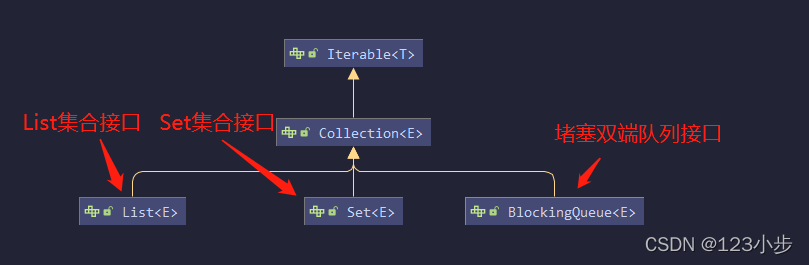
<a name="tA9Mu"></a>## 10.阻塞队列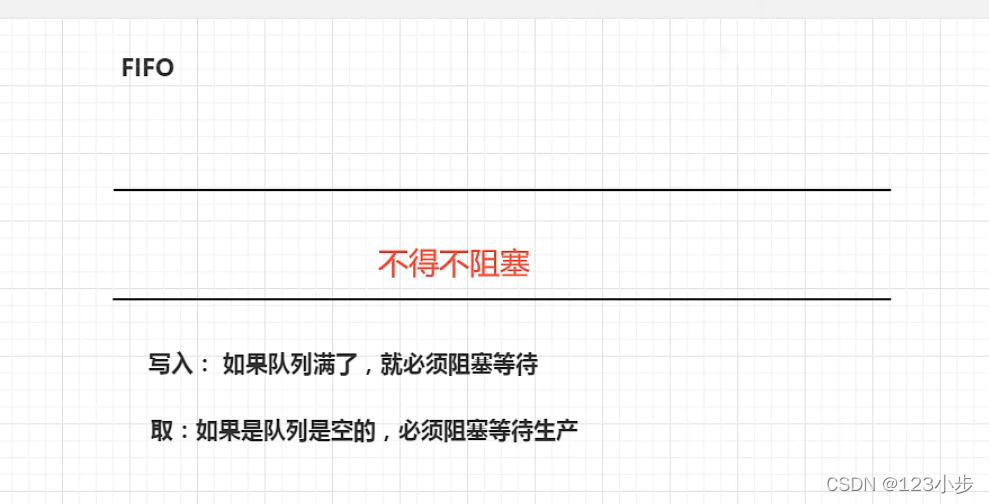<br />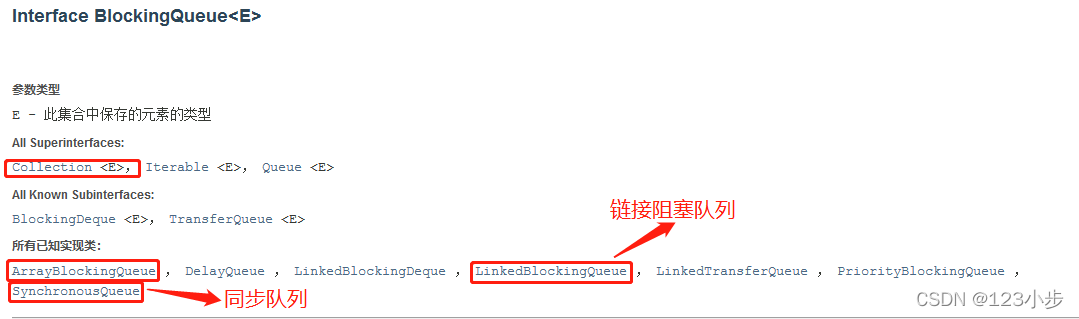<br />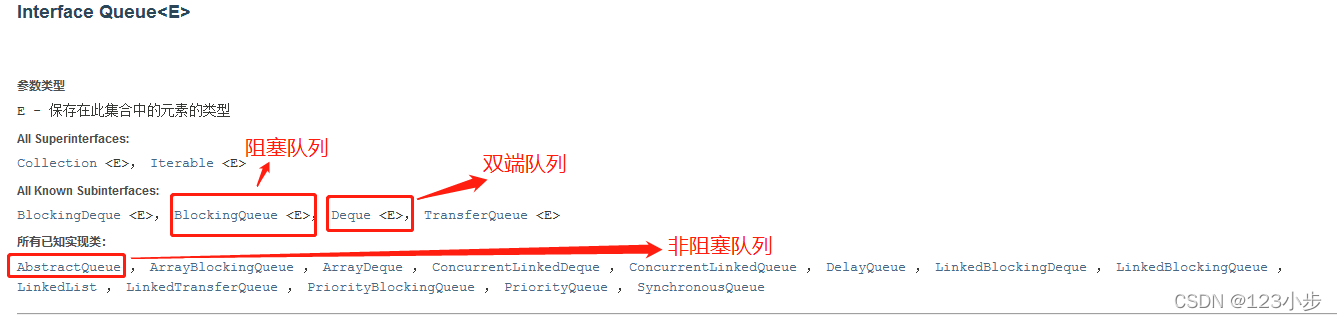<br />BlockingQueue不是新的东西同它的老祖宗也继承了Collection接口(同时也继承了Queue队列接口))<br />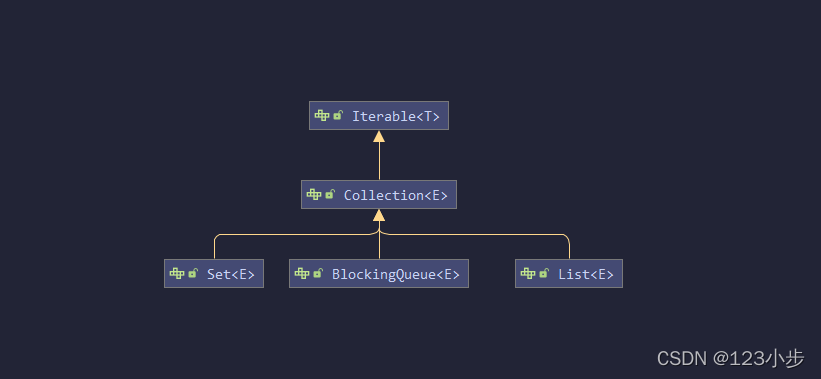<br />**什么情况下会使用堵塞队列?**- 多线程并发处理- 线程池!<a name="Dx20u"></a>### 使用队列四组API:| **方式 ** | **抛出异常** | **有返回值,不抛出异常** | **阻塞 等待** | **超时等待** || --- | --- | --- | --- | --- || **添加** | **add** | **offer** | **put ** | **offer(等待时间,等待单位)** || **移除** | **remove** | **poll** | **take** | **poll(等待时间,等待单位)** || **检测队首元素** | **element** | **peek** | **peek** | **peek** |
//会抛出异常public static void test1(){ArrayBlockingQueue<Object> objects = new ArrayBlockingQueue<>(3);System.out.println(objects.add("a"));System.out.println(objects.add("b"));System.out.println(objects.add("c"));//IllegalStateException: Queue full(队列已满异常!)//System.out.println(objects.add("d"));System.out.println("===================");System.out.println(objects.remove());System.out.println(objects.remove());System.out.println(objects.remove());//NoSuchElementException(队列为空异常!)//System.out.println(objects.remove());}//有返回值.不抛出异常public static void test2(){ArrayBlockingQueue<Object> objects = new ArrayBlockingQueue<>(3);System.out.println(objects.offer("a"));System.out.println(objects.offer("b"));System.out.println(objects.offer("c"));System.out.println(objects.offer("d"));//falseSystem.out.println("===================");System.out.println(objects.poll());System.out.println(objects.poll());System.out.println(objects.poll());System.out.println(objects.poll());//null}//等待,阻塞(一直阻塞)public static void test3() throws InterruptedException {ArrayBlockingQueue<Object> arrayBlockingQueue = new ArrayBlockingQueue<>(3);arrayBlockingQueue.put("a");arrayBlockingQueue.put("b");arrayBlockingQueue.put("c");//arrayBlockingQueue.put("d");//队列没有位置了则会等待System.out.println(arrayBlockingQueue.take());System.out.println(arrayBlockingQueue.take());System.out.println(arrayBlockingQueue.take());//System.out.println(arrayBlockingQueue.take()); //队列没有元素了则会等待}//超时等待public static void test4() throws InterruptedException {ArrayBlockingQueue<Object> arrayBlockingQueue = new ArrayBlockingQueue<>(3);System.out.println(arrayBlockingQueue.offer("a"));System.out.println(arrayBlockingQueue.offer("b"));System.out.println(arrayBlockingQueue.offer("c"));System.out.println(arrayBlockingQueue.offer("d", 2, TimeUnit.SECONDS));//等待超过两秒就退出System.out.println("===================");System.out.println(arrayBlockingQueue.poll());System.out.println(arrayBlockingQueue.poll());System.out.println(arrayBlockingQueue.poll());System.out.println(arrayBlockingQueue.poll(2, TimeUnit.SECONDS));//等待超过两秒就退出}
<a name="TcUqi"></a>### SynchronousQueue(同步队列)没有容量,当进去一个元素必须等待取出才能再次进入元素!
package JUC.Queue;
import java.util.concurrent.SynchronousQueue; import java.util.concurrent.TimeUnit;
public class TestSynchronousQueue { public static void main(String[] args) throws InterruptedException { SynchronousQueue

若有收获,就点个赞吧
0 人点赞


