
新建WCF应用程序
新建WCF模版
略,用VS2019直接创建即可,命名为AxiosWCFService
设置接口信息(IService1.cs)
在IService1.cs中填写如下代码:
using System.Runtime.Serialization;using System.ServiceModel;using System.ServiceModel.Web;namespace AxiosWCFService{// NOTE: You can use the "Rename" command on the "Refactor" menu to change the interface name "IService1" in both code and config file together.[ServiceContract]public interface IService1{[OperationContract][WebGet(BodyStyle =WebMessageBodyStyle.WrappedRequest,ResponseFormat =WebMessageFormat.Json)]WorkData DoWork();[OperationContract][WebInvoke(Method = "POST", BodyStyle = WebMessageBodyStyle.WrappedRequest,RequestFormat =WebMessageFormat.Json, ResponseFormat = WebMessageFormat.Json)]Person GetData(int value);}public class WorkData{private int val;public int Value{get { return val; }set { val = value; }}}[DataContract]public class Person{[DataMember]public string name { get; set; }[DataMember]public int age { get; set; }}}
代码详解:
- 只有声明为DataContract的类型的对象可以被传送,且只有成员属性会被传递,成员方法不会被传递。WCF对声明为DataContract的类型提供更加细节的控制,可以把一个成员排除在序列化范围以外,也就是说,客户端程序不会获得被排除在外的成员的任何信息,包括定义和数据。默认情况下,所有的成员属性都被排除在外,因此需要把每一个要传送的成员声明为DataMember [2] 。(实际测试中,此处DataContract可加可不加,没有影响,但还是都建议加上)
- ServiceContract 用于引用Web服务协议,若缺少此参数则会报错:在服务“Service1”实现的协定列表中找不到协定名称“AjaxWCFService.IService1”。
- [WebGet(BodyStyle =WebMessageBodyStyle.WrappedRequest,ResponseFormat =WebMessageFormat.Json)] 表示采用GET请求,BodyStyle必须制定为WebMessageBodyStyle.WrappedRequest,否则会报错,ResponseFormat = WebMessageFormat.Json表示数据返回的格式是JSON,与之对应,RequestFormat表示请求格式必须为JSON
编写实例代码(Service1.svc.cs)
在Service1.svc.cs中实现IService1.cs定义的方法: ```csharp using System.ServiceModel.Activation;
namespace AxiosWCFService { [AspNetCompatibilityRequirements(RequirementsMode = AspNetCompatibilityRequirementsMode.Allowed)] public class Service1 : IService1 { // 返回一个对象,该对象中Value属性存储了大小为1的值 public WorkData DoWork() { WorkData data = new WorkData(); data.Value = 1; return data; }
// 返回一个的对象,该对象包含姓名和年龄信息public Person GetData(int value){Person myself = new Person();myself.name = "PearEatGrapefruit";myself.age = 18;return myself;}}
}
- [AspNetCompatibilityRequirements(RequirementsMode = AspNetCompatibilityRequirementsMode.Allowed)] 似乎加了该特性能够允许Ajax或Axios的调用(**待验证**)<a name="zFP3P"></a># Wen.config配置- 注意handlers节点非必须,删掉无影响,customHeaders中的设置只有Access-Control-Allow-Origin是必须的且与Gloabl.asax中的设置保留一个,即Gloabl.asax中有Access-Control-Allow-Origin,此处就不要再设置Access-Control-Allow-Origin了。```xml<system.webServer><httpProtocol><customHeaders><add name="Access-Control-Allow-Origin" value="*" /><add name="Access-Control-Allow-Headers" value="Content-Type" /><add name="Access-Control-Allow-Methods" value="GET, POST,PUT, DELETE, OPTIONS" /></customHeaders></httpProtocol><handlers><remove name="ExtensionlessUrlHandler-Integrated-4.0" /><remove name="OPTIONSVerbHandler" /><remove name="TRACEVerbHandler" /><add name="ExtensionlessUrlHandler-Integrated-4.0" path="*." verb="*" type="System.Web.Handlers.TransferRequestHandler" preCondition="integratedMode,runtimeVersionv4.0" /></handlers><modules runAllManagedModulesForAllRequests="true"/><!--To browse web app root directory during debugging, set the value below to true.Set to false before deployment to avoid disclosing web app folder information.--><directoryBrowse enabled="true"/></system.webServer>
- system.webServer:用于指定适用于 Web 应用程序的 IIS设置,常见子节点包括
[handlers](https://docs.microsoft.com/zh-cn/iis/configuration/system.webserver/handlers/)、[httpProtocol](https://docs.microsoft.com/zh-cn/iis/configuration/system.webserver/httpprotocol/)、modules等该节点于IIS7中引进,关于各版本IIS的兼容性与该节点详细介绍见https://docs.microsoft.com/en-us/iis/configuration/system.webserver/ - handlers:处理站点和应用程序发出的请求。对应于IIS中的程序映射,add元素可以添加一个handler到handlers的集合中。remove会从handlers集合中移除对指定handler的引用。

- Access-Control-Request-Method:用来列出浏览器的CORS请求会用到哪些方法,如果是在服务器端则表明接收哪些请求方法。
- Access-Control-Allow-Headers:表明服务器允许请求照片那个携带的字段,其值为逗号分隔的列表(可以指定多个字段)。如Content-type,用于指定资源的媒体类型( MediaType,即是Internet Media Type,互联网媒体类型,也叫做MIME类型)。
Access-Control-Allow-Origin:在服务器端, 表明该资源可以被任意外域访问,如果限定为某一域名则将替换为对应的域名即可。
<endpointBehaviors><behavior name="NewBehavior0"><enableWebScript /><webHttp /></behavior></endpointBehaviors>
enableWebScript:此元素启用的终结点行为可以使用ASP.NET AJAX 网页中的服务。(此行非必须)如果写了这个则必须用WrappedRequest

- webHttp: 此行为与标准绑定结合使用时
,将为 Windows Communication Foundation (WCF)服务启用 Web 编程模型。(此节点必须加上,否则返回的数据格式将出现问题) - 关于endpoint:用来配置web服务,将其暴露出去
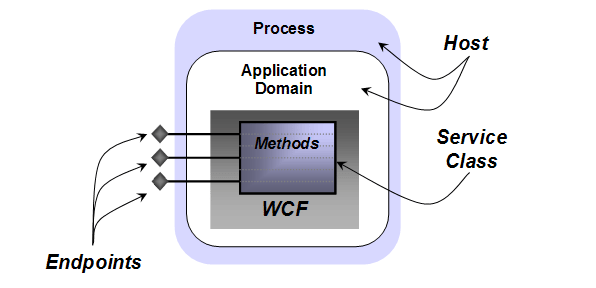
参考网址:https://www.cnblogs.com/judastree/archive/2012/08/24/2654036.html
IIS端的配置

总结
小结一些,WCF与axios或者说ajax的通信要添加哪些Web配置:
首先在Solution Explorer中web.config右击 Edit WCF,然后单击Create a New Service,在bin中选择


终结点地址设置为空
(用向导设置可以免去敲很多代码)
然后在Web.config完善配置:
- binging:”webHttpBinding”
最好添加上
在system.webServer中添加:<services><service name="AjaxWCFService.Service1" behaviorConfiguration="servicebehavior"><endpoint address="" binding="webHttpBinding" bindingConfiguration=""name="endpoint1" contract="AjaxWCFService.IService1" behaviorConfiguration="NewBehavior0" /></service></services><behaviors><endpointBehaviors><behavior name="NewBehavior0"><!--<enableWebScript />--><webHttp /></behavior></endpointBehaviors>
<httpProtocol><customHeaders><add name="Access-Control-Allow-Origin" value="*"/></customHeaders></httpProtocol>

或者在Global.asax中添加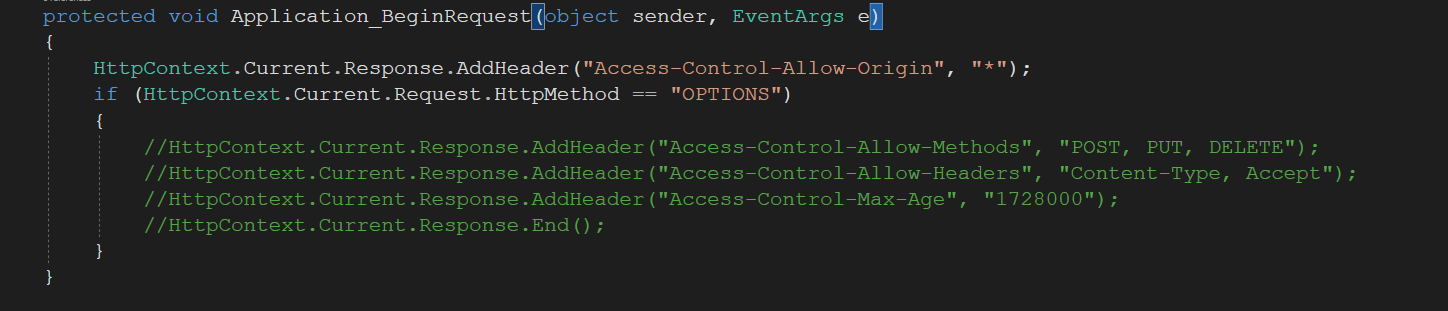 ```csharp
using System;
using System.Collections.Generic;
using System.Linq;
using System.Web;
using System.Web.Security;
using System.Web.SessionState;
```csharp
using System;
using System.Collections.Generic;
using System.Linq;
using System.Web;
using System.Web.Security;
using System.Web.SessionState;
namespace QueryMySQL { public class Global : System.Web.HttpApplication {
protected void Application_Start(object sender, EventArgs e){}protected void Session_Start(object sender, EventArgs e){}protected void Application_BeginRequest(object sender, EventArgs e){HttpContext.Current.Response.AddHeader("Access-Control-Allow-Origin", "*");if(HttpContext.Current.Request.HttpMethod == "OPTIONS"){HttpContext.Current.Response.AddHeader("Access-Control-Allow-Methods", "POST, PUT, DELETE");HttpContext.Current.Response.AddHeader("Access-Control-Allow-Headers", "Content-Type, Accept");HttpContext.Current.Response.AddHeader("Access-Control-Max-Age", "1728000");HttpContext.Current.Response.End();}}protected void Application_AuthenticateRequest(object sender, EventArgs e){}protected void Application_Error(object sender, EventArgs e){}protected void Session_End(object sender, EventArgs e){}protected void Application_End(object sender, EventArgs e){}}
}
最后在接口服务协议上(ServiceContract)要进行如下约定(Get或Post请求,同时规定返回的是XML还是JSON格式)```csharpusing System.Runtime.Serialization;using System.ServiceModel;using System.ServiceModel.Web;namespace AjaxWCFService{// NOTE: You can use the "Rename" command on the "Refactor" menu to change the interface name "IService1" in both code and config file together.[ServiceContract]public interface IService1{[OperationContract][WebGet(BodyStyle =WebMessageBodyStyle.WrappedRequest,ResponseFormat =WebMessageFormat.Json)]WorkData DoWork();[OperationContract][WebInvoke(Method = "POST", BodyStyle = WebMessageBodyStyle.WrappedRequest,RequestFormat =WebMessageFormat.Json, ResponseFormat = WebMessageFormat.Json)]Person GetData(int value);}public class WorkData{private int val;public int Value{get { return val; }set { val = value; }}}[DataContract]public class Person{[DataMember]public string name { get; set; }[DataMember]public int age { get; set; }}}
引用文献

若有收获,就点个赞吧
0 人点赞


