我们来实现一个随时间渐变的效果
css opacity属性设置背景透明度 语法: opacity:1
<div id="app" ><h2 style="opacity: 0.5;">我的透明度是0.5</h2><h2 style="opacity: 0.7">我的透明度是0.7</h2><h3 style="opacity: 1">我是完全不透明的</h3></div>
结果如下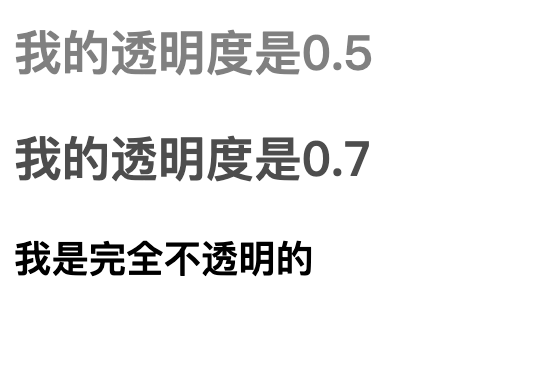
以下几种方式都要理解,里面都是细节
第一种:我们通过js的从上至下的逻辑来完成
<!DOCTYPE html>
<html lang="en">
    <head>
        <meta charset="UTF-8">
    </head>

    <body>
    <script type="text/javascript" src="./vue.js"> </script>

    <div id="app" >
        <!-- style这里是一个特殊的写法-->
        <h2 v-bind:style="{ color: redColor,opacity: opacity}">我的透明度是0.5</h2>
    </div>


    <script type="text/javascript">
        var vm = new Vue({
            el:"#app",
            data:{
                opacity:1 ,
                redColor: 'red',
                mycount : 1,
            },
        })

        var timer = setInterval(function (){
            //
            console.log(vm.mycount ++)
            vm.opacity -= 0.01
            if(vm.opacity <= 0){
                vm.opacity = 1
            }
            if (vm.mycount > 300){
                clearInterval(timer)
            }

        },100)

    </script>
    </body>
</html>
上面有两个逻辑需要我们关注
1.setInterval()这个方法是脱离于 vue的,是从上到下执行的一个函数方法,所以里面要使用vm.opacity,而不能使用this
2.如果这样写,会一直执行的,消耗大量的资源,所以我们引入了 clearInterval() 来终止
3.按照指定的周期(以毫秒计)来调用函数或计算表达式。方法会不停地调用函数,直到 clearInterval() 被调用或窗口被关闭。
除了这种方式我还有什么方式可以实现上面的功能呢???
如果我们把这个计时器放在methods里面的话,那么我可能只能通过button来触发了
第二种 通过一个按钮button实现跑马灯
<!DOCTYPE html>
<html lang="en">
    <head>
        <meta charset="UTF-8">
    </head>

    <body>
    <script type="text/javascript" src="./vue.js"> </script>

    <div id="app" >
        <!-- style这里是一个特殊的写法-->
        <h2 v-bind:style="{ color: redColor,opacity: opacity}">我的透明度是0.5</h2>
        <button @click="myfunc">跑马灯</button>
    </div>

    <script type="text/javascript">
        var vm = new Vue({
            el:"#app",
            data:{
                opacity:1 ,
                redColor: 'red',
                mycount : 1,
            },
            methods:{
                myfunc(){
                    const that = this
                    var timer = setInterval(function (){
                        console.log(that.mycount ++)
                        that.opacity -= 0.01
                        if(that.opacity <= 0){
                            that.opacity = 1
                        }
                        if (that.mycount > 300){
                            clearInterval(timer)
                        }
                    },100)
                }
            }
        })

    </script>
    </body>
</html>
效果如下: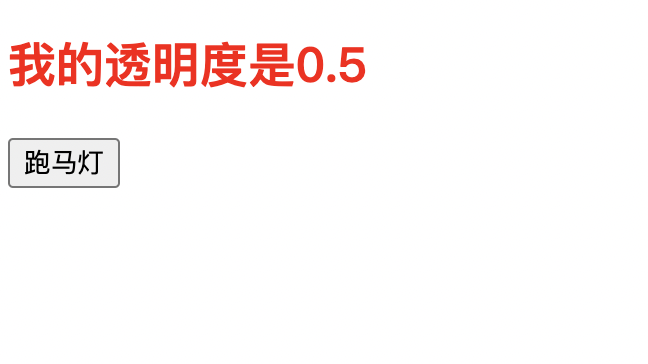
第三种:我们通过第二种的一个微小改造,箭头函数
箭头函数的this指向外层的this,也就是vm
<!DOCTYPE html>
<html lang="en">
    <head>
        <meta charset="UTF-8">
    </head>

    <body>
    <script type="text/javascript" src="./vue.js"> </script>

    <div id="app" >
        <!-- style这里是一个特殊的写法-->
        <h2 v-bind:style="{ color: redColor,opacity: opacity}">我的透明度是0.5</h2>
        <button @click="myfunc">跑马灯</button>
    </div>

    <script type="text/javascript">
        var vm = new Vue({
            el:"#app",
            data:{
                opacity:1 ,
                redColor: 'red',
                mycount : 1,
            },
            methods:{
                myfunc(){

                    var timer = setInterval( () => {
                        console.log(this.mycount ++)
                        this.opacity -= 0.01
                        if(this.opacity <= 0){
                            this.opacity = 1
                        }
                        if (this.mycount > 300){
                            clearInterval(timer)
                        }
                    },100)
                }
            }
        })

    </script>
    </body>
</html>
其实我们可以使用一个mounted函数来解决这个问题,这个mounted属于vm实例内部,既不需要使用button点击,也不需要使用一个完全不相干的函数(函数里面调用vm.xxx)
如下
这个mounted函数在vm内部
<!DOCTYPE html>
<html lang="en">
<head>
    <meta charset="UTF-8">
</head>

<body>
<script type="text/javascript" src="./vue.js"> </script>

<div id="app" >
    <!-- style这里是一个特殊的写法-->
    <h2 v-bind:style="{ color: redColor,opacity: opacity}">我的透明度是0.5</h2>
</div>

<script type="text/javascript">
    var vm = new Vue({
        el:"#app",
        data:{
            opacity:1 ,
            redColor: 'red',
            mycount : 1,
        },
        mounted(){
            var timer = setInterval( () => {
                console.log(this.mycount ++)
                this.opacity -= 0.01
                if(this.opacity <= 0){
                    this.opacity = 1
                }
                if (this.mycount > 300){
                    clearInterval(timer)
                }
            },100)
        }
    })
</script>
</body>
</html>
最重要的说是mounted函数执行的时机
1.Vue是在Vue完成模版的解析并把初始的真实DOM元素放入页面后,再调用mounted
2.所以mounted只会执行一次
3.mounted叫做生命周期函数或者叫做生命周期钩子
**我们除了mounted之外,还应该有其他的生命周期的函数,那么我们来看一下什么是生命周期呢??
**
一般是配合destroyed的
        var vm = new Vue({
            el:"#app",
            components :{
                MyCompose
            },
            data() {
                return {
                    num : 0 ,
                }
            },
            template: `
            <div>{{ num }}</div>
            `,
            mounted(){
                this.timer = setInterval( () => {
                    console.log(this.num )
                    this.num += 1
                    // if(this.num <= 0){
                    //     this.num = 1
                    // }
                    // if (this.num > 300){
                    //     clearInterval(timer)
                    // }
                },1000)
            },
            destroyed(){
                clearInterval(this.timer)
            }


        })

若有收获,就点个赞吧
0 人点赞


