Git 是什么
Git 是一个分布式版本控制系统,每个端都存储着仓库所有代码。对数据的存储是记录快照的方式,默认只增加文件,不删除文件。本质上就是一个内容寻址文件系统,核心部分是键值对数据库。
Git 基础命令和效果
先初始化一个项目,看下空仓库下有什么
# 初始化$ git init learnGit# 进入项目$ cd learnGit
会发现 learnGit 目录里面有个 .git 文件,有如下内容:
.git/|-- hooks # 钩子函数| |-- applypatch-msg.sample| |-- commit-msg.sample| |-- fsmonitor-watchman.sample| |-- post-update.sample| |-- pre-applypatch.sample| |-- pre-commit.sample| |-- pre-merge-commit.sample| |-- pre-push.sample| |-- pre-rebase.sample| |-- pre-receive.sample| |-- prepare-commit-msg.sample| `-- update.sample|-- info # 仓库信息| `-- exclude # 文件忽略|-- objects # 储存二进制文件| |-- info| `-- pack # 储存 git gc 打包文件|-- refs| |-- heads # 所有分支引用(指针)| `-- tags # 标签|-- HEAD # 当前 commit 引用|-- config # 仓库配置文件`-- description # 仓库描述文件
创建 test.txt 文件,并且执行 git add 命令看看
# 创建文件$ vim test.txt# 添加到缓存空间$ git add .# 查看 .git/index 文件$ git ls-files -s
再执行 git commit 将文件提交到仓库区
# 提交文件$ git commit -m 'add test.txt'# 查看 git 提交历史$ git log# 查看 objects$ find .git/objects/# 查看 Object 文件类型 -t 类型 | -s 长度 | -p 内容$ git cat-file -t d67046
可以得出以下树形关系
此时添加一个 test 文件夹,看 git 状态
$ mkdir test$ git statis$ git add .
给 test 文件夹加一个 a.txt 文件
$ vim test/a.txt$ git add .# 查看此时索引状态$ git status# 查看 .git/objests 内容$ find .git/objests$ git commit -m 'add a.txt'# 查看 .git/objests 内容$ find .git/objests
总结可以得出 git 储存主要通过 3 个对象,分别为 blob、tree、commit。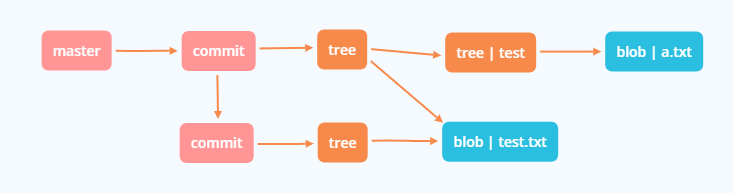
底层命令及部分算法原理
blob 对象
可以看到 git/objects 下面多了一个文件夹和文件,使用 git -cat-files 查看内容
# -t 类型 | -s 长度 | -p 内容$ git cat-file -p d67046test content
就是我们刚刚输入的内容,再将其修改并写入数据库
$ echo 'version 1' > test.txt$ git hash-object -w test.txt83baae61804e65cc73a7201a7252750c76066a30# 再次写入修改$ echo 'version 2' > test.txt$ git hash-object -w test.txt1f7a7a472abf3dd9643fd615f6da379c4acb3e3a
然后查看数据库下所有内容,所有数据都被保存为快照
$ find .git/objects -type f.git/objects/1f/7a7a472abf3dd9643fd615f6da379c4acb3e3a.git/objects/83/baae61804e65cc73a7201a7252750c76066a30.git/objects/d6/70460b4b4aece5915caf5c68d12f560a9fe3e4
删了本地种的 test.txt,可以从数据库中恢复
# 第一个版本$ git cat-file -p 83baae > test.txt$ cat test.txtversion 1# 第二个版本$ git cat-file -p 1f7a7a > test.txt$ cat test.txtversion 1
然后使用 git -cat-files 查看文件类型,是二进制数据对象
$ git cat-file -t 1f7a7ablob
tree 对象
tree 对象的作用是保存文件名和文件目录关系的,有个 demo 项目代码就目录就如下
# master^{tree} 语法表示 master 分支上最新的提交所指向的树对象$ git cat-file -p master^{tree}100644 blob 8178c76d627cade75005b40711b92f4177bc6cfc README.md040000 tree 6258f9911fe852aa82e9da1d3ad5f101c81ba199 lib100644 blob 30d74d258442c7c65512eafab474568dd706c430 test.txt# 查看 lib 的 tree对象$ git cat-file -p 6258f100644 blob 1da36b1e0266efb0e1a57d2bced8734d4343a28a utils.js
Git 内部数据存储为一棵树的结构
Git 在 commit 或 stash 时会根据暂存区生成一个 tree 对象,因此先使用 git update-index 创建一个暂存区。
# 文件模式:100644 普通文件 | 100755 可执行文件 | 120000 符号链接$ git update-index --add --cacheinfo 100644 \83baae61804e65cc73a7201a7252750c76066a30 test.txt# .git 会创建 index 文件,并修改,查看其内容$ git ls-files --stage100644 83baae61804e65cc73a7201a7252750c76066a30 0 test.txt# 将缓存区写入一个树对象$ git write-treed8329fc1cc938780ffdd9f94e0d364e0ea74f579$ git cat-file -p d8329100644 blob 83baae61804e65cc73a7201a7252750c76066a30 test.txt# 生成一个树对象$ git cat-file -t d8329tree
再创建一个新的 tree 对象,使用 test.txt 第二个版本
# 生成暂存区$ echo 'new file' > new.txt$ git update-index --add --cacheinfo 100644 \1f7a7a472abf3dd9643fd615f6da379c4acb3e3a test.txt$ git update-index --add new.txt# 生成树对象$ git write-tree0155eb4229851634a0f03eb265b69f5a2d56f341$ git cat-file -p 0155eb4229851634a0f03eb265b69f5a2d56f341100644 blob fa49b077972391ad58037050f2a75f74e3671e92 new.txt100644 blob 1f7a7a472abf3dd9643fd615f6da379c4acb3e3a test.txt
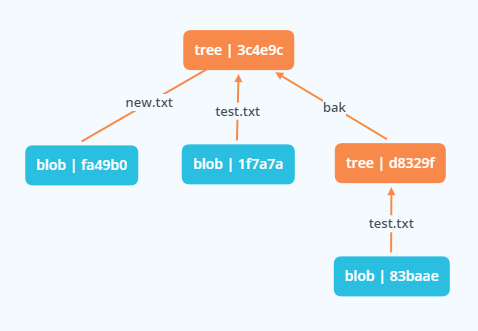
还可以将第一个树对象加入第二个树对象中
$ git read-tree --prefix=bak d8329fc1cc938780ffdd9f94e0d364e0ea74f579$ git write-tree3c4e9cd789d88d8d89c1073707c3585e41b0e614$ git cat-file -p 3c4e9040000 tree d8329fc1cc938780ffdd9f94e0d364e0ea74f579 bak100644 blob fa49b077972391ad58037050f2a75f74e3671e92 new.txt100644 blob 1f7a7a472abf3dd9643fd615f6da379c4acb3e3a test.txt
提交对象
commit 对象的作用是保存 tree 快照、提交作者、提交时间、上一个 commit 等基本信息。根据暂存区生成的 tree 对象和时间、作者等信息生成。信息会保存在 .git/logs/refs/ 里面
$ echo 'first commit' | git commit-tree d8329fe7ef8525b1d22ef056b0365f784e464d5766b822$ git cat-file -p e7ef85tree d8329fc1cc938780ffdd9f94e0d364e0ea74f579author gigot <gigot@gmail.com> 1610458188 +0800committer gigot <gigot@gmail.com> 1610458188 +0800first commit
再将另外两个 tree 对象分别引用到上一次提交
$ echo 'second commit' | git commit-tree 0155eb -p e7ef8514e6379ce4addb40350d3dc114c3180a87145b91$ echo 'third commit' | git commit-tree 3c4e9c -p 14e63703cf4d6eb12f10e0eac3476fb36fde8441458078
然后就可以根据 git log 查看提交的历史记录了
$ git log --stat 03cf4dcommit 03cf4d6eb12f10e0eac3476fb36fde8441458078 (tag: v1.1)Author: gigot <gigot@gmail.com>Date: Wed Jan 13 09:43:15 2021 +0800third commitbak/test.txt | 1 +1 file changed, 1 insertion(+)commit 14e6379ce4addb40350d3dc114c3180a87145b91 (tag: v1.0, test)Author: gigot <gigot@gmail.com>Date: Wed Jan 13 09:39:52 2021 +0800second commitnew.txt | 1 +test.txt | 2 +-2 files changed, 2 insertions(+), 1 deletion(-)commit e7ef8525b1d22ef056b0365f784e464d5766b822Author: gigot <gigot@gmail.com>Date: Tue Jan 12 21:29:48 2021 +0800first committest.txt | 1 +1 file changed, 1 insertion(+)

对象生成原理
- 计算
content长度,构造header; - 将
header添加到content前面,构造 Git 对象; - 使用
sha1算法计算 Git 对象的40位hash码; - 使用
zlib的deflate算法压缩Git对象; - 将压缩后的 Git 对象存储到
.git/objects/hash[0, 2]/hash[2, 40]路径下
# 伪代码$ comtent = "test" => "test"$ header = "blob #{content.length}\0" => "blob 4\u0000"$ store = header + comtent => "blob 16\u0000test"$ sha1(store)9daeafb9864cf43055ae93beb0afd6c7d144bfa4
小结
- 文件以二进制存数据对象 blob,有 tree 对象组成一颗树
- 每次提交更新一个快照对象 commit,指定一个 tree 对象
- commit 之间有依赖关系 patient,形成完整 log
Git 引用
上面最终根据 03cf4d 可以获得所有提交,但我们日常是很难记住这么一个哈希值,所以添加了引用,即指针
# 1. 直接写入 master(不推荐)$ echo 03cf4d6eb12f10e0eac3476fb36fde8441458078 > .git/refs/heads/master$ git log --pretty=oneline master03cf4d6eb12f10e0eac3476fb36fde8441458078 third commit14e6379ce4addb40350d3dc114c3180a87145b91 second commite7ef8525b1d22ef056b0365f784e464d5766b822 first commit# 2. git update-ref 写入 test 分支$ git update-ref refs/heads/test 14e6379ce4addb40350d3dc114c3180a87145b91$ git log --pretty=oneline test14e6379ce4addb40350d3dc114c3180a87145b91 second commite7ef8525b1d22ef056b0365f784e464d5766b822 first commit
HEAD 引用
保存着当前分支引用,文件位于 .git 目录
$ cat .git/HEADref: refs/heads/master
不推荐直接修改 HEAD 文件来改变分支,可以使用 git symbolic-ref 查看修改
$ git symbolic-ref HEADrefs/heads/master# 切换 test 分支$ git symbolic-ref HEAD refs/heads/test
头指针分离即 HEAD 文件中包含一个 sha-1 值。
Tag 引用
保存着标签引用,引用文件保存在 .git/refs/tags 里面
# 打一个 tag:v1.0$ git update-ref refs/tags/v1.0 14e6379ce4addb40350d3dc114c3180a87145b91# 带注释 tag:v1.1$ git tag -a v1.1 03cf4d6eb12f10e0eac3476fb36fde8441458078 -m 'test tag'$ git cat-file -p v1.1object 03cf4d6eb12f10e0eac3476fb36fde8441458078rtype committag v1.1tagger gigot <gigot@gmail.com> 1610627545 +0800test tag
远程引用
保存远程仓库引用,引用文件保存在 .git/refs/remotes 里面
$ git remote add origin git@github.com:weniu/demo.git
小结
- Git 指针是指
HEAD文件 - 切换分支则修改
HEAD文件值 - branch 和 tag 为
refs里面的引用文件,引用文件保存 commit 对象Git 常用功能(课外)
git merge or git cherry-pick
Git 默认合并策略 Recursive 主要分为 fast-forward 和 no-fast-forward(-Xours | -Xtheirs);其他还有 Resolve、Ours、Octopus、Subtree 策略。
- fast-forward,合并的其中一个 commit 为另一个 commit 的子孙级,将分支引用改为最新 commit
release|A <-- B <-- C|master
将 release 分支合并到 master
release|A <-- B <-- C|master
- no-fast-forward,合并时分支是并列的关系(或使用
--no-ff),则采用三方合并(Three-Way Merge)。找到双方分支最近的共同祖先节点,然后分别于其对比看是否修改。如果文件内容冲突,则保留冲突内容,需要手动修改。最终生成新的 commit 对象
1)默认采用递归合并(Recursive 策略) ```bash简单合并
D <— F feature1 / \ A <— B <— C feature2
三方合并
F 与 A 对比
C 与 A 对比
查看公共节点
$ git merge-base feature1 feature2 A
<br /> 假设合并 `text.txt` 文件冲突```diff<<<<<<< HEADtest2=======test1>>>>>>> feature1
通过 git show 可以查看冲突源文件,高级的可以用 git ls-files -u
# 公共祖先,另存为 common.txt;:1:test.txt 代表文件 sha1 值$ git show :1:test.txt > test.commom.txttest# 当前分支版本$ git show :2:test.txt > test.ours.txttest2# 合并分支版本$ git show :3:test.txt > test.theirs.txttest1
想在文件看到全部对比版本,可以使用 git checkout
$ git checkout --conflict=diff3 test.txt<<<<<<< ourstest2||||||| basetest=======test1>>>>>>> theirs
也可以通过 git merge-file 手动执行文件再合并
$ git merge-file -p \test.ours.txt test.common.txt test.theirs.txt > test.txt
上面都是只有 1 个公共节点的情况,当出现 2 个以上公共节点时候呢

图中 E 和 D 有 2 个公共节点为 B、C,这种现象称为 Criss-Cross 现象。git 会根据 B 和 C 创建一个临时节点 F 作为三方合并的 base 节点,然后进行正常的三方合并生成新的 commit
2)Resolve 策略
与 Recursive 策略基本一样,但遇到多个公共节点的情况,取其中一个作为 merge base 节点。是 Recursive 策略出现前默认策略
$ git merge -s resolve feature
3)Ours 策略
丢弃合并分支的所有代码,仅生成新的 commit 对象,内容与当前分支一致。做的是假合并(fake merge)
$ git merge -s ours feature1 feature2
4)Octopus 策略
合并多个分支时的默认策略,采用的也是三方合并。当出现冲突时,默认取第一个分支与当前分支冲突结果
$ git merge -s octopus feature1 feature2
5)Subtree 策略
改进的递归合并策略,如果tree B 是 tree A 的子树,则调整 B 以匹配 A 的树结构,不进行同级对比。
git rebase
git rebase 合并策略与 git merge 的基本一致,但功能要强大更多。
B --- C feature/A --- D master$ git rebase masterfeature|A --- D --- B’ --- C’|master
如上使用 master 进行变基操作,会先找到公共节点 A,然后 feature 上每一个 A 后的 commit 都做对比,然后缓存下来,将 feature 的提交历史重置为 master 分支历史,然后将缓存内容重新提交生成 commit
git reflog
记录 .git/HEAD 的变更历史,即 .git/logs/HEAD 的内容,在 git update-ref 执行时写入
git fsck —full
找到没有被其他对象指向的对象,即无引用对象,通常 git stash 等丢失找回
$ git fsck --fullChecking object directories: 100% (256/256), done.Checking objects: 100% (18/18), done.dangling blob d670460b4b4aece5915caf5c68d12f560a9fe3e4dangling blob 9daeafb9864cf43055ae93beb0afd6c7d144bfa4dangling blob e69de29bb2d1d6434b8b29ae775ad8c2e48c5391
参考资料

若有收获,就点个赞吧
0 人点赞


