注册案例效果图
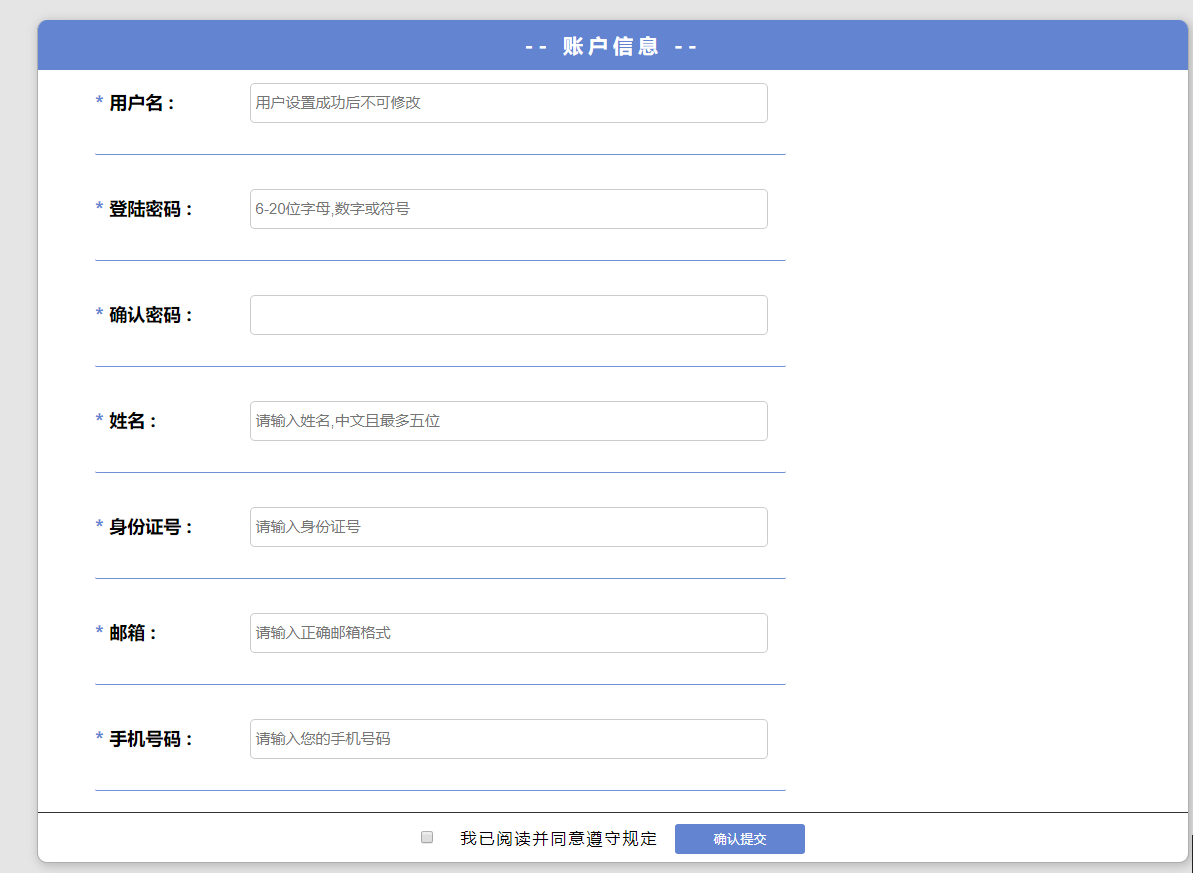
注册案例HTML部分
<!DOCTYPE html><html lang="en"><head><meta charset="UTF-8"><title>注册页面</title><link rel="stylesheet" href="index.css"></head><body><div id="Total"><div id="Title">-- 账户信息 --</div><div class="item"><span class="important">*</span><label for="userAccount">用户名 :</label><input type="text" id="userAccount" placeholder=" 用户设置成功后不可修改"></div><p class="item_"></p><br><!--------------------------------------------------------------------------------><div class="item"><span class="important">*</span><label for="userPass">登陆密码 :</label><input type="password" id="userPass" placeholder=" 6-20位字母,数字或下划线"></div><p class="item_"></p><br><!--------------------------------------------------------------------------------><div class="item"><span class="important">*</span><label for="userPass_">确认密码 :</label><input type="password" id="userPass_" placeholder=" 请再次输入密码"></div><p class="item_"></p><br><!--------------------------------------------------------------------------------><div class="item"><span class="important">*</span><label for="userName">姓名 :</label><input type="text" id="userName" placeholder=" 请输入姓名,中文且最多五位"></div><p class="item_"></p><br><!--------------------------------------------------------------------------------><div class="item"><span class="important">*</span><label for="information">身份证号 :</label><input type="text" id="information" placeholder=" 请输入身份证号"></div><p class="item_"></p><br><!--------------------------------------------------------------------------------><div class="item"><span class="important">*</span><label for="email">邮箱 :</label><input type="email" id="email" placeholder=" 请输入正确邮箱格式"></div><p class="item_"></p><br><!--------------------------------------------------------------------------------><div class="item"><span class="important">*</span><label for="telephone">手机号码 :</label><input type="tel" id="telephone" placeholder=" 请输入您的手机号码"></div><p class="item_"></p><br><!--------------------------------------------------------------------------------><div id="end"><input type="checkbox" id="choose"><label for="choose">我已阅读并同意遵守规定</label><button id="handup">确认提交</button></div><!--------------------------------------------------------------------------------><div id="rule"><h1>填写规定</h1><p>1、用户名设置成功后不可修改<br>2、登录密码为6-20位数字、字母或下划线<br>3、确认密码须与登录密码一致<br>4、姓名须是中文且最多五位<br>5、身份证号码为18位数字<br>6、请填写可以正常通信的电子邮箱<br>7、请填写可以正常通信的手机号码<br>8、勾选“我已阅读并同意遵守规定”后方可“确认提交” <br></p><h1>bug修复</h1><p>1、点击提交按钮的时候 如果更改部分已验证通过的内容 应该显示“提交失败”(已修复)<br>2、输入确认密码验证成功后 若修改了原来的密码 确认密码应该重置并报告更改(已修复)<br></p><h1>体验优化</h1><p>1、点击“确认提交”按钮之后增加了二次确认按钮 防止误操作 (已优化)</p><h1>更新时间</h1><p style="text-align: center;">GJW 2020年6月11日</p></div></div></body><script type="text/javascript" src="index.js"></script></html>
注册案例CSS部分
label {
    cursor: pointer;
}

* {
    margin: 0;
    padding: 0;
    list-style: none;
    text-decoration: none;
    box-sizing: border-box;
}

a {
    color: inherit;
}

body {
    background: rgba(0, 0, 0, 0.1);
}

#Total {
    box-shadow: 2px 2px 10px 1px rgba(0, 0, 0, 0.2);
    background: white;
    width: 60%;
    min-height: 800px;
    margin: 50px auto;
    border-radius: 10px;
    overflow: hidden;
    border-left: 0.5px solid rgba(0, 0, 0, 0.32);
    border-right: 0.5px solid rgba(0, 0, 0, 0.32);
    border-bottom: 0.5px solid rgba(0, 0, 0, 0.32);
}

#Total #Title {
    background: #6385d1;
    color: white;
    width: 100%;
    letter-spacing: 5px;
    height: 50px;
    line-height: 50px;
    text-align: center;
    font-size: 20px;
    font-weight: bold;
}

#Total .item, #Total .item_ {
    width: 90%;
    margin: 10px auto;
    height: 25px;
    line-height: 25px;
    font-size: 18px;
    font-weight: bold;
    position: relative;
}

#Total .item.item, #Total .item_.item {
    margin-top: 20px;
}

#Total .item .important, #Total .item_ .important {
    color: #6385d1;
}

#Total .item input, #Total .item_ input {
    position: absolute;
    width: 50%;
    height: 40px;
    top: 50%;
    left: 15%;
    margin-top: -20px;
    font-size: 15px;
    outline: none;
    border: 1px solid rgba(0, 0, 0, 0.2);
    border-radius: 5px;
    transition: box-shadow .5s;
}

#Total .item input:focus, #Total .item_ input:focus {
    box-shadow: 1px 1px 10px #6385d1, 1px 1px 10px #6385d1;
}

#Total .item.item_, #Total .item_.item_ {
    width: 60%;
    height: 30px;
    border-bottom: .5px solid #6385d1;
    border-radius: 2px;
    font-size: 15px;
    color: rgba(0, 0, 0, 0.6);
    letter-spacing: 2px;
    font-weight: lighter;
    padding-left: 10px;
    margin: 0;
    margin-left: 5%;
}

#Total #end {
    text-align: center;
    height: 50px;
    line-height: 50px;
    border-top: 1px solid rgba(0, 0, 0, 0.8);
    width: 100%;
    letter-spacing: 2px;
}

#Total #end #choose {
    margin-right: 20px;
}

#Total #end #handup {
    width: 130px;
    height: 30px;
    border: none;
    background: #6385d1;
    color: white;
    border-radius: 3px;
    margin-left: 10px;
    cursor: pointer;
}

#Total #rule{
    width: 19%;
    height: 73%;
    background-color: #6385d1;
    position: absolute;
    left: 60%;
    top: 12%;
    border-radius: 5px;
}

#Total #rule h1{
    text-align: center;
    color: white;
    font-size: 25px;
    font-weight: normal;
    margin-top: 10px;
    margin-bottom: 10px;
}

#Total #rule p{
    margin: 10px;
    font-size: 20px;
    color: white;
}
注册案例JavaScript部分
// 此处定义全局变量
var userAccount = document.getElementById('userAccount'),
    userPass = document.getElementById('userPass'),
    userPass_ = document.getElementById('userPass_'),
    userName = document.getElementById('userName'),
    information = document.getElementById('information'),
    email = document.getElementById('email'),
    telephone = document.getElementById('telephone'),
    handup = document.getElementById('handup');
var items = document.querySelectorAll('.item_'),
    choose = document.querySelector('#choose');

//此处定义判断正确是否的变量
var testUserAccount = false,
    testUserPass = false,
    testUserPass_ = false,
    testUserName = false,
    testInformation = false,
    testEmail = false,
    testTelephone = false;

// 用户名验证部分
userAccount.onfocus = function(){
    items[0].innerHTML = '麻烦请输入2-18位中文、英文、数字或下划线的用户名';
    items[0].style.color = 'blue';
}

userAccount.onblur = function(){
    var reg = /^[\u4e00-\u9fa5\w]{2,18}$/;
    if (this.value == '') {
        items[0].innerHTML = '用户名不能为空';
        items[0].style.color = 'red';
        testUserAccount = false;
    } else if (!reg.exec(this.value)) {
        items[0].innerHTML = '请输入2-18位中文、英文、数字或下划线的用户名';
        items[0].style.color = 'red';
        testUserAccount = false;
    } else {
        items[0].innerHTML = '格式正确';
        items[0].style.color = 'green';
        testUserAccount = true;
    }
}

// 登录密码验证部分
userPass.onfocus = function(){
    items[1].innerHTML = '麻烦请输入6-18位只包含字母、数字或下划线的密码';
    items[1].style.color = 'blue';
}

userPass.onblur = function(){
    var reg = /^\w{6,18}$/;
    if (this.value == '') {
        items[1].innerHTML = '密码不能为空';
        items[1].style.color = 'red';
        testUserPass = false;
    } else if (!reg.exec(this.value)) {
        items[1].innerHTML = '请输入6-18位只包含字母、数字或下划线的密码';
        items[1].style.color = 'red';
        testUserPass = false;
    } else {
        items[1].innerHTML = '格式正确';
        items[1].style.color = 'green';
        testUserPass = true;
        // 输入确认密码验证成功后 若修改了原来的密码 确认密码应该报错
        if (this.value != userPass_.value) {
            userPass_.value = '';
            items[2].innerHTML = '请重新输入确认密码';
            items[2].style.color = 'red';
            testUserPass_ = false;
        }
    }
}

// 确认密码验证部分
userPass_.onfocus = function(){
    items[2].innerHTML = '麻烦请再次输入密码';
    items[2].style.color = 'blue';
}

userPass_.onblur = function(){
    if (this.value == '') {
        items[2].innerHTML = '确认密码不能为空';
        items[2].style.color = 'red';
        testUserPass_ = false;
    } else if (this.value != userPass.value) {
        items[2].innerHTML = '登录密码与确认密码不一致';
        items[2].style.color = 'red';
        testUserPass_ = false;
    } else {
        items[2].innerHTML = '格式正确';
        items[2].style.color = 'green';
        testUserPass_ = true;
    }
}

// 姓名验证部分
userName.onfocus = function(){
    items[3].innerHTML = '麻烦请输入2-5位中文姓名';
    items[3].style.color = 'blue';
}

userName.onblur = function(){
    var reg = /^[\u4e00-\u9fa5]{2,5}$/;
    if (this.value == '') {
        items[3].innerHTML = '姓名不能为空';
        items[3].style.color = 'red';
        testUserName = false;
    } else if (!reg.exec(this.value)) {
        items[3].innerHTML = '请输入2-5位中文姓名';
        items[3].style.color = 'red';
        testUserName = false;
    } else {
        items[3].innerHTML = '格式正确';
        items[3].style.color = 'green';
        testUserName = true;
    }
}

// 身份证验证部分
information.onfocus = function(){
    items[4].innerHTML = '麻烦请输入18位身份证号码';
    items[4].style.color = 'blue';
}

information.onblur = function(){
    var reg = /^[1234568]\d{16}[0-9xX]$/;
    if (this.value == '') {
        items[4].innerHTML = '身份证号码不能为空';
        items[4].style.color = 'red';
        testInformation = false;
    } else if (!reg.exec(this.value)) {
        items[4].innerHTML = '请输入18位身份证号码';
        items[4].style.color = 'red';
        testInformation = false;
    } else {
        items[4].innerHTML = '格式正确';
        items[4].style.color = 'green';
        testInformation = true;
    }
}

// 邮箱验证部分
email.onfocus = function(){
    items[5].innerHTML = '麻烦请输入正确的邮箱地址';
    items[5].style.color = 'blue';
}

email.onblur = function(){
    var reg = /^\w+@\w+\.[a-zA-Z_]{2,4}$/;
    if (this.value == '') {
        items[5].innerHTML = '邮箱不能为空';
        items[5].style.color = 'red';
        testEmail = false;
    } else if (!reg.exec(this.value)) {
        items[5].innerHTML = '请输入正确的邮箱地址';
        items[5].style.color = 'red';
        testEmail = false;
    } else {
        items[5].innerHTML = '格式正确';
        items[5].style.color = 'green';
        testEmail = true;
    }
}

// 手机号码验证部分
telephone.onfocus = function(){
    items[6].innerHTML = '麻烦请输入正确的手机号码';
    items[6].style.color = 'blue';
}

telephone.onblur = function(){
    var reg = /^\d{11}$/;
    if (this.value == '') {
        items[6].innerHTML = '手机号码不能为空';
        items[6].style.color = 'red';
        testTelephone = false;
    } else if (!reg.exec(this.value)) {
        items[6].innerHTML = '请输入正确的手机号码';
        items[6].style.color = 'red';
        testTelephone = false;
    } else {
        items[6].innerHTML = '格式正确';
        items[6].style.color = 'green';
        testTelephone = true;
    }
}

// 确认提交按钮部分
handup.onclick = function(){
    if (choose.checked == false) {
        alert('请您先确认提交阅读手册');
    } else {
        if (testUserAccount == false ||
            testUserPass == false ||
            testUserPass_ == false ||
            testUserName == false ||
            testInformation == false ||
            testEmail == false ||
            testTelephone == false) {
            alert('您填写的信息有误!');
        } else {
            // 点击“确认提交”按钮之后增加了二次确认按钮 防止误操作
            var con = confirm('确认提交吗?');
            if (con) {
                alert('提交成功');
            }
        }
    }
}
登录小案例CheckDemo
<!DOCTYPE html>
<html lang="en">
<head>
    <meta charset="UTF-8">
    <title>用户名密码校验</title>
</head>
<body>
    <form action="#" method="post" id="formInfo">
        <div id="err" style="color: red;"></div>
        <div>
            <label>姓名:</label>
            <input type="text" id="name">
        </div>
        <div>
            <label>身份证:</label>
            <input type="text" id="idno">
        </div>
        <div>
            <input type="submit" value="注册">
        </div>
    </form>
</body>
<script type="text/javascript">
    document.getElementById('formInfo').onsubmit = function(){
        var regexp1 = /^[\u4e00-\u9fa5]{2,8}$/,
            regexp2 = /^[1234568]\d{16}[0-9xX]$/;
        var name = document.getElementById('name').value,
            idno = document.getElementById('idno').value,
            err = document.getElementById('err');

        // regexp1.test(name) 返回布尔型
        if (regexp1.test(name) == false) {
            err.innerHTML = '无效姓名';
            return false;
        } else if (regexp2.test(idno) == false) {
            err.innerHTML = '无效身份证';
            return false;
        } else {
            alert('验证通过');
            return true;
        }
    }
</script>
</html>

若有收获,就点个赞吧
0 人点赞


