
1. Request
1.1 请求对象介绍
- 请求:获取资源。在 BS 架构中,就是客户端浏览器向服务器端发出询问。JavaEE工程中,客户浏览器发出询问,遵循HTTP协议所规定.
- 请求对象:就是在项目当中用于发送请求的对象。

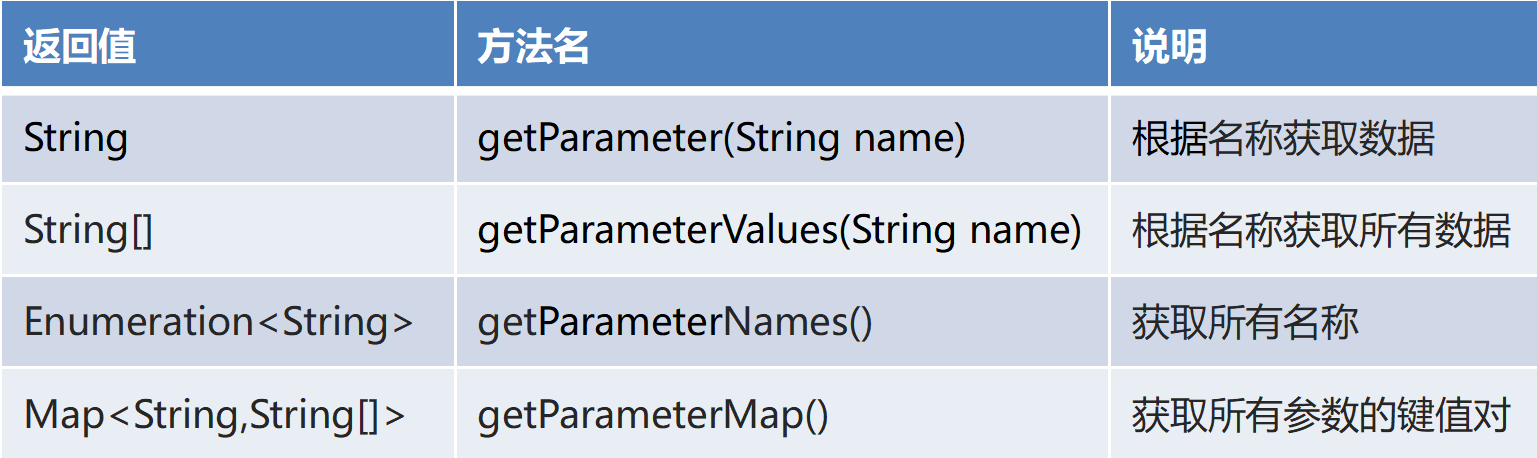
1.2 常用请求对象

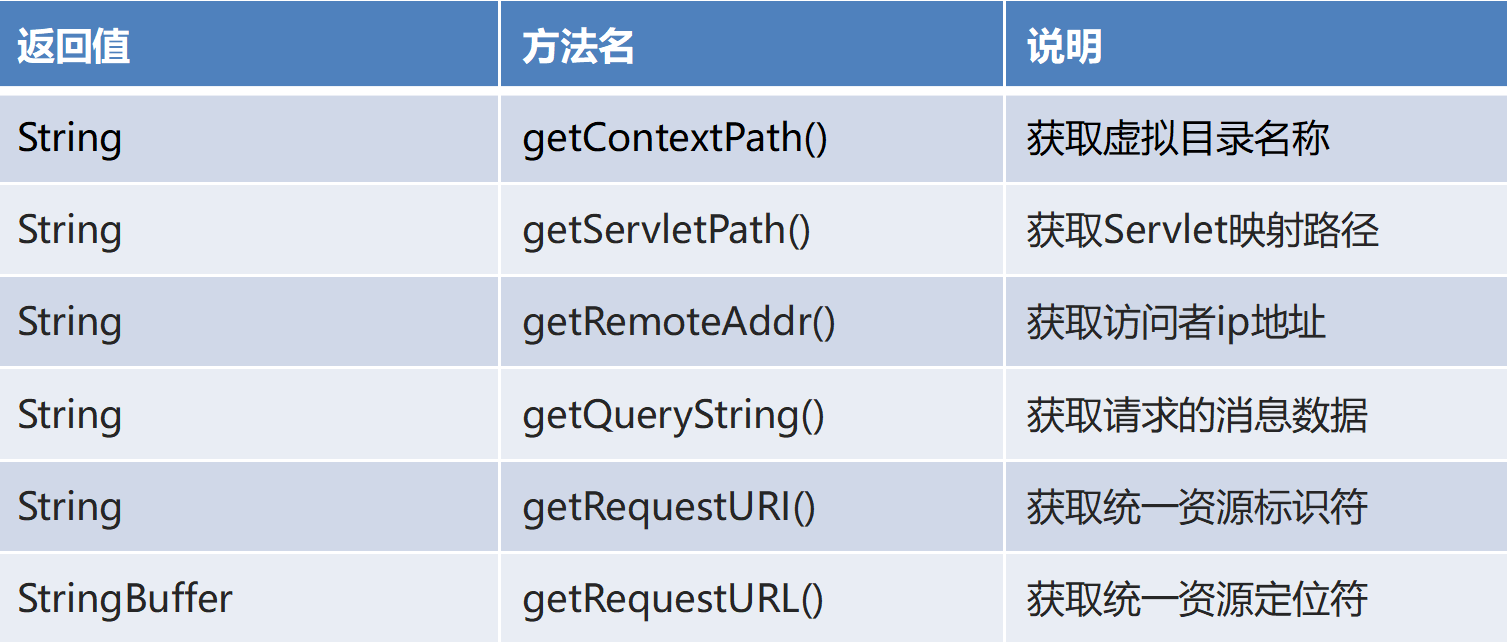
1.3 请求对象常用方法-获取各路径
1.4 请求对象常用方法-获取请求头信息

1.5 请求对象常用方法-获取请求参数信息
1.6 获取请求参数并封装对象
- 手动封装方式。
- 反射封装方式。
工具类封装方式,使用BeanUtils
@WebServlet(value = "/servletDemo03")public class RequestDemo03 extends HttpServlet {@Overrideprotected void doGet(HttpServletRequest req, HttpServletResponse resp) throws ServletException, IOException {Map<String, String[]> map = req.getParameterMap();Student stu = new Student();try {BeanUtils.populate(stu,map);} catch (IllegalAccessException e) {e.printStackTrace();} catch (InvocationTargetException e) {e.printStackTrace();}System.out.println(stu);}}
1.7 流对象获取请求信息

@WebServlet(value = "/servletDemo04")public class RequestDemo04 extends HttpServlet {@Overrideprotected void doGet(HttpServletRequest req, HttpServletResponse resp) throws ServletException, IOException {req.setCharacterEncoding("UTF-8");//字符流BufferedReader reader = req.getReader();String line = null;while ((line = reader.readLine()) != null) {System.out.println(line);}}@Overrideprotected void doPost(HttpServletRequest req, HttpServletResponse resp) throws ServletException, IOException {this.doGet(req,resp);}}
1.8 中文乱码问题
GET 方式
没有乱码问题。在 Tomcat 8.5 版本后已经解决!
POST 方式
有乱码问题。可以通过 setCharacterEncoding() 方法来解决!1.9 请求域
请求域(request 域):可以在一次请求范围内进行共享数据。
- 一般用于请求转发的多个资源中共享数据。
- 请求对象操作共享数据方法:


1.10 请求转发
- 请求转发:客户端的一次请求到达后,发现需要借助其他 Servlet 来实现功能。
- 特点:
- 浏览器地址栏不变
- 域对象中的数据不丢失
- 负责转发的 Servlet 转发前后的响应正文会丢失
- 由转发的目的地来响应客户端

@WebServlet(value = "/servletDemo09")public class RequestDemo09 extends HttpServlet {@Overrideprotected void doGet(HttpServletRequest req, HttpServletResponse resp) throws ServletException, IOException {//1.拿到请求调度对象RequestDispatcher rd = req.getRequestDispatcher("/servletDemo10");req.setAttribute("encoding", "utf-8");rd.forward(req, resp);}@Overrideprotected void doPost(HttpServletRequest req, HttpServletResponse resp) throws ServletException, IOException {this.doGet(req, resp);}}@WebServlet(value = "/servletDemo10")public class RequestDemo10 extends HttpServlet {@Overrideprotected void doGet(HttpServletRequest req, HttpServletResponse resp) throws ServletException, IOException {String encoding = (String) req.getAttribute("encoding");System.out.println(encoding);System.out.println("Servlet10请求到了。。。。");}@Overrideprotected void doPost(HttpServletRequest req, HttpServletResponse resp) throws ServletException, IOException {this.doGet(req, resp);}}
2. Response
2.1 响应对象介绍
- 响应:回馈结果。在 BS 架构中,就是服务器给客户端浏览器反馈结果。
- 响应对象:就是在项目中用于发送响应的对象。

2.2 常见响应状态码

2.3 字节流响应详细

@WebServlet("/servletDemo01")public class ServletDemo01 extends HttpServlet {@Overrideprotected void doGet(HttpServletRequest req, HttpServletResponse resp) throws ServletException, IOException {String str = "阿里嘎多";resp.setContentType("text/html;charset=UTF-8");ServletOutputStream ops = resp.getOutputStream();ops.write(str.getBytes("UTF-8"));ops.close();}@Overrideprotected void doPost(HttpServletRequest req, HttpServletResponse resp) throws ServletException, IOException {this.doGet(req, resp);}}
2.4 字符流响应消息

@WebServlet("/servletDemo02")public class ServletDemo02 extends HttpServlet {@Overrideprotected void doGet(HttpServletRequest req, HttpServletResponse resp) throws ServletException, IOException {String str = "我是字符流响应的消息";resp.setContentType("text/html;charset=UTF-8");//获取字符流对象PrintWriter writer = resp.getWriter();writer.write(str);writer.close();}@Overrideprotected void doPost(HttpServletRequest req, HttpServletResponse resp) throws ServletException, IOException {this.doGet(req, resp);}}
2.5 案例:响应一张图片给浏览器
@WebServlet("/servletDemo03")public class ServletDemo03 extends HttpServlet {@Overrideprotected void doGet(HttpServletRequest req, HttpServletResponse resp) throws ServletException, IOException {//通过文件的相对路径来获取文件的绝对路径String path = getServletContext().getRealPath("/img/hm.png");//用字节流来传输图片等文件BufferedInputStream bis = new BufferedInputStream(new FileInputStream(path));ServletOutputStream os = resp.getOutputStream();//循环读写byte[] arr = new byte[1024];int len;while((len = bis.read(arr)) != -1){os.write(arr,0,len);}//关闭资源bis.close();}@Overrideprotected void doPost(HttpServletRequest req, HttpServletResponse resp) throws ServletException, IOException {this.doGet(req, resp);}}
案例注意点:
- 上传图片文件的目录不能按照/web/img/hm.png 这样的相对路径写,因为实际路径是在通过tomcat处理的,所以建议使用绝对经,用getServletContext().getRealPath(相对路径)来获取。
- javaEE项目中的相对路径是相对于Web目录下的,而不是src。
关闭资源只需要关闭自己创建的流即可,因为servlet创建的流不需要自己手动关闭,servlet会帮助关闭的。
2.6 设置缓存
缓存:对于不经常变化的数据,我们可以设置合理缓存时间,以避免浏览器频繁请求服务器。以此来提高效率!

@WebServlet("/servletDemo04")public class ServletDemo04 extends HttpServlet {@Overrideprotected void doGet(HttpServletRequest req, HttpServletResponse resp) throws ServletException, IOException {String news = "这是一条很火的新闻....";//设置缓存时间为3秒resp.setDateHeader("Exprise",System.currentTimeMillis()+1000*3);resp.setContentType("text/html;charset=UTF-8");PrintWriter wt = resp.getWriter();wt.write(news);System.out.println("aaaa");}@Overrideprotected void doPost(HttpServletRequest req, HttpServletResponse resp) throws ServletException, IOException {this.doGet(req, resp);}}
注意:设置的请求头为Exprise,表示缓存结束时间,下图的 Date为缓存开始时间。

2.7 设置定时刷新
定时刷新:过了指定时间后,页面自动进行跳转

@WebServlet("/servletDemo05")public class ServletDemo05 extends HttpServlet {@Overrideprotected void doGet(HttpServletRequest req, HttpServletResponse resp) throws ServletException, IOException {String news = "您的用户名或密码错误,3秒后自动跳转到百度页面...";//设置编码格式resp.setContentType("text/html;charset=UTF-8");//写出数据resp.getWriter().write(news);//定时3秒后刷新页面跳转到百度官网resp.setHeader("Refresh","3;URL=https://www.baidu.com/");}@Overrideprotected void doPost(HttpServletRequest req, HttpServletResponse resp) throws ServletException, IOException {this.doGet(req, resp);}}
2.8 请求重定向
- 请求重定向:客户端的一次请求到达后,发现需要借助其他 Servlet 来实现功能。
- 特点:2次请求,浏览器地址栏发生改变

请求servletDemo06,触发重定向到servletDemo07
@WebServlet("/servletDemo06")public class ServletDemo06 extends HttpServlet {@Overrideprotected void doGet(HttpServletRequest req, HttpServletResponse resp) throws ServletException, IOException {//设置请求与数据req.setAttribute("name","张三");//设置重定向resp.sendRedirect(req.getContextPath()+"/servletDemo07");}@Overrideprotected void doPost(HttpServletRequest req, HttpServletResponse resp) throws ServletException, IOException {this.doGet(req, resp);}}@WebServlet("/servletDemo07")public class ServletDemo07 extends HttpServlet {@Overrideprotected void doGet(HttpServletRequest req, HttpServletResponse resp) throws ServletException, IOException {System.out.println("servletDemo07执行了...");Object name = req.getAttribute("name");System.out.println(name);}@Overrideprotected void doPost(HttpServletRequest req, HttpServletResponse resp) throws ServletException, IOException {this.doGet(req, resp);}}


2.9 案例:文件下载
@WebServlet("/servletDemo08")public class ServletDemo08 extends HttpServlet {@Overrideprotected void doGet(HttpServletRequest req, HttpServletResponse resp) throws ServletException, IOException {//1.创建字节输入流,关联读取的文件//获取文件的绝对路径String realPath = getServletContext().getRealPath("/img/hm" + System.currentTimeMillis() + ".png");//创建字节输出流对象BufferedInputStream bis = new BufferedInputStream(new FileInputStream(realPath));//2.设置响应头支持的类型 应用支持的类型为字节流/*Content-Type 消息头名称 支持的类型application/octet-stream 消息头参数 应用类型为字节流*/resp.setHeader("Content-Type", "application/octet-stream");//3.设置响应头以下载方式打开 以附件形式处理内容/*Content-Disposition 消息头名称 处理的形式attachment;filename= 消息头参数 附件形式进行处理*/resp.setHeader("Content-Disposition", "attachment;filename=hm.png");//4.获取字节输出流对象ServletOutputStream ops = resp.getOutputStream();//5.循环读写文件byte[] arr = new byte[1024];int len;while ((len = bis.read(arr)) != -1) {ops.write(arr, 0, len);}//6.释放资源bis.close();}@Overrideprotected void doPost(HttpServletRequest req, HttpServletResponse resp) throws ServletException, IOException {this.doGet(req, resp);}}
和上面的响应图片案例差不多,在那基础上添加了设置响应头resp.setHeader("Content-Type", "application/octet-stream");resp.setHeader("Content-Disposition", "attachment;filename=hm.png");
设置响应头,类型为字节流,浏览器响应的形式是以附件形式进行处理,即浏览器将文件下载到本地。

若有收获,就点个赞吧
0 人点赞


