cenots7.4 源码 1.21.6
yum -y install pcre-devel openssl-devel
useradd -r -u 80 www
cat > /etc/security/limits.d/nginx.conf << end
www soft nofile 65535
www hard nofile 65535
end
ulimit -n 65535
tar xf nginx-1.21.6.tar.gz
cd nginx-1.21.6/
./configure —prefix=/apps/nginx-1.21.6 —user=www —group=www —with-http_stub_status_module —with-http_ssl_module —with-http_gzip_static_module —with-http_realip_module —with-pcre —with-openssl= —with-stream
make && make install
cd /apps
ln -s nginx-1.21.6 nginx
echo ‘export PATH=$PATH:/apps/nginx/sbin’ > /etc/profile.d/nginx.sh
. /etc/profile.d/nginx.sh
nginx.conf 示例
user www www;worker_processes auto;pid /data/nginx/logs/nginx.pid;error_log /data/nginx/logs/nginx_error.log crit;#Specifies the value for maximum file descriptors that can be opened by this process.worker_rlimit_nofile 65535;events{use epoll;worker_connections 65535;}http{# server_tokens off;include mime.types;default_type application/octet-stream;log_format main'$remote_addr - $remote_user [$time_local] "$request" ''$status $body_bytes_sent "$http_referer" ''"$http_user_agent" "$http_x_forwarded_for"';# access_log /var/log/nginx/ngnix-access.log main;# error_log /var/log/nginx/ngnix-error.log;#charset gb2312;server_names_hash_bucket_size 128;client_header_buffer_size 32k;large_client_header_buffers 4 32k;client_max_body_size 8m;keepalive_timeout 60;sendfile on;tcp_nopush on;tcp_nodelay on;# FastCGI Configurefastcgi_connect_timeout 300;fastcgi_send_timeout 300;fastcgi_read_timeout 300;fastcgi_buffer_size 64k;fastcgi_buffers 4 64k;fastcgi_busy_buffers_size 128k;fastcgi_temp_file_write_size 128k;# gzip compression configuregzip on;gzip_http_version 1.0;gzip_comp_level 2;# gzip_proxied any; // Nginx Proxy usegzip_proxied any;gzip_min_length 1k;gzip_buffers 4 16k;gzip_types text/plain application/x-javascript text/css application/xml;gzip_vary on;# limit_zone one $binary_remote_addr 10m;server {listen 80 default_server;server_name default;#return 401;root /data/nginx/webroot/default;index index.html index.php;access_log /data/nginx/logs/default.acc;error_log /data/nginx/logs/default.err;location ~ \.php$ {fastcgi_pass unix:/tmp/fpm.sock;#fastcgi_pass 127.0.0.1:9000;fastcgi_index index.php;fastcgi_param SCRIPT_FILENAME /scripts$fastcgi_script_name;include fastcgi.conf;}}include vhosts/*.conf;}
vim nginx.conf 语法高亮
cp -r /data/src/nginx-1.21.6/contrib/vim/ ~/.vim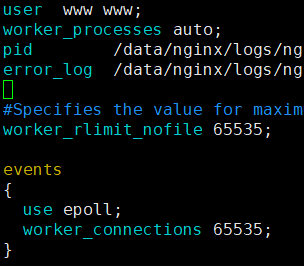
服务启停方式
信号控制
kill -XXX pid
TERM/INT 关闭
QUIT 优雅关闭,包含 master 进程
HUP 重读配置文件并使用服务对新配置项生效
USR1 重新打开日志文件
USR2 平滑升级到最新版nginx
保留之前的 master 及 worker,原 pid文件 改为 pid.oldbin
新创建一组 master 及 worker ,master pid记录到 新pid文件
WINCH 子进程不再接收新连接,相当于对 worker 进程发送 QUIT ,保留 master 进程
命令控制
nginx -s XXX
stop 关闭
quit 优雅关闭
reopen 重新打开日志文件
reload 重读配置文件并使用服务对新配置项生效
nginx systemctl
/usr/lib/systemd/system/nginx.service
[Unit]
Description=web nginx
After=network.target
[Service]
Type=forking
ExecStart=/apps/nginx/sbin/nginx
ExecReload=/apps/nginx/sbin/nginx -s reload
ExecStop=/apps/nginx/sbin/nginx -s stop
PrivateTmp=true
[Install]
WantedBy=default.target
windows
借助”Windows Service Wrapper”小工具,winsw-1.18-bin.exe
放在 nginx安装目录下,并重命名为 service.exe
创建配置文件 service.xml(名字要和工具名一样)
cmd> ./service.exe install

若有收获,就点个赞吧
0 人点赞


