传输
sendfile
| Syntax: | sendfile on | off;
| | —- | —- | | Default: | sendfile off; | | Context: | http, server, location, if in location
|
tcp_nopush
| Syntax: | tcp_nopush on | off;
| | —- | —- | | Default: | tcp_nopush off; | | Context: | http, server, location
|
需要开启 sendfile,有数据先缓存再发送,传输效率高,实时性不高
nginx 在 FreeBSD上 使用 TCP_NOPUSH 套接字选项, 在Linux上使用 TCP_CORK 套接字选项。
开启此选项允许在Linux和FreeBSD 4.*上将响应头和正文的开始部分一起发送;一次性发送整个文件
tcp_nodelay
| Syntax: | tcp_nodelay on | off;
| | —- | —- | | Default: | tcp_nodelay on; | | Context: | http, server, location
|
keep-alive 连接下,有数据就发,实时性高,传输效率低
nginx 使用 TCP_NODELAY 选项的功能。
仅在将连接转变为长连接的时候才被启用。(译者注,在upstream发送响应到客户端时也会启用)
压缩
http_gzip
gzip
| Syntax: | gzip on | off;
| | —- | —- | | Default: | gzip off; | | Context: | http, server, location, if in location
|
gzip_types
| Syntax: | gzip_types mime-type …;
| | —- | —- | | Default: | gzip_types text/html; | | Context: | http, server, location |
压缩的 mime 类型 , * 指所有
视频 图片 没必要压缩
gzip_comp_level
| Syntax: | gzip_comp_level level;
| | —- | —- | | Default: | gzip_comp_level 1; | | Context: | http, server, location |
压缩比率,1 ~ 9
值大压缩比大,耗性能
gzip_vary
| Syntax: | gzip_vary on | off;
| | —- | —- | | Default: | gzip_vary off; | | Context: | http, server, location
|
是否携带 “Vary: Accept-Encoding” 响应头, 告诉接收方发送的数据经过了 gzip 压缩处理
gzip_buffers
| Syntax: | gzip_buffers number size;
| | —- | —- | | Default: | gzip_buffers 32 4k|16 8k; | | Context: | http, server, location |
压缩缓存的空间 个数 及 大小
默认 4k 或 8k ,取决平台
gzip_disable
| Syntax: | gzip_disable regex …;
| | —- | —- | | Default: | — | | Context: | http, server, location |
正则匹配客户端的 User-Agent 关闭 gzip
gzip_disable “Mozilla/5.0”;
gzip_http_version
| Syntax: | gzip_http_version 1.0 | 1.1;
| | —- | —- | | Default: | gzip_http_version 1.1; | | Context: | http, server, location |
gzip_min_length
| Syntax: | gzip_min_length length;
| | —- | —- | | Default: | gzip_min_length 20; | | Context: | http, server, location |
可指定 k m g ,不带单位字节
若响应头中 Content-Length 比这个值小 ,不压缩
gzip_proxied
| Syntax: | gzip_proxied off | expired | no-cache | no-store | private | no_last_modified | no_etag | auth | any …;
| | —- | —- | | Default: | gzip_proxied off; | | Context: | http, server, location |
作为代理时,对服务端返回的结果是否压缩
off 对服务端返回的结果不压缩
any 对所有服务端返回的结果压缩
http_gzip_static
sendfile 与 gzip 存在的问题
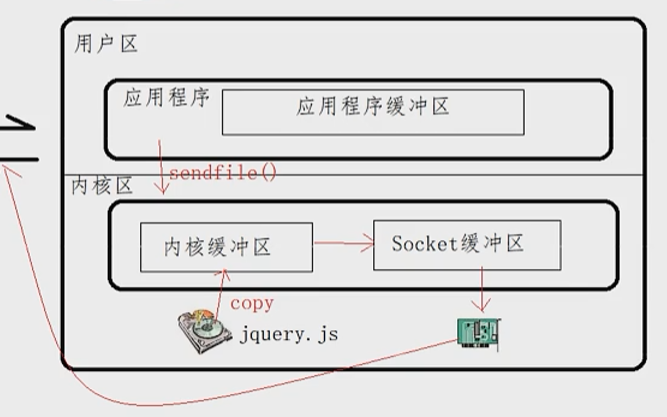
开启 sendfile ,静态资源不再经过用户进程,但是进行 gzip 又必须经过用户进程
gzip_static
需要开启模块
—with-http_gzip_static_module
| Syntax: | gzip_static on | off | always;
| | —- | —- | | Default: | gzip_static off; | | Context: | http, server, location |
检查与访问资源同名的 .gz 文件, response 中以 gzip 相关的 header 返回 .gz 的内容

若有收获,就点个赞吧
0 人点赞


