mapreduce编程
跑一个mapreduce程序 需要yarn
执行命令:
hadoop jar jar包文件路径(绝对的、相对的) 主函数 参数
# 上传文件到 hadoop[root@hadoop01 hadoop3.2.1]# history |grep hadoop136 hadoop fs -mkdir /inhadoop fs -mkdir /in137 hadoop fs -out LICENSE.txt /in/01.txt138 hadoop fs -put LICENSE.txt /in/01.txt139 hadoop fs -put LICENSE.txt /in/02.txt140 hadoop fs -put LICENSE.txt /in/03.txt[root@hadoop01 mapreduce]# pwd/usr/local/hadoop3.2.1/share/hadoop/mapreduce[root@hadoop01 mapreduce]# hadoop jar hadoop-mapreduce-examples-3.2.1.jar wordcount /in /wcout
出现错误
[2019-11-05 20:54:32.193]Container exited with a non-zero exit code 127. Error file: prelaunch.err.Last 4096 bytes of prelaunch.err :Last 4096 bytes of stderr :/bin/bash: /bin/java: No such file or directory[2019-11-05 20:54:32.193]Container exited with a non-zero exit code 127. Error file: prelaunch.err.Last 4096 bytes of prelaunch.err :Last 4096 bytes of stderr :/bin/bash: /bin/java: No such file or directory添加环境变量都试过了,没有办法算了,没有就给你一个吧(每个节点都给)ln -s /usr/local/java1.8/bin/java /bin/java
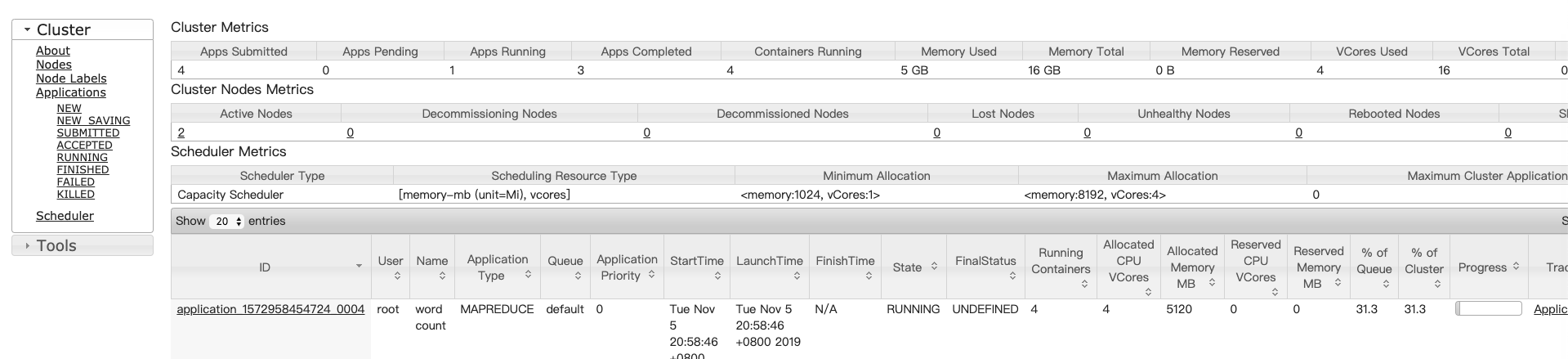
wordcount运行日志
[root@hadoop01 mapreduce]# hadoop jar hadoop-mapreduce-examples-3.2.1.jar wordcount /in /wcout2019-11-05 20:57:27,211 INFO client.RMProxy: Connecting to ResourceManager at hadoop02/192.168.61.102:80322019-11-05 20:57:28,037 INFO mapreduce.JobResourceUploader: Disabling Erasure Coding for path: /tmp/hadoop-yarn/staging/root/.staging/job_1572958454724_00042019-11-05 20:57:28,194 INFO sasl.SaslDataTransferClient: SASL encryption trust check: localHostTrusted = false, remoteHostTrusted = false2019-11-05 20:57:28,436 INFO input.FileInputFormat: Total input files to process : 32019-11-05 20:57:28,500 INFO sasl.SaslDataTransferClient: SASL encryption trust check: localHostTrusted = false, remoteHostTrusted = false2019-11-05 20:57:28,548 INFO sasl.SaslDataTransferClient: SASL encryption trust check: localHostTrusted = false, remoteHostTrusted = false2019-11-05 20:57:28,971 INFO mapreduce.JobSubmitter: number of splits:32019-11-05 20:57:29,217 INFO sasl.SaslDataTransferClient: SASL encryption trust check: localHostTrusted = false, remoteHostTrusted = false2019-11-05 20:57:29,271 INFO mapreduce.JobSubmitter: Submitting tokens for job: job_1572958454724_00042019-11-05 20:57:29,271 INFO mapreduce.JobSubmitter: Executing with tokens: []2019-11-05 20:57:29,546 INFO conf.Configuration: resource-types.xml not found2019-11-05 20:57:29,547 INFO resource.ResourceUtils: Unable to find 'resource-types.xml'.2019-11-05 20:57:29,632 INFO impl.YarnClientImpl: Submitted application application_1572958454724_00042019-11-05 20:57:29,671 INFO mapreduce.Job: The url to track the job: http://hadoop02:8088/proxy/application_1572958454724_0004/# job_时间戳_job的编号(起始 0001)2019-11-05 20:57:29,672 INFO mapreduce.Job: Running job: job_1572958454724_00042019-11-05 20:57:39,891 INFO mapreduce.Job: Job job_1572958454724_0004 running in uber mode : false# 先 map 后 reduce2019-11-05 20:57:39,892 INFO mapreduce.Job: map 0% reduce 0%2019-11-05 20:58:08,354 INFO mapreduce.Job: map 100% reduce 0%2019-11-05 20:58:20,518 INFO mapreduce.Job: map 100% reduce 100%# 运行成功2019-11-05 20:58:21,541 INFO mapreduce.Job: Job job_1572958454724_0004 completed successfully# 结果计数器:总体统计(读了多少数据,写出多少字节数据)2019-11-05 20:58:24,245 INFO mapreduce.Job: Counters: 54File System CountersFILE: Number of bytes read=140544FILE: Number of bytes written=1184301FILE: Number of read operations=0FILE: Number of large read operations=0FILE: Number of write operations=0HDFS: Number of bytes read=451992HDFS: Number of bytes written=35843HDFS: Number of read operations=14HDFS: Number of large read operations=0HDFS: Number of write operations=2HDFS: Number of bytes read erasure-coded=0Job CountersLaunched map tasks=3Launched reduce tasks=1Data-local map tasks=3Total time spent by all maps in occupied slots (ms)=74817Total time spent by all reduces in occupied slots (ms)=9165Total time spent by all map tasks (ms)=74817Total time spent by all reduce tasks (ms)=9165Total vcore-milliseconds taken by all map tasks=74817Total vcore-milliseconds taken by all reduce tasks=9165Total megabyte-milliseconds taken by all map tasks=76612608Total megabyte-milliseconds taken by all reduce tasks=9384960Map-Reduce FrameworkMap input records=8442Map output records=65712Map output bytes=702105Map output materialized bytes=140556Input split bytes=285Combine input records=65712Combine output records=8943Reduce input groups=2981Reduce shuffle bytes=140556Reduce input records=8943Reduce output records=2981Spilled Records=17886Shuffled Maps =3Failed Shuffles=0Merged Map outputs=3GC time elapsed (ms)=4536CPU time spent (ms)=6180Physical memory (bytes) snapshot=671293440Virtual memory (bytes) snapshot=10928197632Total committed heap usage (bytes)=381550592Peak Map Physical memory (bytes)=189513728Peak Map Virtual memory (bytes)=2733113344Peak Reduce Physical memory (bytes)=106672128Peak Reduce Virtual memory (bytes)=2735411200Shuffle ErrorsBAD_ID=0CONNECTION=0IO_ERROR=0WRONG_LENGTH=0WRONG_MAP=0WRONG_REDUCE=0File Input Format CountersBytes Read=451707File Output Format CountersBytes Written=35843
WordCount 程序官方
下载 jar包
<dependency><groupId>org.apache.hadoop</groupId><artifactId>hadoop-mapreduce-examples</artifactId><version>${hadoop.version}</version></dependency>
/maven-repo/org/apache/hadoop/hadoop-mapreduce-examples/3.2.1/hadoop-mapreduce-examples-3.2.1.jar!/org/apache/hadoop/examples/WordCount.class
观察依赖
ExampleDriver
这里就是 hadoop jar XXX.jar 主函数
主函数位置写的是 wordcount的原因
package org.apache.hadoop.examples;import org.apache.hadoop.examples.dancing.DistributedPentomino;import org.apache.hadoop.examples.dancing.Sudoku;import org.apache.hadoop.examples.pi.DistBbp;import org.apache.hadoop.examples.terasort.TeraGen;import org.apache.hadoop.examples.terasort.TeraSort;import org.apache.hadoop.examples.terasort.TeraValidate;import org.apache.hadoop.util.ProgramDriver;public class ExampleDriver {public ExampleDriver() {}public static void main(String[] argv) 注//退出标int exitCode = -1;//项目驱动对对象,类似一个容器集合ProgramDriver pgd = new ProgramDriver();try {//运行wordcount,实际运行的是 WordCount.classpgd.addClass("wordcount", WordCount.class, "A map/reduce program that counts the words in the input files.");pgd.addClass("wordmean", WordMean.class, "A map/reduce program that counts the average length of the words in the input files.");pgd.addClass("wordmedian", WordMedian.class, "A map/reduce program that counts the median length of the words in the input files.");pgd.addClass("wordstandarddeviation", WordStandardDeviation.class, "A map/reduce program that counts the standard deviation of the length of the words in the input files.");pgd.addClass("aggregatewordcount", AggregateWordCount.class, "An Aggregate based map/reduce program that counts the words in the input files.");pgd.addClass("aggregatewordhist", AggregateWordHistogram.class, "An Aggregate based map/reduce program that computes the histogram of the words in the input files.");pgd.addClass("grep", Grep.class, "A map/reduce program that counts the matches of a regex in the input.");pgd.addClass("randomwriter", RandomWriter.class, "A map/reduce program that writes 10GB of random data per node.");pgd.addClass("randomtextwriter", RandomTextWriter.class, "A map/reduce program that writes 10GB of random textual data per node.");pgd.addClass("sort", Sort.class, "A map/reduce program that sorts the data written by the random writer.");pgd.addClass("pi", QuasiMonteCarlo.class, "A map/reduce program that estimates Pi using a quasi-Monte Carlo method.");pgd.addClass("bbp", BaileyBorweinPlouffe.class, "A map/reduce program that uses Bailey-Borwein-Plouffe to compute exact digits of Pi.");pgd.addClass("distbbp", DistBbp.class, "A map/reduce program that uses a BBP-type formula to compute exact bits of Pi.");pgd.addClass("pentomino", DistributedPentomino.class, "A map/reduce tile laying program to find solutions to pentomino problems.");pgd.addClass("secondarysort", SecondarySort.class, "An example defining a secondary sort to the reduce.");pgd.addClass("sudoku", Sudoku.class, "A sudoku solver.");pgd.addClass("join", Join.class, "A job that effects a join over sorted, equally partitioned datasets");pgd.addClass("multifilewc", MultiFileWordCount.class, "A job that counts words from several files.");pgd.addClass("dbcount", DBCountPageView.class, "An example job that count the pageview counts from a database.");pgd.addClass("teragen", TeraGen.class, "Generate data for the terasort");pgd.addClass("terasort", TeraSort.class, "Run the terasort");pgd.addClass("teravalidate", TeraValidate.class, "Checking results of terasort");exitCode = pgd.run(argv);} catch (Throwable var4) {var4.printStackTrace();}System.exit(exitCode);}}
WordCount
//// Source code recreated from a .class file by IntelliJ IDEA// (powered by Fernflower decompiler)//package org.apache.hadoop.examples;import java.io.IOException;import java.util.Iterator;import java.util.StringTokenizer;import org.apache.hadoop.conf.Configuration;import org.apache.hadoop.fs.Path;import org.apache.hadoop.io.IntWritable;import org.apache.hadoop.io.Text;import org.apache.hadoop.mapreduce.Job;import org.apache.hadoop.mapreduce.Mapper;import org.apache.hadoop.mapreduce.Reducer;import org.apache.hadoop.mapreduce.lib.input.FileInputFormat;import org.apache.hadoop.mapreduce.lib.output.FileOutputFormat;import org.apache.hadoop.util.GenericOptionsParser;public class WordCount {public WordCount() {}public static void main(String[] args) throws Exception {Configuration conf = new Configuration();String[] otherArgs = (new GenericOptionsParser(conf, args)).getRemainingArgs();if (otherArgs.length < 2) {System.err.println("Usage: wordcount <in> [<in>...] <out>");System.exit(2);}Job job = Job.getInstance(conf, "word count");job.setJarByClass(WordCount.class);job.setMapperClass(WordCount.TokenizerMapper.class);job.setCombinerClass(WordCount.IntSumReducer.class);job.setReducerClass(WordCount.IntSumReducer.class);job.setOutputKeyClass(Text.class);job.setOutputValueClass(IntWritable.class);for(int i = 0; i < otherArgs.length - 1; ++i) {FileInputFormat.addInputPath(job, new Path(otherArgs[i]));}FileOutputFormat.setOutputPath(job, new Path(otherArgs[otherArgs.length - 1]));System.exit(job.waitForCompletion(true) ? 0 : 1);}public static class IntSumReducer extends Reducer<Text, IntWritable, Text, IntWritable> {private IntWritable result = new IntWritable();public IntSumReducer() {}public void reduce(Text key, Iterable<IntWritable> values, Reducer<Text, IntWritable, Text, IntWritable>.Context context) throws IOException, InterruptedException {int sum = 0;IntWritable val;for(Iterator var5 = values.iterator(); var5.hasNext(); sum += val.get()) {val = (IntWritable)var5.next();}this.result.set(sum);context.write(key, this.result);}}public static class TokenizerMapper extends Mapper<Object, Text, Text, IntWritable> {private static final IntWritable one = new IntWritable(1);private Text word = new Text();public TokenizerMapper() {}public void map(Object key, Text value, Mapper<Object, Text, Text, IntWritable>.Context context) throws IOException, InterruptedException {StringTokenizer itr = new StringTokenizer(value.toString());while(itr.hasMoreTokens()) {this.word.set(itr.nextToken());context.write(this.word, one);}}}}
编程结构
public class WordCount {public WordCount() {}//主方法入口public static void main(String[] args) throws Exception {//组装map和reduce 并进行运行提交...}public static class IntSumReducer extends Reducer<Text, IntWritable, Text, IntWritable> {//map方法....}public static class TokenizerMapper extends Mapper<Object, Text, Text, IntWritable> {//reduce的方法...}}
自己写 MapReduce
Driver.java :组装 map 和 reduce
package pers.sfl.mapreduce;import java.io.IOException;import org.apache.hadoop.conf.Configuration;import org.apache.hadoop.fs.Path;import org.apache.hadoop.io.IntWritable;import org.apache.hadoop.io.Text;import org.apache.hadoop.mapreduce.Job;import org.apache.hadoop.mapreduce.lib.input.FileInputFormat;import org.apache.hadoop.mapreduce.lib.output.FileOutputFormat;/*** 驱动类* @author Administrator**/public class Driver {public static void main(String[] args) {//将mapper reducer类进行一个封装 封装为一个任务----job(作业)//加载配置文件Configuration conf=new Configuration();//启动一个Job 创建一个job对象try {Job job=Job.getInstance(conf);//设置这个job//设置整个job的主函数入口job.setJarByClass(Driver.class);//设置job的mappper的类job.setMapperClass(WordCountMapper.class);//设置job的reducer的类job.setReducerClass(WordCountReducer.class);//设置map输出key value的类型//指定了泛型 这里为什么还要设置一次 泛型的作用范围 编译的时候生效 运行的时候泛型会自动擦除job.setMapOutputKeyClass(Text.class);job.setMapOutputValueClass(IntWritable.class);//设置reduce的输出的k v类型 以下方法设置的是mr的最终输出job.setOutputKeyClass(Text.class);job.setOutputValueClass(IntWritable.class);//指定需要统计的文件的输入路径 FileInputFormat 文件输入类Path inpath=new Path(args[0]);FileInputFormat.addInputPath(job, inpath);//指定输出目录 输出路径不能存在的 否则会报错 默认输出是覆盖式的输出 如果输出目录存在 有可能造成原始数据的丢失Path outpath=new Path(args[1]);FileOutputFormat.setOutputPath(job, outpath);//提交job 执行这一句的时候 job才会提交 上面做的一系列的工作 都是设置job//job.submit();job.waitForCompletion(true);} catch (Exception e) {e.printStackTrace();}}}
WordCountMapper.java
package pers.sfl.mapreduce;import java.io.IOException;import java.io.Serializable;import org.apache.hadoop.io.IntWritable;import org.apache.hadoop.io.LongWritable;import org.apache.hadoop.io.Text;/*** 单词统计*/import org.apache.hadoop.mapreduce.Mapper;/*** 输入和输出 map类型* KEYIN, 输入的键的类型 这里指的是每一行的起始偏移量 long 0 12* VALUEIN,输入的value的类型 这里指的是每一行的内容 和偏移量一一对应的 String* 输出的类型取决于 业务* KEYOUT, 输出的键的类型 这里指的每一个单词 --- string* VALUEOUT,输出的值的类型 这里指的单词的次数 ---- int* @author Administrator*** 这里的数据类型 不能使用java的原生类型* 序列化:数据持久化存储 或 网络传输的时候 数据需要序列化和反序列化的* 张三---序列化------010101110-----反序列化-----张三* java-----Serializable* mapreduce编程中的用于传输的数据类型必须是序列化和反序列化能力的* hadoop弃用了java中原生的Serializable 实现的自己的一套序列化和反序列化的 接口Writable 只会对数据的值进行序列化和反序列化* 原因:java中的序列化和反序列化太重 繁琐* Long 1* 对于一些常用的数据类型 hadoop帮我们实现好了:* int------intWritable* long----LongWritable* string-----Text* byte------ByteWritable* double----DoubleWritable* float-----FloatWritable* boolean-----BooleanWritable* null-----NullWritable*自己定义的需要序列化和反序列化 实现 Writable接口*/public class WordCountMapper extends Mapper<LongWritable, Text, Text, IntWritable>{//重写map函数/*** 参数:* hadoop的底层数据读取的时候 字节读取的* LongWritable key:输入的key 这里指的是每一行的偏移量 没有实际作用 一行的标识而已* Text value:输入的value 这里指的是一行的内容* Context context:上下文对象 用于传输 传输reduce中* 函数的调用频率:* 一行调用一次* 如果一个文件 10行-----map函数会被调用10次*/@Overrideprotected void map(LongWritable key,Text value,Context context)throws IOException, InterruptedException {//创建一个流 进行读取(mapreduce框架帮你做了) 每一行内容进行切分//获取每一行内容 进行切分//text--toString()--StringString line = value.toString();//进行切分 hello word hello wwString[] words = line.split("\t");//循环遍历每一个单词 进行统计 直接发送到reduce端 发送的时候 k-vfor(String w:words){//将String---TextText mk=new Text(w);//int----IntWritableIntWritable mv=new IntWritable(1);//hello,1 world,1 hello,1 ww,1//这里write是直接写出 调用一次 就会写出一个 k---v写出reduce端context.write(mk, mv);}}}
WordCountReduce.java
package pers.sfl.mapreduce;import java.io.IOException;import org.apache.hadoop.io.IntWritable;import org.apache.hadoop.io.Text;/*** 单词统计*/import org.apache.hadoop.mapreduce.Reducer;/*** reduce的数据来源于map* @author Administrator*KEYIN, 输入的key的类型 这里指的是map输出key类型 Text* VALUEIN, 输入的value的类型 这里指的是map输出的value的类型 IntWritable** 输出*KEYOUT, 输出的key 这里指的单词的类型 Text*VALUEOUT,输出的value的类型 这里指的是单词的总次数 IntWritable*/public class WordCountReducer extends Reducer<Text, IntWritable, Text, IntWritable>{//重写 reduce方法/*** 到reduce端的数据 是已经分好组的数据* 默认情况下 按照map输出的key进行分组 将map输出的key相同的分为一组* Text key, 每一组中的相同的key* Iterable<IntWritable> values, 每一组中的所有的value值 封装到一个迭代器中了Context context:上下文对象 用于传输的 写出到hdfs中reduce调用频率:一组调用一次 每次只统计一个单词最终结果每一组只能访问本组的数据 没有办法和上一组的额数据 下一组的数据共享的*/@Overrideprotected void reduce(Text key, Iterable<IntWritable> values,Context context) throws IOException, InterruptedException {//循环遍历values 求和int sum=0;for(IntWritable v:values){//intwritable---int 数值类型 get 将hadoop中的类型转换为java中的类型sum+=v.get();}//写出结果文件IntWritable rv=new IntWritable(sum);context.write(key, rv);}}
jar上传运行
将编写好的程序打成jar包,上传到服务器任意一个节点
运行
运行 指定main函数,程序中指定路径, 没有运行参数的:
hadoop jar wc01.jar
报错:Error: java.io.IOException: Initialization of all the collectors failed. Error in last collector was :class com.sun.jersey.core.impl.provider.entity.XMLJAXBElementProvider$TextText导包问题运行结果:2个文件_SUCCESS:大小为0 运行标志文件 证明job运行成功part-r-00000:结果文件r:最终结果reduce输出的m:最终结果map输出的结果00000:文件编号 从0开始输出多个文件则顺序递增
没有指定main函数:
主函数的类一定是 全限定名hadoop jar wc02_nomain.jar pers.sfl.mapreduce.Driver
没有主函数 又需要参数的
hadoop jar wc03_nomain_pa.jar pers.sfl.mapreduce.Driver /wcin /wc_out02
说明
文件输入(加载的类):
FileInputFormat,默认的实现类是:TextInputFormat文件读取: 默认的文件读取器:
RecordReader,默认实现类:LineRecordReader
LineRecordReader的核心方法
//判断当前的文件是否还有下一个 k-v 要读取public boolean nextKeyValue() throws IOException {}@Override//获取当前行返回的偏移量 -- LongWritablepublic LongWritable getCurrentKey() {return key;}@Override//获取当前行的内容 -- Textpublic Text getCurrentValue() {return value;}
过程
- 通过文件加载器和读取器,将文件内容发送到Map 端
- Map 端实现map方法(LongWritable key, Text value, Context context)
- 将内容进行切割得到(helllo,1),(helllo,1),(helllo,1),(world,1)
shuffle 过程
- 分区:partitioner
- 排序: sort按照 key进行排序(字典顺序) writablecomparable
- 分组:grop相同的 key 分为一组 writablecomparator
- combiner 组件:优化
- reduce接收到的是key相同的一组数据
- FileInputFormat ->
TextOutputFormat文件输出类 - 使用文件写出器
RecordWriter(输出流) ->LineRecordWriter写到 hdfs
mapreduce的编程套路
- reduce: 计算统计
- 一般map端:只做数据的字段的摘取
3个文件中最大值 最小值 平均值
maptask:每次只能取到一行的内容拿到每一个数值 -> 发送map:输出如何判断key:根据reduce端如何接受map输出的key:分组想按找哪一个字段进行分组 map的key就是那一个字段reduce一组会调用一次key:“数据” Textvalue:数据的值reducetask:一组接受的数据 所有的数据分到一组一次性访问所有的数据'将所有的数据取出--values 求最大值 最小值 平均值

若有收获,就点个赞吧
0 人点赞


