工程文件
1.分布式搜索引擎elasticsearch黑马旅游案例
下面,我们通过黑马旅游的案例来实战演练下之前学习的知识。
我们实现四部分功能:
- 酒店搜索和分页
- 酒店结果过滤
- 我周边的酒店
- 酒店竞价排名
- 搜索框自动补全
- 对搜索结果聚合(过滤词条)
- 修改数据同步es
启动我们提供的hotel-demo项目,其默认端口是8089,访问http://localhost:8090,就能看到项目页面了:

1.酒店搜索和分页
案例需求:实现黑马旅游的酒店搜索功能,完成关键字搜索和分页
1.1.需求分析
在项目的首页,有一个大大的搜索框,还有分页按钮:
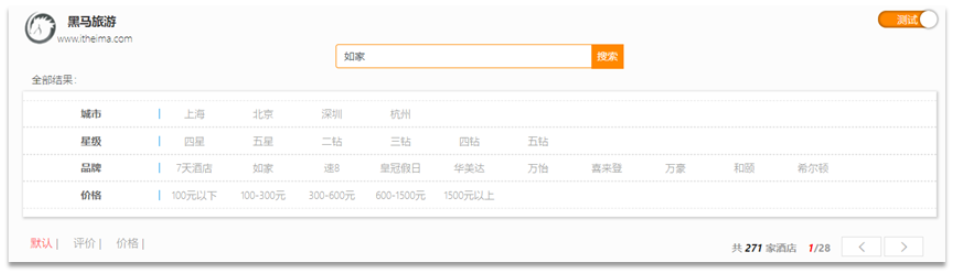
点击搜索按钮,可以看到浏览器控制台发出了请求:

请求参数如下:
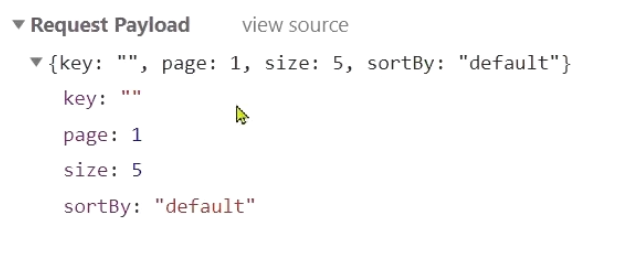
由此可以知道,我们这个请求的信息如下:
- 请求方式:POST
- 请求路径:/hotel/list
- 请求参数:JSON对象,包含4个字段:
- key:搜索关键字
- page:页码
- size:每页大小
- sortBy:排序,目前暂不实现
- 返回值:分页查询,需要返回分页结果PageResult,包含两个属性:
total:总条数List<HotelDoc>:当前页的数据
因此,我们实现业务的流程如下:
- 步骤一:定义实体类,接收请求参数的JSON对象
- 步骤二:编写controller,接收页面的请求
- 步骤三:编写业务实现,利用RestHighLevelClient实现搜索、分页
1.2.定义实体类
实体类有两个,一个是前端的请求参数实体,一个是服务端应该返回的响应结果实体。
1)请求参数
前端请求的json结构如下:
{"key": "搜索关键字","page": 1,"size": 3,"sortBy": "default"}
因此,我们在cn.itcast.hotel.pojo包下定义一个实体类:
package cn.itcast.hotel.pojo;import lombok.Data;@Datapublic class RequestParams {private String key;private Integer page;private Integer size;private String sortBy;}
2)返回值
分页查询,需要返回分页结果PageResult,包含两个属性:
total:总条数List<HotelDoc>:当前页的数据
因此,我们在cn.itcast.hotel.pojo中定义返回结果:
package cn.itcast.hotel.pojo;import lombok.Data;import java.util.List;@Datapublic class PageResult {private Long total;private List<HotelDoc> hotels;public PageResult() {}public PageResult(Long total, List<HotelDoc> hotels) {this.total = total;this.hotels = hotels;}}
1.3.定义controller
定义一个HotelController,声明查询接口,满足下列要求:
- 请求方式:Post
- 请求路径:/hotel/list
- 请求参数:对象,类型为RequestParam
- 返回值:PageResult,包含两个属性
Long total:总条数List<HotelDoc> hotels:酒店数据
因此,我们在cn.itcast.hotel.web中定义HotelController:
@RestController@RequestMapping("/hotel")public class HotelController {@Autowiredprivate IHotelService hotelService;// 搜索酒店数据@PostMapping("/list")public PageResult search(@RequestBody RequestParams params){return hotelService.search(params);}}
1.4.实现搜索业务
我们在controller调用了IHotelService,并没有实现该方法,因此下面我们就在IHotelService中定义方法,并且去实现业务逻辑。
1)在cn.itcast.hotel.service中的IHotelService接口中定义一个方法:
/*** 根据关键字搜索酒店信息* @param params 请求参数对象,包含用户输入的关键字* @return 酒店文档列表*/PageResult search(RequestParams params);
2)实现搜索业务,肯定离不开RestHighLevelClient,我们需要把它注册到Spring中作为一个Bean。在cn.itcast.hotel中的HotelDemoApplication中声明这个Bean:
@Beanpublic RestHighLevelClient client(){return new RestHighLevelClient(RestClient.builder(HttpHost.create("http://192.168.150.101:9200")));}
3)在cn.itcast.hotel.service.impl中的HotelService中实现search方法:
@Overridepublic PageResult search(RequestParams params) {try {// 1.准备RequestSearchRequest request = new SearchRequest("hotel");// 2.准备DSL// 2.1.queryString key = params.getKey();if (key == null || "".equals(key)) {request.source().query(QueryBuilders.matchAllQuery());} else {request.source().query(QueryBuilders.matchQuery("all", key));}// 2.2.分页int page = params.getPage();int size = params.getSize();request.source().from((page - 1) * size).size(size);// 3.发送请求SearchResponse response = client.search(request, RequestOptions.DEFAULT);// 4.解析响应return handleResponse(response);} catch (IOException e) {throw new RuntimeException(e);}}// 结果解析private PageResult handleResponse(SearchResponse response) {// 4.解析响应SearchHits searchHits = response.getHits();// 4.1.获取总条数long total = searchHits.getTotalHits().value;// 4.2.文档数组SearchHit[] hits = searchHits.getHits();// 4.3.遍历List<HotelDoc> hotels = new ArrayList<>();for (SearchHit hit : hits) {// 获取文档sourceString json = hit.getSourceAsString();// 反序列化HotelDoc hotelDoc = JSON.parseObject(json, HotelDoc.class);// 放入集合hotels.add(hotelDoc);}// 4.4.封装返回return new PageResult(total, hotels);}
2.酒店结果过滤
需求:添加品牌、城市、星级、价格等过滤功能
2.1.需求分析
在页面搜索框下面,会有一些过滤项:
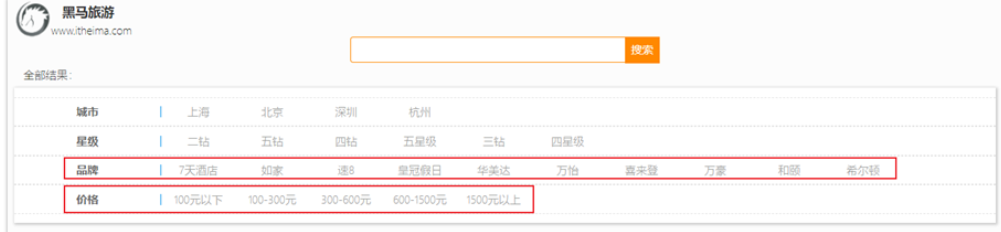
传递的参数如图:
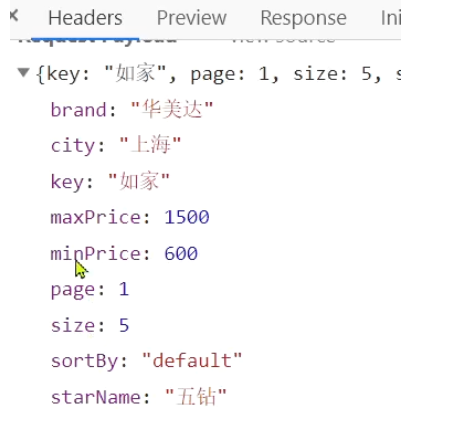
包含的过滤条件有:
- brand:品牌值
- city:城市
- minPrice~maxPrice:价格范围
- starName:星级
我们需要做两件事情:
- 修改请求参数的对象RequestParams,接收上述参数
- 修改业务逻辑,在搜索条件之外,添加一些过滤条件
2.2.修改实体类
修改在cn.itcast.hotel.pojo包下的实体类RequestParams:
@Datapublic class RequestParams {private String key;private Integer page;private Integer size;private String sortBy;// 下面是新增的过滤条件参数private String city;private String brand;private String starName;private Integer minPrice;private Integer maxPrice;}
2.3.修改搜索业务
在HotelService的search方法中,只有一个地方需要修改:requet.source().query( … )其中的查询条件。
在之前的业务中,只有match查询,根据关键字搜索,现在要添加条件过滤,包括:
- 品牌过滤:是keyword类型,用term查询
- 星级过滤:是keyword类型,用term查询
- 价格过滤:是数值类型,用range查询
- 城市过滤:是keyword类型,用term查询
多个查询条件组合,肯定是boolean查询来组合:
- 关键字搜索放到must中,参与算分
- 其它过滤条件放到filter中,不参与算分
因为条件构建的逻辑比较复杂,这里先封装为一个函数:

buildBasicQuery的代码如下:
private void buildBasicQuery(RequestParams params, SearchRequest request) {// 1.构建BooleanQueryBoolQueryBuilder boolQuery = QueryBuilders.boolQuery();// 2.关键字搜索String key = params.getKey();if (key == null || "".equals(key)) {boolQuery.must(QueryBuilders.matchAllQuery());} else {boolQuery.must(QueryBuilders.matchQuery("all", key));}// 3.城市条件if (params.getCity() != null && !params.getCity().equals("")) {boolQuery.filter(QueryBuilders.termQuery("city", params.getCity()));}// 4.品牌条件if (params.getBrand() != null && !params.getBrand().equals("")) {boolQuery.filter(QueryBuilders.termQuery("brand", params.getBrand()));}// 5.星级条件if (params.getStarName() != null && !params.getStarName().equals("")) {boolQuery.filter(QueryBuilders.termQuery("starName", params.getStarName()));}// 6.价格if (params.getMinPrice() != null && params.getMaxPrice() != null) {boolQuery.filter(QueryBuilders.rangeQuery("price").gte(params.getMinPrice()).lte(params.getMaxPrice()));}// 7.放入sourcerequest.source().query(boolQuery);}
3.我周边的酒店
需求:我附近的酒店
3.1.需求分析
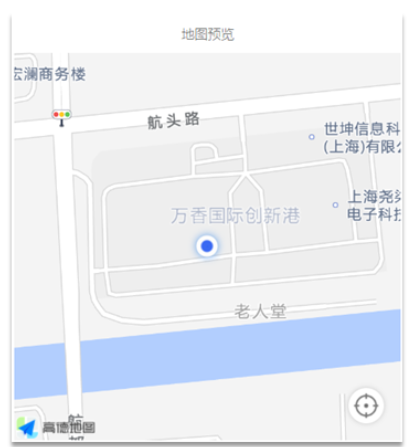
在酒店列表页的右侧,有一个小地图,点击地图的定位按钮,地图会找到你所在的位置:
并且,在前端会发起查询请求,将你的坐标发送到服务端:
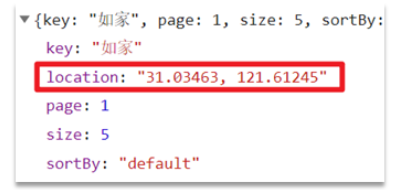
我们要做的事情就是基于这个location坐标,然后按照距离对周围酒店排序。实现思路如下:
- 修改RequestParams参数,接收location字段
- 修改search方法业务逻辑,如果location有值,添加根据geo_distance排序的功能
3.2.修改实体类
修改在cn.itcast.hotel.pojo包下的实体类RequestParams:
package cn.itcast.hotel.pojo;import lombok.Data;@Datapublic class RequestParams {private String key;private Integer page;private Integer size;private String sortBy;private String city;private String brand;private String starName;private Integer minPrice;private Integer maxPrice;// 我当前的地理坐标private String location;}
3.3.距离排序API
我们以前学习过排序功能,包括两种:
- 普通字段排序
- 地理坐标排序
我们只讲了普通字段排序对应的java写法。地理坐标排序只学过DSL语法,如下:
GET /indexName/_search{"query": {"match_all": {}},"sort": [{"price": "asc"},{"_geo_distance" : {"FIELD" : "纬度,经度","order" : "asc","unit" : "km"}}]}
对应的java代码示例:
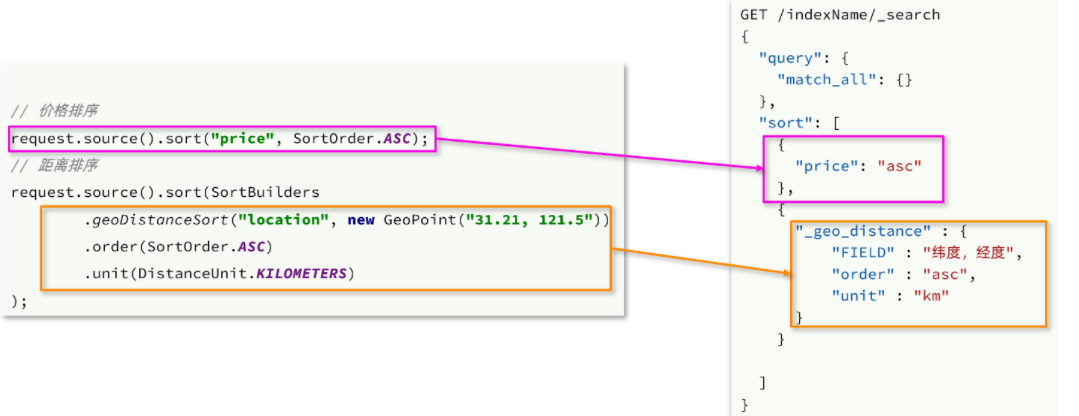
3.4.添加距离排序
在cn.itcast.hotel.service.impl的HotelService的search方法中,添加一个排序功能:

完整代码:
@Overridepublic PageResult search(RequestParams params) {try {// 1.准备RequestSearchRequest request = new SearchRequest("hotel");// 2.准备DSL// 2.1.querybuildBasicQuery(params, request);// 2.2.分页int page = params.getPage();int size = params.getSize();request.source().from((page - 1) * size).size(size);// 2.3.排序String location = params.getLocation();if (location != null && !location.equals("")) {request.source().sort(SortBuilders.geoDistanceSort("location", new GeoPoint(location)).order(SortOrder.ASC).unit(DistanceUnit.KILOMETERS));}// 3.发送请求SearchResponse response = client.search(request, RequestOptions.DEFAULT);// 4.解析响应return handleResponse(response);} catch (IOException e) {throw new RuntimeException(e);}}
3.5.排序距离显示
重启服务后,测试我的酒店功能:
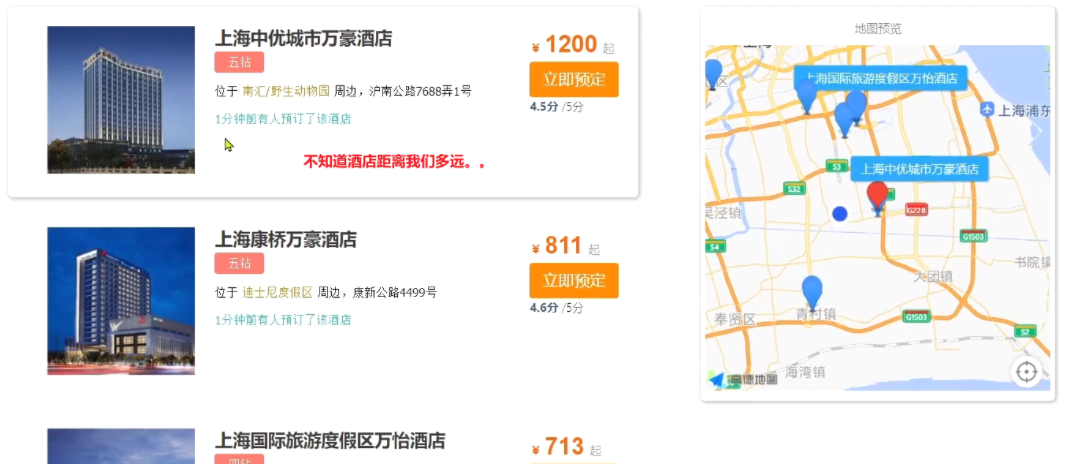
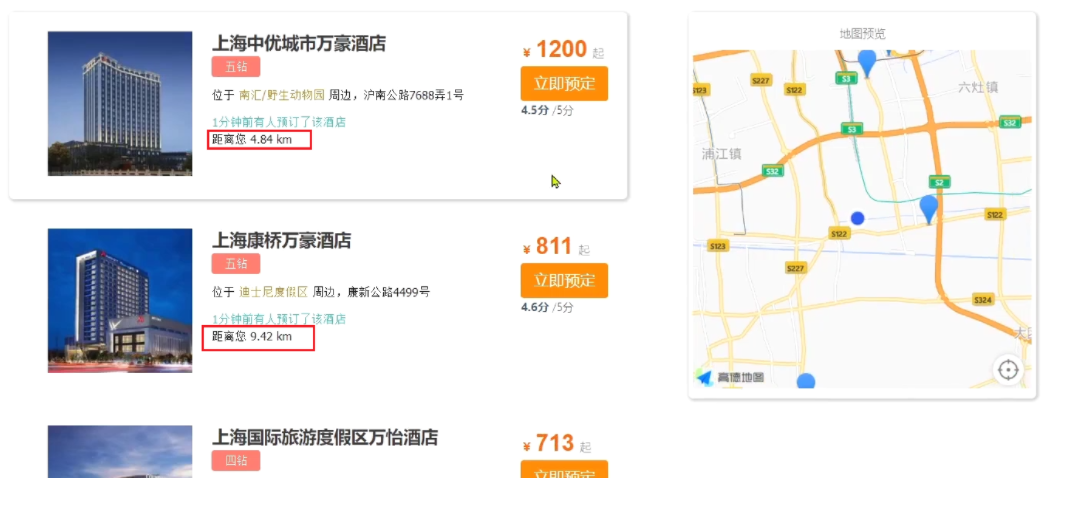
发现确实可以实现对我附近酒店的排序,不过并没有看到酒店到底距离我多远,这该怎么办?
排序完成后,页面还要获取我附近每个酒店的具体距离值,这个值在响应结果中是独立的:
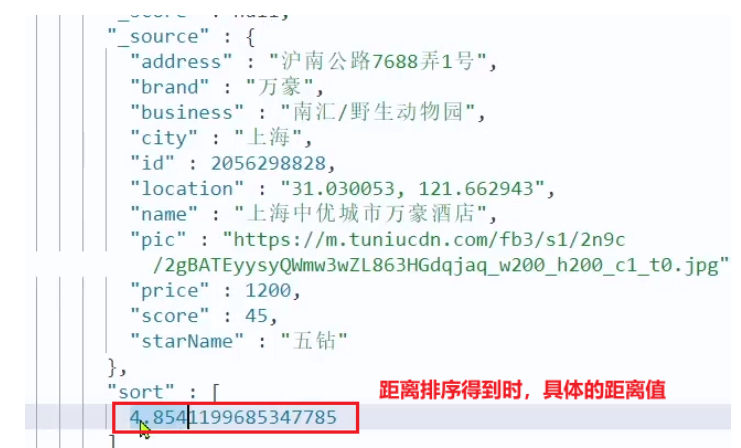
因此,我们在结果解析阶段,除了解析source部分以外,还要得到sort部分,也就是排序的距离,然后放到响应结果中。
我们要做两件事:
- 修改HotelDoc,添加排序距离字段,用于页面显示
- 修改HotelService类中的handleResponse方法,添加对sort值的获取
1)修改HotelDoc类,添加距离字段
package cn.itcast.hotel.pojo;import lombok.Data;import lombok.NoArgsConstructor;@Data@NoArgsConstructorpublic class HotelDoc {private Long id;private String name;private String address;private Integer price;private Integer score;private String brand;private String city;private String starName;private String business;private String location;private String pic;// 排序时的 距离值private Object distance;public HotelDoc(Hotel hotel) {this.id = hotel.getId();this.name = hotel.getName();this.address = hotel.getAddress();this.price = hotel.getPrice();this.score = hotel.getScore();this.brand = hotel.getBrand();this.city = hotel.getCity();this.starName = hotel.getStarName();this.business = hotel.getBusiness();this.location = hotel.getLatitude() + ", " + hotel.getLongitude();this.pic = hotel.getPic();}}
2)修改HotelService中的handleResponse方法
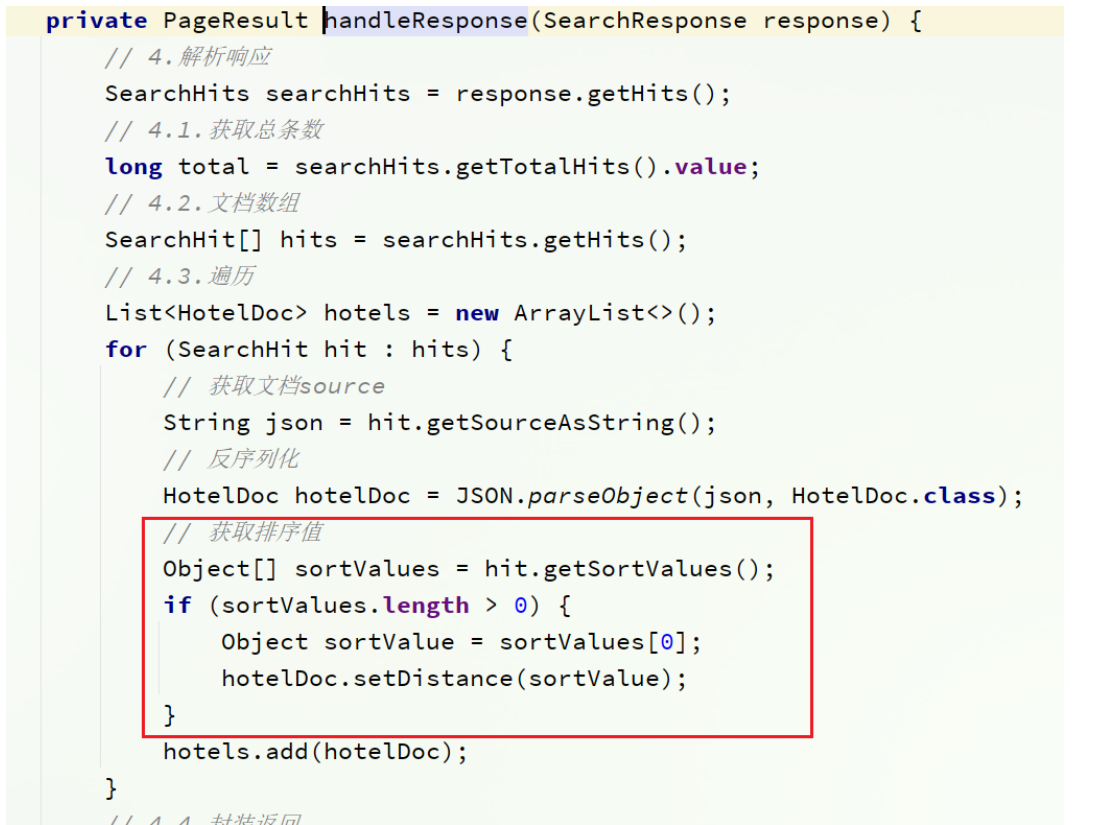
重启后测试,发现页面能成功显示距离了:
4.酒店竞价排名
需求:让指定的酒店在搜索结果中排名置顶
4.1.需求分析
要让指定酒店在搜索结果中排名置顶,效果如图:
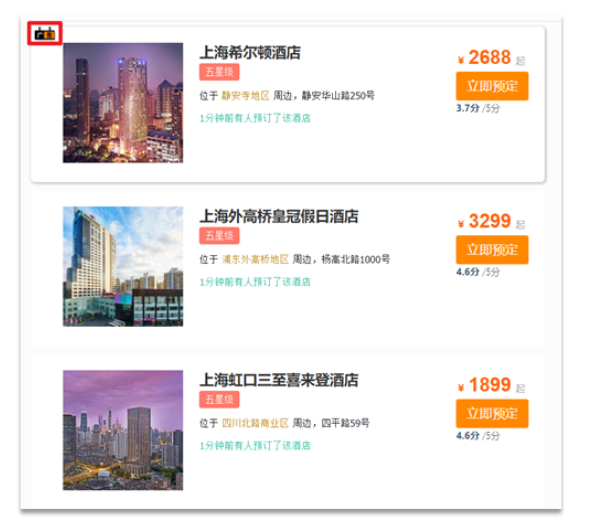
页面会给指定的酒店添加广告标记。
那怎样才能让指定的酒店排名置顶呢?
我们之前学习过的function_score查询可以影响算分,算分高了,自然排名也就高了。而function_score包含3个要素:
- 过滤条件:哪些文档要加分
- 算分函数:如何计算function score
- 加权方式:function score 与 query score如何运算
这里的需求是:让指定酒店排名靠前。因此我们需要给这些酒店添加一个标记,这样在过滤条件中就可以根据这个标记来判断,是否要提高算分。
比如,我们给酒店添加一个字段:isAD,Boolean类型:
- true:是广告
- false:不是广告
这样function_score包含3个要素就很好确定了:
- 过滤条件:判断isAD 是否为true
- 算分函数:我们可以用最简单暴力的weight,固定加权值
- 加权方式:可以用默认的相乘,大大提高算分
因此,业务的实现步骤包括:
- 给HotelDoc类添加isAD字段,Boolean类型
- 挑选几个你喜欢的酒店,给它的文档数据添加isAD字段,值为true
- 修改search方法,添加function score功能,给isAD值为true的酒店增加权重
4.2.修改HotelDoc实体
给cn.itcast.hotel.pojo包下的HotelDoc类添加isAD字段:

4.3.添加广告标记
接下来,我们挑几个酒店,添加isAD字段,设置为true:
POST /hotel/_update/1902197537{"doc": {"isAD": true}}POST /hotel/_update/2056126831{"doc": {"isAD": true}}POST /hotel/_update/1989806195{"doc": {"isAD": true}}POST /hotel/_update/2056105938{"doc": {"isAD": true}}
4.4.添加算分函数查询
接下来我们就要修改查询条件了。之前是用的boolean 查询,现在要改成function_socre查询。
function_score查询结构如下:

对应的JavaAPI如下:

我们可以将之前写的boolean查询作为原始查询条件放到query中,接下来就是添加过滤条件、算分函数、加权模式了。所以原来的代码依然可以沿用。
修改cn.itcast.hotel.service.impl包下的HotelService类中的buildBasicQuery方法,添加算分函数查询:
private void buildBasicQuery(RequestParams params, SearchRequest request) {// 1.构建BooleanQueryBoolQueryBuilder boolQuery = QueryBuilders.boolQuery();// 关键字搜索String key = params.getKey();if (key == null || "".equals(key)) {boolQuery.must(QueryBuilders.matchAllQuery());} else {boolQuery.must(QueryBuilders.matchQuery("all", key));}// 城市条件if (params.getCity() != null && !params.getCity().equals("")) {boolQuery.filter(QueryBuilders.termQuery("city", params.getCity()));}// 品牌条件if (params.getBrand() != null && !params.getBrand().equals("")) {boolQuery.filter(QueryBuilders.termQuery("brand", params.getBrand()));}// 星级条件if (params.getStarName() != null && !params.getStarName().equals("")) {boolQuery.filter(QueryBuilders.termQuery("starName", params.getStarName()));}// 价格if (params.getMinPrice() != null && params.getMaxPrice() != null) {boolQuery.filter(QueryBuilders.rangeQuery("price").gte(params.getMinPrice()).lte(params.getMaxPrice()));}// 2.算分控制FunctionScoreQueryBuilder functionScoreQuery =QueryBuilders.functionScoreQuery(// 原始查询,相关性算分的查询boolQuery,// function score的数组new FunctionScoreQueryBuilder.FilterFunctionBuilder[]{// 其中的一个function score 元素new FunctionScoreQueryBuilder.FilterFunctionBuilder(// 过滤条件QueryBuilders.termQuery("isAD", true),// 算分函数ScoreFunctionBuilders.weightFactorFunction(10))});request.source().query(functionScoreQuery);}
5.实现酒店搜索框自动补全

现在,我们的hotel索引库还没有设置拼音分词器,需要修改索引库中的配置。但是我们知道索引库是无法修改的,只能删除然后重新创建。
另外,我们需要添加一个字段,用来做自动补全,将brand、suggestion、city等都放进去,作为自动补全的提示。
因此,总结一下,我们需要做的事情包括:
- 修改hotel索引库结构,设置自定义拼音分词器
- 修改索引库的name、all字段,使用自定义分词器
- 索引库添加一个新字段suggestion,类型为completion类型,使用自定义的分词器
- 给HotelDoc类添加suggestion字段,内容包含brand、business
- 重新导入数据到hotel库
5.1.修改酒店映射结构
代码如下:
# 酒店数据索引库PUT /hotel{"settings": {"analysis": {"analyzer": {"text_anlyzer": {"tokenizer": "ik_max_word","filter": "py"},"completion_analyzer": {"tokenizer": "keyword","filter": "py"}},"filter": {"py": {"type": "pinyin","keep_full_pinyin": false,"keep_joined_full_pinyin": true,"keep_original": true,"limit_first_letter_length": 16,"remove_duplicated_term": true,"none_chinese_pinyin_tokenize": false}}}},"mappings": {"properties": {"id":{"type": "keyword"},"name":{"type": "text","analyzer": "text_anlyzer","search_analyzer": "ik_smart","copy_to": "all"},"address":{"type": "keyword","index": false},"price":{"type": "integer"},"score":{"type": "integer"},"brand":{"type": "keyword","copy_to": "all"},"city":{"type": "keyword"},"starName":{"type": "keyword"},"business":{"type": "keyword","copy_to": "all"},"location":{"type": "geo_point"},"pic":{"type": "keyword","index": false},"all":{"type": "text","analyzer": "text_anlyzer","search_analyzer": "ik_smart"},"suggestion":{"type": "completion","analyzer": "completion_analyzer"}}}}
5.2.修改HotelDoc实体
HotelDoc中要添加一个字段,用来做自动补全,内容可以是酒店品牌、城市、商圈等信息。按照自动补全字段的要求,最好是这些字段的数组。
因此我们在HotelDoc中添加一个suggestion字段,类型为List<String>,然后将brand、city、business等信息放到里面。
代码如下:
package cn.itcast.hotel.pojo;import lombok.Data;import lombok.NoArgsConstructor;import java.util.ArrayList;import java.util.Arrays;import java.util.Collections;import java.util.List;@Data@NoArgsConstructorpublic class HotelDoc {private Long id;private String name;private String address;private Integer price;private Integer score;private String brand;private String city;private String starName;private String business;private String location;private String pic;private Object distance;private Boolean isAD;private List<String> suggestion;public HotelDoc(Hotel hotel) {this.id = hotel.getId();this.name = hotel.getName();this.address = hotel.getAddress();this.price = hotel.getPrice();this.score = hotel.getScore();this.brand = hotel.getBrand();this.city = hotel.getCity();this.starName = hotel.getStarName();this.business = hotel.getBusiness();this.location = hotel.getLatitude() + ", " + hotel.getLongitude();this.pic = hotel.getPic();// 组装suggestionif(this.business.contains("/")){// business有多个值,需要切割String[] arr = this.business.split("/");// 添加元素this.suggestion = new ArrayList<>();this.suggestion.add(this.brand);Collections.addAll(this.suggestion, arr);}else {this.suggestion = Arrays.asList(this.brand, this.business);}}}
5.3.重新导入
重新执行之前编写的导入数据功能,可以看到新的酒店数据中包含了suggestion:

5.4.自动补全查询的JavaAPI
之前我们学习了自动补全查询的DSL,而没有学习对应的JavaAPI,这里给出一个示例:
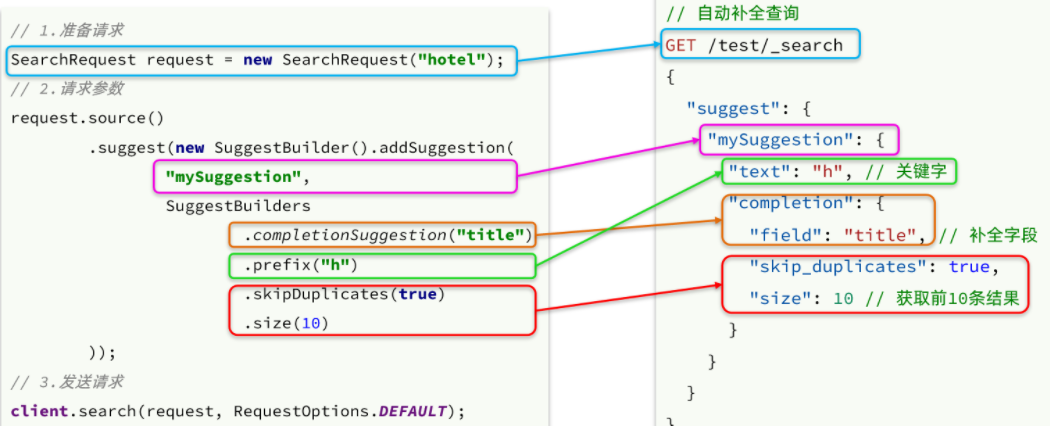
而自动补全的结果也比较特殊,解析的代码如下:
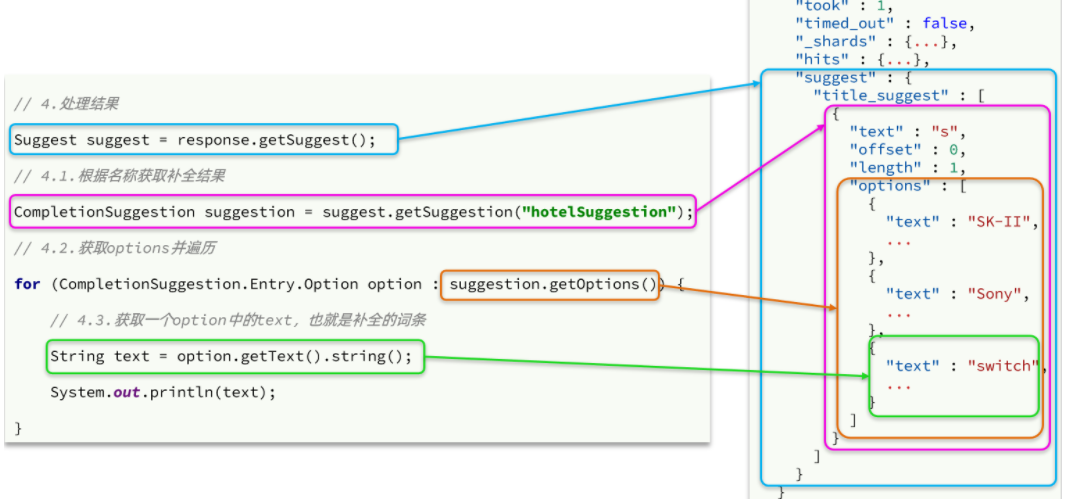
package cn.itcast.hotel;import cn.itcast.hotel.service.IHotelService;import org.apache.http.HttpHost;import org.elasticsearch.action.search.SearchRequest;import org.elasticsearch.action.search.SearchResponse;import org.elasticsearch.client.RequestOptions;import org.elasticsearch.client.RestClient;import org.elasticsearch.client.RestHighLevelClient;import org.elasticsearch.index.query.QueryBuilders;import org.elasticsearch.search.aggregations.AggregationBuilders;import org.elasticsearch.search.aggregations.Aggregations;import org.elasticsearch.search.aggregations.bucket.terms.Terms;import org.elasticsearch.search.builder.SearchSourceBuilder;import org.elasticsearch.search.suggest.Suggest;import org.elasticsearch.search.suggest.SuggestBuilder;import org.elasticsearch.search.suggest.SuggestBuilders;import org.elasticsearch.search.suggest.completion.CompletionSuggestion;import org.junit.jupiter.api.AfterEach;import org.junit.jupiter.api.BeforeEach;import org.junit.jupiter.api.Test;import org.springframework.beans.factory.annotation.Autowired;import org.springframework.boot.test.context.SpringBootTest;import java.io.IOException;import java.util.List;@SpringBootTestpublic class Hotel06SuggestionTests {private RestHighLevelClient client;@Autowiredprivate IHotelService hotelService;@Testpublic void test01() throws IOException {//1.创建请求语义对象SearchRequest request = new SearchRequest("hotel");//2.自动补全request.source().suggest(new SuggestBuilder().addSuggestion("mySuggestion",SuggestBuilders.completionSuggestion("suggestion").prefix("s").skipDuplicates(true).size(10)));//3.发送请求SearchResponse response = client.search(request, RequestOptions.DEFAULT);//4.解析结果Suggest suggest = response.getSuggest();CompletionSuggestion suggestion = suggest.getSuggestion("mySuggestion");// 遍历自动补全结果for (CompletionSuggestion.Entry.Option option : suggestion.getOptions()) {System.out.println(option.getText().string());}}/*** 在单元测试前执行*/@BeforeEachpublic void init(){client = new RestHighLevelClient(RestClient.builder(//new HttpHost("localhost", 9200, "http"),new HttpHost("192.168.163.140", 9200, "http")));// RestHighLevelClient client = new RestHighLevelClient(RestClient.builder(// HttpHost.create("http://192.168.163.140:9200")// ));System.out.println(client);}/*** 在单元测试执行后执行* @throws IOException*/@AfterEachpublic void destory() throws IOException {client.close();}}
5.5.实现搜索框自动补全
查看前端页面,可以发现当我们在输入框键入时,前端会发起ajax请求:

返回值是补全词条的集合,类型为List<String>
1)在cn.itcast.hotel.web包下的HotelController中添加新接口,接收新的请求:
@GetMapping("suggestion")public List<String> getSuggestions(@RequestParam("key") String prefix) {return hotelService.getSuggestions(prefix);}
2)在cn.itcast.hotel.service包下的IhotelService中添加方法:
List<String> getSuggestions(String prefix);
3)在cn.itcast.hotel.service.impl.HotelService中实现该方法:
@Overridepublic List<String> getSuggestions(String prefix) {try {// 1.准备RequestSearchRequest request = new SearchRequest("hotel");// 2.准备DSLrequest.source().suggest(new SuggestBuilder().addSuggestion("suggestions",SuggestBuilders.completionSuggestion("suggestion").prefix(prefix).skipDuplicates(true).size(10)));// 3.发起请求SearchResponse response = client.search(request, RequestOptions.DEFAULT);// 4.解析结果Suggest suggest = response.getSuggest();// 4.1.根据补全查询名称,获取补全结果CompletionSuggestion suggestions = suggest.getSuggestion("suggestions");// 4.2.获取optionsList<CompletionSuggestion.Entry.Option> options = suggestions.getOptions();// 4.3.遍历List<String> list = new ArrayList<>(options.size());for (CompletionSuggestion.Entry.Option option : options) {String text = option.getText().toString();list.add(text);}return list;} catch (IOException e) {throw new RuntimeException(e);}}
6.对搜索结果聚合(过滤词条)
6.1.业务需求
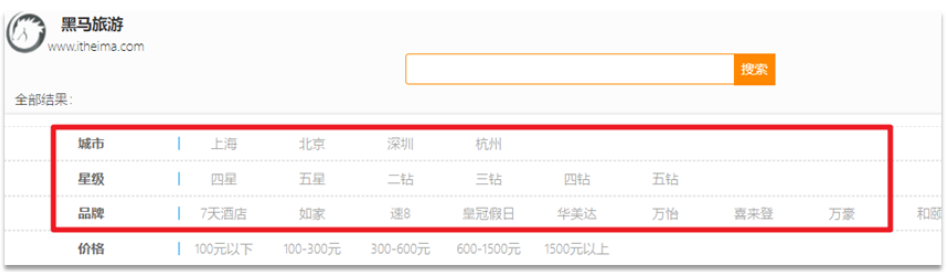
需求:搜索页面的品牌、城市等信息不应该是在页面写死,而是通过聚合索引库中的酒店数据得来的:
分析:
目前,页面的城市列表、星级列表、品牌列表都是写死的,并不会随着搜索结果的变化而变化。但是用户搜索条件改变时,搜索结果会跟着变化。
例如:用户搜索“东方明珠”,那搜索的酒店肯定是在上海东方明珠附近,因此,城市只能是上海,此时城市列表中就不应该显示北京、深圳、杭州这些信息了。
也就是说,搜索结果中包含哪些城市,页面就应该列出哪些城市;搜索结果中包含哪些品牌,页面就应该列出哪些品牌。
如何得知搜索结果中包含哪些品牌?如何得知搜索结果中包含哪些城市?
使用聚合功能,利用Bucket聚合,对搜索结果中的文档基于品牌分组、基于城市分组,就能得知包含哪些品牌、哪些城市了。
因为是对搜索结果聚合,因此聚合是限定范围的聚合,也就是说聚合的限定条件跟搜索文档的条件一致。
查看浏览器可以发现,前端其实已经发出了这样的一个请求:
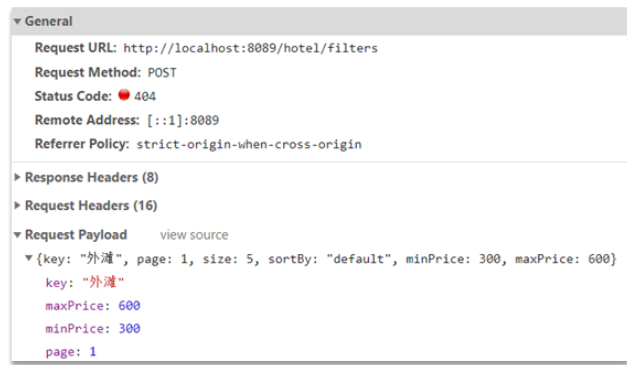
请求参数与搜索文档的参数完全一致。
返回值类型就是页面要展示的最终结果:

结果是一个Map结构:
- key是字符串,城市、星级、品牌、价格
- value是集合,例如多个城市的名称
6.2.业务实现
在cn.itcast.hotel.web包的HotelController中添加一个方法,遵循下面的要求:
- 请求方式:
POST - 请求路径:
/hotel/filters - 请求参数:
RequestParams,与搜索文档的参数一致 - 返回值类型:
Map<String, List<String>>
代码:
@PostMapping("filters")public Map<String, List<String>> getFilters(@RequestBody RequestParams params){return hotelService.getFilters(params);}
这里调用了IHotelService中的getFilters方法,尚未实现。
在cn.itcast.hotel.service.IHotelService中定义新方法:
Map<String, List<String>> filters(RequestParams params);
在cn.itcast.hotel.service.impl.HotelService中实现该方法:
@Overridepublic Map<String, List<String>> filters(RequestParams params) {try {// 1.准备RequestSearchRequest request = new SearchRequest("hotel");// 2.准备DSL// 2.1.querybuildBasicQuery(params, request);// 2.2.设置sizerequest.source().size(0);// 2.3.聚合buildAggregation(request);// 3.发出请求SearchResponse response = client.search(request, RequestOptions.DEFAULT);// 4.解析结果Map<String, List<String>> result = new HashMap<>();Aggregations aggregations = response.getAggregations();// 4.1.根据品牌名称,获取品牌结果List<String> brandList = getAggByName(aggregations, "brandAgg");result.put("brand", brandList);// 4.2.根据品牌名称,获取品牌结果List<String> cityList = getAggByName(aggregations, "cityAgg");result.put("city", cityList);// 4.3.根据品牌名称,获取品牌结果List<String> starList = getAggByName(aggregations, "starAgg");result.put("starName", starList);return result;} catch (IOException e) {throw new RuntimeException(e);}}private void buildAggregation(SearchRequest request) {request.source().aggregation(AggregationBuilders.terms("brandAgg").field("brand").size(100));request.source().aggregation(AggregationBuilders.terms("cityAgg").field("city").size(100));request.source().aggregation(AggregationBuilders.terms("starAgg").field("starName").size(100));}private List<String> getAggByName(Aggregations aggregations, String aggName) {// 4.1.根据聚合名称获取聚合结果Terms brandTerms = aggregations.get(aggName);// 4.2.获取bucketsList<? extends Terms.Bucket> buckets = brandTerms.getBuckets();// 4.3.遍历List<String> brandList = new ArrayList<>();for (Terms.Bucket bucket : buckets) {// 4.4.获取keyString key = bucket.getKeyAsString();brandList.add(key);}return brandList;}
7.实现数据同步(异步通知MQ)
7.1.思路
利用课前资料提供的hotel-admin项目作为酒店管理的微服务。当酒店数据发生增、删、改时,要求对elasticsearch中数据也要完成相同操作。
步骤:
- 导入课前资料提供的hotel-admin项目,启动并测试酒店数据的CRUD
- 声明exchange、queue、RoutingKey
- 在hotel-admin中的增、删、改业务中完成消息发送
- 在hotel-demo中完成消息监听,并更新elasticsearch中数据
- 启动并测试数据同步功能
7.2.导入demo
导入课前资料提供的hotel-admin项目:

运行后,访问 http://localhost:8099

其中包含了酒店的CRUD功能:
7.3.声明交换机、队列
MQ结构如图:

1)引入依赖
在hotel-admin、hotel-demo中引入rabbitmq的依赖:
<!--amqp--><dependency><groupId>org.springframework.boot</groupId><artifactId>spring-boot-starter-amqp</artifactId></dependency>
spring:rabbitmq:host: 192.168.163.130port: 5672virtual-host: /username: itcastpassword: 123321
2)声明队列交换机名称
在hotel-admin和hotel-demo中的cn.itcast.hotel.constatnts包下新建一个类MqConstants:
package cn.itcast.hotel.constants;public class MqConstants {/*** 交换机*/public final static String HOTEL_EXCHANGE = "hotel.topic";/*** 监听新增和修改的队列*/public final static String HOTEL_INSERT_QUEUE = "hotel.insert.queue";/*** 监听删除的队列*/public final static String HOTEL_DELETE_QUEUE = "hotel.delete.queue";/*** 新增或修改的RoutingKey*/public final static String HOTEL_INSERT_KEY = "hotel.insert";/*** 删除的RoutingKey*/public final static String HOTEL_DELETE_KEY = "hotel.delete";}
3)声明队列交换机
在hotel-demo中,定义配置类,声明队列、交换机:
package cn.itcast.hotel.config;import cn.itcast.hotel.constants.MqConstants;import org.springframework.amqp.core.Binding;import org.springframework.amqp.core.BindingBuilder;import org.springframework.amqp.core.Queue;import org.springframework.amqp.core.TopicExchange;import org.springframework.context.annotation.Bean;import org.springframework.context.annotation.Configuration;@Configurationpublic class MqConfig {@Beanpublic TopicExchange topicExchange(){return new TopicExchange(MqConstants.HOTEL_EXCHANGE, true, false);}@Beanpublic Queue insertQueue(){return new Queue(MqConstants.HOTEL_INSERT_QUEUE, true);}@Beanpublic Queue deleteQueue(){return new Queue(MqConstants.HOTEL_DELETE_QUEUE, true);}@Beanpublic Binding insertQueueBinding(){return BindingBuilder.bind(insertQueue()).to(topicExchange()).with(MqConstants.HOTEL_INSERT_KEY);}@Beanpublic Binding deleteQueueBinding(){return BindingBuilder.bind(deleteQueue()).to(topicExchange()).with(MqConstants.HOTEL_DELETE_KEY);}}
7.4.发送MQ消息
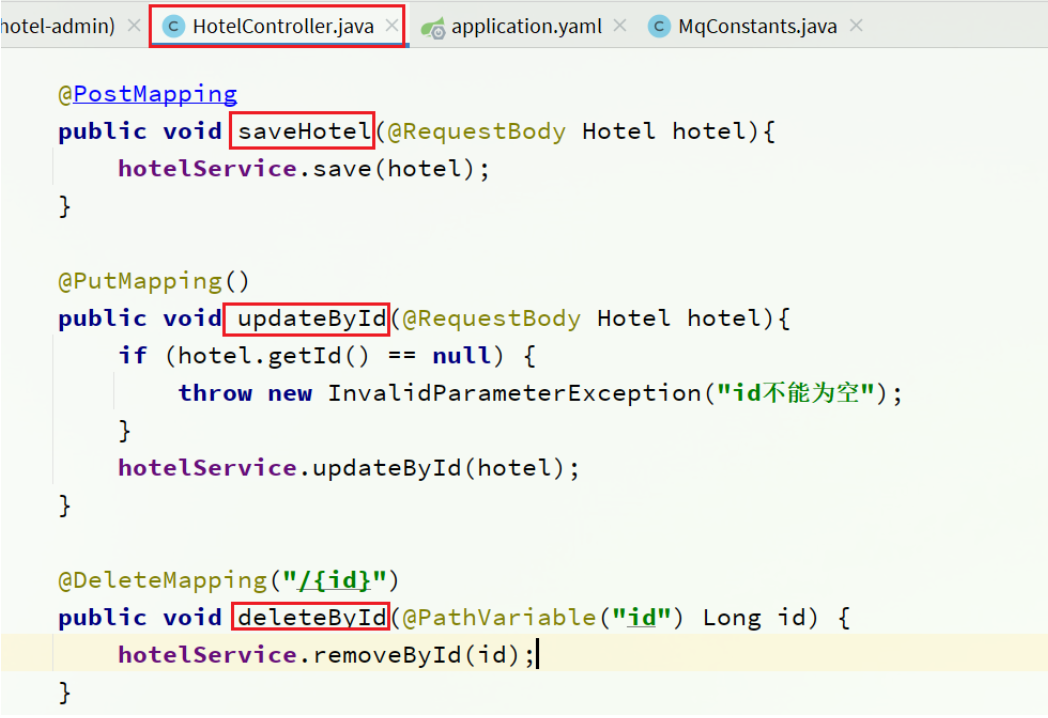
在hotel-admin中的增、删、改业务中分别发送MQ消息:

@PostMappingpublic void saveHotel(@RequestBody Hotel hotel){hotelService.save(hotel);rabbitTemplate.convertAndSend(MqConstants.HOTEL_EXCHANGE,MqConstants.HOTEL_INSERT_KEY,hotel.getId());}@PutMapping()public void updateById(@RequestBody Hotel hotel){if (hotel.getId() == null) {throw new InvalidParameterException("id不能为空");}hotelService.updateById(hotel);rabbitTemplate.convertAndSend(MqConstants.HOTEL_EXCHANGE,MqConstants.HOTEL_INSERT_KEY,hotel.getId());}@DeleteMapping("/{id}")public void deleteById(@PathVariable("id") Long id) {hotelService.removeById(id);rabbitTemplate.convertAndSend(MqConstants.HOTEL_EXCHANGE,MqConstants.HOTEL_DELETE_KEY,id);}
7.5.接收MQ消息
hotel-demo接收到MQ消息要做的事情包括:
- 新增消息:根据传递的hotel的id查询hotel信息,然后新增一条数据到索引库
- 删除消息:根据传递的hotel的id删除索引库中的一条数据
1)首先在hotel-demo的cn.itcast.hotel.service包下的IHotelService中新增新增、删除业务
void deleteById(Long id);void insertById(Long id);
2)给hotel-demo中的cn.itcast.hotel.service.impl包下的HotelService中实现业务:
@Overridepublic void deleteById(Long id) {try {// 1.准备RequestDeleteRequest request = new DeleteRequest("hotel", id.toString());// 2.发送请求client.delete(request, RequestOptions.DEFAULT);} catch (IOException e) {throw new RuntimeException(e);}}@Overridepublic void insertById(Long id) {try {// 0.根据id查询酒店数据Hotel hotel = getById(id);// 转换为文档类型HotelDoc hotelDoc = new HotelDoc(hotel);// 1.准备Request对象IndexRequest request = new IndexRequest("hotel").id(hotel.getId().toString());// 2.准备Json文档request.source(JSON.toJSONString(hotelDoc), XContentType.JSON);// 3.发送请求client.index(request, RequestOptions.DEFAULT);} catch (IOException e) {throw new RuntimeException(e);}}
3)编写监听器
在hotel-demo中的cn.itcast.hotel.mq包新增一个类:
package cn.itcast.hotel.mq;import cn.itcast.hotel.constants.MqConstants;import cn.itcast.hotel.service.IHotelService;import org.springframework.amqp.rabbit.annotation.RabbitListener;import org.springframework.beans.factory.annotation.Autowired;import org.springframework.stereotype.Component;@Componentpublic class HotelListener {@Autowiredprivate IHotelService hotelService;/*** 监听酒店新增或修改的业务* @param id 酒店id*/@RabbitListener(queues = MqConstants.HOTEL_INSERT_QUEUE)public void listenHotelInsertOrUpdate(Long id){hotelService.insertById(id);}/*** 监听酒店删除的业务* @param id 酒店id*/@RabbitListener(queues = MqConstants.HOTEL_DELETE_QUEUE)public void listenHotelDelete(Long id){hotelService.deleteById(id);}}

若有收获,就点个赞吧
0 人点赞


